Archive
Saddleback Leather iPad Case (Review)
Leather iPad Case (Standard iPad–not the iPad mini)
Saddleback Leather Company
$111.00
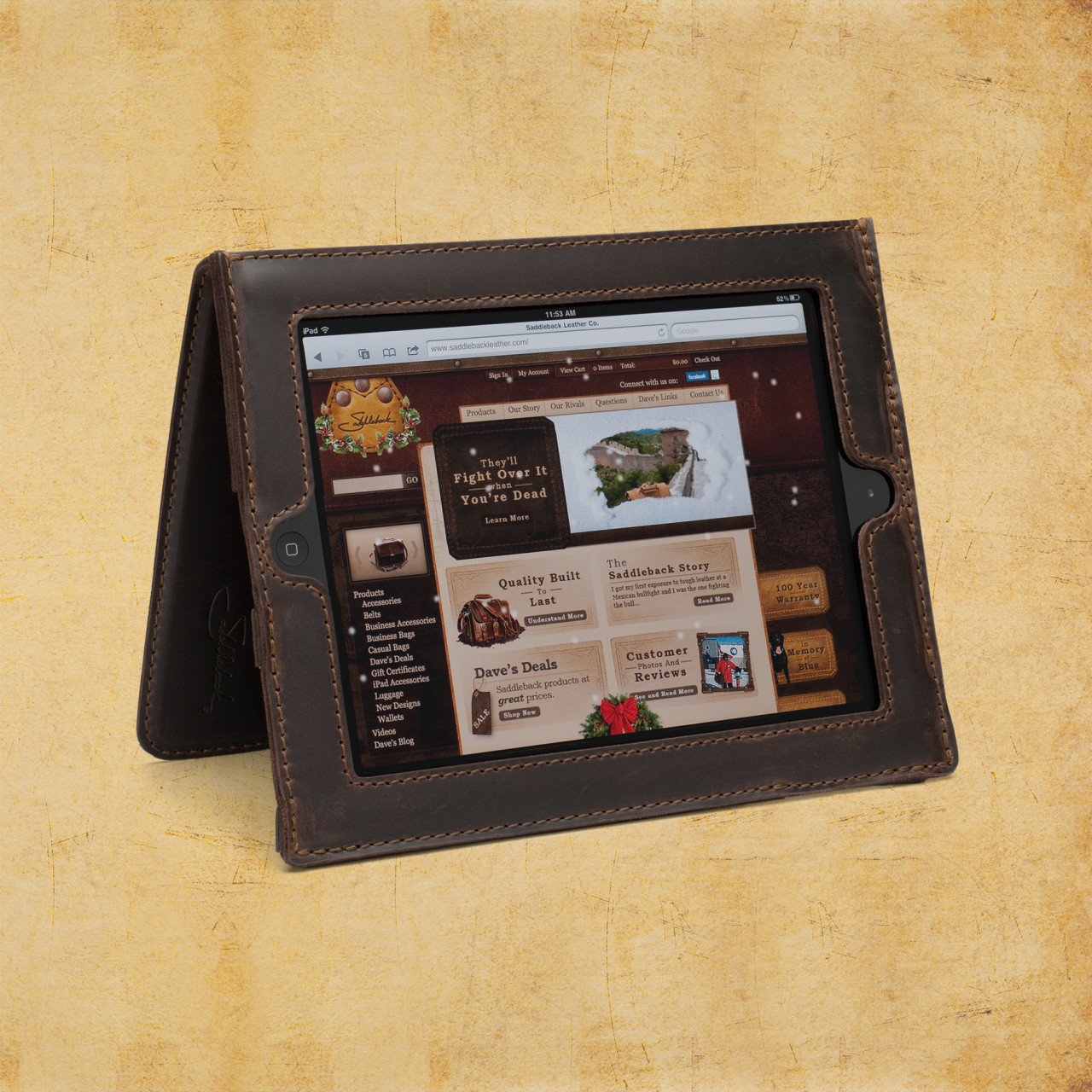 For your $600+ iPad purchase, I submit for your approval, the Saddleback Leather Company iPad case made of full grain cowhide leather. The inside of the case is pigskin. Pigskin is softer, more forgiving, and snuggles your iPad a bit better than the stiffer cowhide alone would. As soon as you hold any of Saddleback’s products, you know that they’re made of quality materials. Dave, the owner, has meticulously designed each item to exacting specifications and has spared no expense, except on labor (more on that later), in creating these beautiful products. As you’d expect, genuine leather products aren’t inexpensive. For just over $100, the iPad case isn’t a bad buy, especially if you consider the price of the device that you’re wrapping up in it.
Saddleback Leather Company, mostly located in San Antonio and Fort Worth Texas, is a locally owned and operated business. You can hit the website to find out Dave’s whole sordid tale of how he started the company way back in 1999.
The iPad case is sturdy and the iPad fits into its spot very well but without binding or stressing. Leather is forgiving but if it’s too small, it’s just too small. This case is just right for the thickness and for the iPad size. The case, when reversed and straps engaged, stands up so that you can watch videos or use as a screen or with a Bluetooth keyboard. The controls are easy to reach but recessed enough so that they’re protected from accidental drops or scrapes.
The cowhide-pigskin layering gives the iPad enough cushion for comfort but enough protection and shock absorption to deflect damage from carrying height or table height drops. The screen is fully visible in the case with no screen overlap. A lot of thought has gone into the creation of this formidable case. I’m assuming Dave, or a family member, owns an iPad and wanted it protected but without being hermetically sealed inside an Otterbox or something that distances you from the iPad. The Saddleback case puts you in contact with the iPad but without fear of accidental damage.
That said, it’s still possible to damage your iPad if misused, so don’t purposely try to damage your iPad and then complain. Also, you can’t prevent fluke damage from drops that hit edges or land oddly.
The leather case is very attractive and has the look and feel of real hand-tooled leather–thanks Wilford Brimley. But seriously, this is a very handsome case. I’ve never seen one like it. Every time I carry it out of the house, someone asks about it. The leather is very tough and rugged. It should last a lifetime or longer.
As a side note, I had some beef kabobs from one of those street vendors in New York and I almost called Saddleback to tell Dave that I think I’d found him a new leather source for his products. Wow, that was some tough meat. I looked like a cow chewing its cud instead of a Texan having a beef snack on a stick. I guess I’ll stick to Canton’s First Monday stick-skewered meaty treats from now on.
Saddleback offers a standard iPad case, an iPad mini case, and leather sleeves for the standard and mini. An Ipad Air case is also available.
Dave spends a lot of time and energy (and humor) on his website convincing potential customers that the products are, in fact, very high quality. They are. His efforts aren’t wasted but it’s also probably not required to the extreme that he goes to either. We get it, Dave, you make great stuff and you had us at Howdy.
What Dave doesn’t tell you (although he alludes to it) in the video “How to knock off a bag” is that his products are made in Mexico. This is that place where I get to rant a bit about hiring locals to do the work that he’s sending to Mexico. He spends a lot of time and sarcasm in telling us how to knock off his bags but fails to mention that you should send your materials to Malaysia, China, India, or Bangladesh to get cheaper labor than he does to produce them. Just saying. That’s really my only complaint is that his stuff isn’t made in Texas.
Anyway, I checked out the Saddleback iPad case for my iPad 4. It is indeed very nice. My iPad feels well-protected and it feels good in my hands. The particular model I received for review is the tobacco-colored model. It looks more like natural tanned cowhide and pigskin (to me) than the other colors. I like the natural look. It feels more rugged and I also don’t mind the scratches, scars, mars, and buffs that the leather receives along the way. It’s a natural product and that’s to be expected and is actually desirable. I also like film photography for the same reasons.
It’s obvious that Dave is a skilled craftsman and is very knowledgeable about leather.
It’s also obvious that people love his products. He gets a lot of repeat business and has hundreds of 4 and 5 star reviews for his handiwork. As of this writing, there are 91 reviews of the iPad case and 92.3% of the reviewers would recommend the product to other customers.
One of the reviews makes me wonder when the other customers wrote their reviews. There’s one reviewer that observed that as leather ages, it loosens and this causes the iPad to slide around a bit and not stand up as shown in the video. I can’t speak to that since I’ve only had this one for about two weeks and haven’t had any issues so far. Everything is tight and stiff at this point in time. Now, in a year or two, it might be a different story. I have several cases that I use and switch between so I’m not sure that my use case is really standard.
Why it’s Frugal: Anything that protects your expensive tablet this well is frugal. Even at just over $100, it’s a good investment. Saddleback products are well made and made of quality materials which means that it’ll probably outlast you and will certainly outlast your iPad.
Saddleback leather products are beautiful, well liked by customers, made of quality materials, and protect your electronics like only thick cowhide and pigskin can. In fact, anytime I go anywhere that I want to impress people, I’ll strap on the Saddleback iPad case. If nothing else, it will be a conversation starter, and that’s a good thing for a freelance writer.
Rating: 8.5/10
Recommendation: If you want to impress someone, buy a Saddleback product as a gift or as a show piece for yourself.
IK Multimedia ships iRing, the first motion controller for iPad, iPhone, iPod touch music apps and more
May 8, 2014 – IK Multimedia, the innovator in mobile music-creation apps and accessories for iPad and iPhone, is proud to announce that iRing™, the first motion controller for music apps and more, is now available from music and electronics retailers worldwide.
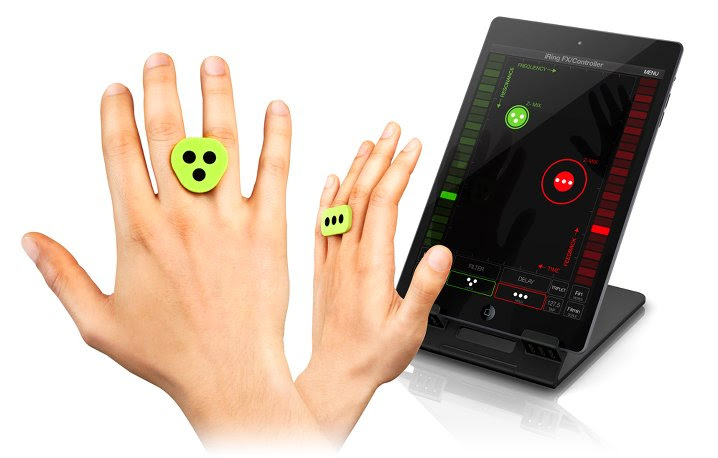
First presented at CES 2014, iRing is an affordable, wearable technology system that gives users a new level of gestural control over their favorite music apps, in real-time, using hand positioning for unprecedented music expression.
The iRing system consists of two double-sided “rings” to wear comfortably on the fingers along with a series of apps that are able to detect the iRings’ accurate positions in space using the device’s camera. Through the recognition of the dot patterns printed on the rings, the device’s camera picks up the movement and translates it into MIDI information. Users can then interact with music apps by simply moving their hands in front of their device through the precise reading of the ring position, which is converted into music commands or MIDI control messages to operate various app parameters without touching the device.
 |
 |
iRing includes two identical double-sided ring controllers plus two free apps for various music applications designed for everyone from music lovers to knowledgeable DJs and musicians: iRing Music Maker and iRing FX/Controller.
iRing Music Maker is a free app that gives music lovers and DJs a fun new way to create music and grooves using hand gestures, no matter what their skill level. iRing Music Maker utilizes music “loops” that always sound good together and can be remixed in virtually limitless combinations by simply waving the hands with the iRing controllers in front of the device’s camera. Users can change beats, control rhythmic elements, play synth parts and control effects providing hours and hours of quality musical entertainment. Plus, iRing Music Maker also includes lead and bass synths with respective pattern players that can be independently operated for hours of error-free musical improvisation. Creating music has never been so much fun!
iRing FX/Controller is the app for skilled musicians and DJs that is both a real-time audio effects processor and a MIDI controller with fully assignable parameters. It can be used as a touch-less outboard audio effects processor, or can be fully configured to send multiple simultaneous MIDI parameters; such as control changes, notes or any other MIDI messages.
As an effects processor, iRing FX/Controller uses the analog or digital input of the device for processing external audio sources. FX/Controller can also be used with Audiobus and Inter-App Audio compatible apps to process the audio stream from music apps running on the device to add stunning and brilliant audio effects. The iRings can control up to six effects parameters at a time. iRing FX/Controller operates two simultaneous effects, selectable from up to 16 powerful and creative effects, including: Delay, Stutter, Phazer, Flanger, Compression, Fuzzy, Reverb, AutoWah, Crush, Twist Up & Down, Brake, Spin and Tail.
As a MIDI controller, iRing FX/Controller can transmit MIDI messages to other Virtual MIDI compatible apps running on the device or to external devices using compatible MIDI interfaces (like IK’s iRig MIDI). iRing FX/Controller can send out the complete set of MIDI messages (control change, notes, program change, pitch wheel, aftertouch, MIDI system real-time, and MMC, MIDI Machine Control) with up to 3 assignable parameters corresponding to the X, Y and Z axis positions for each of the 2 detectable rings for a new level of touch-less control. Additionally, MIDI messages can also be sent to a computer application via Wi-Fi (using MIDI network). Users can configure the app to control effects, filters, notes, patches and more for creative and dynamic “never before seen” performances.
iRing computer vision technology is also directly incorporated into the entire line of IK Multimedia DJ apps likeGroovemaker® and DJ Rig™ and will soon be included into other popular IK apps such as AmpliTube®,SampleTank®, VocaLive™ and more so that DJs, guitarists, vocalists, bass players, producers, keyboardists and engineers will have a new level of control to deliver powerful and unique performances.
For third-party developers who want to incorporate and implement iRing technology directly into their apps, IK is offering a free SDK (software development kit) and licensing program which makes it easy to take advantage of this new breakthrough technology. iRing can also be easily utilized beyond music for a wide variety of applications including gaming, health & fitness, utilities and more. Developers can take advantage of the technology and improve the functionality of their apps by contacting IK via the link provided on the iRing product page.
iRing features
- Advanced motion-tracking technology provides remote control of iOS apps using hand positions and gestures
- Includes two identical, double-sided reversible rings allowing for numerous control combinations and control of up to 6 effects’ parameters simultaneously with two hands
- iRings are unique looking, light, comfortable and provide a universal fit
- Free Apps are available on the App Store: iRing Music Maker app, which gives the ability to make music using hand gestures with no previous musical knowledge, and also the iRing FX/Controller app, which lets musicians and DJs create custom MIDI control setups, plus add and control audio effects, using compatible apps or external devices
- iRing computer vision technology can be licensed and incorporated into other third-party apps including gaming, health & fitness, utilities and more
Pricing & Availability
iRing controllers cost only $24.99/€19.99 (excluding taxes), are available in three colors (white, green and grey) and are now shipping from music and electronics retailers worldwide and from the IK Multimedia online store.
iRing FX/Controller and iRing Music Maker apps are available as free downloads from the App StoreSM.
For more information about iRing™ for iPad, iPhone and iPod touch, please visit:
www.ikmultimedia.com/iring
To view the iRing video playlist, please visit:
www.ikmultimedia.com/products/iring/video
For more information about the free iRing development kit and licensing program, please visit:
www.ikmultimedia.com/iringsdk
harmon.ie Integrates Office for iPad, OneDrive for Business and Microsoft Enterprise Mobility Suite
 BARCELONA, BOOTH #44 — May 7, 2014 – Enterprise mobile collaboration leader, harmon.ie, today announced the full integration of Office for iPad, OneDrive for Business and the Microsoft Enterprise Mobility Suite into its enterprise mobile collaboration hub to give mobile workers a more efficient way to work and collaborate while on the go.
“One of the keys to successful adoption of enterprise collaboration software is seamless integration into the workflows that people follow to get their jobs done. With the rise of mobile device usage, integration is more important than ever, as navigating multiple applications on phones and tablets can be complicated and frustrating,” said Alan Lepofsky, VP and Principal Analyst, Constellation Research.
While the iPad is undeniably the most popular mobile tablet for business, the complicated user experience has stunted user adoption as business users were forced to make due with unfamiliar, third-party Office substitutes for their go-to enterprise tools. Until now, iPad users were forced to spend time focusing on Office compatibility rather than the work they had to get done.
Office for iPad, OneDrive for Business and the Enterprise Mobility Suite are integral pieces of a disconnected mobile puzzle as business users toggle in and out of Microsoft’s growing array of apps and services. harmon.ie combines the depth and familiarity of all of Microsoft’s collaboration tools and business apps into a cohesive, easy-to-use, single-screen experience – making the iPad an effective business tool. Offering the only single-screen experience of Microsoft enterprise collaboration tools, harmon.ie now gives mobile workers an efficient and secure way to work on projects from the road as well as share and collaborate with colleagues
“Microsoft has officially sanctioned the iPad as a work tool – marking a monumental shift for the mobile enterprise and an overall win for user experience,” noted Yaacov Cohen, CEO of harmon.ie. “Adding the last piece of our integrated mobile work apps suite, the latest integrations with Office for iPad, OneDrive and the Microsoft Enterprise Mobility Suite give workers the tools they rely upon daily, like Word, Excel and PowerPoint, directly from the iPad in the secure, single-screen experience they need to get work done.”
These integrations are the latest additions to the vast collection of business tools unified into a single-screen experience in the harmon.ie Mobile app, which was recently awarded a prestigious Best App Award at the Microsoft SharePoint Conference 2014. Certified by all leading mobile device management (MDM) vendors, harmon.ie provides unmatched collaboration across all of the Microsoft document and social tools (e.g., Office 365, SharePoint, Lync, OneDrive, Yammer, email, phone) on any platform – desktop, mobile, and cloud. harmon.ie Mobile invokes and closes the required apps within a single-screen experience to support the specific work task at hand – users no longer need to open an app and try to find the right resource to create, edit, share or collaborate.
The Office for iPad, OneDrive and Microsoft Enterprise Mobility Suite integrations are available immediately on the harmon.ie Mobile app.
About harmon.ie
harmon.ie empowers the social collaboration workforce by delivering the single-screen experience today’s mobile enterprises and tech-saturated users demand. Giving companies a way to securely support their employees’ changing work dynamic, harmon.ie now delivers a seamless user experience anytime, anywhere and on any device. An established global company, harmon.ie combines the power of the top social and collaboration platforms – including IBM, Microsoft and Yammer – to help its thousands of customers around the globe achieve the promise of the mobile enterprise.
The Lap Log: A Made in USA iPad, eReader, or Tablet Stand
 The Lap Log
Bamboosa, LLC.
$39.00 to $50.00 at Bamboosa and Amazon (Prime)
The Lap Log seems an unlikely tablet computer accessory but it’s a really nice one. It’s made of sustainable, renewable products right here in the USA. In my humble opinion, the fact that it’s made in the USA, presumably in South Carolina, is a very good thing. Companies that manufacture good in the USA create new money, use raw materials, and support families by employing local workers. But regardless of where a product is made, consumers want quality products that have value. Bamboosa products fulfill that need. The Lap Log is a soft stand that supports your iPad, eReader, or tablet computer in your lap.
- Adjustable to any viewing angle and stable on all surfacesMade from Eco-friendly Materials
- GOTS Certified 100% Organic Cotton Twill
- Filled with natural buckwheat hulls
- Eco-friendly, removable wooden insert that holds tablet
- Use as a safe and stable station for your tablet to sit while charging
The Lap Log is filled with locally grown buckwheat hulls just like the famous Sobakawa pillow. And if your Lap Log doesn’t fit where you work exactly, you can remove or add buckwheat hulls to adjust it for your needs. How do you add more, you ask? Bamboosa sends you an extra bag of buckwheat hulls. I get the feeling that Bamboosa cares about its customers and its products. It even prints the extra bag information on 100% recycled paper. And Bamboosa offers a 365-day return policy.
I’m proud to see a US-based company that not only produces quality products but one that also is environmentally responsible. They could produce a far less eco-friendly product at a fraction of the cost or ship the manufacturing overseas but they don’t. I, for one, appreciate their efforts.
The Lap Log measures approximately 10.5 x 5 x 5 inches and weighs in at just over one pound. It’s perfect for travel and contains nothing that would set off any airport or ship sensors. If you’re like me, you always have your tablet with you. The Lap Log makes an excellent travel companion during flights, at the airport, in your hotel room, in a coffee shop, or on a park bench.
Of course, the Lap Log is perfectly suited to staying at home too. I take mine to the hammock and use it in my lap out there in the back yard, until I fall asleep that is. And although it’s not marketed as such, it makes a great makeshift hammock pillow too. The Lap Log is washer and dryer safe (follow the instructions) and can be wiped clean with a damp cloth in most cases.
Why it’s Frugal: The Lap Log is frugal because you can use it anywhere and for any tablet computer or eReader–you don’t have to buy more than one product stand. It’s also frugal because it’s an environmentally conscious product. Anything that is sustainable, recyclable, and harmless to the environment is frugal. Plus it’s manufactured in the US, which sustains jobs and creates money.
My wife uses the Lap Log in the kitchen to hold her iPad mini while she’s cooking and looking at a recipe on Allrecipes.com. It’s handy because it’s stable and, as she puts it, “Is shmutz resistant.” My daughter uses it to prop up her iPad mini when doing homework. It sits on her bed while she works. She says it’s “Very handy.” She’s a child of few words and I was lucky to get those in between homework, friend chatting, and listening to My Chemical Romance on iTunes or Pandora.
Do you get the feeling that I don’t see much of the Lap Log because of the other users in my house? You’d be correct to assume that. They just call it “The Log,” which I suppose is OK. I’ve stopped correcting them and steering them toward the official name of Lap Log. There are just some battles not worth fighting.
I like the Lap Log. It’s versatile. It’s made in the USA. It’s eco-friendly. It comes in a variety of colors and patterns. And it’s a product that will last for years. What’s not to like?
Rating: 9/10
Recommendation: Buy one for yourself and a community one so that you’ll get to use yours. Hammock not included.
The HISY Wireless Smartphone Camera Remote (Review)
 HISY Wireless Smartphone Camera Remote
HISY ( pronounced hīgh-see )
$24.99 Amazon (Prime)
The HISY Wireless Smartphone Camera Remote (HISY) is a remote shutter device for your iPhone and iPad (See Features section below for compatibility). The HISY is a very small (approximately 1″x1″) Bluetooth device that fires your camera shutter or starts a video capture. The HISY is compatible with any iPhone camera app that uses the basic camera app as a base.
In other words, if you use a camera app that adds some effect to your pictures as you take them, the HISY will work with it, if the app is based on the iPhone’s basic camera app.
I suggest that you test it with your favorite camera apps before you do any serious photography with it. You don’t want to set everything up only to find that the HISY isn’t compatible with your camera app.
There’s no associated app that you need to buy or download for the HISY to work. All you have to do to is link the device with your iPhone or iPad via Bluetooth, open your camera app and starting taking pictures or starting videos.
HISY Features:
- Apple iOS 7.0 or later of iPhone 4S, 5, 5S, 5C, iPad 3rd & 4th Generation, iPad Mini & iPad Air iPod, & iPod Touch 5th Generation or later
- Frequency Range: ISM Band 2.4 GHz
- Bluetooth Version: BT 4.0 Low Energy
- Active Range: 30-90ft / 10 to 30m
- 2+ Year Battery Life: (CR2032 x 1 Cell)
- Includes headphone jack attachment to carry with you at all times
One of the coolest applications for a device like this, other than selfies, is as a remote camera that’s inconspicuous to its subjects. Often people don’t enjoy having their pictures taken, but if they’re unaware that you have a camera pointed at them, they’re far more relaxed and unguarded for photographs, interviews, or other forms of subtle photography, such as getting those precious moments snaps of your kids playing or of your husband cheerfully taking out the garbage.
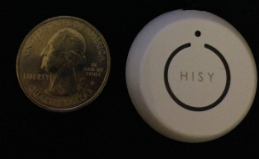 The HISY sells for $24.99 on Amazon and is Prime qualified (free two-day shipping). The HISY also includes a short strap connected to a plastic insert that fits snugly into your earphone port that allows handy access to impromptu photos that you might otherwise miss.
Why it’s frugal: The HISY is frugal because you can take up to 200 photographs with it daily for two years on a single CR2032 ($3.00) battery. It also has a very long range (30 to 90 feet), which puts it in competition with devices costing twice as much or more.
The HISY is small enough to fit comfortably in your hand and has a simple “one touch” operation. It’s simple enough for young children to operate. A single button press fires the camera shutter for a perfect, non-blurry picture.
Rating: 8.5/10
Recommendation: Buy it and test it with your favorite apps before you do real shooting with it.
Keep Your iStuff Stylishly Under Wraps with Mummy Cases (Review)
 Mummy Cases for iPad, iPhone, and iPad mini
Loop Attachment Company
Price: $40.00 for iPad. $24.95 for iPhone. $30.00 for iPad mini.
The Mummy cases for your iPad, iPhone, and iPad mini are just what you need for keeping a firm grip on your mobile device, while also keeping a firm grip on your sanity when using your very expensive gadgetry. Mummy cases are called “mummy” because their design is somewhat reminiscent of mummy wrappings. One significant thing to note about the cases is that they do not cover your product’s cameras, speakers, power connector, earbud interface or Apple logo.
I’m not sure the last one is an absolute requirement but some people like for you to know they’re using Apple products instead of some knock off or lesser quality device. Actually, not covering the logo is really a secondary feature–the real feature is so that you can stash your credit cards, your ID, your gym membership card, or even a few business cards.
The cases are constructed of high-quality silicone rubber polymer, which is chemically unreactive, stable, durable, impact absorbing, and shape retaining. It is also highly resistant to changes in temperature and mechanical stress. In other words, this case will likely outlast the electronic device that it protects by a factor of ten.
 And now, my personal experience with the Mummy case for iPhone 5:
Did you ever have one of those days where everything seemed to go wrong? And one of those things was that your iPhone slid off of your car’s dashboard and hit the floorboard hard after, of course, making an impact on your gearshift lever. I’ve had it happen to me more than once. My iPhone 5 has taken a minor beating because of my desire to have it handily placed on the dashboard within reach. No, I don’t text and drive but I do have a Bluetooth enabled car so I can make and receive phone calls by pressing steering wheel buttons and speaking.
The problem is that I can’t send or retrieve messages using the car’s built-in features. I have to physically press my iPhone’s Home button until Siri responds. Once I do that, all is well but it has to be somewhere handy for me to do it. The dashboard is a good choice–well, would be a good choice if it weren’t for the fact that anytime I turn a corner, it skitters across the car like a rock skipping across a lake, with similar results: I get a sinking feeling at the end of the excitement.
After I received a set of Mummy cases to try, I immediately placed one on my iPhone, my iPad, my wife’s iPad mini, and my daughter’s iPad mini.
I decided that because this case is made of silicone rubber I’d try the dashboard trick again. At least it would have enhanced protection even if it failed to hold the phone in place. To my enjoyment, the case held my phone in place on the dashboard, even through the treacherous, construction-laden streets of Tulsa, Oklahoma. Success. Finally, I can leave my phone on the dash, within reach, without having to hold it down or pick it up every time I turn a corner, swerve to miss an errant driver (don’t laugh, it happens a lot), or to navigate the plague of perennial construction.
Let me say here that the silicon rubber isn’t sticky or tacky, like you might suspect. This is high quality silicone rubber and not the low grade stuff that the “wall walker” toys are made of, nor is it composed of rubber that picks up lint and dust from objects that it touches. It also slides easily in and out of jeans pockets but is “sticky” enough to stay inside under unusual circumstances that I often find myself in during backyard activities, garage puttering, or working in the data center on computers. I don’t have to worry about my phone slipping out of my pocket. That’s one less thing to worry about.
Score one for the Mummy iPhone case.
The iPad case is equally “grippy.” I use my iPad in all sorts of unusual scenarios, such as while I’m watercolor painting, while I’m cooking, or while I’m in the hot tub. Hey, don’t judge me; I like my technology close to me where ever I am.
The case feel good in my hands while I’m playing Trigger Fist or Real Racing 3. Yes, I know that I should be writing, learning, or doing something more constructive but come on–I need my down time too. Didn’t you ever watch Star Trek’s “Shore Leave” episode where they said, “…the more complex the mind, the greater the need for the simplicity of play.”? I don’t care what you think, I’m going with that as applying to myself and as justification for playing video games.
My wife and daughter love the Mummy cases too. My wife really likes the fact that the case has magnetic anchors so that her Apple “smart” cover works with it. She did tell me that you have to be somewhat careful with the smart cover when closing it because sometimes the smart cover doesn’t connect fully and sleep the iPad mini. Neither my daughter nor I have a smart cover so I have to take her word for it.
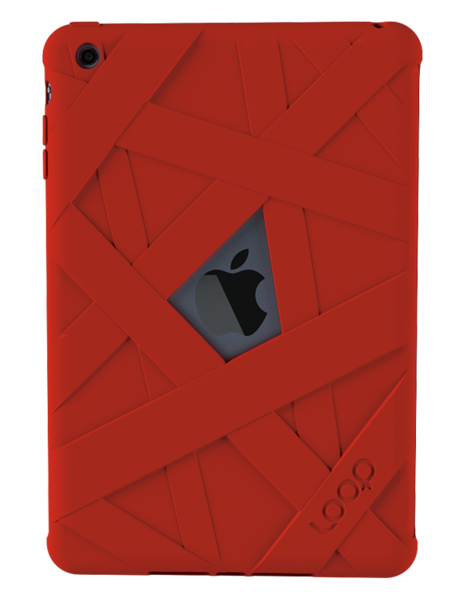 She’s had nothing but good things to say about the Mummy case and that she really likes how it feels in her hands. She feels like it enhances her iPad mini experience. Before the Mummy case, she only had the smart cover by itself and she said it felt awkward and never comfortable. She’s happier with it now that she has the Mummy case.
My daughter’s experience is similar to my wife’s with her iPad mini. She plays a lot of video games and likes the grip it gives her on the iPad. She says that it feels “natural.” I’d have to agree. That feeling is purely subjective, I realize, but it’s accurate. It feels like the iPad should have been made with this kind of feel. It’s very hard to explain but it feels natural and it doesn’t add any real weight or dimensionality to the device. It’s “natural.”
Why it’s frugal: The Mummy case is a frugal product because it protects your valuable devices. If that weren’t enough, and it certainly could be, you also have the bonus features of a natural feel, smart cover compatibility, and surface stability–such as on a car’s dashboard.
The only issue I have with the Mummy case is the price. It seems a little high to me. I don’t know how much it costs to produce but the products are made in China, which is slightly offputting. I do prefer American made products. If I’m going to pay $25, $30, or $40 for a case, I’d rather have it made in America. I’d feel better about purchasing the cases if they were $10 per item less expensive.
I love quality products. Apparently other members of my family love them too, because they haven’t removed the Mummy cases since we put them on. The cases are easy to put on your devices, yet give them a snug and stable fit.
The Loop Attachment Company manufactures very well made products. I like the range of available colors and the number of devices they support. The cases fit well and protect the devices they’re meant to protect. The cases are elegant, stylish, and make great gifts for yourself or others. And they’re attention getters–I’ve had several people check out my iPhone case from just the look alone. No one ever did that when I sported my TARDIS case. Oh well, not everyone is a Whovian.
My family and I love the Mummy cases and gladly recommend them for your iStuff. The grip, the natural feel, the range of colors, the warranty, and the added features make them a fine addition to your busy, gadget-centered lifestyle.
Rating: 8.5/10
Recommendation: Buy for yourself or for a gift. You’ll be happy with your choice.
Cuddle up to your iPad with a Snugg case (Product Review)
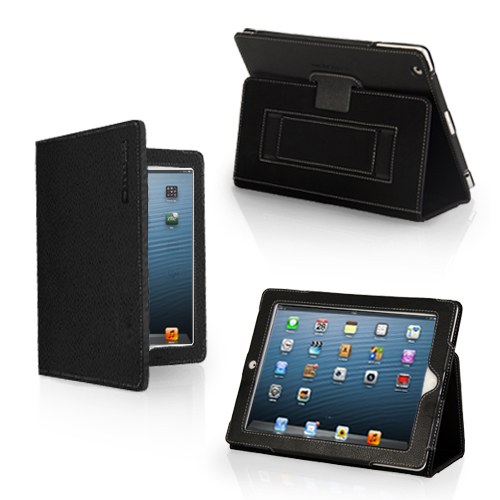 Snugg Case for iPad
The Snugg
$29.99
I’ve seen a lot of cases for iPad. I’ve seen ones that claim to do everything but wash your car. The Snugg case for iPad doesn’t make any high and mighty promises. It just does what it does. And it does it elegantly. You’ll never be embarrassed to pull out your iPad with this case on it. In fact, I’d be surprised if you don’t have someone approach you to ask what kind of case it is, where you bought it and how much it cost.
It’s a beautiful leather case that protects your iPad with a look that’s appropriate for even the most conservative office or location. It’s modern, functional, beautiful and crazily affordable. At $30, who can argue?
The only drawback to the Snugg case, and it’s a pretty minor one, is that it doesn’t prop up well on your lap. It tends to not stay up. That said, the case works perfectly on tables, pillow desks, and other fairly rigid surfaces. The upside is that it’s light enough to ignore that one shortcoming. You’ll hardly notice the weight while holding it.
My favorite features of The Snugg are its light weight and its rich feel. My iPad feels secure. It should feel secure because of the Snugg’s velcro latch and “snug” fit. The Snugg feels good in my hands. The Snugg also has some subtle features that you’ll like too. For example, it has magnetic closures, so when you close the flap your iPad goes to sleep. That saves your battery. It’s a good thing.
As you can see from the pictures, you can prop up your iPad in a variety of ways and rest assured of the case’s stability.
All of your controls and cameras are available to you with the case on so there’s no need to slip out of it to do whatever it is that you need to do with a naked iPad. Your fully clothed iPad can do it all but also maintain a very high level of protection and physical beauty while doing it.
The Snugg features a handy and sturdy stylus loop located at the top or left side of the case, depending on how you’re holding it. It also features a hand strap. I don’t really use the hand strap as a hand strap. I use mine as a place to stash all kinds of miscellany from business cards to receipts to my iPhone. Don’t worry, the strap, like everything else on the Snugg case, is very sturdy and well made.
And that’s the first thing you’ll notice when unboxing the Snugg case is its beautiful, quality construction. For $30 these days, I don’t expect much. I should but I don’t. However, The Snugg raises the bar on value for me.
Why it’s frugal: As I’ve written, $30 for a quality leather case that’s light, well-made, elegant, and protects your iPad. How much more frugal do you want? It’s a great value and a great product. Plus, the Snugg comes with the Snugg Promise and a Lifetime Guarantee. Frugality at its finest.
I really like the Snugg case for iPad. It’s my “go to” case for home, travel, gaming, and general use.
Rating: 9.5/10
Recommendation: The Snugg, in my opinion, is a bargain at $29.99. Buy it. You’ll love it.
iRig KEYS PRO and iRig KEYS with Lightning connector
December 3, 2013 – IK Multimedia, the global leader in mobile music making apps and accessories for iPhone, iPad, iPod touch and Mac/PC, announced the expansion of its iRig KEYS line with two new products for mobile musicians: iRig KEYS PRO and iRig KEYS with Lightning connector, compact MIDI keyboard controllers with 37 velocity-sensitive keys.
 Both iRig KEYS PRO and iRig KEYS come with Lightning-connector, 30-pin and USB cables. These allow musicians to connect all iRig KEYS to any iPhone, iPad, iPod touch and Mac/PC model, and provide MIDI control and performance features for Core MIDI apps of all types, such as IK’s own SampleTank, iGrand Piano and iLectric piano apps, and its range of Mac/PC virtual instruments.
iRig KEYS PRO: Big features — compact design
iRig KEYS PRO is a true “plug and play” professional-quality programmable MIDI controller designed specifically for making music on the go with an iPhone, iPad, iPod touch, Mac, or PC. It features 37 velocity-sensitive full-size keys for 3 full octaves plus one note — allowing for realistic-feeling, two-handed playing. Even with pro features like mod and pitch wheels, illuminated octave and program buttons, 4 programmable “sets” for storing complete setups, and a programmable continuous-controller volume knob, iRig KEYS PRO is 30% smaller than any other full-size key MIDI controller that can be played with two hands.
iRig KEYS PRO comes complete with Lightning-connector and 30-pin cables for plugging directly into the dock connector of any iPhone, iPad or iPod touch. A USB cable is included for direct Mac or PC connection. With standard Core MIDI support, you can play any compatible virtual instrument or recording app on your iOS device or computer from Apple’s GarageBand to IK’s SampleTank. iRig KEYS PRO needs no AC adapter or batteries, it draws its power from the device it’s connected to, and it even features an auxiliary mini-USB port to provide it with power during performance, allowing the battery on the mobile device to be conserved.
Programming and expansion
iRig KEYS PRO also has powerful programming features that are useful during live performance and in the studio. Players can program iRig KEYS PRO with different set-ups and store them in one of the 4 “Set” banks. When iRig KEYS PRO is in Edit mode, the user can set the MIDI transmit channel, velocity (touch) response, assign Control Change numbers to the Volume/Data knob, send custom Program Change messages, transpose the keyboard in semi-tones and more.
iRig KEYS PRO also sports an expansion jack for adding a sustain pedal (not included) for a realistic piano feel, or an expression pedal that sends MIDI continuous controller data that can control parameters such as volume, rotary speaker speed, tremolo and vibrato speed and more, on the connected app or software instrument.
FREE software for instant playability, universal compatibility
iRig KEYS PRO comes with SampleTank FREE* for iPhone/iPod touch and iPad, IK’s award-winning multi-part sound module designed for live performance and recording, and the iGrand Piano FREE* app, a high-quality studio-sampled grand piano sound module. Both apps are expandable with sounds from IK’s massive collection of sound libraries, and provide musicians with tools for complete music production.
iRig KEYS PRO is also right at home in the studio, and works seamlessly with DAW software, including GarageBand, Logic Pro and many others. It’s also perfect for controlling virtual instrument plug-ins such as IK’s SampleTank, Sonik Synth, SampleMoog™, SampleTron and Miroslav Philharmonik. For Mac/PC use, iRig KEYS PRO comes with SampleTank 2L**, the full-featured professional sound workstation that includes over 2 GB of professional samples, which cover all instrument categories.
iRig KEYS with Lightning connector
iRig KEYS with Lightning connector is IK’s new version of the ultra popular iRig KEYS portable mini keyboard and now comes with a Lightning-connector cable for connecting iRig KEYS to the newest Apple devices, including the new iPad, iPad mini and iPhone 5 series. It shares the same powerful features of iRig KEYS PRO but with a more compact build so it only takes up minimal space on your desktop and can easily fit in a backpack or a carry-on bag.
Pricing and Availability
iRig KEYS PRO is priced at $149.99 / €119.99 MSRP (excl. tax), and is available now from the IK network of music and electronic retailers around the world and the IK online store. iRig KEYS with Lightning connector is priced at $129.99/€95.99 and is available now from music and electronics retailers worldwide.
* Available on the App Store.
** Register and download on the IK Multimedia online User Area.
For more information, go to www.irigkeys.com.
For more information on IK Lightning Compatible Accessories, go to www.ikmultimedia.com/lightning
[Note: I have used the iRig KEYS keyboard, SampleTank, and iGrand Piano (Review coming soon). They’re fun and very professional. Advanced enough for the professional musician and simple enough for the beginner. IK Multimedia knows music.]
The iHome type pro Bluetooth keyboard case for iPad (Review)
 iHome type pro Bluetooth keyboard case for iPad
iHome, a division of SDI Technologies, LLC.
Office Depot $99.99
You never know just how your day will turn out or change your whole attitude until you wake up and face what may come head on. I follow a simple routine: I wake up, head to the gym, work out, shower, come home, fix breakfast for my daughter, take a deep breath or two, and then head into my office (a five second commute) to start my work day. And I do all that by 7:30 a.m. Some days I ask myself, “What’s my motivation.” Well, on Monday, I received, via UPS delivery, a new motivation: The iHome type pro Bluetooth keyboard case for iPad. Specifically, my iPad 4.
If you think that I’m being dramatic, you’re probably right. After all, why should I be so excited about an iPad keyboard case thingy? That’s what your formerly cynical self tells you about products like this. But having experienced the iHome keyboard case firsthand, I can tell you honestly that it’s one of the most exciting accessories I’ve ever used.
First, the case opens clamshell style to reveal a standard Apple keyboard–better still, an enhanced Apple-style keyboard–that’s right, it’s an Apple-style keyboard, but enhanced–enhanced with the Command key, the Option key, the Control key, and the fn key. It has the standard function keys along the top (F1 through F12), which perform double duty as special iPad device keys.
Now here’s the enhanced part. Those special iPad keys do stuff that you normally have to tap and swipe for–right there on your keyboard. You can close apps by using the Home key. If you press the Home key twice, it has the same effect as double pressing your Home button twice.

You can change the brightness of your screen with F1/F2, lock/unlock your screen with the F6 key, navigate through your music selections with the F7, F8, and F9 keys, and adjust your sound settings with the F10, F11, and F12 keys. When you need to use your function keys as function keys, press and hold the fn key while pressing the function key that you want to use.
Your iPad fits snuggly into the “screen” area with a couple of simple snaps. You can charge your keyboard case with the included mini USB charger and use it wire free or you can plug it in and use it wired and allow it to charge while you’re using it.
When you close the case, you have a sturdy metal shield on the bottom and a hard plastic cover on the top that creates a protective shell for your keyboard and your iPad. And the whole thing is roughly twice the thickness and just a little larger than your iPad without the keyboard case. The keyboard case feels sturdy too. It feels more like a netbook rather than a tablet plus a keyboard. You can easily carry the combo or slip it into a purse or backpack for easy transport.
I don’t know how long the keyboard’s battery life is because I’ve never had to charge it yet and my iPad has been in the case for several days, switched to the ON position, and not plugged in. I’ve used it quite a bit too. I’ve carried it from room to room, to an outside table, and to the bedroom as a laptop unit used on my ePad pillow desk. I’ve no trouble with it preventing any connectivity to WiFi and have had no issues with the keyboard.
The one exception to its otherwise perfect performance is that it seems that on my iPad, which has iOS 7, three of the keys don’t work–or maybe I should say that I haven’t figured out how to make them work yet. The Internet browser key (F3), the Search key (F4), and the Photos key (F5) have no effect when pressed. I believe it to be an iOS 7 problem because the icons on the keys look like the old symbols for those apps on iOS 6 and previous.
Why it’s frugal: The iHome type pro Bluetooth keyboard case for iPad is frugal because it protects your investment. Spending so much on your iPad means that you need to protect it plus it’s not just a case, you get a top notch keyboard to boot. The Apple Bluetooth keyboard will cost you $69.99 and it can’t be put into a case with your iPad. A great combo at a great price.
I know there are other iPad keyboard/case combos out there but this is the one that I like the best–that’s why you’re seeing it here. The iHome type pro Bluetooth keyboard case for iPad is sturdy, handy, appropriately proportioned for the iPad, attractive, and includes all of the features of an Apple keyboard plus a very nice case rolled into one package. All of your iPad ports remain available while in the case (open or closed) and your mini USB charger port on the keyboard is also exposed for easy connectivity.
Review: 10/10
Recommendation: If you want a sturdy case and a Bluetooth keyboard for your iPad, this is the one to buy.
Announcing the iRig Blueboard: the first wireless MIDI pedalboard controller
 IK Multimedia iRig Blueboard
IK Multimedia
$99.99 / €79.99 MSRP (excluding taxes)
iRig BlueBoard is the first wireless MIDI pedalboard for iPhone, iPad, iPod touch and Mac that uses Bluetooth technology to transmit MIDI messages to control app and software functions and features. Musicians can use iRig BlueBoard to control parameters in their favorite music making apps — such as stompbox effects on/off, preset patch-switching on the fly, volume or wah control, or any other MIDI controllable function. Set-up is as simple as turning on the power and launching the iRig BlueBoard companion app and assigning the backlit pads to the desired control function.
iRig BlueBoard uses Bluetooth 4.0 (LE – Low Energy) technology to transmit the actions of its four onboard, backlit foot switches and its two optional external devices to the mobile device or Mac. Then, using the included iRig BlueBoard app (download from the App Store) and software (download from the IK web site User Area), the Bluetooth signals are converted into MIDI messages and routed internally to the music app that’s running on the device.
The Ultimate App Control
Any music app or Mac music-software application that is MIDI compatible (the standard communication protocol for musical instruments) — such as IK’s AmpliTube, VocaLive, SampleTank, iLectric Piano, iGrand Piano — or any other Core-MIDI-compatible app like Apple’s GarageBand, can be controlled wirelessly.
iRig BlueBoard is also expandable — musicians can add up to two standard additional expression pedals or foot switches via the unit’s two TRS 1/4” expansion jacks, allowing for control of continuous rotary functions like wah effects, volume, EQ, gain control, etc.
For a guitarist or vocalist using a mobile multi-FX app like AmpliTube or VocaLive as a sound processor, iRig BlueBoard provides the foot-controlled functionality and convenience of a pedalboard, but with a form factor so compact and portable that it can easily slide into a backpack, a laptop bag or an instrument case. Because it’s wireless, iRig BlueBoard puts musicians on stage without being tethered to their mobile device. The unit’s range is 10 meters (over 32 feet), giving players a great deal of mobility to roam the stage that would be impossible with a wired unit.
Because the foot switches are backlit, they’re easy to see in all lighting conditions, even on a dark stage. The fact that iRig BlueBoard uses wireless Bluetooth leaves all the wired ports of the device free, so they can be used simultaneously by interfaces or controllers that feature the 30-pin or Lightning connector, like IK’s iRig PRO, iRig HD, iRig MIDI or iRig KEYS, and adapters or microphones that use the device mini-jack such as iRig, iRig PRE or iRig Mic.
Ultra Compact, Ultra Portable
iRig BlueBoard is extremely compact, light and portable, measuring only 27 cm wide x 9 cm deep (10.6″ x 3.5″) and only 2 cm (0.8″) tall. It’s extremely lightweight, but with a sturdy, stageworthy chassis and four foot switches made of soft-touch rubber and designed for durability.
iRig BlueBoard is battery powered using 4 standard AAA batteries (included), and because it uses Bluetooth Low Energy (BLE), it draws very little power giving it extremely long battery life for extended operation.

 Techopedia
- An error has occurred; the feed is probably down. Try again later.
Datamation
- USA₮ Modernizes American Payments with High-Impact St. Patrick’s Day Activation in Times Square
- Google and NextEra Strike AI-Powered Grid Deal
- NYT Sues Perplexity AI in Copyright Conflict
- Cloudflare Outage Affects Major Websites
- OpenAI Forces AI to Confess Its Lies
- OpenAI Declares Code Red as Google’s Gemini 3 Threatens ChatGPT
- Coupang Breach Exposes 33.7M South Koreans’ Data
- ChatGPT Celebrates Third Anniversary
- Asahi Group Reveals Findings of Cyberattack
- OpenAI Discloses Mixpanel Security Incident Affecting Some API Users

 The Frugal Networker
You must be logged in to post a comment.