Archive
IK Multimedia’s SampleTank® for iPhone/iPad adds iOS 8 compatibility, iRig Pads support, new sound collections and more
 November 13, 2014 – IK Multimedia, the leader in mobile music creation apps and accessories, today announced a new version of SampleTank® for iPhone, iPad and iPod touch. The ultimate mobile sound and groove workstation has been updated to take advantage of iOS 8 and includes new features that add to its comprehensive sound library and advanced recording functions. SampleTank now sports full plug-and-play compatibility with iRig Pads, IK’s new ultra-portable MIDI groove controller. Along with this, the latest version introduces two new in-app purchases: The Grid, a sound pack for beat makers and electronic musicians and Sonik Synth™ – Mobile Edition, a downloadable sound collection with over 300 superb instruments that have been remastered and reprogrammed from the popular Sonik Synth 2 virtual instrument. With support for Audiobus 2 also in the mix, the new SampleTank for iPhone, iPad and iPod touch sets a new high standard for mobile music creation.
Up to date features
SampleTank is now fully optimized with iOS 8 and Apple’s latest generations of mobile devices. SampleTank’s new iOS 8 compatibility also comes with support for Audiobus 2, which lets users open SampleTank through the Audiobus app and use it with other compatible apps – like AmpliTube – for real time inter-app audio routing. In addition, the interface of SampleTank has been streamlined with a new global menu that makes it even easier to navigate within the app.
Grooves to go
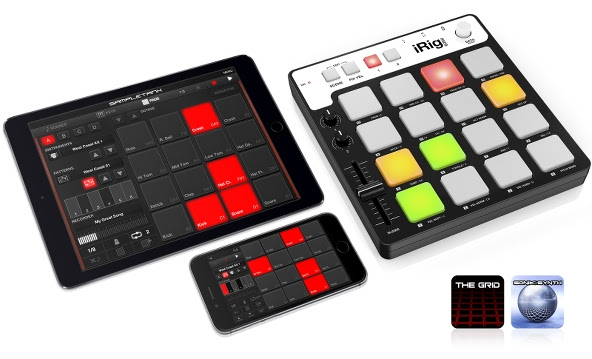
The drum machine-style PADS interface has always allowed for effortless beat creation in SampleTank. Now beatmakers can enjoy an even more intuitive experience thanks to new native plug-and-play support for iRig Pads. IK’s ultra-portable MIDI groove controller works right out of the box with SampleTank, which lets users transform their mobile devices into the ultimate drum machine and beat sequencer. iRig Pads’ full integration mode syncs up with SampleTank’s PADS interface, allowing for seamless control via the physical pads on the hardware.
The addition of native iRig Pads support also brings with it the release of The Grid, a brand new sound pack designed for beat makers and electronic music producers that includes 50 instruments and 50 patterns in two categories: DRUMS and LOOPS & HITS. iRig Pads users can register their controller to receive The Grid for free, while others can enjoy a taste of 4 free kits and patterns with the remaining sounds available via in-app purchase.
An expanded sound universe
The latest version of SampleTank also introduces the Sonik Synth – Mobile Edition downloadable sound collection. It features a selection of the best sounds from the popular Sonik Synth 2 virtual instrument for desktop platforms, which have been specifically remastered and reprogrammed for the mobile edition of SampleTank. From the sample vault of sound design company Sonic Reality, Sonik Synth – Mobile Edition provides a well-rounded sound collection of superb instruments with over 300 meticulously sampled vintage synthesizer, piano, organ, drum, bass, guitar, orchestral, ethnic and other sounds that complement and expand the wide tonal palette that SampleTank for iOS offers for all styles of music.
Pricing and Availability
The new version of SampleTank is available now on the App StoreSM as both a free or paid app for iPhone, iPad and iPod touch for only $19.99/€17.99 for new users. The Grid is available as a free sound pack for registered iRig Pads users or via in-app purchase for $9.99/€8.99. The Sonik Synth – Mobile Edition downloadable sound collection is available as an in-app purchase for $19.99/€17.99.
For more information, please visit:
| www.sampletank.com www.appstore.com/sampletank www.appstore.com/sampletankfree www.irigpads.com |
 |
To watch the video demonstration, please visit:
Boinx Welcomes New PartySnapper App with a Chance to Win an iPad Air 2
Puchheim, Germany – October 29, 2014 – Give PartySnapper Beta a spin at your next party for a chance to win the brand new iPad Air 2. PartySnapper Beta is now available for anyone with an iPhone or iPad running iOS 8 to test out. To celebrate, Boinx Software will be running a fun and friendly competition to see who can throw the best party. An iPad Air 2 will be raffled off among all qualifying party animals.
“We were overwhelmed by the positive feedback we received when we announced PartySnapper a few months ago through our Indiegogo campaign,” comments Oliver Breidenbach, CEO of Boinx Software. “We are so passionate about this app and know people are going to love bringing that extra bit of personalization to their parties. There are just a few kinks to work out, so with the help of Apple TestFlight and 1,000 partiers, PartySnapper will be taking over parties everywhere!”
Join the Party!
To join the PartySnapper beta contest, host a Beta Test Party with at least two of your friends. When the confetti settles, the host must send Boinx a group selfie with all party guests and fill out a questionnaire to officially enter the contest. The host of the party with the most participants and the host of the party with the coolest picture will each receive an exclusive PartySnapper beer stein. All qualifying party hosts will have a chance at the iPad Air 2.
About PartySnapper
PartySnapper has both a photo-taking mode for attendees and a mode for hosting parties. Every guest at a party takes tons of pictures with their iPhones. PartySnapper transmits these instantly to the host’s iPad or iPhone wirelessly, where all the photos are collected then displayed as a beautiful slideshow that plays on a TV or projector via AirPlay or cable. At the end of the party, there’s no need to ask the guests to send in their photos – they’ve already been aggregated on the host’s device. The app is super easy to use; hosts and party-goers alike should both be able to use it, even at the end of a long night of partying.
- Taking Pictures is Free! Taking pictures will always be free for your party guests. Tell everyone to download the free PartySnapper app and start taking pictures the moment they walk through the door.
- Free Party Light Mode: The Party Light mode is limited to one party with a 10 pictures slideshow. You can use this for an afternoon get together while planning the big party.
- In-App Purchases: Purchase a ticket for a single party with unlimited photos, valid for 7 days after purchase, or treat yourself to PartySnapper unlimited for all your parties all year round.
About Boinx Software
Boinx Software Ltd. is located in Puchheim, near Munich, Germany. Boinx Software develops award-winning animation, video production and photography software for the Mac® platform and iOS devices including the iPhone®, iPad® and iPod®. Boinx iStopMotion is the leading solution for stop motion animation and time-lapse capture, used by many thousands of enthusiastic animators at home, in schools, in advertising agencies and professional animation studios. iStopMotion for the Mac was named one of the Best Apps of 2012 on the Mac App Store. In 2011, Boinx Software added iStopMotion for iPad to its family of stop motion animation products. Boinx FotoMagico, winner of two Apple Design Awards, is a presentation tool for professional photographers. BoinxTV, winner of an Apple Design Award, is revolutionary live production software that turns any Mac into a TV studio. Boinx Mouseposé is the indispensable mouse pointer-highlighting tool for users developing presentations, training or demos. You Gotta See This! is Boinx’s iPhone 4 app that works off of 4th generation gyroscope technology to create amazing 360-degree photo collages. PhotoPresenter for iOS, Boinx’s newest app, allows users to connect an iPhone, iPad or iPod touch to an HDTV set using HDMI or VGA, or via AirPlay, then browse the device’s photo library and select specific images or video to display on the second screen.
Follow @boinxsoftware on Twitter and Facebook. For more information, please visit the Boinx Software Website.
WaterField Unveils Sporty Outback iPad Slip Case
 WaterField Designs announces the Outback Slip Case, a custom-fitted case for the just-announced Apple iPads. Natural materials—waxed cotton canvas and vegetable-tanned leather—combine for a sporty, un-pretentious look suitable for personal or casual work use. The custom-fitted Outback iPad Slip Case includes a softly padded interior and a stiff plastic insert to provide extra protection for the new anti-reflective, high resolution screen. WaterField Designs is an innovative San Francisco designer and manufacturer of custom laptop sleeves, designer bags and cases for digital gear.
The waxed canvas and premium leather of the Outback Slip Case gain character over time. A magnetically-secured leather strap keeps the iPad in place, and a cleverly-positioned lower “grab tab” lets users easily remove the iPad from the snug-fitting case. The Outback Slip Case can be carried on its own or stashed in a bag or backpack.
“I think the combination of canvas and leather gives the Outback Slip Case a relaxed, yet sophisticated look,” explains company owner, Gary Waterfield. “With iPads increasingly used both at home and at work, we designed this line to fit comfortably in either setting.”
Outback Slip Case for iPad
- Rugged, water-resistant, tan waxed-canvas outer shell gains character over time
- Premium, naturally-tanned, full-grain leather trim
- Soft, scratch-free, lightly-padded interior
- Screen-protecting plastic insert
- Slim leather strap fastens with invisible magnetic snap
- Exterior leather “grab tab” eases iPad removal
- Options: Snug-fit sizes for ‘naked’ iPad Air 2/iPad mini 3 with Retina and for iPad Air 2/iPad mini 3 with Retina using an Apple Smart Cover.
WaterField Designs offers additional custom-fitted iPad cases for Apple’s new iPad Air 3 and iPad mini 2—the Ultimate SleeveCase, the Suede Jacket, the CitySlicker, the Outback Solo, and the Travel Express, each entirely handcrafted in San Francisco. For the upgraded Mac Mini, WaterField’s Mac Mini SleeveCase keeps the device and its accessories safely stored and organized.
Pricing & Availability
iPad Outback Slip Case
Price: iPad mini 3—$59; iPad Air 2—$69
Color & Materials: Tan waxed, canvas with full-grain, vegetable-tanned, grizzly leather trim
Sizes: #10—iPad mini 3; #11—iPad mini 3 using an Apple Smart Cover; #23—iPad Air 2; #24—iPad Air 2 using an Apple Smart Cover
Shipping begins October 24, 2014.
Additional WaterField Designs iPad Cases—the Ultimate SleeveCase, Suede Jacket, CitySlicker, Outback Solo, and Travel Express—available now.
Mac Mini SleeveCase: $49, one size, colors: black ballistic with checkered Indium” trim.
About WaterField Designs
WaterField Designs manufactures custom-fitted, high-quality cases and bags for a full-range of laptop computers, smartphones, and other digital gear. All products are manufactured to exacting standards in San Francisco. More information is at the SFBags website under Our Story.
IK Multimedia’s AmpliTube for iPhone and iPad adds iOS 8 support, ENGL amps, new drum packs and more
The earth shaking gain of ENGL
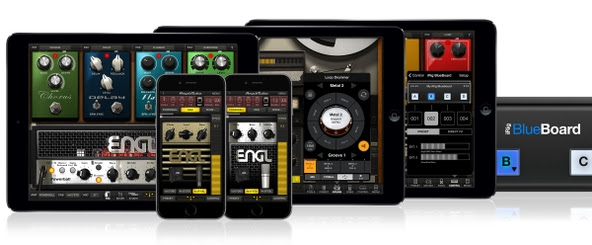
AmpliTube’s amplifier section is about to get a whole lot louder. The latest version introduces two new offerings from ENGL, an innovative German manufacturer whose high-gain amps are tailored to provide that supremely righteous tonality coveted by metal, classic rock and modern hard rock players. The amp heads in AmpliTube are based on the meticulously engineered virtual models found in AmpliTube 3 for Mac and PC.
The ENGL E650: An all-tube head that can conjure up classic rock-god tones from the ’80s and ’90s as well as the heavy crunch and distortion of tomorrow’s tone connoisseurs.
The ENGL Powerball: An amp head that’s earned its reputation as one of the most powerful and versatile modern high-gain amplifiers off the potent combination of its brutal rhythm tones, super high-gain lead tones and ultra-clean tones.
Both amp heads are available as in-app purchases, which means AmpliTube’s collection of amps is bigger than ever before. And to coincide with this, AmpliTube now lets users transfer their purchased gear between versions and devices, such as from AmpliTube for iPad to AmpliTube for iPhone/iPod touch (limited to 10 device transfers per user).
Take control with iRig BlueBoard
Though AmpliTube is fully controllable from the touchscreen, it really comes alive when paired with IK’s iRig® BlueBoard Bluetooth pedal controller. iRig BlueBoard gives users a wireless stompbox-like experience with four assignable buttons that can be used to trigger effects and swap presets from the floor. The latest version of AmpliTube makes the pairing even more seamless and powerful by adding built-in support and a new mode that allows for global control of AmpliTube’s robust built-in recorder.
8 tracks of tone
AmpliTube has always let players record their sessions via its built-in recorder. The latest version expands this capability by giving iPhone and iPod touch users the ability to expand from a single-track to an 8-track recorder through in-app purchase. That means that iPhone, iPad and iPod touch users have the same multitrack recording functionality, which is perfect for AmpliTube’s new project sharing feature. Now users can share their recordings and music projects across different versions and across different devices via iTunes File Sharing.
Powerful drums
For practicing and recording, AmpliTube features a powerful drum module called Loop Drummer. Like a virtual session musician, it provides rock-solid rhythm tracks that sync with AmpliTube’s recorder. The latest version of AmpliTube builds on this by adding additional Style Packs for purchase from the in-app store. Style Packs include 64 loops each, and provide eight different song-construction kits based around a core drumbeat style. The new Style Packs include 5 alternate versions of existing AmpliTube favorites – BLUES 2, FUNKY 2, METAL 2, POP 2 and ROCK 2 – plus three exciting new styles – JAZZ, LATIN and REGGAE. Now, no matter their style, guitar players and bassists will be able to practice with a drummer anywhere.
And a whole lot more
AmpliTube has also been optimized in a number of more subtle ways: It’s fully compatible with iOS 8, the new operating system for iPhone, iPad and iPod touch.
Its MIDI control has been improved by adding more assignable parameters to the built-in recorder. It’s now compatible with Audiobus on iOS 8. Its latency and MIDI control have both been improved. And its quick start guide has been replaced by multi-language dynamic tooltips available in English, French, Italian, Spanish, Portuguese and Japanese.
Pricing and availability
The new version of AmpliTube is a complimentary update for existing users of all versions of AmpliTube, and it’s available now on the App StoreSM as both a free or paid app for iPhone, iPad and iPod touch for only $19.99/€17.99 for new users. The new ENGL E650 and ENGL Powerball amp heads are available via in-app purchase for $6.99/€5.99 each. Each new Loop Drummer 2 Style Pack is available via in-app purchase for $3.99/€3.59.
For more information, please visit:
| www.amplitube.com www.appstore.com/amplitube www.appstore.com/amplitubeforipad |
 |
IK Multimedia. Musicians First.
954-846-9101 ext 313 | www.ikmultimedia.com
AVANTEK USB Car Chargers (Review)
 AVANTEK USB Car Chargers
Claybox Limited
$9.99 to $16.99 Amazon
Do you dread long road trips because either you have to turn off your devices to save battery life or you have to buy those really cheap (not well made) USB charger things in service stations or convenience stores only to toss them into the trash after a single use or two. And you can only charge one or two (if you’re lucky) devices at a time. Frustrating, isn’t it? Well, for just about the same price as dime store charging gadgets, you can have a real multi-device charging station for your long trips.
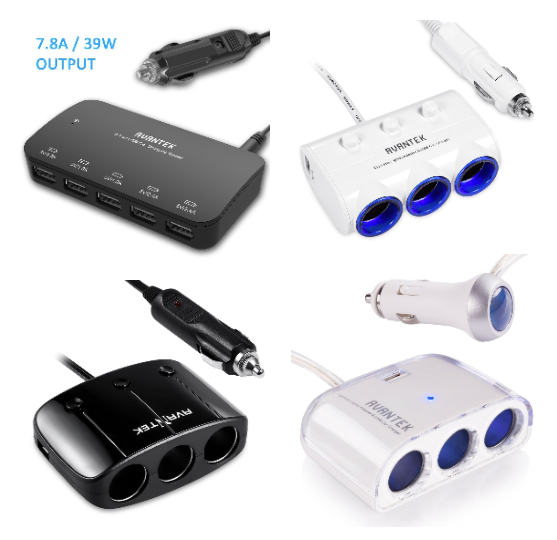
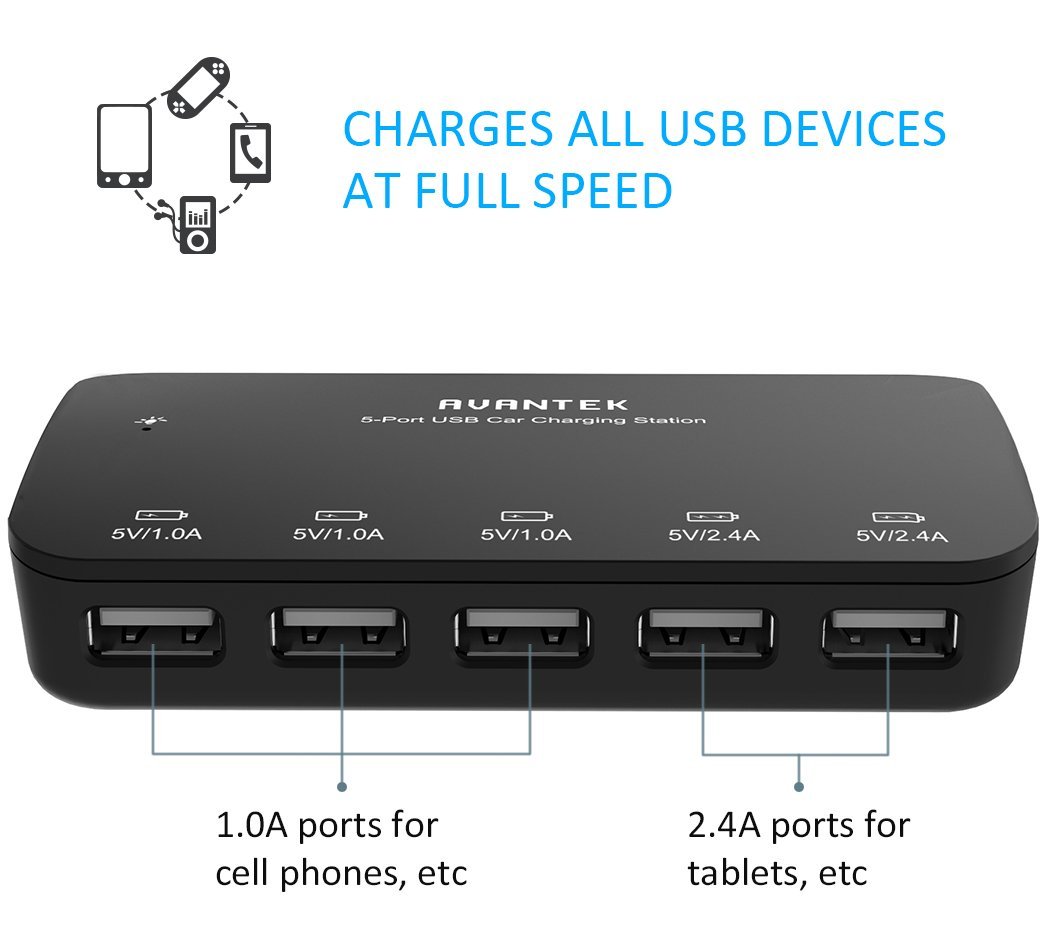
Seriously. For $16.99, you can charge up to five devices at once (upper left device in picture). It’s the one that I take with me on road trips. My wife, daughter, and I are able to charge our three iPhones and my daughter’s iPad all at once. Try that with a convenience store charger.
The other chargers shown have two USB connectors plus three cigarette lighter-style socket charger ports. These units are socket port multipliers. With them, you can charge or power a variety of gadgets, tools, and appliances. You aren’t limited to USB.
My sons chose the socketed chargers for themselves because they have a variety of “thingies” that they want to power. I don’t know what “thingies” are and I don’t want to ask. I feel better not knowing all the details. But whatever those details are, they’ll have plenty of power available to them.
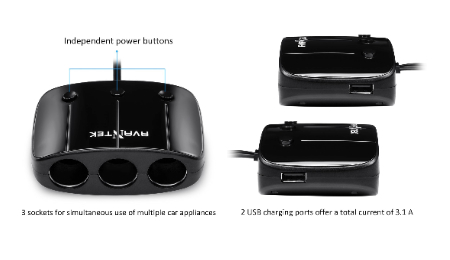
Why it’s Frugal: AVANTEK power products are frugal because they save you both time and money. They save you time by allowing you to charge multiple devices in your car and they save you money because you don’t have to buy multiple chargers nor do you have to re-buy chargers because the ones you bought were cheap pieces of garbage. Frugal and useful. You just can’t beat that combination.
Surprisingly, I don’t have even one bad or slightly negative thing to say about these products. They do what they say they’ll do and they do it inexpensively. The manufacturing quality is very high, the designs are good, and they work. It’s hard to find fault with a product that is so well thought-out, so useful, and so frugal all in one package.
 What more can I say than to tell you that my wife and my two college student sons love these? I can tell you that I love them too. Honestly, every vehicle you own should have at least one of these devices available because these days we depend so much on our personal technology that you can’t do without power.
Rating: 10/10
Recommendation: A must-have for every vehicle and every member of your family. These would make great gifts.
Justin Power Bank and Power Stick (Review)
 Justin Power Bank and Power Stick
Innovative Technology
Power Bank: $29.99/Power Stick $14.99
The list of Justin power products is long. You can find power products to meet just about any need. The two products that I’m reviewing here are the Justin 2,200mAh Power Stick and the Justin 6,000mAh Power Bank. This review is a bit different because it covers two products instead of just one. They serve the same function so that’s why I’m combining them here.
You can find Justin power products at several retail stores including Kohl’s and Staples. I mention those two because they popped up first in a Google search for the manufacturer ID for each product. Prices vary among retailers, but the ones I’ve given are pretty standard.
I’ve review several portable charger products on this site and there are two things to remember with any of them: You have to recharge your charger and you have to bring your USB charging cable with you, as well as the charger, or the charger won’t do you any good at all.
 The Justin 2,200mAh Power Stick (Stick) comes fully charged out of the box and will provide you with at least one full charge for your phone or tablet. The unit is small enough to fit into any pocket or purse. The Stick comes in several standard colors: black, silver, blue, purple and red. I think there’s also a camo version available in some stores, so if you’re into camo, search for it at Kohl’s.
My daughter loves the blue Stick and takes it everywhere with her. She drops it into her backpack and away to school it goes. I don’t think she will ever be without it again. Texting, YouTubing, playing music, and using a camera burns a lot of battery, so it’s no longer an option not to have spare power available.
The Justin Power Bank and the Justin Power Stick would make great giveaways or prizes at trade shows and conferences.
My wife loves the Justin 6,000mAh Power Bank (Bank). No, she has no clue what 6,000mAh is, but she does know that a fully charged Bank provides at least three full phone or iPad mini charges for her. What else does she need to know? I’m the tech guy. She simply receives the bounty of her own personal tech sla–professional at her disposal.
 The Bank isn’t really pocket friendly, but it is purse friendly and certainly is desk friendly. In fact, my wife usually keeps it in her purse for when she forgets to close all 15 apps on her phone or on her iPad mini. Yes, I did teach her how to close them, but alas, she cares little for such annoyances, especially when there’s the Bank to save her from her folly.
The Bank, when sitting on a desk or some surface, provides you with a stand onto which your phone rests. The stand slot gives it just the right amount of tilt so that you can face time or type comfortably on it without contorting your hands or peering over it like an old newspaper guy typing on a Royal typewriter. The Bank is for people who either have multiple devices or who have one that they use a lot.
You don’t have to own Apple devices to use Justin’s Power Bank or the Power Stick. They’re compatible with any device that uses a full-sized USB connector on one end of its charger cord. One of the best things about Justin’s products is that they’re ready to go right out of the box*. You don’t have to take the charger home and plug it in for 12 hours. Buy it, open the box, connect it to your phone, tablet, or whatever, and charge away.
Why it’s Frugal: Charger products are frugal by design. Justin’s power products are frugal because of what you get out of them: a lot of power for the price. At $14.99 for the Stick and $29.99 for the Bank, they’re very frugal choices.
I like Justin power products because they’re obviously well designed, well made, and well-priced. And you know that I don’t mind complaining about product pricing if I feel that it’s too high or not justified. These products are appropriately and competitively priced. Follow the manufacturer’s recommendations for keeping your Justin power products healthy and happy, so that they’ll last longer. My feeling is that you can buy Justin power products with confidence and without buyer’s remorse. Small, powerful, and frugal. What else do you want?
Rating: 9.5/10 for both products.
Recommendation: Buy them for yourself or as a most appreciated and practical gift.
*The products come partially charged, not fully charged.
iRig Mic HD from IK Multimedia now shipping
August 5, 2014 – IK Multimedia, the global technology leader in mobile apps and accessories, today announced it’s shipping iRig® Mic HD, the first mobile digital microphone for iPhone, iPad, iPod touch, Mac and PC. The sequel to IK’s popular iRig Mic, iRig Mic HD is the perfect tool for singers, podcasters, online radio broadcasters, journalists, videographers, home studio enthusiasts and anyone else who needs to record high-definition digital audio on the go. iRig Mic HD comes in black and an exclusive silver version is available only from the Apple Store. Powerful, mobile and affordable: iRig Mic HD is the first handheld digital microphone for everyone.

Designed to perform
iRig Mic HD is the only mobile digital condenser microphone designed for live handheld performance and recording. It delivers high-quality digital sound via an electret condenser capsule, a 24-bit audiophile-grade A/D converter (with 44.1/48 kHz sample rate) and a built-in low-noise high-definition preamp. iRig Mic HD sports an easy-to-use gain control that allows for optimum audio capture at any sound pressure level, from the quiet whisper of an ambient room to the full blast of a loud rock concert. A multi-color LED provides at-a-glance monitoring of sound levels.
Professional plug-and-play sound
For superior recording quality on the move, iRig Mic HD plugs directly into the digital input of your iOS device. iRig Mic HD is compatible with the latest generation of iPhone, iPad and iPod touch devices via its included Lightning cable. An optional 30-pin connector is available for legacy iOS devices. You can also use it for instant plug-and-play compatibility with your computer using the included USB cable to connect to your Mac or PC (driver download required for PC).
Capture high-quality sound on the go with the first mobile digital microphone for iPhone, iPad, iPod touch, Mac and PC.
A full spread of apps
For immediate recording, iRig Mic HD comes fully equipped with a suite of powerful IK apps: iRig® Recorder for iPhone, iPad and iPod touch is a straightforward audio and editing app for field recording and interviews. VocaLive™ for iPhone, iPad and iPod touch is a powerful vocal effects and multi-track recording app with a suite of 12 professional real-time vocal effects. AmpliTube® for iOS, Mac and PC is the industry-standard guitar studio app that features ultra-accurate digital models of some of the world’s most desirable guitar amplifiers and effects. EZ Voice for iPhone, iPad and iPod touch is an easy-to-use vocal recording app that lets you sing-along and record with any song in your iTunes music library. iRig Mic HD is also compatible with a wide variety of third party apps, like GarageBand, Cubasis, ProStudio Vocal FX, MultiTrack DAW and more.
| The iRig Recorder App is available for free from the App Store on iPhone, iPad and iPod touch or at www.appstore.com/irigrecorder |
| The VocaLive App is available from the App Store on iPhone, iPad and iPod touch or at www.appstore.com/vocalive |
| The EZ Voice App is available for free from the App Store on iPhone, iPad and iPod touch or at www.appstore.com/ezvoice |
| The AmpliTube app is available for free from the App Store on iPhone, iPad and iPod touch or at www.appstore.com/amplitubefree |
| Register and download AmpliTube FREE for Mac and PC from the IK Multimedia site or at http://www.ikmultimedia.com/amplitubefree |
Pro sound at an affordable price
iRig Mic HD is so affordable that now anyone can capture high-quality digital audio on the go. Whether it’s broadcast interviews in the field, home recording in the studio, memo recording for the office or anywhere else audio needs to be captured.
Pricing and Availability
iRig Mic HD is now available from music and electronics retailers worldwide for $129.99/€99.99 (excluding taxes). An exclusive silver version is also available from the Apple Store.
For more information, please visit www.irigmichd.com
IK Multimedia. Musicians First.
About IK Multimedia: IK Multimedia is a computer music technology company that offers a diverse range of affordable and easy-to-use music production tools with great sound quality and a realistic look and feel. With millions of installations worldwide, the IK range has been adopted by musicians of every level, from beginners to professionals, to gain access to high-end, studio-quality gear from their computers or mobile devices. iRig®, AmpliTube® and VocaLive™ are trademarks property of IK Multimedia Production. iPhone, iPad, iPod touch, Mac and GarageBand are trademarks of Apple, Inc., registered in the U.S. and other countries. iPad Air, iPad mini and Lightning are trademarks of Apple, Inc. All other trademarks are property of their respective owners.
The Brydge+ Keyboard for iPad (Review)
 Brydge+ Keyboard for iPad
Brydge
$99
I’ve reviewed several keyboards for the iPad and I’ve also refused to review some (You don’t see those), but the Brydge+ keyboard for iPad is a very fine accessory. I really like it. In fact, it’s rarely been off my iPad since I received it in the mail almost a month ago. Yes, I’m a bit slow with some reviews–not because of the products, but because I have so many in my queue to do. I have finally caught up to this one and I’m glad because I really like this keyboard. It matches my iPad perfect in material and in looks.
The Brydge+ is made of the same aircraft aluminum as the iPad itself. Same color, same weight, and same lines. In fact, you’d probably assume that it’s made by Apple, but it isn’t. The Brydge keyboard line began life as a Kickstarter project.
Their Kickstarter campaign is one of the most successful that I’ve ever seen. They asked for $90K and received almost $800K. Yes, you read that correctly. It can happen, even on Kickstarter, which I really don’t like. That said, it does work for some people.
The keyboard coupled with the iPad makes for a bit of heavy lifting. I’m pretty sure that the keyboard more than doubles the weight of the iPad. I also have the built-in speaker version which probably weighs heavier than the non speaker version. But if you’re used to carrying around a full-sized laptop computer, this little combo will seem lightweight to you.
The keyboard has keys that mimic the iPad’s Home button, lock button, music controls, brightness, search, and sound volume. The best additional functionality is that you can press the keyboard’s Home button and Lock button at the same time to take screenshots. That’s a great feature! It’s great because I have a hard time doing it with the actual iPad buttons. If my timing is a little off, either I lock the iPad or I close the App that I’m using.
One thing to note about the Brydge keyboard: the charge lasts a very long time. I’ve charged my iPad five or six times compared to two charges on the keyboard.
The keyboard pairs easily with your iPad and stays paired, even after prolonged non-use, it will stay paired. And by prolonged, I mean days not hours. If you haven’t had your keyboard paired in several days, just switch it on and tap a key. It might take a second or two to re-establish the link, but you really have to do nothing else to re-establish the pairing. I like that. I don’t like having to repeat the same process to pair a device with my iPad every time the two become disconnected. I consider such behavior a fail.
Your iPad slips into the keyboards clamps with the help of silicone rubber protectors that also hold your device with a pretty good grip. Don’t worry, it won’t slip out. You have to pull it out of the clamps. You can adjust the iPad’s angle from closed for carrying to 180 degrees flat. The clamps are sturdy and ready to work. When you have your keyboard attached, you can place your iPad/keyboard combination on an table surface safely because of the keyboard’s protective feet. Of course, the same goes for when it’s open and in use. Don’t worry, you won’t get yelled at for scratching someone’s mahogany table with your fancy thingamajig.
I’ve never had any problem with the Brydge+ keyboard from first use. The keys have a nice touch to them, good feedback, and no repeated characters. This is a well made product that’s durable, elegant in design, professional quality, and priced well for the market at $99. The non-speaker model is $79. For the extra $20, I say go for the speakers, especially if you have a hard time adjusting sound on your iPad to get the right volume.
The speakers are located at the top of the keyboard above the keys, which makes the sound project back to your ears very well because it bounces off the iPad and back toward you. I can tell from the craftsmanship, attention to detail, and key quality that a lot of thought went into this product. This is definitely not some thrown together gadget that’s meant to entice you, extract $100 from you, and then promptly leave its usefulness in the ad. The Brydge+ keyboard basically turns your $800 iPad into an $1,800 laptop computer that folds up into a neat little package.
The only negative I find with the Brydge keyboard is that, depending on your iPad’s generation (2,3,4), some of the function keys might not work. For example, on my iPad 4, the Internet key doesn’t work and neither does the Photos key that opens your Camera Roll. Minor issues to be sure, still worth mentioning.
Why it’s Frugal: The Brydge+ keyboard with speakers is a frugal choice because not only does the keyboard protect your iPad, when folded, it is an extremely functional device. It also uses very little power and requires very little intervention from the user. The keyboard offers you a laptop look and feel, with a design esthetic that says, “Made for Apple.” It’s a frugal choice for your iPad.
The instructions that come with your Brydge keyboard are clear and concise. You connect the keyboard in the usual way via your iPad’s Bluetooth settings and powering on the keyboard. To pair the speakers is not as intuitive and might require a try or two to get it right.
Press Ctrl-B on the keyboard and hold it until you hear four beeps, watch your iPad’s Bluetooth settings to confirm the pairing. I had to pair/unpair a few times before I got the hang of it. Now the unit pairs by itself without my intervention.
I’ve read a few other reviews of the Brydge keyboard and there are two points they mention that I’d like to respond to. First, they write that the back of the iPad isn’t protected. It’s true that the Brydge keyboard, when folded only protects the somewhat delicate glass portion of the iPad. You know, the most important part. The back of the iPad is made of aircraft aluminum like the keyboard. That is its protection.
If there were another protective cover, the unit would be even heavier. That, and the fact that nothing protects your laptop when it’s folded. I have yet to see a protective cover for a laptop except for carrying cases.
Second, they state the price of $99 as being high. If you read my other reviews, you’ll see that I do mention price often as a negative point for some of these products. However, I balance value with price. That is to say that I measure a product’s quality against its price. If the quality, design, and craftsmanship justify the price, so be it, as is the case with the Brydge keyboard. Its $99 price tag doesn’t detract from its functionality, ease of use, design, materials, features, and esthetic.
The Brydge+ keyboard with speakers is an excellent choice for your iPad. The keyboard operates on very little power. It looks good. It feels good. And the price is right. Check out the official promotional video to get a better look at it and its functionality.
Rating: 9.5/10
Recommendation: Once you use it, you probably will never separate your iPad from it again. Buy it from the Brydge keyboards website.
Open Mic Night: IK Multimedia’s iRig Voice Microphone (Review)
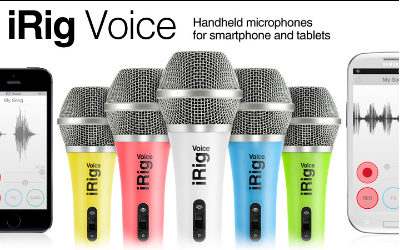 iRig Voice Microphone
IK Multimedia
$39.99
If you’re like a majority of surveyed people, you want to sing. You also want to write what you sing. Singer/songwriters are a very common person type. Other than a good singing voice and an audience, you need some basic equipment with which to record your masterpieces, namely a microphone and some recording equipment. These days, your required recording equipment can be emulated with software. You can record, mix, add effects, and export your works to a variety of formats for public consumption.
The iRig Voice microphone is a standard microphone with a 3.5mm jack, but also includes a free working lite recording studio app named EZ Voice. The input jack also features an earphone jack so that you can speak and listen through the same interface.
The EZ Voice App (Free) allows you to do some basic voice recording, add some live effects, and record foreground vocals with your songs. But, the iRig Voice microphone is compatible with other multimedia apps as well. It works on the iPhone, iPad, iPod touch, newer Mac models and Android devices. I’ve personally tested it on my iPhone 5, iPad 4, Mac mini, Windows Phone (Nokia 928B) Metro, and my Android-based HP Slate 7+. All successful and perfect.
Audio App Compatibility List
- EZ Voice
- Dragon Dictation
- QuickVoice
- Skype
- SP Multitrack
- Garage Band
I recorded a short message using the EZ Voice app for you as a demonstration.
I don’t sing well enough to record a music demo, so you’ll have to use your imagination.
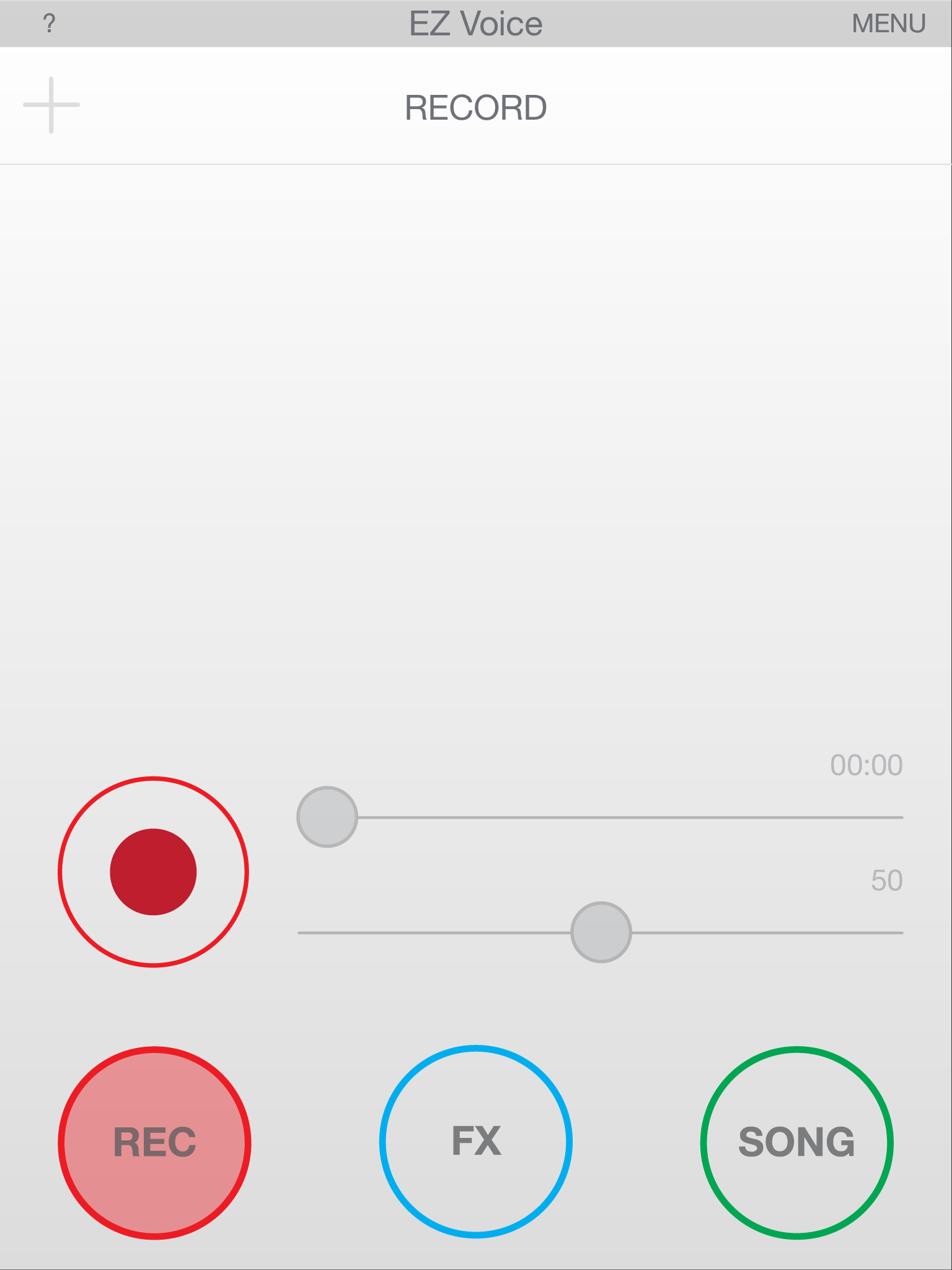
EZ Voice Main Screen
The microphone feels and sounds like any professional microphone I’ve ever used. The mic and apps worked together the first time without any issues. I did have to turn off Siri on my iPhone and on my iPad, but that might just be my experience and not yours. Siri kept popping up when I spoke into the mic during testing, so to avoid that annoyance, I disabled Siri.
This is one of the few products that I’ve ever reviewed that I’m absolutely convinced that the pricing is spot on. At $39.99, the iRig Voice is a great value. It performs as well as any microphone that I’ve ever used. I do suggest, as I would with any microphone, that you purchase a pop filter (about $3.00) to alleviate wind noise, pop, and some ambient noise.
Don’t use the mic when you’re charging your device because it creates a little bit of static, or it did for me, on my iPhone.
Why it’s Frugal: The iRig Voice microphone is frugal because its $39.99 price tag is perfect for anyone who wants to get into podcasting, song recording, or voiceover acting without spending a huge amount of money. It’s a great microphone at a great price. It’s an excellent value. Sure, you could spend $1,000 on a better microphone, but why would you?

EZ Voice – List of Effects
The microphone’s clarity is demonstrated very well when using it with the Dragon Dictation app on the iPhone or on the iPad. I’m not the best at enunciating my words (It’s a Texas thing), but the software picked up and correctly typed out every word I said on my iPhone and on my iPad. That’s impressive. I’ve never had that happen before and I always use the same lines for testing:
“Now is the time for all good men to come to the aid of their party” and “Conjunction Junction, what’s your function”.
Those are two fun phrases that can confuse dictation software due to speech patterns. If you don’t think you can confuse the software, try it by using your device’s built-in microphone. It almost never gets them perfect.
Features
- Handheld vocal microphone delivers professional sound quality
- Compatible with iPhone, iPad, iPod touch, newer Mac models and Android devices
- Compact cardioid pattern minimizes feedback
- Constructed of durable, lightweight thermoplastic
- Available in 5 colors: Green, Blue, Yellow, Pink and White
- Comes with EZ Voice app
- Works with dozens of karaoke, sing-along and music making apps
- Headphone jack for real-time monitoring
- Convenient on/off switch located on the mic
EZ Voice, while free of charge, does prompt you to purchase sound effect add-ons for $0.99 each. I purchased Tune and Morph, although I’m not sure exactly how to use them. I tap the FX icon and then tap the settings but the same list of settings shows up for each, so I must be doing something wrong. I’m not sure at this point if it’s me, that the app isn’t intuitive enough, or that it’s working as designed and I just don’t realize it.

EZ Voice – In App Effect Purchases
In either case, $2.00 isn’t a lot to spend trying out an app. It’s just too bad that it isn’t more obvious how to use the effects. There is a long list of effects that cover everything from arena to robotic to extremely deep to childlike. The effects are a lot of fun. There is one very cool effect called ‘Diana’ that changes your voice into a normal sounding female voice. It’s useful in case you need to sing a female part or speak a female part but don’t have a woman to provide the voice for you. It would work great for recording script dialog or for creating a voiceover for a product or service. It’s very impressive and I recommend it.
The app also allows you to sing along with and record your favorite songs. The instrumental parts are normal volume but the original vocals become background for you. EZ Voice is very well constructed and well thought out app. I do wish it were more obvious how to use the effects, but that isn’t a major flaw, but a little annoying.
I really like the iRig Voice microphone and the EZ Voice app. The microphone is a welcome addition to any musician’s, aspiring singer/songwriter’s, or voice artist’s toolbox. It’s cool to have multiple colors from which to choose. The only problem is that you might not be able to choose a color without a little buyer’s remorse. I suppose that you could collect all six and have one for every mood or gig.
I chose the green one for review because that lime green color has a special meaning for my daughter and me. The microphones are sturdy and well-built. They’re heavy on the end, just like you’d expect, and although IK Multimedia sells a professional digital microphone (iRig Mic HD), this one feels right and sounds right to me. But, this mic is probably best suited for song demos, podcasting, and voiceover work where extreme quality isn’t needed. The ads tell you that it’s perfect for karaoke and portable vocal studio. I’d have to agree, but you won’t be at all disappointed with the quality or the good looks of this mic. For $40, you can’t go wrong.
Rating: 9/10
Recommendation: Buy it, have some fun, and maybe hit the big time!

EZ Voice – Recording My Test Message
Note: I tested the iRig Voice microphone on my Windows Nokia 928B phone. This is not an officially ‘certified’ product and IK Multimedia does not endorse the use of the microphone on the Windows phone, so your mileage may vary. I tried it just to see if it would work and it did without any issues, but don’t blame me or IK Multimedia if the mic doesn’t work on your Windows phone.
You can also follow IK Multimedia and share your audio and video material on our YouTube, Twitter, Facebook and SoundCloud channels.
Also, check out the complete range of iOS accessories and apps for vocalists and recording!
– iRig MIC HD, digital handheld microphone for iPhone/iPod touch/iPad and Mac
– iRig Voice, new colored handheld microphones for smartphones and tablets
– iRig MIC, the first handheld microphone for iPhone/iPod touch/iPad and Android
– iRig MIC Cast, ultra-compact microphone for iPhone/iPod touch/iPad and Android
– iRig PRO, universal audio/MIDI interface for iPhone/iPod touch/iPad and Mac
– iRig PRE, XLR microphone interface for iPhone/iPod touch/iPad and Android
– iLoud, studio quality portable speaker
– VocaLive, professional vocal effects/recording suite
– iRig Recorder, audio recorder and editor
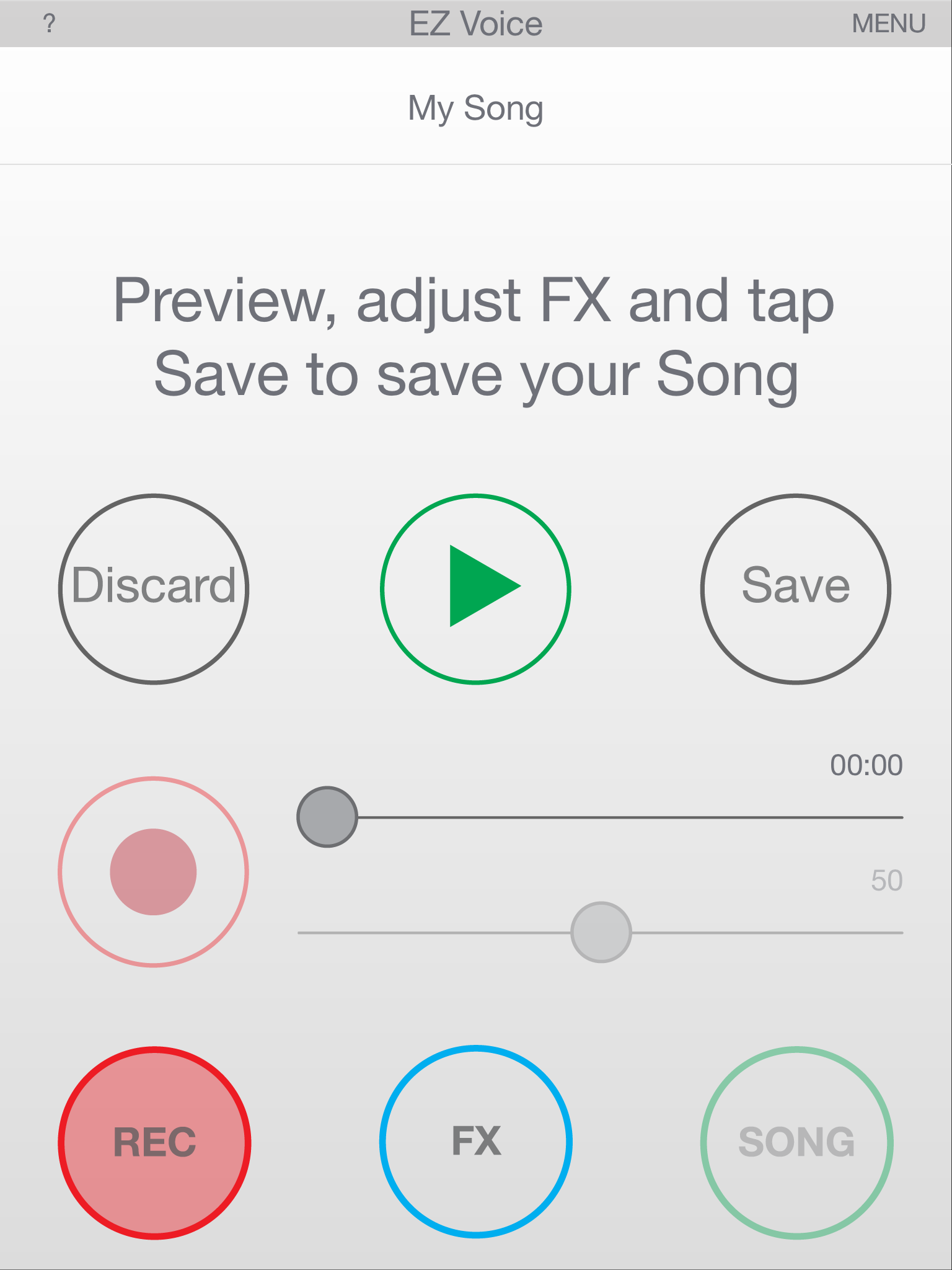
EZ Voice – Recording Playback
And also check out IK‘s:
– iKlip, range of stage and studio support and stand for your mobile device
– iLine, range of quality audio cable adapters
– All the music creation accessories and apps
– All the music software for Mac/PC
IK Multimedia is a “Musicians First” music technology company. It makes a complete range of sound and tone solutions for Guitar & Bass players, Keyboardists, Sound Designers, Engineers, DJs and Producers. You can check out their full line of professional mobile and studio performance products at www.ikmultimedia.com.
The mykeyO Executive Restt iPad Keyboard Stand and Organizer (Review)
mykeyO Executive Restt iPad Keyboard Stand and Organizer
mykeyO
$34.95/$24.95 Amazon(Prime)
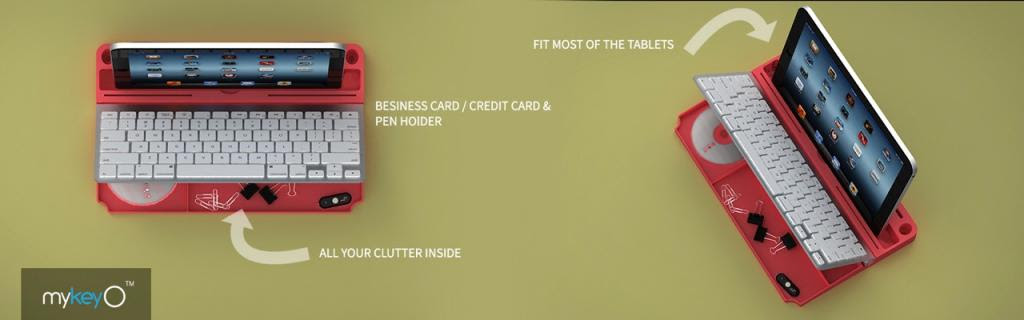
 Rarely do I find a product that I like so much that I spoil the story at the very beginning of my review, but this is one of those products. I love the mykeyO executive restt™ (restt™). It is a keyboard caddy, an iPad stand, a pen holder, and under the keyboard rest, there’s storage for all the clutter on your desk. As soon as the restt™ arrived, I placed it under my keyboard and I haven’t tossed it aside or changed its location at all.
The restt™ has found a permanent home on my desk.
The Apple Wireless Bluetooth Keyboard (not included with the restt™) fits perfectly into the keyboard slot. As you can see in the picture, you can raise your keyboard to reveal all your goodies stored below. Your iPad, iPhone, or other tablet fits nicely into the large slot so that you can work with your device as if it were a laptop without the rigidity of a laptop.
Plus, your device is close enough and tilted just right so that you can tap and swipe as needed.
I use the restt™ as a keyboard caddy for my Apple Wireless Keyboard for my Mac mini, but the cool thing is that I can place my iPad or my iPhone into the slot and have it there handy as well. In fact, as I write this post, my iPhone is in the slot. I have to keep track of my retweets and messages, so this makes it very convenient. Plus, the restt™ is made of silicone rubber, which means that it’s rigid enough to be stable and sturdy for typing but soft enough to absorb the vibrations from typing and from my ever-vibrating phone.
 Silicone rubber also won’t scratch any surfaces nor will it make those odd looking greasy spots that some pure petroleum-based rubber products do. And silicone rubber is easy to clean and it doesn’t fade or turn funny colors as it ages. This is a product that you’ll have around a while.
I haven’t found any flaws or negatives with the restt™. It’s a thoughtfully made product that really helps keep my sundries organized and out of sight.
One notable feature is that the keyboard doesn’t “walk” around while you’re typing on it. No matter how hard you type, or how fast, your keyboard stays put.
Why it’s Frugal: The mykeyO executive restt™ is frugal because it keeps you organized, it won’t harm your furniture, it keeps your iPad, iPhone, or other tablet handy, and you can take it from place to place easily. It provides you with a comfortable work surface and environment, which will make you more efficient and productive. If that’s not frugal, I don’t know the definition of frugal.
Now we come to the price. $34.95 is the retail price, but you can buy it for $24.95 on Amazon and if you’re a Prime member, there’s no shipping charges. $24.95 is a very good price for the restt™. I love the design features and you have your choice of colors to boot, which coupled with its sheer utility value, I don’t think you can go wrong with it.
The only stipulation is that you have to have an Apple Wireless Keyboard to use with the restt™. If you don’t have one, but want one, you can purchase a reasonable facsimile of an Apple Wireless Keyboard from mykeyO. Actually, the mykeyO version is a tiny bit wider than the Apple keyboard but is much better. It’s better because it has functions specific for Windows, Apple, and Android-based devices. I’ll have a full review of that product posted soon, so keep watching.
Rating: 10/10
Recommendation: Forget the rest and buy the restt™ and get yourself organized.

 Techopedia
- An error has occurred; the feed is probably down. Try again later.
Datamation
- USA₮ Modernizes American Payments with High-Impact St. Patrick’s Day Activation in Times Square
- Google and NextEra Strike AI-Powered Grid Deal
- NYT Sues Perplexity AI in Copyright Conflict
- Cloudflare Outage Affects Major Websites
- OpenAI Forces AI to Confess Its Lies
- OpenAI Declares Code Red as Google’s Gemini 3 Threatens ChatGPT
- Coupang Breach Exposes 33.7M South Koreans’ Data
- ChatGPT Celebrates Third Anniversary
- Asahi Group Reveals Findings of Cyberattack
- OpenAI Discloses Mixpanel Security Incident Affecting Some API Users

 The Frugal Networker
You must be logged in to post a comment.