Archive
The HISY Wireless Smartphone Camera Remote (Review)
 HISY Wireless Smartphone Camera Remote
HISY ( pronounced hīgh-see )
$24.99 Amazon (Prime)
The HISY Wireless Smartphone Camera Remote (HISY) is a remote shutter device for your iPhone and iPad (See Features section below for compatibility). The HISY is a very small (approximately 1″x1″) Bluetooth device that fires your camera shutter or starts a video capture. The HISY is compatible with any iPhone camera app that uses the basic camera app as a base.
In other words, if you use a camera app that adds some effect to your pictures as you take them, the HISY will work with it, if the app is based on the iPhone’s basic camera app.
I suggest that you test it with your favorite camera apps before you do any serious photography with it. You don’t want to set everything up only to find that the HISY isn’t compatible with your camera app.
There’s no associated app that you need to buy or download for the HISY to work. All you have to do to is link the device with your iPhone or iPad via Bluetooth, open your camera app and starting taking pictures or starting videos.
HISY Features:
- Apple iOS 7.0 or later of iPhone 4S, 5, 5S, 5C, iPad 3rd & 4th Generation, iPad Mini & iPad Air iPod, & iPod Touch 5th Generation or later
- Frequency Range: ISM Band 2.4 GHz
- Bluetooth Version: BT 4.0 Low Energy
- Active Range: 30-90ft / 10 to 30m
- 2+ Year Battery Life: (CR2032 x 1 Cell)
- Includes headphone jack attachment to carry with you at all times
One of the coolest applications for a device like this, other than selfies, is as a remote camera that’s inconspicuous to its subjects. Often people don’t enjoy having their pictures taken, but if they’re unaware that you have a camera pointed at them, they’re far more relaxed and unguarded for photographs, interviews, or other forms of subtle photography, such as getting those precious moments snaps of your kids playing or of your husband cheerfully taking out the garbage.
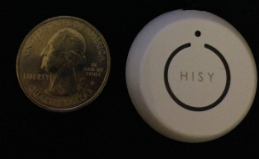 The HISY sells for $24.99 on Amazon and is Prime qualified (free two-day shipping). The HISY also includes a short strap connected to a plastic insert that fits snugly into your earphone port that allows handy access to impromptu photos that you might otherwise miss.
Why it’s frugal: The HISY is frugal because you can take up to 200 photographs with it daily for two years on a single CR2032 ($3.00) battery. It also has a very long range (30 to 90 feet), which puts it in competition with devices costing twice as much or more.
The HISY is small enough to fit comfortably in your hand and has a simple “one touch” operation. It’s simple enough for young children to operate. A single button press fires the camera shutter for a perfect, non-blurry picture.
Rating: 8.5/10
Recommendation: Buy it and test it with your favorite apps before you do real shooting with it.
Discovering the 3Pod Flashpoint Flat-Folding P5CFH Tripod (Review)
 3Pod Flashpoint Flat-Folding Tripod (P5CFH)
Formal Name: 3Pod P5CFH 8X Carbon Fiber 5 Section FlatFold Tripod with K2 BallHead
Adorama
$149.95*
*This price is currently $199.95 with $50.00 instant rebate savings and free shipping.
There are a few things that you’ll never hear anyone say. One of those things is, “I have plenty of space, so adding another large, three-dimensional object to my overpacked car is fine with me.” You’ll also never hear a professional or prosumer photographer say that “Another 20 pounds of equipment that’s difficult to carry is no problem at all.” Nope, you’ll never hear those words from anyone. You know what you’ll hear from a photographer about the Flashpoint Flat-Folding Tripod? The word “Wow” will be part of what’s said. As for additional words of exclamation, superlatives, and odd sounds of joy–one can only speculate.
I’m still lugging around an old painfully heavy, bulky, noisy–yes, noisy tripod from the thrilling days of yesteryear–or the 1980s as some people call them. Obviously my old clunker is durable but it weighs a ton and only collapses so far. It’s clumsy to carry. It’s clumsy to work with. It is almost impossible to level. And it generally drives me nuts to use it.
So, you ask, why haven’t I bought something newer and better? Well, to this I can only say, it’s a mixture of laziness and of not wanting to spend $300+ for a bang up tripod that is probably not that much better than my old one is. The only part that might be better is that many higher end tripods have bubble levels on them so that leveling is easier. As for weight, forget about it. I don’t want to trade a bulldozer for a tank.

 Adorama, of course, has the answer to my problem. Adorama has just the remedy in its lineup of affordable, lightweight, durable, sturdy, fully adjustable tripods that not only feature built-in bubble levels but they’re also flat when you fold them. Flat, as in two-dimensional. Yes, I know it sounds strange but it’s true. Flat tripods. The flatness aspect goes against everything you know about tripods, doesn’t it?
Well, these beauties fold flat and come with their own carrying cases. The whole thing looks like a soft sided Clarinet case. And it’s about the same weight as a loaded Clarinet case. All cased up, the tripod measures about 15″x7″x2.75″. The case is actually 7″ at one end and approximately 5″ at the other, so it really looks like a Clarinet case and not a tripod at all.
Inside the case, you’ll find the flat-folding tripod base, a K2 hydraulic Ballhead with standard 0.25″ screw mount, a shoulder strap for you shleppers out there, the user’s manual, tools (two hex key wrenches), and a velvet Ballhead cover to protect your bubble level. The case itself is a heavy duty nylon with reinforced double zippers–think expensive luggage style materials here. It also features internal padding and soft material on the inside to prevent damage from accidental drops and random mishaps during packing or traveling.
At its shortest, unextended height, the tripod is a mere 12 inches tall. The Ballhead adds another 14 inches to the height unextended. However, if you need to get down a little closer to the action, you can adjust the tripod legs downward so that the overall height is only 19 inches.
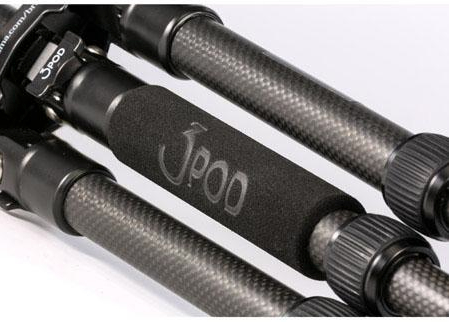 The middle leg of the tripod has this heavy duty padded hand grip on it for easy manipulation and repositioning of the tripod. The Ballhead also has its own carrying strap so that you don’t have to carry the case on location, unless you want to carry it to and unpack at your destination.
Photographers and their assistants will love the quick setup of this tripod. The legs are quick release, quick tighten and have five height selectors. Fully extended Ballhead and leg angles at their maximum, the tripod stands at just over 56 inches, which means that even at my height (6’2″), a mounted camera is at a very comfortable eye level.
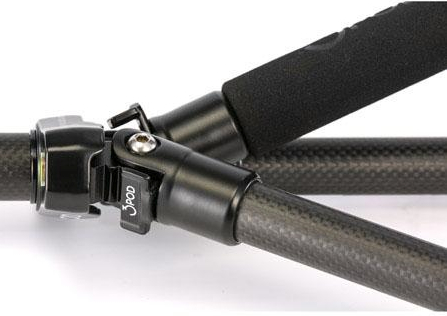 You can position the legs at three different angles and all independent of one another. The same goes for the heights of the extensions. This can provide you with an almost infinite array of possibilities for unusual but stable camera shots. As is suggested by its name, the Ballhead can be used to place your camera at any angle from horizontal to vertical.
The whole assembly is handsome as well as sturdy. The equipment has been tested with camera and accessories at weights up to 20 pounds. That means that your camera, on board flash, umbrella, microphone, lights, or just about anything else you can think of will not be too much for this tripod.
Its strength comes from its carbon fiber construction. In case you don’t know about carbon fiber materials, here’s an excerpt from Wikipedia on the topic:
“The properties of carbon fibers, such as high stiffness, high tensile strength, low weight, high chemical resistance, high temperature tolerance and low thermal expansion, make them very popular in aerospace, civil engineering, military, and motorsports, along with other competition sports. However, they are relatively expensive when compared to similar fibers, such as glass fibers or plastic fibers.”
 The leg releases are easy to use in both directions and the feet are large and padded for added stability. However, if you don’t like the padded feet for use on turf, for example, remove them to reveal spikes. Although you’ll have to use a bit of force, the feet simply pull off, push on–no screwing and unscrewing.
The tripod also features a compass, 360-degree head rotation, two levels, and a removable quick-release plate with universal mounting screw.
This tripod does everything but snap the picture for you. Knowing Adorama, they probably have an accessory for that as well.
I consider this tripod to be for outdoors and for travel. It’s weight and capacity dictate that it will work well under just about any condition or application. Location photographers and filmmakers will like this little tripod. No, it’s not suited for large equipment but you really wouldn’t expect it to be for under $150, now would you?
Carbon fiber is well-suited to more extremes than any of your other equipment so don’t worry about environmental conditions causing you any problems at all.
The only problem I found with this tripod is actually one of its features: weight. I know what I said about weight earlier but the problem is that this tripod is so light that your camera is going to be a bit top heavy, which becomes more obvious when the tripod is fully extended. This won’t be a problem unless conditions are breezy. Then it gets a little “iffy.” It might be fine but I’m just too paranoid to let go, walk away and use a wireless remote in anything but a gentle breeze.
That said, you can adjust the legs to give a wider stance and provide more stability even in fairly high winds. It’s just a word of caution mostly to let you know that this is not a 30 or 40 pound beast that will withstand windy conditions. Additionally, the compass seems not to be great. I’d either leave it off or upgrade it a bit to be really useful.
The 3Pod P5CFH flat-folding tripod is a well-constructed, well thought out, versatile tripod that’s easy to travel with and easy to carry.
Why it’s frugal: If you have a need for multiple tripods in your travels, this one could cut that need down to just one. Frugal doesn’t always mean dollars saved but can also mean space, weight, and pain on those long walks to distance locations.
Rating: 8.5/10
Recommendation: If you need a light duty, durable, versatile tripod, this one is very good. Buy it but stay out of the wind.
Momentisa app (Product Review)
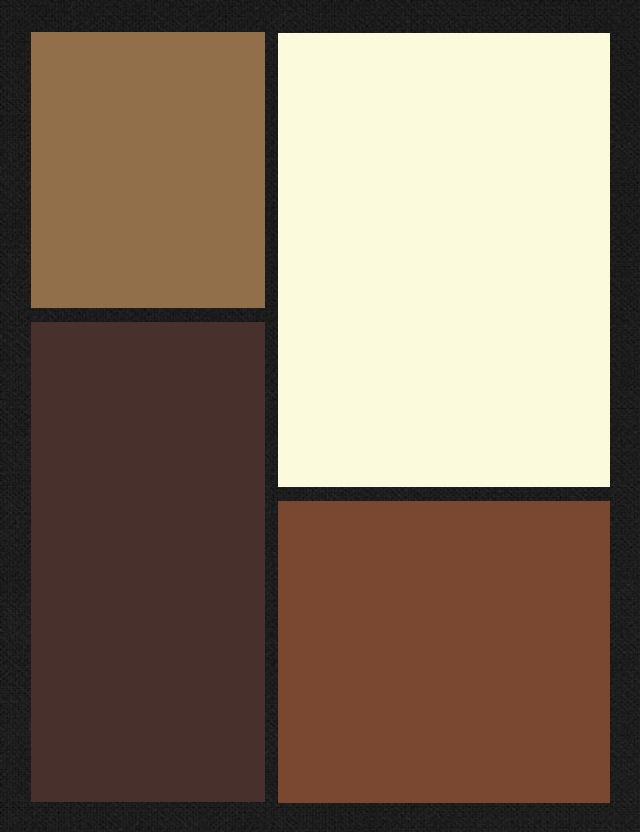
Figure 1
Momentsia
madbits, LLC.
Free
iPhoneography effect app
I am an avid freelance, semi-pro photographer and as such, I really enjoy all types of photography from the very lowest common denominator of point-and-shoot film cameras all the way up to my fancy shmancy digital SLR (Canon T3). I’m equally intrigued by iPhoneography. I like the instant effects I can get with different apps that mimic, almost imperfect pixel by imperfect pixel, the effects I get with film and cross processing. I’m also a big fan of art, especially the various schools of modern art or what I call modern art–from the post Impressionists through the Bauhaus movement all the way up to what’s popularly known as Post-modernism*.
The Momentsia app gives you sort of a Modrian type effect in multiple collage type frames. See Figure 1 for an example.
The app is very simple to use. See steps below. Once you open the app and select the frame style that you want from the dozens of options, then tap a frame to take a picture with your phone’s camera to send to that frame. Repeat for the other frames.
Using Momentsia
- Select a layout.
- Capture or select a picture.
- Save or share.
If you’d like to add any shots from one of your albums, then tap and hold to bring up your album options. Select a photo for the selected frame and continue until your frames are filled. You can also use your front or rear facing camera with this app to get yourself into the action.

Figure 2: Mannequin collage
You can perform some minor manipulation like zoom in, zoom out and pan on your photos, which can give you some more interesting effects even with the same photo. See Figure 2 as an example.
The photo in Figure 2 is the same mannequin picture used for each frame. I zoomed in on the face for the lower left frame. The upper frame is a zoom and pan. The lower right frame is the original photo as it landed into that frame.
You can change the frame arrangement after your photos are in place if you want by tapping the design icon. Your photos will stay in the buffer. You can add, remove, take new shots and rearrange your pictures an infinite number of times.
Once you’ve completed your new masterpiece, you can save it to your Camera Roll, email it to a friend, post it to Instagram, attach to a tweet or post on your Facebook page.
The app is easy to use, versatile, offers lots of options and does what it says it does: creates collages.
Momentsia is free but I think if madbits wanted to monetize this app, they could for a cool 99 cents. I don’t think many people would pay more for it and it’s totally worth a buck for all you can do with it.
One thing to note about this app: the colors you see in the design preview have nothing to do with the actual colors in the end product. I’m not exactly sure why there are different colors, since they have no apparent effect on your photos.
In all, Momentsia is fun to use and is a great little app to have for you iPhoneographers out there who want something a little different to play with. I say, “Get it.” Why not, it’s free so if you hate it, you can delete it without a moments (Yes, that’s a slight attempt at a pun) remorse.
I give Momentsia a 7 out of 10 because there are few options and I can’t figure out how to get color tinting, if it’s even an option, for my frames. It’s a “good enough” app for a collage special effect but don’t expect spectacular and you won’t be disappointed. Hey, it’s free, after all.
Review: 7/10
*In today’s terms, Post-modernism would no doubt have the name Modernism 2.0.
Flashpoint 14″ Fluorescent Dimmable Ring Light (Product Review)
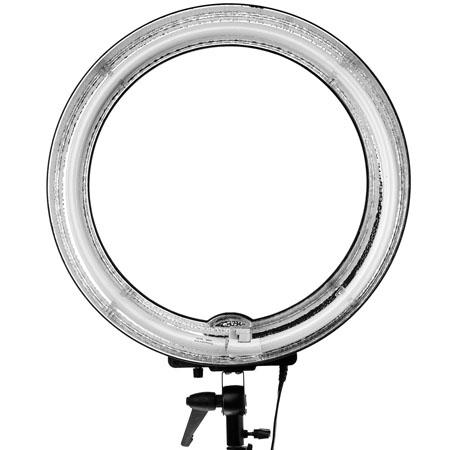
Front view showing reflective outer ring and adjustable pitch clamp.
Flashpoint 14″ Fluorescent Dimmable Ring Light Adorama Camera, Inc. Retail: $139.95 Adorama: $124.95 5500K 80W Bulb replacement $15.95 As an avid film and digital photographer, I know that lighting is very important. There are times when flash units just won’t do the trick. Portraits, products, stop motion video, movies and many more applications require a constant, shadow free light source. Light is everything to the camera. It is your palette and your paintbrush. The Flashpoint 14″ Fluorescent Dimmable Ring Light from Adorama is a well-built, carefully thought out piece of photographic equipment. It’s hard not to be excited when you light up your subject with it. The perfect white light, the even tones and no shadowing or weird color shifts are what photographers and filmmakers long for in their quest to create their masterpieces.
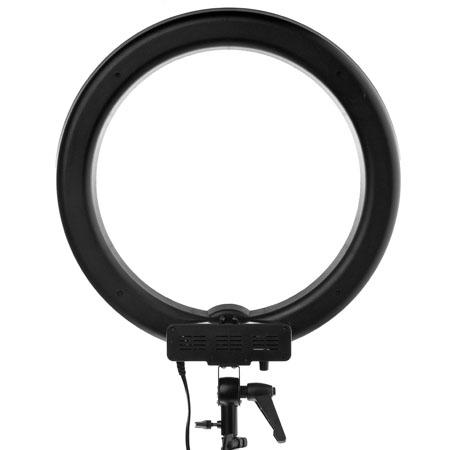
Rear view of the light fixture showing the adjustable clamp, the light stand clamp and power cable.
The light has an adjustable dimmer/brightener on it so that you can modulate the amount of light bathing your subject. The light is very bright but not blinding to your human subjects, although they will appreciate the ability to dim and diffuse the light a bit when you place the ring close. The ring light allows you to take photographs or film through the loop or from the side. The unit as described does not ship with a light stand. For this review, I used my own ProMaster Basic LS-1, which worked perfectly with the ring light. The ring light fixture is lightweight enough to be very mobile but sturdy enough to remain still in light breezes outdoors. For inexpensive studio lighting, I don’t think you can do much better than this light setup. I love it. From still portraiture, to product photography, to videography, this is one accessory that you need to add to your list. It comes with its own thick, padded nylon carrying case and a velcro-attachable diffuser. Below you can see two photographs I made with the ring light of my daughter. No Photoshop adjustments have been made to these photos. They’ve been resized to fit better into the space here but size adjustment is the only one made.

Cropped photo through the ring light.
These photographs were taken with my Canon T3, auto focus, no flash setting. Note the bright but soft lighting effect with this ring light. The first photo is unretouched except for cropping to remove background details. It was taken through the ring light. If you look carefully, you can see the ring light in her eyes.
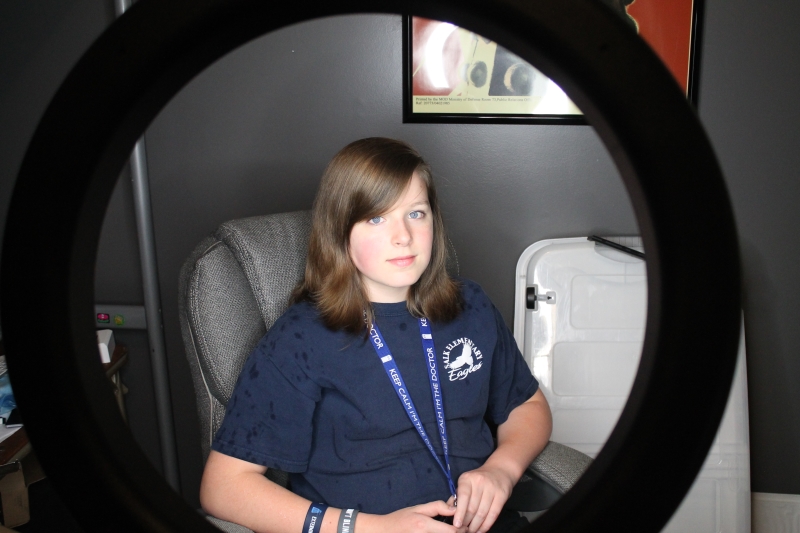
Uncropped photo through the rear of the ring light.
The positional clamp on the light allows you to use a variety of angles so that you can not only position your light distance-wise but also from above, below or straight on. For these photographs, I positioned the light slightly above the subject’s eyeline.
I’m impressed with the overall quality of light, adjustability and flexibility of this ring light. I find no flaws in its workmanship or use. I really enjoyed working with this lighting unit and I think that it’s a worthwhile, yet small, investment if you even slightly serious about photography or videography. I highly recommend this product. The price is good, the replacement bulb price is excellent and you receive free shipping on this product from Adorama. What more could you want?
Review: 10/10
Stay tuned for an upcoming review of iStopMotion Pro and a stop motion video that I’m making using this light.
A Lomographers Dream Come True: Tiffen Photo fx App (review)

Tiffen Software
Tiffen Photo fx
$2.99 Apple App Store
I don’t review many apps and there’s a good reason for it: not that many are really worth a good review. I don’t like to pan products unless I feel ripped off by them, so generally, if I review a product or piece of software, the review is going to be more positive than negative. The Tiffen Photo fx app is really good. Hopefully, that assessment is enough to pique your interest enough to read why I think it’s so good.
Tiffen’s Photo fx app is a Lomographer’s dream. I don’t know if that’s what Tiffen had in mind when they created this little gem but it certainly was the outcome, for me, at least.
I am a Lomographer. I own multiple cameras and much to my wife’s chagrin, I often lug two or more at a time with us on walks, trips and events. Yes, I also own a nice Canon EOS T3 digital SLR and an iPhone 4 with camera apps but I like the look and feel of film too.
However, <deep breath> I sometimes forego packing up like a beast of photographic burden and just carry my iPhone. Luckily for me I have Tiffen’s Photo fx app to make up for the unbearable lightness of being sans plastic cameras.
But enough about me and my hangups, you want to know about my review of the Photo fx app. Well, I like it. I like it a lot. In fact, I can just about reproduce every “Lomo” effect with it that I can get with one of my many Lo-Fi cameras. It pains me to say that because I really love my cheap, crappy cameras that most people would toss away like yesterday’s newspaper. Sorry about the newspaper reference there–I guess I’m not only dating myself but am going retro again.
The Photo fx app’s main screen allows you to either take a new photo or dig one out of your Camera’s photo gallery. The “effect” is the same so don’t sweat it if you didn’t take the picture with Photo fx. Once you either take a new photo or select one from your gallery of masterpieces, the fun begins.
There are dozens, if not hundreds (I don’t have the patience to count) of effects that await your creative eye. And these aren’t “canned” effects–each one is adjustable on one to three different parameters. The parameters could be brightness, blurriness, sharpness, skew, color intensity and many more. Each effect has its own range of things (parameters) that you can change for that effect.

One of the many effects is Photographic, which mimics different film types, filter types, exposures and so on. If you’re a photographer with any chops, you know what I mean. There are five pages of these photographic effects that vary from these yellows to blues, greens, reds and some other “one off” colors such as amber.
This single effect almost makes fun of photographic anachronists like myself because of the range of predictable creativity you get with it. You don’t get this kind of predictability with film or even digital cameras. You have to import the photos into another expensive program that will remain nameless here and then you have to manipulate it with masks, layers and so on until you get the right visual effect. Sure, your results might be a little better but I’ll have mine on Twitter or in an article way before you will.
The next two screen shots give you a look at two other effect matrices available to you: Special FX and Tint.

I took this picture of the iconic landmark Las Vegas sign on my recent trip. I’d never seen the sign before and had to do it this time. My wife and I walked from Mandalay Bay to the sign and back. We stayed at Caesar’s Palace and walked to Mandalay Bay first, then on to the sign. Not a short trek.
I used the sign because it has a good range of colors and it’s something that’s familiar to everyone.
The Tiffen Photo fx app is a very good buy at $2.99. It sounds a little pricey for an app but you’ll find no other app or three apps that can do all that it does. And in photographic equipment dollars, this app definitely saves some big bucks with its many effects–some of which would only be available through some darkroom trickery or expensive software manipulation.
 I give the Tiffen Photo fx app a solid 9 out of 10. Though it’s totally worth it, the price still leaves me a little flat. I think they’d get more traction at $1.99 but it’s not my call. It’s still a bargain at $2.99, especially if you’re an avid iPhoneographer like me. I say, “Get it.”
Review: 9/10
Recommendation: Get it.

 Techopedia
- An error has occurred; the feed is probably down. Try again later.
Datamation
- Google and NextEra Strike AI-Powered Grid Deal
- NYT Sues Perplexity AI in Copyright Conflict
- Cloudflare Outage Affects Major Websites
- OpenAI Forces AI to Confess Its Lies
- OpenAI Declares Code Red as Google’s Gemini 3 Threatens ChatGPT
- Coupang Breach Exposes 33.7M South Koreans’ Data
- ChatGPT Celebrates Third Anniversary
- Asahi Group Reveals Findings of Cyberattack
- OpenAI Discloses Mixpanel Security Incident Affecting Some API Users
- Firefox Zero-Day Flaw Exposed 180M Users

 The Frugal Networker
You must be logged in to post a comment.