Archive
Overwhelming Majority of IT Professionals Still Running Windows XP As End-of-Life Nears (Survey Results)
 AUSTIN, Texas – December 18, 2013 –Spiceworks, the vertical network for IT, today announced the results of a new report exploring the plans, considerations and issues IT professionals are addressing as Windows XP end-of-life (EOL) nears. The study, “Getting Over Your XP,” revealed that 76 percent of IT professionals run Windows XP on some devices today, and of those, 36 percent will leave Windows XP on at least one device as the operating system EOLs. The independent study was sponsored by CDW, a provider of integrated information technology solutions.
“The data clearly illustrates how prevalent Windows XP remains 12 years after its initial release,” said Kathryn Pribish, Voice of IT program manager at Spiceworks. “The next four months will be a busy time for the majority of IT professionals migrating XP-based systems and for the vendors who can provide professional services and support for resource-strained IT departments.”
Survey highlights include:
IT professionals clearly favor a migration to Windows 7
- Ninety-six percent of IT professionals said they’re running Windows 7 on their network today compared to 42 percent running Windows 8 or 8.1, and 30 percent running Apple’s OS X.
- Of those IT professionals who still run Windows XP on company desktops and/or laptops, 49 percent plan to upgrade at least some of their devices to Windows 7, while seven percent of IT professionals plan to upgrade to Windows 8 or 8.1.
- Forty-eight percent of the IT professionals who still run Windows XP on company desktops and/or laptops plan to decommission some of these devices and purchase new Windows 7-based machines. Twelve percent plan to decommission and purchase Windows 8 or 8.1-based devices.
- Seventy-four percent of IT professionals cited the importance of “maintaining a similar user experience” as the primary reason why they’re planning to upgrade to Windows 7-based devices.
IT professionals expect bumps along the migration road
- When IT professionals were asked why they haven’t already migrated their company’s XP devices, 55 percent cited a lack of budget, 39 percent referenced a lack of time, and 31 percent said they didn’t have the resources needed.
- Sixty-eight and 59 percent of respondents have already started the process of upgrading device operating systems or purchasing entirely new devices respectively.
- Seventy-four percent of respondents are “somewhat,” “very” or “extremely” confident their XP migration plan will work, while 26 percent are “not very” or “not at all” confident in their plans.
“Organizations currently maintaining PCs on Windows XP need to understand that they will put their networks and data at high and increasing risk if they continue to use it after Microsoft discontinues support in April,” said Scott DeTota, senior director, product and partner management, CDW. “Upgrading to a more current version of Windows, though, also brings the benefit of newer, more powerful functionalities as well as improved security and productivity. CDW is prepared to help our customers work through the decisions they need to make and help them capture the benefits of upgrading their systems.”
Methodology
The survey was conducted in October 2013 and included more than 1300 respondents. Eighty-five percent of respondents were from North America and 15 percent from EMEA. Respondents represented a variety of industries including manufacturing, healthcare, education, government, finance and IT service providers.
About Spiceworks Voice of IT
The Spiceworks Voice of IT market insights program publishes statistics, trends and opinions collected from IT professionals worldwide. More than 620,000 IT professionals in over 100 countries have joined the program to share information and feedback on the technology issues important to them.
About Spiceworks
Spiceworks is the vertical network for IT more than 4 million IT professionals use to connect with one another and over 2,700 technology brands. The company simplifies how IT professionals discover, buy and manage more than $500 billion in technology products and services each year. Headquartered in Austin, Texas, Spiceworks is backed by Adams Street Partners, Tenaya Capital, Institutional Venture Partners (IVP), Shasta Ventures and Austin Ventures.
For more information visit http://www.spiceworks.com.
Follow Spiceworks on Twitter: http://twitter.com/spiceworks and connect with Spiceworks on Facebook: http://www.facebook.com/Spiceworks.
Photographer’s Holiday Gift Guide 2013
 If you have a photographer in your life, then this gift guide is the key to his or her happiness this holiday season. No photographer, amateur or professional, has everything he or she wants. There’s always some light, lens, or gadget that’s missing and she’s just never taken the time to buy it or it slips her mind until there’s a special need. You can fill that void with these ideas but first there’s something you have to do.
You have to listen to and observe your photographer. What subjects does she shoot? Does she only photograph people? Does she only work outdoors? Does she like to create short films? Does she ever work with film or is she a digital only type? Does your photographer ever take pictures with her phone? It’s a real thing called Phoneography and there are a lot of apps and accessories available for it. Ask a few questions. It won’t kill you to find out a few details before embarking on a shopping spree.
And you have the choice of enhancing your photographer’s equipment list or expanding it in a different direction. For example, if your photographer only shoots outdoors, you could buy her some studio lights and backdrops to give her a chance to try some portraiture or product photography.
If she’s a digital only shooter, you should buy her an old school film camera and let her creativity flow. Yes, lots of people still use film. In fact, more people now use film than ever before and there are some really cool ones available that extend your sight beyond the normal.
Here are the “goto” websites that you need to know for photography gear, cameras, lenses, and accessories.
Adorama: http://www.adorama.com
I’ll go out on a limb here and say that most serious photographers know about Adorama. It is the primary goto site for all things professional or prosumer, a term that means a high-end consumer who might be a part-time freelance photographer or someone who uses professional equipment. Although bent toward the professional, your up and coming amateur can benefit from better lighting, a higher quality tripod, or a new telephoto lens.
There are shopping tabs on the site that direct you to products that fit your budget or those oriented toward him or her. For example, there are tabs labeled Under $50, Under $100, Under $200 up to Over $500. You can also purchase Adorama gift cards from the front page. Trust me when I say that you’ll see a happy face when your photographer opens an Adorama gift card. A gift card is a great idea, especially if you have no clue as to what your photographer wants or needs.
There are also tabs that are product specific, such as Studio & Lighting, Cameras, Tripods, Lenses, etc.
Great sound is essential for movies, great lighting is essential for photography. Adorama has lighting. It has studio lighting, outdoor lighting, reflectors for natural lighting, flash lighting, continuous lighting, and just about everything any photographer or movie maker needs.
There are two lighting products in particular that I want to bring to your attention: Flashpoint 14″ Fluorescent Dimmable Ring Light and the Glow HexaPop 20″ for portable off camera flash – R Series.
My Flashpoint 14″ Dimmable Ring Light Review gives you a lot of good reasons to choose it for a portrait light. If your photographer needs a source of continuous light for portrait photos, product photos, short films, or stop motion films, this is what you should buy her. Currently, the Ring Light costs $140.00 with free shipping. Buy a replacement bulb for $15.95 and a stand for $25.00 to round out this full lighting solution.

The Glow Hexapop Diffuser shown on stand and with flash unit.
The other interesting lighting gift idea is the 20″ Glow Hexapop Diffuser. Though I haven’t posted my Hexapop review yet, I can tell you that I’ve worked with it and I like it. It is extremely portable, lightweight and it does a great job of providing soft, even lighting from a flash unit.
Ordinarily a flash unit sits atop your camera in what’s known as the “hot shoe.” This is an electronic interface that’s timed with the shutter button so that the flash fires as the shutter opens so that your subject receives enough light to be photographed. Unfortunately most flash units are overpowered and flood the subject with bright, harsh light that is neither flattering nor even.
The Hexapop diffuser does. To use the Hexapop, your photographer needs to have her own flash unit (most do) and a flash sync cord (again, most do). If your photographer happens not to own a flash sync cord, get one at least ten feet long and one that’s compatible with your photographer’s equipment.
The Hexapop is sort of a hybrid softbox and umbrella combination that photographer’s use for studio lighting. Unlike studio lighting, the Hexapop can travel with the photographer without the need for external power. It comes with its own tasteful black carrying case that makes it extremely portable for the photographer on the move.

The Glow Hexapop Diffuser ready to open or to drop in the bag for easy transport.
It sets up quickly and easily by pulling the arms into place and it folds up even faster with a “Pop!” by pressing its release triggers.
Adorama has everything for the photographer and photography enthusiast. For the truly budget conscious, there’s a Deals link that you should check out for Specials, overstocks, refurbished products, and used equipment. Adorama offers free shipping within the USA on many products.
Lomography: http://www.lomography.com
Lomography is an online presence, it’s a store, it’s a movement, it’s a place for you to show off your lo-fi photography, it’s an online magazine, and it’s something kind of unexplainable. Lomography is film and cheap cameras. I should put cheap in quotation marks because some of them aren’t so cheap at all. I guess cheap is relative. You have to love film, its unexpected qualities, its artistic value, and the feeling that you’re going against the grain of the “digital revolution.”
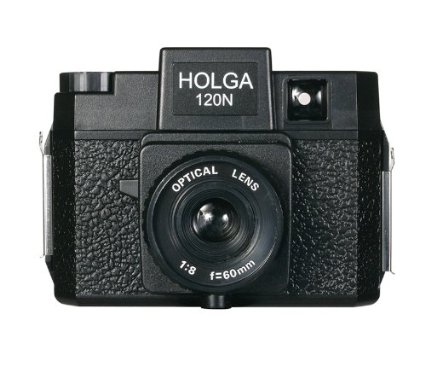
The Holga 120N Camera.
There’s no wrong answer or wrong way to do anything in the world of Lomography but you have to have a lo-fi lens or lo-fi camera to do it. If you want to know more about it all, you can read up on the history and the movement on the website. Just know this: Lomography is addictive and once you start, you want to experience every type of camera.
For example, the medium format (120 film) cameras are kind of my favorites. The negatives are large (generally 2″ x 2″) and you only get 12 or 16 photos per roll. Using one of these plastic gems is not an exact science but it’s really fun. Great examples of medium format lo-fi cameras are: Holga, Diana, and Debonair (the look of a Diana but the operation of a Holga).

The Debonair Camera
My own collection “lomo” cameras include the Smena (Russian), the Holga, the Diana, half-frame cameras, Canon AE-1s, and others. But my most favorite of all is the Debonair. It’s a super cheap little camera that uses 120 film. See photo.
You can find them on ebay.com for under $20. They are cheap, plastic cameras that have a very simple focusing mechanism, a manual film advance, and your creativity to power them. Awesome.
For someone who isn’t into Lomography or just wants to try it, the Debonair is a great starter camera. If you can’t find one, buy a Holga. You can find Holgas everywhere and they come in a variety of colors and styles but only two film sizes: 120 and 35mm. The Holga 135 is the 35mm one. Holgas generally cost under $30 for the standard black 120 film version. You can find film for it online or in camera shops. Use color print film C-41 process because Black and White film is getting harder to find a developer locally. Good luck if you like B&W, like I do. Use color, have the developer scan them onto CD for me and then I use a photo manipulation program to change them to grayscale. It’s almost the same. Plus you can alter the contrast that way too.

The Classic Diana updated with interchangeable lenses and more durable construction.
Once your photographer has caught the bug, you can buy her a Diana, or a 35mm Smena, or one of the more exotic cameras such as a Sprocket Rocket, an LC-A, or a Lubitel. They all have their quirks and interesting features. In fact, no two Holgas are alike, so explore the possibilities with more than one.
Photojojo: http://www.photojojo.com
Photojojo is the Phoneographer’s paradise. It has everything cool for the Phoneographer: lights, lenses, carrying cases, ideas for DIY projects, and all sorts of off the wall products.
I personally bought the three lens set for my iPhone from Photojojo. I love them and they work perfectly. Photojojo also sells some Lomography accessories too. You can also buy film, tripods, microphones, a film scanner, props, a dolly, and just about every kind of oddball thing you can imagine and a lot that you can’t.
If nothing else, Photojojo is worth a look just to see what’s out there for the phoneography nut in your life or perhaps for yourself. Photojojo offers free shipping on orders over $50.00. Often this is not easy to do because most of their items are under $50.00. I guess that’s so you’ll buy more stuff. That’s OK because I’ve never been bummed out about anything that I’ve purchased there.
Amazon: http://www.amazon.com
Amazon has a lot of the photographic equipment, cameras, and accessories that you want and at the prices you want to pay. It has an excellent search engine and if you’re a Prime member, then you get free priority shipping on anything that is Prime qualified. Look for the Prime symbol  when you find a product that you like.
Sometimes I use Amazon just as a sanity check against other online retailers. I also use it to see if I can get the products I want with free shipping, because I’m a Prime member. I don’t want to take anything away from the other retailers in this list or any other but if I can find the exact product on Amazon with Prime at a comparable price, I’m going for free shipping.
If you can’t figure out what you want to buy or you need a little extra advice, I’d be glad to help out. Drop me a line at ken-at-kenhess-dot-com (replace the at with @ and dot with . and don’t use the dashes. I have to do this to confuse email bots–sorry) and I’ll see what I can do for you.
iRig KEYS PRO and iRig KEYS with Lightning connector
December 3, 2013 – IK Multimedia, the global leader in mobile music making apps and accessories for iPhone, iPad, iPod touch and Mac/PC, announced the expansion of its iRig KEYS line with two new products for mobile musicians: iRig KEYS PRO and iRig KEYS with Lightning connector, compact MIDI keyboard controllers with 37 velocity-sensitive keys.
 Both iRig KEYS PRO and iRig KEYS come with Lightning-connector, 30-pin and USB cables. These allow musicians to connect all iRig KEYS to any iPhone, iPad, iPod touch and Mac/PC model, and provide MIDI control and performance features for Core MIDI apps of all types, such as IK’s own SampleTank, iGrand Piano and iLectric piano apps, and its range of Mac/PC virtual instruments.
iRig KEYS PRO: Big features — compact design
iRig KEYS PRO is a true “plug and play” professional-quality programmable MIDI controller designed specifically for making music on the go with an iPhone, iPad, iPod touch, Mac, or PC. It features 37 velocity-sensitive full-size keys for 3 full octaves plus one note — allowing for realistic-feeling, two-handed playing. Even with pro features like mod and pitch wheels, illuminated octave and program buttons, 4 programmable “sets” for storing complete setups, and a programmable continuous-controller volume knob, iRig KEYS PRO is 30% smaller than any other full-size key MIDI controller that can be played with two hands.
iRig KEYS PRO comes complete with Lightning-connector and 30-pin cables for plugging directly into the dock connector of any iPhone, iPad or iPod touch. A USB cable is included for direct Mac or PC connection. With standard Core MIDI support, you can play any compatible virtual instrument or recording app on your iOS device or computer from Apple’s GarageBand to IK’s SampleTank. iRig KEYS PRO needs no AC adapter or batteries, it draws its power from the device it’s connected to, and it even features an auxiliary mini-USB port to provide it with power during performance, allowing the battery on the mobile device to be conserved.
Programming and expansion
iRig KEYS PRO also has powerful programming features that are useful during live performance and in the studio. Players can program iRig KEYS PRO with different set-ups and store them in one of the 4 “Set” banks. When iRig KEYS PRO is in Edit mode, the user can set the MIDI transmit channel, velocity (touch) response, assign Control Change numbers to the Volume/Data knob, send custom Program Change messages, transpose the keyboard in semi-tones and more.
iRig KEYS PRO also sports an expansion jack for adding a sustain pedal (not included) for a realistic piano feel, or an expression pedal that sends MIDI continuous controller data that can control parameters such as volume, rotary speaker speed, tremolo and vibrato speed and more, on the connected app or software instrument.
FREE software for instant playability, universal compatibility
iRig KEYS PRO comes with SampleTank FREE* for iPhone/iPod touch and iPad, IK’s award-winning multi-part sound module designed for live performance and recording, and the iGrand Piano FREE* app, a high-quality studio-sampled grand piano sound module. Both apps are expandable with sounds from IK’s massive collection of sound libraries, and provide musicians with tools for complete music production.
iRig KEYS PRO is also right at home in the studio, and works seamlessly with DAW software, including GarageBand, Logic Pro and many others. It’s also perfect for controlling virtual instrument plug-ins such as IK’s SampleTank, Sonik Synth, SampleMoog™, SampleTron and Miroslav Philharmonik. For Mac/PC use, iRig KEYS PRO comes with SampleTank 2L**, the full-featured professional sound workstation that includes over 2 GB of professional samples, which cover all instrument categories.
iRig KEYS with Lightning connector
iRig KEYS with Lightning connector is IK’s new version of the ultra popular iRig KEYS portable mini keyboard and now comes with a Lightning-connector cable for connecting iRig KEYS to the newest Apple devices, including the new iPad, iPad mini and iPhone 5 series. It shares the same powerful features of iRig KEYS PRO but with a more compact build so it only takes up minimal space on your desktop and can easily fit in a backpack or a carry-on bag.
Pricing and Availability
iRig KEYS PRO is priced at $149.99 / €119.99 MSRP (excl. tax), and is available now from the IK network of music and electronic retailers around the world and the IK online store. iRig KEYS with Lightning connector is priced at $129.99/€95.99 and is available now from music and electronics retailers worldwide.
* Available on the App Store.
** Register and download on the IK Multimedia online User Area.
For more information, go to www.irigkeys.com.
For more information on IK Lightning Compatible Accessories, go to www.ikmultimedia.com/lightning
[Note: I have used the iRig KEYS keyboard, SampleTank, and iGrand Piano (Review coming soon). They’re fun and very professional. Advanced enough for the professional musician and simple enough for the beginner. IK Multimedia knows music.]
2X ApplicationServer XG version 11 (Review)
 2X ApplicationServer XG version 11
2X Software
The 2X ApplicationServer is an application and desktop delivery system, similar to Citrix XenApp or Microsoft’s App-V and RemoteApp solutions.
Pricing: $75/concurrent user/1 year subscription; $93/concurrent user/2 year subscription; $109/concurrent user/3 year subscription. Licensing available in 15 user packs. Support at various levels available at additional cost.
If you’re thinking of using Citrix, or some other product, to deliver virtual desktops or applications to your users, you should hold off until you read this review of the 2X ApplicationServer XG (XG) version 11. XG is a complete Citrix alternative for desktop and application delivery.
It’s rare for me to give such high marks to any product that I review but I really like the 2X ApplicationServer. XG is easy to install, setup, and manage. It supports a wide range of clients and the price is attractive to small and medium-sized businesses. The price is a real treat for larger companies too.
I first looked at the 2X ApplicationServer in 2011 over at Linux Magazine (now defunct), where I showed readers how to connect Linux clients to its published applications via Linux clients.
For this review, I focus mostly on application publishing because to write extensively on every aspect of XG would require that you read 50 or more pages of material. For that level of detail, you can read the product manual. This review is an independent assessment of the product, its features, its pricing, its licensing, and my overall impressions.
I’ve recommended the 2X ApplicationServer product to clients, colleagues, and associates in the past, and I’ve never had anything but praise for the product–especially its extreme ease of use and speed of setup.
Download and Installation
The first thing you need to do is to download XG. You have to fill out the online form to receive your free license key for the product. The evaluation license provides you with the capability of testing 25 concurrent users for two terminal servers or virtual hosts. You can also manage ten devices with the 2X ClientManager application.
After the initial 30 day trial, the software scales back to three concurrent users and three devices for the ClientManager.
The XG download is approximately 95MB and is delivered in the form of a Windows MSI file. Once you download the 2X ApplicationServer XG installer file, double-click it to begin installation. Click through the install wizard, accept the license agreement, and allow the program to install to your system.
The only prerequisite for your XG host system is that it must be configured as a Terminal Server or that you have a Terminal Server available to configure for use with XG.
For my evaluation, I used a Windows Server 2008 R2 Standard Edition on a physical server system. You can install and configure XG on virtual machines. I used a regular server because I already had it setup for another project and it was handy for me. Otherwise, I would have used the virtual machine option.
My server hardware consists of a 2.0GHz dual-core AMD with 4GB RAM and standard SATA II HDD.
The download to completed installation was less than 10 minutes.
Resource Publishing
Publishing an application is quick too. I published Notepad, a classic test application, in less than five minutes. I installed the product and published my first application all without reading a single word of documentation. Try that with any competitive product. Now, for advanced configuration options such as printing, scanning, reporting, and Active Directory integration, I suggest that you read the manual.
But, like all things 2X creates, XG is simple to use, quick to setup, and painless to administer. And the application’s server footprint is extremely small and unobtrusive. The fact that you can run XG on virtual machines proves how lightweight it is.
I like that 2X has setup a menu of sorts for publishing resources. I say resources because you can publish more than just desktops and applications. You can publish applications, folders, desktops, predefined applications, and documents with a few simple clicks.
Predefined applications are applications that you can deploy by simply selecting them from an existing list. Included in the list are control panel applets, network configuration, Windows Explorer, or the Windows desktop as a folder.
Never before has centralized resource publishing been so easy to do.
How to Publish a Resource: Internet Explorer
From anywhere in the 2X Console application, click the Application icon located on the far left of the toolbar. See Figure 1.

Figure 1: The 2X Console.
This launches the Publish New Application Wizard and the first screen you see is the Select Server Type screen where you pick the type of server from which you want to publish your application as shown in Figure 2.
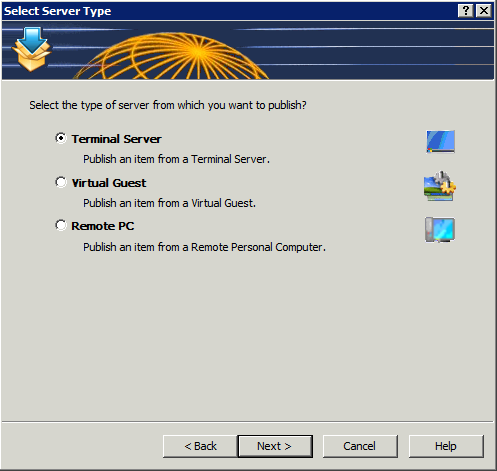
Figure 2: Select the source server type.
I chose Terminal Server because I want to publish Internet Explorer from the local system. Click Next to continue.
Figure 3 prompts you to select the application type to publish: single application, installed application, or predefined application.
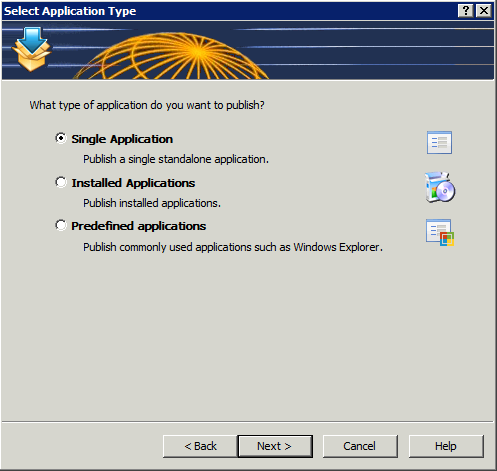
Figure 3: Select the type of application to publish.
I selected Single Application. Click Next to continue.
On this final screen, you’ll give your application a familiar name, select your application (browse to its executable), enter its description, and choose a server from which to run the application. Optionally, you may also select an icon and various application parameters. By default, if you browse to your executable, the optional parameters automatically fill in for you. See Figure 4.

Figure 4: Supply the application details for publishing.
Click Finish to complete the wizard and publish your application. Your published application will appear in the Console window under Published Resources and is ready to be accessed from remote systems that have the 2X client software installed.
Client Access
Download and install the 2X client software appropriate for your device.
Setup the client software to connect to your 2X server by entering an alias (familiar name) for your connection, the server name or IP address of the 2X server, the connection port (default is 80), a username, a password, and the servers “mode.” The mode can be Gateway, Direct, Gateway SSL, or Direct SSL. If you don’t know, try Gateway first. If you aren’t the 2X system administrator, ask the administrator which type you use.
There might be other optional parameters that you can select and tweak but for testing, I suggest leaving everything default. When you’ve finished your client setup, test it by attempting a connection. You should automatically logon to the Windows system and see a list of published resources to which you have access.
Security
Everyone wants to know about security and 2X has it in spades, which means there are so many security options that you can really lock down access to your published resources. For example, in the 2X Console, in the Connection section, you can select domain authentication from the Authentication tab. You can specify the domain, all trusted domains, workgroups, and you can also require authentication before a user can see the list of published resources.
On the Second Level Authentication tab, you specify a provider (Deepnet, SafeNet, or RADIUS) and then you enter exclude list details by IP address, client, or MAC address. Additionally, you can select specific gateway servers to service clients using second level authentication.
If you have a bring your own device (BYOD) program in place but only want to allow certain types of devices to connect to published 2X resources, you can exclude users by the device or client type. For example, if you only want to allow Windows and iOS-based systems to connect, you can exclude all other clients.
There are other security options that you can configure but they require more advanced setup than what I have available to me in my limited lab but I want you to be aware of their existence. You configure groups, 2X client policies, and other options via the Client Manager section of the 2X Console.
Nikolaos Makris, 2X CEO, had this to say about ApplicationServer XG version 11:
“This is a significant release for 2X as it enables businesses of all sizes the ability to scale their virtualization infrastructure according to their organizational demands. We have achieved this through the development of a feature-rich, yet flexible virtual desktop and application delivery solution. Our focus was to provide companies with a cost-effective solution to easily implement and manage a Private Cloud infrastructure. Now that we have released, I’m excited to say that we have achieved our objectives.”
New Features
Sites Management: A farm can be divided into multiple sites with each site representing a single location infrastructure. All sites share the same settings and are isolated. Sites can forward users to other sites if an application or desktop is not available on the current site, if the user is already running sessions on a different site, or if a user is geographically closer to another site.
Role Based Administration: Multiple administrators can modify farm settings at the same time. Different administrators can also have different roles and levels of authority within the system. The settings are stored at the master site, then distributed and activated to the others when the settings are applied. Auditing of who made changes to the system, and when they did so, is also available. If two users try to edit the same object, the second user will find the object locked. If a user adds, edits or deletes an object, the change is shown immediately in the second console. When a user starts the console application they will need to enter their credentials.
Task Menu: The task menu behaves more efficiently when items are selected. On right click in the list control, a context menu can be used. This provides more space for information and makes it easier to add new actions.
Replicate Settings in All Sites: A standard button is used throughout the console so that the same set of settings can be replicated in all sites.
Notifications to Multiple Administrators: Since multiple administrators can be managing the system, it’s possible to send notifications to more than one user depending on the settings used. New types of notification have also been introduced.
Improvements
Start-up Speed of 2X Publishing Agent: When system settings are changed, it has no effect on the agents in use, as the publishing agent will not be restarted but rather it will refresh the actual setting which was effected.
Restructuring of the Console Page: With the addition of Role Based Administration, the console page was structured in a more logical manner, creating a new category for administrator roles.

iPad Client running Internet Explorer and displaying the options menu.
Client Accessibility
You can connect from a wide range of clients to 2X resources. This list is current as of this writing:
- 2X Windows client
- 2X Cloud Portal
- 2X Java client
- 2X Android client
- 2X iOS client
- 2X Linux client
- 2X Mac client
- 2X HTML5 client
- 2X Blackberry client
- 2X Wyse client
- 2XOS client
The range of available clients means that users will be able to connect to published resources regardless of which device they use. This is very good news for companies who participate in BYOD programs.
Why the 2X ApplicationServer XG product is frugal: XG is frugal because of its low barriers to implementation. The pricing is low. The installation and setup are very easy. The management is relatively simple. The security is comfortably high and easy to configure. And you can connect any currently available device to published resources. XG is a lot of bang for the buck and that’s the definition of frugal for me: value.
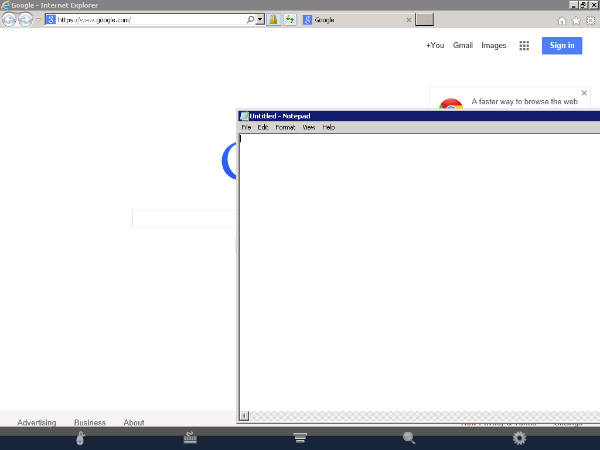
iPad Client running Internet Explorer and Notepad.
Pricing and Licensing
The 2X ApplicationServer XG is licensed to you as a subscription in one-year, two-year, or three-year increments and by number of concurrent users. The three-year subscription is the most cost effective option at $109 per concurrent user. You have to purchase license packs in increments of 15 users.
The 2X license model is a bit hard to follow. I find it somewhat confusing. The licensing document (link below) attempts to describe several scenarios to help with understanding but the examples aren’t very clear. I don’t understand the expiry terms, upgrade insurance, or the timing when purchasing new licensing.
In my opinion, the licensing could be made simpler. I also don’t really like having to purchase licenses in 15 user increments. But, the license pricing is so good for those 15 that it might matter less to you than purchasing a competitor’s product at a much higher cost. In other words, I can deal with some licensing idiosyncrasies if the numbers are right.
For full pricing and support options, see the 2X Licensing Guide in US Dollars.
Summary
The 2X ApplicationServer XG product can have you up and running published applications in minutes instead of hours or days. You need little to no training to install, setup, publish, and manage a 2X ApplicationServer system.
The price is low enough to where even the smallest companies with the tightest budgets can withstand its pricing model.
And for those really tight budgets, just about anyone with very little training can setup and manage the XG product. For those who don’t want a full-time IT person on staff, you could hire someone to take care of your needs remotely. Publishing an application is so quick an easy that your support costs should be minimal as well.
For my money, the 2X ApplicationServer XG product is the most cost-effective and simplest application and desktop delivery product on the market.
My assessment on a 10-point scale, with 1 being low and 10 being high:
Ease of installation: 10
Speed of installation: 10
Easy to publish resources: 10
Easy to access published resources from remote clients (Windows, Linux, Mac, tablets): 10
License Model: 7
Price/Licensing: 10
Support options: 10
Security options: 10
Client accessibility: 10
You can also check out my ZDNet version of this review.

 Techopedia
- An error has occurred; the feed is probably down. Try again later.
Datamation
- USA₮ Modernizes American Payments with High-Impact St. Patrick’s Day Activation in Times Square
- Google and NextEra Strike AI-Powered Grid Deal
- NYT Sues Perplexity AI in Copyright Conflict
- Cloudflare Outage Affects Major Websites
- OpenAI Forces AI to Confess Its Lies
- OpenAI Declares Code Red as Google’s Gemini 3 Threatens ChatGPT
- Coupang Breach Exposes 33.7M South Koreans’ Data
- ChatGPT Celebrates Third Anniversary
- Asahi Group Reveals Findings of Cyberattack
- OpenAI Discloses Mixpanel Security Incident Affecting Some API Users

 The Frugal Networker
You must be logged in to post a comment.