Archive
Checking Out the CHIC BUDS Porta Party Bluetooth Speakers (Review)
 Porta Party Bluetooth Speakers (Katie)
CHIC BUDS, A Division of FxA
$49.99/$41.94 Amazon (Prime)
I’ve reviewed several Bluetooth speakers on this blog but none as fun or as unique as the Porta Party Bluetooth Speakers by CHIC BUDS. But, I’m a little confused by the company name. On the web site, I’ve seen it as chicBuds and CHIC BUDS, but on the package it’s CHIC BUDS and CH!C BUDS. So, for the purposes of this review, I’m going to use CHIC BUDS because I’ve seen it on the packaging and on the web site that way. It actually doesn’t matter how you spell it, though, because the Porta Party (And, it’s Porta PARTY, not POTTY) is an awesome little speaker with a HUGE sound.
I don’t usually use all caps to describe something but since I’m going with the all caps company name, why not just go all the way. Seriously, this small jar-sized speaker packs a big sound. When I first turned it on, I figured that it would be a small, tinny sound because of the diminutive stature. I was wrong. Really wrong.
There’s no tinny sound from this little pocket-sized bomb. The trebles are loud and clear and the bass is body thumpingly deep. If I were to sum up the sound quality and volume into a single word, it would be, “Impressive.”
If sound alone weren’t enough to sell you on the Porta Party speaker, check out its stats and features:
- Standard USB/DC charging port
- Play 30 ft. away from sound source
- Hands-free call answering
- Bluetooth music playing
- Weighs just 8 ounces
- Uses a 3.5mm audio cable (included)
- Charge lasts up to 10 hours
- USB cable included
- Bluetooth 3.0
- Easy device pairing
- 4.7 x 2.4 x 2.4 inches
In their own words:
“In 2005, the founders of CHIC BUDS recognized a need in the market for technology accessories created specifically for females, and CHIC BUDS was launched.
Today, CHIC BUDS, a division of FxA, continues to be a company of girls designing and developing fashionable, fun and functional tech accessories for all of us girls that heavily rely on technology yet still delight in embracing our own personal style. At CHIC BUDS, we embrace and celebrate individuality and creativity amongst all women and girls which drives us to bring all the hard-working women and girls around the world more fun choices when it comes to their technology accessories. Our product line up not only solves the modern girl’s tech style challenges but also delivers the function we all require.”
So, I know that these speakers are “created specifically for females,” but guys can buy them too and just use them ironically. To me, the Porta Party speakers are kind of like Cosmos, you know, the drink. They’re so good and yet not really something you want your friends to see you drinking. My brother-in-law once asked my wife and me, “Have you guys ever had a Cosmo? They’re yummy!” Yeah, they’re yummy, Scott.
Sound Nerd Info:
- Transmission distance: 10m/30ft
- Bluetooth frequency: 2.4GHz-2.48GHz
- Output: 3W
- Speaker: Ø40MM, 4Ω
- Audio bandwidth: 200Hz-20KHz
- SNR: ≥80dB
- Li-ion: 3.7V/500mA
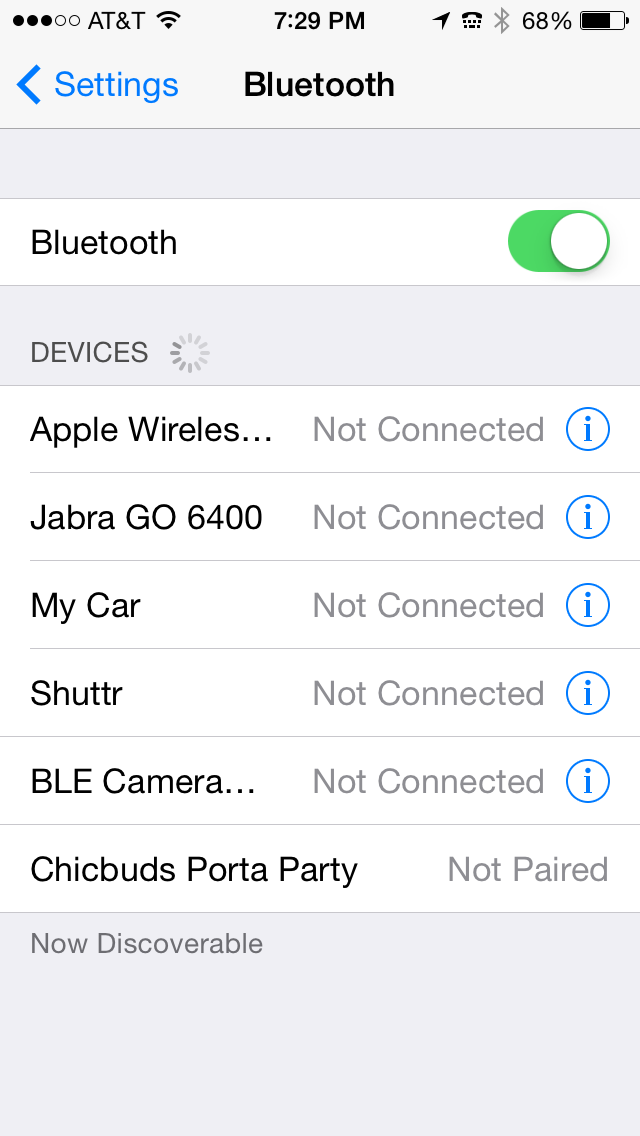
Using the Porta Party speaker is very simple. Switch it to the ON position on the bottom of the speaker. Turn on Bluetooth on your device. When ChicBuds Porta Party appears in your Bluetooth device list, tap it to connect. You’re connected. Play music, make a phone call, answer a phone call, and have fun with your tiny boom box (large handle and shoulder not required).
 OK, I just thought of something funny to do with your Porta Party speaker. Have a friend call you and answer it on the Porta Party by pressing the Phone button near the bottom edge of the speaker. Put the speaker in your purse. While you’re in a store, have your friend start yelling and screaming, “Let me out of here. Help! I’m trapped in this purse. Stop just looking and help me.”
That should start a party and a conversation.
Hopefully that conversation won’t end with, “You have the right to remain silent…”
One thing to note about the Porta Party speaker. To skip to the next or to the previous song, press the + or – button once. To turn up or to turn down the sound volume, press and hold the corresponding button. If you’re using the speaker as a phone, speak into the Mic located near the Phone and Volume buttons.
To charge the speaker, plug in the supplied USB cable’s small end into the speaker and the other end into your computer’s USB port. Mine charges in 2-3 hours.
My wife and daughter both love the Katie style speaker and have both expressed a desire for one. In fact, to write this review, I found the speaker on my wife’s desk and I didn’t put it there. It had been in my office in the “Review Queue” to my knowledge. I was wrong. Fortunately, it still had a charge on it and I’m currently playing it as I write this. It’s playing my “Workout” playlist on my iPhone 5.
In fact, I thought I had the sound down sufficiently but when “The Ballad of Mona Lisa” by Panic! at the Disco came on, my daughter came in and sang with it. She was supposed to be doing homework.
Why it’s Frugal: The CHIC BUDS Porta Party isn’t frugal. It’s not a frugal device. It’s a luxury device. It’s a fashion-forward accessory that’s fun and powerful enough to provide all the sound you need, but frugal it’s not. And as any woman will tell you, if it looks good (and sounds good), it doesn’t have to be frugal.
The Porta Party Bluetooth speaker is on the upper end of the price range for an electronic gadget like this. $50 is a pretty big chunk of change for this accessory. Fortunately, you can grab one for almost $10 off that MSRP by buying it from Amazon. If you’re an Amazon Prime subscriber, which I strongly recommend, you’ll save shipping costs and get it in two days.
Although I’m kind of complaining about the price tag, $50 is about average for portable Bluetooth speakers. There are some that sell for $40-ish and some sell for as much as $150. The CHIC BUDS Porta Party Bluetooth speaker is very well made and attractive. It should provide years of enjoyment and look darn good doing it.
Rating: 9/10
Recommendation: Have him buy you one or splurge on yourself. You deserve it.
Clearing the Air about Windows XP’s Life Extension with 2X Software
 Some people thrive on controversy. I am not one of those people, although I’m no stranger to it. On May 2nd, I posted a story on my ZDNet Consumerization blog titled, “Here’s how to extend the life of Windows XP indefinitely.” Currently, there are 75 comments and not all of them are pro Windows XP life extension. In fact, I endured a few hours of a Twitter battle about some of the product features discussed in the article covering 2X Software’s 2xLifeCyclePlus.
One of the “controversial” points was whether the 2XLifeCyclePlus product is or is not a Windows XP replacement shell. It is a Windows XP replacement shell. The shell replacement is meant to mitigate the problems arising from the fact that Microsoft no longer supports Windows XP. No longer supports means that Microsoft will no longer provide security updates, patches, or service packs to the now outdated operating system.
Who knew there could be so much controversy and angst over helping people to save money and extend the life of a beloved product? I, for one, did not.
Who knew that a project that I believe is basically commercial philanthropy could cause problems for so many otherwise normal people? Again, not I.
Several of the virtual chalk wielders stated that XP users should just “let go” of XP and let it die. To prolong it is more cruel than just sending it into the annals of history. Those who have to spend profits to accommodate Windows 7 or Windows 8 in their environments is also very cruel, especially when they already have something stable, usable, and low maintenance to use.
In this podcast, Scott Sims, 2X Software’s Sales Director, and I discuss the 2XLifeCyclePlus product and its features plus its relationship to the 2X Application Server XG product, which is similar in function to the Citrix Presentation/Application Server but at approximately 25% of the cost.
Podcast Info:
Format: MP3. Length: 13:19 mins. Rated: G
Twitter: @2XSoftware
Saddleback Leather iPad Case (Review)
Leather iPad Case (Standard iPad–not the iPad mini)
Saddleback Leather Company
$111.00
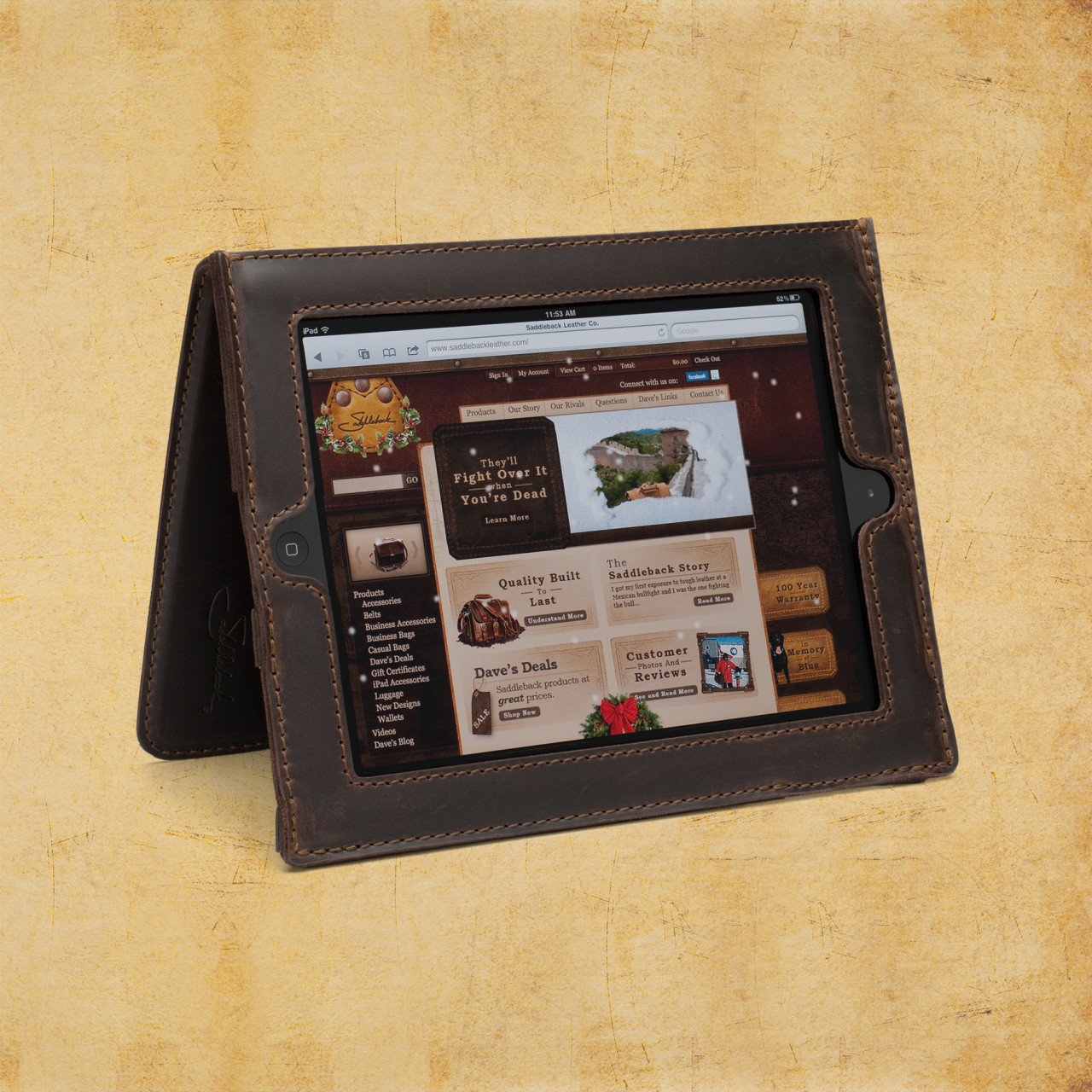 For your $600+ iPad purchase, I submit for your approval, the Saddleback Leather Company iPad case made of full grain cowhide leather. The inside of the case is pigskin. Pigskin is softer, more forgiving, and snuggles your iPad a bit better than the stiffer cowhide alone would. As soon as you hold any of Saddleback’s products, you know that they’re made of quality materials. Dave, the owner, has meticulously designed each item to exacting specifications and has spared no expense, except on labor (more on that later), in creating these beautiful products. As you’d expect, genuine leather products aren’t inexpensive. For just over $100, the iPad case isn’t a bad buy, especially if you consider the price of the device that you’re wrapping up in it.
Saddleback Leather Company, mostly located in San Antonio and Fort Worth Texas, is a locally owned and operated business. You can hit the website to find out Dave’s whole sordid tale of how he started the company way back in 1999.
The iPad case is sturdy and the iPad fits into its spot very well but without binding or stressing. Leather is forgiving but if it’s too small, it’s just too small. This case is just right for the thickness and for the iPad size. The case, when reversed and straps engaged, stands up so that you can watch videos or use as a screen or with a Bluetooth keyboard. The controls are easy to reach but recessed enough so that they’re protected from accidental drops or scrapes.
The cowhide-pigskin layering gives the iPad enough cushion for comfort but enough protection and shock absorption to deflect damage from carrying height or table height drops. The screen is fully visible in the case with no screen overlap. A lot of thought has gone into the creation of this formidable case. I’m assuming Dave, or a family member, owns an iPad and wanted it protected but without being hermetically sealed inside an Otterbox or something that distances you from the iPad. The Saddleback case puts you in contact with the iPad but without fear of accidental damage.
That said, it’s still possible to damage your iPad if misused, so don’t purposely try to damage your iPad and then complain. Also, you can’t prevent fluke damage from drops that hit edges or land oddly.
The leather case is very attractive and has the look and feel of real hand-tooled leather–thanks Wilford Brimley. But seriously, this is a very handsome case. I’ve never seen one like it. Every time I carry it out of the house, someone asks about it. The leather is very tough and rugged. It should last a lifetime or longer.
As a side note, I had some beef kabobs from one of those street vendors in New York and I almost called Saddleback to tell Dave that I think I’d found him a new leather source for his products. Wow, that was some tough meat. I looked like a cow chewing its cud instead of a Texan having a beef snack on a stick. I guess I’ll stick to Canton’s First Monday stick-skewered meaty treats from now on.
Saddleback offers a standard iPad case, an iPad mini case, and leather sleeves for the standard and mini. An Ipad Air case is also available.
Dave spends a lot of time and energy (and humor) on his website convincing potential customers that the products are, in fact, very high quality. They are. His efforts aren’t wasted but it’s also probably not required to the extreme that he goes to either. We get it, Dave, you make great stuff and you had us at Howdy.
What Dave doesn’t tell you (although he alludes to it) in the video “How to knock off a bag” is that his products are made in Mexico. This is that place where I get to rant a bit about hiring locals to do the work that he’s sending to Mexico. He spends a lot of time and sarcasm in telling us how to knock off his bags but fails to mention that you should send your materials to Malaysia, China, India, or Bangladesh to get cheaper labor than he does to produce them. Just saying. That’s really my only complaint is that his stuff isn’t made in Texas.
Anyway, I checked out the Saddleback iPad case for my iPad 4. It is indeed very nice. My iPad feels well-protected and it feels good in my hands. The particular model I received for review is the tobacco-colored model. It looks more like natural tanned cowhide and pigskin (to me) than the other colors. I like the natural look. It feels more rugged and I also don’t mind the scratches, scars, mars, and buffs that the leather receives along the way. It’s a natural product and that’s to be expected and is actually desirable. I also like film photography for the same reasons.
It’s obvious that Dave is a skilled craftsman and is very knowledgeable about leather.
It’s also obvious that people love his products. He gets a lot of repeat business and has hundreds of 4 and 5 star reviews for his handiwork. As of this writing, there are 91 reviews of the iPad case and 92.3% of the reviewers would recommend the product to other customers.
One of the reviews makes me wonder when the other customers wrote their reviews. There’s one reviewer that observed that as leather ages, it loosens and this causes the iPad to slide around a bit and not stand up as shown in the video. I can’t speak to that since I’ve only had this one for about two weeks and haven’t had any issues so far. Everything is tight and stiff at this point in time. Now, in a year or two, it might be a different story. I have several cases that I use and switch between so I’m not sure that my use case is really standard.
Why it’s Frugal: Anything that protects your expensive tablet this well is frugal. Even at just over $100, it’s a good investment. Saddleback products are well made and made of quality materials which means that it’ll probably outlast you and will certainly outlast your iPad.
Saddleback leather products are beautiful, well liked by customers, made of quality materials, and protect your electronics like only thick cowhide and pigskin can. In fact, anytime I go anywhere that I want to impress people, I’ll strap on the Saddleback iPad case. If nothing else, it will be a conversation starter, and that’s a good thing for a freelance writer.
Rating: 8.5/10
Recommendation: If you want to impress someone, buy a Saddleback product as a gift or as a show piece for yourself.
The Tivax MiTraveler 8-inch 3D Tablet: No Glasses Required (Review)
 MiTraveler 3D-8
Tivax/Michley Electronics, Inc.
Amazon (Prime) $240.71 (Retail: $369.99)
I didn’t know what to think when I first heard of the Tivax MiTraveler Android-based 3D tablet, except, “This I have to see.” The No Glasses Required part of the advertisement was especially intriguing to me. I wanted to see if it looked 3D or if it looked like the 3D pictures of my childhood that had that blurry, headache-inducing, “deep sight” kind of thing going on.
Although it took me almost an hour to figure out how to switch into 3D mode, I’m glad that 3D isn’t the default mode. I, personally, can’t look at 3D video for very long at a time. It’s interesting when I’m in a darkened theater and that’s my only focus but an 8-inch tablet is quite a different story.
It works. You can see movies or photos in 3D without glasses. But, for me, the technology still isn’t where it needs to be for prolonged use. Right now, it’s more of a “Hey, look what my tablet can do” sort of thing. That’s just my opinion. If you’re interested in viewing movies or photos in 3D, check one out at a retailer or spring for the $240 and buy one direct.
Specifications
- OS Android 4.1 Jelly Bean
- Dual-core CPU
- Flash 10.1 supported
- Parallax barrier 3D technology
- Capacitive multi-touch screen
- 8GB storage
- 1G RAM
- Resolution: 1280*800
- Wi-Fi 802.11 b/g/n
- Micro SD card port for storage expansion up to 32GB
- Micro USB port
- Mini HDMI output
- Built-in speaker & microphone
- 0.3M front camera and 2M rear camera
- 5000mAh Li-Polymer battery
- Supports Bluetooth
Don’t get me wrong, I like the MiTraveler tablet, even in 3D mode. I’m just saying that I can’t look at it for a long period of time, at least not without Dramamine. It’s a me thing, not a Tivax tablet thing. The 3D effect on the MiTraveler is very good and there are actually three 3D modes to choose from. My favorite is the 2D to 3D effect. It looks more like a real 3D movie. The horizontal and vertical 3D modes have to be used with photos and movies that specifically use those techniques, otherwise they are unwatchable. You can experience the real 3D effect with the 2D to 3D mode.

Figure 1: Video Options Bar
You can switch into 3D mode with a single tap while watching a video. When you start a video, tap the 3D icon in the video options bar shown in Figure 1. Unfortunately, in 3D mode, the Android tablet doesn’t seem to allow me to take screenshots. I assume it’s because it doesn’t know how to render them. In your case, the video will be playing in the background. This particular video shows two side-by-side pictures, which when combined, create a very nice 3D effect.
So, the exact steps to see a movie in 3D are:
- Start the movie.
- Tap the screen once to launch the Video Options Bar at the bottom center of your screen (Figure 1).
- Tap the 3D icon to launch a 3D Options Menu.
- Select the option that will play your video.
- For the Transformers demo video, select 3D Left Right.

Figure 2: 3D Options Menu
See Figure 2 for the 3D Options Menu.
If you want to view a “normal” video in 3D mode, select the 2D to 3D option.
You can browse the web and the local filesystem for videos, so you aren’t limited by delivery method. You can adjust the sound volume to suit you but beware that different videos have different sound levels and you’ll have to adjust each one accordingly. This is not a fault of the tablet, but normal variation in video production quality and style.
As far as other functions, the tablet looks fairly limited upon first glance. The default desktop would lead you to believe that the MiTraveler is primarily a photo and video viewing device. It isn’t.
Figure 3 shows you the desktop and all available default desktop apps: Browser, Email, Camera (front and rear facing), STREAMit, and Music. If you want to see all of the installed apps and the Google Play Store app, tap the multi-window icon in the upper right corner of the main desktop screen. There you’ll see all of your standard apps plus a few extras that are sound, movie, and game-related to take full advantage of the tablet’s 3D and accelerated 2D capabilities. You can copy any app to the main desktop by pressing and holding its icon for a few seconds, so you can customize the MiTraveler in any way you like.
You can download apps, remove apps, and treat it as you would any other Android device. The only difference is that this one can render video in 3D.
Why it’s Frugal: The Tivax MiTraveler 3D 8-inch tablet is anything but frugal. But, it’s a specialty item and it’s not designed or marketed as a frugal or inexpensive device. It’s more than a standard Android device but functions like a standard one except for the 3D enhancements.
The Tivax MiTraveler is an excellent 3D video movie and photo viewer. If you love 3D video, you’ll love this tablet. If it’s not your thing, save your money. You’re probably asking yourself (and me) if I think that the tablet is worth the money for the 3D enhancements. Good question. I think it is. The 3D is smooth and well done. I’m not sure how they do it and like making laws and making sausages, I don’t think I want to know how it’s done. I appreciate it for what it is. I don’t need the details.
The MiTraveler is a quality device that does exactly what it says it can do. I tried to find something wrong with it and couldn’t. So, if you have $250 and you want a 3D capable tablet, this is the one you want.
Rating: 9/10
Recommendation: Buy the Tivax MiTraveler 8-inch 3D tablet for awesome 3D rendering. And remember, no glasses required.
IK Multimedia ships iRing, the first motion controller for iPad, iPhone, iPod touch music apps and more
May 8, 2014 – IK Multimedia, the innovator in mobile music-creation apps and accessories for iPad and iPhone, is proud to announce that iRing™, the first motion controller for music apps and more, is now available from music and electronics retailers worldwide.
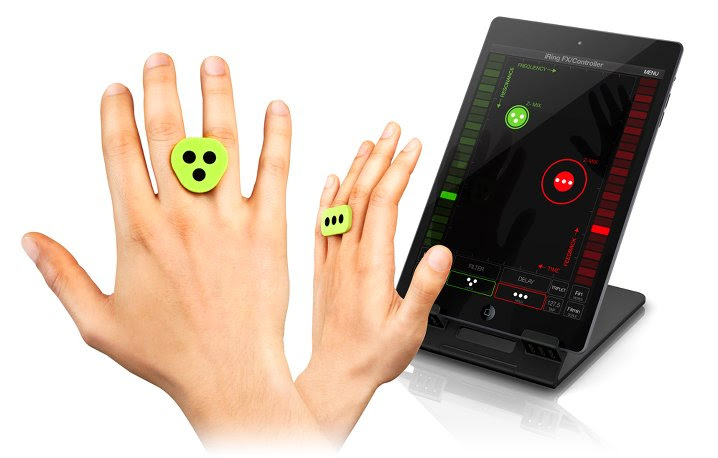
First presented at CES 2014, iRing is an affordable, wearable technology system that gives users a new level of gestural control over their favorite music apps, in real-time, using hand positioning for unprecedented music expression.
The iRing system consists of two double-sided “rings” to wear comfortably on the fingers along with a series of apps that are able to detect the iRings’ accurate positions in space using the device’s camera. Through the recognition of the dot patterns printed on the rings, the device’s camera picks up the movement and translates it into MIDI information. Users can then interact with music apps by simply moving their hands in front of their device through the precise reading of the ring position, which is converted into music commands or MIDI control messages to operate various app parameters without touching the device.
 |
 |
iRing includes two identical double-sided ring controllers plus two free apps for various music applications designed for everyone from music lovers to knowledgeable DJs and musicians: iRing Music Maker and iRing FX/Controller.
iRing Music Maker is a free app that gives music lovers and DJs a fun new way to create music and grooves using hand gestures, no matter what their skill level. iRing Music Maker utilizes music “loops” that always sound good together and can be remixed in virtually limitless combinations by simply waving the hands with the iRing controllers in front of the device’s camera. Users can change beats, control rhythmic elements, play synth parts and control effects providing hours and hours of quality musical entertainment. Plus, iRing Music Maker also includes lead and bass synths with respective pattern players that can be independently operated for hours of error-free musical improvisation. Creating music has never been so much fun!
iRing FX/Controller is the app for skilled musicians and DJs that is both a real-time audio effects processor and a MIDI controller with fully assignable parameters. It can be used as a touch-less outboard audio effects processor, or can be fully configured to send multiple simultaneous MIDI parameters; such as control changes, notes or any other MIDI messages.
As an effects processor, iRing FX/Controller uses the analog or digital input of the device for processing external audio sources. FX/Controller can also be used with Audiobus and Inter-App Audio compatible apps to process the audio stream from music apps running on the device to add stunning and brilliant audio effects. The iRings can control up to six effects parameters at a time. iRing FX/Controller operates two simultaneous effects, selectable from up to 16 powerful and creative effects, including: Delay, Stutter, Phazer, Flanger, Compression, Fuzzy, Reverb, AutoWah, Crush, Twist Up & Down, Brake, Spin and Tail.
As a MIDI controller, iRing FX/Controller can transmit MIDI messages to other Virtual MIDI compatible apps running on the device or to external devices using compatible MIDI interfaces (like IK’s iRig MIDI). iRing FX/Controller can send out the complete set of MIDI messages (control change, notes, program change, pitch wheel, aftertouch, MIDI system real-time, and MMC, MIDI Machine Control) with up to 3 assignable parameters corresponding to the X, Y and Z axis positions for each of the 2 detectable rings for a new level of touch-less control. Additionally, MIDI messages can also be sent to a computer application via Wi-Fi (using MIDI network). Users can configure the app to control effects, filters, notes, patches and more for creative and dynamic “never before seen” performances.
iRing computer vision technology is also directly incorporated into the entire line of IK Multimedia DJ apps likeGroovemaker® and DJ Rig™ and will soon be included into other popular IK apps such as AmpliTube®,SampleTank®, VocaLive™ and more so that DJs, guitarists, vocalists, bass players, producers, keyboardists and engineers will have a new level of control to deliver powerful and unique performances.
For third-party developers who want to incorporate and implement iRing technology directly into their apps, IK is offering a free SDK (software development kit) and licensing program which makes it easy to take advantage of this new breakthrough technology. iRing can also be easily utilized beyond music for a wide variety of applications including gaming, health & fitness, utilities and more. Developers can take advantage of the technology and improve the functionality of their apps by contacting IK via the link provided on the iRing product page.
iRing features
- Advanced motion-tracking technology provides remote control of iOS apps using hand positions and gestures
- Includes two identical, double-sided reversible rings allowing for numerous control combinations and control of up to 6 effects’ parameters simultaneously with two hands
- iRings are unique looking, light, comfortable and provide a universal fit
- Free Apps are available on the App Store: iRing Music Maker app, which gives the ability to make music using hand gestures with no previous musical knowledge, and also the iRing FX/Controller app, which lets musicians and DJs create custom MIDI control setups, plus add and control audio effects, using compatible apps or external devices
- iRing computer vision technology can be licensed and incorporated into other third-party apps including gaming, health & fitness, utilities and more
Pricing & Availability
iRing controllers cost only $24.99/€19.99 (excluding taxes), are available in three colors (white, green and grey) and are now shipping from music and electronics retailers worldwide and from the IK Multimedia online store.
iRing FX/Controller and iRing Music Maker apps are available as free downloads from the App StoreSM.
For more information about iRing™ for iPad, iPhone and iPod touch, please visit:
www.ikmultimedia.com/iring
To view the iRing video playlist, please visit:
www.ikmultimedia.com/products/iring/video
For more information about the free iRing development kit and licensing program, please visit:
www.ikmultimedia.com/iringsdk
harmon.ie Integrates Office for iPad, OneDrive for Business and Microsoft Enterprise Mobility Suite
 BARCELONA, BOOTH #44 — May 7, 2014 – Enterprise mobile collaboration leader, harmon.ie, today announced the full integration of Office for iPad, OneDrive for Business and the Microsoft Enterprise Mobility Suite into its enterprise mobile collaboration hub to give mobile workers a more efficient way to work and collaborate while on the go.
“One of the keys to successful adoption of enterprise collaboration software is seamless integration into the workflows that people follow to get their jobs done. With the rise of mobile device usage, integration is more important than ever, as navigating multiple applications on phones and tablets can be complicated and frustrating,” said Alan Lepofsky, VP and Principal Analyst, Constellation Research.
While the iPad is undeniably the most popular mobile tablet for business, the complicated user experience has stunted user adoption as business users were forced to make due with unfamiliar, third-party Office substitutes for their go-to enterprise tools. Until now, iPad users were forced to spend time focusing on Office compatibility rather than the work they had to get done.
Office for iPad, OneDrive for Business and the Enterprise Mobility Suite are integral pieces of a disconnected mobile puzzle as business users toggle in and out of Microsoft’s growing array of apps and services. harmon.ie combines the depth and familiarity of all of Microsoft’s collaboration tools and business apps into a cohesive, easy-to-use, single-screen experience – making the iPad an effective business tool. Offering the only single-screen experience of Microsoft enterprise collaboration tools, harmon.ie now gives mobile workers an efficient and secure way to work on projects from the road as well as share and collaborate with colleagues
“Microsoft has officially sanctioned the iPad as a work tool – marking a monumental shift for the mobile enterprise and an overall win for user experience,” noted Yaacov Cohen, CEO of harmon.ie. “Adding the last piece of our integrated mobile work apps suite, the latest integrations with Office for iPad, OneDrive and the Microsoft Enterprise Mobility Suite give workers the tools they rely upon daily, like Word, Excel and PowerPoint, directly from the iPad in the secure, single-screen experience they need to get work done.”
These integrations are the latest additions to the vast collection of business tools unified into a single-screen experience in the harmon.ie Mobile app, which was recently awarded a prestigious Best App Award at the Microsoft SharePoint Conference 2014. Certified by all leading mobile device management (MDM) vendors, harmon.ie provides unmatched collaboration across all of the Microsoft document and social tools (e.g., Office 365, SharePoint, Lync, OneDrive, Yammer, email, phone) on any platform – desktop, mobile, and cloud. harmon.ie Mobile invokes and closes the required apps within a single-screen experience to support the specific work task at hand – users no longer need to open an app and try to find the right resource to create, edit, share or collaborate.
The Office for iPad, OneDrive and Microsoft Enterprise Mobility Suite integrations are available immediately on the harmon.ie Mobile app.
About harmon.ie
harmon.ie empowers the social collaboration workforce by delivering the single-screen experience today’s mobile enterprises and tech-saturated users demand. Giving companies a way to securely support their employees’ changing work dynamic, harmon.ie now delivers a seamless user experience anytime, anywhere and on any device. An established global company, harmon.ie combines the power of the top social and collaboration platforms – including IBM, Microsoft and Yammer – to help its thousands of customers around the globe achieve the promise of the mobile enterprise.
Blumoo Entertainment Remote Control and Mobile Streaming Device Now Available
 (Kansas City, MO – May 6, 2014) – Flyover Innovations, LLC announces the availability of Blumoo,™ a new universal home entertainment device and corresponding app. Blumoo is simple to install, easy to use, and provides the convenience of combined wireless home entertainment system control and music streaming from mobile devices to existing home entertainment equipment.
Combining Bluetooth, infrared, and mobile app technology, Blumoo is a universal remote for more than 200,000 TVs, Blu-ray players, cable provider boxes, and home audio systems. Compatible with virtually any mobile music source, Blumoo streams Google Play, Pandora, Spotify and iTunes to existing home audio systems, creating superior sound. Multiple devices can be paired with Blumoo at one time, and using patent-pending algorithms, user prioritization preferences are ensured, intelligently transmitting the correct audio at the right time.
“With Blumoo, there’s no more tethering your mobile device to a docking station or having to keep track of multiple remotes,“ said Jason Carman, CEO of Flyover Innovations. “Consumers no longer have to sacrifice sound quality while streaming music, as Blumoo allows them to enjoy elite sound through high-quality stereo equipment.”
With the Blumoo app installed, mobile devices gain full control of home entertainment systems, even from outdoors or other rooms. Blumoo allows iOS devices to remotely switch TV and receiver inputs, power devices on/off, adjust volume and control nearly any existing home entertainment device. The Blumoo app provides a simple interface to access media directories, channel guides and push reminders for favorite shows and sports teams. Controlling home entertainment devices via smartphone or tablet has never been easier.
The Blumoo hardware device retails for $129.99 and is currently available for purchase at Blumoo.com. For more information on Blumoo, follow on Facebook and Twitter.
###
About Flyover Innovations? Flyover Innovations, LLC is dedicated to designing, developing and delivering “technology made simple,” in order to improve our experiences and the ways we interact with our home entertainment and media devices. Flyover Innovations is headquartered in Kansas City, MO.
Twitter: @BlumooUSA
Facebook: BlumooUSA
LinkedIn: Flyover Innovations, LLC.
The Lap Log: A Made in USA iPad, eReader, or Tablet Stand
 The Lap Log
Bamboosa, LLC.
$39.00 to $50.00 at Bamboosa and Amazon (Prime)
The Lap Log seems an unlikely tablet computer accessory but it’s a really nice one. It’s made of sustainable, renewable products right here in the USA. In my humble opinion, the fact that it’s made in the USA, presumably in South Carolina, is a very good thing. Companies that manufacture good in the USA create new money, use raw materials, and support families by employing local workers. But regardless of where a product is made, consumers want quality products that have value. Bamboosa products fulfill that need. The Lap Log is a soft stand that supports your iPad, eReader, or tablet computer in your lap.
- Adjustable to any viewing angle and stable on all surfacesMade from Eco-friendly Materials
- GOTS Certified 100% Organic Cotton Twill
- Filled with natural buckwheat hulls
- Eco-friendly, removable wooden insert that holds tablet
- Use as a safe and stable station for your tablet to sit while charging
The Lap Log is filled with locally grown buckwheat hulls just like the famous Sobakawa pillow. And if your Lap Log doesn’t fit where you work exactly, you can remove or add buckwheat hulls to adjust it for your needs. How do you add more, you ask? Bamboosa sends you an extra bag of buckwheat hulls. I get the feeling that Bamboosa cares about its customers and its products. It even prints the extra bag information on 100% recycled paper. And Bamboosa offers a 365-day return policy.
I’m proud to see a US-based company that not only produces quality products but one that also is environmentally responsible. They could produce a far less eco-friendly product at a fraction of the cost or ship the manufacturing overseas but they don’t. I, for one, appreciate their efforts.
The Lap Log measures approximately 10.5 x 5 x 5 inches and weighs in at just over one pound. It’s perfect for travel and contains nothing that would set off any airport or ship sensors. If you’re like me, you always have your tablet with you. The Lap Log makes an excellent travel companion during flights, at the airport, in your hotel room, in a coffee shop, or on a park bench.
Of course, the Lap Log is perfectly suited to staying at home too. I take mine to the hammock and use it in my lap out there in the back yard, until I fall asleep that is. And although it’s not marketed as such, it makes a great makeshift hammock pillow too. The Lap Log is washer and dryer safe (follow the instructions) and can be wiped clean with a damp cloth in most cases.
Why it’s Frugal: The Lap Log is frugal because you can use it anywhere and for any tablet computer or eReader–you don’t have to buy more than one product stand. It’s also frugal because it’s an environmentally conscious product. Anything that is sustainable, recyclable, and harmless to the environment is frugal. Plus it’s manufactured in the US, which sustains jobs and creates money.
My wife uses the Lap Log in the kitchen to hold her iPad mini while she’s cooking and looking at a recipe on Allrecipes.com. It’s handy because it’s stable and, as she puts it, “Is shmutz resistant.” My daughter uses it to prop up her iPad mini when doing homework. It sits on her bed while she works. She says it’s “Very handy.” She’s a child of few words and I was lucky to get those in between homework, friend chatting, and listening to My Chemical Romance on iTunes or Pandora.
Do you get the feeling that I don’t see much of the Lap Log because of the other users in my house? You’d be correct to assume that. They just call it “The Log,” which I suppose is OK. I’ve stopped correcting them and steering them toward the official name of Lap Log. There are just some battles not worth fighting.
I like the Lap Log. It’s versatile. It’s made in the USA. It’s eco-friendly. It comes in a variety of colors and patterns. And it’s a product that will last for years. What’s not to like?
Rating: 9/10
Recommendation: Buy one for yourself and a community one so that you’ll get to use yours. Hammock not included.
Jelly Box Portable Bluetooth Speaker (Review)
 Jelly Box Portable Bluetooth Speaker
OrigAudio
$34.99
OrigAudio designs some of the coolest and most affordable music/sound-related thingies on the market today. If you don’t believe me, check out the website and go to Amazon and search for OrigAudio and see for yourself. Cute, fun, happy, clever are all words that come to mind when I see the brain drizzle from OrigAudio’s founders Jason Lucash and Mike Szymczak. I’m assuming that Mike’s real last name isn’t really Szymczak. My guess is that he lost at Scrabble and is paying off some drunken bet that he made with Lucash, et al.
I digress.
This is a review for the Jelly Box portable Bluetooth speaker. They sent me a black one. Clever. I’ve heard of other colors, you know. Seriously, I’m not tricked by the thought of a Blue Raspberry, Dragonfruit, or even an <yuck> Grape Jelly Box.
Anyway, I’ve reviewed other portable Bluetooth speakers on frugalnetworker.com and this one stands well with the rest of them and at a decent price point. The Jelly Box has clear, bright sound, even at the highest levels where my teenaged children like to play it. I’m glad I was working in the yard the day my daughter decided to blast My Chemical Romance and Panic! at the Disco tunes on it. Don’t get me wrong, I like those bands but at a non-earwax cleaning level, thank you. In fact, I took my daughter to a Panic! concert earlier this month and now I’m a super fan. No T-shirts or faux-hawk yet, but the year is still young and summer’s coming.
Jellybox Bluetooth Speaker features:
- Full stereo sound with Bluetooth functionality
- Bluetooth range up to 33 feet
- Built in microphone and one touch call answering for phone calls
- On-speaker play/pause and change song buttons
- Built in TF card slot to store your music in the speaker
- Mini USB charging slot (cord included)
- Speaker power: 3 watts
- S/N: ≥ 60dB
- Frequency response: 100HZ-20KHZ
- Battery life: 10 hours
- Size: 4 x 2 x 1.5 inches with a weight of 0.75 lbs
- Compatible with any device that has Bluetooth connectivity. Also included is a 3.5mm audio cord for devices that don’t have the option of Bluetooth.
- Available in 9 different flavors (colors).
 Speaking of summer, the Jelly Box would serve you well by the pool, on the beach, on a picnic, while doing yardwork while your lazy teenagers sit and drink iced tea and watch you, on a road trip, or even just chilling in your room. You can adjust volume on the Jelly Box or on your phone. You can also skip or revert tracks, replay a track, and answer your phone using the Jelly Box’s built-in speaker.
Note: The only thing jelly-related about the Jelly Box is perhaps the jelly-related colors, although I can’t really speak to the whole color thing directly, but I think that’s probably what they were going for.
 I really like the Jelly Box portable Bluetooth speaker. You can plug in a non-Bluetooth device into it as well. The unit also sports a TF (micro SD) card slot for storing your music. I don’t think you can play it from there, although I didn’t try, I think it’s just for convenient storage. If you get one in color, you could write your favorite artist’s name with a Sharpie on it. It would look something like the illustration to the right. This is only a theory and I have not had the opportunity to test it for myself, so YMMV.
Of course, being young entrepreneurial types, living in (you guessed it) California, they’ve got their liberal, offbeat, hipster causes that some people view as positive, as uplifting, and as what successful and happy people should do with their millions of ill-gotten gain. I only mention it in passing.
Why it’s frugal: The Jelly Box is a lot of things but frugal isn’t one of them. It’s cute. It’s fun. It’s well priced for the market. Why does something always have to be frugal to be purchase worthy? It doesn’t.
 The Jelly Box connects to your Bluetooth enabled device easily and immediately. My iPhone 5 picked it right up and all I had to do was tap “Connect” on my iPhone to make the connection and listen to my Frank Sinatra and Duke Ellington hits–HA! Kidding, I listen to Flyleaf, Mazzy Star, The Cure, Coldplay, Lisa Loeb, and Gotye. Yes, I know, I have varied tastes, shut up about it already.
What more can I say about the Jelly Box? It’s portable. It’s well-made. It works. I understand that it comes in a variety of awesome colors. It plays loud. It plays soft. It plays well with others. And I’m sure that Frank Sinatra and Duke Ellington sound great on it too. So buy one for Grandpa, Grandma, and the whole gang. Anyone can afford $35. And if it keeps the likes of Lucash and what’s his name off the street, I’m good with that.
Rating: 9.372/10
Recommendation: Buy one in one of those cool colors and tell me what you think of it.
Secur Sun Power Bank 4000 (Review)
 Secur Sun Power Bank 4000 Portable Charger
Secur Products
A division of Maverick Industries, Inc.
$69.00 estimated
When I first saw a note about the Secur Sun Power Bank 4000, my curiosity piqued. “A solar-powered charger for my various gadgetry,” I queried to myself. Could it really be? Well, I had to find out for myself and report to you on my findings.
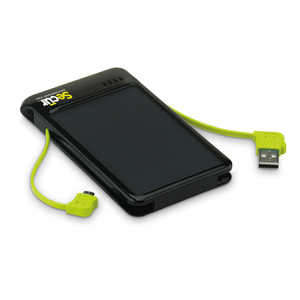
The Secur Sun Power Bank 4000 (4000) is approximately the same size and weight as an Android phone. The dimensions make it easy to carry or to stow away in a small bag. You can plug into the charger using your mini USB connector or you can use the built-in one. It’s a matter of convenience and space as to which one you use. For Apple device users, you have to carry along a charger cable to plug into the device’s standard USB port.
Remember to press the On/Off button on the bottom of the unit or your device won’t charge.
DETAILED FEATURES:
- High Efficiency Solar Panel
- High capacity lithium polymer battery – 4000 mAh
- Built-in full size male USB cable and plug
- Built-in male micro USB cable and plug
- Female USB port for charging any digital devices
- Built in micro USB for charging via USB power sources
- LED light indicator for current battery charge
To charge the unit fully, you plug it into a computer’s USB port via the built-in standard USB cable. Alternatively, you can place the unit in direct sunlight to charge it via its high-efficiency solar panel.
As intriguing as it sounds to have a solar-powered battery charger, it’s not all that practical when recharging the charging unit itself. You’ll probably plug it into your computer for a full charge, which requires four (4) hours. The reason that using the sun isn’t practical for recharging the unit is that it requires 14 to 18 hours of full and direct sunlight to a full charge. I suppose that you could leave it on the dashboard of your car while you’re at work or in school and hope for a half charge when you’re ready use it.
TECHNICAL SPECIFICATIONS:
- High Efficiency Solar Panel – 5.5V/280mA
- 21.5% efficiency
- High Capacity Lithium Battery – 3.7volts/4000 mAh
- Micro USB Input – 5V/1A
- USB Output – 5V/2.1A
- Charging time via USB input – 4 hours
- Charging time via built-in solar panel – 14 – 18 hours – Full Sunlight
- 3″ x 5″ x .5″
- 6 oz.
 That minor flaw aside, if you’re in a real power pinch and you’re also in the sun, you can use the 4000 to power your phone while you make an emergency call. As a charger, the 4000 is cool. As a solar-powered charger, it’s about average. Solar cells haven’t really made the efficiency leap that’s required for today’s power-guzzling gadgets. Maybe in a few years the battery charging technology and the battery-sucking technology will meet in a better place.
The lack of solar cell efficiency isn’t the fault of the manufacturer; it’s just a technological shortfall. It will get better (more efficient) and less expensive to use solar.
Why it’s frugal: For an estimated $70, the 4000 isn’t all that frugal unless you live in a place that gets a lot of sunlight or you do as I suggested and leave it on the dash of your car to power up. As a standard portable charger the 4000 is fine, but a little pricey. It’s frugality is mostly based on your access to the sun for recharging and your need for “off the grid” power.
I once owned a “solar” calculator that I loved. It lasted for more than 15 years. In fact, I might still have it somewhere in the garage. Solar-powered devices rarely die. The advantage my calculator had was that it really wasn’t bound to the sun for power. That would have been downright silly–that the only place I could use it was outside when I really needed it inside. Thank goodness it was photon-powered and not just solar-powered. If you don’t know the difference, this isn’t the place to learn it, sorry.
The bottom line here for the Secur Sun Power Bank 4000 is that it’s a clever device. It’s well-designed. If you’re a camper, hunter, beach-goer, or truster of things left visibly in the sun, then the 4000 is a jackpot for you–you can totally survive with your gadgetry in an off-the-grid fashion. For some people that’s really important.
If you ignore the whole solar thing, unless you really need it, the 4000 is still a good portable source of power. It’s lightweight, clever built-in cord design, and cell phone sizing makes it a nice companion for you on-the-go types.
Rating: 7.5/10
Recommendation: This is your chance to go “green” and to spend some time in the sun.

 Techopedia
- An error has occurred; the feed is probably down. Try again later.
Datamation
- Minimus Appoints Tech Dealmaker Yael Nardi as Chief Business Officer to Drive Hyper-Growth
- USA₮ Modernizes American Payments with High-Impact St. Patrick’s Day Activation in Times Square
- Google and NextEra Strike AI-Powered Grid Deal
- NYT Sues Perplexity AI in Copyright Conflict
- Cloudflare Outage Affects Major Websites
- OpenAI Forces AI to Confess Its Lies
- OpenAI Declares Code Red as Google’s Gemini 3 Threatens ChatGPT
- Coupang Breach Exposes 33.7M South Koreans’ Data
- ChatGPT Celebrates Third Anniversary
- Asahi Group Reveals Findings of Cyberattack

 The Frugal Networker
You must be logged in to post a comment.