Archive
How a Managed Service Provider Can Help Your IT Career Hit the Big Leagues
[Contributed article by Patrick Zelten]

There is a saying among baseball players in the Dominican Republic that “No one ever walked their way off the island.” It’s used to explain why players from that region are such “free swingers.”
While conventional baseball strategy might dictate that you only swing at good pitches, and that a walk is as good as a hit, players from the Dominican Republic know they may only get one chance to impress a Major League Baseball (MLB) scout and get signed to a contract that will get them off the island and to the USA. And the only way to impress those scouts is to hit the ball hard. So they pass on doing what’s expected in order to focus on doing something that will get them noticed.
That’s an approach ambitious IT managers should embrace when it comes to how they spend their time. However, typically the majority of their time is spent keeping the lights on – i.e. performing all the routine maintenance tasks that keep current hardware and software running smoothly. In fact, according to Gartner the budget is broken into two parts — continuing IT operations costs or “keep the lights on” money (circa 65%), and new projects for business improvement and change (circa 35%). Source: Gartner CEO Advisory: Three Changes You Can Make to the Way IT Innovation is Framed, Mark Raskino, Jackie Fenn (28 June 2013).
It’s important work. Perhaps even mission-critical in some respects. Yet it’s also what’s expected, mere table stakes. In fact, you might say that while letting the lights go off regularly will certainly get you noticed in a negative way, meeting expected service levels—no matter how much skill, time and effort it reflects—will likely do little to advance your career.
To become a superstar within the organization, you need to do something spectacular – something that helps transform the business for the better, or at least delivers noticeable value to it. You need a home run, not a walk. But how can you hit that home run when the bulk of your day is spent monitoring, tweaking, patching and otherwise tending to the day-to-day needs of the organization’s technology?
This is where bringing on a managed service provider (MSP) can help. If you can hand off most of the 65 percent “keeping the lights on” duties to an MSP, you will gain back time for you and your staff to perform more meaningful work. The right MSP can also bring you new ideas that have worked with other companies or in other industries – ideas you can suggest to your management that make you look brilliant. And “brilliant” is definitely a good reputation to have when you’re looking for a career boost.
Striking out the fears
 So why don’t more IT managers bring in an MSP? For many, it could be a misunderstanding about what an MSP is. They may still think of it as 1990s-style outsourcing, where entire internal IT departments were shut down and their functions moved to an offshore provider to drive down costs.
Here in the second decade of the 21st Century, an MSP is not a replacement for an IT department. It’s an enhancement to it.
The objective in bringing in an MSP isn’t to reduce head count; it’s to free those minds to develop the innovations and make the kinds of contributions that only internal personnel, with their deep knowledge of the business, can create in order to add value to the business.
IT managers may also hesitate to bring in an MSP if their performance reviews depend on documenting a high uptime. In those cases, they may feel pressure to take personal responsibility for performing the actual work. Yet the evaluators don’t really care who keeps the lights on, so long as they stay on. By choosing the right MSP, and holding them to a higher service level agreement (SLA) than the organization might be able to commit to internally, IT managers can still meet or even exceed performance goals without having to invest a lot of time in the day-to-day operations that make achieving “five nines” uptime possible.
One other factor that may be preventing the move is concern about a loss of control. IT managers may fear that the MSP will come in and start dictating policy or telling their staff what to do. Yet that’s not the way a proper MSP/client relationship works.
Instead, the MSP should be viewed as an extension of your IT department, operating under the same business policies, security protocols, approval and rule change procedures etc. as internal personnel. It’s still your IT environment. The MSP may make suggestions, but in the end it’s you who makes the decisions.
Going to Bat
Once you’ve decided bringing in an MSP is a good idea, it’s time to go to bat for them; in other words, build the business case. Generally this involves identifying an area of need and showing how the MSP can fill it immediately.
The MSP should be able to assist you with demonstrating the business value. They can help you identify areas of need, develop service level agreements (SLAs) that meet or even exceed your internal department’s current performance and lay out penalties if those SLAs are not met.
For many organizations, the business case for bringing in an MSP is made based on staffing needs. For example, perhaps you’re having trouble finding or retaining the right skillsets to maintain the level of security demanded by the business. You can show how bringing in an MSP that already knows the security technology you’re using can solve the problem faster, and more cost-efficiently, than hiring and training a new internal staff member. After proving themselves with this project you can use it as a lever for other work.
You might also consider using an MSP to provide local (or remote) support for one or more branch offices. As they demonstrate their value the program can grow until they are providing support for multiple solutions, or even the entire organization.
A third possibility is in cases of rapid growth, where it is difficult for the internal department to keep up with technology patches, upgrades, user provisioning and other maintenance-type work. The cost to hire, train and provide benefits for internal resources to meet the peak demand versus bringing in an MSP to fill the gaps will likely easily justify the MSP; once they have demonstrated their value it will be easier to explain how they can take on additional work.
Of course, in the end you have justify the cost by demonstrating the ROI. If the MSP can deliver the service faster and at a higher level than your internal department, that’s great. If in doing so they allow your team to get to other work that improves profitability or creates a distinct business advantage, that’s even better.
Swinging for the Fences
Beyond the what and the how comes the “why?” Why you should make the effort to bring an MSP on board and integrate them with your in-house team? The reason is that there are several ways working with an MSP can help advance your career.
As mentioned previously, the most obvious is by giving you and your team time to do great things instead of spending your days merely keeping the lights on. Rather than punching out a few singles or taking a walk here and there and hoping someone notices, you can really swing for the fences with dramatic projects that have sweeping, long-term impact on the organization.
Beyond that, though, by working with an MSP you’ll gain access to a broad range of knowledge and experience your team may not possess. In their role as consultants, the MSP can offer suggestions on ways to approach a business issue that your team may not have thought of. They will likely be able to help you build the business case by pointing to other successful implementation in which they’ve participated.
An MSP can help drive cost optimization as well by providing focus on your maintenance tasks. For your internal staff, maintenance involves things that have to be done, even though they may not be the most exciting. For the MSP, however, that is their primary focus with your organization, and in order to keep the engagement they must do it well. This focus will help you ensure your environment is kept current with all patches and updates. It will also help you avoid staffing challenges by having a “bench” to call on when the situation requires it. It could even help you lower your costs. Most importantly, though, it will give you and your staff time to focus on areas that are core to driving the business, which will make you look like an all-star to the front office.
The overall impact of these contributions is they show you to be more strategic and less tactical. Which is exactly the impression you want to make when you’re looking to advance your career.
Make It to the Game
 Just as no one ever walked their way off the island in baseball, it’s highly unlikely you’ll advance your career by doing only what’s expected. You need to do things that have a positive, noticeable effect on the business.
Working with an MSP can give you the time, knowledge and resources to make a major league improvement in your organization while helping you move to the top of the lineup for your next job. And that’s a home run in anyone’s book.
Patrick Zelten is the vice president of managed services for Forsythe, a North American IT infrastructure integrator headquartered outside Chicago. He can be reached at pzelten@forsythe.com.
Announcing the iRig Blueboard: the first wireless MIDI pedalboard controller
 IK Multimedia iRig Blueboard
IK Multimedia
$99.99 / €79.99 MSRP (excluding taxes)
iRig BlueBoard is the first wireless MIDI pedalboard for iPhone, iPad, iPod touch and Mac that uses Bluetooth technology to transmit MIDI messages to control app and software functions and features. Musicians can use iRig BlueBoard to control parameters in their favorite music making apps — such as stompbox effects on/off, preset patch-switching on the fly, volume or wah control, or any other MIDI controllable function. Set-up is as simple as turning on the power and launching the iRig BlueBoard companion app and assigning the backlit pads to the desired control function.
iRig BlueBoard uses Bluetooth 4.0 (LE – Low Energy) technology to transmit the actions of its four onboard, backlit foot switches and its two optional external devices to the mobile device or Mac. Then, using the included iRig BlueBoard app (download from the App Store) and software (download from the IK web site User Area), the Bluetooth signals are converted into MIDI messages and routed internally to the music app that’s running on the device.
The Ultimate App Control
Any music app or Mac music-software application that is MIDI compatible (the standard communication protocol for musical instruments) — such as IK’s AmpliTube, VocaLive, SampleTank, iLectric Piano, iGrand Piano — or any other Core-MIDI-compatible app like Apple’s GarageBand, can be controlled wirelessly.
iRig BlueBoard is also expandable — musicians can add up to two standard additional expression pedals or foot switches via the unit’s two TRS 1/4” expansion jacks, allowing for control of continuous rotary functions like wah effects, volume, EQ, gain control, etc.
For a guitarist or vocalist using a mobile multi-FX app like AmpliTube or VocaLive as a sound processor, iRig BlueBoard provides the foot-controlled functionality and convenience of a pedalboard, but with a form factor so compact and portable that it can easily slide into a backpack, a laptop bag or an instrument case. Because it’s wireless, iRig BlueBoard puts musicians on stage without being tethered to their mobile device. The unit’s range is 10 meters (over 32 feet), giving players a great deal of mobility to roam the stage that would be impossible with a wired unit.
Because the foot switches are backlit, they’re easy to see in all lighting conditions, even on a dark stage. The fact that iRig BlueBoard uses wireless Bluetooth leaves all the wired ports of the device free, so they can be used simultaneously by interfaces or controllers that feature the 30-pin or Lightning connector, like IK’s iRig PRO, iRig HD, iRig MIDI or iRig KEYS, and adapters or microphones that use the device mini-jack such as iRig, iRig PRE or iRig Mic.
Ultra Compact, Ultra Portable
iRig BlueBoard is extremely compact, light and portable, measuring only 27 cm wide x 9 cm deep (10.6″ x 3.5″) and only 2 cm (0.8″) tall. It’s extremely lightweight, but with a sturdy, stageworthy chassis and four foot switches made of soft-touch rubber and designed for durability.
iRig BlueBoard is battery powered using 4 standard AAA batteries (included), and because it uses Bluetooth Low Energy (BLE), it draws very little power giving it extremely long battery life for extended operation.
Calling all Technical Authors or Want-to-Be Technical Authors
 The following is a list of book topics for which my agent is looking. Are you an author or have you wanted to be one? Drop me an email at: ken (at) kenhess (dot) com and I’ll fill you in on the details–at least as many details as I have.
Here’s the list:
- Database security
- Cloud consolidation
- Privilege analysis
- Software as a Service (SaaS)
- Database as a Service (DBaaS)
- Back-up and the Cloud
- R Techniques for Big Data
- R programming
- Solaris
- Database and OS administration
- Application consolidation
- Integrating technologies (Database, servers, OS)
- *aaS (Anything as a Service)
- Assembly language programming
- Lambda programming in Java
- Fast Data
- BPM
- SOA
- Middleware
- Enterprise data quality
- BPM for Healthcare
- Process Modeling for Healthcare
Now’s your chance, so go for it. You have nothing to lose. If you’re successful, you’ll have fame, fortune, precious jewels, expensive cars…OK, so you might not have any of those but you might see your book in a bookstore and definitely on Amazon.com. And you’ll be able to call yourself a real author.
Storage Trends and the Future of Storage

Do you see the Infographic to the right? You only see part of it. How much information can you use from what you see now? Not much, right? It’s the same with your storage–you’re only getting part of the story because you’re only seeing part of the picture. Only seeing part of the picture is disturbing enough here but think about what you’re not seeing from your current storage tools.
What do you know about the storage in your company or organization? One thing you do know for sure, without much investigation on your part, is that a lot of the storage you’ve paid for is wasted. Your money’s wasted. Your capacity’s wasted. And all the while, your technology staff’s begging for more storage because they’re running out of space–or at least they think they are running out of it.
Some of it isn’t your staff’s fault. They too, are only seeing part of the picture. It’s your storage management tools, your storage management strategy, and your storage technology that’s causing most of your space waste problems.
But waste is also only part of the picture. How will you manage the rapidly growing volume of data with which you must contend? How efficiently can you retrieve it? Are you still relying on tape and traditional data recovery technologies?
And how about disaster recovery? How many tapes and restore points will you have to manage in case of a major outage? Have you estimated your mean time to restore (MTTR)?
There’s a way to manage your storage environment efficiently, with less waste, with lower power consumption, and with less sprawl. Check out the full The Top Trends in Storage Infographic from IBM to see the solution and get the whole story.
IBM offers a range of Storwize products from Entry to Enterprise.
Five of the many outstanding features of the Storwize family of products are:
- Flash Copy – Make up to 2,040 copies of your data.
- Remote Mirror Function – Copy data to a remote location for disaster recovery.
- Data Volume Management – Real-time compression takes place on data as it is written to disk.
- Visual enhancements – You can easily view your storage capacity, how much you’re using, how much is free, and how much space is saved by compression.
- Lower costs – Easy to manage storage that is space, time, and cost efficient.
The Storwize product line is part of IBM’s Smarter Storage for Smarter Computing solution.

This post was written as part of the IBM for Midsize Business program, which provides midsize businesses with the tools, expertise and solutions they need to become engines of a smarter planet.
I’ve been compensated to contribute to this program, but the opinions expressed in this post are my own and don’t necessarily represent IBM’s positions, strategies or opinions.
Recoil: The no cuss, no fuss automatic cord winder (Review)
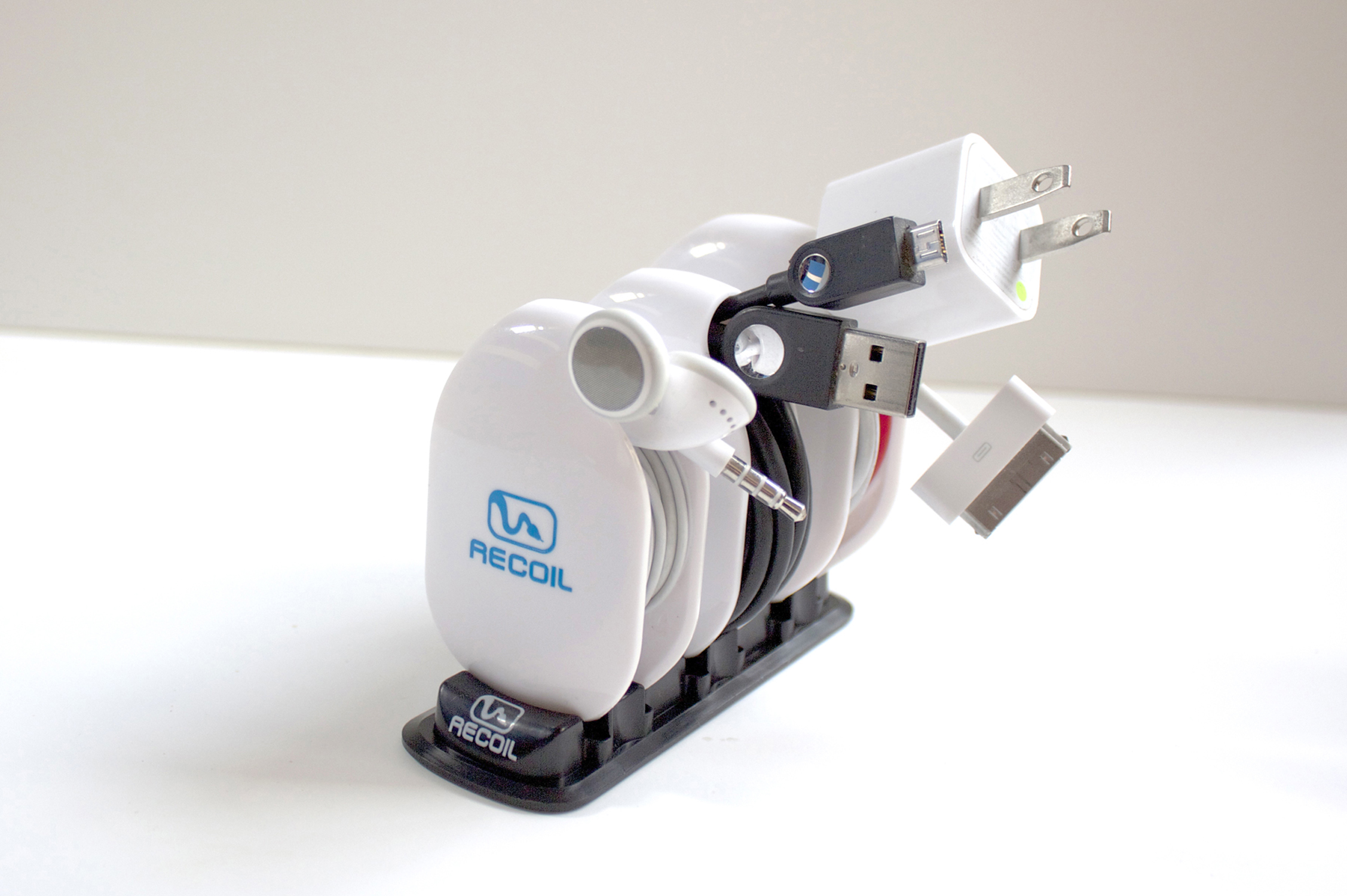
The Recoil Combo Pack
Recoil Automatic Cord Winders
Recoil Winders
$9.99 each or set of 3 for $27.99
(Set of 3 Combo Pack comes with Storage Rack)
I’ve had the theory that any two cables laid side-by-side, as neatly as possible, will somehow, through the magic of universal entropy, become impossibly entangled without human intervention. I’m sure you’ve experienced this too. The funny thing is that now my theory has a corollary: Any cable will become impossibly entangled upon itself in a pocket, a drawer, or even on a desktop. I just want to know why that is.
Often, on my way to gym, I place my earbuds into my pocket so that I don’t look like a total nerd until I get to the weight machines. I pull out my iPhone. I retrieve my earbuds, untangle my earbuds, place my phone back into my pocket and start my workout.
Even funnier than my theory, is that the five minute drive and two minute walk into the gym, collects enough entropy to twist and mangle my earbuds into knots and Moebius strips that require another ten minutes, forty calories (OK, I’m thankful for the calorie burn), quite a bit of cussing, and a whole bucket of frustration to detangle the !@#$% things.
And now here’s where I sound like a late night infomercial, which I hate more than detangling my earbuds every time I use them.
But, has this ever happened to you?
Well, now there’s a solution: The Recoil Winder.

Large winder loaded with USB cable.
Yeah, I know, a TV Pitchman could say it better and with more zeal. But seriously, you know what I’m talking about with tangled earbuds, USB, and Apple power cords. It’s enough to make me want to break the law. The Second Law of Thermodynamics that is.
The Recoil Winder is a clever little gadget that comes in three sizes so that you can organize your earbuds, USB power cables, Apple power cables, and other small gauge electronic cables into a neat little entropy-defying package that fits neatly into your pocket, purse, backpack, or whatever.
The video provides a far better look at the product than I can give you in text format. Take a look to see what I mean.
I use the smallest winder for my earbuds. No more cussing. No more ten minutes wasted at the beginning of every workout trying to untangle tasteless spaghetti. No more starting my workout with an elevated anxiety level. One tug and the cable is out. And it’s just as easy to load: just loop, pull, and let the Recoil Winder do its job.
I should warn you that the Recoil Winder really grabs the cable, so you need to be careful until you acquaint yourself with the product by practicing a few times. And when you remove a cable for use, pull it all the way until the Winder stops and locks, otherwise, you might loosen your grip and allow the cable to rewind onto the Recoil Winder unexpectedly. You can see for yourself in the demo video that you need to keep your fingers out of the way. Don’t worry, after a few times, you’ll get the hang of it.
The Recoil Winder is a cool product. I’m not sure how I kept my cables organized and out of the way before. You see, it’s not just a winder product, it’s also an organizer. I have trouble keeping track of my cables. One reason is that they get tangled up. The other reason is that they tend to get lost. Now they do neither.
The Recoil Winder is one of those products that you look at and think, “I should have thought of that.” It’s both handy and obvious that you need it. The only problem that I have is that I have more cables than Recoil Winders.
The only three negatives I’ve found with the Recoil Winder is that one, I wish they made bigger ones for laptop cables–I hate those things. Two, $9.99 is a little steep for as many as I need. If you only need one, two, or three, you’re OK. I need like ten or so to keep all of my various gadget cables tangle-free and where I can find them easily. And finally, the third negative is that I wish that I could pull out a cable part way so that I could use the cable but keep it partially wound.
Maybe in Recoil Winder 2.0, they’ll add that feature.
Why it’s frugal: The Recoil Winder is frugal because it keeps you organized and that has value. If you’re fumbling around for a USB cable, earbuds, or other cable, you’re neglecting something else. And the Recoil Winder only takes about half a second to wind a cable. It saves you time, which is essentially money.
Review: 9/10
Recommendation: Pick one up and try it out. Chances are very good that you’ll buy more–one for each annoying cable that you have.
Don’t get caught in the rain without your Bheestie Bag (Review)

56g Bheestie Bag
Bheestie Bag (56g)
Bheestie & Co., LLC.
$29.95 (56g)/ $17.95 (28g)
What’s worse than getting your new Canon T3 DSLR wet because you got caught in the rain? Telling your wife that you think your new Canon T3 DSLR might be ruined because you got caught in the rain, that’s what. Water and electronic devices don’t mix. It’s kind of an oil and water thing, only much worse. Plus, even at the price of oil these days, electronics are still more expensive. They’re far too valuable to use a few times and then have to scrap them or sell them on an auction site for pennies on the dollar just because they got a little damp.
We were on a short, impromptu family vacation this summer in Wyoming (aka Kenapalooza), when we got caught in a downpour at a place called Veedauwoo (between Laramie and Cheyenne) in southern Wyoming. Nice place. Cool rock formations and a biblical proportion deluge that was unexpected.
Southern Wyoming. Summer. Downpour. Which of these things doesn’t belong?
I did everything I could to protect my camera during the quick mile-long walk back to the car in ever-increasing rain. We were all soaked by the time we got back to the parking lot. I held my camera and leaned over it while I walked at first. The trees protected me from the rain when it was only sprinkling. But when the rain came down so hard that I couldn’t see ten feet in front of me, I was worried. I was worried about our safety and my camera’s status as a floatation device.
Soon, I placed the camera under my shirt and walked briskly back toward the car. The rain came harder. The camera, under my shirt, was still getting wet. I bent over it to shield it more, while also trying to trot along while herding kids, my wife, and her sister uphill toward dry refuge.
As soon as I got back to the car, I dried myself and the camera with a beach towel that we had in the back. My wife looked as if I’d sacrificed our first born to an angry volcano.
We were both upset at the prospect of my camera becoming a paperweight, when I’d only had it a few months.
I meticulously dried it after getting back to her sister’s house a few hours later.
The only thing I noticed that had gone wrong was that the Flash wouldn’t pop up when it was supposed to. It just made this loud clicking noise and an error appeared on the LCD screen.
Ruined, I thought. Ruined.
I’ll never be able to replace it. That’s OK, I can always go back to film. Yeah, like that’s an option these days with all of my online venues, Dropbox, and relatives that don’t want to wait two days for developing and scanning.
Rice wouldn’t work with a DSLR. I’m not putting my camera into a bowl of rice to dry it out. That’s just silly.
A few days went by and I had researched ways to get my Flash to pop up again but no luck. A few more days went by and I got an email from a representative of Bheestie who read one of my stories about the trip and wanted me to test out the bag on my camera. I said that I would.
After receiving the bag and reading the instructions (I know, who does that? But, hey, I’m desperate), I reluctantly placed my camera in the bag and sealed it shut. I left the camera in for 24 hours per the instructions.
The next evening, I removed my camera, checked it out and then thought I’d try the ultimate test.
Click, click, pop! Up came the flash.
Whoa!
It worked. I was so happy that I tried it over and over and it worked every time. Sometimes after only one click but it worked.
I put it back into the bag for another 24 hours to be sure that everything that could be done was done.
I brought the camera out and have had no trouble with my flash. Sometimes it only clicks once and sometimes it pops up the first time. It’s not 100 percent back but it’s much better than 100 percent broken.
If I’d had the Bheestie Bag on the day that the camera got wet, I think it would have been much better. Instead, I had to rely on other methods that weren’t effective such as drying with rubbing alcohol, blow drying, and using Q-tips.
The Bheestie Bag saved my camera from the auction block and saved me from the wrath of “you know who.” I wish I’d had it sooner but I didn’t know about it. The large bag (56g) was more than adequately big enough for my camera, attached lens, and strap.
I’m convinced that the Bheestie Bag is the right choice for anyone who uses electronics such as DSLRs, phones, tablet computers, or anything that might get wet in the process. Personally, I’ll never be without one. If you’re thinking that a bowl of rice is just as good, you’re wrong. That might work for a momentary plunk into some water but for something that’s soaked, you’d better have something other than rice available to you.
I’m sure that there are commercial services that would dry your gadget for you at almost the price of a new one but that isn’t frugal. So, how is the Bheestie Bag frugal, you ask? $500 camera. $30 fix. You do the math.
It would be ridiculous of me not to highly recommend the fix for my camera, now wouldn’t it? It worked for me and there are hundreds of other testimonials on the Internet that agree.
Review: 10/10
Recommendation: Buy one and keep it handy for emergencies. You don’t use a fire extinguisher everyday but you keep one handy, don’t you?
IK Multimedia announces iRig PRO: Universal MIDI Interface

iRig Pro Universal MIDI Interface
IK Multimedia
$149.99/€119.99 (exc. taxes).
IK Multimedia, the global leader in mobile music-creation apps and accessories, is proud to announce iRig® PRO, the universal digital mobile audio/MIDI interface for iPhone, iPad, iPod touch and Mac.
Universal Compatibility
iRig PRO comes with three detachable cables, compatible with Lightning, 30-pin and USB connectors, respectively, allowing for digital connection to every model of iPhone, iPod touch, iPad and Mac, out of the box, with no need for adapters. A MIDI cable with a standard MIDI jack is also provided to connect the widest variety of MIDI-compatible keyboards and controllers.
iRig PRO is class compliant and compatible with Core Audio and Core MIDI, so it can be used with any audio and MIDI processing apps for iOS and Mac OS, for true plug-and-play performance without additional hardware/software.
Universal Apps and Software Included
For iPhone and iPad users, iRig PRO comes with a suite of IK Multimedia’s most popular apps for mobile music creation on iPhone, iPad and iPod touch, including AmpliTube FREE (the #1 app for guitar players) for guitarists and bass players, VocaLive FREE for singers, SampleTank FREE and iGrand Piano FREE for keyboard players and iRig Recorder FREE for recording engineers.
For Mac users, iRig PRO includes AmpliTube Custom Shop, the industry standard guitar-and-bass processing software; a free version of AmpliTube Metal; T-RackS Custom Shop, the mixing-and-mastering effect suite with a free version of T-RackS Classic; and SampleTank XT, a sound workstation that includes over 1GB of sounds. All these software titles are available both as plug-ins for the most popular digital audio workstations (including GarageBand), or as standalone applications for immediate plug and play.
While this post is not a review, I have used other IKMultimedia products (Reviews coming soon) and they are very high quality, durable, and they deliver the performance and features that you’d expect from equipment priced many times higher. If you’re a singer/songwriter, bandmate, or a hobbyist with a flare for producing your own sound, you need to check out IKMultimedia’s line. I’m excited every time IKMultimedia announces a new product. I haven’t seen the iRig Pro yet but it’s only a matter of time.
It’s not yet available at all online retailers but I’m looking forward to plugging one in and testing it for myself. You can purchase one directly through the IKMultimedia Store or use the Dealer Locator to find a store near you.
Why it’s frugal: The iRig Pro, for $149.99 is an all-in-one device. The iRig Pro comes with apps, cables, and MIDI peripherals. All you need are instruments, a microphone, and inspiration.
Looking at the ROI and TCO of IBM PureFlex Systems
 By a show of hands, how many of you need to know, or want to know, the total cost of ownership (TCO) of your technology investments? Fine. Now, how many of you need to calculate the return on your technology investments (ROI)? Chances are very good that if you raised your hand at either or both of those questions, you’re a company manager, a C-level executive, a project manager, or a marketing representative. You have a vested interest in knowing the numbers behind a technology investment. No one has enough power to make capital purchases without answering to someone for them.
Sure, there are some intangible returns reaped from using the best available technology but subjective value is difficult to put on a graph. It’s even more difficult to explain to shareholders. Perhaps the best way to gain an understanding of ROI, TCO, and value is to use a disinterested third party to give you an unemotional, objective assessment.
IBM understands the value of doing just that. That’s precisely why IBM has enlisted the services of Alinean, Inc. Alinean, Inc. (Alinean) is a company that develops “economic justification tools” for business-to-business (B2B) vendors. Alinean developed the IBM PureFlex System TCO Analysis Tool to compare the total cost of ownership for the IBM PureFlex System versus a traditional dedicated or virtualized IT infrastructure.
To use the IBM PureFlex System TCO Analysis Tool, you’ll need some assistance from your technical team leads. There are questions that refer to server groups, hypervisor type, databases, application servers, storage tiers, and virtual machine configurations that you’ll have to know to complete the Requirements section (tab).
 Based on the information you provide in the Requirements section, the tool calculates the IBM PureFlex Systems equivalent hardware and software requirements and the total cost associated with the transition*.
The final page of the report compares your current solution to the IBM PureFlex equivalent. Given in the analysis are costs from capital outlay such as hardware, software, licensing, and storage. There’s a section outlining estimated operating costs from support contracts, support labor, and facilities. There are also sections that calculate employee productivity and revenue impacts.
The TCO Analysis page also summarizes your initial investment expenses, your five-year expenses, your total five-year benefits, your total ROI, and estimated payback time in months. The calculator also provides you with a graphical representation of the costs associated with your current solution versus the equivalent IBM PureFlex one. Finally, the report presents you with a graphical Break Even Analysis displaying your costs vs. benefits over a five year period.
As with any such automated analysis, there are factors that are specific to your circumstances that might alter your actual numbers and outcomes. This calculator provides you with a reasonable estimate based on your answers to the questions but can’t evaluate every scenario.

I challenge you to dedicate a few hours of research into your current solution and invest fifteen minutes into the TCO/ROI Tool to make the comparison. This PureFlex System comparison could save you a significant amount of money–a move that makes everyone happy–from managers to shareholders to customers. Take the IBM PureFlex Systems TCO challenge and post your savings numbers here as proof of the possibilities of moving to a PureFlex environment.
*As noted on the IBM PureFlex System Configuration page, the cost of training is not included in the price, since this number will vary depending on several factors.
This post was written as part of the IBM for Midsize Business program, which provides midsize businesses with the tools, expertise and solutions they need to become engines of a smarter planet.
I’ve been compensated to contribute to this program, but the opinions expressed in this post are my own and don’t necessarily represent IBM’s positions, strategies or opinions.
The IBM PowerLinux 7R4 Interview with Chuck Bryan (Podcast)

The IBM PowerLinux 7R4 Server.
Chuck Bryan, Team Leader for Linux on Power Systems, and I discuss Power 7 and Power 7+ Systems, the power behind the famous Watson computer, and the recent Linux on Power Systems announcement from IBM, the IBM PowerLinux 7R4 server.
PowerLinux systems run industry standard Red Hat Enterprise Linux or SUSE Linux Enterprise Server. You can also partition Power Systems using PowerVM virtualization tools to run Linux, AIX, or IBM i applications.
Length: 23:54 minutes. Format: MP3. Rating: G
The embedded player requires Adobe Flash. If you need a different delivery method, please notify me.
This interview focuses on IBM’s announcement about the new PowerLinux System (PowerLinux 7R4) for analytics and cloud computing. The PowerLinux 7R4 server is the same technology behind Watson. The purpose of the PowerLinux 7R4 is to provide businesses with a system that is an energy and cost-efficient computing platform to run your data-centric workloads for analytics, transaction processing, applications, and other compute-intense workloads.
The Power Systems line provides you with a secure, reliable computing and energy efficient virtualization platform.
An interesting addition to IBM’s announcement, that Chuck discusses during the podcast, is that IBM has partnered with EnterpriseDB, the company that develops and supports the open source database, PostgreSQL, to bring you a low-cost, Oracle-compatible solution. EnterpriseDB’s Postgres Plus Advanced Server allows you to seamlessly migrate off of Oracle and onto an equally capable database (RDBMS) for a fraction of Oracle’s cost.
In May 2013 IBM opened the world’s first IBM’s Power Systems Linux Center in Beijing, China and in June 2013 IBM announced its intention to open two more IBM Power Systems Linux Centers in New York and Austin, TX.
This post was written as part of the IBM for Midsize Business program, which provides midsize businesses with the tools, expertise and solutions they need to become engines of a smarter planet.
I’ve been compensated to contribute to this program, but the opinions expressed in this post are my own and don’t necessarily represent IBM’s positions, strategies or opinions.
Quiller: Your private Journal App (Review)
 Quiller (App)
Journaling App for iPad
From Passion to Purpose, LLC.
$1.99 Apple App Store
Follow: @quillerapp
Remember Doogie Howser, MD. pecking away at the end of every episode in the obscure blue-screened word processor to record the day’s thoughts, hopes, and dreams? Sure you do. Primitive wasn’t it? Well, if Doogie inspired you to begin journaling back then but you never did anything about it, let Quiller bring that inspiration into the 21st Century as an iPad app.
When questioned, something to the tune of 85% of all people want to write for publication but sadly, or maybe happily for writers like me, fewer than five percent ever become published in any kind of forum. But you don’t have aspire to be the next Hemingway or James Joyce to enjoy putting your own thoughts down onto electronic paper or into an electronic journal.
You, like many others, can journal for the therapeutic value or for posterity. But whatever your reason for doing it, Quiller can make it easy–far easier than using a word processor or Big Chief tablet. If you know what a Big Chief tablet is, bless you. If not, it has nothing to do with what you call a tablet today. This one is made of paper and has lined pages. I’m pretty sure that it was the substrate onto which many novels and journals were written. I digress.
Quiller is the new genre of journaling. It is a prompt-driven journaling program that helps you collect your thoughts, navigate the app, and even apply an emotion (via emoticon) to the day.
You can create multiple journals, each with a different look, and you can password protect them too–each with a different password, if you prefer. This also means that if you share a single iPad in your family, each of you can have your own password-protected journal. How do you know which journal is yours? You engrave your name on it. Nice.

Figure 1: Creating a new journal.
Oh, and if you forget your journal password, you can have it reset via email, so that you never get locked out of your journal.
To understand what’s meant by “prompt-driven,” refer to Figure 1 that shows you what a new journal looks like when you open it for the first time.

Figure 2: Starting your new journal.
As you can see from Figure 2, there are more prompts once you open your journal and begin or continue writing. My daughter left me a message back in June. Yes, I’ve been a bad boy in not getting this review finished months ago. Apologies all around. Better late than never.
To use the journal, simply follow the on screen prompts. It really couldn’t be any easier than that.

Figure 3: Your Personal Stats Page.
There is a very interesting additional detail that the designers put into Quiller: Personal Stats. To get to your personal stats, go back to the home area by tapping the Home icon in the app. Now tap the Person icon at the top of the screen to see a page similar to that in Figure 3.
The other very cool feature shown on this page is that you can export your journal entries as PDF or TXT files. This is an extremely valuable feature if you ever decide to publish or self-publish your writings.
Quiller, at $1.99, is not the least expensive app on the market but it’s certainly one of the finest that I’ve seen at any price. No ads to bug you or distract you. That’s worth 99 cents all by itself. Remember that any “free” apps that you get will probably have ads and those annoying “In App” purchase prompts.
Remember Quiller is prompt-driven not ad-driven.
Why it’s frugal: Quiller is a quality app that helps you get your thoughts down on “paper.” You might not save a bundle of money by using it but if your writing is good and you stick with it, you could become a published writer, if that’s your thing. Buying a quality product that doesn’t constantly tap you to buy something else is worth something.
Since you can create multiple journals and password protect them individually, you only have to buy Quiller once. That’s pretty frugal.
The only features missing from Quiller are the ability to allow you to write with a stylus–or something other than the keyboard and the ability to embed pictures or graphics either from external sources or from your own scribbles.
Review: 9/10
Recommendation: Buy it and write, write, write.

 Techopedia
- An error has occurred; the feed is probably down. Try again later.
Datamation
- Minimus Appoints Tech Dealmaker Yael Nardi as Chief Business Officer to Drive Hyper-Growth
- USA₮ Modernizes American Payments with High-Impact St. Patrick’s Day Activation in Times Square
- Google and NextEra Strike AI-Powered Grid Deal
- NYT Sues Perplexity AI in Copyright Conflict
- Cloudflare Outage Affects Major Websites
- OpenAI Forces AI to Confess Its Lies
- OpenAI Declares Code Red as Google’s Gemini 3 Threatens ChatGPT
- Coupang Breach Exposes 33.7M South Koreans’ Data
- ChatGPT Celebrates Third Anniversary
- Asahi Group Reveals Findings of Cyberattack

 The Frugal Networker
You must be logged in to post a comment.