Archive
Start Your Own MSP Business with Pulseway’s SaaS Enterprise Server
 Pulseway SaaS Enterprise Server
Pulseway
Pricing
Pulseway’s new SaaS Enterprise Server enables small Managed Service Providers to leverage the cloud for system and service monitoring, real-time alert notification, and granular remote management of a diverse array of operating systems and applications. If you’ve ever wanted to go into business for yourself as an MSP, there’s no better time or no better software to get you there.
When you think of managed services or managed services providers (MSPs), you might assume that they’re all staffed by dozens or perhaps hundreds of people working around the clock to support their customers. That might be true for a small percentage of MSPs, but did you know that most MSP businesses have fewer than 50 employees? The MSP space is growing at a double-digit pace and some MSPs report triple-digit growth. And this isn’t a trend that just began with the introduction of cloud technologies, it’s been growing at or near this rate since 2000. Smaller MSPs see higher rates of growth than their larger counterparts do.
From the MSPmentor 501: 2013 Edition:
Generally speaking, the largest MSPs continue to enjoy success, but in many cases annual growth rates for large MSPs have slowed to single-digits. The fastest-growing MSPs are those that successfully blended mobile, hybrid cloud and application-level management. Also, many of the top-rated MSPs are thriving in extremely targeted markets – such as the hedge fund vertical.
If you think that the MSP market is saturated, it isn’t. In fact, it’s far from it with these kinds of reported growth numbers. MSPs that deliver great service at competitive prices have the most success, even in markets or locations that appear overcrowded.
With Pulseway’s SaaS Enterprise Server, not only can you setup monitoring and alert notifications for a variety of systems, services, and applications, but you can also manage those systems from any device, including mobile devices via Pulseway’s secure apps.
For more videos that demonstrate Pulseway’s mobile management, check out the Pulseway YouTube Channel.
With Pulseway’s service, you can monitor and completely manage Mac OS X, Windows, and Linux systems. You have fully control over each operating system within the same interface. And you can monitor and manage desktop or server systems. Heterogeneous environments are no problem for Pulseway.
You can configure custom monitoring, alerting, and management for all your systems either through the easy to use Windows application or by editing the /etc/pulseway/config.xml file on Linux and Mac OS X systems.
On Windows, you can optionally select to manage the following advanced services:
- Active Directory
- Exchange Server
- Hyper-V
- IIS
- SCOM
- SQL Server
- Windows Backups
- VMware hosts
- XenServer hosts
- Amazon services
- Azure services
- SNMP
- ESET Remote Administrator
You can also manage notifications for host status, ping of various other hosts, storage, website availability, and SSL certification expiration.
Download the Pulseway agents and get started right away with the standard, free option or you can take the 30-day free trial of the SaaS Enterprise Server.
Pulseway’s friendly interface and quick setup are perfect for consultancies and MSPs who want to offer a wider range of services, remote management, and real-time monitoring for their customers. There’s no lengthy training required, no huge licensing fees, no datacenter equipment maintenance, and no hassles or long-term contracts to prevent you from adding Pulseway to your toolbox.
- Run command line commands (All operating systems).
- Run PowerShell commands (Windows).
- Carry on real-time chat with users.
- Logoff the current user or lock the desktop.
- Restart, Shutdown, Power off, Suspend, or Hibernate the system.
- Enter Maintenance Mode.
- Perform Windows Updates.
- Uninstall software.
- Manage security settings.
- Kill or restart processes.
- View Event Logs.
- View disk space and browse filesystems.
From a technical perspective, Pulseway’s management capability gives you deep insight into your monitored systems. From command line interface, to service management, to filesystem access; you have it all at your fingertips, literally, with Pulseway’s mobile app. You can stop, start, and restart services. You can issue commands at the command line with any operating system. On Windows, you have the added capability of being able to issue PowerShell cmdlets. You can apply Windows Updates to Windows operating systems. You can update Linux systems via the command line. And you can connect via RDP to your Windows systems for a full graphical desktop-level experience.
“It is an invaluable tool to follow up on alerts from our monitoring system while on the road – no need to connect via VPN and log on to the troubled server. The support for Pulseway is awesome.”
Brian Hansen, System Administrator / eBay
Pulseway is a frugal choice for MSPs and consultants because you don’t have to spend a lot of money to setup your own infrastructure, you don’t have to hire a team of support people to monitor and manage it, and you don’t have to worry about some crazy licensing scheme that extracts all of your profits from your business.
Pulseway is enterprise monitoring, alerting, and management for all your computers that allows you to monitor 24x7x365, receive alerts, respond to problems no matter where you are, and from any device.
Embarcadero Delivers Major New Release with RAD Studio XE8
Enables Delphi/Object Pascal and C++ developers to extend existing Windows applications into solutions for mobile, cloud, and the Internet of Things
 SAN FRANCISCO – April 7, 2015 – Embarcadero Technologies, a leading provider of software solutions for application and database development, today released Embarcadero® RAD Studio XE8, the connected app platform for Windows and beyond. This major new release of RAD Studio enables Delphi/Object Pascal and C++ developers to leverage their Windows VCL applications and build expanded, innovative solutions for mobile, cloud and the Internet of Things (IoT).
RAD Studio XE8 delivers easy-to-add connectivity and mobile-platform support for developing distributed, connected apps – for Windows, Android, iOS, OS X, IoT gadgets and devices, middleware, cloud, and enterprise services. Featuring new iOS 64-bit and Universal App support, RAD Studio XE8 enables development teams to easily add IoT features, like proximity awareness with beacons, improve app performance and developer productivity, and better understand user app behavior. The new GetIt Package Manager provides easy discovery of source code libraries, components, and more from within the IDE.
“Our customers are developing and maintaining millions of business-critical Windows applications across a wide spectrum of industries. Today, they are driving to extend those applications with mobile extensions, cloud services, and IoT enhanced user experiences. RAD Studio XE8 delivers the features teams need to expand and enhance their customer experience,” says Michael Swindell, Senior Vice President of Products at Embarcadero. “The Internet of Things, in particular, can revolutionize customer experience, yet IoT has been complex and out of reach for most developers. With XE8, Embarcadero is at the forefront of enabling developers to easily integrate IoT in 2015 and beyond.”
New XE8 Features:
- iOS 64-bit and Universal App Support: To deliver new apps to the Apple App Store, the XE8 version of RAD Studio features new iOS 64-bit Object Pascal and C++ compilers, including linkers and tools to build an iOS 64-bit target. RAD Studio XE8 supports Apple Universal apps, offering both 32-bit and 64-bit binaries in a single package as well as a wide range of iOS platform native controls to deliver a highly specialized iOS user experience.
- Multi-Device Form Factor Preview: Developers can build connected apps faster with the Multi-Device Preview in RAD Studio XE8, a valuable visual tool that allows developers to see their user interface on all target form factors at once, from which they easily identify which form factors need additional optimization. The Multi-Device Preview features live previews of any number of target form factors and orientations including desktop, tablets, phones, and smart watches.
- Proximity Awareness with Beacons: New component-level beacon support in RAD Studio XE8 makes it incredibly easy to add proximity and location-awareness to existing Windows and mobile apps.
- AppAnalytics: To better understand user behavior, AppAnalytics captures anonymous usage statistics on how users are using applications built with RAD Studio XE8. AppAnalytics is a hosted, pay-per-use service that offers VCL and FireMonkey support to embed into existing Windows applications as well as OS X, Android and iOS apps.
- GetIt Package Manager: Hosting both VCL and multi-device libraries and components, the GetIt Package Manager provides easy discovery, download and update of source code libraries, components, and other features from Embarcadero GetIt servers – with one-click installation. It includes all TurboPack projects.
- Upgraded Enterprise Mobility Services (EMS): EMS is a turnkey, on-premise solution for mobilizing distributed, connected apps, and is now equipped with Push notification server support for iOS and Android. Based on open standards and technologies, EMS offers an easy-to deploy middleware server that delivers user authentication, custom REST APIs management with analytics, an embedded and server side secure database, and data access to major Enterprise databases like Oracle, SQL Server, Informix, DB2, PostgreSQL, MySQL, and much more.
Other enhancements in the XE8 version of RAD Studio include: major developer productivity boosters from the integrated Castalia plug-in with Object Pascal refactoring; Project Statistics; Code Analysis; and time-saving code editor shortcuts. The new configuration settings migration tool assists in migrating configurations of older versions of the product to a newer version or between different installations of the same version.
According to Al Hilwa, research director, software development at IDC, “Cross-platform development is emerging as one of the few ways to effectively conquer platform proliferation. A multi-platform development environment such as RAD Studio can help developers build cross-platform native apps that are extended from their existing Delphi and C++ Windows VCL apps and connect with IoT gadgets and devices, middleware, cloud, and enterprise services.”
Availability
RAD Studio XE8, Delphi XE8 and C++Builder XE8 are available immediately from Embarcadero and from Embarcadero partners. Visit the Embarcadero online store athttps://store.embarcadero.com/ for pricing.
To download a free trial, visit http://www.embarcadero.com/products/rad-studio/downloads.
Tweet This
RAD Studio XE8 launched by @EmbarcaderoTech. Extends Windows apps to mobile, cloud and IoT.
About Embarcadero Technologies
Embarcadero Technologies, Inc. is a leading provider of award-winning tools for application developers and database professionals so they can design systems right, build them faster and run them better, regardless of their platform or programming language. Ninety of the Fortune 100 and an active community of more than three million users worldwide rely on Embarcadero products to increase productivity, reduce costs, simplify change management and compliance, and accelerate innovation. Founded in 1993, Embarcadero is headquartered in San Francisco, with offices located around the world. To learn more, please visit www.embarcadero.com.
IK Multimedia’s GrooveMaker® 2 is now available for Android devices
The revolutionary remixing app that allows anyone to make non-stop mixes in real-time and sound like a professional DJ is now available for Android devices
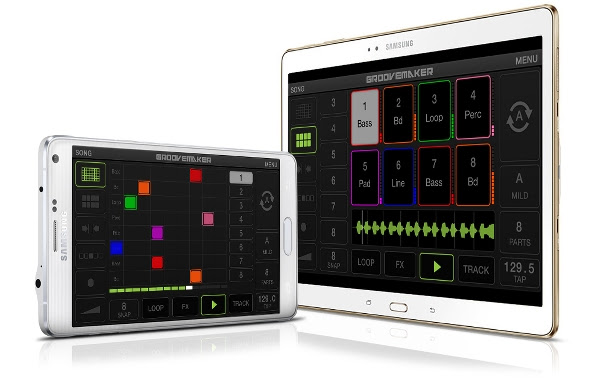
January 19, 2015 – IK Multimedia, the leader in mobile music creation technology, is pleased to announce that GrooveMaker® 2, its revolutionary remixing app, is now available for Android devices. With a full spread of features and an intuitive interface, GrooveMaker 2 lets Android smartphone and tablet users make non-stop electronic dance mixes in real-time and sound like a professional DJ.
Remixing reinvented on Android
IK Multimedia’s history as pioneers of the computer music industry dates back for 19 years when it released its first music software, GrooveMaker. History was made again when GrooveMaker made its debut on the App StoreSM as one of the first real-time audio apps for iPhone and iPad. Now with nearly 3 million downloads on iOS, GrooveMaker will help music fans make music with their Android devices anywhere in the world, regardless of skill level.Now available for smartphones and tablets running Android 4.1 and above, GrooveMaker 2 lets users manipulate pre-arranged sets of loops in real time – just like a DJ or live electronic music performer – thanks to its patented “groove generator” technology. These loops have been created to always sound good together, and they encompass virtually every style and sound imaginable.
A sound for every dance floor
GrooveMaker 2 gives users packs of loops organized as song packs. These song packs comprise a huge amount of musical styles: House, Dubstep, Hip-Hop, Techno, Trance, Electro, Drum and Bass, Reggae, Reggaeton, Rock and more – there are even signature song packs from artists like Ace from Skunk Anansie, Chris Domingo and Cool & Dre. Each song contains over 60 loops that cover essential categories like kick drums, basslines, pads, effects, percussion and more. GrooveMaker 2 also lets users import their own sounds and loops directly from their music library; its editing and auto-sync features allow for endless and effortless creative exploration.
Professional DJ results made easy
With GrooveMaker 2, getting great sounding results is easy as touching a button. Users can draw in grooves on its grid interface or use its Randomix feature to have the app automatically mix and match on its own. GrooveMaker 2’s intuitive controls make it easy to lock, solo and mute loops, change volume and panning and save favorite sequences for future use. Its groove length control and advanced time-stretch features allow for even further creative applications, allows GrooveMaker 2 to sync up with and be used as a performance tool in even the most sophisticated of DJ setups. When used with IK Multimedia’s mobile mixer, iRig MIX, GrooveMaker 2’s X-Sync feature detects the BPM from an external audio source and automatically syncs to the groove.
Killer special FX
In addition to its streamlined sequencing, GrooveMaker 2 also sports a suite of powerful effects that can be used for live performance. These include classics like Filter, Delay, Stutter, Flanger, Crush and Noise as well as more creative effects like Twist, Brake, Spin and Tail.
Pricing and availability
GrooveMaker 2 is available now for Android on the Google Play Store for $9.99/€8.99. A free version is also available.
For more information, please visit: www.groovemaker.com
To see the official video of GrooveMaker 2 for Android in action, go to: www.groovemaker.com/video
iRig 2: The sequel to the most popular guitar interface of all time
IK Multimedia announces iRig 2, the sequel to
the most popular mobile guitar interface of all time
The successor to the guitar interface that sparked the mobile music revolution improves sound quality, adds features and allows wide cross-platform compatibility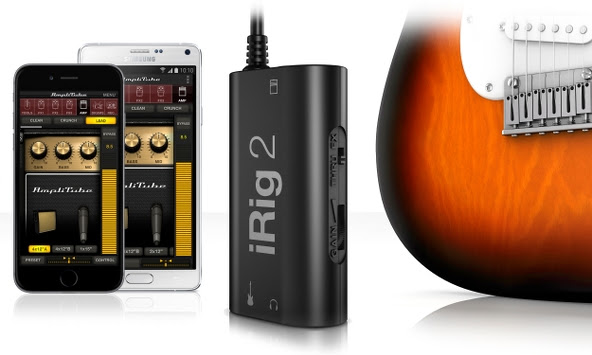 January 5, 2015 – IK Multimedia, the leader in mobile music creation, is pleased to announce iRig® 2, the latest addition to its iRig range of products. The sequel to IK’s groundbreaking and best-selling iRig guitar interface, iRig 2 builds on the design that made its predecessor so popular. It pairs great sound and streamlined convenience with new updated features like versatile input gain control, a ¼” amplifier output jack and Android compatibility. iRig 2 makes for a versatile tool that’s perfect for practice sessions, live performances, jamming with friends, recording and more.Now everyone can plug in their guitar or bass to enjoy killer tone on their iPhone, iPad, iPod touch, Mac or Android device – with the release of iRig 2, the world’s most popular guitar interface is better than ever before.
Powerful performance
The biggest update that iRig 2 brings is its new ¼” amplifier output. This augments its 1/8″ headphone output by allowing musicians to use iRig 2 and their mobile device along with their favorite amplifier, without the use of an adaptor. This opens up a whole world of opportunities when paired with AmpliTube®, IK’s powerful guitar and bass multi-effects processor. iRig 2 now lets musicians easily use AmpliTube’s vast library of meticulously modeled virtual stompbox effects, amplifiers and other gear as a part of their physical rig.iRig 2’s added switch allows dual-mode operation: FX lets musicians send a processed signal to their amplifier’s ¼” output from apps like AmpliTube. THRU sends a clean signal, letting musicians use their mobile device as a tuner, recorder or other utility while using their classic analog rig, which maintains the purity of a 100% analog signal path.Made for both practice and performance, iRig 2 comes with a removable support that, together with a Velcro strip, allows easy mounting of iRig 2 on any mic or music stand, making iRig 2 perfectly at home on stage during live performance.
Plug and play simplicity on every device
iRig 2 has been made to be compatible with the widest range of instruments and mobile devices possible. Its built-in universal 1/8″ TRRS output connector provides a true plug-and-play experience on iPhone, iPod touch, Mac and Android. Likewise, its 1/4″ instrument input works with any guitar, bass or line-level instrument. To ensure the best sound quality, iRig 2 comes with an input gain thumbwheel that allows musicians to dial in the perfect setting for their setup – iRig 2 works just as well when its connecting a wailing 3 humbucker electric guitar to a Samsung Galaxy Note 4 as it does a jazzy archtop or mellow electric piano to an iPhone 6.
Killer guitar tone on Android
iRig 2 is now widely compatible with Android smartphones and tablets. Its 1/8″ output connector is compatible with many popular Android devices produced by manufacturers like Samsung, LG, Motorola, HTC and more – any device with an 1/8″ input that supports the CTIA/AHJ wiring standard works with iRig 2.Additionally, users with Android devices that support Samsung Professional Audio can enjoy AmpliTube for Android, a special version of the popular multi-effects processor that brings a full spread of meticulously modeled virtual gear to the Android platform.
A full suite of apps
iRig 2 is ready to go right out of the box. It comes with a powerful cross-platform suite of apps and software that includes free versions of AmpliTube for iOS, Android and Mac/PC. And while iRig 2 is the ideal companion to AmpliTube, it also works with any other recording, processing, tuning or music app.
Pricing and availability
The new iRig 2 interface will be available in Q1 2015 via the IK Online Store and select music and consumer electronics retailers worldwide for $39.99/€29.99 (excl. taxes).
For more information, please visit:
www.irig2.com
www.amplitube.com
IK Multimedia brings real time vocal processing to Samsung Professional Audio devices
November 20, 2014 – IK Multimedia, the leader in mobile music apps and accessories, is pleased to announce another breakthrough in mobile music creation: the release of EZ Voice™ and iRig® Mic HD-A. Together they bring real-time vocal processing and digital audio microphone recording to Android devices for the first time.
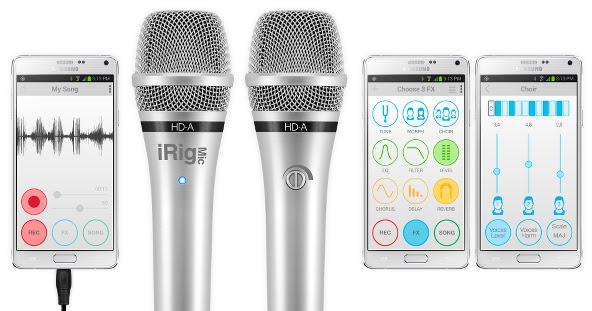
With EZ Voice, users will be able to enjoy real-time vocal processing and recording on the latest generation of Samsung devices with Samsung Professional Audio, like the Samsung Galaxy Note 4, Galaxy Note Edge and more.
iRig Mic HD-A is the first digital microphone compatible with all Samsung devices running Samsung Professional Audio as well as other devices running the just released Android 5 “Lollipop” operating system thanks to its new USB audio support.
Real time vocal processing on Android
The new EZ Voice for Samsung Professional Audio devices offers a simple and intuitive way for every singer to create and capture great sounding vocal performances while on the go.
EZ Voice users can process their performances with effects in real-time by applying up to 3 of the available 9 high-quality effects. EZ Voice includes traditional studio standbys like Reverb, Delay, Chorus, EQ, Filter and Level. It also features creative options like Tune, Morph and Choir, which let users apply more radical alterations like changing a vocal performance’s key or gender or even adding in extra voices and harmonies. Users can apply these effects individually or select from a number of included presets for a truly immediate recording experience.
EZ Voice also features a streamlined interface that takes the work out of the recording process – it lets users import any song from their music library and use its included “NO VOICE” function to quickly remove the original vocal track. It clears the way for anyone to step in and give a show-stopping performance.
Available on the new Samsung Galaxy Note 4 and Galaxy Note Edge – and soon to be available on the Galaxy S5, Galaxy Note 3 and other devices – this app allows singers and vocalists to enjoy real time effects processing anytime and everywhere.
The new Samsung Professional Audio compatible devices come with Samsung Soundcamp, a free and full-fledged music studio app that lets musicians record and compose full songs entirely within the device. The EZ Voice app can be used as a standalone application but also as a plug-in inside the new Soundcamp studio for full recording and play-along uses.
Digital audio capture on Android
And now Samsung and all Android 5 users can enjoy high-quality digital recording thanks to iRig Mic HD-A. It’s the first pro-quality digital microphone for Android that allows plug-and-play connectivity via its included USB OTG cable (an additional USB cable is also available for use with PC). The input signal can be set using the onboard gain control while a multicolor LED provides sound level monitoring.
Featuring a 24-bit audiophile-grade A/D converter, a 44.1/48 kHz sampling rate and a low-noise/high-definition pre-amp, iRig Mic HD-A offers unmatched versatility: Singers can perform and record their voices. Musicians and audio engineers can record instruments in the studio and on stage. And broadcasters and journalists can record interviews and other audio sources while in the field. In all cases, iRig Mic HD-A produces recordings with high-fidelity digital sound and superior clarity previously unavailable on the Android platform.
Along with the iRig Mic HD-A, users can also choose from IK’s current range of analog microphones, like the iRig Voice, iRig Mic and iRig Mic Cast. All of these use the mini jack for the input/output connection with the device. Now singers, vocalists and everyone who needs to capture high-quality audio on their Android devices have multiple options suiting a wide variety of needs, applications and budgets.
But there’s more to IK’s line of microphones than EZ Voice, they’re also compatible with iRig Recorder (IK’s quick and easy audio recorder) and any other Android app that uses the mini jack or USB input to record and capture audio.
Pricing and availability
The new EZ Voice app for Android/Samsung Professional Audio is available through the Samsung Galaxy Apps store for only $4.99/€4.49. A free version is also available. EZ Voice and iRig Recorder are also available on the Google Play store.
The new iRig Mic HD-A digital microphone will be available in December 2014 via the IK Online Store and select music and consumer electronics retailers for $129.99/€99.99. The iRig Voice microphone is available for $39.99/€29.99, the iRig Mic is available for $59.99/€49.99 and the iRig Mic Cast for $39.99/€29.99 (prices excluding taxes).
| For more information, please visit: www.ikmultimedia.com/ezvoiceandroid www.ikmultimedia.com/irigmichda www.ikmultimedia.com/irig |
 |
 |
For the complete list of Android mobile music accessories:
www.ikmultimedia.com/android
MediaFire Launches Native iOS 8 Update With “Power Upload” Feature
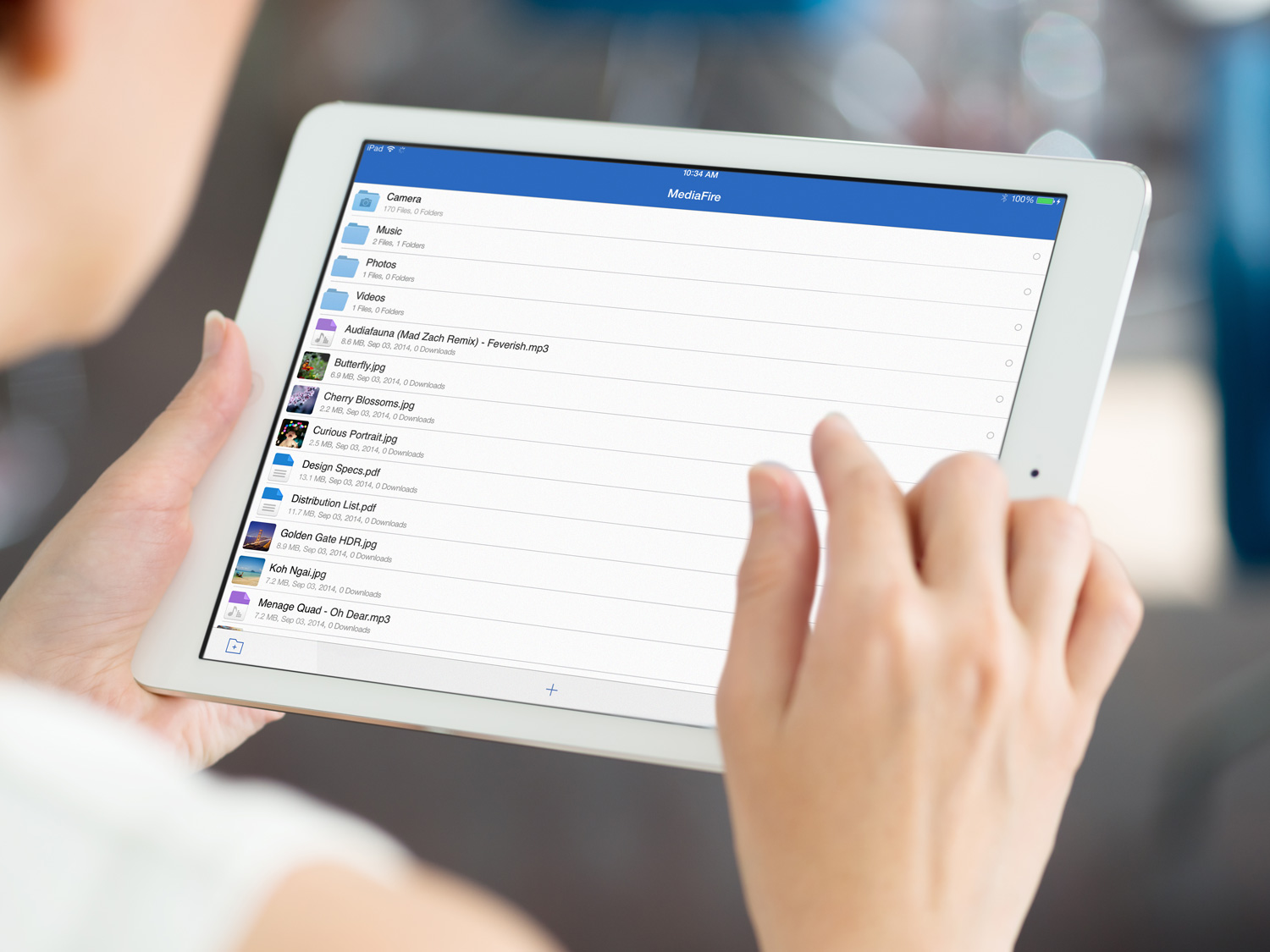 HOUSTON, TX–(November 18th, 2014) – MediaFire, a leading provider of consumer online storage solutions, today announced the release of MediaFire for iOS 8, our latest and greatest cloud storage application for iPhone and iPad users.
Available today for free on iTunes, MediaFire for iOS 8 adds a variety of new features that make it easier than ever to access, and share all of your files on the go, including new photo and video playback options, a new “Power Upload” mode for faster data syncing, and a new optimized interface designed to take advantage of the extra screen real estate offered by the iPhone Plus.
To download MediaFire for iOS, 8 visit: https://itunes.apple.com/us/app/mediafire/id555646196?mt=8
MediaFire’s newest feature, called “Power Upload” allows iOS users to effectively double their upload speeds. The feature can be toggled on and off as needed, in order to quickly and easily upload all of your photos and videos from your iPhone or iPad.
Now iOS 8 users can use MediaFire to access, protect, and share all of their mobile photos, videos, automatically. Files are safely stored in the cloud, and can be automatically synced and accessed on your home computer (via MediaFire Desktop), or the web via MediaFire’s online interface. MediaFire Desktop is currently available as a free download for both OSX and Windows users.
“Everyday, over a Million iOS users choose MediaFire to access, share, and safeguard the files that matter most to them,” said Derek Labian, president and CEO of MediaFire. “Whether you are looking to simply share a file, or to back up and access all of your media from the cloud, MediaFire is the simplest and most affordable cloud storage service on the market today.”
Starting at just $2.50 per month, or 24.99 a year for one terabyte of online storage,
 In addition to paid accounts, MediaFire continues to offer users up to 50 gigs of cloud storage for free.
In addition to today’s launch, MediaFire’s complete mobile SDK for iOS has been updated with additional support for iOS 8 devices, enabling developers around the world to easily integrate cloud syncing and storage into their mobile applications.
For a full list of resources and tutorials, visit http://www.mediafire.com/developers/
MediaFire iOS 8 Features:
- Automatically backup your camera photos! – MediaFire for iOS lets you automatically upload and protect all your photos and videos.
- Power Upload -A new selectable mode that allows you to harness the full upload speed from your iOS Device.
- Stream music and videos – Stream your music and video collection anywhere and anytime.
- Share documents and media directly from your mobile device – Easily share through email, sms, or your favorite chat app!)
About MediaFire:
MediaFire is an online storage and collaboration company focused on providing regular people with a complete and easy-to-use solution for managing their digital stuff. Available for iPhone, Android, OSX, Windows, and Web, MediaFire is the only online storage solution to offer unlimited downloads, download resuming, zero wait times and more, all for free. Every month, more than 150 million people use MediaFire to quickly and securely store, organize and share all their personal and work data.
For Developers
MediaFire’s API solutions enable developers to quickly and easily integrate cloud storage and file sharing into their applications. For information on how your organization can use MediaFire to enhance your business, visit http://developers.mediafire.com/, or contact developers@mediafire.com for more information.
AVANTEK USB Car Chargers (Review)
 AVANTEK USB Car Chargers
Claybox Limited
$9.99 to $16.99 Amazon
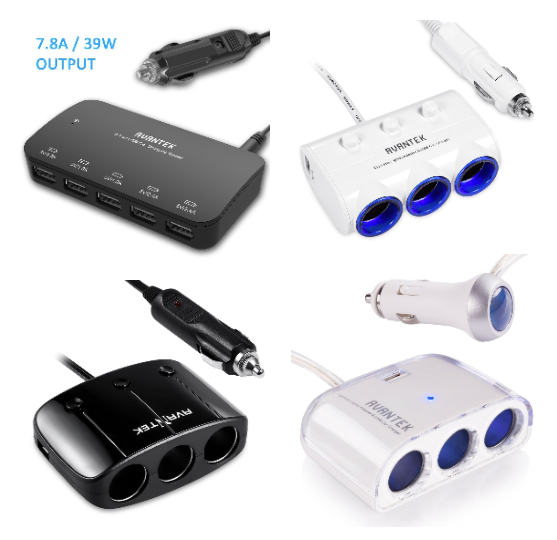
Do you dread long road trips because either you have to turn off your devices to save battery life or you have to buy those really cheap (not well made) USB charger things in service stations or convenience stores only to toss them into the trash after a single use or two. And you can only charge one or two (if you’re lucky) devices at a time. Frustrating, isn’t it? Well, for just about the same price as dime store charging gadgets, you can have a real multi-device charging station for your long trips.
Seriously. For $16.99, you can charge up to five devices at once (upper left device in picture). It’s the one that I take with me on road trips. My wife, daughter, and I are able to charge our three iPhones and my daughter’s iPad all at once. Try that with a convenience store charger.
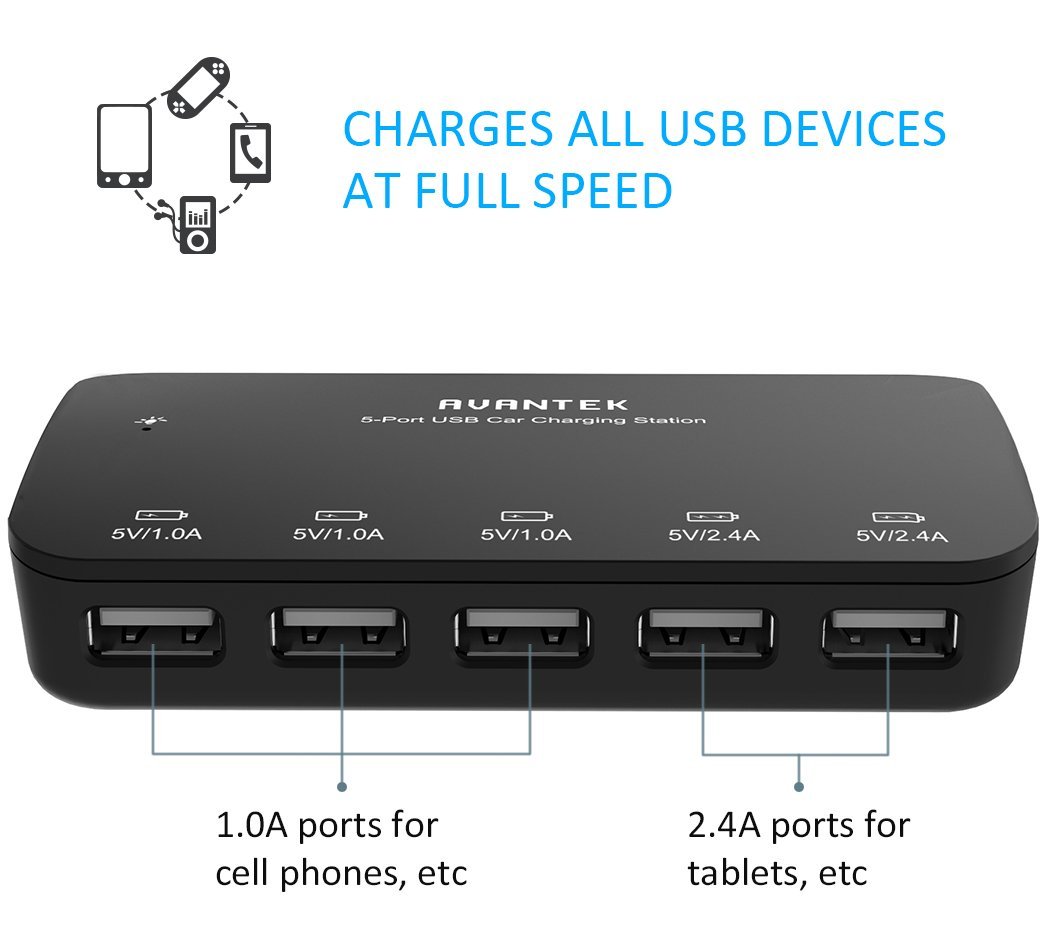
The other chargers shown have two USB connectors plus three cigarette lighter-style socket charger ports. These units are socket port multipliers. With them, you can charge or power a variety of gadgets, tools, and appliances. You aren’t limited to USB.
My sons chose the socketed chargers for themselves because they have a variety of “thingies” that they want to power. I don’t know what “thingies” are and I don’t want to ask. I feel better not knowing all the details. But whatever those details are, they’ll have plenty of power available to them.
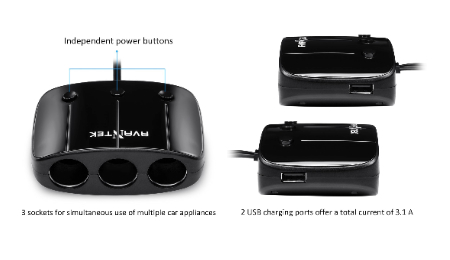
Why it’s Frugal: AVANTEK power products are frugal because they save you both time and money. They save you time by allowing you to charge multiple devices in your car and they save you money because you don’t have to buy multiple chargers nor do you have to re-buy chargers because the ones you bought were cheap pieces of garbage. Frugal and useful. You just can’t beat that combination.
Surprisingly, I don’t have even one bad or slightly negative thing to say about these products. They do what they say they’ll do and they do it inexpensively. The manufacturing quality is very high, the designs are good, and they work. It’s hard to find fault with a product that is so well thought-out, so useful, and so frugal all in one package.
 What more can I say than to tell you that my wife and my two college student sons love these? I can tell you that I love them too. Honestly, every vehicle you own should have at least one of these devices available because these days we depend so much on our personal technology that you can’t do without power.
Rating: 10/10
Recommendation: A must-have for every vehicle and every member of your family. These would make great gifts.
Justin Power Bank and Power Stick (Review)
 Justin Power Bank and Power Stick
Innovative Technology
Power Bank: $29.99/Power Stick $14.99
The list of Justin power products is long. You can find power products to meet just about any need. The two products that I’m reviewing here are the Justin 2,200mAh Power Stick and the Justin 6,000mAh Power Bank. This review is a bit different because it covers two products instead of just one. They serve the same function so that’s why I’m combining them here.
You can find Justin power products at several retail stores including Kohl’s and Staples. I mention those two because they popped up first in a Google search for the manufacturer ID for each product. Prices vary among retailers, but the ones I’ve given are pretty standard.
I’ve review several portable charger products on this site and there are two things to remember with any of them: You have to recharge your charger and you have to bring your USB charging cable with you, as well as the charger, or the charger won’t do you any good at all.
 The Justin 2,200mAh Power Stick (Stick) comes fully charged out of the box and will provide you with at least one full charge for your phone or tablet. The unit is small enough to fit into any pocket or purse. The Stick comes in several standard colors: black, silver, blue, purple and red. I think there’s also a camo version available in some stores, so if you’re into camo, search for it at Kohl’s.
My daughter loves the blue Stick and takes it everywhere with her. She drops it into her backpack and away to school it goes. I don’t think she will ever be without it again. Texting, YouTubing, playing music, and using a camera burns a lot of battery, so it’s no longer an option not to have spare power available.
The Justin Power Bank and the Justin Power Stick would make great giveaways or prizes at trade shows and conferences.
My wife loves the Justin 6,000mAh Power Bank (Bank). No, she has no clue what 6,000mAh is, but she does know that a fully charged Bank provides at least three full phone or iPad mini charges for her. What else does she need to know? I’m the tech guy. She simply receives the bounty of her own personal tech sla–professional at her disposal.
 The Bank isn’t really pocket friendly, but it is purse friendly and certainly is desk friendly. In fact, my wife usually keeps it in her purse for when she forgets to close all 15 apps on her phone or on her iPad mini. Yes, I did teach her how to close them, but alas, she cares little for such annoyances, especially when there’s the Bank to save her from her folly.
The Bank, when sitting on a desk or some surface, provides you with a stand onto which your phone rests. The stand slot gives it just the right amount of tilt so that you can face time or type comfortably on it without contorting your hands or peering over it like an old newspaper guy typing on a Royal typewriter. The Bank is for people who either have multiple devices or who have one that they use a lot.
You don’t have to own Apple devices to use Justin’s Power Bank or the Power Stick. They’re compatible with any device that uses a full-sized USB connector on one end of its charger cord. One of the best things about Justin’s products is that they’re ready to go right out of the box*. You don’t have to take the charger home and plug it in for 12 hours. Buy it, open the box, connect it to your phone, tablet, or whatever, and charge away.
Why it’s Frugal: Charger products are frugal by design. Justin’s power products are frugal because of what you get out of them: a lot of power for the price. At $14.99 for the Stick and $29.99 for the Bank, they’re very frugal choices.
I like Justin power products because they’re obviously well designed, well made, and well-priced. And you know that I don’t mind complaining about product pricing if I feel that it’s too high or not justified. These products are appropriately and competitively priced. Follow the manufacturer’s recommendations for keeping your Justin power products healthy and happy, so that they’ll last longer. My feeling is that you can buy Justin power products with confidence and without buyer’s remorse. Small, powerful, and frugal. What else do you want?
Rating: 9.5/10 for both products.
Recommendation: Buy them for yourself or as a most appreciated and practical gift.
*The products come partially charged, not fully charged.
iBlazer Flash for Smartphones (Review)
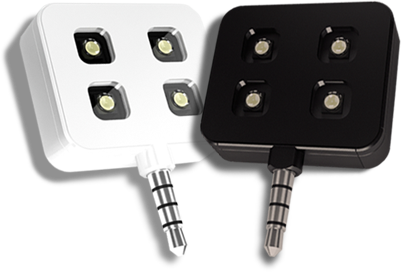 iblazr LED Flash Unit
iblazr.com
$49.99
The iblazr LED Flash Unit for Smartphones (iblazr) is an absolutely essential accessory for any serious phoneographer. Whether you’re making short films, taking photos, or providing an extra light source for photographic equipment, the iblazr is a lighting dynamo that easily fits into any pocket or bag. It is a source of continuous light or flash for your visual work.
The iblazr package comes with one, four-light iblazr LED flash unit, an instruction booklet, a microfiber drawstring carrying pouch, and a 3.5mm to USB interface charging cable.
- 70 degree beam
- 5600K color temperature
- >80 CRI
- 27mm (1 inch) x 32mm (1.25 inchess)
- 10 grams
- Three Power Modes: 16, 60, and 120 Lux at 1 meter
- Easy battery level check
- USB charging
- 3.5mm jack
- iblazr app takes movies and photos
- Continuous lighting or flash
- Can be used off the device
- Cold shoe mount for DSLR and SLR continuous lighting
The founders and iblazr team members are obviously visionaries who know what we phoneographers like for versatile lighting. When you read the list of features, note that many of them are advanced for such a small and inexpensive device. I’m usually a bit critical of accessories like this that are priced in excess of about $39, but not this time. I think the $50 price tag is just right. And, no, you can’t get it cheaper on Amazon–I looked.
 I particularly like the feature that allows you to have continuous like off the camera or in the so-called “cold shoe”. The cold shoe is really just a plastic holder for the iblazr that slides into the hot shoe on your camera. It’s handy because how else do you get continuous, mobile lighting for your DSLR or SLR? Think of trying to provide some continuous lighting with any of the lo-fi cameras such as the Holga, Diana, LomoKino, or Smena. The answer is that you can’t–not easily anyway.
The iblazr makes photography more fun because good lighting is essential to produce good images. How many times have you lost a great shot because of poor lighting or lighting that was off or cast the wrong shadows? Well, you won’t anymore thanks to the iblazr.
Why it’s Frugal: The iblazr is frugal because it is an expensive way to deliver a lot of light on your subject. What’s frugal about that, you ask? Have you priced photographic lighting? Have you ever priced portable photographic lighting? Have you looked at portable lighting at all? The way I figure it, the iblazr is very frugal because it does so much for so little. Frugal.
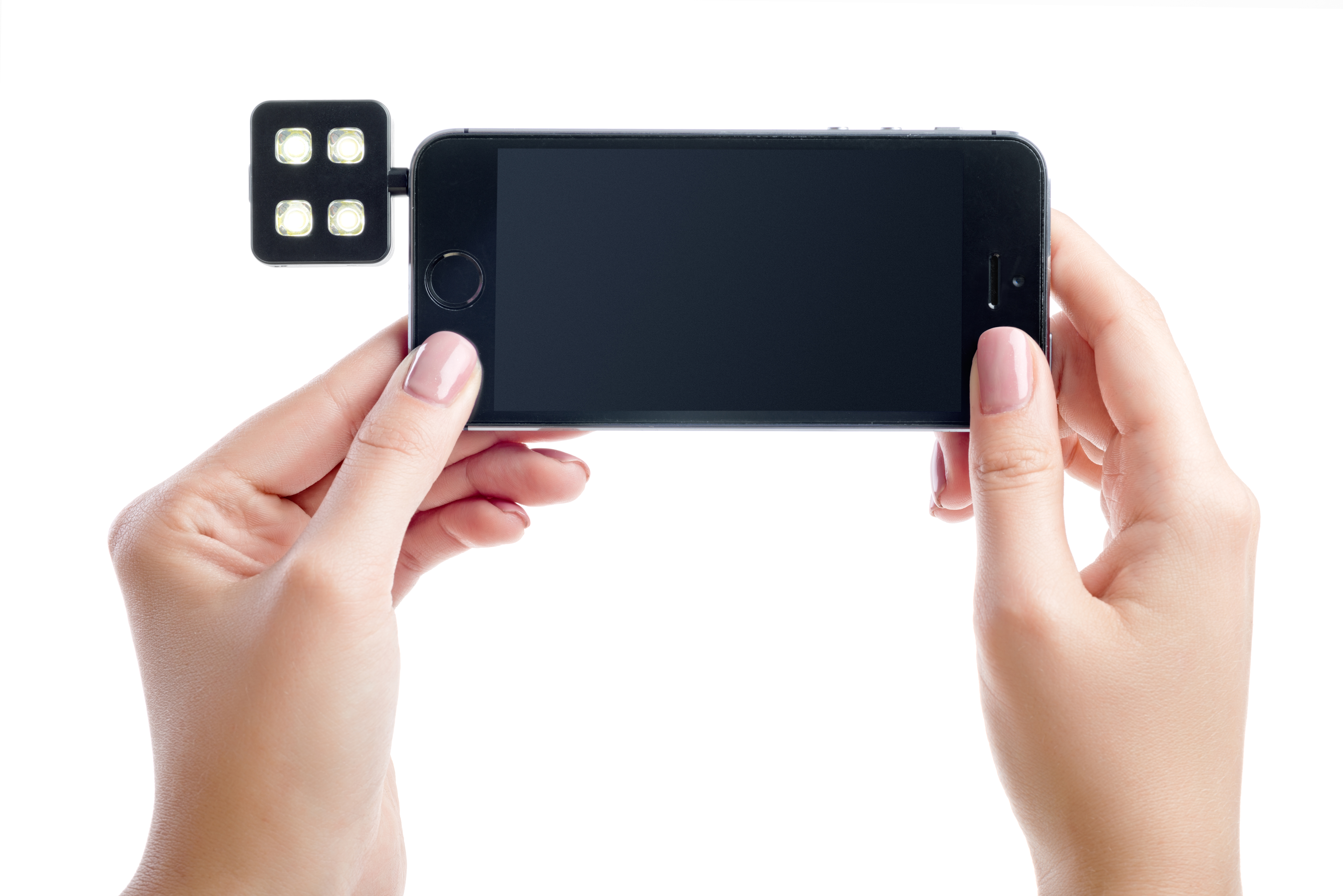
There’s nothing that I don’t like about the iblazr LED flash unit. I can’t find anything wrong with it. It does everything I’d want it to do if I’d designed it myself. And I’d never have thought of the cold shoe attachment, so it’s better than what I could have dreamed up.
Rating: 10/10
Recommendation: If you’re a phoneographer or a photographer who needs portable light, you must have it.
Open Mic Night: IK Multimedia’s iRig Voice Microphone (Review)
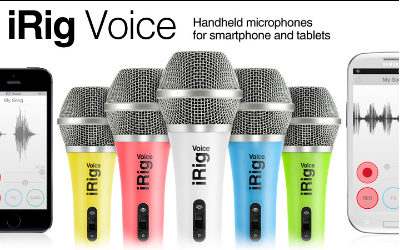 iRig Voice Microphone
IK Multimedia
$39.99
If you’re like a majority of surveyed people, you want to sing. You also want to write what you sing. Singer/songwriters are a very common person type. Other than a good singing voice and an audience, you need some basic equipment with which to record your masterpieces, namely a microphone and some recording equipment. These days, your required recording equipment can be emulated with software. You can record, mix, add effects, and export your works to a variety of formats for public consumption.
The iRig Voice microphone is a standard microphone with a 3.5mm jack, but also includes a free working lite recording studio app named EZ Voice. The input jack also features an earphone jack so that you can speak and listen through the same interface.
The EZ Voice App (Free) allows you to do some basic voice recording, add some live effects, and record foreground vocals with your songs. But, the iRig Voice microphone is compatible with other multimedia apps as well. It works on the iPhone, iPad, iPod touch, newer Mac models and Android devices. I’ve personally tested it on my iPhone 5, iPad 4, Mac mini, Windows Phone (Nokia 928B) Metro, and my Android-based HP Slate 7+. All successful and perfect.
Audio App Compatibility List
- EZ Voice
- Dragon Dictation
- QuickVoice
- Skype
- SP Multitrack
- Garage Band
I recorded a short message using the EZ Voice app for you as a demonstration.
I don’t sing well enough to record a music demo, so you’ll have to use your imagination.
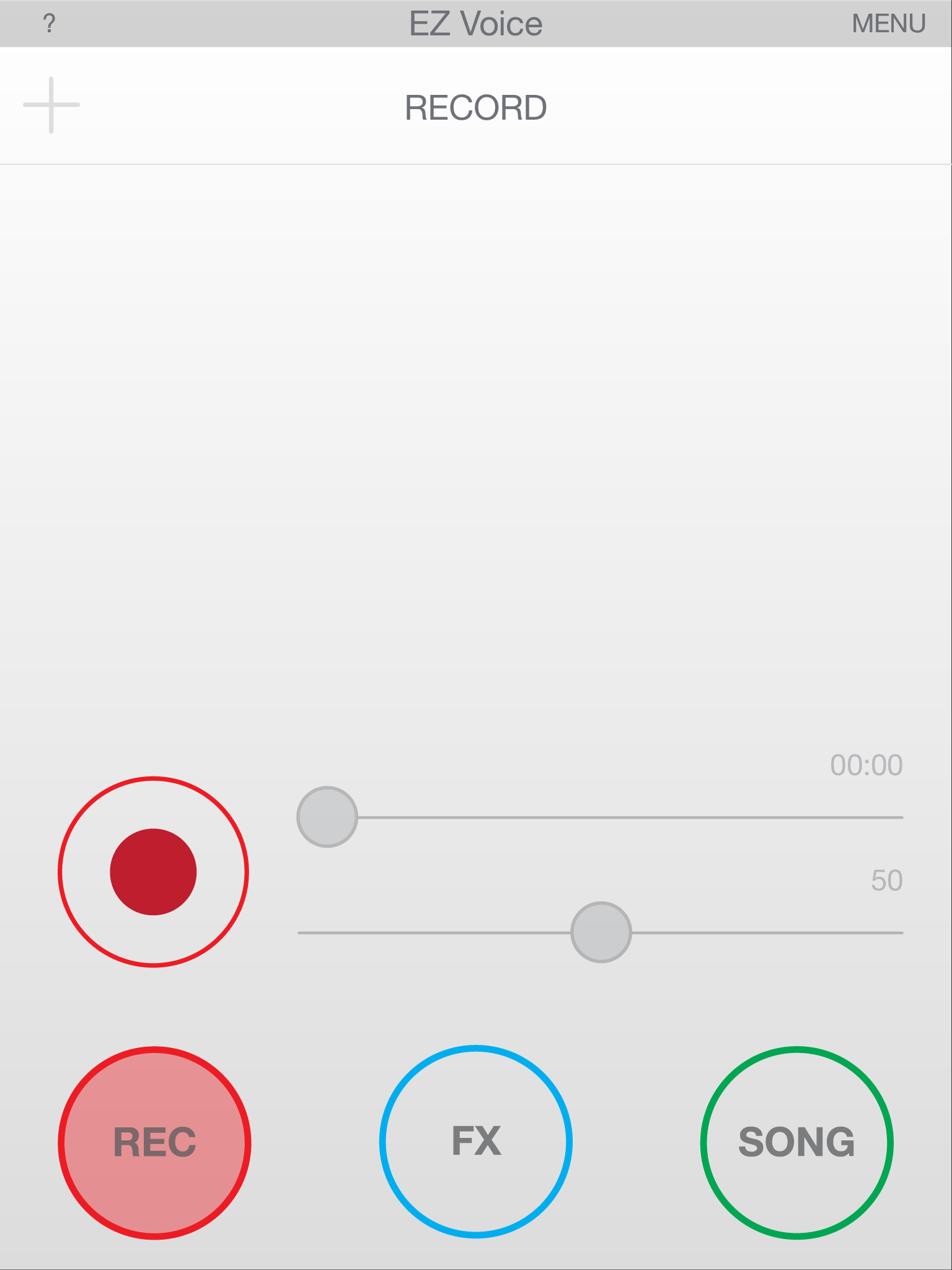
EZ Voice Main Screen
The microphone feels and sounds like any professional microphone I’ve ever used. The mic and apps worked together the first time without any issues. I did have to turn off Siri on my iPhone and on my iPad, but that might just be my experience and not yours. Siri kept popping up when I spoke into the mic during testing, so to avoid that annoyance, I disabled Siri.
This is one of the few products that I’ve ever reviewed that I’m absolutely convinced that the pricing is spot on. At $39.99, the iRig Voice is a great value. It performs as well as any microphone that I’ve ever used. I do suggest, as I would with any microphone, that you purchase a pop filter (about $3.00) to alleviate wind noise, pop, and some ambient noise.
Don’t use the mic when you’re charging your device because it creates a little bit of static, or it did for me, on my iPhone.
Why it’s Frugal: The iRig Voice microphone is frugal because its $39.99 price tag is perfect for anyone who wants to get into podcasting, song recording, or voiceover acting without spending a huge amount of money. It’s a great microphone at a great price. It’s an excellent value. Sure, you could spend $1,000 on a better microphone, but why would you?

EZ Voice – List of Effects
The microphone’s clarity is demonstrated very well when using it with the Dragon Dictation app on the iPhone or on the iPad. I’m not the best at enunciating my words (It’s a Texas thing), but the software picked up and correctly typed out every word I said on my iPhone and on my iPad. That’s impressive. I’ve never had that happen before and I always use the same lines for testing:
“Now is the time for all good men to come to the aid of their party” and “Conjunction Junction, what’s your function”.
Those are two fun phrases that can confuse dictation software due to speech patterns. If you don’t think you can confuse the software, try it by using your device’s built-in microphone. It almost never gets them perfect.
Features
- Handheld vocal microphone delivers professional sound quality
- Compatible with iPhone, iPad, iPod touch, newer Mac models and Android devices
- Compact cardioid pattern minimizes feedback
- Constructed of durable, lightweight thermoplastic
- Available in 5 colors: Green, Blue, Yellow, Pink and White
- Comes with EZ Voice app
- Works with dozens of karaoke, sing-along and music making apps
- Headphone jack for real-time monitoring
- Convenient on/off switch located on the mic
EZ Voice, while free of charge, does prompt you to purchase sound effect add-ons for $0.99 each. I purchased Tune and Morph, although I’m not sure exactly how to use them. I tap the FX icon and then tap the settings but the same list of settings shows up for each, so I must be doing something wrong. I’m not sure at this point if it’s me, that the app isn’t intuitive enough, or that it’s working as designed and I just don’t realize it.

EZ Voice – In App Effect Purchases
In either case, $2.00 isn’t a lot to spend trying out an app. It’s just too bad that it isn’t more obvious how to use the effects. There is a long list of effects that cover everything from arena to robotic to extremely deep to childlike. The effects are a lot of fun. There is one very cool effect called ‘Diana’ that changes your voice into a normal sounding female voice. It’s useful in case you need to sing a female part or speak a female part but don’t have a woman to provide the voice for you. It would work great for recording script dialog or for creating a voiceover for a product or service. It’s very impressive and I recommend it.
The app also allows you to sing along with and record your favorite songs. The instrumental parts are normal volume but the original vocals become background for you. EZ Voice is very well constructed and well thought out app. I do wish it were more obvious how to use the effects, but that isn’t a major flaw, but a little annoying.
I really like the iRig Voice microphone and the EZ Voice app. The microphone is a welcome addition to any musician’s, aspiring singer/songwriter’s, or voice artist’s toolbox. It’s cool to have multiple colors from which to choose. The only problem is that you might not be able to choose a color without a little buyer’s remorse. I suppose that you could collect all six and have one for every mood or gig.
I chose the green one for review because that lime green color has a special meaning for my daughter and me. The microphones are sturdy and well-built. They’re heavy on the end, just like you’d expect, and although IK Multimedia sells a professional digital microphone (iRig Mic HD), this one feels right and sounds right to me. But, this mic is probably best suited for song demos, podcasting, and voiceover work where extreme quality isn’t needed. The ads tell you that it’s perfect for karaoke and portable vocal studio. I’d have to agree, but you won’t be at all disappointed with the quality or the good looks of this mic. For $40, you can’t go wrong.
Rating: 9/10
Recommendation: Buy it, have some fun, and maybe hit the big time!

EZ Voice – Recording My Test Message
Note: I tested the iRig Voice microphone on my Windows Nokia 928B phone. This is not an officially ‘certified’ product and IK Multimedia does not endorse the use of the microphone on the Windows phone, so your mileage may vary. I tried it just to see if it would work and it did without any issues, but don’t blame me or IK Multimedia if the mic doesn’t work on your Windows phone.
You can also follow IK Multimedia and share your audio and video material on our YouTube, Twitter, Facebook and SoundCloud channels.
Also, check out the complete range of iOS accessories and apps for vocalists and recording!
– iRig MIC HD, digital handheld microphone for iPhone/iPod touch/iPad and Mac
– iRig Voice, new colored handheld microphones for smartphones and tablets
– iRig MIC, the first handheld microphone for iPhone/iPod touch/iPad and Android
– iRig MIC Cast, ultra-compact microphone for iPhone/iPod touch/iPad and Android
– iRig PRO, universal audio/MIDI interface for iPhone/iPod touch/iPad and Mac
– iRig PRE, XLR microphone interface for iPhone/iPod touch/iPad and Android
– iLoud, studio quality portable speaker
– VocaLive, professional vocal effects/recording suite
– iRig Recorder, audio recorder and editor
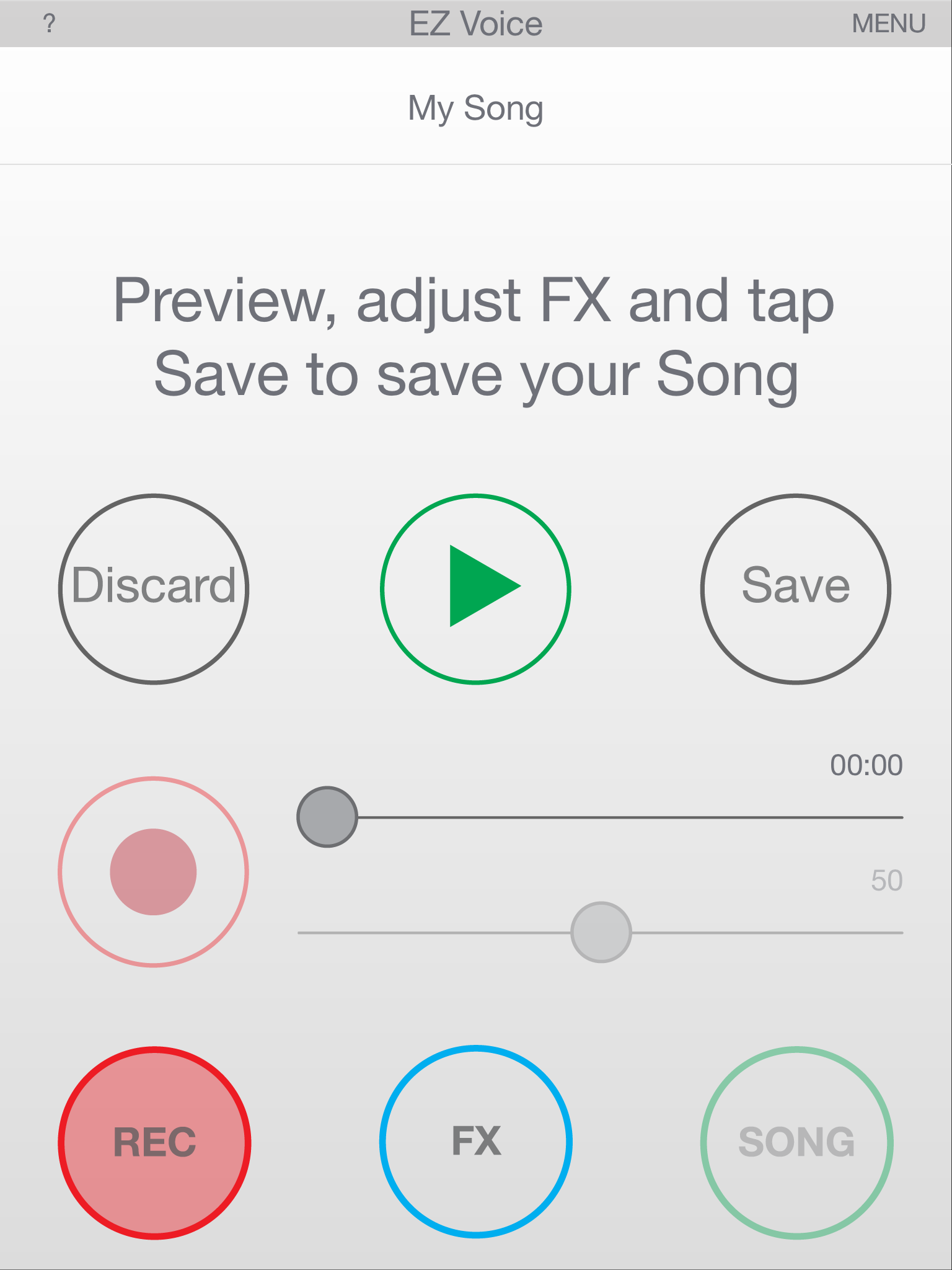
EZ Voice – Recording Playback
And also check out IK‘s:
– iKlip, range of stage and studio support and stand for your mobile device
– iLine, range of quality audio cable adapters
– All the music creation accessories and apps
– All the music software for Mac/PC
IK Multimedia is a “Musicians First” music technology company. It makes a complete range of sound and tone solutions for Guitar & Bass players, Keyboardists, Sound Designers, Engineers, DJs and Producers. You can check out their full line of professional mobile and studio performance products at www.ikmultimedia.com.

 Techopedia
- An error has occurred; the feed is probably down. Try again later.
Datamation
- USA₮ Modernizes American Payments with High-Impact St. Patrick’s Day Activation in Times Square
- Google and NextEra Strike AI-Powered Grid Deal
- NYT Sues Perplexity AI in Copyright Conflict
- Cloudflare Outage Affects Major Websites
- OpenAI Forces AI to Confess Its Lies
- OpenAI Declares Code Red as Google’s Gemini 3 Threatens ChatGPT
- Coupang Breach Exposes 33.7M South Koreans’ Data
- ChatGPT Celebrates Third Anniversary
- Asahi Group Reveals Findings of Cyberattack
- OpenAI Discloses Mixpanel Security Incident Affecting Some API Users

 The Frugal Networker
You must be logged in to post a comment.