Archive
Screenwriters Unite and Discover WriterDuet
 WriterDuet
WriterDuet.com
Collaborative Screenwriting Site
Free
[This post is a product spotlight and not a review]
FADE IN:
Guy Goldstein has created one of the best screenwriting tools that I’ve ever seen and used. I’ve used several: Celtx, Final Draft, Microsoft Word with Screenwriting Template, and Sophocles, to name a few. One of the cool things about WriterDuet is that you can collaborate in real-time with someone else on a script. You can immediately see updates, chat, share ideas, and more. This means that your writing team no longer has to all be in the same room or on the phone trying to fumble around with some white board or screen sharing program.
WriterDuet has an easy to use, intuitive interface that gets you going fast. You really need almost no experience with screenplay formatting to use it–it helps but it isn’t absolutely necessary.
And Guy listens to his users. I wrote him that I’d love to have the ability to create an outline and have a place for notes. He created it within a few days and emailed me back for feedback. The new tools were perfect and exactly what I was looking for.
It’s a true collaborative tool that I’d recommend to anyone who writes scripts alone or in a group. To me, WriterDuet is like the WordPress of screenwriting: easy, unencumbered, and free. Well, it’s like WordPress with one notable exception: Guy responds to his emails. So, there’s that.
To see WriterDuet in action, check out the video below and meet Guy Goldstein face-to-face (virtually speaking).
 As you can see from the image (right), the interface is clean and ready to help you on your way to screenwriting success. There’s a built-in spell checker, all the screenwriting features you need such as parentheticals, actions, dialogues, character, and more. If you don’t want to type, you can click the microphone icon and speak your script to get a feel for how your dialogue sounds as it’s written to the screen.
You can download your scripts to PDF format or into a variety of other popular commercial screenwriting tool formats. There’s also an option for uploading your scripts so that you can collaborate on them.
So, what more could you want from a cool screenwriting tool? Well, how about an offline version? You know, a standard, installable software version of this great tool. That’s exactly what Guy is working on now. He’s started a Kickstarter campaign to help fund it.
If you decide that you like WriterDuet and that you’d like an offline version, please go to his Kickstarter page and help fund it. Or if you’d just like to help out a young man realize his dreams in exchange for a few dollars, I’m sure that he’d be OK with that.
Personally, I love WriterDuet. I love its professional design. I love its simplicity. I love its price. And I love the fact that Guy is trying to make this incredible tool even better by creating the offline version. I think that WriterDuet is the perfect screenwriting tool and its enhanced features (collaboration, notes, chat, voice chat, voice dictation, downloads) make it even better.
FADE OUT:
Phoenix Republic: The Lone Star Gambit (Podcast)
 Phoenix Republic: The Lone Star Gambit
Danielle Wedgeworth
Amazon: Kindle Edition $4.99/Paperback $15.71
I had the opportunity to speak to author Danielle Wedgeworth about her new novel, Phoenix Republic: The Lone Star Gambit, which is available now on Amazon.com and other outlets.
Visit Danielle’s website for more information on ordering, obtaining a signed copy, or discussing nuances of the book with her.
Podcast Info:
MP3 format. 19:55 minutes. Rated G for all audiences.
This political thriller will put your teeth on edge because of its very real look at one possible, but fictional, outcome of our current political and economic climate.
“Three ordinary American sisters from Texas must cope with the destruction of their comfortable lives. They must survive the dangers of dramatic upheaval as they rediscover their faith amidst an economic tsunami affecting the United States and Europe.
Following a collapse of the U.S. dollar, Kate, Megan, and Annie each struggle to overcome personal failings as they make their way back home to the Texas ranch where they grew up, and back to their core values. If an economic collapse was not enough, Americans must also contend with the rise of a profound level of oppression brought on by a statist political class, as well as a fundamental power shift in the Middle East.
The situation is dire and freedom-loving Americans will be gravely tested if they wish to retain their freedom and their God-given rights.”
After reading this book, I feel like pulling a significant amount of money out of the bank and burying it in the back yard–just in case. If this book doesn’t send a few chills up your spine, check your pulse. I’m not sure that I’ll ever be the same.
If you check out Danielle’s site and the incredible art on it, created especially for Phoenix Republic, let her know that you agree with me that this book and images would make an incredible Graphic Novel. Because it would.
Listening to myself: Eskuché Headphones (Review)
 Eskuché Control V2 Headphones
Eskuché
$59.95
Classic Design * Modern Sound
There’s something seductive about any product that is based on a classic style. Whether it’s furniture, cars, clothes, or headphones, there’s something special in those updated retro designs. That’s what you’ll find with the Control V2 lineup of Eskuché (es-koo-chay) headphones. It’s also cool that they have an exotic sounding name. I wasn’t exactly sure how to pronounce Eskuché until I saw the phonetic helper that I’ve also provided for you.
But, it doesn’t matter how the name sounds, it matters how the product sounds and this one sounds like professional-quality to me.
The padded earpieces filter out all but the loudest of external noises. Even on lower volumes, I have to remove the headset to hear what someone is saying to me. The headband is also padded for greater comfort. The cord that attaches to your computer or other device is a soft, braided one instead of a rubber-coated one. Being soft and braided means that it won’t catch on other rubber-coated cords or get tangled easily. The cord is also far more forgiving than the rubber-coated ones. It moves as you do. There’s no stiffness to it.
Beyond the retro styling, the Eskuché Control V2 headphones are an excellent piece of audio workmanship. The sound is clear and crisp with no fuzziness that you sometimes get with ear-covering ear cups.
For you audiophiles, here’s the technical data:
Driver diameter: 40mm
Impedance: 32Ω
Frequency response: 20Hz-20kHz
Input plug diameter: 3.5mm
The headset also has a 3-button control microphone on it. Upon casual use, I didn’t notice this feature, which means that I’ve unknowingly embarrassed myself multiple times over the past week or so. I make a lot of Skype calls and I have an external microphone for those calls. I assumed, incorrectly, that this headset was just a headset and not also a microphone.
I wondered why my recorder was still responding to my extraneous noises when my microphone was muted–it has a blinking light when on mute, so there’s no doubt. After having a couple of people pause during a conversation and a “Bless you,” I figured it out and fixed the problem. I went back through my recent calls to find out just how obnoxious I’ve been and it’s not as bad as I’d thought. Still, I should have read the box a bit before plugging in and assuming all would be OK. Totally my fault but be warned that the headset has a built-in microphone. Be sure that your devices are setup to use the correct input and output so that you don’t have the same problem.
The pair that I reviewed are a very 1970s burnt orange color. There are other colors from which to choose: Light blue, chocolate brown, and cream.
 I like the colors, but if you’re really going retro, there’s another list of colors that should have been used that include burnt orange: Avocado green, coppertone, harvest gold, and that loud red color that some called “Poppy.” If you’re going retro, you’ve got to go all the way.
The headset also has a music player button on the same control as the volume up/down for the microphone. If you’re using an Apple device and you press it, your music app launches and begins to play. You can also use that button for answering/hanging up your phone.
Why it’s Frugal: The Eskuché is frugal because the headset is quality made down to the 90° (right angle) input jack, so that the wire doesn’t become weak and worn. The frugality comes from being able to use a device for a period of time that offsets its cost. In other words, if you could only use the headset for three months, it wouldn’t be worth the price. Three years or more is a different story.
In all, the Eskuché headset is excellent. I really enjoy using the headset, especially now that I’ve discovered all of its features. The headset is well made, lightweight, durable and well worth the $60 price tag. If you’re an avid musicphile, you’ll love the great sound. If you’re a casual user, you’ll love that cool hipster, retro look. You’ll also like that soft cord that stays out of your way and untangled. If you’re a podcaster or audio editor, you’ll enjoy the comfort of the headset. Sometimes I forget that I have it on–honestly.
If there’s an Apple store or a Best Buy near you, I suggest that you go and try out the Eskuché headset for yourself. There’s no amount of discussion that can match your own experience. I’ve used a lot of headsets of every shape and description and I really like this one.
Rating: 9/10
Recommendation: Go try them out for yourself and listen to the sound quality. Don’t forget to look in a mirror to see how cool you look.
Try Shuttr by Muku Labs for redefined selfies and sneakies (Review)
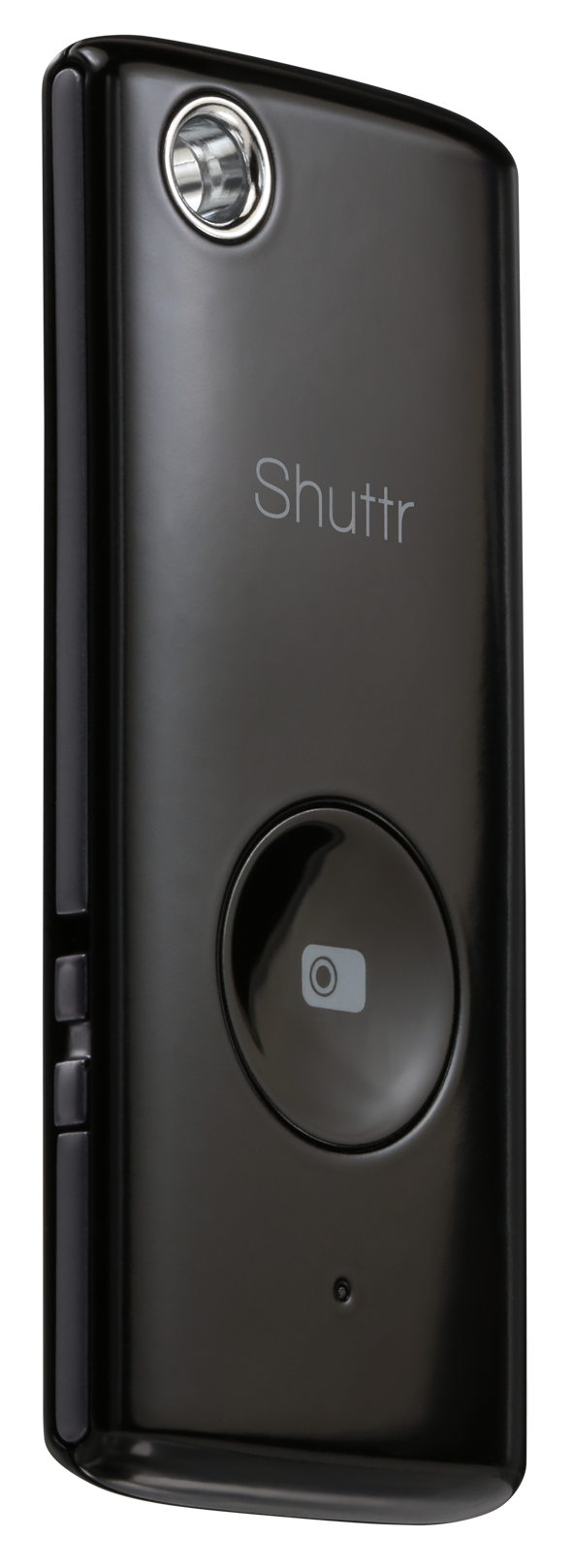
 Shuttr, Remote Shutter Release
Muku Labs
$39.99
Compatible with iOS5+, Samsung Galaxy S3/S4/Note 2/3/10.1/ and Nexus 4/7
Dimensions: 2.2 x 0.2 x 1 inches
Weight: 2 ounces
Attention avid Phoneographers! I’m not going to make you wait for the punch line on this one. The Muku Labs’ Shuttr, remote shutter release, is exactly what I’ve been looking for–for a very long time. I love it! I love my iPhone 5 too. It takes great photos. But, it has one limitation–the same limitation as all phone cameras, and cameras in general–it’s awkward to take remote pictures with.
Sure, you can prop it up or use a phone tripod and set the timer but are you really getting the picture you want with a timer? It’s a rare occurrence, if you do.
With the Shuttr, you can use the handy included phone stand or use some other method of planting your phone far enough away from yourself that you don’t look distorted like you’re looking through some psycho’s eyes in a horror movie.
Or, my favorite thing to do with the Shuttr–place my phone around and take candid shots on demand. And as many as I want to take. No silly app and no timer. Just press, press, press as much as you want to grab those stills or to start and pause video.
The Shuttr works great with the standard iPhone‘s native camera app in still or video mode. But what about other apps?
Here’s the list I’ve tested with and my results (iPhone 5, iOS 7.3):
(In no particular order)
| Camera | Yes |
| Camera+ | Yes |
| Old Camera | No |
| Sepia Camera | No |
| Old Movie | No |
| Cameo | No |
| Cartoonmatic | No |
| Retro Camera | No |
| 360 | No |
| Hipstamatic | Yes |
| Fisheye Cam | Yes |
| Cam Studio+ | No |
| Super Pop Cam | No |
| Pixlromatic | Yes |
| Popstamatic | Yes |
| iDarkroom | Yes |
| Camera360 | Yes |
| Paper Camera/td> | No |
| Duomatic | Yes |
| More Lomo | No |
| SlowShutter | Yes |
| Leme Cam | No |
| TtV Camera | Yes |
| Top Camera Lite | No |
| CrossProcess | Yes |
| Otaku Camera | No |
| Big Lens | Yes |
| Diptic | Yes |
| Orange Cam | No |
| ShakeItPhoto | Yes |
| Momentage | No |
| Momentsia | No |
| Fixel | No |
| Vintagio | Yes |
| Rawporter | Yes |
| Ustream | No |
Your mileage, of course, may vary. I think some of my problems were due to iOS 7 and not Shuttr. Although, I did notice that the apps that work use the basic Camera app and simply apply filters or effects after the fact. So, chances are that if your camera app uses the built-in, generic Camera app, then Shuttr will likely work.
Shuttr is small enough to fit on your keychain and lightweight enough to take anywhere. I love the Muku Labs Shuttr. It’s one of the best smart phone and tablet accessories that I’ve seen. It feels durable and well made. You can also replace the battery when it gets weak or dies. This is not a throw away device.
Apparently I’m not alone in my praise of the Shuttr. There’s a lot of love for it out there. Every major blog and gadget site has sung its praises and it has all five star reviews on Amazon. You can add mine to that.
The Shuttr comes in either black or white and includes a soft carrying pouch and stand. If the $40 price tag seems high to you, then try to find something else that does the same thing. I hadn’t found anything like it and I receive daily emails from Photojojo.
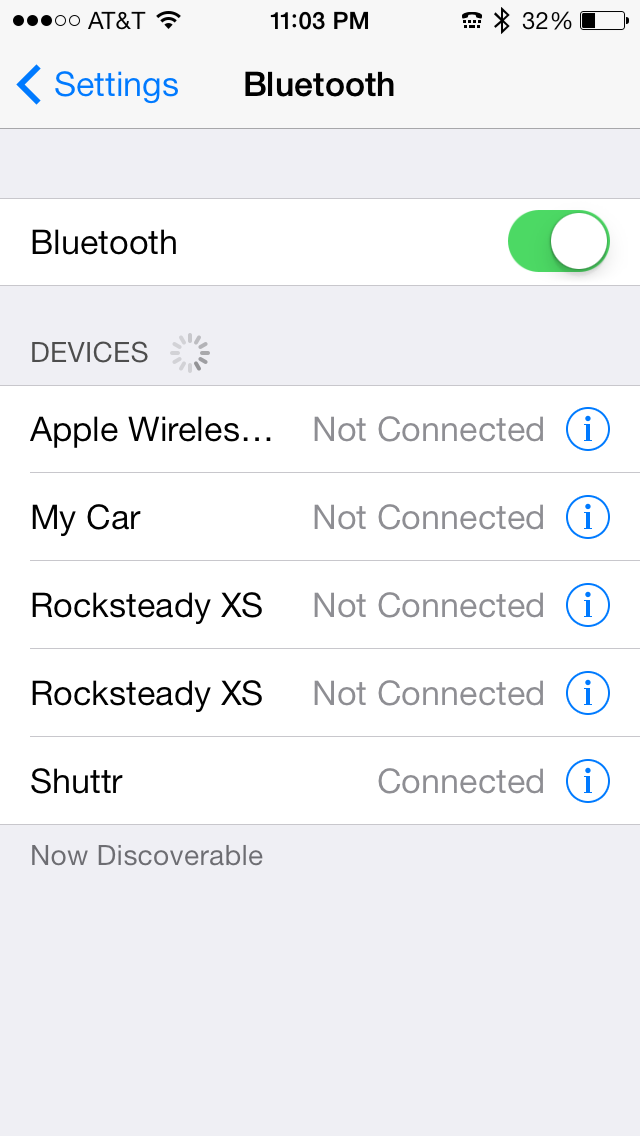 You connect it via Bluetooth by turning on the Shuttr, opening your Settings, opening Bluetooth settings, and then discovering the Shuttr. Tap the Shuttr listing to pair it. You’re done and the Shuttr is ready to use.
Why it’s frugal: The Shuttr is an essential device if you’re a real Phoneographer–seriously. You should have one. I haven’t found anything that comes close to it at any price, so for me, it’s the most valuable photographic accessory that I have. Its value as a must-have accessory makes it frugal.
Of all the iPhone accessories I’ve played with and used, the Shuttr is one that I’ll always have with me. I might forget my tripod, a USB disk, an EyeFi card, or even my car keys, but you can be sure that I’ll never forget this little gem.
Review: 10/10
Recommendation: Definitely buy it.

 Techopedia
- An error has occurred; the feed is probably down. Try again later.
Datamation
- Minimus Appoints Tech Dealmaker Yael Nardi as Chief Business Officer to Drive Hyper-Growth
- USA₮ Modernizes American Payments with High-Impact St. Patrick’s Day Activation in Times Square
- Google and NextEra Strike AI-Powered Grid Deal
- NYT Sues Perplexity AI in Copyright Conflict
- Cloudflare Outage Affects Major Websites
- OpenAI Forces AI to Confess Its Lies
- OpenAI Declares Code Red as Google’s Gemini 3 Threatens ChatGPT
- Coupang Breach Exposes 33.7M South Koreans’ Data
- ChatGPT Celebrates Third Anniversary
- Asahi Group Reveals Findings of Cyberattack

 The Frugal Networker
You must be logged in to post a comment.