Archive
IBM’s Entry into Software-Defined Storage: Elastic Storage
 By now, everyone has heard of the hot new buzzword: software-defined data center (SDDC). SDDC is the new data center paradigm where everything is software-defined: network, computers, and storage. Yes, there’s underlying hardware making the whole thing possible but what do software-defined resources really do for us? The answer is simple: It abstracts hardware into pooled resources that users can partake of in discreet slices for cloud applications and for cloud workloads.
But the real story here is IBM’s venture into software-defined storage that it calls Elastic Storage. On May 12, 2014, IBM announced a portfolio of software defined storage products that deliver improved economics at the same time they enable organizations to access and process any type of data, on any type of storage device, anywhere in the world. Elastic Storage offers unprecedented performance, infinite scale, and is capable of reducing storage costs up to 90 percent by automatically moving data onto the most economical storage device.
For example, if a company has data that’s accessed infrequently, that data will be moved to tape or to low cost disk systems for archiving. Alternatively, data that’s accessed regularly or that requires high speed access will be moved to flash storage. Data redistribution is based on policy-driven rules and data analytics. This type of automated data movement shows cost savings of up to 90 percent.
“Born in IBM Research Labs, this new, patented breakthrough technology allows enterprises to exploit – not just manage – the exploding growth of data in a variety of forms generated by countless devices, sensors, business processes, and social networks. The new storage software is ideally suited for the most data-intensive applications, which require high-speed access to massive volumes of information – from seismic data processing, risk management and financial analysis, weather modeling, and scientific research, to determining the next best action in real-time retail situations.”
Elastic Storage features and benefits:
- Enhanced security – Protects data on disk from security breaches, unauthorized access, or being lost, stolen or improperly discarded with encryption of data at rest and enable HIPAA, Sarbanes-Oxley, EU, and various national data privacy laws compliance.
- Extreme performance – Server-side Elastic Storage flash caches speed IO performance up to 6X, benefitting application performance, while still enjoying all the manageability benefits of shared storage.
- Save acquisition costs – Uses standard servers and storage instead of expensive, special purpose hardware.
- Limitless elastic data scaling – Scale out with relatively inexpensive standard hardware, while maintaining world-class storage management.
- Increase resource and operational efficiency – Pools redundant isolated resources and optimizes utilization.
- Achieve greater IT agility – Quickly reacts, provisions and redeploys resources in response to new requirements.
- Intelligent resource utilization and automated management – Automated, policy-driven management of storage reduces storage costs up to 90% and drives operational efficiencies.
- Empower geographically distributed workflows – Places critical data close to everyone and everything that needs it, accelerating schedules and time to market.
As for performance, IBM’s Elastic Storages boasts the capability of scanning over 10 billion files on just one cluster in less than 45 minutes. This type of performance as extreme implications for analytics and big data applications. IBM’s Elastic Storage solution is built for performance for big data and is based on the same technologies used in the Watson computer.
“Elastic Storage offers unprecedented performance, infinite scale, and is capable of reducing storage costs up to 90 percent by automatically moving data onto the most economical storage device.”
Part of Elastic Storage’s performance enhancement is due to IBM’s parallel data access technology: (General Parallel File System (GPFS). It eliminates the performance bottlenecks and so-called “choke” points of other data access algorithms and technologies.
What it all means is that now you have the same capability to access, analyze, and report on huge data sets in a fraction of the time it used to take to perform these analyses as large companies have. Elastic Storage puts the data where it needs to be to best serve you and your data requirements at a tremendous cost savings.
IBM Elastic Storage supports OpenStack Cinder and Swift interfaces. IBM is a platinum sponsor of OpenStack Foundation and is now its second most prolific contributor. It also supports other open APIs, such as POSIX and Hadoop.
 This post was written as part of the IBM for Midsize Business program, which provides midsize businesses with the tools, expertise and solutions they need to become engines of a smarter planet.
I’ve been compensated to contribute to this program, but the opinions expressed in this post are my own and don’t necessarily represent IBM’s positions, strategies or opinions.
The Nova Wireless Flash for iPhone (Review)
 Nova Wireless Flash Unit for iPhone
Sneaky Squid, LLC.
$59 (Order from http://wantnova.com)
Any photographer worth his or her salt (no salt print pun intended) will tell you that light is the key to great photos. A well lit subject has an appeal, whether it’s a portrait, a landscape, or a product that you’re going to sell; good lighting makes photographs better. The Nova Wireless Flash Unit for iPhone (Nova) excited me when I saw it. I definitely wanted one and I needed one. I’m guessing a lot of other people did as well because they received $85,480 of their $25,000 Kickstarter goal. Not many projects do that well on Kickstarter or any other so-called crowdfunding sites.
 I’ve demonstrated the Nova for several people and they love it. I don’t simply run up to unsuspecting friends and coworkers and show them the Nova and give them the elevator speech. I have a clever way of introducing the product: I let them hold it and try to figure out what it is that I’m showing them.
While they’re figuring out what I’ve handed them, I grab my phone, open the Nova app, and snap their picture. It’s always a shock to the system, but after that initial shock, they always want to know all about it and they also want one.
The cool part of it is that the photos are always natural and unexpected, as you can see in the photo of my son analyzing the Nova.
You can also see that, although I didn’t tamper with the default settings and he’s holding the Nova quite close, his face isn’t washed out with light. That’s an amazing feat for camera flash of any kind.
The Nova flash unit is small–about the size of a credit card. It’s also quite thin (less than the iPhone’s thickness). The size makes it easy to handle and use in a variety of situations. You can hold it high to light large areas, you can hold it close for spotlighting, or you can have your subject hold it to get a nice even light for portraits.
The price for the Nova Wireless Flash for iPhone is $59, which to me, is high. I think a better price point would be in the $29 to $39 range, but apparently people knew the price going into the Kickstarter campaign, so I might be wrong. I’m sure that if it’s ever sold on Amazon, the price will be more along the lines of what I’ve suggested.
- Size: 86mm × 53mm × 6.3mm (3.4″ × 2.1″ × 0.25″)
- Weight: 28g (1oz)
- Supported OS: iOS 7
- Supported devices: iPhone 4S/5/5C/5S, iPad 3/4/Mini/Air, iPod Touch 5G
- Wireless communication: Bluetooth 4.0 Low Energy
- Battery: Built-in lithium-ion polymer battery
- Charging: USB Micro B cable (included)
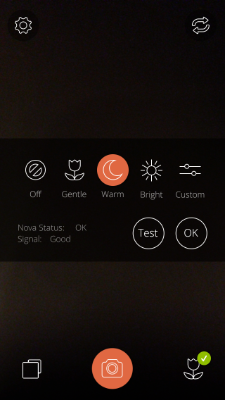 You can change the flash settings from Off to custom settings, as shown in the photo. If one of the presets (Default is Warm) doesn’t work for you, you can setup custom lighting conditions that fit your needs.
If you select Custom, you’ll see two sliders that offer a range of brightness and lighting tone. The two scales are: Cool Brightness and Warm Brightness. I suggest that you test a range of custom lighting settings before you attempt to use it on a field shoot. And I’m not telling you that because the settings are random or that they don’t work–they do, but you’ll need to understand what changing the sliders means to the light output that you get.
For those of you who aren’t pro photographer types, “Cool” means that it will have a bluish tone and “Warm” means more yellows/browns in the light.
Experimentation will give you the best results. If you’re in a hurry, my suggestion would be to use the default (Warm) setting or the Bright setting. The Bright setting gives you kind of a standard bright blue light.
Why it’s Frugal: The Nova is frugal if you take a lot of pictures with your iPhone and you require good lighting. The iPhone has a pretty good back-facing camera and some photographers and iPhoneographers use it extensively. The off camera flash gives you the opportunity to use more professional lighting for your shots, without investing hundreds of dollars on light fixtures that are cumbersome and power hungry.
 The Nova is an impressive little device. There’s no Bluetooth pairing required. Once you open the Nova App, it’s already paired for you and it’s ready to use.
If you’re an avid iPhoneographer and you need better light than the built-in flash can give you, the Nova is a great item to have. It’s there when you need it and it’s not big, bulky, or cumbersome to use. It powers up in a couple of hours via the mini USB cable that’s included and a full charge will carry you through hundreds of well-lit photographs.
Rating: 9/10
Recommendation: Buy it and take your iPhoneography to a whole new level.
The mykeyO Executive Restt iPad Keyboard Stand and Organizer (Review)
mykeyO Executive Restt iPad Keyboard Stand and Organizer
mykeyO
$34.95/$24.95 Amazon(Prime)
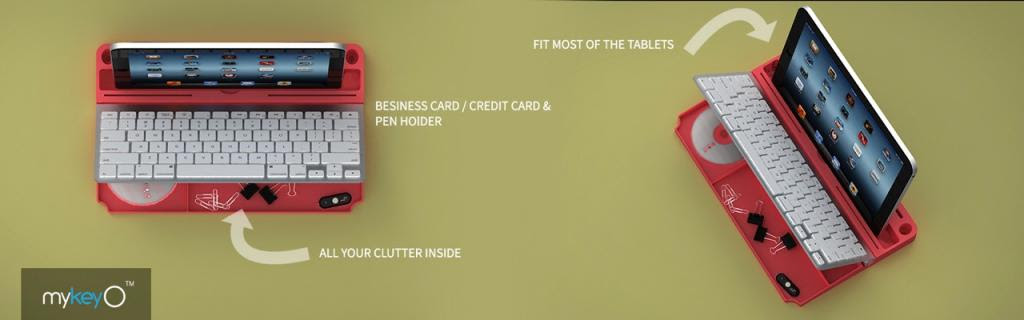
 Rarely do I find a product that I like so much that I spoil the story at the very beginning of my review, but this is one of those products. I love the mykeyO executive restt™ (restt™). It is a keyboard caddy, an iPad stand, a pen holder, and under the keyboard rest, there’s storage for all the clutter on your desk. As soon as the restt™ arrived, I placed it under my keyboard and I haven’t tossed it aside or changed its location at all.
The restt™ has found a permanent home on my desk.
The Apple Wireless Bluetooth Keyboard (not included with the restt™) fits perfectly into the keyboard slot. As you can see in the picture, you can raise your keyboard to reveal all your goodies stored below. Your iPad, iPhone, or other tablet fits nicely into the large slot so that you can work with your device as if it were a laptop without the rigidity of a laptop.
Plus, your device is close enough and tilted just right so that you can tap and swipe as needed.
I use the restt™ as a keyboard caddy for my Apple Wireless Keyboard for my Mac mini, but the cool thing is that I can place my iPad or my iPhone into the slot and have it there handy as well. In fact, as I write this post, my iPhone is in the slot. I have to keep track of my retweets and messages, so this makes it very convenient. Plus, the restt™ is made of silicone rubber, which means that it’s rigid enough to be stable and sturdy for typing but soft enough to absorb the vibrations from typing and from my ever-vibrating phone.
 Silicone rubber also won’t scratch any surfaces nor will it make those odd looking greasy spots that some pure petroleum-based rubber products do. And silicone rubber is easy to clean and it doesn’t fade or turn funny colors as it ages. This is a product that you’ll have around a while.
I haven’t found any flaws or negatives with the restt™. It’s a thoughtfully made product that really helps keep my sundries organized and out of sight.
One notable feature is that the keyboard doesn’t “walk” around while you’re typing on it. No matter how hard you type, or how fast, your keyboard stays put.
Why it’s Frugal: The mykeyO executive restt™ is frugal because it keeps you organized, it won’t harm your furniture, it keeps your iPad, iPhone, or other tablet handy, and you can take it from place to place easily. It provides you with a comfortable work surface and environment, which will make you more efficient and productive. If that’s not frugal, I don’t know the definition of frugal.
Now we come to the price. $34.95 is the retail price, but you can buy it for $24.95 on Amazon and if you’re a Prime member, there’s no shipping charges. $24.95 is a very good price for the restt™. I love the design features and you have your choice of colors to boot, which coupled with its sheer utility value, I don’t think you can go wrong with it.
The only stipulation is that you have to have an Apple Wireless Keyboard to use with the restt™. If you don’t have one, but want one, you can purchase a reasonable facsimile of an Apple Wireless Keyboard from mykeyO. Actually, the mykeyO version is a tiny bit wider than the Apple keyboard but is much better. It’s better because it has functions specific for Windows, Apple, and Android-based devices. I’ll have a full review of that product posted soon, so keep watching.
Rating: 10/10
Recommendation: Forget the rest and buy the restt™ and get yourself organized.
The Hornet’s Nest Movie: Tribute Video
If you haven’t seen the movie, “The Hornet’s Nest,” you should as soon as it’s available in your area. It’s one of the most powerful movies I’ve ever seen. It’s the year long story of veteran war correspondent Mike Boettcher’s embedded adventures with the US military in Afghanistan. The sounds, the action, the scenes, the bullets, and the bombs are all real. The Hornet’s Nest is a slice of life from the war in Afghanistan.
During the course of the movie, Mike Boettcher captures some of the most compelling war footage ever seen. And he also captures moments with his son, Carlos. Early in the film, you’ll hear panic in Mike’s voice when Carlos is pinned down by enemy fire. Bullets buzz by like bees. Bullets hit the trees just in front of Carlos and his life is in real danger.
One mission takes Mike and a platoon into the hornet’s nest. A two-day mission that stretches into nine. Exhaustion, fear, and casualties take their toll on the group.
Perhaps the most emotional moments in the film, though, are near the end at the muster. As the Sergeant Major calls roll, you can see the pain of battle in young men’s and young women’s faces.
If you see this film, you’ll never forget it. And you’ll know why young men’s dreams are haunted by battle scenes. The range of emotion you’ll feel in this movie span everything from fear to sadness to relief to happiness. Watch all the way to the end for outtakes and tributes to the men and women who’ve made the ultimate sacrifice in service to the United States of America.
Every parent who watches this movie will go home and hug his or her children or call the ones that aren’t close enough to touch. You’ll never be the same after watching it.
It’s rated R for language and violence.
I think everyone should see this movie.
My personal message to the people of Afghanistan:
I’m sorry for what’s been brought upon you and your families. I believe that you want the same things we want: to worship God, to enjoy your families, to work, and to live peacefully without any person imposing his will on you and your people. Please know that the American people mean you no harm nor wish you any ill will. We are not your enemy and we want you to be free from oppression. Our hearts go out to yours.
May Allah protect you and bless you all the days of your life.
The Story of Storlets: IBM’s Computational Storage Model
 Cloud storage vendors generally use commodity servers as the underlying storage nodes that serve large data sets to users. IBM leverages storage node processing capabilities to execute computational modules, namely storlets, close to where the data is stored. The Storlet Engine provides cloud storage with the capability to dynamically upload storlets and execute them in sandboxes that insulate the storlets from the rest of the system and from other storlets.
Interestingly, IBM proposes that a Storlets Marketplace can be used as a repository of storlets from different vendors. An application on top of the storage can mash-up and use various storlets from the marketplace to create its logic and functionality.
Storlet Benefits:
- Reduced WAN bandwidth used from fewer bytes transferred
- Enhanced security through decreased data exposure
- Cost savings from reduced amount of infrastructure
- Compliance support from improved provenance tracking
The definition of a storlet is a bit elusive but can best be described as a unit of computation where required computations are brought to the data, instead of the other way around. Storlets can analyze each object and extract its metadata, including size, subject, resolution, format, and more. Storlets are dynamically loaded code. Perhaps the primary researcher and developer of storlets, Michael Factor, Distinguished Engineer and expert on Storage Systems at IBM Research in Haifa, Israel can explain in his own words:
“A new method of storing information is called object storage. This approach stores information as objects. Each object contains the data (the bits and bytes of our documents, movies, images, and so forth), together with metadata that holds user- and system-defined tags. These smart data objects include rich information – or metadata – that describes the content of the data, how the object is related to other objects, how the data should be handled, replicated, or backed up, and more.
Although object storage can store objects, manage them, protect them, and so on – it doesn’t by itself dramatically increase the rate at which we can extract value from objects. But what if we could turn a software-defined object store into a smart storage platform?
Storlets bring the computation to the data
A new research prototype called “storlets” holds the promise of greatly increasing the value we get out of storage and the speed at which we can access what we need. A new software-defined mechanism, storlets allow object storage to move the computation to the data, instead of the system having to move the data to a server to carry out the computation.”
The significance of storlets might not be immediately apparent but the real value is that the technology allows you to process data where it’s stored. This means that there’s no over-the-network data transfer, which saves both time and money.
“Our vision is to reduce costs, increase flexibility and improve security by turning the object store into a platform, and allowing the functionality of the object store to be extended using software.”
Also known as “computational storage,” storlets introduce stored procedures for storage cloud which provide the ability to run computations (“storlets”) safely and securely, close to the data in the cloud. Storlets typically run in a sandbox, loaded as objects and triggered by events on objects (e.g., put/get) or on their associated metadata attributes.
IBM researchers in Haifa, Israel have been working on prototyping storlets for several years in the context of European Union Research projects such as ENSURE, VISION Cloud, and Forget IT.
You can view the entire 1:31 hour video that covers IBM’s software-defined storage offerings and research.
This post was written as part of the IBM for Midsize Business program, which provides midsize businesses with the tools, expertise and solutions they need to become engines of a smarter planet.
I’ve been compensated to contribute to this program, but the opinions expressed in this post are my own and don’t necessarily represent IBM’s positions, strategies or opinions.
Plextor Will Give Away SSDs Every Week to Fans as Part of Their “Life Is Better With Plextor” Campaign
 Fremont, Calif., (May 20, 2014)–Plextor (www.plextoramericas.com) kicked off the year with its new lineup of M6 series solid-state drives led by the M6e PCl-e SSD. The full M6 lineup features the M6S, the M6M, and –later this year –the M6Pro.To emphasize their working premise that better computers make for a better life, they have announced the “Life is Better With Plextor” campaign. As part of this campaign, Plextor will be giving away one solid-state drive every week for the remainder of 2014. Plextor’s tech partners, YouTubers, Publishers, and prominent members of the IT Community will be joining them in this unprecedented giveaway campaign for SSD fans.
Contest Details: On May 19, 2014 the weekly sweepstakes begins. Winners will be announced Monday of every week and the contest will end every Sunday.
How to sign up: Each week fans can enter to win at Plextor America’s Facebook contest page http://win.plextoramericas.com/. Throughout the year there will be many other opportunities to win additional product from Plextor and their tech partners.
Plextor will also launch an exclusive promotion with NewEgg USA of up to $30 off certain capacities of the M6e PCI-e SSD for a limited time only. Use promo code: prm6e.
The new lineup includes:
M6S 2.5″ SATA- The M6S is the perfect hard-drive upgrade for any desktop or laptop PC, improving the computing experience for the everyday user and power-users alike providing faster boot times, faster application loading, and faster response time than a traditional hard drive (HDD).
M6M mSATA – The M6M mSATA is the ultimate ultra-book upgrade and ideal solution for users looking to upgrade any device that requires a SSD with a small footprint. At nearly one-eighth the size of a standard 2.5-inch SSD, the M6M still manages to pack in all of the performance and reliability that is expected of a Plextor drive.
M6e PCI-e – The M6e PCI-e is the first SSD specifically designed to meet the demanding requirements of the gaming community. The M6e PCI-e SSD uses a new generation of high-bandwidth components to deliver smooth, uninterrupted gameplay, allowing players to excel to the next level.
M6Pro 2.5″ SATA (available later this year) – This highly anticipated product is expected to deliver dramatically enhanced speed, massive throughput, and fault tolerant performance that is ideal for prosumers, serious gamers, and system integrators.
All Plextor M6 Series SSDs feature a server-grade Marvell controller, Toshiba 19nm NAND Flash (M6S/M6M feature Toshiba A19), and Plextor’s proprietary firmware with TrueSpeed Technology that prevents SSD speed drops by automatically returning performance to like-new speeds. Plextor knows that speed doesn’t count for much unless products are reliable–ultimately reliable. Plextor SSDs typically have an MTBF (mean time between failures) of 2.4 million hours. This level of reliability gives Plextor the highest ranking in the industry. All M6 drives are backed with a 3-5 year limited warranty and are available in 64, 128, 256, and 512 GB capacities, depending on model.
For additional product information, please visit:
Website: www.plextoramericas.com
Facebook: www.facebook.com/PlextorAmericas
LinkedIn: www.linkedin.com/company/plextor-americas
Twitter: www.twitter.com/plextorusa
YouTube: www.youtube.com/plextorofficial
About Plextor
Plextor is a leading developer of high-performance digital storage equipment for professionals, consumers, and enterprises. Plextor launched its first CD-ROM drive in 1989. Since then, Plextor’s prestigious multi–award winning products have set the standard for quality and performance. Plextor will continue to deliver generations of innovative industry-leading products, including Blu-ray optical disc drives, solid state drives, digital video converters, and multimedia devices. The Plextor brand of storage and multimedia products is owned by Shinano Kenshi of Japan.
Checking Out the CHIC BUDS Porta Party Bluetooth Speakers (Review)
 Porta Party Bluetooth Speakers (Katie)
CHIC BUDS, A Division of FxA
$49.99/$41.94 Amazon (Prime)
I’ve reviewed several Bluetooth speakers on this blog but none as fun or as unique as the Porta Party Bluetooth Speakers by CHIC BUDS. But, I’m a little confused by the company name. On the web site, I’ve seen it as chicBuds and CHIC BUDS, but on the package it’s CHIC BUDS and CH!C BUDS. So, for the purposes of this review, I’m going to use CHIC BUDS because I’ve seen it on the packaging and on the web site that way. It actually doesn’t matter how you spell it, though, because the Porta Party (And, it’s Porta PARTY, not POTTY) is an awesome little speaker with a HUGE sound.
I don’t usually use all caps to describe something but since I’m going with the all caps company name, why not just go all the way. Seriously, this small jar-sized speaker packs a big sound. When I first turned it on, I figured that it would be a small, tinny sound because of the diminutive stature. I was wrong. Really wrong.
There’s no tinny sound from this little pocket-sized bomb. The trebles are loud and clear and the bass is body thumpingly deep. If I were to sum up the sound quality and volume into a single word, it would be, “Impressive.”
If sound alone weren’t enough to sell you on the Porta Party speaker, check out its stats and features:
- Standard USB/DC charging port
- Play 30 ft. away from sound source
- Hands-free call answering
- Bluetooth music playing
- Weighs just 8 ounces
- Uses a 3.5mm audio cable (included)
- Charge lasts up to 10 hours
- USB cable included
- Bluetooth 3.0
- Easy device pairing
- 4.7 x 2.4 x 2.4 inches
In their own words:
“In 2005, the founders of CHIC BUDS recognized a need in the market for technology accessories created specifically for females, and CHIC BUDS was launched.
Today, CHIC BUDS, a division of FxA, continues to be a company of girls designing and developing fashionable, fun and functional tech accessories for all of us girls that heavily rely on technology yet still delight in embracing our own personal style. At CHIC BUDS, we embrace and celebrate individuality and creativity amongst all women and girls which drives us to bring all the hard-working women and girls around the world more fun choices when it comes to their technology accessories. Our product line up not only solves the modern girl’s tech style challenges but also delivers the function we all require.”
So, I know that these speakers are “created specifically for females,” but guys can buy them too and just use them ironically. To me, the Porta Party speakers are kind of like Cosmos, you know, the drink. They’re so good and yet not really something you want your friends to see you drinking. My brother-in-law once asked my wife and me, “Have you guys ever had a Cosmo? They’re yummy!” Yeah, they’re yummy, Scott.
Sound Nerd Info:
- Transmission distance: 10m/30ft
- Bluetooth frequency: 2.4GHz-2.48GHz
- Output: 3W
- Speaker: Ø40MM, 4Ω
- Audio bandwidth: 200Hz-20KHz
- SNR: ≥80dB
- Li-ion: 3.7V/500mA
Using the Porta Party speaker is very simple. Switch it to the ON position on the bottom of the speaker. Turn on Bluetooth on your device. When ChicBuds Porta Party appears in your Bluetooth device list, tap it to connect. You’re connected. Play music, make a phone call, answer a phone call, and have fun with your tiny boom box (large handle and shoulder not required).
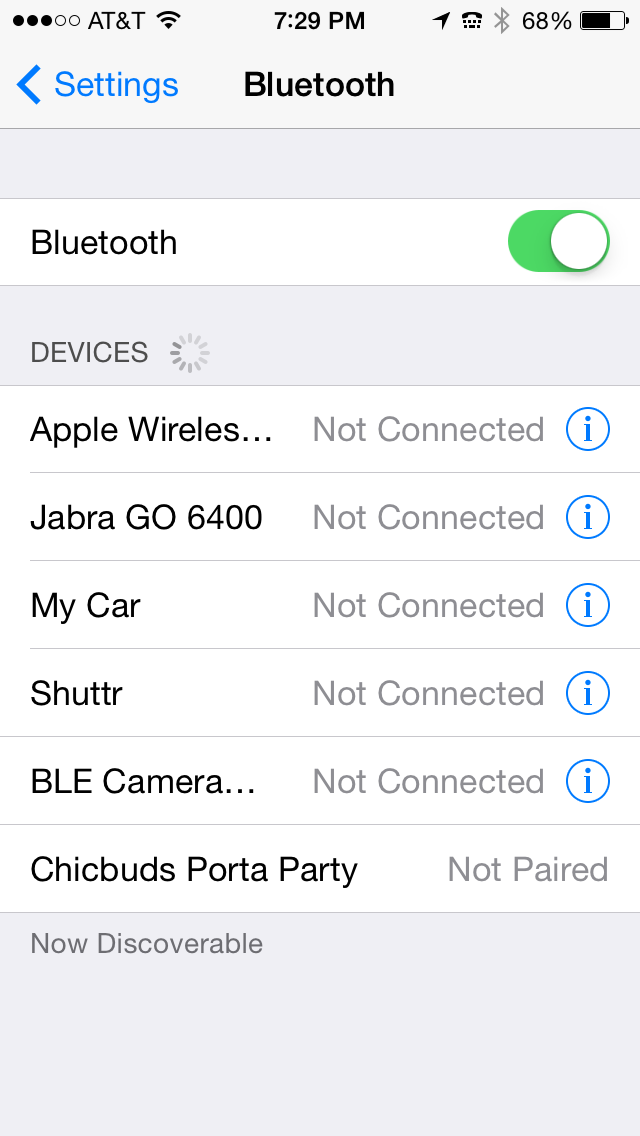 OK, I just thought of something funny to do with your Porta Party speaker. Have a friend call you and answer it on the Porta Party by pressing the Phone button near the bottom edge of the speaker. Put the speaker in your purse. While you’re in a store, have your friend start yelling and screaming, “Let me out of here. Help! I’m trapped in this purse. Stop just looking and help me.”
That should start a party and a conversation.
Hopefully that conversation won’t end with, “You have the right to remain silent…”
One thing to note about the Porta Party speaker. To skip to the next or to the previous song, press the + or – button once. To turn up or to turn down the sound volume, press and hold the corresponding button. If you’re using the speaker as a phone, speak into the Mic located near the Phone and Volume buttons.
To charge the speaker, plug in the supplied USB cable’s small end into the speaker and the other end into your computer’s USB port. Mine charges in 2-3 hours.
My wife and daughter both love the Katie style speaker and have both expressed a desire for one. In fact, to write this review, I found the speaker on my wife’s desk and I didn’t put it there. It had been in my office in the “Review Queue” to my knowledge. I was wrong. Fortunately, it still had a charge on it and I’m currently playing it as I write this. It’s playing my “Workout” playlist on my iPhone 5.
In fact, I thought I had the sound down sufficiently but when “The Ballad of Mona Lisa” by Panic! at the Disco came on, my daughter came in and sang with it. She was supposed to be doing homework.
Why it’s Frugal: The CHIC BUDS Porta Party isn’t frugal. It’s not a frugal device. It’s a luxury device. It’s a fashion-forward accessory that’s fun and powerful enough to provide all the sound you need, but frugal it’s not. And as any woman will tell you, if it looks good (and sounds good), it doesn’t have to be frugal.
The Porta Party Bluetooth speaker is on the upper end of the price range for an electronic gadget like this. $50 is a pretty big chunk of change for this accessory. Fortunately, you can grab one for almost $10 off that MSRP by buying it from Amazon. If you’re an Amazon Prime subscriber, which I strongly recommend, you’ll save shipping costs and get it in two days.
Although I’m kind of complaining about the price tag, $50 is about average for portable Bluetooth speakers. There are some that sell for $40-ish and some sell for as much as $150. The CHIC BUDS Porta Party Bluetooth speaker is very well made and attractive. It should provide years of enjoyment and look darn good doing it.
Rating: 9/10
Recommendation: Have him buy you one or splurge on yourself. You deserve it.
Clearing the Air about Windows XP’s Life Extension with 2X Software
 Some people thrive on controversy. I am not one of those people, although I’m no stranger to it. On May 2nd, I posted a story on my ZDNet Consumerization blog titled, “Here’s how to extend the life of Windows XP indefinitely.” Currently, there are 75 comments and not all of them are pro Windows XP life extension. In fact, I endured a few hours of a Twitter battle about some of the product features discussed in the article covering 2X Software’s 2xLifeCyclePlus.
One of the “controversial” points was whether the 2XLifeCyclePlus product is or is not a Windows XP replacement shell. It is a Windows XP replacement shell. The shell replacement is meant to mitigate the problems arising from the fact that Microsoft no longer supports Windows XP. No longer supports means that Microsoft will no longer provide security updates, patches, or service packs to the now outdated operating system.
Who knew there could be so much controversy and angst over helping people to save money and extend the life of a beloved product? I, for one, did not.
Who knew that a project that I believe is basically commercial philanthropy could cause problems for so many otherwise normal people? Again, not I.
Several of the virtual chalk wielders stated that XP users should just “let go” of XP and let it die. To prolong it is more cruel than just sending it into the annals of history. Those who have to spend profits to accommodate Windows 7 or Windows 8 in their environments is also very cruel, especially when they already have something stable, usable, and low maintenance to use.
In this podcast, Scott Sims, 2X Software’s Sales Director, and I discuss the 2XLifeCyclePlus product and its features plus its relationship to the 2X Application Server XG product, which is similar in function to the Citrix Presentation/Application Server but at approximately 25% of the cost.
Podcast Info:
Format: MP3. Length: 13:19 mins. Rated: G
Twitter: @2XSoftware
Saddleback Leather iPad Case (Review)
Leather iPad Case (Standard iPad–not the iPad mini)
Saddleback Leather Company
$111.00
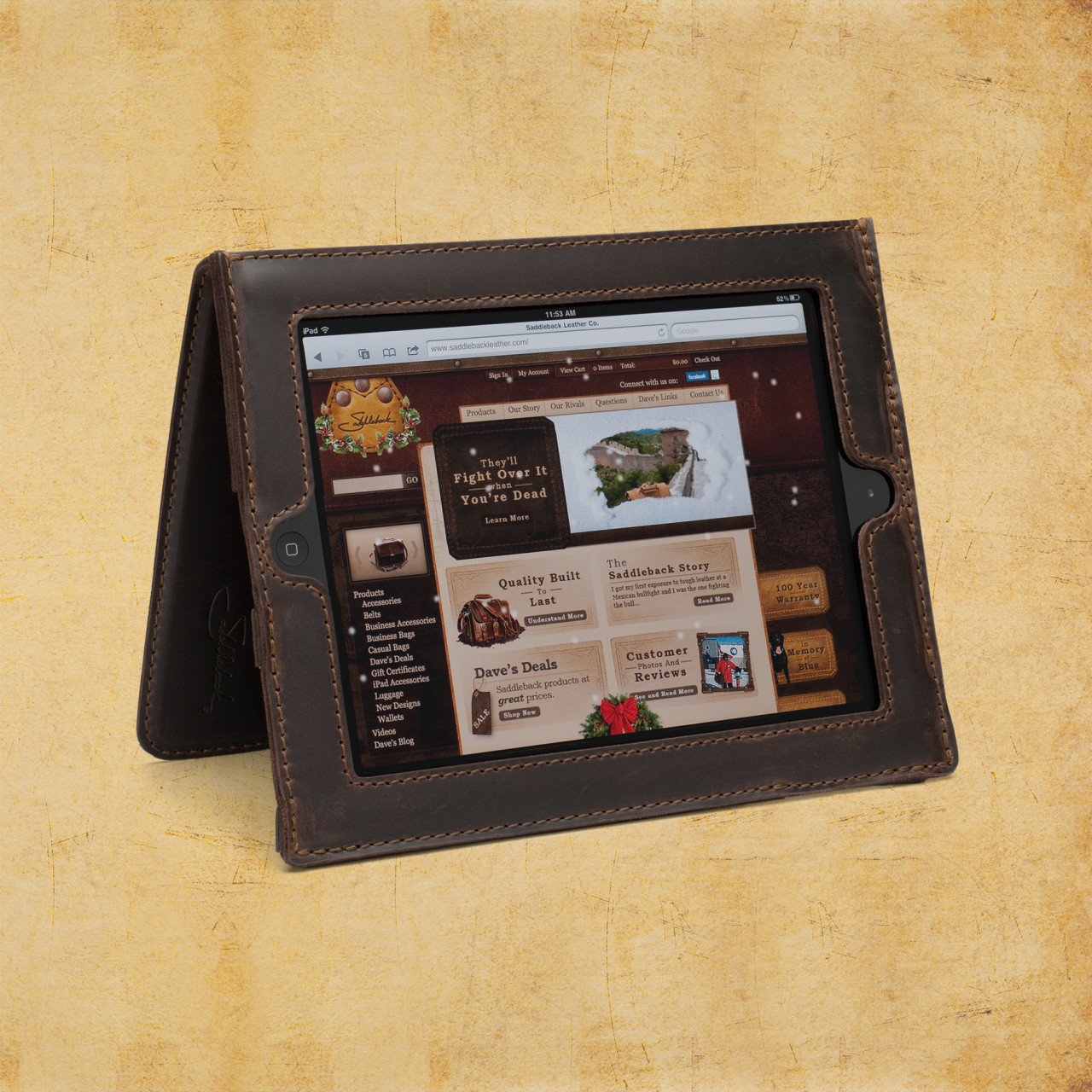 For your $600+ iPad purchase, I submit for your approval, the Saddleback Leather Company iPad case made of full grain cowhide leather. The inside of the case is pigskin. Pigskin is softer, more forgiving, and snuggles your iPad a bit better than the stiffer cowhide alone would. As soon as you hold any of Saddleback’s products, you know that they’re made of quality materials. Dave, the owner, has meticulously designed each item to exacting specifications and has spared no expense, except on labor (more on that later), in creating these beautiful products. As you’d expect, genuine leather products aren’t inexpensive. For just over $100, the iPad case isn’t a bad buy, especially if you consider the price of the device that you’re wrapping up in it.
Saddleback Leather Company, mostly located in San Antonio and Fort Worth Texas, is a locally owned and operated business. You can hit the website to find out Dave’s whole sordid tale of how he started the company way back in 1999.
The iPad case is sturdy and the iPad fits into its spot very well but without binding or stressing. Leather is forgiving but if it’s too small, it’s just too small. This case is just right for the thickness and for the iPad size. The case, when reversed and straps engaged, stands up so that you can watch videos or use as a screen or with a Bluetooth keyboard. The controls are easy to reach but recessed enough so that they’re protected from accidental drops or scrapes.
The cowhide-pigskin layering gives the iPad enough cushion for comfort but enough protection and shock absorption to deflect damage from carrying height or table height drops. The screen is fully visible in the case with no screen overlap. A lot of thought has gone into the creation of this formidable case. I’m assuming Dave, or a family member, owns an iPad and wanted it protected but without being hermetically sealed inside an Otterbox or something that distances you from the iPad. The Saddleback case puts you in contact with the iPad but without fear of accidental damage.
That said, it’s still possible to damage your iPad if misused, so don’t purposely try to damage your iPad and then complain. Also, you can’t prevent fluke damage from drops that hit edges or land oddly.
The leather case is very attractive and has the look and feel of real hand-tooled leather–thanks Wilford Brimley. But seriously, this is a very handsome case. I’ve never seen one like it. Every time I carry it out of the house, someone asks about it. The leather is very tough and rugged. It should last a lifetime or longer.
As a side note, I had some beef kabobs from one of those street vendors in New York and I almost called Saddleback to tell Dave that I think I’d found him a new leather source for his products. Wow, that was some tough meat. I looked like a cow chewing its cud instead of a Texan having a beef snack on a stick. I guess I’ll stick to Canton’s First Monday stick-skewered meaty treats from now on.
Saddleback offers a standard iPad case, an iPad mini case, and leather sleeves for the standard and mini. An Ipad Air case is also available.
Dave spends a lot of time and energy (and humor) on his website convincing potential customers that the products are, in fact, very high quality. They are. His efforts aren’t wasted but it’s also probably not required to the extreme that he goes to either. We get it, Dave, you make great stuff and you had us at Howdy.
What Dave doesn’t tell you (although he alludes to it) in the video “How to knock off a bag” is that his products are made in Mexico. This is that place where I get to rant a bit about hiring locals to do the work that he’s sending to Mexico. He spends a lot of time and sarcasm in telling us how to knock off his bags but fails to mention that you should send your materials to Malaysia, China, India, or Bangladesh to get cheaper labor than he does to produce them. Just saying. That’s really my only complaint is that his stuff isn’t made in Texas.
Anyway, I checked out the Saddleback iPad case for my iPad 4. It is indeed very nice. My iPad feels well-protected and it feels good in my hands. The particular model I received for review is the tobacco-colored model. It looks more like natural tanned cowhide and pigskin (to me) than the other colors. I like the natural look. It feels more rugged and I also don’t mind the scratches, scars, mars, and buffs that the leather receives along the way. It’s a natural product and that’s to be expected and is actually desirable. I also like film photography for the same reasons.
It’s obvious that Dave is a skilled craftsman and is very knowledgeable about leather.
It’s also obvious that people love his products. He gets a lot of repeat business and has hundreds of 4 and 5 star reviews for his handiwork. As of this writing, there are 91 reviews of the iPad case and 92.3% of the reviewers would recommend the product to other customers.
One of the reviews makes me wonder when the other customers wrote their reviews. There’s one reviewer that observed that as leather ages, it loosens and this causes the iPad to slide around a bit and not stand up as shown in the video. I can’t speak to that since I’ve only had this one for about two weeks and haven’t had any issues so far. Everything is tight and stiff at this point in time. Now, in a year or two, it might be a different story. I have several cases that I use and switch between so I’m not sure that my use case is really standard.
Why it’s Frugal: Anything that protects your expensive tablet this well is frugal. Even at just over $100, it’s a good investment. Saddleback products are well made and made of quality materials which means that it’ll probably outlast you and will certainly outlast your iPad.
Saddleback leather products are beautiful, well liked by customers, made of quality materials, and protect your electronics like only thick cowhide and pigskin can. In fact, anytime I go anywhere that I want to impress people, I’ll strap on the Saddleback iPad case. If nothing else, it will be a conversation starter, and that’s a good thing for a freelance writer.
Rating: 8.5/10
Recommendation: If you want to impress someone, buy a Saddleback product as a gift or as a show piece for yourself.
The Tivax MiTraveler 8-inch 3D Tablet: No Glasses Required (Review)
 MiTraveler 3D-8
Tivax/Michley Electronics, Inc.
Amazon (Prime) $240.71 (Retail: $369.99)
I didn’t know what to think when I first heard of the Tivax MiTraveler Android-based 3D tablet, except, “This I have to see.” The No Glasses Required part of the advertisement was especially intriguing to me. I wanted to see if it looked 3D or if it looked like the 3D pictures of my childhood that had that blurry, headache-inducing, “deep sight” kind of thing going on.
Although it took me almost an hour to figure out how to switch into 3D mode, I’m glad that 3D isn’t the default mode. I, personally, can’t look at 3D video for very long at a time. It’s interesting when I’m in a darkened theater and that’s my only focus but an 8-inch tablet is quite a different story.
It works. You can see movies or photos in 3D without glasses. But, for me, the technology still isn’t where it needs to be for prolonged use. Right now, it’s more of a “Hey, look what my tablet can do” sort of thing. That’s just my opinion. If you’re interested in viewing movies or photos in 3D, check one out at a retailer or spring for the $240 and buy one direct.
Specifications
- OS Android 4.1 Jelly Bean
- Dual-core CPU
- Flash 10.1 supported
- Parallax barrier 3D technology
- Capacitive multi-touch screen
- 8GB storage
- 1G RAM
- Resolution: 1280*800
- Wi-Fi 802.11 b/g/n
- Micro SD card port for storage expansion up to 32GB
- Micro USB port
- Mini HDMI output
- Built-in speaker & microphone
- 0.3M front camera and 2M rear camera
- 5000mAh Li-Polymer battery
- Supports Bluetooth
Don’t get me wrong, I like the MiTraveler tablet, even in 3D mode. I’m just saying that I can’t look at it for a long period of time, at least not without Dramamine. It’s a me thing, not a Tivax tablet thing. The 3D effect on the MiTraveler is very good and there are actually three 3D modes to choose from. My favorite is the 2D to 3D effect. It looks more like a real 3D movie. The horizontal and vertical 3D modes have to be used with photos and movies that specifically use those techniques, otherwise they are unwatchable. You can experience the real 3D effect with the 2D to 3D mode.

Figure 1: Video Options Bar
You can switch into 3D mode with a single tap while watching a video. When you start a video, tap the 3D icon in the video options bar shown in Figure 1. Unfortunately, in 3D mode, the Android tablet doesn’t seem to allow me to take screenshots. I assume it’s because it doesn’t know how to render them. In your case, the video will be playing in the background. This particular video shows two side-by-side pictures, which when combined, create a very nice 3D effect.
So, the exact steps to see a movie in 3D are:
- Start the movie.
- Tap the screen once to launch the Video Options Bar at the bottom center of your screen (Figure 1).
- Tap the 3D icon to launch a 3D Options Menu.
- Select the option that will play your video.
- For the Transformers demo video, select 3D Left Right.

Figure 2: 3D Options Menu
See Figure 2 for the 3D Options Menu.
If you want to view a “normal” video in 3D mode, select the 2D to 3D option.
You can browse the web and the local filesystem for videos, so you aren’t limited by delivery method. You can adjust the sound volume to suit you but beware that different videos have different sound levels and you’ll have to adjust each one accordingly. This is not a fault of the tablet, but normal variation in video production quality and style.
As far as other functions, the tablet looks fairly limited upon first glance. The default desktop would lead you to believe that the MiTraveler is primarily a photo and video viewing device. It isn’t.
Figure 3 shows you the desktop and all available default desktop apps: Browser, Email, Camera (front and rear facing), STREAMit, and Music. If you want to see all of the installed apps and the Google Play Store app, tap the multi-window icon in the upper right corner of the main desktop screen. There you’ll see all of your standard apps plus a few extras that are sound, movie, and game-related to take full advantage of the tablet’s 3D and accelerated 2D capabilities. You can copy any app to the main desktop by pressing and holding its icon for a few seconds, so you can customize the MiTraveler in any way you like.
You can download apps, remove apps, and treat it as you would any other Android device. The only difference is that this one can render video in 3D.
Why it’s Frugal: The Tivax MiTraveler 3D 8-inch tablet is anything but frugal. But, it’s a specialty item and it’s not designed or marketed as a frugal or inexpensive device. It’s more than a standard Android device but functions like a standard one except for the 3D enhancements.
The Tivax MiTraveler is an excellent 3D video movie and photo viewer. If you love 3D video, you’ll love this tablet. If it’s not your thing, save your money. You’re probably asking yourself (and me) if I think that the tablet is worth the money for the 3D enhancements. Good question. I think it is. The 3D is smooth and well done. I’m not sure how they do it and like making laws and making sausages, I don’t think I want to know how it’s done. I appreciate it for what it is. I don’t need the details.
The MiTraveler is a quality device that does exactly what it says it can do. I tried to find something wrong with it and couldn’t. So, if you have $250 and you want a 3D capable tablet, this is the one you want.
Rating: 9/10
Recommendation: Buy the Tivax MiTraveler 8-inch 3D tablet for awesome 3D rendering. And remember, no glasses required.

 Techopedia
- An error has occurred; the feed is probably down. Try again later.
Datamation
- USA₮ Modernizes American Payments with High-Impact St. Patrick’s Day Activation in Times Square
- Google and NextEra Strike AI-Powered Grid Deal
- NYT Sues Perplexity AI in Copyright Conflict
- Cloudflare Outage Affects Major Websites
- OpenAI Forces AI to Confess Its Lies
- OpenAI Declares Code Red as Google’s Gemini 3 Threatens ChatGPT
- Coupang Breach Exposes 33.7M South Koreans’ Data
- ChatGPT Celebrates Third Anniversary
- Asahi Group Reveals Findings of Cyberattack
- OpenAI Discloses Mixpanel Security Incident Affecting Some API Users

 The Frugal Networker
You must be logged in to post a comment.