Archive
IK Multimedia announces iRig PRO: Universal MIDI Interface

iRig Pro Universal MIDI Interface
IK Multimedia
$149.99/€119.99 (exc. taxes).
IK Multimedia, the global leader in mobile music-creation apps and accessories, is proud to announce iRig® PRO, the universal digital mobile audio/MIDI interface for iPhone, iPad, iPod touch and Mac.
Universal Compatibility
iRig PRO comes with three detachable cables, compatible with Lightning, 30-pin and USB connectors, respectively, allowing for digital connection to every model of iPhone, iPod touch, iPad and Mac, out of the box, with no need for adapters. A MIDI cable with a standard MIDI jack is also provided to connect the widest variety of MIDI-compatible keyboards and controllers.
iRig PRO is class compliant and compatible with Core Audio and Core MIDI, so it can be used with any audio and MIDI processing apps for iOS and Mac OS, for true plug-and-play performance without additional hardware/software.
Universal Apps and Software Included
For iPhone and iPad users, iRig PRO comes with a suite of IK Multimedia’s most popular apps for mobile music creation on iPhone, iPad and iPod touch, including AmpliTube FREE (the #1 app for guitar players) for guitarists and bass players, VocaLive FREE for singers, SampleTank FREE and iGrand Piano FREE for keyboard players and iRig Recorder FREE for recording engineers.
For Mac users, iRig PRO includes AmpliTube Custom Shop, the industry standard guitar-and-bass processing software; a free version of AmpliTube Metal; T-RackS Custom Shop, the mixing-and-mastering effect suite with a free version of T-RackS Classic; and SampleTank XT, a sound workstation that includes over 1GB of sounds. All these software titles are available both as plug-ins for the most popular digital audio workstations (including GarageBand), or as standalone applications for immediate plug and play.
While this post is not a review, I have used other IKMultimedia products (Reviews coming soon) and they are very high quality, durable, and they deliver the performance and features that you’d expect from equipment priced many times higher. If you’re a singer/songwriter, bandmate, or a hobbyist with a flare for producing your own sound, you need to check out IKMultimedia’s line. I’m excited every time IKMultimedia announces a new product. I haven’t seen the iRig Pro yet but it’s only a matter of time.
It’s not yet available at all online retailers but I’m looking forward to plugging one in and testing it for myself. You can purchase one directly through the IKMultimedia Store or use the Dealer Locator to find a store near you.
Why it’s frugal: The iRig Pro, for $149.99 is an all-in-one device. The iRig Pro comes with apps, cables, and MIDI peripherals. All you need are instruments, a microphone, and inspiration.
Quiller: Your private Journal App (Review)
 Quiller (App)
Journaling App for iPad
From Passion to Purpose, LLC.
$1.99 Apple App Store
Follow: @quillerapp
Remember Doogie Howser, MD. pecking away at the end of every episode in the obscure blue-screened word processor to record the day’s thoughts, hopes, and dreams? Sure you do. Primitive wasn’t it? Well, if Doogie inspired you to begin journaling back then but you never did anything about it, let Quiller bring that inspiration into the 21st Century as an iPad app.
When questioned, something to the tune of 85% of all people want to write for publication but sadly, or maybe happily for writers like me, fewer than five percent ever become published in any kind of forum. But you don’t have aspire to be the next Hemingway or James Joyce to enjoy putting your own thoughts down onto electronic paper or into an electronic journal.
You, like many others, can journal for the therapeutic value or for posterity. But whatever your reason for doing it, Quiller can make it easy–far easier than using a word processor or Big Chief tablet. If you know what a Big Chief tablet is, bless you. If not, it has nothing to do with what you call a tablet today. This one is made of paper and has lined pages. I’m pretty sure that it was the substrate onto which many novels and journals were written. I digress.
Quiller is the new genre of journaling. It is a prompt-driven journaling program that helps you collect your thoughts, navigate the app, and even apply an emotion (via emoticon) to the day.
You can create multiple journals, each with a different look, and you can password protect them too–each with a different password, if you prefer. This also means that if you share a single iPad in your family, each of you can have your own password-protected journal. How do you know which journal is yours? You engrave your name on it. Nice.
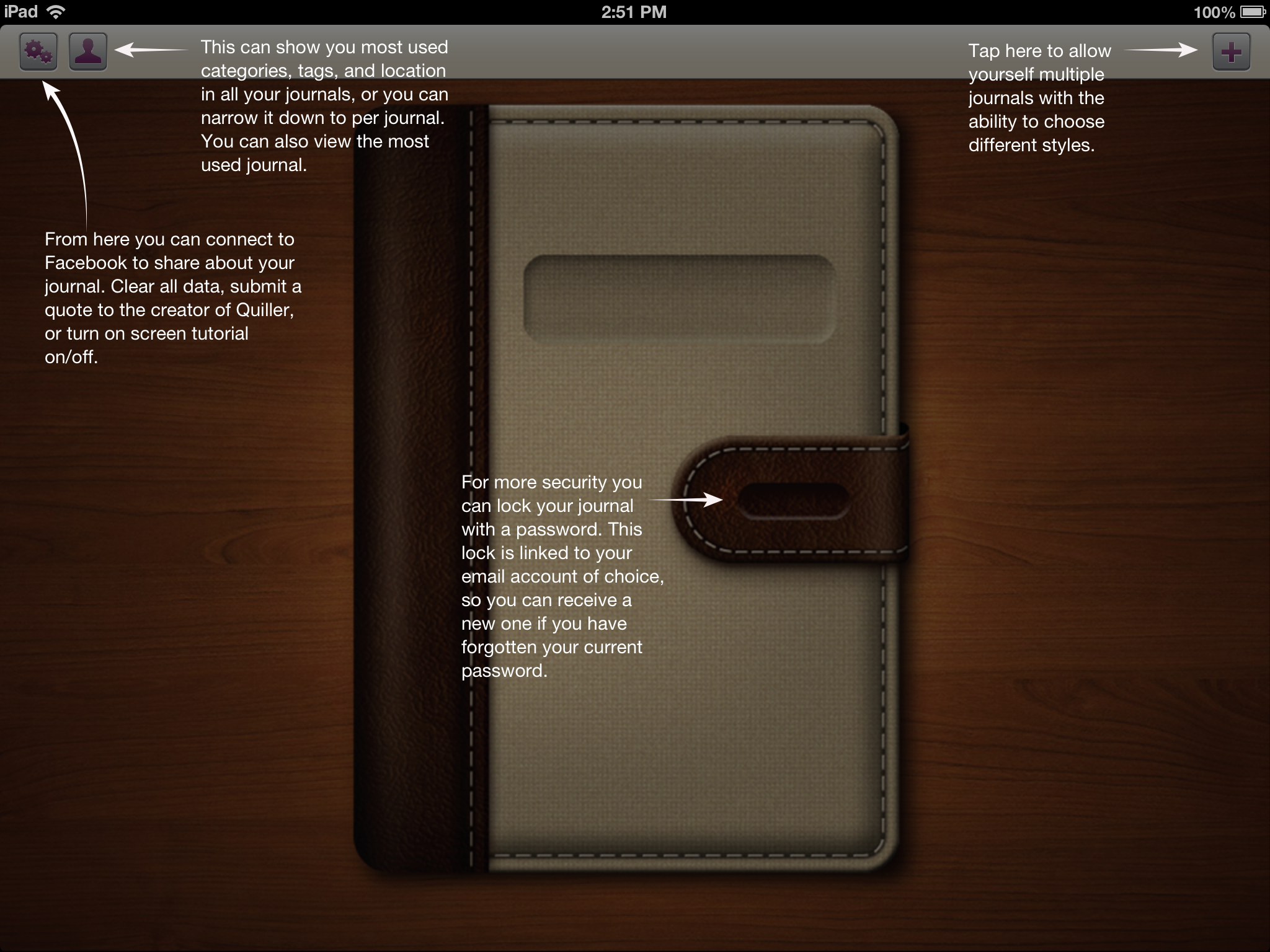
Figure 1: Creating a new journal.
Oh, and if you forget your journal password, you can have it reset via email, so that you never get locked out of your journal.
To understand what’s meant by “prompt-driven,” refer to Figure 1 that shows you what a new journal looks like when you open it for the first time.

Figure 2: Starting your new journal.
As you can see from Figure 2, there are more prompts once you open your journal and begin or continue writing. My daughter left me a message back in June. Yes, I’ve been a bad boy in not getting this review finished months ago. Apologies all around. Better late than never.
To use the journal, simply follow the on screen prompts. It really couldn’t be any easier than that.

Figure 3: Your Personal Stats Page.
There is a very interesting additional detail that the designers put into Quiller: Personal Stats. To get to your personal stats, go back to the home area by tapping the Home icon in the app. Now tap the Person icon at the top of the screen to see a page similar to that in Figure 3.
The other very cool feature shown on this page is that you can export your journal entries as PDF or TXT files. This is an extremely valuable feature if you ever decide to publish or self-publish your writings.
Quiller, at $1.99, is not the least expensive app on the market but it’s certainly one of the finest that I’ve seen at any price. No ads to bug you or distract you. That’s worth 99 cents all by itself. Remember that any “free” apps that you get will probably have ads and those annoying “In App” purchase prompts.
Remember Quiller is prompt-driven not ad-driven.
Why it’s frugal: Quiller is a quality app that helps you get your thoughts down on “paper.” You might not save a bundle of money by using it but if your writing is good and you stick with it, you could become a published writer, if that’s your thing. Buying a quality product that doesn’t constantly tap you to buy something else is worth something.
Since you can create multiple journals and password protect them individually, you only have to buy Quiller once. That’s pretty frugal.
The only features missing from Quiller are the ability to allow you to write with a stylus–or something other than the keyboard and the ability to embed pictures or graphics either from external sources or from your own scribbles.
Review: 9/10
Recommendation: Buy it and write, write, write.
The iProp Universal Tablet Stand: The Return of the Bean Bag (Review)
 iProp Universal Tablet Stand
iProp
Dockem
$29.99 Retail, $29.99 Amazon (Prime qualified).
When I first heard of the iProp Universal Tablet Stand (iProp), I didn’t know what to think. I have seen other stands and, in fact, I have one that is a bit awkward to use and only works on rigid surfaces. But the iProp is cool in that it can sit comfortably on just about any surface including laps, tables, beds, chairs, floors, and carpet, because it conforms to the surface with its “bean bag” construction. And who doesn’t love bean bag stuff?
The iProp does its job well. In my house, we have iPhones, iPads, and iPad minis and they all work very well with the iProp. My daughter Maria loves the iProp and uses it for reading and working with her iPad mini for everything except video games. Apparently you need to hold the iPad for that.
The iProp has several clever features but our favorite is that you can stash your earbuds and power cable into the zipper pocket for safe keeping and handy access because you don’t want to disturb others while you watch YouTube videos. And you certainly don’t want to run low on power during the all-important Minecraft world creation.
I like to use the iProp to hold my iPad while using my Apple Bluetooth Keyboard. It works much better than the aforementioned rigid stand. I can use the iProp up close and it’s the perfect height to avoid neck strain during my long hours of article writing. The iProp makes writing on the iPad pleasant.
 The iProp currently is available in two colors: Silver (Light Gray) and Black. It is lightweight at just 7.4 ounces and its small footprint (5.9″ x 7.1″ x 5.9″) makes it easy to carry or pack.
Although I’m not sure why, but the plastic tablet rest/holder detaches from the rest of the unit with snaps. Perhaps it does so for convenience if you should need to wash the iProp or for more compact packing. But, in any case, it’s there as an added feature if you should need to separate the two pieces.
The iProp adjusts to minimize glare from your tablet and to accommodate your optimum viewing angle. Just mash it around like you would any bean bag type product until you’re satisfied. You’ll find the iProp stable and comfortable to use no matter how picky you are.
From a quality perspective, the iProp is very well made. I’m impressed with the construction and apparent durability. The product feels good in your hands and is something that you’d be proud to use in public settings such as lunch, bookstores, presentations, seminars, group meetings, or at home. This product will outlast many generations of iPads.
I can honestly recommend the iProp as a phone or tablet accessory. I use it in the kitchen to hold my iPad when I’m on allrecipes.com concocting a new creation for my family.
I love the iProp and so does my daughter who will probably take it to her room and never allow me to touch it again.
 The iProp is frugal because you will only need this one product to hold your tablet or phone, regardless of manufacturer. The iProp is compatible with Apple products, Androids, the Microsoft Surface tablet, and all mobile phones.
Maria’s Review: 10/10
My Review: 9/10
Recommendation: If you need a tablet or phone stand, get the iProp.
Making it Move with MotionComposer for Windows (Review)
 MotionComposer 1.0.14
Aquafadas
$149 US
MotionComposer for Windows
Also available in Mac format.
MotionComposer is a desktop application that allows you to create Flash or HTML5 animations for your website or animated ebooks for iPad and iPhone. MotionComposer is a relatively complex program that has just about every bell and whistle imaginable for creating dynamic content. I like the application. It’s too bad that I’m either not smart enough to create really good content or I haven’t spent enough time with it to do so.
I’m too embarrassed to post my creation for you to see but I can see how easy it is for someone who can spend time with the application to learn its ways and means.
It’s a very powerful program that I would compare to Adobe Photoshop in flexibility, power, capability, support, and complexity. Don’t mistake the application’s complexity for complexity of use. The program is complex but its operation is simple.
The user interface is clean and enjoyable to use. It is responsive and does exactly what you tell it to do. MotionComposer is one of those programs that you could use to create an interactive training device, a dynamic website, an animated ebook, magazines, newspapers or just about any animated digital content that you can imagine. I’d love to have expert knowledge of it but I may never gain that kind of competence with the application on my own.
MotionComposer’s website makes the following claims:
MotionComposer makes your life easy
- No coding required.
- A clear user interface lets you create beautiful animations effortlessly.
- Publish in Flash® and HTML5 in a single step.
- Publish content to any computer, smartphone, and tablet, including iPhone and iPad.
- Optimized HTML5 code ensures the best performance of your content on iPhone and iPad.
I’d have to agree. Even my very poorly conceived animation worked very well. If you’re a graphic artist, designer, web administrator, ebook creator, or creative person in general, you’ll love it. And for $149, it’s easy on the wallet too. Seriously, these types of applications, if you’ve priced them, are far more expensive or you have to purchase add-ons or modules to do what this one does as is.
Creating content with MotionComposer reminds me a bit of creating a stop motion movie. You begin with a timeline and slides. From there, you add graphics or text and edit the transitions and movements of your objects. It’s great fun actually and not anywhere near as tedious as creating a stop motion movie.
The app features multiple transitions for elements, such as text fly-in, transitions between slides, audio capability, zoom and more. If you really want to see it in action, watch the demo video.
I have some good advice for you after working with this application for a few hours. First, if you’re a beginner with this kind of app, read the docs, watch the demo video and learn its capabilities before you experiment. It’s easy but it’s not child’s play. This is a professional application that requires mastery. If you’re a pro who’s coming at this from another similar application or from some other method, you’ll love it.
In all, I think the price plus performance rate this application at a solid 8.5 out of 10 for me. A company representative told me that there is a newer version coming soon that will knock your socks off. Frankly, I never liked socks anyway. I can’t wait. I hope they allow me to upgrade. This is one app that I’d love to master and use.
Rating: 8.5/10
Recommendation: Buy and Learn.
iStopMotion for iPad (Product Review)
iStopMotion for iPad
Boinx Software Ltd.
$9.99 iTunes Store
App for making stop motion and time lapse videos
Related product: iStopMotion Remote Camera (Free)
I was pretty excited when asked to review iStopMotion for iPad, since I’ve been a fan of stop motion video and claymation since I was a kid. I remember watching Gumby, Davey and Goliath, and all of those holiday claymation shows and loving them. I have always wanted to make my own stopmotion movies but never knew how. Plus, it takes a LOT of patience to make them, even with a cool app like iStopMotion for iPad.
And iStopMotion for iPad is cool. I like it. The really cool part about it is that you can install iStopMotion Remote Camera for your iPhone and use it as your camera and save your photos to your iPad without having to do anything more than clicking the shutter button.
I like the onion skinning feature too. This allows you to see where you’ve been on the previous shot so that you can move your objects a small amount so that the movie doesn’t look jumpy.
Over on your iPad, iStopMotion assembles your snaps into a stop motion video for you. One word of caution here, though. Don’t assume, like I did, that iStopMotion will allow you to manipulate your movie a great deal–it doesn’t. Now, if you’re a Mac owner and you also have iStopMotion installed, you might be able to do more but all you can do with the iStopMotion for iPad app is delete the current frame, delete all frames, duplicate the current frame, or reverse the order of all the frames.
Hopefully in the future, Boinx will give us more editing features with the app. One I would love to see is the ability to export the video into individual frames. I need this feature because, like most filmmakers, I do not necessarily create in linear order. I need the ability to move frames.
I created a short video but didn’t realize the limitations so it won’t be posted here. Sorry. It was basically two hours wasted because I wasn’t aware. I guess I didn’t read the fine print.
That said, I think that if you create your movies in linear fashion, meaning you create your video from the beginning and work through to the end, then you’re fine. Unfortunately, I was going to work my magic in “Post.”
The app does exactly what it should otherwise. You can create all kinds of really cool stop motion movies, claymation animations, text-based animations and more. Don’t let my ignorance of the app cloud your decision to use it or not. I think it’s a very cool app and having the ability to shoot with the far more agile iPhone is the absolute coolest feature.
For my studio setup, I used an 18″x24″ whiteboard, an iPhone 4, an iPad 4, a tripod and phone holder, and a dimmable, fluorescent ring light.
You can share and upload your movies via the app to Dropbox, YouTube, or save to the Camera Roll.
I think to get a full appreciation out of this app and what you can do with it, you’d have to own a Mac equipped with iStopMotion or maybe iMovie, although I’m not 100 percent sure that the movies are editable in iMovie. I don’t own one, unfortunately.
So, in a very rare move, I’m offering two different review results for this app.
9/10 for Mac owners who also own iStopMotion.
6/10 for everyone else.
The Rocksteady XS Bluetooth Speaker: A Modern Take on the Boombox of Yesteryear (review)

Rocksteady XS bluetooth portable speaker.
Killer Concepts, LLC.
$89.99
Killer Concepts, LLC., introduces a new portable, bluetooth speaker that will blow you away: the Rocksteady XS. This little black box is the best and loudest bluetooth speaker that I’ve ever seen. The unit has a simple design, a tough construction, speakers that have a near-deafening upper end and a range that will knock your socks off.
OK, I’m not much of an audiophile and I’m often annoyed by people who obsess over music gadgetry. From high priced direct drive turntables and super woofers to boomboxes and ghetto blasters to Sony’s Walkman products to MP3 players to smart phones, I’ve always found them to be rude, offensive and irritating–just like their owners. That said, since I’ve begun working out daily at the local YMCA again, I find myself taking my iPhone and earbuds to assist me on my quest for the perfect physique. I’ve become what I used to hate, an audiophile, or at least an irritating facsimile of one.
I digress.
The Rocksteady XS arrives with a USB cable, a charger interface, a small instruction booklet and itself. You don’t need anything else.
Just larger than a Nintendo Wii remote, it measures approximately 6.5″ long and is just under 2″ on all four sides. It’s very lightweight–a half pound maybe? On one side is the power button, Line In jack, DC-5V interface and a USB 3.0 interface. On another side is your battery access panel. On another face, you have the primary music controls: Play/Pause/Stop, Volume controls and next/previous track. There is also a Mode button that, when pushed, pairs your Rocksteady XS speakers with your bluetooth capable device.
Operation is simple: Power On, press Mode, pair the device, play music.
Your phone/tablet/computer controls also control the play/pause/stop, speaker volume and track selection so that no matter which one you’re closer to, you have maximum control.
Just for fun, my wife and I tested the speaker outside with my iPhone 4. I started playing a song on my phone with the Rocksteady XS paired. She walked down the street away from me to test the connectivity distance and the sound quality outside.
Both surprised us. She was over 100 feet away and I could still hear the music and control the speaker volume and track selection from my phone. I didn’t expect that kind of distance. At most, I figured 30 to 40 feet but over 100 really impressed us.
We switched tracks, played saved music, played Pandora, played audiobooks and my daughter even played back some voice recordings that were on the phone. Whichever app has the foreground is the one that you can hear through the speaker.
We’ve had a good time reviewing the Rocksteady XS bluetooth speaker. It’s a high quality device that you will enjoy using. We love it. My wife wants one and that’s significant because she doesn’t ever request technology. In the past ten years, she’s only asked for a few bits of technology: a laptop, an iPhone, an iPad mini and the Rocksteady XS. Mother’s Day is coming soon so I’m sure she’ll have one.
The Rocksteady XS speaker retails for $89.99 on Amazon.com. A bit pricey, in my opinion. I think a $49.99 price point would be far more attractive to me but my wife didn’t seem to have a big problem with $90, so maybe I’m wrong. It’s definitely cool, very portable, extremely well built/designed and loud enough that it doesn’t sound cheap or “tinny.” It sounds like a much larger device. The sound quality is very good. I say, “Buy it.”
I give it a 8.5 out of 10 because of the price and that it only comes with a 90-day warranty. For $90, I really think that one year is more appropriate.
Review: 8.5/10
Recommendation: Buy it.

 Techopedia
- An error has occurred; the feed is probably down. Try again later.
Datamation
- Google and NextEra Strike AI-Powered Grid Deal
- NYT Sues Perplexity AI in Copyright Conflict
- Cloudflare Outage Affects Major Websites
- OpenAI Forces AI to Confess Its Lies
- OpenAI Declares Code Red as Google’s Gemini 3 Threatens ChatGPT
- Coupang Breach Exposes 33.7M South Koreans’ Data
- ChatGPT Celebrates Third Anniversary
- Asahi Group Reveals Findings of Cyberattack
- OpenAI Discloses Mixpanel Security Incident Affecting Some API Users
- Firefox Zero-Day Flaw Exposed 180M Users

 The Frugal Networker
You must be logged in to post a comment.