Archive
The HISY Wireless Smartphone Camera Remote (Review)
 HISY Wireless Smartphone Camera Remote
HISY ( pronounced hīgh-see )
$24.99 Amazon (Prime)
The HISY Wireless Smartphone Camera Remote (HISY) is a remote shutter device for your iPhone and iPad (See Features section below for compatibility). The HISY is a very small (approximately 1″x1″) Bluetooth device that fires your camera shutter or starts a video capture. The HISY is compatible with any iPhone camera app that uses the basic camera app as a base.
In other words, if you use a camera app that adds some effect to your pictures as you take them, the HISY will work with it, if the app is based on the iPhone’s basic camera app.
I suggest that you test it with your favorite camera apps before you do any serious photography with it. You don’t want to set everything up only to find that the HISY isn’t compatible with your camera app.
There’s no associated app that you need to buy or download for the HISY to work. All you have to do to is link the device with your iPhone or iPad via Bluetooth, open your camera app and starting taking pictures or starting videos.
HISY Features:
- Apple iOS 7.0 or later of iPhone 4S, 5, 5S, 5C, iPad 3rd & 4th Generation, iPad Mini & iPad Air iPod, & iPod Touch 5th Generation or later
- Frequency Range: ISM Band 2.4 GHz
- Bluetooth Version: BT 4.0 Low Energy
- Active Range: 30-90ft / 10 to 30m
- 2+ Year Battery Life: (CR2032 x 1 Cell)
- Includes headphone jack attachment to carry with you at all times
One of the coolest applications for a device like this, other than selfies, is as a remote camera that’s inconspicuous to its subjects. Often people don’t enjoy having their pictures taken, but if they’re unaware that you have a camera pointed at them, they’re far more relaxed and unguarded for photographs, interviews, or other forms of subtle photography, such as getting those precious moments snaps of your kids playing or of your husband cheerfully taking out the garbage.
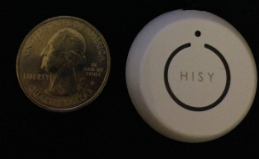 The HISY sells for $24.99 on Amazon and is Prime qualified (free two-day shipping). The HISY also includes a short strap connected to a plastic insert that fits snugly into your earphone port that allows handy access to impromptu photos that you might otherwise miss.
Why it’s frugal: The HISY is frugal because you can take up to 200 photographs with it daily for two years on a single CR2032 ($3.00) battery. It also has a very long range (30 to 90 feet), which puts it in competition with devices costing twice as much or more.
The HISY is small enough to fit comfortably in your hand and has a simple “one touch” operation. It’s simple enough for young children to operate. A single button press fires the camera shutter for a perfect, non-blurry picture.
Rating: 8.5/10
Recommendation: Buy it and test it with your favorite apps before you do real shooting with it.
Staying Secure in the Cloud: Four Tips for Midsized Businesses
 Working in the cloud can be risky business but it doesn’t have to be a show stopper. What you have to understand is that there’s risk with anything you do and the cloud is no different. You have to manage your risk with intelligent security measures and accept a certain amount of risk that comes with doing any kind of business online. Risk is part of doing business–in the cloud or not.
“IBM is an industry leader in IT security. IBM and IBM Business Partners offer a complete package to fit the needs of midmarket organizations. From cloud computing and big data management to mobile technology and social networking, IBM security offerings allow midsize companies to assess, plan, deploy, and use effective security solutions for their businesses.According to analysts, no other company has the depth and breadth of IBM’s knowledge and experience for security solutions. Few service providers offer end-to-end identity and access management solutions that can address various requirements with a complete set of solution elements that encompass hardware, software, design and implementation, and management services.”
As someone who needs to protect your midsize business, security is important but often elusive and “black box-like.” Your business needs to find new ways to provide security for data, mobile, and cloud computing environments. For more information on how to acquire the industry’s best and most acclaimed security solutions, connect to: http://ibm.com/midmarket/us/en/it-security.html and download the IBM X-Force 2012 Trend and Risk report.

This post was written as part of the IBM for Midsize Business program, which provides midsize businesses with the tools, expertise and solutions they need to become engines of a smarter planet.
I’ve been compensated to contribute to this program, but the opinions expressed in this post are my own and don’t necessarily represent IBM’s positions, strategies or opinions.
Nyrius ARIES PRO Wireless HD Transmitter for Laptops (Review)
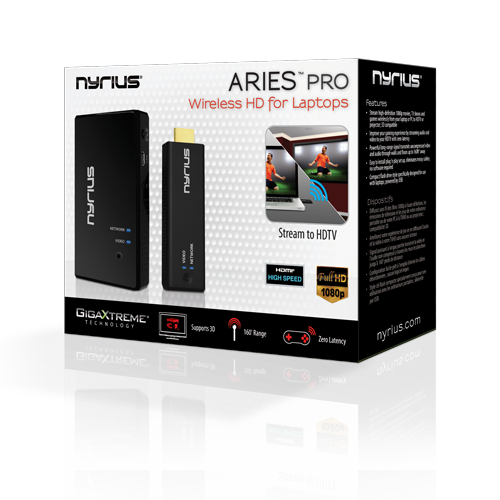 ARIES PRO Wireless HD Transmitter (NPCS550)
Nyrius
$249.99 Amazon (Prime)
Uncompressed streaming of 3D video at 1080p from computer to TV up to 160 feet away.
I didn’t know quite what to think of this product just from its description but once I saw it in action, I decided that I’m a Nyrius convert. I know it might sound funny to say it but I’ve wanted a product like this for a long time–at least for the past five years. The Nyrius ARIES PRO Wireless HDMI Transmitter for Laptops consists of a wireless transmitter that you insert into a laptop (or other computer) via its USB and HDMI interfaces and an HDMI receiver that connects to your TV’s HDMI interface. The receiver also plugs into a power outlet. And as if by magic, the two units connect and your computer’s screen is streamed to your TV. Seriously.
The reason that I’ve waited so long for this can be summed up in a single word: Netflix. Several years ago, we purchased a Netflix subscription from which we ordered physical DVD movies, three at a time, that were delivered to our home. After watching the movies, we returned them.
Well, as you know, Netflix started offering streaming movies via the Internet. We didn’t have a TV capable of receiving Netflix, so we had to opt for one or more of the following as options:
1. The Netflix Channel on our Nintendo Wii.
2. A laptop wired to our TV.
3. DVDs mailed to our house, which we also had to mail back.
None of those options were/are that great.
 The Nyrius ARIES PRO Wireless HD Transmitter (ARIES PRO) takes care of that problem. But the service doesn’t just stop at Netflix. I can stream anything to the TV that I have on my laptop, which includes movies, TV shows, computer applications, presentations, and even Skype conversations.
I used to have what was called a “TVator” that consisted of wires and hookups that worked very well back in the 1990s. It was very cool. A wireless setup would have been (And is) much better.
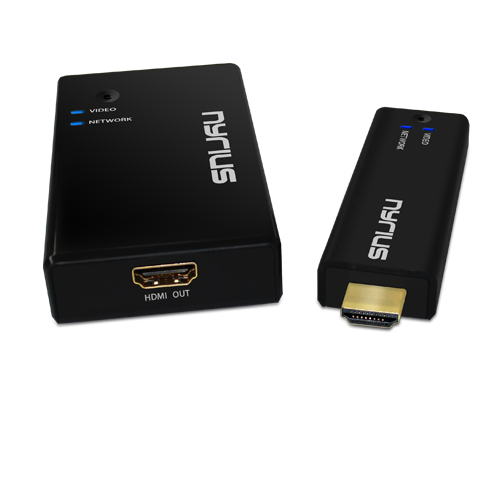 For presentations, I’m not limited to where I am in a room. I don’t have to stand in some cumbersome place and have the people in the room shuffle around to see the screen. I’m totally out of the way. In fact, I don’t even have to be in the room. I could be at my desk giving the presentation to the conference room up to 160 feet away. That’s handy for when I need to record a presentation as well as present one at the same time. Being able to do it remotely cuts down on all of the ambient room noise: coughing, shuffling, random comments, etc.
Now, I understand that this product is meant for streaming TV, movies, and video games from your computer to a TV screen but come on, that’s way too limiting for someone who needs this product for less esoteric use.
What you get for $249.99:
- Digital Wireless HD Transmitter
- Digital Wireless HD Receiver
- Velcro strips
- External IR Receiver
- Velcro Strips
- 100-240V AC Power Adapter
- 5 ft HDMI Cable
- Right Angle HDMI Adapter
- USB Power Cable
- Female USB Adapter
- 1 Year Warranty
- Lifetime Live Customer Support
Why it’s frugal: The ARIES PRO product is frugal because of its flexibility as a streaming device. If you could only use it as a computer to TV connection for games and movies, it wouldn’t be frugal. But its extended use as a professional presentation tool makes it extremely frugal. You don’t have to buy anything else.
My favorite part of the product is that it just worked. I didn’t have to fuss or tweak anything. In fact, it shocked me that it was so easy to setup. Here are the setup steps from unboxing to video streaming:
- Unbox the product
- Plug in the HDMI cable and power connector to the TV receiver box (the larger one) and then connect that box to your TV and power.
- Change your TV channel to use the HDMI port that you plugged the receiver into.
- Connect the USB cable to the transmitter and then plug in the transmitter to your computer’s HDMI interface and into an open USB interface.
- The two units “find” each other and begin transmitting. If this doesn’t happen automatically, press the button on the transmitter once.
Everything that is now on your computer screen is mirrored on your TV. Magic.
There’s no software to install, no messing around in Control Panel, no calling your brother-in-law the computer expert to help you figure it out. It just works.
The downside of a product like this for home use is that now there are Roku boxes, Chromecast devices, and Apple TV, for streaming movies and TV shows that the need for such a device has diminished somewhat. However, the need for this service has exploded in businesses for training, presentations, software demonstrations, and collaboration. No conference room should be without one. And while $250 for a home setup is a little steep, it’s a great deal for businesses. I guess the old adage is true for the ARIES PRO–when one door closes, another one opens.
For quick, easy setup for conference room computer visualization, I haven’t seen anything better since the TVator. It’s a quality product at a great price point for business use.
Rating: 8/10
Recommendation: Buy it for your business but you probably don’t need it at home.
Keep Your iStuff Stylishly Under Wraps with Mummy Cases (Review)
 Mummy Cases for iPad, iPhone, and iPad mini
Loop Attachment Company
Price: $40.00 for iPad. $24.95 for iPhone. $30.00 for iPad mini.
The Mummy cases for your iPad, iPhone, and iPad mini are just what you need for keeping a firm grip on your mobile device, while also keeping a firm grip on your sanity when using your very expensive gadgetry. Mummy cases are called “mummy” because their design is somewhat reminiscent of mummy wrappings. One significant thing to note about the cases is that they do not cover your product’s cameras, speakers, power connector, earbud interface or Apple logo.
I’m not sure the last one is an absolute requirement but some people like for you to know they’re using Apple products instead of some knock off or lesser quality device. Actually, not covering the logo is really a secondary feature–the real feature is so that you can stash your credit cards, your ID, your gym membership card, or even a few business cards.
The cases are constructed of high-quality silicone rubber polymer, which is chemically unreactive, stable, durable, impact absorbing, and shape retaining. It is also highly resistant to changes in temperature and mechanical stress. In other words, this case will likely outlast the electronic device that it protects by a factor of ten.
 And now, my personal experience with the Mummy case for iPhone 5:
Did you ever have one of those days where everything seemed to go wrong? And one of those things was that your iPhone slid off of your car’s dashboard and hit the floorboard hard after, of course, making an impact on your gearshift lever. I’ve had it happen to me more than once. My iPhone 5 has taken a minor beating because of my desire to have it handily placed on the dashboard within reach. No, I don’t text and drive but I do have a Bluetooth enabled car so I can make and receive phone calls by pressing steering wheel buttons and speaking.
The problem is that I can’t send or retrieve messages using the car’s built-in features. I have to physically press my iPhone’s Home button until Siri responds. Once I do that, all is well but it has to be somewhere handy for me to do it. The dashboard is a good choice–well, would be a good choice if it weren’t for the fact that anytime I turn a corner, it skitters across the car like a rock skipping across a lake, with similar results: I get a sinking feeling at the end of the excitement.
After I received a set of Mummy cases to try, I immediately placed one on my iPhone, my iPad, my wife’s iPad mini, and my daughter’s iPad mini.
I decided that because this case is made of silicone rubber I’d try the dashboard trick again. At least it would have enhanced protection even if it failed to hold the phone in place. To my enjoyment, the case held my phone in place on the dashboard, even through the treacherous, construction-laden streets of Tulsa, Oklahoma. Success. Finally, I can leave my phone on the dash, within reach, without having to hold it down or pick it up every time I turn a corner, swerve to miss an errant driver (don’t laugh, it happens a lot), or to navigate the plague of perennial construction.
Let me say here that the silicon rubber isn’t sticky or tacky, like you might suspect. This is high quality silicone rubber and not the low grade stuff that the “wall walker” toys are made of, nor is it composed of rubber that picks up lint and dust from objects that it touches. It also slides easily in and out of jeans pockets but is “sticky” enough to stay inside under unusual circumstances that I often find myself in during backyard activities, garage puttering, or working in the data center on computers. I don’t have to worry about my phone slipping out of my pocket. That’s one less thing to worry about.
Score one for the Mummy iPhone case.
The iPad case is equally “grippy.” I use my iPad in all sorts of unusual scenarios, such as while I’m watercolor painting, while I’m cooking, or while I’m in the hot tub. Hey, don’t judge me; I like my technology close to me where ever I am.
The case feel good in my hands while I’m playing Trigger Fist or Real Racing 3. Yes, I know that I should be writing, learning, or doing something more constructive but come on–I need my down time too. Didn’t you ever watch Star Trek’s “Shore Leave” episode where they said, “…the more complex the mind, the greater the need for the simplicity of play.”? I don’t care what you think, I’m going with that as applying to myself and as justification for playing video games.
My wife and daughter love the Mummy cases too. My wife really likes the fact that the case has magnetic anchors so that her Apple “smart” cover works with it. She did tell me that you have to be somewhat careful with the smart cover when closing it because sometimes the smart cover doesn’t connect fully and sleep the iPad mini. Neither my daughter nor I have a smart cover so I have to take her word for it.
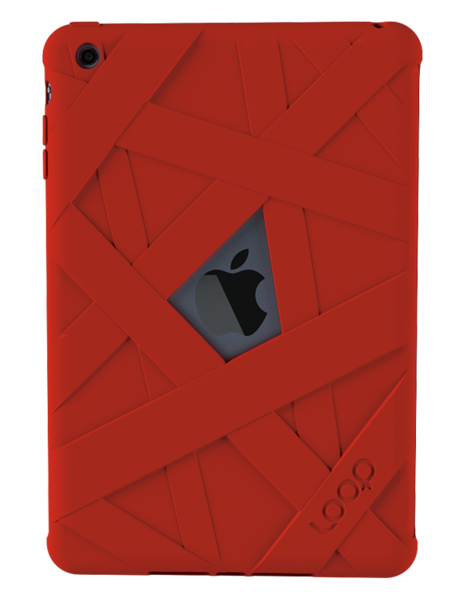 She’s had nothing but good things to say about the Mummy case and that she really likes how it feels in her hands. She feels like it enhances her iPad mini experience. Before the Mummy case, she only had the smart cover by itself and she said it felt awkward and never comfortable. She’s happier with it now that she has the Mummy case.
My daughter’s experience is similar to my wife’s with her iPad mini. She plays a lot of video games and likes the grip it gives her on the iPad. She says that it feels “natural.” I’d have to agree. That feeling is purely subjective, I realize, but it’s accurate. It feels like the iPad should have been made with this kind of feel. It’s very hard to explain but it feels natural and it doesn’t add any real weight or dimensionality to the device. It’s “natural.”
Why it’s frugal: The Mummy case is a frugal product because it protects your valuable devices. If that weren’t enough, and it certainly could be, you also have the bonus features of a natural feel, smart cover compatibility, and surface stability–such as on a car’s dashboard.
The only issue I have with the Mummy case is the price. It seems a little high to me. I don’t know how much it costs to produce but the products are made in China, which is slightly offputting. I do prefer American made products. If I’m going to pay $25, $30, or $40 for a case, I’d rather have it made in America. I’d feel better about purchasing the cases if they were $10 per item less expensive.
I love quality products. Apparently other members of my family love them too, because they haven’t removed the Mummy cases since we put them on. The cases are easy to put on your devices, yet give them a snug and stable fit.
The Loop Attachment Company manufactures very well made products. I like the range of available colors and the number of devices they support. The cases fit well and protect the devices they’re meant to protect. The cases are elegant, stylish, and make great gifts for yourself or others. And they’re attention getters–I’ve had several people check out my iPhone case from just the look alone. No one ever did that when I sported my TARDIS case. Oh well, not everyone is a Whovian.
My family and I love the Mummy cases and gladly recommend them for your iStuff. The grip, the natural feel, the range of colors, the warranty, and the added features make them a fine addition to your busy, gadget-centered lifestyle.
Rating: 8.5/10
Recommendation: Buy for yourself or for a gift. You’ll be happy with your choice.
Discovering the 3Pod Flashpoint Flat-Folding P5CFH Tripod (Review)
 3Pod Flashpoint Flat-Folding Tripod (P5CFH)
Formal Name: 3Pod P5CFH 8X Carbon Fiber 5 Section FlatFold Tripod with K2 BallHead
Adorama
$149.95*
*This price is currently $199.95 with $50.00 instant rebate savings and free shipping.
There are a few things that you’ll never hear anyone say. One of those things is, “I have plenty of space, so adding another large, three-dimensional object to my overpacked car is fine with me.” You’ll also never hear a professional or prosumer photographer say that “Another 20 pounds of equipment that’s difficult to carry is no problem at all.” Nope, you’ll never hear those words from anyone. You know what you’ll hear from a photographer about the Flashpoint Flat-Folding Tripod? The word “Wow” will be part of what’s said. As for additional words of exclamation, superlatives, and odd sounds of joy–one can only speculate.
I’m still lugging around an old painfully heavy, bulky, noisy–yes, noisy tripod from the thrilling days of yesteryear–or the 1980s as some people call them. Obviously my old clunker is durable but it weighs a ton and only collapses so far. It’s clumsy to carry. It’s clumsy to work with. It is almost impossible to level. And it generally drives me nuts to use it.
So, you ask, why haven’t I bought something newer and better? Well, to this I can only say, it’s a mixture of laziness and of not wanting to spend $300+ for a bang up tripod that is probably not that much better than my old one is. The only part that might be better is that many higher end tripods have bubble levels on them so that leveling is easier. As for weight, forget about it. I don’t want to trade a bulldozer for a tank.

 Adorama, of course, has the answer to my problem. Adorama has just the remedy in its lineup of affordable, lightweight, durable, sturdy, fully adjustable tripods that not only feature built-in bubble levels but they’re also flat when you fold them. Flat, as in two-dimensional. Yes, I know it sounds strange but it’s true. Flat tripods. The flatness aspect goes against everything you know about tripods, doesn’t it?
Well, these beauties fold flat and come with their own carrying cases. The whole thing looks like a soft sided Clarinet case. And it’s about the same weight as a loaded Clarinet case. All cased up, the tripod measures about 15″x7″x2.75″. The case is actually 7″ at one end and approximately 5″ at the other, so it really looks like a Clarinet case and not a tripod at all.
Inside the case, you’ll find the flat-folding tripod base, a K2 hydraulic Ballhead with standard 0.25″ screw mount, a shoulder strap for you shleppers out there, the user’s manual, tools (two hex key wrenches), and a velvet Ballhead cover to protect your bubble level. The case itself is a heavy duty nylon with reinforced double zippers–think expensive luggage style materials here. It also features internal padding and soft material on the inside to prevent damage from accidental drops and random mishaps during packing or traveling.
At its shortest, unextended height, the tripod is a mere 12 inches tall. The Ballhead adds another 14 inches to the height unextended. However, if you need to get down a little closer to the action, you can adjust the tripod legs downward so that the overall height is only 19 inches.
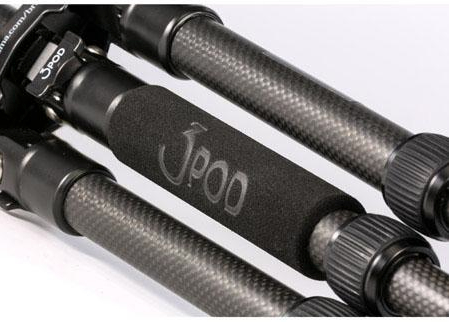 The middle leg of the tripod has this heavy duty padded hand grip on it for easy manipulation and repositioning of the tripod. The Ballhead also has its own carrying strap so that you don’t have to carry the case on location, unless you want to carry it to and unpack at your destination.
Photographers and their assistants will love the quick setup of this tripod. The legs are quick release, quick tighten and have five height selectors. Fully extended Ballhead and leg angles at their maximum, the tripod stands at just over 56 inches, which means that even at my height (6’2″), a mounted camera is at a very comfortable eye level.
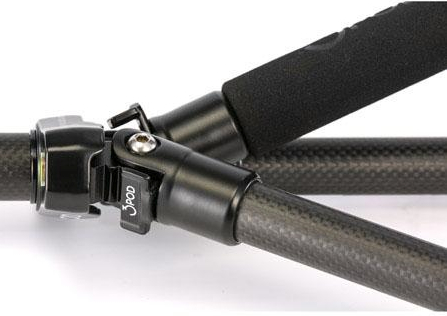 You can position the legs at three different angles and all independent of one another. The same goes for the heights of the extensions. This can provide you with an almost infinite array of possibilities for unusual but stable camera shots. As is suggested by its name, the Ballhead can be used to place your camera at any angle from horizontal to vertical.
The whole assembly is handsome as well as sturdy. The equipment has been tested with camera and accessories at weights up to 20 pounds. That means that your camera, on board flash, umbrella, microphone, lights, or just about anything else you can think of will not be too much for this tripod.
Its strength comes from its carbon fiber construction. In case you don’t know about carbon fiber materials, here’s an excerpt from Wikipedia on the topic:
“The properties of carbon fibers, such as high stiffness, high tensile strength, low weight, high chemical resistance, high temperature tolerance and low thermal expansion, make them very popular in aerospace, civil engineering, military, and motorsports, along with other competition sports. However, they are relatively expensive when compared to similar fibers, such as glass fibers or plastic fibers.”
 The leg releases are easy to use in both directions and the feet are large and padded for added stability. However, if you don’t like the padded feet for use on turf, for example, remove them to reveal spikes. Although you’ll have to use a bit of force, the feet simply pull off, push on–no screwing and unscrewing.
The tripod also features a compass, 360-degree head rotation, two levels, and a removable quick-release plate with universal mounting screw.
This tripod does everything but snap the picture for you. Knowing Adorama, they probably have an accessory for that as well.
I consider this tripod to be for outdoors and for travel. It’s weight and capacity dictate that it will work well under just about any condition or application. Location photographers and filmmakers will like this little tripod. No, it’s not suited for large equipment but you really wouldn’t expect it to be for under $150, now would you?
Carbon fiber is well-suited to more extremes than any of your other equipment so don’t worry about environmental conditions causing you any problems at all.
The only problem I found with this tripod is actually one of its features: weight. I know what I said about weight earlier but the problem is that this tripod is so light that your camera is going to be a bit top heavy, which becomes more obvious when the tripod is fully extended. This won’t be a problem unless conditions are breezy. Then it gets a little “iffy.” It might be fine but I’m just too paranoid to let go, walk away and use a wireless remote in anything but a gentle breeze.
That said, you can adjust the legs to give a wider stance and provide more stability even in fairly high winds. It’s just a word of caution mostly to let you know that this is not a 30 or 40 pound beast that will withstand windy conditions. Additionally, the compass seems not to be great. I’d either leave it off or upgrade it a bit to be really useful.
The 3Pod P5CFH flat-folding tripod is a well-constructed, well thought out, versatile tripod that’s easy to travel with and easy to carry.
Why it’s frugal: If you have a need for multiple tripods in your travels, this one could cut that need down to just one. Frugal doesn’t always mean dollars saved but can also mean space, weight, and pain on those long walks to distance locations.
Rating: 8.5/10
Recommendation: If you need a light duty, durable, versatile tripod, this one is very good. Buy it but stay out of the wind.
Cuddle up to your iPad with a Snugg case (Product Review)
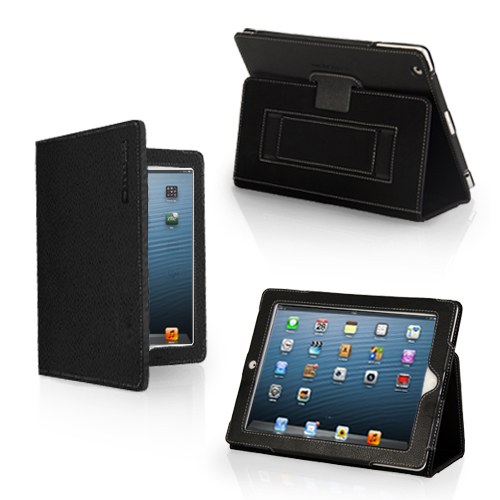 Snugg Case for iPad
The Snugg
$29.99
I’ve seen a lot of cases for iPad. I’ve seen ones that claim to do everything but wash your car. The Snugg case for iPad doesn’t make any high and mighty promises. It just does what it does. And it does it elegantly. You’ll never be embarrassed to pull out your iPad with this case on it. In fact, I’d be surprised if you don’t have someone approach you to ask what kind of case it is, where you bought it and how much it cost.
It’s a beautiful leather case that protects your iPad with a look that’s appropriate for even the most conservative office or location. It’s modern, functional, beautiful and crazily affordable. At $30, who can argue?
The only drawback to the Snugg case, and it’s a pretty minor one, is that it doesn’t prop up well on your lap. It tends to not stay up. That said, the case works perfectly on tables, pillow desks, and other fairly rigid surfaces. The upside is that it’s light enough to ignore that one shortcoming. You’ll hardly notice the weight while holding it.
My favorite features of The Snugg are its light weight and its rich feel. My iPad feels secure. It should feel secure because of the Snugg’s velcro latch and “snug” fit. The Snugg feels good in my hands. The Snugg also has some subtle features that you’ll like too. For example, it has magnetic closures, so when you close the flap your iPad goes to sleep. That saves your battery. It’s a good thing.
As you can see from the pictures, you can prop up your iPad in a variety of ways and rest assured of the case’s stability.
All of your controls and cameras are available to you with the case on so there’s no need to slip out of it to do whatever it is that you need to do with a naked iPad. Your fully clothed iPad can do it all but also maintain a very high level of protection and physical beauty while doing it.
The Snugg features a handy and sturdy stylus loop located at the top or left side of the case, depending on how you’re holding it. It also features a hand strap. I don’t really use the hand strap as a hand strap. I use mine as a place to stash all kinds of miscellany from business cards to receipts to my iPhone. Don’t worry, the strap, like everything else on the Snugg case, is very sturdy and well made.
And that’s the first thing you’ll notice when unboxing the Snugg case is its beautiful, quality construction. For $30 these days, I don’t expect much. I should but I don’t. However, The Snugg raises the bar on value for me.
Why it’s frugal: As I’ve written, $30 for a quality leather case that’s light, well-made, elegant, and protects your iPad. How much more frugal do you want? It’s a great value and a great product. Plus, the Snugg comes with the Snugg Promise and a Lifetime Guarantee. Frugality at its finest.
I really like the Snugg case for iPad. It’s my “go to” case for home, travel, gaming, and general use.
Rating: 9.5/10
Recommendation: The Snugg, in my opinion, is a bargain at $29.99. Buy it. You’ll love it.
Introducing the Jackery Leaf Integrated Battery and Case for iPhone 5 and 5S
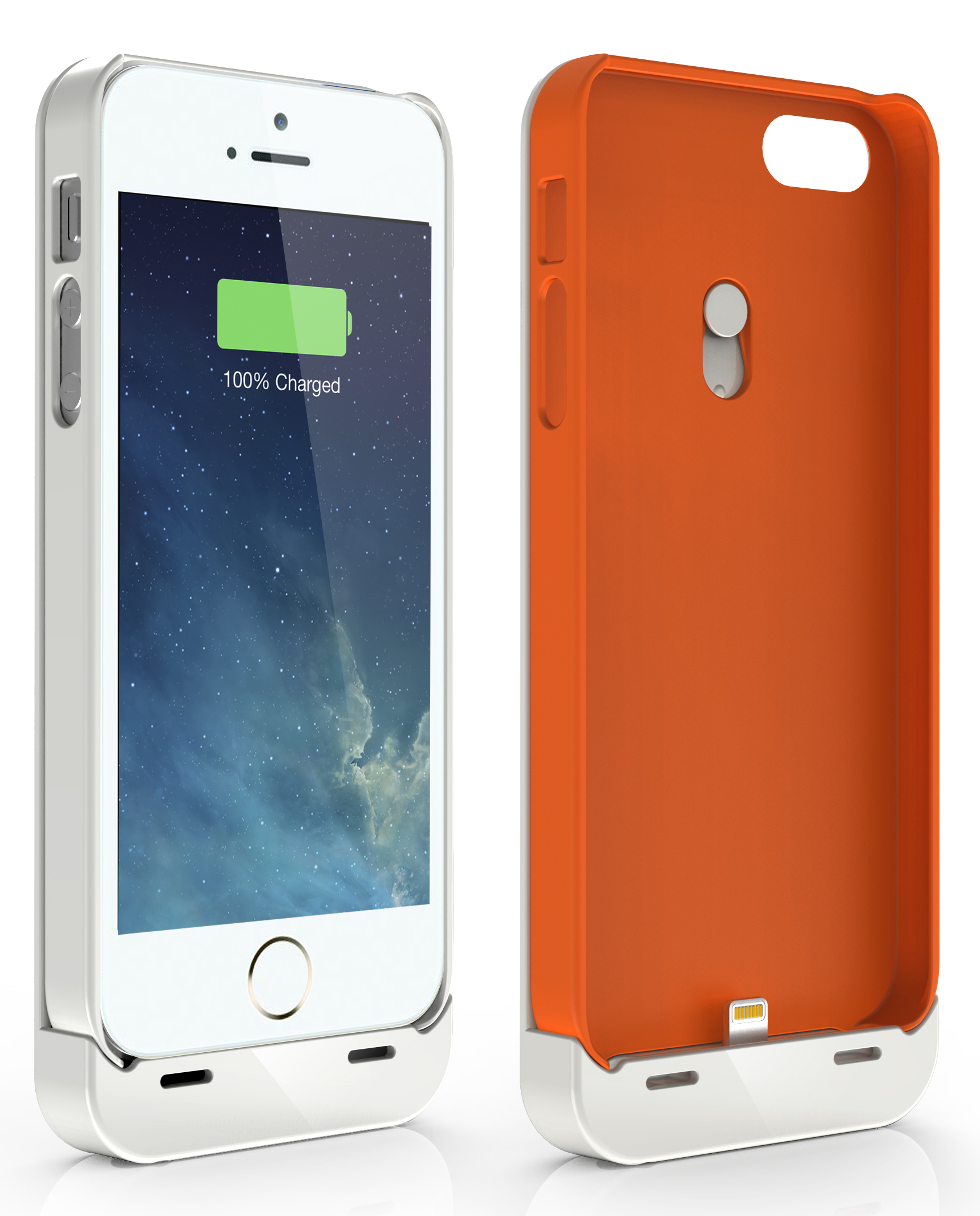 iPhone 5 and 5S Users Enjoy Extended Talk and App Time with the Jackery Leaf Integrated Battery/Case Solution Powerful and Lightweight Battery Enables Fast Charging on the Go –Jackery Leaf Doubles the Operational Time of the iPhone Battery
Santa Clara, CA (January 21, 2014) — Jackery, Amazon’s #1 provider of premium portable battery products for mobile devices, announced today the release of the Jackery Leaf, the company’s first powerful rechargeable battery for iPhone 5 and 5S devices that is integrated within a protective phone case.
Available in Jackery’s signature orange, black, or white, the Jackery Leaf allows iPhone users to charge their phone while they are mobile due to the battery being integrated within the protective case. The Apple Certified product features a micro-USB to Lightning connector converter, so users can plug in and charge the battery and their iPhone at the same time for optimal efficiency. Full charging takes only two and a half hours. The capacity of the Jackery Leaf gives users up to 50 extra hours of operational time depending on what types of applications they are running or tasks they are performing.
“The Jackery Leaf was built to fit specifically with iPhone 5 and 5S devices within a protective case structure” said York Wu, CEO of Jackery. “A significant differentiator for our product is the battery is detachable from the case, so users can still have the benefits of our great case while the Jackery Leaf is charging. It’s also a considerable value, as users get Jackery’s legendary craftsmanship with two protection cases and an additional battery at a price that is very reasonable. It’s this relentless focus on quality and value that has established us as the industry’s number one provider of premium portable batteries.”
 The Jackery Leaf features a three-color LED charging status indicator for simple operation and a four-layer smart safety protection circuit. Each order includes two cases, the battery, a premium audio extension cable and micro-USB charging cable. It is available now at Amazon.com.
In 2013 Jackery established itself as the provider of the most affordable and powerful portable chargers available in the marketplace. Many of Jackery’s products are compatible with Android and iOS devices and also Windows phones, various smartphone and tablet platforms, multiple gaming devices, and MP3 players. The Jackery Leaf joins the Jackery Air, Jackery Fit, Jackery Giant+, Jackery Giant, Jackery Bar and Jackery Mini products. Consumers can purchase the entire Jackery lineup at: http://www.amazon.com/gp/browse.html?ie=UTF8&marketplaceID=ATVPDKIKX0DER&me=AZF6YB7UVA7OU or http://store.jackeryusa.com/.
About Jackery
 Jackery is a Santa Clara, California-based technology company focused on developing premium battery products for smartphones and tablets. The company offers a lineup of four products, the Jackery Air, Jackery Giant+, Jackery Giant, Jackery Bar, and Jackery Mini, which all offer considerable charging time and small form factors for owners of the most popular smartphones, tablet devices, MP3 players and gaming devices. For more information, visit www.jackeryusa.com.
Ken Hess’ Topics of Interest
I am always looking for article ideas and topics from readers, companies, PR folks, friends, and techies. This page is where I post my current needs. I have a variety of venues for articles. I decide where I post the information according to interest, audience, and other factors.
If a topic is posted here, I’m interested in interviews, discussions, podcasts, infographics, ideas, and data related to it. Feel free to contact me via email (ken-at-kenhess-dot-com) or Twitter (@kenhess) to continue the dialog. Please read the complete list of needs and the list of things I’m not looking for.
CURRENT NEEDS:
Internet of Things & Machine to machine communications
- Users
- Use cases
- Case studies
- Infographics
- Statistics
- Perspectives
- Security
- Pain Points
- Successes
- Clever applications
Security
- Breaches, thefts, hacks
- Vulnerabilities
- Successes
- Costs and cost data
- Challenges
Virtualization
- Special virtualized workloads
- Interesting applications
- Challenges
- New frontiers
- Cloud applications
Consumerization/BYOD
- Solutions
- Challenges
- Success stories
- Pain points
- Productivity Apps
- Security
Big Data
- Case studies
- Statistics
- Users
- Alternatives
- Challenges
- Solutions
Offshore outsourcing
- Failures
- Expose’
- Non-performance issues
- Challenges
- Cost vs. return
- Scams, deals gone wrong, security problems
Technical Startup Companies
- Profiles
- Innovations
- Technology overview
- David and Goliath stories
- Successes
NOT CURRENTLY LOOKING FOR:
Funding information
Partnerships/Strategic Partnerships
Healthcare-related
Fashion-related
Food-related
IBM Introduces X6 Architecture, Optimizes x86-Based Servers For Cloud, Analytics
 IBM Introduces X6 Architecture, Optimizes x86-Based Servers For Cloud, Analytics
Industry-first integrated flash storage for high performance, modular design for long life cycles to help reduce costs, improves resiliency for increased uptime
New IBM FlashSystem 840 doubles performance, ideal for virtualization and cloud
Armonk, N.Y. – 16 Jan 2014: IBM (NYSE: IBM) today announced the sixth generation of its enterprise X-Architecture for System x and PureSystems servers, providing industry-leading improvements in the performance and economics of x86-based systems for analytics and cloud.
“Our enterprise X-Architecture for x86-based servers and solutions delivers high performance and the highest customer satisfaction in the industry, making us number one in high-end x86 systems,” said Adalio Sanchez, general manager for IBM System x and PureFlex. “We continue to innovate and deliver leadership performance, reliability and investment protection for mission-critical workloads with X6.”
Clients are rapidly adopting analytics for greater business insight and moving critical workloads like ERP, analytics and database to the cloud for increased efficiency and lower costs, and x86-based systems are the first choice for many. The X6 architecture represents IBM’s continuing R&D investment and industry leadership in x86-based systems, and is specifically designed to provide new levels of performance and resiliency for enterprise applications. For memory-hungry applications, X6 delivers three times the scalable memory of current competitors’ and IBM x86-based systems to support cloud and analytics.*
The X6 architecture is:
- Fast, with integrated eXFlash memory-channel storage–an industry first, this DIMM-based storage provides up to 12.8 terabytes of ultrafast flash storage close to the processor, increasing application performance by providing the lowest system write latency available, essential for analytics applications. X6 can provide significantly lower latency for database operations, which can lower licensing costs and reduce storage costs by reducing or eliminating the need for external SAN/NAS storage units;**
- Agile, with a modular, scalable design that supports multiple generations of CPUs–another industry first–and can reduce acquisition costs, up to 28 percent in comparison to one competitive offering.*** X6 provides stability and flexibility through forthcoming technology developments, allowing users to scale up now and upgrade efficiently in the future. Fast set-up and configuration patterns simplify deployment and life-cycle management;
- Resilient, with features that can help extend cloud delivery models to mission-critical applications. Memory and storage increase virtual machine capacity to allow SaaS delivery of applications. Autonomous self-healing CPU and memory systems maximize application uptime by proactively identifying potential failures and taking action to correct them. In addition, Upward Integration Modules can help reduce the cost and complexity of system administration by allowing operators to perform management tasks through virtualization tools.
Server models supported by this new architecture currently include the System x3850 X6 four-socket system, System x3950 X6 eight-socket system, and the IBM Flex System x880 scalable compute nodes. IBM also is introducing the System x3650 M4 BD storage server, a two-socket rack server supporting up to 14 drives delivering up to 56 terabytes of high-density storage — the largest available in the industry. It provides 46 percent greater performance than previous comparable IBM System x servers and is ideally suited for distributed scale-out of big data workloads.****
New Solutions for X6
Clients moving enterprise applications to cloud models and adopting analytics for quick business insights require integrated solutions for fast deployment, efficiency and performance. To help clients achieve these results, IBM is announcing new solutions for its X6 architecture for analytics, database and cloud deployment, including IBM System x Solution for DB2 with BLU Acceleration on X6 for accelerating analytics, IBM System x Solution for SAP HANA on X6 for analytics, and System x Solution for VMware vCloud Suite on X6 for infrastructure-as-a-service capabilities.
New Storage for cloud, analytics
IBM has announced the general availability of the new IBM FlashSystem 840. The new system provides nearly double the bandwidth and double the performance — 1.1M IOPS — of its predecessor, the FlashSystem 820 — making it ideally suited for analytical databases, virtualization infrastructures, and public and private clouds.***** Supporting up to 48 terabytes of usable capacity in a 2U unit, the all-Flash array also features IBM MicroLatency technology that significantly speeds data access times from milliseconds to microseconds (less than 135 microseconds) giving organizations faster actionable insights from real-time data analytics. In addition, a new management GUI, as well as datacenter-optimized features such as hot-swap components and concurrent code load, enable fast installation and easy management.
IBM also is introducing the FlashSystem Enterprise Performance Solution, which bundles the FlashSystem 840 and IBM System Storage SAN Volume Controller (SVC) technology. The solution includes a suite of advanced data management features ranging from Real-time Compression, snapshots, thin provisioning, VAAI, and application aware copies, to FlashCopy, and storage virtualization with IBM Easy Tier.
New SDE capabilities for cloud
IBM is strengthening its software defined environment (SDE) portfolio with the introduction of IBM Platform Resource Scheduler for private and hybrid IBM SmartCloud clients who want to accelerate time-to-results, improve infrastructure flexibility and reduce operating costs. IBM Platform Resource Scheduler provides a fully virtualized, open and programmable architecture that ensures enterprises are taking advantage of all available IT resources — from application software licenses to available network bandwidth.
Integrated with OpenStack, this dynamic resource management tool provides a comprehensive set of intelligent, policy-driven scheduling features that automatically allocate the right resources to the right job, balances workload demand with infrastructure supply and ensures adherence to service level agreements, improving overall application performance and efficiency. The open and extensible architecture also allows enterprises to easily reconfigure and add customized policies to meet their specific sharing and scheduling needs.
Financing for cloud and analytics
IBM Global Financing has announced new financing offerings today to help clients quickly adopt new cloud and analytics solutions by helping reduce upfront costs and speed return on investment. Credit-qualified clients can obtain Fair Market Value leasing when acquiring X6 architecture solutions. Other offerings announced include 0-percent financing and deferred payments for 90 days when they acquire IBM PureSystems, SDE and Storage technology.
Also, IBM’s new mobile financing application can help IBM Business Partners close more business with their clients, allowing credit-qualified clients to acquire financing to deploy solutions for analytics, mobile computing, social business and Smarter Planet technologies quickly.
IBM Systems and Technology Group offers a full range of offerings supporting public, private and hybrid cloud implementations that integrate with IBM’s cloud software and services. This Systems portfolio includes IBM System x racks and BladeCenter, NeXtScale, PureFlex, Power Systems and System z servers, and IBM Storage solutions. For more information on IBM Global Financing, please go here.
*Triple the memory capacity (Up to 6TB in 4S system; up to 12TB in 8S system) and support up to 24 DDR3 DIMMs per socket and up to 64GB LRDIMM density, based on published Intel specifications, compared with x86 competitors with offerings based on Intel’s current processors.
**5-10 microseconds write latency for eXFlash DIMMs in preliminary testing vs. 15-19 microseconds latency for PCIe-based flash storage from Fusion IO, Micron, and Virident, and 65 microseconds latency for Intel S3500 and S3700 SSDs. (Pending final IBM performance testing.)
Using internal eXFlash storage reduces or eliminates the need for external SAN/NAS storage. Less SAN hardware means fewer software licenses.
***28 percent acquisition cost savings based on pricing of x3850 X6 at announcement on 2/18 vs. current pricing of a comparable x86 based system that includes 2 x Intel Xeon E7-4820 (v1) processors, 1TB of memory (16GB RDIMMs) 3.6TB of HDD storage, and Dual Port 10GBe SFP+ controller. x3850 X6 includes 2 Compute Books, 2 x Intel Xeon E7 processors, 1TB of memory (16GB RDIMMs), 3.6TB of HDD storage, and Dual Port 10GBe SFP+ controller.
****Compared to HP two-socket servers supporting a maximum of 48 TB storage with 12 x 3.5″ drives, and Dell two-socket servers supporting a maximum of 51.2 TB storage with 12 x 3.5″ and 2 x 2.5″ drives.
46-percent figure based on Intel Internal Test Report #1310, using SPECjbb*2013 benchmark, July 2013.
*****The performance data discussed herein is presented as derived under specific operating conditions by IBM. Actual results may vary.
This post was written as part of the IBM for Midsize Business program, which provides midsize businesses with the tools, expertise and solutions they need to become engines of a smarter planet.
I’ve been compensated to contribute to this program, but the opinions expressed in this post are my own and don’t necessarily represent IBM’s positions, strategies or opinions.
Overwhelming Majority of IT Professionals Still Running Windows XP As End-of-Life Nears (Survey Results)
 AUSTIN, Texas – December 18, 2013 –Spiceworks, the vertical network for IT, today announced the results of a new report exploring the plans, considerations and issues IT professionals are addressing as Windows XP end-of-life (EOL) nears. The study, “Getting Over Your XP,” revealed that 76 percent of IT professionals run Windows XP on some devices today, and of those, 36 percent will leave Windows XP on at least one device as the operating system EOLs. The independent study was sponsored by CDW, a provider of integrated information technology solutions.
“The data clearly illustrates how prevalent Windows XP remains 12 years after its initial release,” said Kathryn Pribish, Voice of IT program manager at Spiceworks. “The next four months will be a busy time for the majority of IT professionals migrating XP-based systems and for the vendors who can provide professional services and support for resource-strained IT departments.”
Survey highlights include:
IT professionals clearly favor a migration to Windows 7
- Ninety-six percent of IT professionals said they’re running Windows 7 on their network today compared to 42 percent running Windows 8 or 8.1, and 30 percent running Apple’s OS X.
- Of those IT professionals who still run Windows XP on company desktops and/or laptops, 49 percent plan to upgrade at least some of their devices to Windows 7, while seven percent of IT professionals plan to upgrade to Windows 8 or 8.1.
- Forty-eight percent of the IT professionals who still run Windows XP on company desktops and/or laptops plan to decommission some of these devices and purchase new Windows 7-based machines. Twelve percent plan to decommission and purchase Windows 8 or 8.1-based devices.
- Seventy-four percent of IT professionals cited the importance of “maintaining a similar user experience” as the primary reason why they’re planning to upgrade to Windows 7-based devices.
IT professionals expect bumps along the migration road
- When IT professionals were asked why they haven’t already migrated their company’s XP devices, 55 percent cited a lack of budget, 39 percent referenced a lack of time, and 31 percent said they didn’t have the resources needed.
- Sixty-eight and 59 percent of respondents have already started the process of upgrading device operating systems or purchasing entirely new devices respectively.
- Seventy-four percent of respondents are “somewhat,” “very” or “extremely” confident their XP migration plan will work, while 26 percent are “not very” or “not at all” confident in their plans.
“Organizations currently maintaining PCs on Windows XP need to understand that they will put their networks and data at high and increasing risk if they continue to use it after Microsoft discontinues support in April,” said Scott DeTota, senior director, product and partner management, CDW. “Upgrading to a more current version of Windows, though, also brings the benefit of newer, more powerful functionalities as well as improved security and productivity. CDW is prepared to help our customers work through the decisions they need to make and help them capture the benefits of upgrading their systems.”
Methodology
The survey was conducted in October 2013 and included more than 1300 respondents. Eighty-five percent of respondents were from North America and 15 percent from EMEA. Respondents represented a variety of industries including manufacturing, healthcare, education, government, finance and IT service providers.
About Spiceworks Voice of IT
The Spiceworks Voice of IT market insights program publishes statistics, trends and opinions collected from IT professionals worldwide. More than 620,000 IT professionals in over 100 countries have joined the program to share information and feedback on the technology issues important to them.
About Spiceworks
Spiceworks is the vertical network for IT more than 4 million IT professionals use to connect with one another and over 2,700 technology brands. The company simplifies how IT professionals discover, buy and manage more than $500 billion in technology products and services each year. Headquartered in Austin, Texas, Spiceworks is backed by Adams Street Partners, Tenaya Capital, Institutional Venture Partners (IVP), Shasta Ventures and Austin Ventures.
For more information visit http://www.spiceworks.com.
Follow Spiceworks on Twitter: http://twitter.com/spiceworks and connect with Spiceworks on Facebook: http://www.facebook.com/Spiceworks.

 Techopedia
- An error has occurred; the feed is probably down. Try again later.
Datamation
- Minimus Appoints Tech Dealmaker Yael Nardi as Chief Business Officer to Drive Hyper-Growth
- USA₮ Modernizes American Payments with High-Impact St. Patrick’s Day Activation in Times Square
- Google and NextEra Strike AI-Powered Grid Deal
- NYT Sues Perplexity AI in Copyright Conflict
- Cloudflare Outage Affects Major Websites
- OpenAI Forces AI to Confess Its Lies
- OpenAI Declares Code Red as Google’s Gemini 3 Threatens ChatGPT
- Coupang Breach Exposes 33.7M South Koreans’ Data
- ChatGPT Celebrates Third Anniversary
- Asahi Group Reveals Findings of Cyberattack

 The Frugal Networker
You must be logged in to post a comment.