Archive
Justin Power Bank and Power Stick (Review)
 Justin Power Bank and Power Stick
Innovative Technology
Power Bank: $29.99/Power Stick $14.99
The list of Justin power products is long. You can find power products to meet just about any need. The two products that I’m reviewing here are the Justin 2,200mAh Power Stick and the Justin 6,000mAh Power Bank. This review is a bit different because it covers two products instead of just one. They serve the same function so that’s why I’m combining them here.
You can find Justin power products at several retail stores including Kohl’s and Staples. I mention those two because they popped up first in a Google search for the manufacturer ID for each product. Prices vary among retailers, but the ones I’ve given are pretty standard.
I’ve review several portable charger products on this site and there are two things to remember with any of them: You have to recharge your charger and you have to bring your USB charging cable with you, as well as the charger, or the charger won’t do you any good at all.
 The Justin 2,200mAh Power Stick (Stick) comes fully charged out of the box and will provide you with at least one full charge for your phone or tablet. The unit is small enough to fit into any pocket or purse. The Stick comes in several standard colors: black, silver, blue, purple and red. I think there’s also a camo version available in some stores, so if you’re into camo, search for it at Kohl’s.
My daughter loves the blue Stick and takes it everywhere with her. She drops it into her backpack and away to school it goes. I don’t think she will ever be without it again. Texting, YouTubing, playing music, and using a camera burns a lot of battery, so it’s no longer an option not to have spare power available.
The Justin Power Bank and the Justin Power Stick would make great giveaways or prizes at trade shows and conferences.
My wife loves the Justin 6,000mAh Power Bank (Bank). No, she has no clue what 6,000mAh is, but she does know that a fully charged Bank provides at least three full phone or iPad mini charges for her. What else does she need to know? I’m the tech guy. She simply receives the bounty of her own personal tech sla–professional at her disposal.
 The Bank isn’t really pocket friendly, but it is purse friendly and certainly is desk friendly. In fact, my wife usually keeps it in her purse for when she forgets to close all 15 apps on her phone or on her iPad mini. Yes, I did teach her how to close them, but alas, she cares little for such annoyances, especially when there’s the Bank to save her from her folly.
The Bank, when sitting on a desk or some surface, provides you with a stand onto which your phone rests. The stand slot gives it just the right amount of tilt so that you can face time or type comfortably on it without contorting your hands or peering over it like an old newspaper guy typing on a Royal typewriter. The Bank is for people who either have multiple devices or who have one that they use a lot.
You don’t have to own Apple devices to use Justin’s Power Bank or the Power Stick. They’re compatible with any device that uses a full-sized USB connector on one end of its charger cord. One of the best things about Justin’s products is that they’re ready to go right out of the box*. You don’t have to take the charger home and plug it in for 12 hours. Buy it, open the box, connect it to your phone, tablet, or whatever, and charge away.
Why it’s Frugal: Charger products are frugal by design. Justin’s power products are frugal because of what you get out of them: a lot of power for the price. At $14.99 for the Stick and $29.99 for the Bank, they’re very frugal choices.
I like Justin power products because they’re obviously well designed, well made, and well-priced. And you know that I don’t mind complaining about product pricing if I feel that it’s too high or not justified. These products are appropriately and competitively priced. Follow the manufacturer’s recommendations for keeping your Justin power products healthy and happy, so that they’ll last longer. My feeling is that you can buy Justin power products with confidence and without buyer’s remorse. Small, powerful, and frugal. What else do you want?
Rating: 9.5/10 for both products.
Recommendation: Buy them for yourself or as a most appreciated and practical gift.
*The products come partially charged, not fully charged.
Glow Hexapop 20-inch Portable Softbox (Review)
 Glow Hexapop 20″ Portable Softbox by Flashpoint (R-series)
Adorama
$129.95 (free shipping)
If you’re an amateur photographer and just getting into lighting, you’re probably also looking for a few good choices to provide shadowless light to your subjects. Look no further than the Glow Hexapop line of portable lighting softboxes. A softbox is a cloth “box” that is black on all sides except for the side that faces your subject. This design keeps stray light from entering your lens as you take pictures. The softbox also spreads (diffuses) the otherwise harsh, concentrated light from your flash unit onto a white cloth sheet so that you don’t get the hard shadows, that “deer in the headlights,” or Rosemary’s Baby red eye effect from your subjects.
These softboxes are available exclusively from Adorama.
Many photographers use the softbox light as an artistic eye reflection artifact for portraits. Look at a few portraits that include the subject wearing sunglasses or extreme closeups and you’ll see what I mean.
Glow HEXAPOP Includes
- HexaPop 20″ Softbox
- Speedlight Bracket
- Stand Adapter
- Zippered Soft Case & Strap
But the softbox isn’t used exclusively for portraits. You can use it for product photography, closeup photography, night photography, and limited daytime outdoor photography to provide gentle lighting in shadows (fill flash).
 The Glow Hexapop 20″ softbox (Hexapop) is an ideal soft lighting solution because it’s fast and easy to setup, it’s very lightweight, you can use it on your camera for a truly portable soft lighting effect, or you can use it off camera for stable subject lighting. To use it off camera, you’ll need a stand, such as the Flashpoint Pro Air Cushioned Heavy Duty Light Stand (sold separately). You’ll also need a flash sync cable to attach your camera to the off camera flash unit. There are so many different sync cables available, that I can’t give you a single URL to accommodate them all. You’ll have to search for the one that connects to your camera’s hot shoe and then to your flash unit. Be sure to buy one long enough so that you can place the flash unit out of frame for your shots.
The video below shows the Glow softboxes in action.
The Hexapop folds down with a “POP!” into a very small bundle to fit into the included carrying case.
If you’ve ever wondered why your photos don’t look like those of the pros, lighting is the primary reason. The other two reasons are that they have very expensive lenses and they spend a lot of time in Photoshop. Most of you don’t need that level of perfection and can live with a few artifacts, stray lights, empty pixels, and a hair out of place. What you need is better lighting. You might also need Photoshop and better lenses, but it’s really hard to fix bad lighting without it looking fixed.
Why it’s Frugal: The Hexapop is a great value. The tough fiberglass rods will last a very long time. The material is also very tough. No part of the material is stretched enough to tear a seam. Solid construction plus the included accessories worth an estimated $75 by themselves make this softbox an excellent and frugal choice for amateurs and pros alike. Durable, complete, and a great value.
 For those of you who know a photographer, this softbox is a great gift idea. If you think your photographer has everything, he or she might not have this. Once your lucky recipient has unwrapped the Hexapop, you should suggest an impromptu portrait session to “try it out.” In about 60 seconds, you’ll see the diffused light hitting your face. It might be the single most used item in your photographer’s accessory list. Everyone needs great lighting and the Hexapop is it.
Rating: 8/10
Recommendation: By it for yourself or for your favorite photographer and watch the smiles happen.
iBlazer Flash for Smartphones (Review)
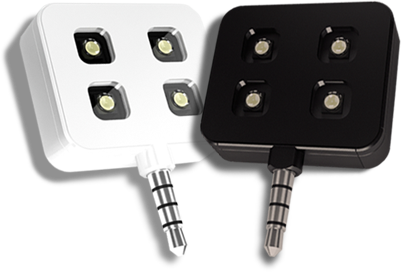 iblazr LED Flash Unit
iblazr.com
$49.99
The iblazr LED Flash Unit for Smartphones (iblazr) is an absolutely essential accessory for any serious phoneographer. Whether you’re making short films, taking photos, or providing an extra light source for photographic equipment, the iblazr is a lighting dynamo that easily fits into any pocket or bag. It is a source of continuous light or flash for your visual work.
The iblazr package comes with one, four-light iblazr LED flash unit, an instruction booklet, a microfiber drawstring carrying pouch, and a 3.5mm to USB interface charging cable.
- 70 degree beam
- 5600K color temperature
- >80 CRI
- 27mm (1 inch) x 32mm (1.25 inchess)
- 10 grams
- Three Power Modes: 16, 60, and 120 Lux at 1 meter
- Easy battery level check
- USB charging
- 3.5mm jack
- iblazr app takes movies and photos
- Continuous lighting or flash
- Can be used off the device
- Cold shoe mount for DSLR and SLR continuous lighting
The founders and iblazr team members are obviously visionaries who know what we phoneographers like for versatile lighting. When you read the list of features, note that many of them are advanced for such a small and inexpensive device. I’m usually a bit critical of accessories like this that are priced in excess of about $39, but not this time. I think the $50 price tag is just right. And, no, you can’t get it cheaper on Amazon–I looked.
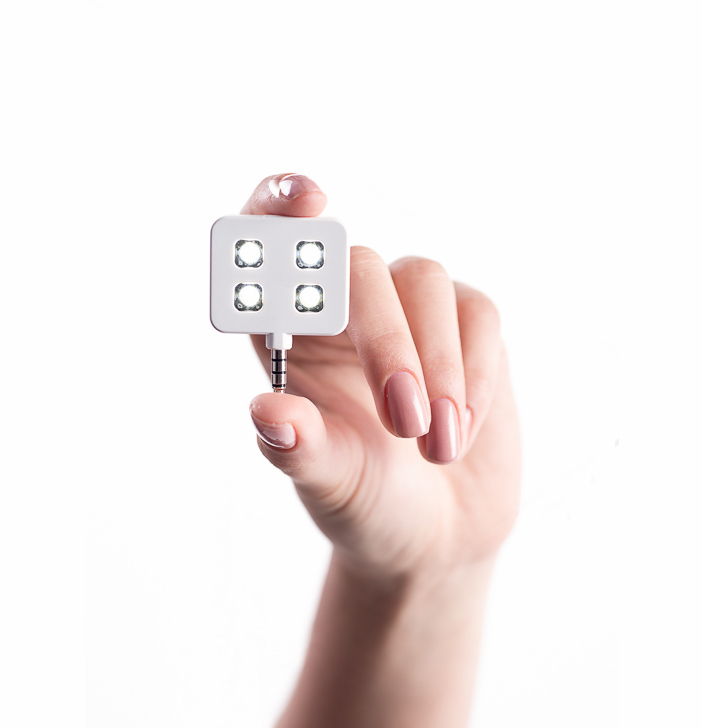 I particularly like the feature that allows you to have continuous like off the camera or in the so-called “cold shoe”. The cold shoe is really just a plastic holder for the iblazr that slides into the hot shoe on your camera. It’s handy because how else do you get continuous, mobile lighting for your DSLR or SLR? Think of trying to provide some continuous lighting with any of the lo-fi cameras such as the Holga, Diana, LomoKino, or Smena. The answer is that you can’t–not easily anyway.
The iblazr makes photography more fun because good lighting is essential to produce good images. How many times have you lost a great shot because of poor lighting or lighting that was off or cast the wrong shadows? Well, you won’t anymore thanks to the iblazr.
Why it’s Frugal: The iblazr is frugal because it is an expensive way to deliver a lot of light on your subject. What’s frugal about that, you ask? Have you priced photographic lighting? Have you ever priced portable photographic lighting? Have you looked at portable lighting at all? The way I figure it, the iblazr is very frugal because it does so much for so little. Frugal.
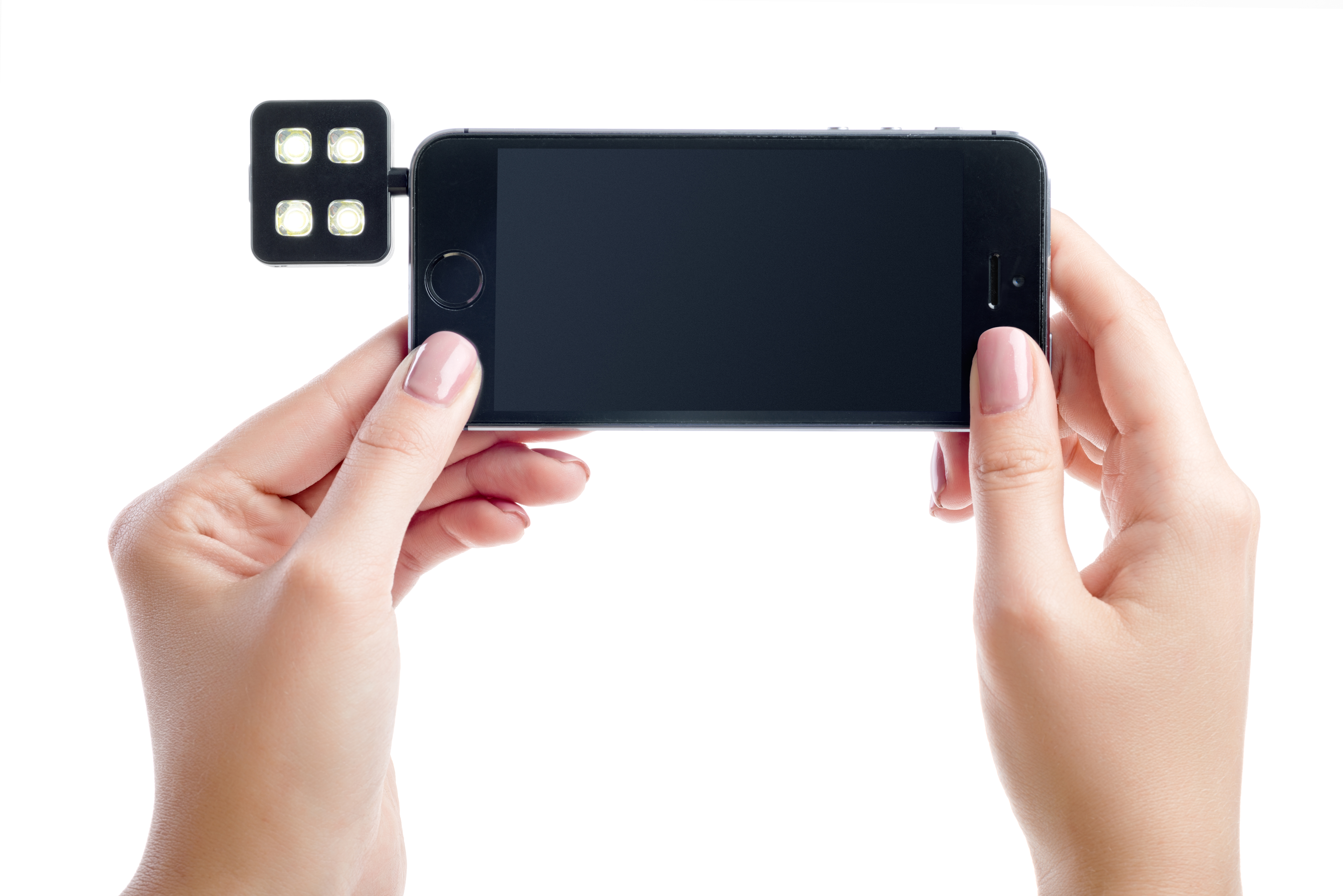
There’s nothing that I don’t like about the iblazr LED flash unit. I can’t find anything wrong with it. It does everything I’d want it to do if I’d designed it myself. And I’d never have thought of the cold shoe attachment, so it’s better than what I could have dreamed up.
Rating: 10/10
Recommendation: If you’re a phoneographer or a photographer who needs portable light, you must have it.
Acer Chromebook C720 (Review)
 Acer Chromebook C720
Acer, Inc.
Price varies from $179 to $379 depending on hardware and features.
$199 for the C720-2800 Reviewed model
My Acer Chromebook C720 is just cool. I know that’s not a very good review, but it is in fact, cool. I love it. If there’s one computer that I always grab for writing, Internet browsing, buying stuff online, watching YouTube videos, or connecting to remote server systems to do some heavy work, it’s my trusty, little C720 Chromebook. If you’ve ever read anything I’ve written on ZDNet in my Consumerization column, you know that I sort of have a love affair with Acer. Yes, I’m afraid that it’s a one-sided affair, but it’s one that I’ve carried on for years.
I’ve purchased many Acer products and have recommended them (successfully) to my in-laws and others. Someday I’ll provide a full list of the still living models, although I can tell you that I have one, a Linux system living in my personal data center (garage) that has to be ten years old. I digress. But you see my point? I love Acer products. And the C720 hasn’t changed my mind.
The C720 is what Chromebooks aspire (Watch that pun, Acer has a line of Aspire systems) to be. They’re lightweight, powerful, stable, durable, high quality, full of features, and competitively priced. What more can you ask for? Great support, probably. Well, Acer has that. Although I’ve never had any serious problems with any of my Acer products, the two or three times I’ve used Customer Support, the agent has helped me until the issue was resolved. I’ve never disconnected from one of the online chat sessions with anything but satisfaction in my head and a smile on my face.
My Acer C720 surpassed my Acer One Netbook as my favorite computer about a week after I got it. The C720 is so fast and responsive that rivals even the most souped-up computer that I’ve ever used. There’s never any hesitation, freezing, or “Not responding” messages. And I really don’t have the patience for “Not responding” messages.
And say what you will about Google, but the Chrome browser and the Chrome OS are the best things to happen to computers since Linus released Linux back in the mid-1990s. Google aced it, in my humble opinion, with Chrome and Chrome OS.

The C720 comes in a variety of models from the most basic to the very elaborate with a touch screen, super fast CPU(s), 4GB RAM, and a larger (32GB) internal SSD. The touch screen is the big bonus feature for the Chromebook. Chrome OS isn’t Windows 8, but the operating system and computing environment is still enhanced by touch screen technology for those of us who have become accustomed to tapping and swiping our phones and tablets. Alas, my C720 doesn’t have a touchscreen, but the trackpad is very good. Sometimes, if I’m working at a desk instead of on my lap, I plug in an external mouse and I’m fine.
- 11.6’’ (1366×768) display, 16:9 aspect ratio
- 0.75 inches thin – 2.76 lbs/ 1.25kg
- Up to 8.5 hours of active use 1
- New Intel® Celeron™ processor
- 100 GB Google Drive Cloud Storage2 with 16GB Solid State Drive
- 30-day free trial with Google Play Music All Access
- Built-in dual band Wi-Fi 802.11 a/b/g/n
- VGA Camera
- 1x USB 3.0, 1x USB 2.0
- Full size HDMI Port
- Bluetooth®4.0 Compatible
One thing to note about your Chromebook is that its operating system, Chrome OS, has been deemed the “most secure operating system” by Kevin Mitnick, the famous hacker turned security expert. He’s correct. I’ve performed multiple security scans over the network against the Chromebook and I can’t break into it. There’s just no available attack vector. In other words, you can feel safe using your Chromebook out in public because no one can scan your system, break into it, and grab your data.
Why it’s Frugal: The C720 is frugal for many reasons, but the most important one is features per dollar. You get a full, powerful computer for $200 that won’t require you to spend on hardware upgrades because of a newer operating system version every two years. There’s no spinning hard drive to fail on you. There’s very little heat generated from it. It requires very little electricity. It really requires no additional accessories to make it useful. And it’s an Acer product, which means that it will last for years. That’s frugal.
While your C720 doesn’t come with an Ethernet connection, you can purchase a USB-to-Ethernet network interface for under $20. There are no drivers to install or any issues. Plug it in and it works.
The Brydge+ Keyboard for iPad (Review)
 Brydge+ Keyboard for iPad
Brydge
$99
I’ve reviewed several keyboards for the iPad and I’ve also refused to review some (You don’t see those), but the Brydge+ keyboard for iPad is a very fine accessory. I really like it. In fact, it’s rarely been off my iPad since I received it in the mail almost a month ago. Yes, I’m a bit slow with some reviews–not because of the products, but because I have so many in my queue to do. I have finally caught up to this one and I’m glad because I really like this keyboard. It matches my iPad perfect in material and in looks.
The Brydge+ is made of the same aircraft aluminum as the iPad itself. Same color, same weight, and same lines. In fact, you’d probably assume that it’s made by Apple, but it isn’t. The Brydge keyboard line began life as a Kickstarter project.
Their Kickstarter campaign is one of the most successful that I’ve ever seen. They asked for $90K and received almost $800K. Yes, you read that correctly. It can happen, even on Kickstarter, which I really don’t like. That said, it does work for some people.
The keyboard coupled with the iPad makes for a bit of heavy lifting. I’m pretty sure that the keyboard more than doubles the weight of the iPad. I also have the built-in speaker version which probably weighs heavier than the non speaker version. But if you’re used to carrying around a full-sized laptop computer, this little combo will seem lightweight to you.
The keyboard has keys that mimic the iPad’s Home button, lock button, music controls, brightness, search, and sound volume. The best additional functionality is that you can press the keyboard’s Home button and Lock button at the same time to take screenshots. That’s a great feature! It’s great because I have a hard time doing it with the actual iPad buttons. If my timing is a little off, either I lock the iPad or I close the App that I’m using.
One thing to note about the Brydge keyboard: the charge lasts a very long time. I’ve charged my iPad five or six times compared to two charges on the keyboard.
The keyboard pairs easily with your iPad and stays paired, even after prolonged non-use, it will stay paired. And by prolonged, I mean days not hours. If you haven’t had your keyboard paired in several days, just switch it on and tap a key. It might take a second or two to re-establish the link, but you really have to do nothing else to re-establish the pairing. I like that. I don’t like having to repeat the same process to pair a device with my iPad every time the two become disconnected. I consider such behavior a fail.
Your iPad slips into the keyboards clamps with the help of silicone rubber protectors that also hold your device with a pretty good grip. Don’t worry, it won’t slip out. You have to pull it out of the clamps. You can adjust the iPad’s angle from closed for carrying to 180 degrees flat. The clamps are sturdy and ready to work. When you have your keyboard attached, you can place your iPad/keyboard combination on an table surface safely because of the keyboard’s protective feet. Of course, the same goes for when it’s open and in use. Don’t worry, you won’t get yelled at for scratching someone’s mahogany table with your fancy thingamajig.
I’ve never had any problem with the Brydge+ keyboard from first use. The keys have a nice touch to them, good feedback, and no repeated characters. This is a well made product that’s durable, elegant in design, professional quality, and priced well for the market at $99. The non-speaker model is $79. For the extra $20, I say go for the speakers, especially if you have a hard time adjusting sound on your iPad to get the right volume.
The speakers are located at the top of the keyboard above the keys, which makes the sound project back to your ears very well because it bounces off the iPad and back toward you. I can tell from the craftsmanship, attention to detail, and key quality that a lot of thought went into this product. This is definitely not some thrown together gadget that’s meant to entice you, extract $100 from you, and then promptly leave its usefulness in the ad. The Brydge+ keyboard basically turns your $800 iPad into an $1,800 laptop computer that folds up into a neat little package.
The only negative I find with the Brydge keyboard is that, depending on your iPad’s generation (2,3,4), some of the function keys might not work. For example, on my iPad 4, the Internet key doesn’t work and neither does the Photos key that opens your Camera Roll. Minor issues to be sure, still worth mentioning.
Why it’s Frugal: The Brydge+ keyboard with speakers is a frugal choice because not only does the keyboard protect your iPad, when folded, it is an extremely functional device. It also uses very little power and requires very little intervention from the user. The keyboard offers you a laptop look and feel, with a design esthetic that says, “Made for Apple.” It’s a frugal choice for your iPad.
The instructions that come with your Brydge keyboard are clear and concise. You connect the keyboard in the usual way via your iPad’s Bluetooth settings and powering on the keyboard. To pair the speakers is not as intuitive and might require a try or two to get it right.
Press Ctrl-B on the keyboard and hold it until you hear four beeps, watch your iPad’s Bluetooth settings to confirm the pairing. I had to pair/unpair a few times before I got the hang of it. Now the unit pairs by itself without my intervention.
I’ve read a few other reviews of the Brydge keyboard and there are two points they mention that I’d like to respond to. First, they write that the back of the iPad isn’t protected. It’s true that the Brydge keyboard, when folded only protects the somewhat delicate glass portion of the iPad. You know, the most important part. The back of the iPad is made of aircraft aluminum like the keyboard. That is its protection.
If there were another protective cover, the unit would be even heavier. That, and the fact that nothing protects your laptop when it’s folded. I have yet to see a protective cover for a laptop except for carrying cases.
Second, they state the price of $99 as being high. If you read my other reviews, you’ll see that I do mention price often as a negative point for some of these products. However, I balance value with price. That is to say that I measure a product’s quality against its price. If the quality, design, and craftsmanship justify the price, so be it, as is the case with the Brydge keyboard. Its $99 price tag doesn’t detract from its functionality, ease of use, design, materials, features, and esthetic.
The Brydge+ keyboard with speakers is an excellent choice for your iPad. The keyboard operates on very little power. It looks good. It feels good. And the price is right. Check out the official promotional video to get a better look at it and its functionality.
Rating: 9.5/10
Recommendation: Once you use it, you probably will never separate your iPad from it again. Buy it from the Brydge keyboards website.
Open Mic Night: IK Multimedia’s iRig Voice Microphone (Review)
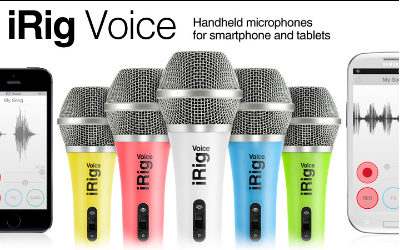 iRig Voice Microphone
IK Multimedia
$39.99
If you’re like a majority of surveyed people, you want to sing. You also want to write what you sing. Singer/songwriters are a very common person type. Other than a good singing voice and an audience, you need some basic equipment with which to record your masterpieces, namely a microphone and some recording equipment. These days, your required recording equipment can be emulated with software. You can record, mix, add effects, and export your works to a variety of formats for public consumption.
The iRig Voice microphone is a standard microphone with a 3.5mm jack, but also includes a free working lite recording studio app named EZ Voice. The input jack also features an earphone jack so that you can speak and listen through the same interface.
The EZ Voice App (Free) allows you to do some basic voice recording, add some live effects, and record foreground vocals with your songs. But, the iRig Voice microphone is compatible with other multimedia apps as well. It works on the iPhone, iPad, iPod touch, newer Mac models and Android devices. I’ve personally tested it on my iPhone 5, iPad 4, Mac mini, Windows Phone (Nokia 928B) Metro, and my Android-based HP Slate 7+. All successful and perfect.
Audio App Compatibility List
- EZ Voice
- Dragon Dictation
- QuickVoice
- Skype
- SP Multitrack
- Garage Band
I recorded a short message using the EZ Voice app for you as a demonstration.
I don’t sing well enough to record a music demo, so you’ll have to use your imagination.
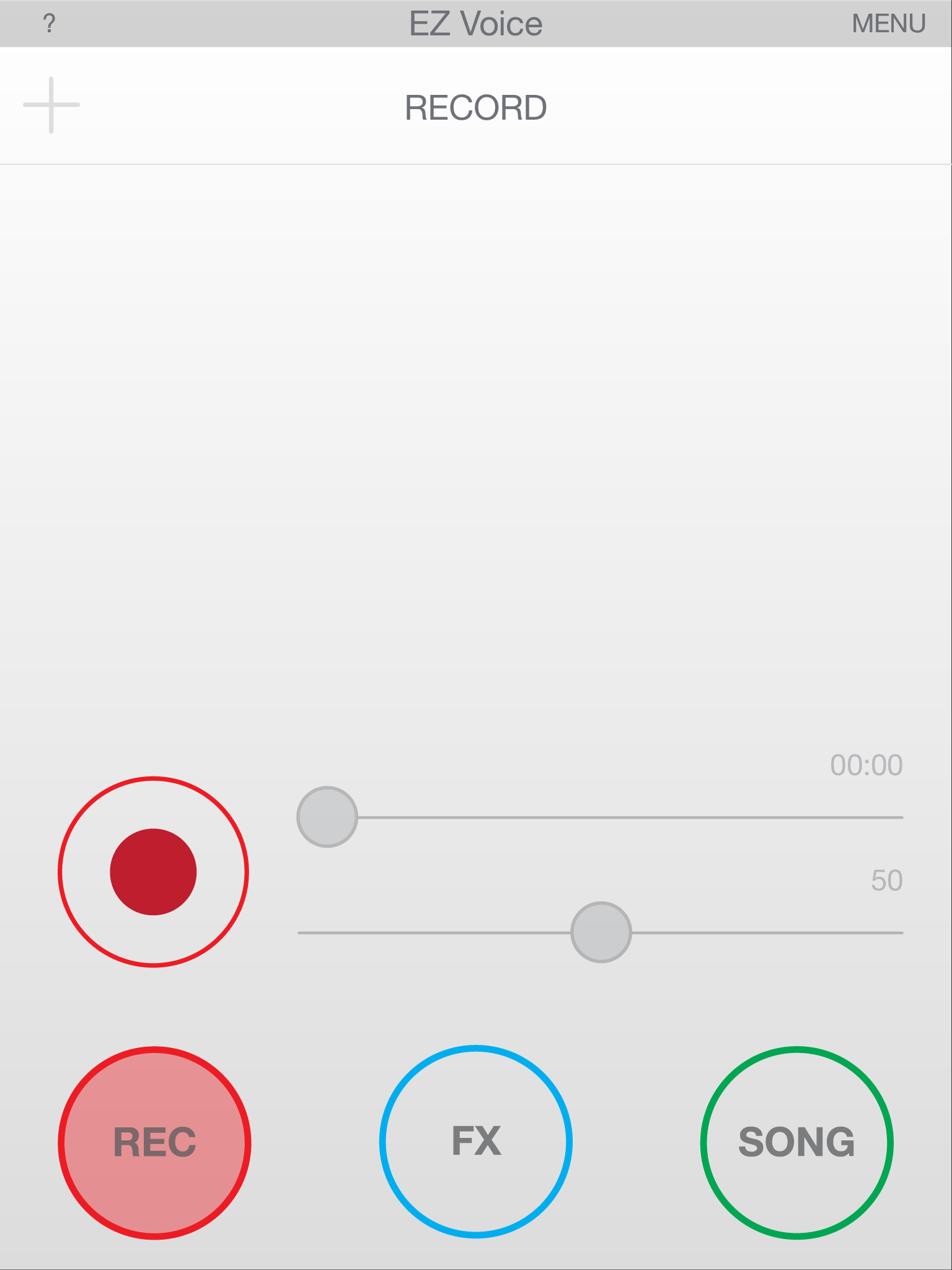
EZ Voice Main Screen
The microphone feels and sounds like any professional microphone I’ve ever used. The mic and apps worked together the first time without any issues. I did have to turn off Siri on my iPhone and on my iPad, but that might just be my experience and not yours. Siri kept popping up when I spoke into the mic during testing, so to avoid that annoyance, I disabled Siri.
This is one of the few products that I’ve ever reviewed that I’m absolutely convinced that the pricing is spot on. At $39.99, the iRig Voice is a great value. It performs as well as any microphone that I’ve ever used. I do suggest, as I would with any microphone, that you purchase a pop filter (about $3.00) to alleviate wind noise, pop, and some ambient noise.
Don’t use the mic when you’re charging your device because it creates a little bit of static, or it did for me, on my iPhone.
Why it’s Frugal: The iRig Voice microphone is frugal because its $39.99 price tag is perfect for anyone who wants to get into podcasting, song recording, or voiceover acting without spending a huge amount of money. It’s a great microphone at a great price. It’s an excellent value. Sure, you could spend $1,000 on a better microphone, but why would you?

EZ Voice – List of Effects
The microphone’s clarity is demonstrated very well when using it with the Dragon Dictation app on the iPhone or on the iPad. I’m not the best at enunciating my words (It’s a Texas thing), but the software picked up and correctly typed out every word I said on my iPhone and on my iPad. That’s impressive. I’ve never had that happen before and I always use the same lines for testing:
“Now is the time for all good men to come to the aid of their party” and “Conjunction Junction, what’s your function”.
Those are two fun phrases that can confuse dictation software due to speech patterns. If you don’t think you can confuse the software, try it by using your device’s built-in microphone. It almost never gets them perfect.
Features
- Handheld vocal microphone delivers professional sound quality
- Compatible with iPhone, iPad, iPod touch, newer Mac models and Android devices
- Compact cardioid pattern minimizes feedback
- Constructed of durable, lightweight thermoplastic
- Available in 5 colors: Green, Blue, Yellow, Pink and White
- Comes with EZ Voice app
- Works with dozens of karaoke, sing-along and music making apps
- Headphone jack for real-time monitoring
- Convenient on/off switch located on the mic
EZ Voice, while free of charge, does prompt you to purchase sound effect add-ons for $0.99 each. I purchased Tune and Morph, although I’m not sure exactly how to use them. I tap the FX icon and then tap the settings but the same list of settings shows up for each, so I must be doing something wrong. I’m not sure at this point if it’s me, that the app isn’t intuitive enough, or that it’s working as designed and I just don’t realize it.

EZ Voice – In App Effect Purchases
In either case, $2.00 isn’t a lot to spend trying out an app. It’s just too bad that it isn’t more obvious how to use the effects. There is a long list of effects that cover everything from arena to robotic to extremely deep to childlike. The effects are a lot of fun. There is one very cool effect called ‘Diana’ that changes your voice into a normal sounding female voice. It’s useful in case you need to sing a female part or speak a female part but don’t have a woman to provide the voice for you. It would work great for recording script dialog or for creating a voiceover for a product or service. It’s very impressive and I recommend it.
The app also allows you to sing along with and record your favorite songs. The instrumental parts are normal volume but the original vocals become background for you. EZ Voice is very well constructed and well thought out app. I do wish it were more obvious how to use the effects, but that isn’t a major flaw, but a little annoying.
I really like the iRig Voice microphone and the EZ Voice app. The microphone is a welcome addition to any musician’s, aspiring singer/songwriter’s, or voice artist’s toolbox. It’s cool to have multiple colors from which to choose. The only problem is that you might not be able to choose a color without a little buyer’s remorse. I suppose that you could collect all six and have one for every mood or gig.
I chose the green one for review because that lime green color has a special meaning for my daughter and me. The microphones are sturdy and well-built. They’re heavy on the end, just like you’d expect, and although IK Multimedia sells a professional digital microphone (iRig Mic HD), this one feels right and sounds right to me. But, this mic is probably best suited for song demos, podcasting, and voiceover work where extreme quality isn’t needed. The ads tell you that it’s perfect for karaoke and portable vocal studio. I’d have to agree, but you won’t be at all disappointed with the quality or the good looks of this mic. For $40, you can’t go wrong.
Rating: 9/10
Recommendation: Buy it, have some fun, and maybe hit the big time!

EZ Voice – Recording My Test Message
Note: I tested the iRig Voice microphone on my Windows Nokia 928B phone. This is not an officially ‘certified’ product and IK Multimedia does not endorse the use of the microphone on the Windows phone, so your mileage may vary. I tried it just to see if it would work and it did without any issues, but don’t blame me or IK Multimedia if the mic doesn’t work on your Windows phone.
You can also follow IK Multimedia and share your audio and video material on our YouTube, Twitter, Facebook and SoundCloud channels.
Also, check out the complete range of iOS accessories and apps for vocalists and recording!
– iRig MIC HD, digital handheld microphone for iPhone/iPod touch/iPad and Mac
– iRig Voice, new colored handheld microphones for smartphones and tablets
– iRig MIC, the first handheld microphone for iPhone/iPod touch/iPad and Android
– iRig MIC Cast, ultra-compact microphone for iPhone/iPod touch/iPad and Android
– iRig PRO, universal audio/MIDI interface for iPhone/iPod touch/iPad and Mac
– iRig PRE, XLR microphone interface for iPhone/iPod touch/iPad and Android
– iLoud, studio quality portable speaker
– VocaLive, professional vocal effects/recording suite
– iRig Recorder, audio recorder and editor
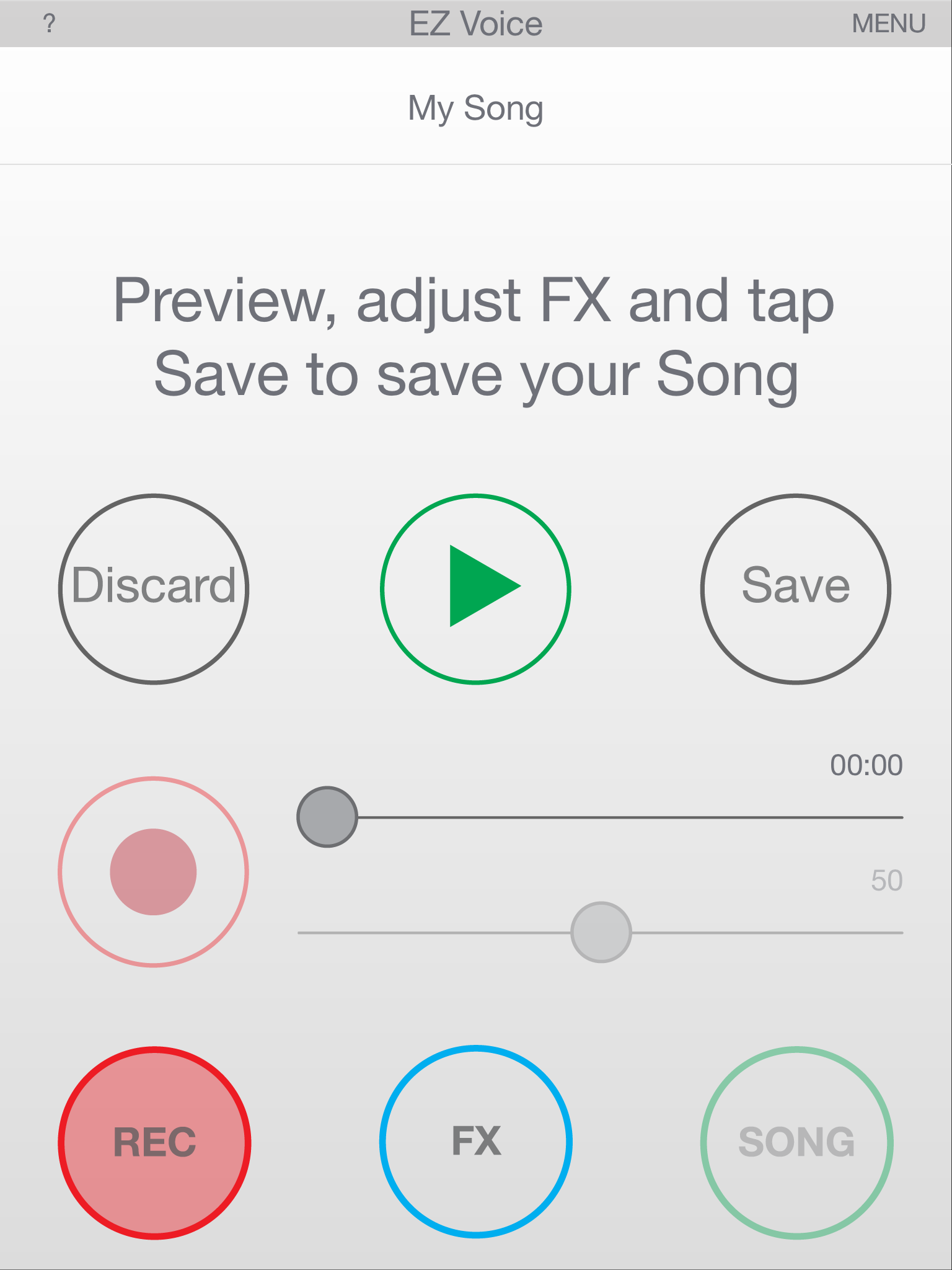
EZ Voice – Recording Playback
And also check out IK‘s:
– iKlip, range of stage and studio support and stand for your mobile device
– iLine, range of quality audio cable adapters
– All the music creation accessories and apps
– All the music software for Mac/PC
IK Multimedia is a “Musicians First” music technology company. It makes a complete range of sound and tone solutions for Guitar & Bass players, Keyboardists, Sound Designers, Engineers, DJs and Producers. You can check out their full line of professional mobile and studio performance products at www.ikmultimedia.com.
The Nova Wireless Flash for iPhone (Review)
 Nova Wireless Flash Unit for iPhone
Sneaky Squid, LLC.
$59 (Order from http://wantnova.com)
Any photographer worth his or her salt (no salt print pun intended) will tell you that light is the key to great photos. A well lit subject has an appeal, whether it’s a portrait, a landscape, or a product that you’re going to sell; good lighting makes photographs better. The Nova Wireless Flash Unit for iPhone (Nova) excited me when I saw it. I definitely wanted one and I needed one. I’m guessing a lot of other people did as well because they received $85,480 of their $25,000 Kickstarter goal. Not many projects do that well on Kickstarter or any other so-called crowdfunding sites.
 I’ve demonstrated the Nova for several people and they love it. I don’t simply run up to unsuspecting friends and coworkers and show them the Nova and give them the elevator speech. I have a clever way of introducing the product: I let them hold it and try to figure out what it is that I’m showing them.
While they’re figuring out what I’ve handed them, I grab my phone, open the Nova app, and snap their picture. It’s always a shock to the system, but after that initial shock, they always want to know all about it and they also want one.
The cool part of it is that the photos are always natural and unexpected, as you can see in the photo of my son analyzing the Nova.
You can also see that, although I didn’t tamper with the default settings and he’s holding the Nova quite close, his face isn’t washed out with light. That’s an amazing feat for camera flash of any kind.
The Nova flash unit is small–about the size of a credit card. It’s also quite thin (less than the iPhone’s thickness). The size makes it easy to handle and use in a variety of situations. You can hold it high to light large areas, you can hold it close for spotlighting, or you can have your subject hold it to get a nice even light for portraits.
The price for the Nova Wireless Flash for iPhone is $59, which to me, is high. I think a better price point would be in the $29 to $39 range, but apparently people knew the price going into the Kickstarter campaign, so I might be wrong. I’m sure that if it’s ever sold on Amazon, the price will be more along the lines of what I’ve suggested.
- Size: 86mm × 53mm × 6.3mm (3.4″ × 2.1″ × 0.25″)
- Weight: 28g (1oz)
- Supported OS: iOS 7
- Supported devices: iPhone 4S/5/5C/5S, iPad 3/4/Mini/Air, iPod Touch 5G
- Wireless communication: Bluetooth 4.0 Low Energy
- Battery: Built-in lithium-ion polymer battery
- Charging: USB Micro B cable (included)
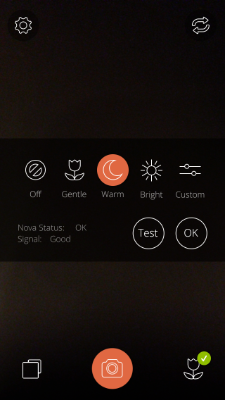 You can change the flash settings from Off to custom settings, as shown in the photo. If one of the presets (Default is Warm) doesn’t work for you, you can setup custom lighting conditions that fit your needs.
If you select Custom, you’ll see two sliders that offer a range of brightness and lighting tone. The two scales are: Cool Brightness and Warm Brightness. I suggest that you test a range of custom lighting settings before you attempt to use it on a field shoot. And I’m not telling you that because the settings are random or that they don’t work–they do, but you’ll need to understand what changing the sliders means to the light output that you get.
For those of you who aren’t pro photographer types, “Cool” means that it will have a bluish tone and “Warm” means more yellows/browns in the light.
Experimentation will give you the best results. If you’re in a hurry, my suggestion would be to use the default (Warm) setting or the Bright setting. The Bright setting gives you kind of a standard bright blue light.
Why it’s Frugal: The Nova is frugal if you take a lot of pictures with your iPhone and you require good lighting. The iPhone has a pretty good back-facing camera and some photographers and iPhoneographers use it extensively. The off camera flash gives you the opportunity to use more professional lighting for your shots, without investing hundreds of dollars on light fixtures that are cumbersome and power hungry.
 The Nova is an impressive little device. There’s no Bluetooth pairing required. Once you open the Nova App, it’s already paired for you and it’s ready to use.
If you’re an avid iPhoneographer and you need better light than the built-in flash can give you, the Nova is a great item to have. It’s there when you need it and it’s not big, bulky, or cumbersome to use. It powers up in a couple of hours via the mini USB cable that’s included and a full charge will carry you through hundreds of well-lit photographs.
Rating: 9/10
Recommendation: Buy it and take your iPhoneography to a whole new level.
The mykeyO Executive Restt iPad Keyboard Stand and Organizer (Review)
mykeyO Executive Restt iPad Keyboard Stand and Organizer
mykeyO
$34.95/$24.95 Amazon(Prime)
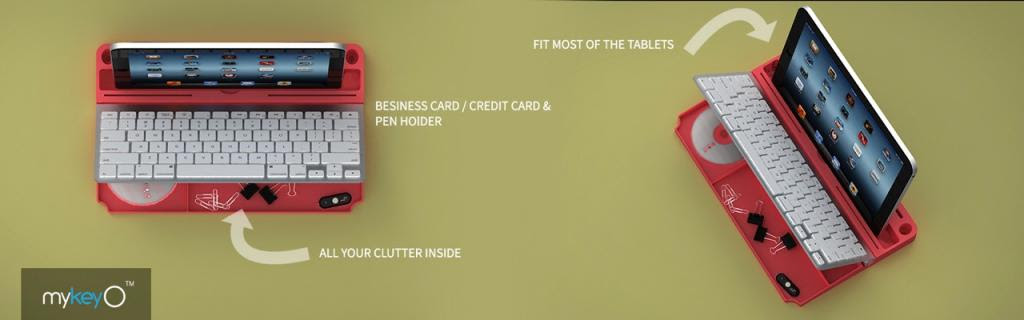
 Rarely do I find a product that I like so much that I spoil the story at the very beginning of my review, but this is one of those products. I love the mykeyO executive restt™ (restt™). It is a keyboard caddy, an iPad stand, a pen holder, and under the keyboard rest, there’s storage for all the clutter on your desk. As soon as the restt™ arrived, I placed it under my keyboard and I haven’t tossed it aside or changed its location at all.
The restt™ has found a permanent home on my desk.
The Apple Wireless Bluetooth Keyboard (not included with the restt™) fits perfectly into the keyboard slot. As you can see in the picture, you can raise your keyboard to reveal all your goodies stored below. Your iPad, iPhone, or other tablet fits nicely into the large slot so that you can work with your device as if it were a laptop without the rigidity of a laptop.
Plus, your device is close enough and tilted just right so that you can tap and swipe as needed.
I use the restt™ as a keyboard caddy for my Apple Wireless Keyboard for my Mac mini, but the cool thing is that I can place my iPad or my iPhone into the slot and have it there handy as well. In fact, as I write this post, my iPhone is in the slot. I have to keep track of my retweets and messages, so this makes it very convenient. Plus, the restt™ is made of silicone rubber, which means that it’s rigid enough to be stable and sturdy for typing but soft enough to absorb the vibrations from typing and from my ever-vibrating phone.
 Silicone rubber also won’t scratch any surfaces nor will it make those odd looking greasy spots that some pure petroleum-based rubber products do. And silicone rubber is easy to clean and it doesn’t fade or turn funny colors as it ages. This is a product that you’ll have around a while.
I haven’t found any flaws or negatives with the restt™. It’s a thoughtfully made product that really helps keep my sundries organized and out of sight.
One notable feature is that the keyboard doesn’t “walk” around while you’re typing on it. No matter how hard you type, or how fast, your keyboard stays put.
Why it’s Frugal: The mykeyO executive restt™ is frugal because it keeps you organized, it won’t harm your furniture, it keeps your iPad, iPhone, or other tablet handy, and you can take it from place to place easily. It provides you with a comfortable work surface and environment, which will make you more efficient and productive. If that’s not frugal, I don’t know the definition of frugal.
Now we come to the price. $34.95 is the retail price, but you can buy it for $24.95 on Amazon and if you’re a Prime member, there’s no shipping charges. $24.95 is a very good price for the restt™. I love the design features and you have your choice of colors to boot, which coupled with its sheer utility value, I don’t think you can go wrong with it.
The only stipulation is that you have to have an Apple Wireless Keyboard to use with the restt™. If you don’t have one, but want one, you can purchase a reasonable facsimile of an Apple Wireless Keyboard from mykeyO. Actually, the mykeyO version is a tiny bit wider than the Apple keyboard but is much better. It’s better because it has functions specific for Windows, Apple, and Android-based devices. I’ll have a full review of that product posted soon, so keep watching.
Rating: 10/10
Recommendation: Forget the rest and buy the restt™ and get yourself organized.
Checking Out the CHIC BUDS Porta Party Bluetooth Speakers (Review)
 Porta Party Bluetooth Speakers (Katie)
CHIC BUDS, A Division of FxA
$49.99/$41.94 Amazon (Prime)
I’ve reviewed several Bluetooth speakers on this blog but none as fun or as unique as the Porta Party Bluetooth Speakers by CHIC BUDS. But, I’m a little confused by the company name. On the web site, I’ve seen it as chicBuds and CHIC BUDS, but on the package it’s CHIC BUDS and CH!C BUDS. So, for the purposes of this review, I’m going to use CHIC BUDS because I’ve seen it on the packaging and on the web site that way. It actually doesn’t matter how you spell it, though, because the Porta Party (And, it’s Porta PARTY, not POTTY) is an awesome little speaker with a HUGE sound.
I don’t usually use all caps to describe something but since I’m going with the all caps company name, why not just go all the way. Seriously, this small jar-sized speaker packs a big sound. When I first turned it on, I figured that it would be a small, tinny sound because of the diminutive stature. I was wrong. Really wrong.
There’s no tinny sound from this little pocket-sized bomb. The trebles are loud and clear and the bass is body thumpingly deep. If I were to sum up the sound quality and volume into a single word, it would be, “Impressive.”
If sound alone weren’t enough to sell you on the Porta Party speaker, check out its stats and features:
- Standard USB/DC charging port
- Play 30 ft. away from sound source
- Hands-free call answering
- Bluetooth music playing
- Weighs just 8 ounces
- Uses a 3.5mm audio cable (included)
- Charge lasts up to 10 hours
- USB cable included
- Bluetooth 3.0
- Easy device pairing
- 4.7 x 2.4 x 2.4 inches
In their own words:
“In 2005, the founders of CHIC BUDS recognized a need in the market for technology accessories created specifically for females, and CHIC BUDS was launched.
Today, CHIC BUDS, a division of FxA, continues to be a company of girls designing and developing fashionable, fun and functional tech accessories for all of us girls that heavily rely on technology yet still delight in embracing our own personal style. At CHIC BUDS, we embrace and celebrate individuality and creativity amongst all women and girls which drives us to bring all the hard-working women and girls around the world more fun choices when it comes to their technology accessories. Our product line up not only solves the modern girl’s tech style challenges but also delivers the function we all require.”
So, I know that these speakers are “created specifically for females,” but guys can buy them too and just use them ironically. To me, the Porta Party speakers are kind of like Cosmos, you know, the drink. They’re so good and yet not really something you want your friends to see you drinking. My brother-in-law once asked my wife and me, “Have you guys ever had a Cosmo? They’re yummy!” Yeah, they’re yummy, Scott.
Sound Nerd Info:
- Transmission distance: 10m/30ft
- Bluetooth frequency: 2.4GHz-2.48GHz
- Output: 3W
- Speaker: Ø40MM, 4Ω
- Audio bandwidth: 200Hz-20KHz
- SNR: ≥80dB
- Li-ion: 3.7V/500mA
Using the Porta Party speaker is very simple. Switch it to the ON position on the bottom of the speaker. Turn on Bluetooth on your device. When ChicBuds Porta Party appears in your Bluetooth device list, tap it to connect. You’re connected. Play music, make a phone call, answer a phone call, and have fun with your tiny boom box (large handle and shoulder not required).
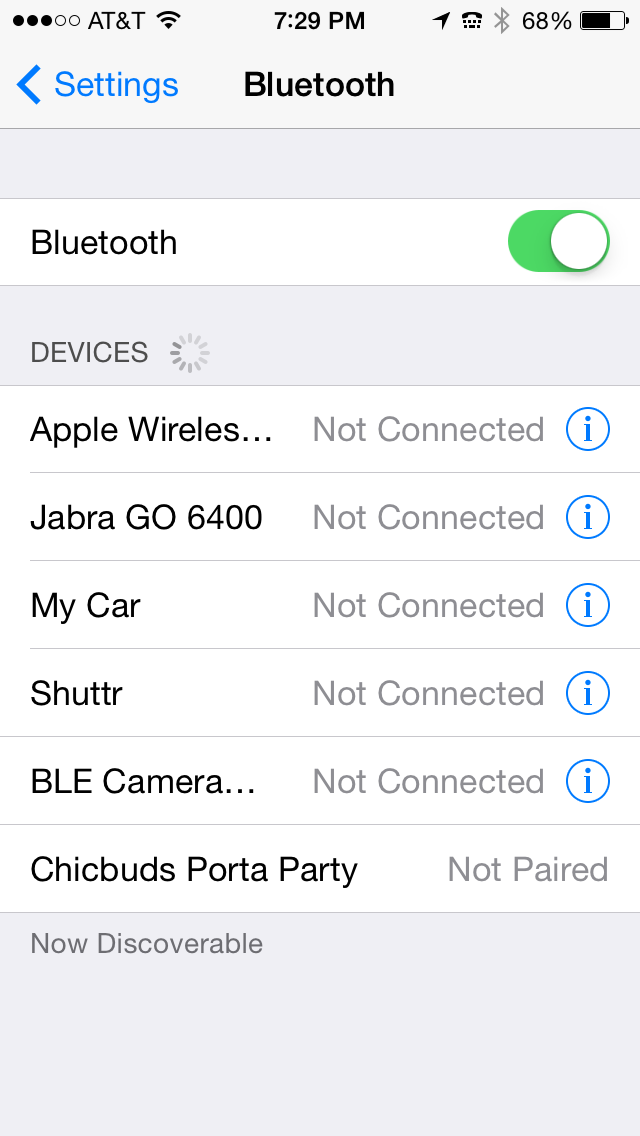 OK, I just thought of something funny to do with your Porta Party speaker. Have a friend call you and answer it on the Porta Party by pressing the Phone button near the bottom edge of the speaker. Put the speaker in your purse. While you’re in a store, have your friend start yelling and screaming, “Let me out of here. Help! I’m trapped in this purse. Stop just looking and help me.”
That should start a party and a conversation.
Hopefully that conversation won’t end with, “You have the right to remain silent…”
One thing to note about the Porta Party speaker. To skip to the next or to the previous song, press the + or – button once. To turn up or to turn down the sound volume, press and hold the corresponding button. If you’re using the speaker as a phone, speak into the Mic located near the Phone and Volume buttons.
To charge the speaker, plug in the supplied USB cable’s small end into the speaker and the other end into your computer’s USB port. Mine charges in 2-3 hours.
My wife and daughter both love the Katie style speaker and have both expressed a desire for one. In fact, to write this review, I found the speaker on my wife’s desk and I didn’t put it there. It had been in my office in the “Review Queue” to my knowledge. I was wrong. Fortunately, it still had a charge on it and I’m currently playing it as I write this. It’s playing my “Workout” playlist on my iPhone 5.
In fact, I thought I had the sound down sufficiently but when “The Ballad of Mona Lisa” by Panic! at the Disco came on, my daughter came in and sang with it. She was supposed to be doing homework.
Why it’s Frugal: The CHIC BUDS Porta Party isn’t frugal. It’s not a frugal device. It’s a luxury device. It’s a fashion-forward accessory that’s fun and powerful enough to provide all the sound you need, but frugal it’s not. And as any woman will tell you, if it looks good (and sounds good), it doesn’t have to be frugal.
The Porta Party Bluetooth speaker is on the upper end of the price range for an electronic gadget like this. $50 is a pretty big chunk of change for this accessory. Fortunately, you can grab one for almost $10 off that MSRP by buying it from Amazon. If you’re an Amazon Prime subscriber, which I strongly recommend, you’ll save shipping costs and get it in two days.
Although I’m kind of complaining about the price tag, $50 is about average for portable Bluetooth speakers. There are some that sell for $40-ish and some sell for as much as $150. The CHIC BUDS Porta Party Bluetooth speaker is very well made and attractive. It should provide years of enjoyment and look darn good doing it.
Rating: 9/10
Recommendation: Have him buy you one or splurge on yourself. You deserve it.
Saddleback Leather iPad Case (Review)
Leather iPad Case (Standard iPad–not the iPad mini)
Saddleback Leather Company
$111.00
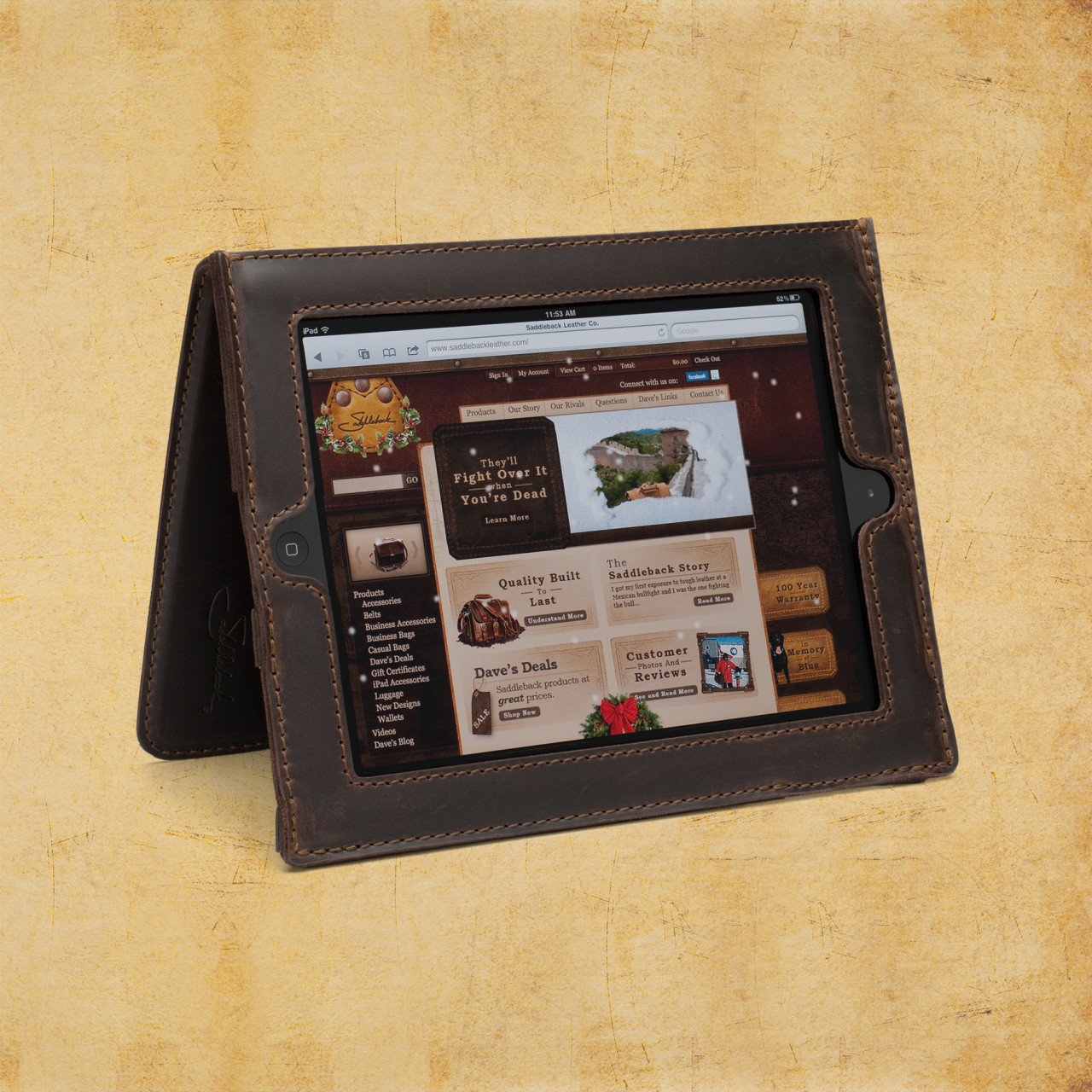 For your $600+ iPad purchase, I submit for your approval, the Saddleback Leather Company iPad case made of full grain cowhide leather. The inside of the case is pigskin. Pigskin is softer, more forgiving, and snuggles your iPad a bit better than the stiffer cowhide alone would. As soon as you hold any of Saddleback’s products, you know that they’re made of quality materials. Dave, the owner, has meticulously designed each item to exacting specifications and has spared no expense, except on labor (more on that later), in creating these beautiful products. As you’d expect, genuine leather products aren’t inexpensive. For just over $100, the iPad case isn’t a bad buy, especially if you consider the price of the device that you’re wrapping up in it.
Saddleback Leather Company, mostly located in San Antonio and Fort Worth Texas, is a locally owned and operated business. You can hit the website to find out Dave’s whole sordid tale of how he started the company way back in 1999.
The iPad case is sturdy and the iPad fits into its spot very well but without binding or stressing. Leather is forgiving but if it’s too small, it’s just too small. This case is just right for the thickness and for the iPad size. The case, when reversed and straps engaged, stands up so that you can watch videos or use as a screen or with a Bluetooth keyboard. The controls are easy to reach but recessed enough so that they’re protected from accidental drops or scrapes.
The cowhide-pigskin layering gives the iPad enough cushion for comfort but enough protection and shock absorption to deflect damage from carrying height or table height drops. The screen is fully visible in the case with no screen overlap. A lot of thought has gone into the creation of this formidable case. I’m assuming Dave, or a family member, owns an iPad and wanted it protected but without being hermetically sealed inside an Otterbox or something that distances you from the iPad. The Saddleback case puts you in contact with the iPad but without fear of accidental damage.
That said, it’s still possible to damage your iPad if misused, so don’t purposely try to damage your iPad and then complain. Also, you can’t prevent fluke damage from drops that hit edges or land oddly.
The leather case is very attractive and has the look and feel of real hand-tooled leather–thanks Wilford Brimley. But seriously, this is a very handsome case. I’ve never seen one like it. Every time I carry it out of the house, someone asks about it. The leather is very tough and rugged. It should last a lifetime or longer.
As a side note, I had some beef kabobs from one of those street vendors in New York and I almost called Saddleback to tell Dave that I think I’d found him a new leather source for his products. Wow, that was some tough meat. I looked like a cow chewing its cud instead of a Texan having a beef snack on a stick. I guess I’ll stick to Canton’s First Monday stick-skewered meaty treats from now on.
Saddleback offers a standard iPad case, an iPad mini case, and leather sleeves for the standard and mini. An Ipad Air case is also available.
Dave spends a lot of time and energy (and humor) on his website convincing potential customers that the products are, in fact, very high quality. They are. His efforts aren’t wasted but it’s also probably not required to the extreme that he goes to either. We get it, Dave, you make great stuff and you had us at Howdy.
What Dave doesn’t tell you (although he alludes to it) in the video “How to knock off a bag” is that his products are made in Mexico. This is that place where I get to rant a bit about hiring locals to do the work that he’s sending to Mexico. He spends a lot of time and sarcasm in telling us how to knock off his bags but fails to mention that you should send your materials to Malaysia, China, India, or Bangladesh to get cheaper labor than he does to produce them. Just saying. That’s really my only complaint is that his stuff isn’t made in Texas.
Anyway, I checked out the Saddleback iPad case for my iPad 4. It is indeed very nice. My iPad feels well-protected and it feels good in my hands. The particular model I received for review is the tobacco-colored model. It looks more like natural tanned cowhide and pigskin (to me) than the other colors. I like the natural look. It feels more rugged and I also don’t mind the scratches, scars, mars, and buffs that the leather receives along the way. It’s a natural product and that’s to be expected and is actually desirable. I also like film photography for the same reasons.
It’s obvious that Dave is a skilled craftsman and is very knowledgeable about leather.
It’s also obvious that people love his products. He gets a lot of repeat business and has hundreds of 4 and 5 star reviews for his handiwork. As of this writing, there are 91 reviews of the iPad case and 92.3% of the reviewers would recommend the product to other customers.
One of the reviews makes me wonder when the other customers wrote their reviews. There’s one reviewer that observed that as leather ages, it loosens and this causes the iPad to slide around a bit and not stand up as shown in the video. I can’t speak to that since I’ve only had this one for about two weeks and haven’t had any issues so far. Everything is tight and stiff at this point in time. Now, in a year or two, it might be a different story. I have several cases that I use and switch between so I’m not sure that my use case is really standard.
Why it’s Frugal: Anything that protects your expensive tablet this well is frugal. Even at just over $100, it’s a good investment. Saddleback products are well made and made of quality materials which means that it’ll probably outlast you and will certainly outlast your iPad.
Saddleback leather products are beautiful, well liked by customers, made of quality materials, and protect your electronics like only thick cowhide and pigskin can. In fact, anytime I go anywhere that I want to impress people, I’ll strap on the Saddleback iPad case. If nothing else, it will be a conversation starter, and that’s a good thing for a freelance writer.
Rating: 8.5/10
Recommendation: If you want to impress someone, buy a Saddleback product as a gift or as a show piece for yourself.

 Techopedia
- An error has occurred; the feed is probably down. Try again later.
Datamation
- Google and NextEra Strike AI-Powered Grid Deal
- NYT Sues Perplexity AI in Copyright Conflict
- Cloudflare Outage Affects Major Websites
- OpenAI Forces AI to Confess Its Lies
- OpenAI Declares Code Red as Google’s Gemini 3 Threatens ChatGPT
- Coupang Breach Exposes 33.7M South Koreans’ Data
- ChatGPT Celebrates Third Anniversary
- Asahi Group Reveals Findings of Cyberattack
- OpenAI Discloses Mixpanel Security Incident Affecting Some API Users
- Firefox Zero-Day Flaw Exposed 180M Users

 The Frugal Networker
You must be logged in to post a comment.