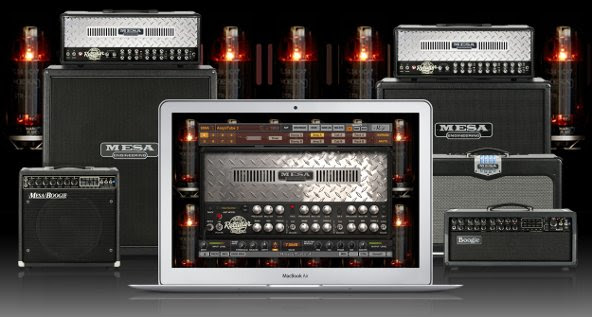
IK Multimedia and Mesa Engineering announce AmpliTube MESA/Boogie for Mac/PC

July 23, 2015 Comments off

July 23, 2015 – IK Multimedia is proud to announce AmpliTube® MESA/Boogie®, a new collaboration with the R&D Team at Mesa Engineering that brings some of the most legendary tones from the original boutique manufacturer’s amplifiers and cabinets to AmpliTube® 3 Custom Shop for Mac and PC.

AmpliTube MESA/Boogie

Now guitarists, producers, engineers and anyone needing the power of “in-the-box” professional amplifier software can enjoy modeled versions of several of MESA/Boogie’s most famous high-gain sounds via 5 inspiring amplifiers and cabinets. These exciting new co-developed models deliver everything from gorgeous sparkling clean sounds to the percussive aggression and tight crunch of the Rectifier series to the violin-like sustain of the Mark series to the ultra-flexible mid-gain British leanings of the TransAtlantic TA-30, and everything in between.

This first-ever officially authorized by MESA® line-up includes the classic Boogie® V-Curve EQ’d crunch rhythm and singing lead voice of both the MARK III and MARK IV Series as well as what many refer to as the biggest sound in Rock, the crushing gain of the Dual and Triple Rectifiers – these are amps that have ruled the airwaves for almost two decades. As an added bonus, the TransAtlantic TA-30 (MESA’s upscale tribute to the classic British EL84 legacy) is included as well. It roams the elusive pushed clean and medium gain territories with both finesse and attitude.

And, like all AmpliTube virtual gear, these models have been meticulously crafted to sound, look and perform just like their hardware counterparts. Each model has been meticulously scrutinized, worked, re-worked and approved by the R&D Team at Mesa Engineering. The addition of these inspiring MESA/Boogie amp models to AmpliTube Custom Shop means the world’s biggest library of officially authorized virtual guitar gear just got infinitely more versatile, and certainly more toneful.

High-gain boogie on the desktop/laptop
Nothing says high-gain modern guitar tone like MESA/Boogie. MESA literally invented the concept when the original boutique amp company burst on the scene in the late ’60s with the now legendary MARK I Boogie®. Its innovative “cascading” tube preamp introduced guitarists to a new, never-before-possible world of sustain that was, at long last, separate from volume.

Leap-frogging all existing guitar technologies of the day, that original tone was a defining part of the sound of golden-era greats like Carlos Santana, Pete Townshend, Keith Richards, Robben Ford, Larry Carlton, The Eagles, Fleetwood Mac, The Grateful Dead and countless other recording artists throughout the 70s. And that original tone has also helped to set the stage for successive waves of era-defining high-gain tones over the years thanks to amps like the MESA/Boogie MARK II, III and IV and the inimitable Rectifier Series, which again completely re-defined MESA’s impact on the world of Rock. When the percussive, yet perfectly-scooped high-gain aggression of the Recto’s was unleashed on the radio via the music of Limp Bizkit, Korn, Linkin’ Park, Creed and other 90s greats, there was no turning back. Guitar forever more HAD to be menacing. Today the Recto’s continue to widen their footprint in defining Rock and Metal, and, after 21 years, they’re still in constant demand and uninterrupted production.

AmpliTube MESA/Boogie recreates this historic and diverse legacy in virtual form. IK software engineers worked relentlessly with the Mesa Engineering R&D Team to ensure that each amplifier and cabinet has been rendered with the same degree of integrity and attention-to-detail that goes into the company’s physical products – the operation of both the front and the back panel controls has been fully replicated to provide exacting performance and function. The amplifiers and cabinets available in AmpliTube MESA/Boogie include:

MESA/Boogie Dual and Triple Rectifier: THE standard for modern high-gain heavy guitar tone and more. The Rectifier amps are aggressive amplifiers for aggressive players. They’re some of the most recorded and widely visible amps on big-venue stages all across the world. Effectively two different power section versions of the same amp introduced in 1989, these amps deliver maximum tone flexibility and serious rock attitude. Both have played a major role in defining the sound of grunge, metal and countless other forms of hard and heavy music. Each amp offers 3-channel, 8-mode operation and varying levels of tube saturation, plus a virtual switchable tube/solid state rectifier section. Soul, personality and feel: the Rectifiers provide a tremendous range of sounds that can be everything from crushingly percussive to liquid and elastic. These amps provide a high-gain response that can’t be found anywhere else.

MESA/Boogie Mark III: This amp from 1984 is the first original 3-channel “Tri-Modal Amplifier” design. It features an amazing set of sonic sculpting tools; it sports the original three-channel setup: Rhythm, a distinct midrange “Crunch” Rhythm, and a Lead channel with independent gain and master volume controls. Just like on the hardware counterpart, it features a full spread of tone controls plus the vitally important Boogie 5-band Graphic EQ section. When combined, it provides for a huge range of additional tone tweaking options that make it easy for players to easily recreate the sounds they hear in their heads.

MESA/Boogie Mark IV:
An improvement on a classic, this amp from 1990 takes everything that made the Mark III the standard for Boogie tone in that era and makes it even better. Three big sounds with individual controls define the tone palette for this powerhouse of a unit. Its three channels allow it deliver an incredibly wide sonic array that stretches from sparkling clean tones to ultra high-gain lead sounds that are rich with harmonics and sustain. It’s the very definition of MESA/Boogie’s signature high-gain sound, and it’s also the ultimate in versatility.

MESA/Boogie TransAtlantic TA-30: A decidedly British MESA/Boogie tribute that jumps back and forth across the sonic pond, this model captures the essence of what, for MESA, was an exercise in simplicity of operation and comprehensive tonal control. It features two-channel operation and 5 distinct “Mode” voicing choices that reference several classic British and American circuits. Throw in the Gain Boost feature, and two high-gain options (HI 1 and HI 2 in Channel 2), and this model covers everything from classic 60s to crushing contemporary, and everything in between. Each channel also features the flexibility of 3 levels of output power. This allows for a full range of power response and character that adds yet another level of accuracy and authenticity to its preamp sounds! This amp may be the most versatile yet simple-to-use MESA amplifier ever made, and it covers anything and everything the other models might miss due to their higher power ranges and gain structures.

Whole lotta gear
In the four years since its release in 2011, AmpliTube Custom Shop has established itself as the largest collection of virtual gear on the market. Its easily browsable selection of amps, stomps, cabinets and more includes officially certified models from the likes of such legendary greats as Fender™, Ampeg®, Orange®, Soldano™, Groove Tubes®, Gallien-Krueger®, Jet City Amplification™, THD® and T-Rex®, Fulltone®, Z.Vex®, Carvin®, Morley®, Wampler Pedals®, Dr. Z®, ENGL® and more. In addition to these well-recognized brands, there’s also signature gear from artists like Slash and Jimi Hendrix™. All told, there are over 280 pieces of professional-grade gear now available for trial and purchase in the AmpliTube Custom Shop!

A one stop tone shop
The AmpliTube Custom Shop for Mac/PC is a free DAW plug-in and standalone software that gives players 24/7 access to some of the most sought-after analog and digital music gear of all time. Once installed, it allows players to browse, audition and purchase collections from the world’s top gear manufacturers à-la-carte. Each model can be tested for free before purchase, just like trying out an amp or effect in a physical guitar shop. Gear models are sold in the Custom Shop using Gear Credits and are priced between 5 and 30 credits each. Gear Credits are sold in packs from a minimum of 20 credits to a maximum of 1,500 credits, with individual gear models starting as low as $/€3 each!

Plugging in to a world of sound
With IK Multimedia’s range of interfaces for mobile devices and Mac and PC, getting tone from AmpliTube is as simple as plugging into an amplifier. iRig 2, iRig HD and iRig PRO are IK’s latest generation of interfaces that allow players to plug in and get pristine, pure sound quality from their Mac or PC (or iPhone or iPad).

Pricing and availability
AmpliTube MESA/Boogie is now open for preorder at a special launch price of just $/€99.99* from the IK Multimedia online store and for just 100 Custom Shop Gear Credits from the AmpliTube Custom Shop.

The new AmpliTube MESA/Boogie bundle will be available from September 1, 2015 for $/€149.99 (150Custom Shop Gear Credits).

*Prices exclude taxes.

For more information, please visit:
www.amplitube.com/mesaboogie

Damage Control: Making what’s visible in Citrix/Terminal Servers invisible

July 22, 2015 Comments off

Kurt Mueffelmann, CEO and President, CryptzoneArticle contributed by Kurt Mueffelmann, President and CEO, Cryptzone

The Citrix XenDesktop™ and XenApp™ solutions, and Windows Terminal Servers, are commonly used to provide remote access to network resources. They are typically located between the internet and the internal network, providing an entry point into internal servers—something that makes them an attractive target for hackers.

Citrix/Terminal Servers provide highly valuable functionality for session-based access from the server to the network, which must be very open to allow for all the differing user profiles and use cases. The challenge is that all traffic from every user using a Citrix/Terminal Server is seen on the network as coming from a single IP address, which might represent dozens of different user types, all with various levels of clearance.

For a traditional firewall, this means that an access rule is necessary to allow the server to access every resource that any user on that server could need. In practice, these access rules often become a permit all for the Citrix/Terminal Server. This open door to the network represents a significant security risk.

What cyber criminals can’t see, they can’t compromise.

Taking the recent Anthem breach and many other notable breaches that were the result of stolen credentials into account, it’s safe to say that nothing is out of reach. Accepting that Citrix/Terminal Server access will be compromised is the most proactive cybersecurity strategy you could take. Here’s why: hackers are, simply, the best at what they do. Research supports his theory: incident response provider Mandiant recently reported that 97 percent of organizations have been breached at least once.

Citrix/Terminal Server access rules allow users sharing an IP address to access every resource on a network segment. Once inside the network a cyber criminal who possess stolen credentials, can “see” applications and services, whether authorized or not. Enterprises need to move away from IP-centric architectures to a role-based security model, dynamically provisioning access depending on the user’s role and contextual attributes.

Once past denial, and on to acceptance, an organization can fully embrace a practical Citrix/Terminal Server security plan by focusing on minimizing risk. While the majority of cybersecurity spending historically has gone toward building up a perimeter, limiting the amount of damage intruders can do after they’re in is a powerful paradigm shift in a CXO’s strategy.

It’s time to flip cybersecurity strategies on their head.

The focus now becomes about user access and entitlements, including tight user-based controls around network access from virtual desktops. Enterprises must move away from IP-centric architectures to a role-based security model that maintains the distinction between individual users connecting through a Citrix or Windows Terminal, then dynamically provisions access on the network and application level depending on the user’s role and contextual attributes.

Dynamic access control considers factors such as, “Is the user on a laptop at home, or on an unrecognized tablet on an unsecure Wi-Fi network?” “Should access be granted in the latter case to sensitive data?”

Disruptive solutions allow organizations to limit the damage that can be done by cyber attacks (via privileged account and third-party users) by using identity and context to dynamically secure access to individual resources—essentially making the rest of an enterprise’s infrastructure invisible. They prevent the exposure of sensitive and confidential information to only allow an individual to access what they are authorized to access. This not only prevents someone from authenticating into a network if something seems amiss, but can also limit any damage a bad actor can take if they get in with stolen credentials.

This concept is taking hold at places like Coca-Cola, Google and others. It’s IT’s job to ensure that every enterprise, regardless of their size or resources, can reap the same benefits. In order to truly protect corporate data and resources, tighter user-based controls around network access from virtual desktops is critical.

10 Questions to Ask to Make the Most of Your Data Center Investment

July 20, 2015 Comments off

FortrustContributed post by Josh Moody, Fortrust Senior VP of Sales and Marketing

While outsourcing your data center services often can be less expensive than maintaining your own in-house data center, it is still a considerable monetary commitment. That’s why most companies want to maximize their ROI by finding the right data center partner.

“Knowing what to ask and what to look for in a data center partner can help companies save valuable time and resources,” explains Josh Moody, Senior Vice President of Sales and Marketing at FORTRUST. “Businesses entrust a large component of their livelihood to their data center, so it’s important to work with someone with integrity and who will follow through.”

Here are 10 questions to help ensure you find a data center that fits your needs and can help you make the most of your data center investment.

1.     Have you considered consolidating data centers?

If your company’s main focus is to prevent downtime and data loss, you may be considering colocation at multiple, lower quality sites. Instead, consider colocating in one or two facilities that have an impeccable uptime record. This solution will remove redundant IT assets, software, maintenance and support, and disaster recovery contracts while maintaining the reliability you require.

2.     Is your hardware rationalized?

Rationalizing your hardware will provide a clear look at your inventory, giving insight into which machines are used effectively and which are not. By paring down your equipment, you can lower maintenance and support charges as well as lower energy costs, freeing up capital to allocate more wisely elsewhere.

3.     How secure is your data center?

Security is one of the biggest concerns for businesses looking to outsource their datacenter services. Your data center partner should deploy a combination of multi-layered and progressive security measures to control personnel access with multiple points and types of 2-factor authentication, including card readers and biometric scanners, dual mantraps, security identification points, CCTV, and 24-hour onsite security guards combined with offsite security monitoring. Your data center should be doing all they can to protect your business’s assets from attack.

4.     Does your data center provide constant customer support?

In addition to security teams and a skilled operations team, your data center should provide a professional, highly available customer support team. A problem, question, or a need to alter your services or environment could come up at any moment. A live support staff should be made available to you 24/7/365 to handle any questions, concerns, or requests for assistance quickly and with competence.

5.     Can your data center accommodate you now and in the future?

It’s important to select a data center that can accommodate your legacy hardware, extend its lifetime, and yet allow for future growth when customer computing demands or technology increase. A typical data center traditionally over-provisions, but a datacenter that provides a fit-for-purpose solution to match your requirements now and in the future optimizes your data center investment.

6.     Have you considered data modules?

In terms of energy consumption, security, and design, data modules offer some of themost efficient methods of colocation. Modules segregate hot and cold aisle containment and adjust cooling parameters based on the customer’s real time IT load. Their effective method of cooling allows for higher density computing, which maximizes space and efficient energy utilization, thus reducing operation costs by as much as 18.5 percent. By providing the infrastructure to perform high density computing, as well as savings from the energy efficient design and an extra layer of security due to its containerized architecture, modules are an effective colocation solution.

7.     How efficient is your data center?

Consider storing your infrastructure at a facility that maximizes operational efficiency. A highly efficient data center will have lower operations costs, which results in lower rates for the customer. Efficiency also speaks to how well a data center is run and maintained. Look for features that keep the data center’s IT equipment running longer and at peak operating efficiency like seismic enhancements, custom air filtration systems, closed loop cooling systems, a comprehensive Data Center Infrastructure Management (DCIM).

8.     Can you be sure your IT environment is optimized and your SLA is being met?

Most data centers today use a DCIM system that allows them to monitor the datacenter’s critical infrastructure, but a few progressive facilities are now offering their customers a real-time view into their data center environment as well. This virtual window offers insight into how and where your resources are being expended without speculation. This visibility ensures your SLA is being met, and informs you of any adjustments that need to be made.

9.     Does your data center provide ample connectivity?

Internet and WAN connectivity is vital to maintaining normal business operations in a connected world. Be sure your data center has a robust network infrastructure and employs several carriers with intelligent route optimization capabilities and regional peering points. Diversified connectivity, high redundancy, and intelligent load balancing ensure you experience low latency and a lower risk of uninterrupted service, which can be costly to your company.

10.  What is your data center’s uptime record?

Recent reports show that the average length of an outage was 86 minutes. When you factor in the average cost per minute of downtime — $7,900 — that means the average total cost of an outage was a whopping $690,200. With that in mind, smart IT organizations need a data center that does everything it can to prevent a costly unplanned outage. To minimize the chance of an interruption of services, choose adata center with risk mitigation features, a resilient critical systems design, a thorough DCIM, a well-trained operations team, and frequently tested redundant components and critical systems infrastructure. Be sure to ask for the data center’s uptime record, as well as the frequency of critical systems infrastructure (Electrical and Mechanical distribution) maintenance windows, which are the true measuring stick for any datacenter provider.

Every data center is different and will offer varying levels of service. Invest in a facility that offers all of the above to ensure that your organization receives the benefits and protection it needs. At the end of the day, your data center should be more than just another expense; it should serve as a valuable business partner to make your job easier.

# # #

FORTRUST is one of the most progressive high-availability data center services providers in North America, serving clients across the globe who depend on colocation services for a critical lifeline of their business. FORTRUST Denver is the largest data center in the region with over 300,000 square feet and 34 megawatts ofdata center capacity. FORTRUST offers agile, reliable, sustainable and secure raised floor and modular data center capacity for any-size enterprise supported by optimal power infrastructure and connectivity to safeguard mission-critical business services. In addition to the national headquarters in Denver, FORTRUST has data centerlocations in Phoenix, Arizona and Edison, New Jersey. www.ftdc.com

Categories: Contributed Articles

BoinxTV: Broadcast Quality Video Made Easy (Review)

July 16, 2015 Comments off

BoinxTVBoinxTV
Boinx Software, Ltd.
$499.99 for the Professional version*
$49.99 for the Home version

BoinxTV is broadcast quality video casting software that turns your Mac into a TV studio. With BoinxTV, you can create your very own high quality TV show that includes, split screens, picture-in-picture, transitions, crawls, bugs, multiple cameras, automatic upload to YouTube and much more.

BoinxTV on Location

If you want to see me and my videographer, Joseph Butler, creating videos at the Social Media Tulsa event this year with various guests, check out our work. Using BoinxTV on location was easy. Once you make a few basic decisions (video capture resolution, on-screen effects, and lower thirds), you can capture video over and over like we did over a stretch of a few hours.

For our videos, we used the same backdrop, the same lighting, and format throughout the process to keep a consistent look and feel. We also used a directional microphone, but used a second microphone that allowed some ambient sound to leak in because we liked the “busy background” it imparted to the videos.

At the SMTulsa Conference, we created 12 videos. Some of them were done back to back and only required about two minutes of file saving of the previous video and queueing of the new one in between. Joseph created the opening transition that you see just prior to each interview.

BoinxTV is your best friend on location. Seriously. It’s easy to use, easy to queue one recording right after the other, easy to use with multiple sources (cameras), and easy to create great looking, professional video (as demonstrated by our interview dozen). We never had to restart a recording because of a BoinxTV fault nor did we experience any technical issues during its use.

Video Input:

Video Cameras

  • SDI cameras supported via SDI input devices such as the Blackmagic UltraStudio Mini Recorder.
  • HDMI cameras supported via HDMI input devices such as the Blackmagic UltraStudio Mini Recorder.
  • HDV/Firewire cameras supported on Macs with Firewire connectors or via Apple Thunderbolt to Firewire adaptor.
  • USB Webcams
  • Select AXIS network cameras supported via AXIS camera layer
  • The number of video inputs is only limited by the number of interfaces and the bandwidth of the internal bus of your Mac
  • See example configurations for guidance on multi-camera setups

Video and Graphics Files

  • Playback video files of almost any format
  • Use PDF, PNG, JPEG and many more formats for graphics
Presentation Recording

  • Capture PowerPoint or other presentations from a presentation computer via VGA, DVI or HDMI via a capture device like the Epiphan DVI2USB3

Skype and Hangout

  • Skype calls or Hangouts can be recorded using the screen capture source

Screensource

  • Capture output from any application on your Mac via screen recording

See all technical specifications for video, audio, output, and effects.

The only downside of BoinxTV is that it doesn’t work with a lot of DSLR cameras which is bad for YouTubers. It doesn’t work with my Canon T3 nor Joseph’s Canon 60D. It does work with every web camera, my Panasonic HM-TA1, and an older Canon XL1S professional camera, but DSLRs are kind of hit and miss.

Why it’s Frugal: BoinxTV Professional is frugal because it is an all-inclusive TV production studio. You can create anything with it from technical videocasts all the way up to professional TV programs. Frugal.

If you ask me what I think of BoinxTV, I’d have to say I love it. It is a professional studio that is easy to use. So easy that I can do it and before I used it I had no experience with this type of software. At all. The software is easy to use, but extremely powerful. You can do anything with it that you see on Headline News or CNN. I don’t know if they use BoinxTV for their programming, but they probably could.

Joseph has a little different take on BoinxTV. His is from a professional videographer viewpoint. “The application is fairly easy to use, but the interface is a little clunky and pre-recorded video could be easier to use.” Joseph also told me that the video sources would drop when you add a new one to BoinxTV. I noticed the same behavior but had forgotten about it.

BoinxTV is the ultimate production package for YouTube shows. I’d highly recommend it for anyone who wants to create professional, high-quality video programs. In fact, as I discovered, you can do so much on-the-fly with BoinxTV that you might not need to do any “post” work at all. It can all be done in BoinxTV as you’re working.

One of the things I really like about it is that you can create a template for your show so that it looks the same every time–even on location. BoinxTV is everything I could ask for out of a professional studio production program.

Rating: 9/10

Recommendation: Buy it. Use it. Become a YouTube millionaire.

*This review is for BoinxTV Professional

Get To Know an MSP: Breakthrough Technology Group (BTG)

July 15, 2015 Comments off

Breakthrough Technology Group, Inc.Breakthrough Technology Group, Inc. – BTG
Managed Telecom and IT Services
Morganville, NJ.
(732) 978-4443
sales@btgroupinc.com

CEO – Jeff Kaplan

May 27, 2015 was a red-letter day for Breakthrough Technology Group, Inc. (BTG) in that it had two major announcements for its new partner programs: BTG Partner and BTG Private Cloud Partner. I spoke with CEO Jeff Kaplan about the new partner programs and BTG’s cloud offerings.

Podcast Info: Length: 26:15 minutes. Format: MP3. Rating: G (All audiences).

BTG Partner Program

The new BTG Partner Program opened to consultants, systems integrators, vendors and agents to offer cloud computing and services to enterprise, and midmarket and smaller businesses.

“When you look at the consulting community, there’s a ton of partners out there who don’t have a recurring-revenue stream and who are looking for the right partner, and the right reliability for their customers,” Kaplan said. “Those are relationships we’re looking to build.”

This program really focuses on the consultant community in an attempt to broaden BTG’s reach into smaller companies and to bring recurring revenue to consultants. BTG is also trying to help those consultants and VARs extend their reach and transform their businesses into a more sustainable format by enabling these new partners to leverage cloud services for their customers.

The program includes three levels for participation:

  • Adviser, which qualifies a customer, and initiates a discussion between BTG and the customer;
  • Reseller Billing Only, which becomes BTG’s client on behalf of the customer in terms of billing; and
  • Reseller White Label, in which everything, from the support portal to answering of phones, will be branded as the partner.

For consultants and vendors who want to use BTG’s infrastructure and cloud services as their own infrastructure, BTG offers a so-called “White Label” partnership where BTG becomes an extension of the partner for customer support. This partnership enables small consultancies the opportunity to offer a wider range of services and technologies to their customers with extended support from BTG.

BTG Private Cloud Partner Program

Systems integrators, VARs, and agents are now able to deliver secure cloud solutions, offer Tier-1 data center, applications and services without capital investment. This partnership program lowers the barriers to cloud solutions business for its partners, which otherwise would be unreachable due to the costs associated with infrastructure, networking, and support personnel.

“Analysts and industry experts worldwide agree that private cloud offers a tremendous opportunity for solutions providers to mitigate risk and deliver a secure, efficient computing experience,” said Kaplan. “Our Private Cloud Partner Program will open new doors for businesses of all sizes and markets by creating supplemental revenue streams, taking their companies to unprecedented heights.”

As a managed services provider, BTG puts itself in the background as the support system for its partners.

BTG’s Cloud-based Offerings

A major pain point for companies is how to manage desktop computing. To that end, BTG offers its AppsAnyplace solution that includes fully managed, hosted, custom virtual desktops and applications. The pain points of desktop computing are support costs, patch management, remote user support, consistent desktop environments, standardized applications, malware problems, and data security.

The standard Desktop-as-a-Service takes care of these issues by hosting virtual desktops in a private cloud environment and taking care of all support, security, and maintenance in the background.

BTG’s Private Cloud services leverage a highly redundant and virtualized security, networking, and SAN storage.

Private Cloud features include:

  • 24×7×365 infrastructure and private cloud management
  • Optional management and monitoring through the OS/Application layers
  • Cloud environment to host client applications
  • Optional replication of data and applications
  • 24x7x365 Help Desk
  • Support for dedicated virtual Linux and Windows servers
  • Application and data security
  • Consumption-based pricing

For SaaSAnyplace, BTG supports dedicated hosted Exchange Server, hosted SharePoint, hosted Lync Server, and hosted archiving & eDiscovery. For its DataAnyplace service, BTG uses Citrix ShareFile to enable users to use data on any device and for easy collaboration.

Founded in 2007, Breakthrough Technology Group (BTG) is a managed services provider that supports mid-market enterprise customers, through the use of advanced technology and telecommunications.

Start Your Own MSP Business with Pulseway’s SaaS Enterprise Server

July 14, 2015 Comments off

Pulseway Enterprise ServerPulseway SaaS Enterprise Server
Pulseway
Pricing

Pulseway’s new SaaS Enterprise Server enables small Managed Service Providers to leverage the cloud for system and service monitoring, real-time alert notification, and granular remote management of a diverse array of operating systems and applications. If you’ve ever wanted to go into business for yourself as an MSP, there’s no better time or no better software to get you there.

When you think of managed services or managed services providers (MSPs), you might assume that they’re all staffed by dozens or perhaps hundreds of people working around the clock to support their customers. That might be true for a small percentage of MSPs, but did you know that most MSP businesses have fewer than 50 employees? The MSP space is growing at a double-digit pace and some MSPs report triple-digit growth. And this isn’t a trend that just began with the introduction of cloud technologies, it’s been growing at or near this rate since 2000. Smaller MSPs see higher rates of growth than their larger counterparts do.

From the MSPmentor 501: 2013 Edition:

Generally speaking, the largest MSPs continue to enjoy success, but in many cases annual growth rates for large MSPs have slowed to single-digits. The fastest-growing MSPs are those that successfully blended mobile, hybrid cloud and application-level management. Also, many of the top-rated MSPs are thriving in extremely targeted markets – such as the hedge fund vertical.

If you think that the MSP market is saturated, it isn’t. In fact, it’s far from it with these kinds of reported growth numbers. MSPs that deliver great service at competitive prices have the most success, even in markets or locations that appear overcrowded.

With Pulseway’s SaaS Enterprise Server, not only can you setup monitoring and alert notifications for a variety of systems, services, and applications, but you can also manage those systems from any device, including mobile devices via Pulseway’s secure apps.

For more videos that demonstrate Pulseway’s mobile management, check out the Pulseway YouTube Channel.

With Pulseway’s service, you can monitor and completely manage Mac OS X, Windows, and Linux systems. You have fully control over each operating system within the same interface. And you can monitor and manage desktop or server systems. Heterogeneous environments are no problem for Pulseway.

You can configure custom monitoring, alerting, and management for all your systems either through the easy to use Windows application or by editing the /etc/pulseway/config.xml file on Linux and Mac OS X systems.

On Windows, you can optionally select to manage the following advanced services:

You can also manage notifications for host status, ping of various other hosts, storage, website availability, and SSL certification expiration.

Download the Pulseway agents and get started right away with the standard, free option or you can take the 30-day free trial of the SaaS Enterprise Server.

Pulseway’s friendly interface and quick setup are perfect for consultancies and MSPs who want to offer a wider range of services, remote management, and real-time monitoring for their customers. There’s no lengthy training required, no huge licensing fees, no datacenter equipment maintenance, and no hassles or long-term contracts to prevent you from adding Pulseway to your toolbox.

  • Run command line commands (All operating systems).
  • Run PowerShell commands (Windows).
  • Carry on real-time chat with users.
  • Logoff the current user or lock the desktop.
  • Restart, Shutdown, Power off, Suspend, or Hibernate the system.
  • Enter Maintenance Mode.
  • Perform Windows Updates.
  • Uninstall software.
  • Manage security settings.
  • Kill or restart processes.
  • View Event Logs.
  • View disk space and browse filesystems.

From a technical perspective, Pulseway’s management capability gives you deep insight into your monitored systems. From command line interface, to service management, to filesystem access; you have it all at your fingertips, literally, with Pulseway’s mobile app. You can stop, start, and restart services. You can issue commands at the command line with any operating system. On Windows, you have the added capability of being able to issue PowerShell cmdlets. You can apply Windows Updates to Windows operating systems. You can update Linux systems via the command line. And you can connect via RDP to your Windows systems for a full graphical desktop-level experience.

“It is an invaluable tool to follow up on alerts from our monitoring system while on the road – no need to connect via VPN and log on to the troubled server. The support for Pulseway is awesome.”

Brian Hansen, System Administrator / eBay

Pulseway is a frugal choice for MSPs and consultants because you don’t have to spend a lot of money to setup your own infrastructure, you don’t have to hire a team of support people to monitor and manage it, and you don’t have to worry about some crazy licensing scheme that extracts all of your profits from your business.

Pulseway is enterprise monitoring, alerting, and management for all your computers that allows you to monitor 24x7x365, receive alerts, respond to problems no matter where you are, and from any device.

IK Multimedia announces 96kHz firmware update for iRig PRO and iRig HD

July 2, 2015 Comments off
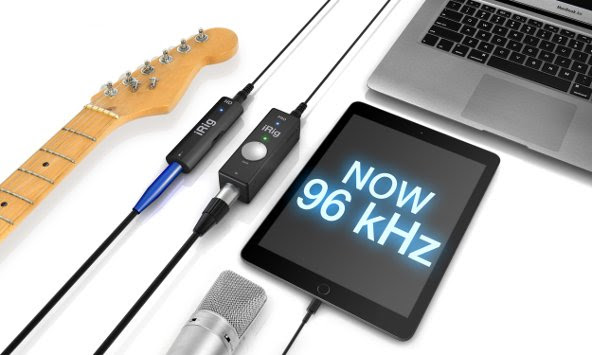
July 1, 2015 – IK Multimedia, the leader in mobile music creation, is pleased to announce a new complementary firmware update that enables high resolution 24-bit/96kHz audio sampling for its iRig® PRO and iRig® HD mobile audio interfaces. At double the original 24-bit/48kHz sample rate, it makes these ultra-compact mobile interfaces sound even more clean, nuanced and transparent by offering the utmost in professional recording quality – anywhere and anytime.

96kHz firmware update for iRig PRO and iRig HD

The higher the bandwidth, the better
Simply put, musicians can now play and record with recording studio quality sound. Both iRig HD and iRig PRO are now able to capture even more of the subtle nuance and detail of analog instruments and other input sources. It’s an ideal feature for professionals and advanced home studio enthusiasts who won’t settle for anything less than the best sound possible – and it’s a completely no-cost update for all existing iRig HD and iRig PRO users.

iRig PRO – The 96kHz “all-in-one” mobile audio solution
iRig PRO is the first full-featured compact audio and MIDI interface for iPhone, iPad, iPod touch and Mac or PC. It’s like a Swiss Army knife for mobile recording: It sports an XLR/¼” combo input socket and a MIDI input which means that it can be used with any XLR microphone (it even provides 48V phantom power supplied by an onboard 9V battery), guitars, basses, keyboards, line-level instruments and MIDI controllers.

It’s perfect for the musician on the move who needs to have it all. Now anyone can record guitars, bass, vocals, harmonies, acoustic instruments, keyboards, MIDI data and more without having to swap interfaces, and lose that creative flow. iRig PRO is compact – about as small as a harmonica – and comes with everything needed to get started playing and recording right out of the box. Its included Lightning, 30-pin and USB connector cables ensure the right connection every time.

iRig HD – Streamlined high-definition sound
High-definition sound that fits in the palm of a hand – that’s what iRig HD was made for. It’s a slim and compact audio interface with a ¼” instrument input that features an input gain control knob, a multicolor LED and ultra-low-draw power consumption circuitry. Its ¼” Hi-Z input jack can accommodate any guitar, bass or line-level instrument, and its detachable Lightning, 30-pin and USB connector cables allow for maximum compatibility. And with the addition of 24-bit/96kHz recording, now it sounds better than ever before.

A world of apps
Both iRig PRO and iRig HD come equipped with a USB cable that allows them to be used with a computer and a wide variety of popular 24-bit/96kHz recording-compatible DAW software, like Apple Logic Pro X, Ableton Live, Avid Pro Tools, MOTU Digital Performer, PreSonus Studio One and Steinberg Cubase. In addition, both come with a full suite of mobile apps and software designed for creating inspired music on the go.

Pricing and availability
The 96kHz firmware update is provided to registered owners of iRig HD and iRig PRO at no charge. To update, users just need to simply log into their user account on the IK Multimedia web site, download the firmware updater for their computer OS and then follow the simple installation instructions. The PC version of the Firmware Updater is available now, July 1, 2015, and a Macintosh version will be available in the second week of July, 2015.

Alongside this special announcement, IK Multimedia is offering a $/€20 discount on the list price of iRig PRO and iRig HD through the entire month of July. iRig PRO is now available for $/€129.99 and iRig HD is available for $/€79.99. Both can be purchased from music and electronics retailers worldwide and from the IK online store.

For more information, please visit:
www.ikmultimedia.com/irigpro
www.ikmultimedia.com/irighd

For more information about the 96kHz firmware update, please visit:
www.ikmultimedia.com/firmware

Singtrix: Karaoke for Dads, Grads, and Music Enthusiasts (Review)

June 19, 2015 Comments off

Singtrix Party BundleSingtrix
Singtrix.com
$349.00 Amazon, Sams, Target

The Singtrix karaoke machine is a microphone, a microphone stand, a “studio”, cables, and a 40-Watt speaker that uses your mobile phone or tablet’s music playlist for background music and helping vocals. It’s billed as “the next-generation karaoke machine that makes bad singers sound good and good singers sound amazing!”

It takes a few minutes to setup the Singtrix unit, because you have to assemble the microphone stand, plug in the cables, connect your phone or tablet, and tune the device. Tuning the device can take a while, as in perhaps an hour to tweak it so that it’s just right for the room you’re in. Tuning involves adjusting your phone or tablet’s volume control, the effects, and the volume, bass, and treble on the speaker. It’s not a trivial task to get it just right, but once you do, the fun begins.

You can adjust the singing voice in your song to very low so that it’s just barely audible as a helping voice. It’s fun to use one of the more than 300 voice effects that are interestingly named for songs that you’ll recognize, but careful not to infringe on copyrights.

The components are well made, clearly marked, and are of decent quality for creating some cool sounds. It’s easy enough to use for just about anyone. The controls are very intuitive and you can choose from no voice enhancement to extreme voice modulation, so there’s almost no limits to the range of possibilities.

The video below is on the Singtrix website, although I wouldn’t have included it there, it does show how versatile the Singtrix is and how impressively you can sound on it. The video shows the Singtrix inventors being a bit stubborn about getting an investment for the product launch, although I’m not completely convinced that the appearance on Shark Tank was for an investment. I think it was probably more along the lines of free advertisement for the product. I would have done the same thing.

This demo video shown in the link below is very good. And it’s 100 percent realistic. You really can get all of these sounds and effects out of the Singtrix.

For myself, I think the Singtrix is a cool, portable PA system. I’m not a singer and not even the Singtrix can make me sound good, but I do like it for its PA capabilities. I think it’s interesting in that respect and would use it for that extensively. My primary problem with the unit, besides how long it takes to get the sound right, is that it doesn’t provide the words to songs. Using an external device for lyrics is difficult because you can’t easily synchronize the song on your Singtrix-connected device to the lyrics.

The StudioMy daughter and her friends who came over and played with it for an entire weekend, much to the chagrin of my wife and myself, loved it for how it made them sound when singing. My daughter explained to me that not having the words display for you is a sacrifice to be able to choose your own songs instead of ones that the company chooses for you.
She went on to say that you can look up karaoke version of your songs on your iPad, while your phone plays the song. She didn’t think there was a problem getting the two synchronized, so she loved it.

  • From the same guys who created Guitar Hero.
  • Features the Singtrix “Studio” vocal effects unit with more than 300 unique, studio-quality vocal effects, including pitch correction and harmonies.
  • Plug in your phone, tablet, or mp3 player to play any song of your choosing while Singtrix lowers the vocals to create your own karaoke track from any song in your library.
  • Bad singers become good singers, good singers become great singers and great singers turn into rockstars!

It must be an age-related complex. I’m used to “old school” karaoke machines and she’s willing to make something work. Your mileage may vary.

40-Watt SpeakerMy best advice is that if you want to use the Singtrix as a karaoke machine, have some teenagers or preteens around to make that work for you, otherwise you’d better know all the lyrics to the songs.

Why it’s Frugal: The Singtrix isn’t frugal. It’s a luxury item that might not be for everyone at the $349 price. That’s not to say it isn’t worth the price; it is, but you should be someone who likes to sing to justify it or have a lot of parties.

I suggest that once you get the settings like you want them, leave them there. Tweaking even a little bit can cost you a lot of time and kids have short attention spans.

I don’t want you to think that this is a negative review because it isn’t. It’s a realistic one. I don’t want you to buy a Singtrix and not be satisfied because it’s a little less than falling-off-a-log simple to setup and use. I really like the Singtrix. It’s fun and you can have hours and hours of fun messing with the different voice effects, speaking like a robot, singing like a girl (if you’re a guy), singing or talking like Barry White, and more.

One final thing to note is that with the speaker pointed out toward your audience, you won’t be able to clearly hear the voice modulation. To you, you’ll sound pretty much the same as you always do, but to people in front of the speaker, your voice has changed. My daughter and friends had a lot of fun with the Singtrix. I had a lot more fun with it pretending that I was announcing plays at a baseball game or singing the National Anthem (poorly) with a lot of enhancement and Broadway stylings like many performers use. Why can’t they just sing it like Francis Scott Key wrote it? Some things shouldn’t be messed with and the National Anthem is one of them.

The Singtrix comes with everything that you need in the box to start singing and having fun. If you’re a good singer, you’ll sound like you’re in a studio. If you’re a bad singer, like me, you’ll need some help and the Singtrix has it with more than 300 voice modulations and controls. If you need to pump up the jam at your next family gathering, party, or kid sleepover; get a Singtrix and get ready to laugh and sing until you lose your voice.

Rating: 8/10

Recommendation: Try it, buy it, but be ready to tweak.

ProGear™ Vault Case For the Apple iPad mini® 1/2/3 by Pelican (Review)

June 8, 2015 Comments off

VaultCaseiPadMini_closed_high VaultcaseiPadminihighProGear™ Vault Case For the Apple iPad mini® 1/2/3
Pelican
$79.99 MSRP. $75.00 Amazon (Prime)

When you first open the ProGear™ Vault Case (Vault) for the iPad mini, you notice that it’s made of very strong plastic. In fact, the company boasts that the construction passes military standards (MIL-STD 810G) for durability. And for all its toughness, it doesn’t add a lot of unnecessary bulk or weight to your iPad mini (8.72″ x 6.71″ x 0.71″ (22.1 x 17 x 1.8 cm).

When your iPad mini is in the Vault, with the lid closed (as shown in the first picture above), it’s fully protected, with the exception of your rear-facing camera. The rear-facing camera is protected by being inset into the product, but there’s no plastic shield between the outside world and your camera lens.

With the Vault lid open (as shown in the second picture above), your iPad mini screen is exposed and vulnerable to drops, spills, scratches, and other mishaps. If you drop it screen down, it will take damage.

The Vault’s construction is very solid and would be difficult to break under all but the harshest conditions. If conditions are harsh enough to break the Vault case, then perhaps you’re in an unhealthy and life-threatening situation yourself.

The hinge is a weak spot for most cases, but this one has two steel bars that run on each side of the hinge. It would take a tremendous amount of force to break that hinge. As I wrote earlier, with the lid closed and secured, your iPad mini is well protected from drops, from objects being dropped onto it, and from minor liquid spills or splashes.

Why it’s Frugal: The Pelican ProGear™ Vault Case is frugal because it protects your iPad mini in all but the harshest conditions and situations. For $75.00, protecting your $349+ investment is a good deal and is a frugal choice.

The Lightning charger port and the 3.5mm jack are both protected via attached rubber “plugs” that prevent damage to these two vulnerable areas when the plugs are in place.

  • Military Tough: Tested to Military Specifications (MIL-STD 810G) to survive multiple drops
  • Dust Protection: Ingress Protection (IP54) tested to achieve a full seal design against dust and dirt
  • Guaranteed For Life: You break it, we replace it…forever.™
  • Elastomeric Liner: Absorbs shock and protects electronics
  • Screen Protection: Hard cover protects against impact and abrasion
  • Dual Axis Hinge: Allows for unlimited viewing angles
  • Watertight Seal: Keeps out rain and dust
  • Easy, Tool Free Assembly

With the Vault, you could feel comfortable taking your iPad mini outside, to work, on biking trips, on campouts, in the garage, or in the kitchen without much fear of something terrible happening to your iPad. The lid opens all the way (near 360 degrees) to provide a stand for your iPad mini to hold it at a convenient viewing angle while you work with it in a hands free fashion.

Overall, I like the Vault. I think it’s a well made product that’s durable, simple, effective, and priced well considering its materials and construction. It’s available in various colors and also for the iPad Air.

Rating: 8/10

Recommendation: Buy it, but be aware of its exposed camera port and vulnerabilities when open.

About Pelican

Pelican Products, Inc. is the global leader in the design and manufacture of both high-performance case solutions and advanced portable lighting systems. Their products are used by professionals in the most demanding markets including fire safety, law enforcement, defense / military, aerospace, entertainment, industrial and consumer. Pelican™ products are designed and built to last a lifetime. The company operates in 19 countries, with 28 offices and six manufacturing facilities across the globe. For more information, visit www.pelican.com or www.behrmancap.com.

Domke Next Generation Metro Messenger Photographer’s Bag (Review)

May 26, 2015 Comments off

Domke Metro Messenger BagDomke Next Generation Metro Messenger Bag
Tiffen
$349.95

The bag I chose for review is the Domke Next Generation Metro Messenger Bag from Tiffen. This particular bag (pictured right) that I reviewed is a photographer “gig” bag for me. Sure you can haul just about anything in it, including a laptop and accessories. But I’m an avid photographer who carries a camera, multiple lenses, and multiple camera bodies, and sometimes multiple cameras with me. I also throw in my battery charger, a flash unit or two, small lights, various cables, and even film (Yes, film. Don’t judge me). This bag can hold more than you can carry–trust me on that point. I’ve filled it so full and with so many different things that I’m sure the people behind me at the airport were rolling their eyes and taking some heavy sighs at the spectacle. Watching me pull out so much stuff from that bag–I’m sure I looked like a guy pulling clowns out of a Volkswagen at a rodeo. But I don’t care. The bag is capable of holding my stuff, so I’m going to take advantage of its capacity.

The Metro Messenger bag is one tough cookie too. It’s made of Cordura, which is a military-grade nylon blend fabric that’s used to make backpacks, duffle bags, and other stuff for the military. It’s also the material that’s used to make a lot of the new lightweight, super durable luggage that you see in department stores.

I chose the Metro Messenger because not only does it not look like a standard issue photographer’s bag, it can double, as I wrote earlier, as a laptop or other type of tote. The Messenger style bag has a good look for me that’s somewhere between briefcase/satchel and small suitcase. I don’t want to feel like I’m carrying a purse/murse nor do I want to look like I’m toting a really fancy diaper bag. That’s why I chose the evergreen style of the Metro Messenger. It’s classic, smart, and professional without being stuffy or pretentious.

Metro Messenger - Inside LookYou can also tell that this is a substantial bag. In other words, it isn’t some cheap knockoff of a bag that you really want. It IS the bag that you really want without paying the big price for it.

Now you might say that $349.95 isn’t inexpensive, but I’d tell you that you’ll probably never have to buy another one unless it’s a gift for someone. In other words, you’ll likely never have to replace it, so $349.95 is a steal, even if you keep it for just ten years, but you’ll keep it longer because it won’t wear out.

Color – Black
Fabric – Cordura
Laptop Friendly – Yes
Carry Options – Shoulder
Exterior Size – 21 in Long
Weight – 4.50 lbs
Exterior Dimensions – 21″L x 5″W x12″H
Interior Main Dimensions – 16″L x 4.5″W x11.25″H
Internal Laptop Area – 14.25 x 9.5″
Dividers – (2) D6
Webbing Color – Black
Warranty – 2 Years


DOMKE NEXT GENERATION METRO MESSENGER – CORDURA BLACK
Satchels, Courier and Messenger Bags

NEXT GENERATION brings evolutionary and revolutionary features to the trusted name of Domke. The Metro Messenger (the grandchild of the F-832) is part of the Metro Series of Satchels, Courier and Messenger Bags. The Metro Messenger , with functionality as the core design inspiration, integrates our patent pending systems for personalizing, protecting and accessing your valuable gear. Also available in RuggedWear Black and RuggedWear Military.

Features:

  • Black color with Sand color webbing
  • Top access with double zipper
  • Rear slide pocket
  • Expandable zippered side pocket
  • Stacked front slide pockets
  • Key-ring strap
  • Secure luggage strap
  • Numbered identity plate
  • Side rain hoods
  • Padded zippered tablet sleeve fits up to 14.25 x 9.5
  • Foam-lined laptop cargo pocket with double zipper
  • “Quiet” system hook and loop silencer
  • Expandable front pockets
  • Custom antique steel hardware
  • Detachable Gripper shoulder and grab strap
  • Domke flap tucks in for anonymity
  • All zippers YKK®
  • Comes with 2 dividers – Additional divider inserts (D6) available in GearProtex Accessories

Accessories:

  • Domke GearProtex Insert System – a revolutionary, customizable insert system that allows you to compartmentalize and organize your contents to create any size or shape using bendable, self-adhering separators.
  • Domke PocketFlex Pocket and Pouch System – an ingenious system of movable, pockets, patches and pouches.  These innovative storage components adhere to all interior surfaces, personalizing your storage.

Why it’s Frugal: The Domke Metro Messenger bag by Tiffen is frugal because it will quite possibly outlast you. I’m pretty sure that if you amortize the price over 20 years, you’ll see that for less than $1.50 per month is a great deal. The bag is tough, attractive, and functional. And it could become an heirloom. What else do you need?

The only negative about this bag is that it only has a shoulder strap and no handle on the top. I don’t always want to shoulder a bag, but it’s required with this one. Yes, it’s a messenger bag, but a top handle would be a very welcome design addition to this near perfect product.

CrapDance Film Festival

It's a real shit show

Experimental Film Fest

A refuge for art house, avant-garde, experimental, exploratory, and silent cinematic creations

False Pretense Films

Films with a Twist

I'm Just Trying to Help

Helpful Hints, Tips, Tricks, and Info

5K a Day 2017

Our 2017 fitness goal

The securityNOW Podcast Show

Cybersecurity News and Interviews

LoneStarFreedomPress

Phoenix Republic - The Lone Star Gambit / Sovereign's Journey