
New Photography Lightstands and Accessories From Flashpoint Now Available Exclusively From Adorama
February 19, 2015
Comments off

New York, NY – February 19, 2015 – Adorama, one of the world’s largest photography, video, imaging and electronics retailers, has released a handful of new products to complement its award-winning Flashpoint accessory line. The latest releases include the Flashpoint Auto Stand (in 7’ and 9’ models), the Flashpoint Telescopic Reflector Holder and two new Flashpoint Flip-Flash Brackets. All items are now available with complimentary shipping.
Flashpoint Auto Stand (7’ and 9’)
The Flashpoint Auto Stand, available in both 7’ (http://www.adorama.com/FPLS7AS.html) and 9’ (http://www.adorama.com/FPLS9AS.html) models, is a heavy-duty yet lightweight support with an ultra-quick setup, perfect for solo photographers carrying their own gear, as well as assistants helping with location changes. Setting up the Flashpoint Auto Stand is as simple as placing it on the ground, as the stand legs instantly extend outward. Automatically retracting legs make location changes easy and discreet – simply lift and relocate into those tight spaces where fitting an already-extended stand is impossible, like between church pews during a wedding ceremony shoot.
The 7-foot option adjusts from approximately 3.1’ to 7’ and folds down to 30” for storage and transport. The 9’ option adjusts from approximately 3.5’ to just over 9’ and folds down to 40”. Both options come with a reversible 5/8” stud, with a 1/4”-20 thread on one end and 3/8” on the other, which can be vertically or horizontally mounted as needed.
For more information on the 7’ and 9’ Flashpoint Auto Stand models, please visit:http://www.adorama.com/searchsite/default.aspx?searchinfo=flashpoint+auto+stand.
Flashpoint Telescopic Reflector Holder
The Flashpoint Telescopic Reflector Holder (http://www.adorama.com/FPXBKPR01.html) is designed to hold a 5-in-1 portable reflector (such as these models from Glow:http://www.adorama.com/searchsite/default.aspx?searchinfo=glow+portable+5+in+1+reflector+kit) at any angle. Specially designed for collapsible reflectors, the holder allows users to place light-shaping accessories in any position for maximum impact. The standard 5/8” stand receiver can be connected to light stands and booms, while the ballhead design allows for quick and precise positioning and locking.
After telescoping the aluminum alloy rod to the required reflector length, the balance can be adjusted easily by positioning the rod above the central axis using knobs. With an easy-pinch design and a large, adjustable handle, the Flashpoint reflector holder manages the mechanics while leaving the creativity to the user. Its lightweight design makes for flawless transportation while retaining the sturdy, solid frame Flashpoint is known for.
Flashpoint Flip-Flash Brackets
With two different Flashpoint Flip-Flash Bracket models to choose from, users can be assured that their lighting quality is perfect in every situation. The first of the two options, the Flip-Flash Bracket (http://www.adorama.com/FPXBKFL01.html), has a rotating arm that positions the flash farther from the lens while staying directly above it, regardless of the camera’s orientation. The second, the Rotating Camera Flip-Flash Bracket (http://www.adorama.com/FPXBKFL05.html), allows the camera to actually swivel inside of the bracket for ultimate flash manipulation. Unique to Flashpoint, both models have an integrated anti-twist plate on the platform that the camera rests on, to prevent the camera from twisting off axis during swivel motions.
Both Flashpoint brackets allow users to smoothly rotate flash and SLR cameras up to 90 degrees for vertical and horizontal shots while eliminating red-eye and side shadows. The speedlight flash support arm is designed with a 180-degree range of travel for creative flash effects. With a lightweight aluminum frame and a comfortable foam grip, both brackets are easy to hold in heavy use and at rest between shots, giving users the most control possible.
Pricing and Availability
All new Flashpoint models are now available for purchase through Adorama’s official website, or at the Adorama Superstore, located at 42 West 18th Street in New York City. The Flashpoint Auto Stands each retail at 49.95 USD (7’ model) and 69.95 USD (9’ model) – after a $10 instant rebate. The Flashpoint Telescopic Reflector Holder retails at 39.95 USD. The Flashpoint Flip-Flash Bracket retails at 19.95 USD, and the Rotating Camera Flip-Flash Bracket retails at 29.95 USD.
For additional pricing information, or to explore other exciting camera accessory options from Adorama, please visit www.adorama.com.
ADORAMA: More Than a Camera Store
Adorama is more than a camera store – it’s one of the world’s largest photography, video, imaging and electronics retailers. Serving customers for more than 35 years, Adorama has grown from its flagship NYC store to include the leading online destination for photography, video and consumer electronics. Adorama’s vast product offerings encompass home entertainment, mobile computing, and professional video and audio, while its services include an in-house photo lab, AdoramaPix, pro equipment rental at Adorama Rental Company, and the award-winning Adorama Learning Center, which offers free education for photographers in online channels such as the popular Adorama TV.
Adorama is listed as one of the top five electronics retailers by Consumer Reports, “Best of the Web” by Forbes.com, Internet Retailers Top 100, and is the official Electronics Retailer of the NY Giants.
Visit ADORAMA at www.adorama.com.
Categories: Press Releases
Adorama, cameras, DSLR, flash brackets, Flashpoint, Photography, stands
IK Multimedia updates iGrand Piano and iLectric Piano, studio-quality acoustic and electric piano apps for iOS
February 17, 2015
Comments off
iGrand Piano and iLectric Piano add iOS 8 Audiobus and Inter-App Audio
compatibility, user presets, new expansion libraries and more
compatibility, user presets, new expansion libraries and more
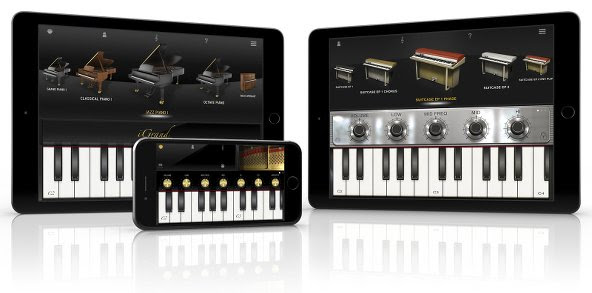
February 17, 2015 – IK Multimedia, the leader in mobile music creation technology, is pleased to announce updated versions of its acclaimed piano apps iGrand Piano™ for iPhone, iPad and iPod touch and iLectric Piano™ for iPad. The apps, which provide players with some of the best acoustic and electric piano sounds available on mobile devices, now sport a variety of powerful new features: full compatibility with Audiobus and Inter-App Audio in iOS 8, new instrument expansion libraries, an improved user preset management system and more. In addition, iGrand Piano now includes the same semi-parametric equalizer included in iLectric Piano.Both apps are perfect for use with IK Multimedia’s iRig® KEYS line of portable MIDI keyboard controllers, like iRig KEYS PRO and iRig KEYS. When paired they create the ultimate mobile solution for the discerning keyboard player on the go.
Optimized for iOS 8
Compatibility is at the heart of the latest versions of iGrand Piano and iLectric Piano. Musicians can now use both with their favorite third-party audio apps, thanks to newly updated compatibility with Audiobus and Inter-App Audio in iOS 8. This new support allows for both practical and wildly creative combinations when combined with DAW-style recording apps like GarageBand for iOS or multi-effects modeling apps like IK’s own AmpliTube.
Versatile variations
Both iGrand Piano and iLectric Piano feature easy to use and adjustable controls that allow for limitless tonal sculpting. iGrand Piano has been updated to now include the same semi-parametric equalizer as iLectric Piano, meaning musicians can now tweak both with the power of 4 EQ knobs in addition to other app-specific parameters – like piano lid aperture in iGrand Piano or modulation effects in iLectric Piano.
Users can also now save specific edit panel settings in 4 writeable locations provided for each instrument using the newly introduced “Variation” system. This system gives musicians 4 conveniently accessible buttons (found in the Edit Strip of either app) that can be used to store knob positions and tweaks for later use when recording in the studio, on stage performing or just practicing at home.
Introducing new sounds
The latest update to both apps also introduces new sound packs available for in-app purchase. These packs expand the sonic range of iGrand Piano’s collection of gorgeous acoustic pianos and iLectric Piano’s stunning collection of vintage and modern keyboards by making 22 entirely new instruments available for each app – in total, that makes for 40 possible instruments in iGrand Piano and 64 possible instruments in iLectric Piano. The additions, titled “Piano Expansion 2” for iGrand Piano and “Electric Piano Expansion 2” for iLectric Piano, unlock an entirely new tonal dimension for mobile keyboard players to explore.
Pricing and availability
The latest versions of iGrand Piano for iPhone/iPod touch and iPad and iLectric Piano for iPad are available now as a complimentary update for existing users or individually as paid apps for just $19.99/€18.99 for new users. The “Piano Expansion 2” for iGrand Piano and “Electric Piano Expansion 2” for iLectric Piano sound packs are available individually for $9.99/€9.99. A free version of iGrand Piano is also available.
| iLectric Piano for iPad on the App Store: www.appstore.com/ilectricpianoforipad |
 |
| iGrand Piano for iPhone/iPod touch on the App Store: www.appstore.com/igrandpiano |
|
| iGrand Piano for iPad on the App Store: www.appstore.com/igrandpianoforipad |
|
For more information, please visit:
www.ikmultimedia.com/igrandipad
www.ikmultimedia.com/igrandiphone
www.ikmultimedia.com/ilectricipad
To see the official video of iGrand Piano and iLectric Piano in action, please visit:
www.ikmultimedia.com/igrandpiano/videos
www.ikmultimedia.com/ilectricpiano/videos
Categories: Press Releases
AmpliTube, iGrand Piano, IK Multimedia, iLectric Piano, iOS8, iPad, iPhone, iRig KEYS, iRig KEYS Pro, music, musicians
Lite-On Delivers State-of-the-Art Storage Advancements with Dell PowerEdge Servers
February 3, 2015
Comments off
Lite-On’s unique 1.8-inch SATA Flash drives included in industry’s first hybrid storage server from Dell
 Fremont, CA, February 2, 2015— Lite-On today announced that it is providing solid-state drives for Dell’s latest portfolio of PowerEdge servers, including the unique 1.8-inch SSD form factor option customized for Dell. The new Lite-On SSDs provide new levels of storage density, flexibility and performance, as well as new monitoring features that further protect data across the enterprise.
The combination of Lite-On SSDs and Dell PowerEdge servers enable customers to accelerate applications by bringing data closer to the processor for increased application performance. For example, with Lite-On’s cost effective N9S 1.8-inch SATA flash drives, the Dell PowerEdge R630 can deliver customers up to 2.4 times the input/output operations per second (IOPS) in the same amount of space as 2.5-inch SSDs.(1)
With the PowerEdge R730xd, the first hybrid storage server in the industry to employ Lite-On’s 1.8-inch SATA flash drives, Dell provides up to 100TB of storage for workloads such as Microsoft Exchange, where it also delivers up to a 50 percent increase in mailbox size over previous generation servers.(2)
“Recent research has reported that 70 percent of IT decision-makers have been negatively affected by performance issues when running applications requiring fast access to data – an alarming figure,” said Brian Payne, executive director, Dell server solutions. “Dell’s 13th generation of PowerEdge servers includes a slew of new innovations, such as Lite-On’s dense 1.8-inch SATA flash drives, enabling customers to accelerate application performance by up to 11x and meet unique application and workload requirements.”
Lite-On drives feature end-to-end data protection with self-regulated temperature control features that detect heat levels in real-time and adapt to bring temperatures back to specifications, as well as performance monitoring to indicate when a unit will need to be replaced. The drives also feature power loss protection to automatically extend write operation in the event of a power loss.
Lite-On N9S Series SATA SSDs are available in 1.8-inch and 2.5-inch form factor configurations with capacities ranging from 60GB up to 2TB.
Darlo Perez, Managing Director of Lite-On Storage SBG, said, “This exciting collaboration between Lite-On and Dell takes us to a new level of product advancement and recognizes the evolving needs of our customers in the server industry. Dell is providing leading-edge servers and we’re pleased to provide them with a versatile product designed for the widest range of workloads.”
All Lite-On SSDs offer consistent high performance and low power consumption for the most demanding hyperscale environments and specialized group of users. Lite-On drives have a MTBF (mean time between failures) of 2 million hours and an endurance rating of up to 1 drive write per day for 3 years.
(1) Based on Dell analysis, August 2014.
(2) Based on August 2014 Dell testing comparing a 13G R730xd 16×3.5” to a 12G R720xd 12×3.5” server both running Windows Server 2012.
About Lite-On Storage
A Strategic Business Group of Lite-On Technology Corporation, Lite-On Storage is a global leader in the design, development and manufacturing of Solid State Drives (SSDs), embedded flash products and Optical Disk Drives (ODDs) for PC Client, Industrial Solutions, Automotive, Enterprise and Cloud Computing.
Available in a variety of interfaces and form factors to deliver the right product for the right application, Lite-On SSD solutions are highly customizable using industry-leading key components. All Lite-On SSDs are manufactured in-house utilizing state-of-the art facilities at the company’s headquarters in Taiwan. Lite-On Storage employs approximately 80,000 employees worldwide with a global presence all over the world. Additional information about Lite-On can be found at: liteonssd.com
Categories: Press Releases
EditShare Ships Geevs 7 Video Server for Post, Broadcast and Sports
January 27, 2015
Comments off
 Boston, MA — January 27, 2015 — EditShare®, the technology leader in shared media storage and end-to-end tapeless workflow solutions, today announced the release of version 7 of its Geevs range of ingest and playout video servers. Geevs 7 adds a host of new features including enhanced integration with EditShare’s shared storage and Flow media asset management solutions.
Tara Montford, EditShare’s managing director, comments, “This release marks a significant milestone in EditShare’s strategy to provide resilient and collaborative solutions that simplify our customers’ workflows. Geevs 7 exemplifies this philosophy and expands our ability to provide completely integrated EditShare workflow solutions.”
Geevs Broadcast Servers have a long history of success within a wide range of demanding workflows including newsroom scheduling, live sports with instant replay, and multi-camera studio ingest. With over 1,000 channels deployed on-air and unrivalled integration with third-party solutions, Geevs servers offer broadcast and post-production facilities real benefits and return on investment.
Geevs 7 New Features
Geevs 7 provides a host of increased functionality and features for the standard Geevs Client license:
- Playback and recording of channels across multiple Geevs servers from a single client
- Descriptive markers while recording for fast content tagging
- Channel Viewer and Administrator interface redesign
- Local playback of clip files for reduced network bandwidth
- “Record Local and Push” option adds recording resilience on slow networks
Application-specific updates for Geevs options include:
- New short-cut key for camera and marker selection in Geevs Studio MC
- NLE sequences can now be imported into Geevs Live for instant playback
- Direct timecode entry for fast, precise review and playout in Geevs Sports
Also fundamental to the Geevs 7 release is deeper integration across the EditShare product line.
- Enhanced integration with EditShare’s Flow media asset management platform includes the ability for Geevs to generate AirFlow-compatible H.264 proxy files, allowing immediate web-based access to recorded media
- Quality of Service integration with EditShare shared storage reserves bandwidth for Geevs ingest and media playback
For full details on the Geevs 7 release, please visit the EditShare website at: http://www.editshare.com/products/geevs.
About EditShare
EditShare is the technology pioneer in networked shared storage and tapeless, end-to-end workflow solutions for the post-production, TV, and film industries. EditShare’s ground-breaking products improve efficiency and workflow collaboration every step of the way. They include video capture and playout servers, high-performance central shared storage, archiving and backup software, media asset management, and Lightworks – the world’s first three-platform (Windows/OS X/Linux) professional non-linear video editing application.
©2015 EditShare LLC. All rights reserved. EditShare® is a registered trademark of EditShare LLC. All other trademarks mentioned herein belong to their respective owners.
Categories: Press Releases
editshare, film, shared storage, tapeless workflow, tv, video editing, workflow
New Dell KACE K1000 Appliance Delivers ‘Anypoint’ Management
January 27, 2015
Comments off
 Round Rock, Texas – January 27, 2105 – Dell today announced the newest version of its award-winning Dell KACE K1000 Systems Management Appliance, which includes new and enhanced functionality to further transform how organizations discover, configure, secure and manage computers and devices in multi-platform environments. Dell KACE K1000 version 6.3 features first-to-market systems management support of Chromebook, with seamless integration of inventory integrated directly into the K1000’s asset management, reporting and service desk capabilities.
This latest release also gives IT greater insight and control with new agentless inventory of Windows servers and PCs, as well as an option to integrate server monitoring logs and alerts for Windows, Linux and Unix servers. Additionally, enhanced agentless device discovery and asset management of any connected device offer a wealth of actionable data to help customers better manage their “Enterprise of Things.”
The Dell KACE K1000 v6.3 is a major step forward in providing “anypoint” management under a single pane of glass. “With the proliferation of mobile and smart devices connected to corporate networks, it is imperative for organizations to make systems management a top priority,” said David Kloba, vice president and general manager of Endpoint Systems Management for Dell. “We’re redefining systems management by delivering a comprehensive, easy-to-deploy anypoint management solution for hundreds to tens of thousands of computers and devices, helping IT to significantly reduce costs.”
To help organizations address the surge of mobile devices, BYOD and Internet of Things (IoT) in the workplace, Dell Software sponsored a Dimensional Research survey in December 2014. More than 700 IT professionals worldwide assessed the biggest challenges companies face in managing a never-ending onslaught of network-connected devices.
Key findings include:
- In addition to traditional computing devices, 96 percent of those surveyed had printing devices, 84 percent had mobile devices, 78 percent had telephonic devices and 53 percent had audio-visual devices connected to their networks.
- Nearly 90 percent of the respondents expect the total number or the total types of devices requiring management to increase in the next three years.
- More than half of the survey respondents had three or more systems management tools; 67 percent of those polled wanted to use fewer systems.
- Security, the ability to monitor device/application performance, and asset management were the top three concerns for addressing increased types and numbers of devices.
- More than 60 percent of the survey participants were sure, or suspected, that there were unknown devices or applications connected to their networks.
Securely Manage Anypoint Systems and Devices with Dell KACE Systems Management
The Dell KACE K1000 v6.3 helps customers clear major obstacles caused by the sharp rise in the number and types of devices connected to corporate networks. With Dell KACE, organizations can alleviate security and compliance concerns while replacing multiple point solutions or manual processes with a single appliance that automates and integrates critical systems management functionality.
Benefits of the new Dell KACE K1000 include:
- Integration of Chromebook data greatly simplifies daily administrative, security and systems management of Chrome devices.
- Agentless asset management of Windows systems enables companies to easily manage server hardware and software without worrying about agent-based performance concerns.
- Integrated server log monitoring offers greater oversight without requiring extensive training or special expertise.
- Greater visibility through enhanced agentless technology produces actionable insights into a broad spectrum of non-computer devices such as printers, projectors, network routers and switches—all from a single console.
The Dell KACE K1000 v6.3 also streamlines patch management with real-time and roll-up status reporting. Additional enhancements include service desk improvements, greater integration with Dell Enterprise Mobility Management via single sign-on, and software asset management extensions for supporting more license types as well as an inventory of applications installed within Microsoft App-V.
Supporting Quotes
Dave Perry, technical operations manager, Denver Museum of Nature and Science
“The newest Dell KACE K1000 allows us to discover, configure, secure and support 600 computers, hundreds of network switches and printers, as well as automatic electronic device and powerful projection systems in our interactive exhibits, immersive classrooms and planetarium. With more than 1.3 million visitors each year, including 2,000 students each day and up to 20 events each week, it’s crucial to provide the highest level of support for Museum and research operations. With Dell KACE, we are more responsive, efficient and effective in managing and maintaining everything connected to the Museum’s network.”
Stephen Carr, chief technology officer, Ventura County Office of Education
“We continually seek new ways to increase both the efficiency and effectiveness of managing network-connected devices across 21 public school districts and a K-12 student population that current exceeds 140,000 students. As many of our smaller school districts are eager to take advantage of economical Chromebook deployments, having a simple solution for managing Chromebooks along with other computer systems and devices enables Ventura County to deliver a higher level of service to our school districts. With Dell KACE, we can best meet the needs of our schools while reducing IT administration.”
Steve Van Ginkel, director of business development, Sterling Computers Corporation
“As an award-winning member of Dell’s PartnerDirect channel program, we are committed to delivering the latest and most innovative solutions to overcome today’s complex IT challenges. With the newest release of the Dell KACE K1000, we can offer unprecedented visibility and control of ever-increasing network-connected devices in a simple, easy-to-use appliance. For our education customers, the ability to incorporate data from the Chromebook management console directly into Dell KACE for integrated inventory, asset, service desk, and reporting will yield significant IT time and cost savings.”
IDC, “Worldwide and U.S. Phone, Tablet, PC and Connected Consumer 2015 Top 10 Projections”
“Google continues to pour resources into its Chromebook efforts, and in 2014, those efforts began to drive real shipment growth, with totals increasing to a forecast of 6 million units for the year (up from 2.6 million units for the full year 2013). In 2015, the company will look to expand its Chromebook footprint, partnering with additional hardware vendors as well as new processor suppliers in an effort to drive hardware prices even lower. As a result, we expect Chromebook vendors to ship more than 9 million units in 2015.”[1]
Pricing and Availability
- Dell KACE K1000 v6.3 is available as a physical, virtual or hosted appliance. Dell KACE K1000 pricing is $8,900 for the physical or virtual appliance and 100 managed systems – computers or servers. The K1000 as a Service is available for $6.50 per managed computer per month.
- Existing Dell KACE K1000 customers can upgrade to the latest version at no additional cost. In addition to agentless technology, patching and service desk improvements, customers receive single sign-on capabilities with Dell Enterprise Mobility Management and one server monitoring license.
- An additional charge of $2,000 supports up to 200 licenses for server monitoring. The license cost for managing Chromebooks and non-computing devices is $1,250 for up to 250 devices.
- The Dell KACE K1000 is sold direct by Dell and through an extensive network of Dell certified channel partners.
About the Survey
- In December 2014, a global database of IT professionals was emailed an invitation to participate in an online survey on the topic of managing endpoints in changing IT environments.
- A total of 723 individuals completed the survey. Participants included a variety of stakeholders, including IT executives, managers, front-line IT professionals, and others representing a wide range of company sizes and industry verticals.
Dell KACE Delivers Comprehensive Anypoint Systems Management
The award-wining Dell KACE systems management appliances provide comprehensive, easy-to-use and affordable solutions for securing and maintaining critical IT assets. Only Dell ESM delivers endpoint systems management capabilities in an appliance-based architecture that simplifies deployment and ensures fast time to value. Dell KACE also provides best-of-class systems management capabilities as part of Dell’s Enterprise Mobility Managementsolution. For more information, visit www.dell.com/kace.
About Dell
Dell Inc. listens to customers and delivers innovative technology and services that give them the power to do more. For more information, visit www.dell.com.
Dell is a trademark of Dell Inc. Dell disclaims any proprietary interest in the marks and names of others.
TCP Connected Automated Home Lighting System Starter Kit (Review)
January 27, 2015
Comments off

TCP Connected Automated Home Lighting System Starter Kit
TCPI
$69.95 Amazon (Prime)
I have loved home automation products for as long as I can recall. When the X10 stuff first came out, I bought a $100+ starter kit that included lamp timers, a control unit, a motion sensor or two, and a remote control. There were possibly other components included that I can’t recall, but it was expensive and I never got any of it to work. Until I received the TCP Starter Kit, I hadn’t been hopeful home automation products impressing me enough for a purchase.
 The TCP Connected Home Lighting System Starter Kit (Kit) that I review here contains two 60W equivalent LED light bulbs, a wireless gateway unit, an Ethernet cable, and an instruction booklet.
It only requires a few minutes to install the bulbs, gateway, and to setup your app to control them. It’s so easy that I didn’t have to read the instructions, although I recommend that you do so.
Install the bulbs just as you do any other bulbs. Plug the wireless gateway unit into your network router or a switch via the included Ethernet cable and plug the unit into a power source. With your lights turned on and your gateway powered up, install the TCP app, that’s searchable and downloadable from your app store.
 Once installed, open the app to allow it to locate your gateway. Once you do that, follow the easy instructions to setup and customize your lights.
I like that you can actually take a picture of your light fixture with the light on to represent the connected light that you’re using. In the video, I demonstrate using the app, turning on, turning off, dimming, and brightening the lights.
I have one of my two TCP connected lightbulbs installed in my front porch light fixture and the other installed in a lamp in my living room.
One question that I’m sure you have is, “Can I control my lights when I’m not at home or within range of my wireless gateway?”
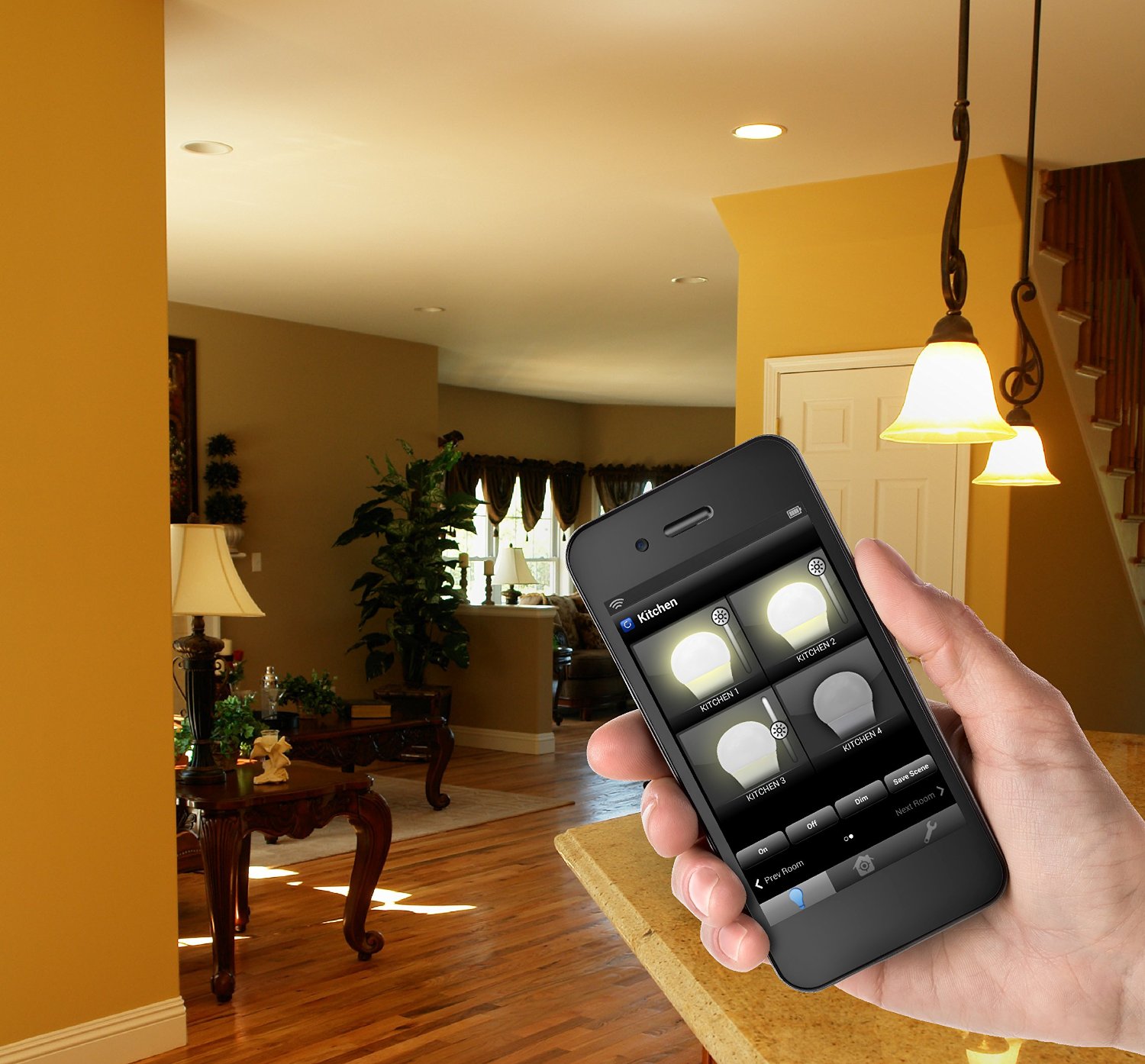 The answer, according to the documentation is, “Yes.” However, I’ve not been able to get it to work, so I personally can’t say for sure either way. If it does work, that’s a great feature. Who doesn’t want to be able to turn on his or her lights remotely so that the lights are on when you come home in the evening? I’d love to have that feature.
You can create a Smart Control, which is a program to control your lights in a particular way. Default ones included are: Home, Away, and Night. You can add and customize your own. I have setup and used this feature and it works quite well. It requires a little experimentation to get exactly what you want, but you have a lot of options and presets to help you along.
Why it’s Frugal: The Kit is frugal because it helps protect your home inexpensively. For as little as $70, you can have a little peace of mind that your lights back home can be controlled on a schedule or randomly by your own hand. The bulbs are rated for a 20+ year lifetime. Plus, you can add dozens of lights to your network to make your home fully automated and to look as if someone is there 24×7.
As you saw and heard in the video, I stated that the ability to control your lights without using the switch is a great feature. My reason for saying this is that often I like to see who’s at my front door without allowing that person to see me near the door. That gives me the advantage should that person be a potential intruder.
I like the TCP Connected Automated Home Lighting System. I think that even having two controllable lights at your disposal is a huge safety boost for you and your family. And for the starter price of $70, it’s not bad. You can add extra lightbulbs at around $20 each. That sounds like a lot until you realize that these bulbs are rated for 25 years of use.
Categories: Product Review
Connected, Home Automation, internet of things, IoT, TCP, TCPI
Dux Case by STM for iPad mini (Review)
January 26, 2015
Comments off
 dux for iPad mini
Standard Technical Merchandise Pty Ltd
$40.26 Amazon (Prime)
STM has an array of products, but the one I’m focused on for this review is for my wife’s iPad mini. The dux protective cover for the iPad mini is a hard plastic full cover that features a smart cover, a magnetic clasp, and a see-through back cover area. The case covers the entire iPad mini, but isn’t bulky or heavy. It’s surprisingly unobtrusive for a full cover case.
The dux case gives you full access to all of your iPad controls, but also protects them from drops from heights of six feet or so.
dux case notable features:
- Tested to meet or exceed US Dept. of Defense Standard 810F/G protocols
- Survives extreme drop test at 6.6 feet or 200 cm
- Super protective polycarbonate and rubberized TPU bracket for even the most accident prone among us
- Clear back to customize your device with personal images, scan a tagging barcode or allow your pristine device to shine through
- Durable and water resistant polyurethane cover to ward off an occasional drip or spill
- Patent pending magnetic closure for an easy fold into the perfect typing or viewing position
- Instant on/off cover wakes and turns the device off saving battery life
- Will fit and protect all generations of the mini (iPad mini, iPad mini Retina, iPad mini 2 and iPad mini 3)
- Designed in Australia
Why it’s Frugal: The STM dux case for the iPad mini is frugal because it protects your device from accidental drops, spills, and other random acts that might damage it. Part of frugality is taking care of your devices, especially the expensive ones. $40 to fully protect your (my) $350 investment is a very wise and frugal choice.
The dux case really impressed my wife who had used the Apple smart cover ($30) that I purchased for her with the iPad mini. The back protector is a silicone rubber case which also cost $30. And both together didn’t protect it as well as the single $40 case by STM.
So, she actually gets credit for rating this one. As you can see in the video, she told me to give it a 10/10. She loves it and will probably never use anything else on her mini. And if she’s happy with it, I’m happy with it.
Rating: 10/10
Recommendation: Buy it and love it for the life of your device.
Categories: Product Review
Apple, dux, iPad, ipad mini, protective cases, stm, stmbags.com
IK Multimedia announces iRig Mic Studio, the ultra-portable large-diaphragm digital microphone for every platform
January 22, 2015
Comments off
The latest addition to IK’s iRig digital microphone range provides professional-quality sound, an extremely compact size and compatibility with all popular mobile and desktop platforms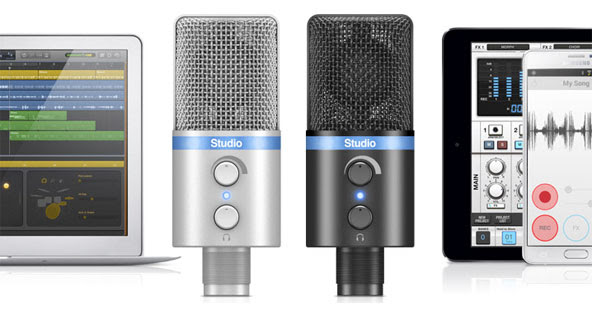
January 22, 2015 – IK Multimedia, the leader in mobile music creation technology, is pleased to announce iRig® Mic Studio, its ultra-portable large-diaphragm digital condenser microphone for iPhone, iPad, iPod touch, Mac, PC and Android. Offering superior sound and an extremely portable size, it packs a 1” diameter condenser capsule into an ultra-compact enclosure that can be used to make professional recordings anywhere. With iRig Mic Studio, musicians, vocalists, home producers, podcasters, broadcasters, voice-over artists and more have a studio-quality large-diaphragm microphone that fits in the palm of their hand.
Superior portable performance
iRig Mic Studio has been designed to provide the best possible recording quality. It features a large 1” diameter back electret condenser capsule, a 24-bit audiophile-grade A/D converter (with 44.1/48 kHz sample rate) and a built-in low-noise high-definition preamp. These, combined with its 133dB SPL rating, allow for optimal audio capture at any sound pressure level — it can capture everything from the subtle and nuanced dynamics of the human voice to the full-on bombast of an amplified electric guitar, and everything in between.And while these features are excellent on their own, what’s truly remarkable about iRig Mic Studio is that it fits its components into a compact enclosure that’s smaller than an iPhone.
Comprehensive control
To assist its high-end components, iRig Mic Studio also sports a comprehensive set of monitoring and level control features. To ensure the best sound for every situation, it comes with a gain control knob and a multicolor LED level indicator. It also includes a headphone output with its own level control for monitoring directly from iRig Mic Studio itself. And, for better positioning while recording, iRig Mic Studio comes with a sturdy and portable tabletop tripod stand.
It’s all about the connections
iRig Mic Studio is compatible with nearly every popular mobile and desktop platform. It comes with a female micro-USB port and an assortment of cables: Micro-USB to Lightning for iPhone, iPad and iPod touch; micro-USB to micro-USB OTG for Android (requires either an Android 5 or Samsung Professional Audio device); and micro-USB to USB for Mac and PC.
Record with the power of apps
For immediate recording, iRig Mic Studio comes equipped with a powerful suite of vocal apps. VocaLive™ is a powerful effects processor and multi-track recording app that features a selection of 12 professional real-time vocal effects. EZ Voice™ for iPhone, iPad and iPod touch and EZ Voice™ for Android are streamlined and easy-to-use sing-along apps that make it easy for vocalists to practice with any song in their music library. iRig® Recorder for iPhone, iPad and iPod touch and iRig® Recorder for Android are straightforward apps for field recording, podcasting, note taking and more.
The VocaLive App is available from the App Store at www.appstore.com/vocalive
The EZ Voice App is available from the App Store at www.appstore.com/ezvoice
The iRig Recorder App is available from the App Store at www.appstore.com/irigrecorder
EZ Voice is available for Android via Google Play and the Samsung GALAXY Apps store. iRig Recorder is available for Android on Google Play.
iRig Mic Studio is also fully compatible with a wide variety of third party apps and software, like Cubasis, ProStudio Vocal FX, MultiTrack DAW and more. It’s also compatible with Apple’s GarageBand and Logic Pro X apps, and iOS Voice Memo.
Pricing and availability
iRig Mic Studio comes in silver or black and will be available Q1, 2015 from music and electronics retailers worldwide, and from the IK online store, for only $179.99/€144.99 (excluding taxes).
For more information, please visit: www.irigmicstudio.com
To see the official video of iRig Mic Studio in action, go to: www.irigmicstudio.com/video
Categories: Press Releases
audio, audiophiles, ez voice, IK Multimedia, iPad, iPhone, iPod, iRig, irig mic studio, irig recorder, vocalive
Beacon Audio Phoenix 2 Portable Bluetooth Speaker (Review)
January 22, 2015
Comments off
 Phoenix 2 Portable Bluetooth Speaker
Beacon Audio
$59.95 Amazon (Prime)
$59.95 Beacon Audio (Free Shipping)
The Phoenix 2 portable Bluetooth speaker by Beacon Audio is a coffee cup-sized speaker that delivers big sound, handy two-way phone conversation capability, and long battery life all at a moderate price point. It would make a great gift or a cool conversation starter at any party. No one will believe the volume and depth of sound that you can squeeze out of this tiny box. The two speakers and single subwoofer might be a clue to that volume, although I’m not officially an audiophile.
The range is somewhere between 30 to 80 feet depending on where your music device and the Phoenix 2 are located. Walls, metal objects, and other electronic devices might interfere at varying levels. But outside in good weather with no obstructions, expect to be able to walk pretty far from the speaker or from your phone with no problems.
- Two speakers and a subwoofer
- 360-degree sound
- Microphone for phone calls
- Long-lasting (8-10 hours) rechargeable battery
- Bluetooth connectivity
- 3.5mm auxiliary jack
- USB charge connector
- Compatible with most devices
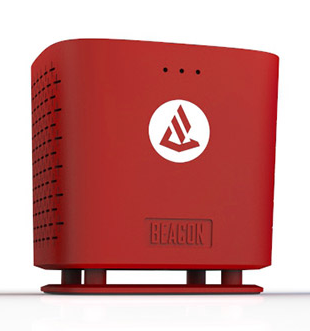 As you can see from the video, the Phoenix 2 is small, attractive, and ready to serve. I like it. I can’t find any flaws with it. That said, I do think that the price is a little high. $60 seems a little steep, but I’m kind of cheap, hence the frugal part of this blog. I think that a $30 to $40 range would be much better.
Why it’s Frugal: The Beacon Audio Phoenix 2 portable Bluetooth speaker isn’t particularly frugal. It does deliver an unexpected sound quality, even at the highest volume level, it is a luxury item, especially at the $60 price level.
If you’re looking for a portable Bluetooth speaker that will pair with just about anything you have and doesn’t require an extra app or any hassle, then the Phoenix 2 is a great choice. It comes in a variety of colors and free shipping from Amazon or the manufacturer, so that’s a big bonus.
Rating: 8.5/10
Recommendation: Buy it. Have fun with it.
Categories: Product Review
audiophiles, beacon audio, Bluetooth, phoenix 2, portable speakers, speakers
IK Multimedia’s GrooveMaker® 2 is now available for Android devices
January 19, 2015
Comments off
The revolutionary remixing app that allows anyone to make non-stop mixes in real-time and sound like a professional DJ is now available for Android devices
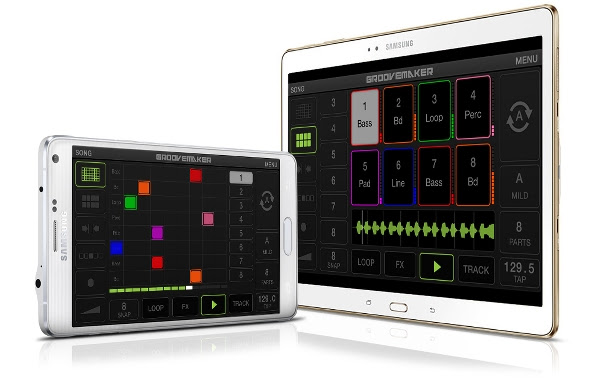
January 19, 2015 – IK Multimedia, the leader in mobile music creation technology, is pleased to announce that GrooveMaker® 2, its revolutionary remixing app, is now available for Android devices. With a full spread of features and an intuitive interface, GrooveMaker 2 lets Android smartphone and tablet users make non-stop electronic dance mixes in real-time and sound like a professional DJ.
Remixing reinvented on Android
IK Multimedia’s history as pioneers of the computer music industry dates back for 19 years when it released its first music software, GrooveMaker. History was made again when GrooveMaker made its debut on the App StoreSM as one of the first real-time audio apps for iPhone and iPad. Now with nearly 3 million downloads on iOS, GrooveMaker will help music fans make music with their Android devices anywhere in the world, regardless of skill level.Now available for smartphones and tablets running Android 4.1 and above, GrooveMaker 2 lets users manipulate pre-arranged sets of loops in real time – just like a DJ or live electronic music performer – thanks to its patented “groove generator” technology. These loops have been created to always sound good together, and they encompass virtually every style and sound imaginable.
A sound for every dance floor
GrooveMaker 2 gives users packs of loops organized as song packs. These song packs comprise a huge amount of musical styles: House, Dubstep, Hip-Hop, Techno, Trance, Electro, Drum and Bass, Reggae, Reggaeton, Rock and more – there are even signature song packs from artists like Ace from Skunk Anansie, Chris Domingo and Cool & Dre. Each song contains over 60 loops that cover essential categories like kick drums, basslines, pads, effects, percussion and more. GrooveMaker 2 also lets users import their own sounds and loops directly from their music library; its editing and auto-sync features allow for endless and effortless creative exploration.
Professional DJ results made easy
With GrooveMaker 2, getting great sounding results is easy as touching a button. Users can draw in grooves on its grid interface or use its Randomix feature to have the app automatically mix and match on its own. GrooveMaker 2’s intuitive controls make it easy to lock, solo and mute loops, change volume and panning and save favorite sequences for future use. Its groove length control and advanced time-stretch features allow for even further creative applications, allows GrooveMaker 2 to sync up with and be used as a performance tool in even the most sophisticated of DJ setups. When used with IK Multimedia’s mobile mixer, iRig MIX, GrooveMaker 2’s X-Sync feature detects the BPM from an external audio source and automatically syncs to the groove.
Killer special FX
In addition to its streamlined sequencing, GrooveMaker 2 also sports a suite of powerful effects that can be used for live performance. These include classics like Filter, Delay, Stutter, Flanger, Crush and Noise as well as more creative effects like Twist, Brake, Spin and Tail.
Pricing and availability
GrooveMaker 2 is available now for Android on the Google Play Store for $9.99/€8.99. A free version is also available.
For more information, please visit: www.groovemaker.com
To see the official video of GrooveMaker 2 for Android in action, go to: www.groovemaker.com/video
Categories: Press Releases
Android, audio, audiophiles, dance, DJ, groovemaker, IK Multimedia, music, musicians

 Techopedia
- An error has occurred; the feed is probably down. Try again later.
Datamation
- USA₮ Modernizes American Payments with High-Impact St. Patrick’s Day Activation in Times Square
- Google and NextEra Strike AI-Powered Grid Deal
- NYT Sues Perplexity AI in Copyright Conflict
- Cloudflare Outage Affects Major Websites
- OpenAI Forces AI to Confess Its Lies
- OpenAI Declares Code Red as Google’s Gemini 3 Threatens ChatGPT
- Coupang Breach Exposes 33.7M South Koreans’ Data
- ChatGPT Celebrates Third Anniversary
- Asahi Group Reveals Findings of Cyberattack
- OpenAI Discloses Mixpanel Security Incident Affecting Some API Users

 The Frugal Networker
You must be logged in to post a comment.