Archive
IK Multimedia ships iRing, the first motion controller for iPad, iPhone, iPod touch music apps and more
May 8, 2014 – IK Multimedia, the innovator in mobile music-creation apps and accessories for iPad and iPhone, is proud to announce that iRing™, the first motion controller for music apps and more, is now available from music and electronics retailers worldwide.
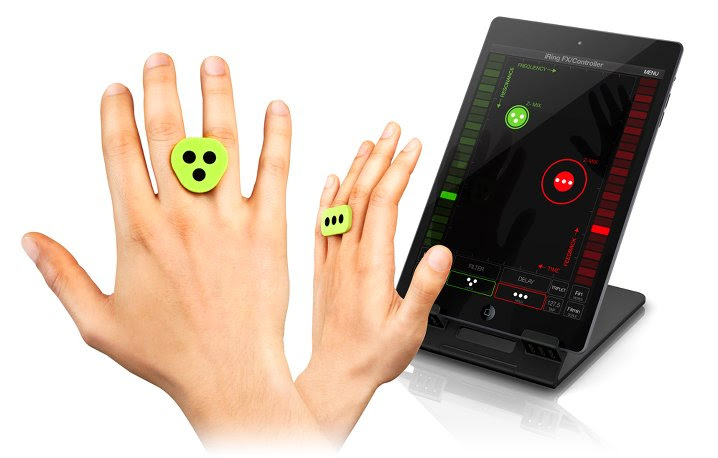
First presented at CES 2014, iRing is an affordable, wearable technology system that gives users a new level of gestural control over their favorite music apps, in real-time, using hand positioning for unprecedented music expression.
The iRing system consists of two double-sided “rings” to wear comfortably on the fingers along with a series of apps that are able to detect the iRings’ accurate positions in space using the device’s camera. Through the recognition of the dot patterns printed on the rings, the device’s camera picks up the movement and translates it into MIDI information. Users can then interact with music apps by simply moving their hands in front of their device through the precise reading of the ring position, which is converted into music commands or MIDI control messages to operate various app parameters without touching the device.
 |
 |
iRing includes two identical double-sided ring controllers plus two free apps for various music applications designed for everyone from music lovers to knowledgeable DJs and musicians: iRing Music Maker and iRing FX/Controller.
iRing Music Maker is a free app that gives music lovers and DJs a fun new way to create music and grooves using hand gestures, no matter what their skill level. iRing Music Maker utilizes music “loops” that always sound good together and can be remixed in virtually limitless combinations by simply waving the hands with the iRing controllers in front of the device’s camera. Users can change beats, control rhythmic elements, play synth parts and control effects providing hours and hours of quality musical entertainment. Plus, iRing Music Maker also includes lead and bass synths with respective pattern players that can be independently operated for hours of error-free musical improvisation. Creating music has never been so much fun!
iRing FX/Controller is the app for skilled musicians and DJs that is both a real-time audio effects processor and a MIDI controller with fully assignable parameters. It can be used as a touch-less outboard audio effects processor, or can be fully configured to send multiple simultaneous MIDI parameters; such as control changes, notes or any other MIDI messages.
As an effects processor, iRing FX/Controller uses the analog or digital input of the device for processing external audio sources. FX/Controller can also be used with Audiobus and Inter-App Audio compatible apps to process the audio stream from music apps running on the device to add stunning and brilliant audio effects. The iRings can control up to six effects parameters at a time. iRing FX/Controller operates two simultaneous effects, selectable from up to 16 powerful and creative effects, including: Delay, Stutter, Phazer, Flanger, Compression, Fuzzy, Reverb, AutoWah, Crush, Twist Up & Down, Brake, Spin and Tail.
As a MIDI controller, iRing FX/Controller can transmit MIDI messages to other Virtual MIDI compatible apps running on the device or to external devices using compatible MIDI interfaces (like IK’s iRig MIDI). iRing FX/Controller can send out the complete set of MIDI messages (control change, notes, program change, pitch wheel, aftertouch, MIDI system real-time, and MMC, MIDI Machine Control) with up to 3 assignable parameters corresponding to the X, Y and Z axis positions for each of the 2 detectable rings for a new level of touch-less control. Additionally, MIDI messages can also be sent to a computer application via Wi-Fi (using MIDI network). Users can configure the app to control effects, filters, notes, patches and more for creative and dynamic “never before seen” performances.
iRing computer vision technology is also directly incorporated into the entire line of IK Multimedia DJ apps likeGroovemaker® and DJ Rig™ and will soon be included into other popular IK apps such as AmpliTube®,SampleTank®, VocaLive™ and more so that DJs, guitarists, vocalists, bass players, producers, keyboardists and engineers will have a new level of control to deliver powerful and unique performances.
For third-party developers who want to incorporate and implement iRing technology directly into their apps, IK is offering a free SDK (software development kit) and licensing program which makes it easy to take advantage of this new breakthrough technology. iRing can also be easily utilized beyond music for a wide variety of applications including gaming, health & fitness, utilities and more. Developers can take advantage of the technology and improve the functionality of their apps by contacting IK via the link provided on the iRing product page.
iRing features
- Advanced motion-tracking technology provides remote control of iOS apps using hand positions and gestures
- Includes two identical, double-sided reversible rings allowing for numerous control combinations and control of up to 6 effects’ parameters simultaneously with two hands
- iRings are unique looking, light, comfortable and provide a universal fit
- Free Apps are available on the App Store: iRing Music Maker app, which gives the ability to make music using hand gestures with no previous musical knowledge, and also the iRing FX/Controller app, which lets musicians and DJs create custom MIDI control setups, plus add and control audio effects, using compatible apps or external devices
- iRing computer vision technology can be licensed and incorporated into other third-party apps including gaming, health & fitness, utilities and more
Pricing & Availability
iRing controllers cost only $24.99/€19.99 (excluding taxes), are available in three colors (white, green and grey) and are now shipping from music and electronics retailers worldwide and from the IK Multimedia online store.
iRing FX/Controller and iRing Music Maker apps are available as free downloads from the App StoreSM.
For more information about iRing™ for iPad, iPhone and iPod touch, please visit:
www.ikmultimedia.com/iring
To view the iRing video playlist, please visit:
www.ikmultimedia.com/products/iring/video
For more information about the free iRing development kit and licensing program, please visit:
www.ikmultimedia.com/iringsdk
In Search of the Holy Grail Screen Protector (Review)
 Holy Grail iPhone 5 Screen Protector (clear)
Sir Lancelot’s Armor
$9.95 Available in clear or non-glare
The Sir Lancelot’s Armor iPhone 5 Screen Protector (Protector) is a reusable iPhone 5 screen protector made of bulletproof glass. I received the clear version of the product to review. There is also a non-glare version available but be aware that it causes a slight pixelation when you look at your screen. If you’ve ever used a non-glare or privacy screen over a computer or mobile device screen, you know what to expect. Some people don’t like the effect. I’m one of those people. It makes me a bit dizzy to look at a screen that has a non-glare or a privacy product attached.
The clear product is thin and practically unnoticeable when attached. It is unobtrusive and doesn’t slip or slide around on your phone. I tend to keep my phone in my back pocket and the protector hasn’t budged since I placed it on my phone two weeks ago.
If you don’t get the protector on just right, you can move it. It’s reusable. Just pry it up with your fingernail at one corner and lift. Reposition as necessary.
The protector also comes with a Home button protector as well but it isn’t mentioned in any of the literature. You’ll find this button protector handy for two reasons. First, it protects the Home button from impact damage due to drops. Second, while the protector is very thin, it still adds a bit of an extra layer to your screen so the Home button protector raises the button up to a better level.
In fact, I found that repositioning the protector with the Home button protector installed helped me better align the protector, so my advice is to install the Home button protector first.
To install the Home button protector, peel off the backing and place it over your Home button. Doing so will likely press your Home button but that’s not really a problem. Just lock your phone before installing it so that any presses will occur without issue.
Installation is very easy and consists of these four steps:
- Clean your screen with the supplied screen moistened cloth cleaner.
- Peel off the back plastic layer.
- Align the protector and press to set.
- Smooth out any bubbles with the supplied dry cloth.
I didn’t have any bubbles to smooth out on my iPhone, so I can’t speak to that aspect of how effective the cloth works for that. Keep the dry cloth handy to remove fingerprints from the protector. The protector won’t fingerprint as bad as the bare screen but you’ll still want to occasionally wipe it clean.
If you’d like to see the product interactively installed, check out the installation videos.
Notable features of the iPhone 5 Screen Protector:
- Made from the highest quality recyclable materials
- Protects your screen from scratches, cracks and the every day elements
- Designed to inhibit bacterial growth
- Easy to install
- Lifetime Warranty
It’s difficult to show you the product because it’s clear glass. The installation videos are the best venue for viewing the product in action.
I wondered, as I installed the product, if it decreased the sensitivity of the original screen. Would I have to tap harder or leave my finger on the surface longer to use the phone. If so, those things would be a deal breaker for me. I want good protection for the device but I don’t want to have to think twice about using the phone because of it.
The good news is that it doesn’t decrease the original screen’s sensitivity or hinder you in any way. It doesn’t magnify the icons or require any extra tapping or pressing from you. It’s as if the screen protector doesn’t exist at all.
Why it’s frugal: The Sir Lancelot’s Armor iPhone 5 Screen Protector is frugal because it protects your iPhone 5 screen with a proven technology. To repair an iPhone screen costs an average of $250. The Protector is $9.95. You can do the math.
The manufacturer has tested the product in some very harsh ways: drills, razors, hammers, knives, and saws. The protector ranks at 9 on the Mhos hardness scale. A diamond is 10.
It feels the same as your regular screen and it’s much better than those little plastic screen protectors that only protect you from surface scratches. In fact, it’s kind of funny that the manufacturer basically provides you with two of those cheap plastic screen protectors as product backing for the Holy Grail Protector. They’re the ones that you peel off of the product and discard during installation.
Sir Lancelot’s Armor also produces protective products for other Apple devices, LG, Blackberry, Motorola, HTC, and Samsung smartphones. If you have another device, check the website as they continue to expand the line of offerings.
I really like the iPhone 5 protector product. What’s not to like? It was easy to install. It protects my phone. It doesn’t impeded usage, performance, or attaching chargers or other cases. And it only costs $9.95.
The product also comes with a limited lifetime warranty against manufacturer defects. So, the bad news here is that you shouldn’t purposely test the product by abusing your device. The damage you do to your device isn’t covered.
Review rating: 10/10
Recommendation: Buy it to protect your device’s screen and your investment.
The HISY Wireless Smartphone Camera Remote (Review)
 HISY Wireless Smartphone Camera Remote
HISY ( pronounced hīgh-see )
$24.99 Amazon (Prime)
The HISY Wireless Smartphone Camera Remote (HISY) is a remote shutter device for your iPhone and iPad (See Features section below for compatibility). The HISY is a very small (approximately 1″x1″) Bluetooth device that fires your camera shutter or starts a video capture. The HISY is compatible with any iPhone camera app that uses the basic camera app as a base.
In other words, if you use a camera app that adds some effect to your pictures as you take them, the HISY will work with it, if the app is based on the iPhone’s basic camera app.
I suggest that you test it with your favorite camera apps before you do any serious photography with it. You don’t want to set everything up only to find that the HISY isn’t compatible with your camera app.
There’s no associated app that you need to buy or download for the HISY to work. All you have to do to is link the device with your iPhone or iPad via Bluetooth, open your camera app and starting taking pictures or starting videos.
HISY Features:
- Apple iOS 7.0 or later of iPhone 4S, 5, 5S, 5C, iPad 3rd & 4th Generation, iPad Mini & iPad Air iPod, & iPod Touch 5th Generation or later
- Frequency Range: ISM Band 2.4 GHz
- Bluetooth Version: BT 4.0 Low Energy
- Active Range: 30-90ft / 10 to 30m
- 2+ Year Battery Life: (CR2032 x 1 Cell)
- Includes headphone jack attachment to carry with you at all times
One of the coolest applications for a device like this, other than selfies, is as a remote camera that’s inconspicuous to its subjects. Often people don’t enjoy having their pictures taken, but if they’re unaware that you have a camera pointed at them, they’re far more relaxed and unguarded for photographs, interviews, or other forms of subtle photography, such as getting those precious moments snaps of your kids playing or of your husband cheerfully taking out the garbage.
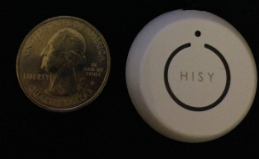 The HISY sells for $24.99 on Amazon and is Prime qualified (free two-day shipping). The HISY also includes a short strap connected to a plastic insert that fits snugly into your earphone port that allows handy access to impromptu photos that you might otherwise miss.
Why it’s frugal: The HISY is frugal because you can take up to 200 photographs with it daily for two years on a single CR2032 ($3.00) battery. It also has a very long range (30 to 90 feet), which puts it in competition with devices costing twice as much or more.
The HISY is small enough to fit comfortably in your hand and has a simple “one touch” operation. It’s simple enough for young children to operate. A single button press fires the camera shutter for a perfect, non-blurry picture.
Rating: 8.5/10
Recommendation: Buy it and test it with your favorite apps before you do real shooting with it.
Cuddle up to your iPad with a Snugg case (Product Review)
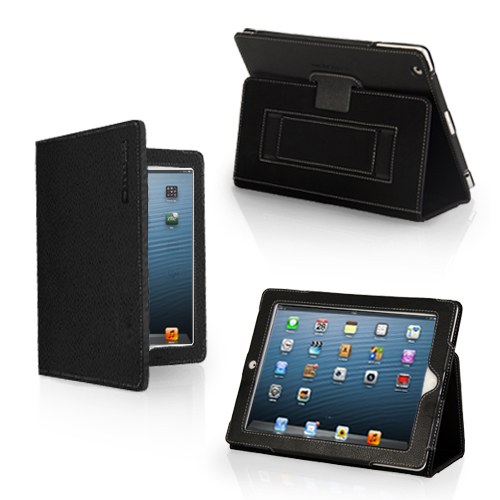 Snugg Case for iPad
The Snugg
$29.99
I’ve seen a lot of cases for iPad. I’ve seen ones that claim to do everything but wash your car. The Snugg case for iPad doesn’t make any high and mighty promises. It just does what it does. And it does it elegantly. You’ll never be embarrassed to pull out your iPad with this case on it. In fact, I’d be surprised if you don’t have someone approach you to ask what kind of case it is, where you bought it and how much it cost.
It’s a beautiful leather case that protects your iPad with a look that’s appropriate for even the most conservative office or location. It’s modern, functional, beautiful and crazily affordable. At $30, who can argue?
The only drawback to the Snugg case, and it’s a pretty minor one, is that it doesn’t prop up well on your lap. It tends to not stay up. That said, the case works perfectly on tables, pillow desks, and other fairly rigid surfaces. The upside is that it’s light enough to ignore that one shortcoming. You’ll hardly notice the weight while holding it.
My favorite features of The Snugg are its light weight and its rich feel. My iPad feels secure. It should feel secure because of the Snugg’s velcro latch and “snug” fit. The Snugg feels good in my hands. The Snugg also has some subtle features that you’ll like too. For example, it has magnetic closures, so when you close the flap your iPad goes to sleep. That saves your battery. It’s a good thing.
As you can see from the pictures, you can prop up your iPad in a variety of ways and rest assured of the case’s stability.
All of your controls and cameras are available to you with the case on so there’s no need to slip out of it to do whatever it is that you need to do with a naked iPad. Your fully clothed iPad can do it all but also maintain a very high level of protection and physical beauty while doing it.
The Snugg features a handy and sturdy stylus loop located at the top or left side of the case, depending on how you’re holding it. It also features a hand strap. I don’t really use the hand strap as a hand strap. I use mine as a place to stash all kinds of miscellany from business cards to receipts to my iPhone. Don’t worry, the strap, like everything else on the Snugg case, is very sturdy and well made.
And that’s the first thing you’ll notice when unboxing the Snugg case is its beautiful, quality construction. For $30 these days, I don’t expect much. I should but I don’t. However, The Snugg raises the bar on value for me.
Why it’s frugal: As I’ve written, $30 for a quality leather case that’s light, well-made, elegant, and protects your iPad. How much more frugal do you want? It’s a great value and a great product. Plus, the Snugg comes with the Snugg Promise and a Lifetime Guarantee. Frugality at its finest.
I really like the Snugg case for iPad. It’s my “go to” case for home, travel, gaming, and general use.
Rating: 9.5/10
Recommendation: The Snugg, in my opinion, is a bargain at $29.99. Buy it. You’ll love it.
iRig KEYS PRO and iRig KEYS with Lightning connector
December 3, 2013 – IK Multimedia, the global leader in mobile music making apps and accessories for iPhone, iPad, iPod touch and Mac/PC, announced the expansion of its iRig KEYS line with two new products for mobile musicians: iRig KEYS PRO and iRig KEYS with Lightning connector, compact MIDI keyboard controllers with 37 velocity-sensitive keys.
 Both iRig KEYS PRO and iRig KEYS come with Lightning-connector, 30-pin and USB cables. These allow musicians to connect all iRig KEYS to any iPhone, iPad, iPod touch and Mac/PC model, and provide MIDI control and performance features for Core MIDI apps of all types, such as IK’s own SampleTank, iGrand Piano and iLectric piano apps, and its range of Mac/PC virtual instruments.
iRig KEYS PRO: Big features — compact design
iRig KEYS PRO is a true “plug and play” professional-quality programmable MIDI controller designed specifically for making music on the go with an iPhone, iPad, iPod touch, Mac, or PC. It features 37 velocity-sensitive full-size keys for 3 full octaves plus one note — allowing for realistic-feeling, two-handed playing. Even with pro features like mod and pitch wheels, illuminated octave and program buttons, 4 programmable “sets” for storing complete setups, and a programmable continuous-controller volume knob, iRig KEYS PRO is 30% smaller than any other full-size key MIDI controller that can be played with two hands.
iRig KEYS PRO comes complete with Lightning-connector and 30-pin cables for plugging directly into the dock connector of any iPhone, iPad or iPod touch. A USB cable is included for direct Mac or PC connection. With standard Core MIDI support, you can play any compatible virtual instrument or recording app on your iOS device or computer from Apple’s GarageBand to IK’s SampleTank. iRig KEYS PRO needs no AC adapter or batteries, it draws its power from the device it’s connected to, and it even features an auxiliary mini-USB port to provide it with power during performance, allowing the battery on the mobile device to be conserved.
Programming and expansion
iRig KEYS PRO also has powerful programming features that are useful during live performance and in the studio. Players can program iRig KEYS PRO with different set-ups and store them in one of the 4 “Set” banks. When iRig KEYS PRO is in Edit mode, the user can set the MIDI transmit channel, velocity (touch) response, assign Control Change numbers to the Volume/Data knob, send custom Program Change messages, transpose the keyboard in semi-tones and more.
iRig KEYS PRO also sports an expansion jack for adding a sustain pedal (not included) for a realistic piano feel, or an expression pedal that sends MIDI continuous controller data that can control parameters such as volume, rotary speaker speed, tremolo and vibrato speed and more, on the connected app or software instrument.
FREE software for instant playability, universal compatibility
iRig KEYS PRO comes with SampleTank FREE* for iPhone/iPod touch and iPad, IK’s award-winning multi-part sound module designed for live performance and recording, and the iGrand Piano FREE* app, a high-quality studio-sampled grand piano sound module. Both apps are expandable with sounds from IK’s massive collection of sound libraries, and provide musicians with tools for complete music production.
iRig KEYS PRO is also right at home in the studio, and works seamlessly with DAW software, including GarageBand, Logic Pro and many others. It’s also perfect for controlling virtual instrument plug-ins such as IK’s SampleTank, Sonik Synth, SampleMoog™, SampleTron and Miroslav Philharmonik. For Mac/PC use, iRig KEYS PRO comes with SampleTank 2L**, the full-featured professional sound workstation that includes over 2 GB of professional samples, which cover all instrument categories.
iRig KEYS with Lightning connector
iRig KEYS with Lightning connector is IK’s new version of the ultra popular iRig KEYS portable mini keyboard and now comes with a Lightning-connector cable for connecting iRig KEYS to the newest Apple devices, including the new iPad, iPad mini and iPhone 5 series. It shares the same powerful features of iRig KEYS PRO but with a more compact build so it only takes up minimal space on your desktop and can easily fit in a backpack or a carry-on bag.
Pricing and Availability
iRig KEYS PRO is priced at $149.99 / €119.99 MSRP (excl. tax), and is available now from the IK network of music and electronic retailers around the world and the IK online store. iRig KEYS with Lightning connector is priced at $129.99/€95.99 and is available now from music and electronics retailers worldwide.
* Available on the App Store.
** Register and download on the IK Multimedia online User Area.
For more information, go to www.irigkeys.com.
For more information on IK Lightning Compatible Accessories, go to www.ikmultimedia.com/lightning
[Note: I have used the iRig KEYS keyboard, SampleTank, and iGrand Piano (Review coming soon). They’re fun and very professional. Advanced enough for the professional musician and simple enough for the beginner. IK Multimedia knows music.]
Listening to myself: Eskuché Headphones (Review)
 Eskuché Control V2 Headphones
Eskuché
$59.95
Classic Design * Modern Sound
There’s something seductive about any product that is based on a classic style. Whether it’s furniture, cars, clothes, or headphones, there’s something special in those updated retro designs. That’s what you’ll find with the Control V2 lineup of Eskuché (es-koo-chay) headphones. It’s also cool that they have an exotic sounding name. I wasn’t exactly sure how to pronounce Eskuché until I saw the phonetic helper that I’ve also provided for you.
But, it doesn’t matter how the name sounds, it matters how the product sounds and this one sounds like professional-quality to me.
The padded earpieces filter out all but the loudest of external noises. Even on lower volumes, I have to remove the headset to hear what someone is saying to me. The headband is also padded for greater comfort. The cord that attaches to your computer or other device is a soft, braided one instead of a rubber-coated one. Being soft and braided means that it won’t catch on other rubber-coated cords or get tangled easily. The cord is also far more forgiving than the rubber-coated ones. It moves as you do. There’s no stiffness to it.
Beyond the retro styling, the Eskuché Control V2 headphones are an excellent piece of audio workmanship. The sound is clear and crisp with no fuzziness that you sometimes get with ear-covering ear cups.
For you audiophiles, here’s the technical data:
Driver diameter: 40mm
Impedance: 32Ω
Frequency response: 20Hz-20kHz
Input plug diameter: 3.5mm
The headset also has a 3-button control microphone on it. Upon casual use, I didn’t notice this feature, which means that I’ve unknowingly embarrassed myself multiple times over the past week or so. I make a lot of Skype calls and I have an external microphone for those calls. I assumed, incorrectly, that this headset was just a headset and not also a microphone.
I wondered why my recorder was still responding to my extraneous noises when my microphone was muted–it has a blinking light when on mute, so there’s no doubt. After having a couple of people pause during a conversation and a “Bless you,” I figured it out and fixed the problem. I went back through my recent calls to find out just how obnoxious I’ve been and it’s not as bad as I’d thought. Still, I should have read the box a bit before plugging in and assuming all would be OK. Totally my fault but be warned that the headset has a built-in microphone. Be sure that your devices are setup to use the correct input and output so that you don’t have the same problem.
The pair that I reviewed are a very 1970s burnt orange color. There are other colors from which to choose: Light blue, chocolate brown, and cream.
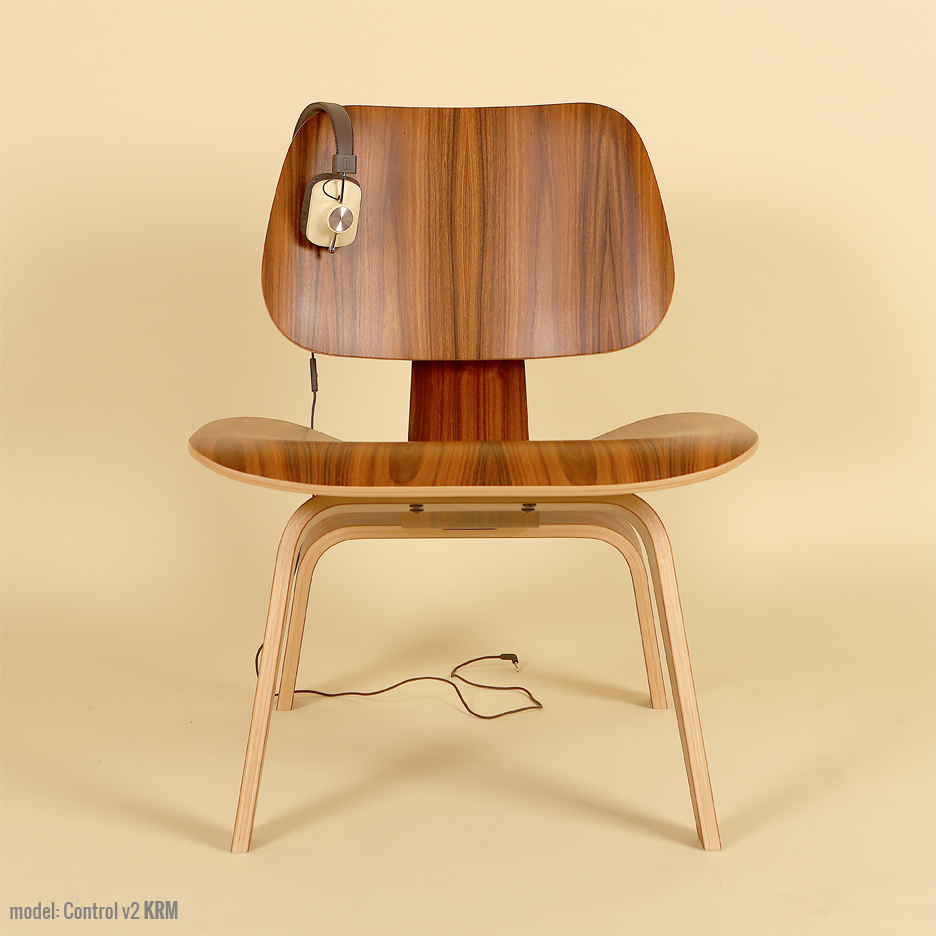 I like the colors, but if you’re really going retro, there’s another list of colors that should have been used that include burnt orange: Avocado green, coppertone, harvest gold, and that loud red color that some called “Poppy.” If you’re going retro, you’ve got to go all the way.
The headset also has a music player button on the same control as the volume up/down for the microphone. If you’re using an Apple device and you press it, your music app launches and begins to play. You can also use that button for answering/hanging up your phone.
Why it’s Frugal: The Eskuché is frugal because the headset is quality made down to the 90° (right angle) input jack, so that the wire doesn’t become weak and worn. The frugality comes from being able to use a device for a period of time that offsets its cost. In other words, if you could only use the headset for three months, it wouldn’t be worth the price. Three years or more is a different story.
In all, the Eskuché headset is excellent. I really enjoy using the headset, especially now that I’ve discovered all of its features. The headset is well made, lightweight, durable and well worth the $60 price tag. If you’re an avid musicphile, you’ll love the great sound. If you’re a casual user, you’ll love that cool hipster, retro look. You’ll also like that soft cord that stays out of your way and untangled. If you’re a podcaster or audio editor, you’ll enjoy the comfort of the headset. Sometimes I forget that I have it on–honestly.
If there’s an Apple store or a Best Buy near you, I suggest that you go and try out the Eskuché headset for yourself. There’s no amount of discussion that can match your own experience. I’ve used a lot of headsets of every shape and description and I really like this one.
Rating: 9/10
Recommendation: Go try them out for yourself and listen to the sound quality. Don’t forget to look in a mirror to see how cool you look.
The iHome type pro Bluetooth keyboard case for iPad (Review)
 iHome type pro Bluetooth keyboard case for iPad
iHome, a division of SDI Technologies, LLC.
Office Depot $99.99
You never know just how your day will turn out or change your whole attitude until you wake up and face what may come head on. I follow a simple routine: I wake up, head to the gym, work out, shower, come home, fix breakfast for my daughter, take a deep breath or two, and then head into my office (a five second commute) to start my work day. And I do all that by 7:30 a.m. Some days I ask myself, “What’s my motivation.” Well, on Monday, I received, via UPS delivery, a new motivation: The iHome type pro Bluetooth keyboard case for iPad. Specifically, my iPad 4.
If you think that I’m being dramatic, you’re probably right. After all, why should I be so excited about an iPad keyboard case thingy? That’s what your formerly cynical self tells you about products like this. But having experienced the iHome keyboard case firsthand, I can tell you honestly that it’s one of the most exciting accessories I’ve ever used.
First, the case opens clamshell style to reveal a standard Apple keyboard–better still, an enhanced Apple-style keyboard–that’s right, it’s an Apple-style keyboard, but enhanced–enhanced with the Command key, the Option key, the Control key, and the fn key. It has the standard function keys along the top (F1 through F12), which perform double duty as special iPad device keys.
Now here’s the enhanced part. Those special iPad keys do stuff that you normally have to tap and swipe for–right there on your keyboard. You can close apps by using the Home key. If you press the Home key twice, it has the same effect as double pressing your Home button twice.

You can change the brightness of your screen with F1/F2, lock/unlock your screen with the F6 key, navigate through your music selections with the F7, F8, and F9 keys, and adjust your sound settings with the F10, F11, and F12 keys. When you need to use your function keys as function keys, press and hold the fn key while pressing the function key that you want to use.
Your iPad fits snuggly into the “screen” area with a couple of simple snaps. You can charge your keyboard case with the included mini USB charger and use it wire free or you can plug it in and use it wired and allow it to charge while you’re using it.
When you close the case, you have a sturdy metal shield on the bottom and a hard plastic cover on the top that creates a protective shell for your keyboard and your iPad. And the whole thing is roughly twice the thickness and just a little larger than your iPad without the keyboard case. The keyboard case feels sturdy too. It feels more like a netbook rather than a tablet plus a keyboard. You can easily carry the combo or slip it into a purse or backpack for easy transport.
I don’t know how long the keyboard’s battery life is because I’ve never had to charge it yet and my iPad has been in the case for several days, switched to the ON position, and not plugged in. I’ve used it quite a bit too. I’ve carried it from room to room, to an outside table, and to the bedroom as a laptop unit used on my ePad pillow desk. I’ve no trouble with it preventing any connectivity to WiFi and have had no issues with the keyboard.
The one exception to its otherwise perfect performance is that it seems that on my iPad, which has iOS 7, three of the keys don’t work–or maybe I should say that I haven’t figured out how to make them work yet. The Internet browser key (F3), the Search key (F4), and the Photos key (F5) have no effect when pressed. I believe it to be an iOS 7 problem because the icons on the keys look like the old symbols for those apps on iOS 6 and previous.
Why it’s frugal: The iHome type pro Bluetooth keyboard case for iPad is frugal because it protects your investment. Spending so much on your iPad means that you need to protect it plus it’s not just a case, you get a top notch keyboard to boot. The Apple Bluetooth keyboard will cost you $69.99 and it can’t be put into a case with your iPad. A great combo at a great price.
I know there are other iPad keyboard/case combos out there but this is the one that I like the best–that’s why you’re seeing it here. The iHome type pro Bluetooth keyboard case for iPad is sturdy, handy, appropriately proportioned for the iPad, attractive, and includes all of the features of an Apple keyboard plus a very nice case rolled into one package. All of your iPad ports remain available while in the case (open or closed) and your mini USB charger port on the keyboard is also exposed for easy connectivity.
Review: 10/10
Recommendation: If you want a sturdy case and a Bluetooth keyboard for your iPad, this is the one to buy.
Recoil: The no cuss, no fuss automatic cord winder (Review)
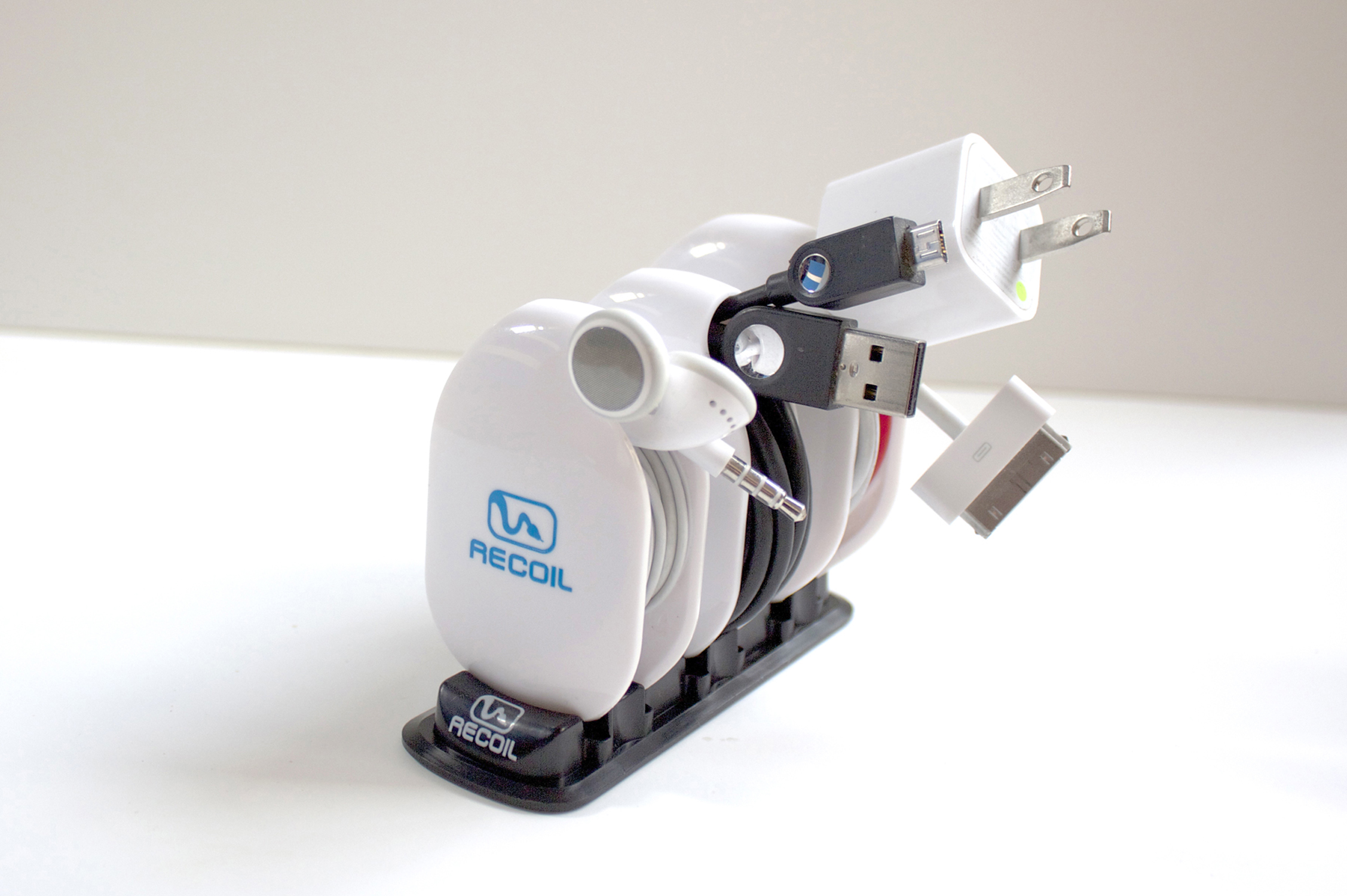
The Recoil Combo Pack
Recoil Automatic Cord Winders
Recoil Winders
$9.99 each or set of 3 for $27.99
(Set of 3 Combo Pack comes with Storage Rack)
I’ve had the theory that any two cables laid side-by-side, as neatly as possible, will somehow, through the magic of universal entropy, become impossibly entangled without human intervention. I’m sure you’ve experienced this too. The funny thing is that now my theory has a corollary: Any cable will become impossibly entangled upon itself in a pocket, a drawer, or even on a desktop. I just want to know why that is.
Often, on my way to gym, I place my earbuds into my pocket so that I don’t look like a total nerd until I get to the weight machines. I pull out my iPhone. I retrieve my earbuds, untangle my earbuds, place my phone back into my pocket and start my workout.
Even funnier than my theory, is that the five minute drive and two minute walk into the gym, collects enough entropy to twist and mangle my earbuds into knots and Moebius strips that require another ten minutes, forty calories (OK, I’m thankful for the calorie burn), quite a bit of cussing, and a whole bucket of frustration to detangle the !@#$% things.
And now here’s where I sound like a late night infomercial, which I hate more than detangling my earbuds every time I use them.
But, has this ever happened to you?
Well, now there’s a solution: The Recoil Winder.

Large winder loaded with USB cable.
Yeah, I know, a TV Pitchman could say it better and with more zeal. But seriously, you know what I’m talking about with tangled earbuds, USB, and Apple power cords. It’s enough to make me want to break the law. The Second Law of Thermodynamics that is.
The Recoil Winder is a clever little gadget that comes in three sizes so that you can organize your earbuds, USB power cables, Apple power cables, and other small gauge electronic cables into a neat little entropy-defying package that fits neatly into your pocket, purse, backpack, or whatever.
The video provides a far better look at the product than I can give you in text format. Take a look to see what I mean.
I use the smallest winder for my earbuds. No more cussing. No more ten minutes wasted at the beginning of every workout trying to untangle tasteless spaghetti. No more starting my workout with an elevated anxiety level. One tug and the cable is out. And it’s just as easy to load: just loop, pull, and let the Recoil Winder do its job.
I should warn you that the Recoil Winder really grabs the cable, so you need to be careful until you acquaint yourself with the product by practicing a few times. And when you remove a cable for use, pull it all the way until the Winder stops and locks, otherwise, you might loosen your grip and allow the cable to rewind onto the Recoil Winder unexpectedly. You can see for yourself in the demo video that you need to keep your fingers out of the way. Don’t worry, after a few times, you’ll get the hang of it.
The Recoil Winder is a cool product. I’m not sure how I kept my cables organized and out of the way before. You see, it’s not just a winder product, it’s also an organizer. I have trouble keeping track of my cables. One reason is that they get tangled up. The other reason is that they tend to get lost. Now they do neither.
The Recoil Winder is one of those products that you look at and think, “I should have thought of that.” It’s both handy and obvious that you need it. The only problem that I have is that I have more cables than Recoil Winders.
The only three negatives I’ve found with the Recoil Winder is that one, I wish they made bigger ones for laptop cables–I hate those things. Two, $9.99 is a little steep for as many as I need. If you only need one, two, or three, you’re OK. I need like ten or so to keep all of my various gadget cables tangle-free and where I can find them easily. And finally, the third negative is that I wish that I could pull out a cable part way so that I could use the cable but keep it partially wound.
Maybe in Recoil Winder 2.0, they’ll add that feature.
Why it’s frugal: The Recoil Winder is frugal because it keeps you organized and that has value. If you’re fumbling around for a USB cable, earbuds, or other cable, you’re neglecting something else. And the Recoil Winder only takes about half a second to wind a cable. It saves you time, which is essentially money.
Review: 9/10
Recommendation: Pick one up and try it out. Chances are very good that you’ll buy more–one for each annoying cable that you have.
The Diamond Multimedia PlugnView Home Monitoring Kit (Review)
 PlugnView Home Monitoring Kit
Live video security camera hardware
Diamond Multimedia
$119.99 Retail/$94.66 Amazon (Prime)
Product Spotlight Video
Like all Diamond Multimedia products, the PlugnView Home Monitoring Kit (PlugnView) is a high quality, low cost product. Diamond succeeds in putting a lot of ‘bang for the buck’ into every one of its devices. And you know that you have a Diamond Multimedia product because it has all the familiar design features: small footprint, abundant ventilation slots, highly visible labels, status lights, attention to details such as furniture-protecting rubber feet, and high impact plastic construction.
Diamond Multimedia (DMM) puts a lot of thought into its products. The PlugnView is standard high quality fare for a DMM product, which is worth noting here.
 Included in the kit is everything you need except the apps, which are available through Apple’s App Store or through Google Play. You get the PlugnView camera, a HP500AV Home Plug Adapter, a Quick Start guide, and a three-foot Ethernet cable.
DMM also has a reputation for making products that are very easy to setup and use. The PlugnView follows that time-honored tradition too.
To setup the PlugnView, attach the Ethernet cable to the HP500AV, plug in the Ethernet cable’s free end directly into an open slot in your router or into an open slot in your network switch, and plug in the HP500AV to electric power. The HP500AV has to access your network via the Ethernet cable and then it attaches to your PlugnView camera via wireless. All three lights should be green, when properly connected.
Plug in the PlugnView camera to electric power and aim it at whatever you want to view. The camera swivels left and right on its base plus you can adjust the vertical (up and down) pitch as well. These adjustments are manual. You can’t move (pan) the camera electronically to scan an area.
Next, download the PlugnView app from the Apple App Store or, if you have an Android device, from the Google Play Store.
Open the app, tap the Plus (+) button to add a camera. On the next screen, select the way you want to add your camera to the app: via QR code on the bottom of the camera, local network search, or manually. I suggest that you attempt to add your camera first by searching. If that doesn’t work, then scan the QR code on the bottom of the PlugnView. Finally, if those two fail, add it manually. But one should work and adding manually is a pain because of the length of the ID and the password. You can change the password later in the app.
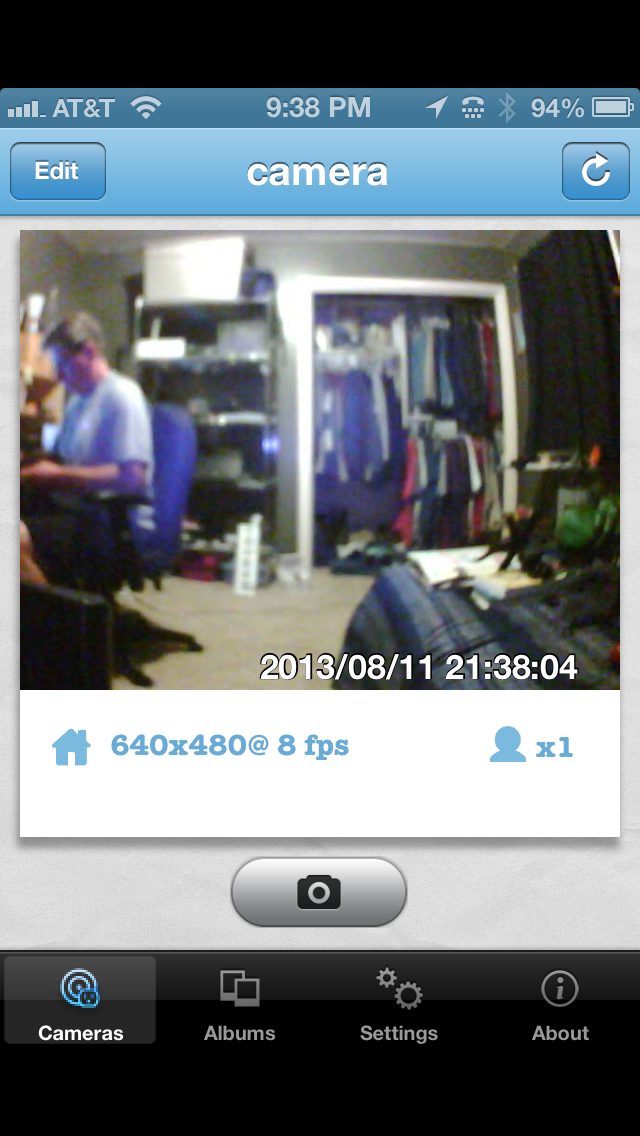
Figure 1: A live video view using the iPhone PlugnView app.
A local network search should find your camera within a few seconds. Once it does, you’ll see the cryptic identification code for your camera. Tap the found camera to edit its properties. Name your camera. I named mine “camera”. Leave the Camera ID as is. Enter the camera password from the bottom of the camera. Be careful to type it in exactly as you see it. Tap Save when done. Tap the Done button when your camera light in the app turns green.
Tap the camera that you just setup. You’ll see a “connecting to camera” message and then in a few seconds, you’ll see what the camera sees. You can also take pictures by tapping the camera icon on the screen. See Figure 1.
If you tap the Edit button (upper left corner), you can change the configuration of your camera, such as enhanced night vision, frame rate, resolution, and a few other details.
I suggest changing the frequency from 60Hz to 50Hz for better viewing inside your home. 60Hz probably works better outside. I also like the highest resolution and best quality picture available. You’ll have to experiment a bit for your surroundings and lighting conditions. Once you change something, tap the Apply button for it to take effect and then evaluate the results.
The PlugnView has pretty good resolution for the cost. Remember that this camera is not high definition video capable. It is what it is, which is an inexpensive, easy to setup, easy to use security camera. If you need something with higher resolution, sound, faster frame capture, and a panning camera, then you’ll have to spend a lot more money. For around $100, I doubt you’ll find anything better.
The PlugnView Home Monitoring Kit will keep you aware of what’s going on inside or outside your home. The PC software that you can download from DMM’s site is quite good. You can monitor multiple cameras at once with it but the app is a quick view used for occasional monitoring from your mobile device.
My overall impression and evaluation of the PlugnView Home Monitoring Kit is favorable. I like the ease of setup, the product quality, and the mobile app combination.
Why it’s frugal: The PlugnView is inexpensive but it’s more than price. If you need a decent quality home security camera, it fits that bill. You have night vision that is quite good, live video, snapshots, and good resolution. It is a good value and a good product.
Review: 8/10
Recommendation: Buy it with an understanding of its limitations and its features.
Mujjo iPhone 5 Leather Sleeve: Originals Collection (Review)
 iPhone 5 Leather Sleeve
Originals Collection
Mujjo
Retail 34.95 Euro/~$45.00 USD
If you prefer to keep your iPhone naked, then the new Mujjo iPhone 5 sleeve is just what you need to protect your investment when it’s not in use. This all leather, vegetable-dyed sleeve will provide you with all the protection you’ll need from scratches, drops, dirt, dust, and smudges from carrying around in a pocket, a briefcase or a purse.
The Mujjo sleeve is a quality product. It is not a cheap knock-off. It’s real stitched leather, subtly stamped with “The Originals” on one side to show that the product is part of Mujjo’s Originals Collection.
The sleeves, also available for the iPhone 4/4S, come in beautiful ivory white or natural brown. This review covers the white sleeve.
Don’t confuse this sleeve with a protective case. This sleeve is protective but you have to remove the phone from the case before you use it. You also can’t use the case with other protective cases, although you could use a screen protector with this product with no trouble. This case is for those of us who prefer to use our phones naked.
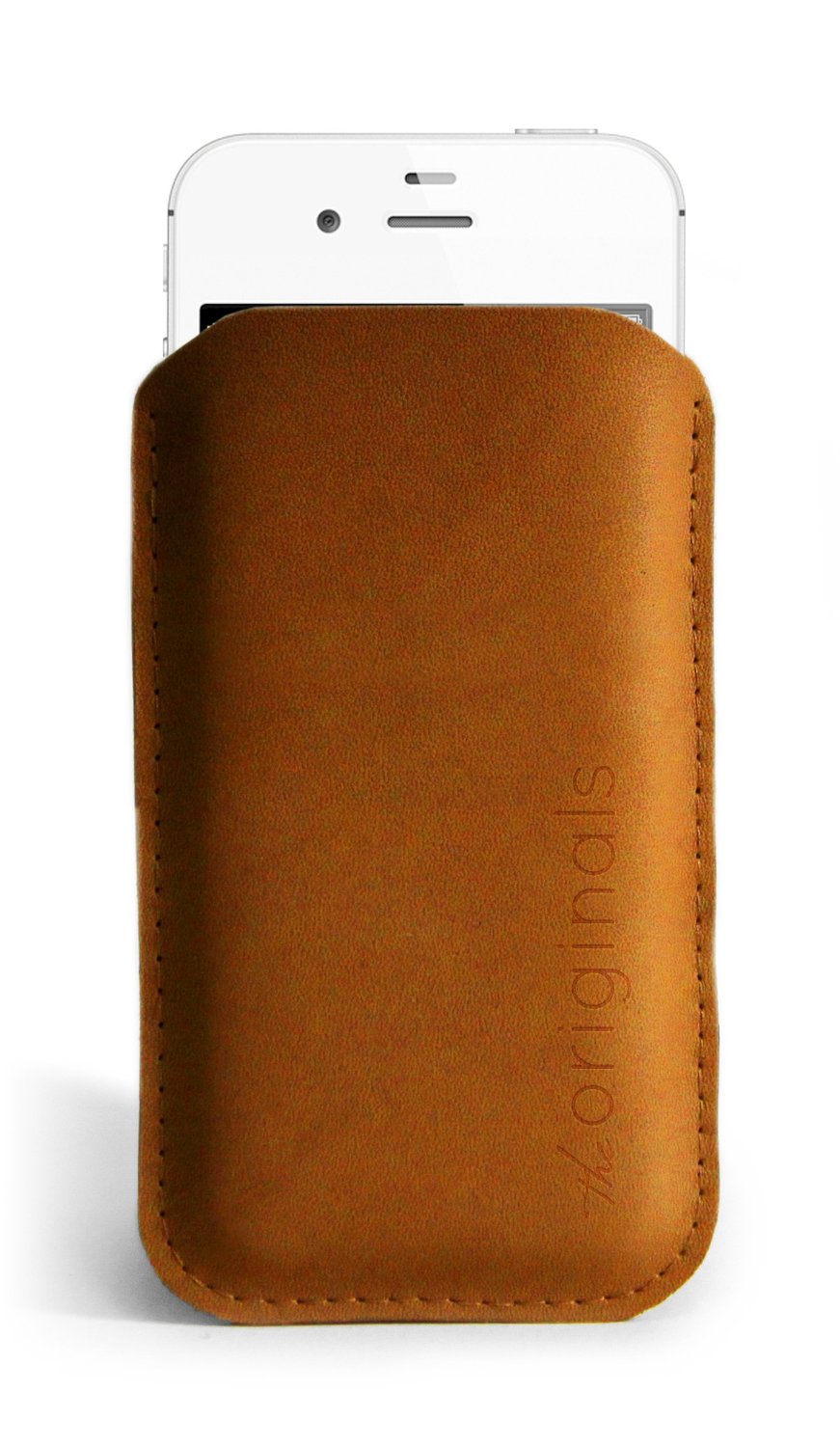 The price of the sleeve is not cheap at around $45.00 USD, it’s a fashion statement as well as a protective element. Why not have something a little posh as well as useful? After all, isn’t that what fashion is all about?
The sleeve holds your phone tight so that there’s little chance of it slipping out on its own. You’ll feel confident in its protective capability while you’re running for a taxi or bumping into strangers on the bus or subway.
On a funny side note, neither my wife nor my daughter “get” the purpose of the sleeve. Both of them looked at the product and simply asked, “Why?”
The “Why” is simple to answer: It’s a statement–a statement about who you are and about quality products. No one needs expensive rims on a car, $300 Prada sunglasses, a $75,000 Mercedes, or a $45.00 iPhone sleeve. It isn’t about need. To be perfectly honest, I don’t need an iPhone 5. I want an iPhone 5, therefore I have an iPhone 5. If you’re a person who loves quality accessories, then you will want the Mujjo iPhone sleeve as well. Seriously, I have to ask, who wouldn’t?
The Mujjo Originals Collection accessories also make great gifts. Everyone loves a quality gift and if you have someone in your life who has everything else, get her or him one of these beautiful and useful sleeves.
It’s frugal because it is a quality product that will last a very long time. Plus, it protects your valuable phone from damage during transport between uses. There’s nothing more frugal than protecting your investment in something you already have.
You’ll love the Mujjo iPhone sleeve at any price. It’s sleek, it’s fashion forward, it’s leather, and it’s an original. What more do you need or want?
Review: 9/10
Recommendation: It’s the nicest iPhone sleeve that I’ve seen and if you like using your phone without being wrapped up in a rubber case, then this is the ultimate accessory for you.

 Techopedia
- An error has occurred; the feed is probably down. Try again later.
Datamation
- Google and NextEra Strike AI-Powered Grid Deal
- NYT Sues Perplexity AI in Copyright Conflict
- Cloudflare Outage Affects Major Websites
- OpenAI Forces AI to Confess Its Lies
- OpenAI Declares Code Red as Google’s Gemini 3 Threatens ChatGPT
- Coupang Breach Exposes 33.7M South Koreans’ Data
- ChatGPT Celebrates Third Anniversary
- Asahi Group Reveals Findings of Cyberattack
- OpenAI Discloses Mixpanel Security Incident Affecting Some API Users
- Firefox Zero-Day Flaw Exposed 180M Users

 The Frugal Networker
You must be logged in to post a comment.