Archive
The myCharge RazorMax 6000mAh portable charger
 Razor Max RZ60G-A Portable Charger
myCharge
$69.99
I’ve reviewed so many portable chargers that sometimes I feel like saying no to the next pitch for one, but the myCharge Razor Max RZ60G-A 6000mAh portable charger (RZ60G-A) caught my eye. It caught my eye because it has not one but two USB ports for charging and it’s extremely thin. In fact, it’s just a little larger, heavier, and thicker than my iPhone 5.
The RZ60G-A is made of anodized aluminum that’s rugged and lightweight. Its dimensions are a diminutive 4.4 in x 2.6 in x 0.5 in and 0.38 pounds (6 ounces), which is perfect to stash into a purse, back pocket, any pocket, tote, or in your car. After seeing and using this charger, my days of lugging around brick sized chargers is over. It’s so small and lightweight that I actually I thought that I hadn’t brought it along in my camera bag on a recent video shoot.
 It powered my iPad 4 and my iPhone 5 simultaneously all day long without issue. I never ran out of power for them. When I returned home, I plugged it in and I still showed two lights, which means that I only used about 50 percent of its capacity. 6000mAh is a lot of power. The charger’s two built-in USB ports deliver a combined 2.4A output–enough for a lot of charging.
Notable Features:
- Smart-sense: ensures complete device compatibility
- Max-power: maximum power transfer from powerbank to device
- Power-stay: maintains battery power for up to 1 year
- High-density battery: the smallest and lightest powerbank
- Safe-cell: provides the highest level of battery safety
- Pass Through Charging: will charge the powerbank and connected device simultaneously
Why it’s Frugal: The RZ60G-A charger is frugal because it’s small, but it packs a huge amount of power. 6000mAh is enough to power multiple devices (up to two at a time) for at least an entire day. For $69.99, it’s a little pricey, but it delivers exactly as advertised.
The RZ60G-A’s capacity is 22.2Wh, with input at 5VDC and 0.7A to 2.1A, and output at 5VDC and 2.4A maximum.
 One interesting feature of the charger is that you can simply shake it to make the LEDs light up to tell you how much power you have left. Clever. That feature was an unexpected surprise for me. The RZ60G-A comes with its own mini USB charging cable and a Quick Start Guide. The unit comes with a one year limed warranty and is fully charged when you receive it.
In all, the Razor Max RZ60G-A Portable Charger delivers a powerful punch of on demand power where ever you take it and for any device that you can plug into a USB connector/charger.
Rating: 8.5/10
Recommendation: Buy it for all your charging needs. It’s portable and powerful.
Lantronix xPrintServer Home Edition (Review)
 xPrintServer Home Edition
Lantronix
$99.95
The xPrintServer Home Edition box reads, “iPad & iPhone Printing Made Easy. Print From All Your iOS Devices To Virtually Any Printer.” And Lantronix has adhered to ‘truthful advertising’ because the xPrintServer Home Edition (xPrintServer) does exactly that and it does so without any fancy setup or hassles. It couldn’t be any easier to do so, with the xPrintServer’s two-step process.
- Connect the xPrintServer to power, your network, and printer.
- Print from your iPad, iPhone, or computer.
In addition to printing from your iPad and iPhone, you can also print from Macs and Windows computers. However, Windows 8 seems to have a problem with Bonjour printing and my Mac mini works at first and then doesn’t print again. Windows 7, iPad, and iPhone work great with it.

I’ve used other print servers, from the small generic and inexpensive ones on up to the ones costing several hundred dollars and the Lantronix xPrintServer Home Edition falls into the category of an individual home use unit as advertised. I wouldn’t use it for a small business unless all of my employees used Windows 7 and iPads because it doesn’t seem to work consistently with Mac and I can’t get it to work with Windows 8.x at all.
That said, I’m not sure whether the failure to print is with the Lantronix unit , the Bonjour printing software, or perhaps with my somewhat outdated HP OfficeJet J3680 All-in-One printer. Since it does print with Windows 7 and our iPads, I have to assume it is the Bonjour printing software.
The xPrintServer takes up very little space. It has the approximate dimensions of an iPhone 5, but about two to three times the thickness. It does require its own AC power source, a network connection, and a USB connected printer plugged into it. So, while the unit is small, it still requires three wires for power and connectivity. That’s not a negative statement; just a fact.
The xPrintServer does what it’s supposed to do: print. For those systems it works with, it’s never failed or hesitated to work in any way.
Why it’s Frugal: The Lantronix xPrintServer Home Edition is a frugal solution for home users who need to print from a short list of supported devices to a single printer and have no other means to do so. The $99.95 price tag is a little off-putting, but still within the range of a home-oriented gadget.
Here’s how it works from an iPhone:

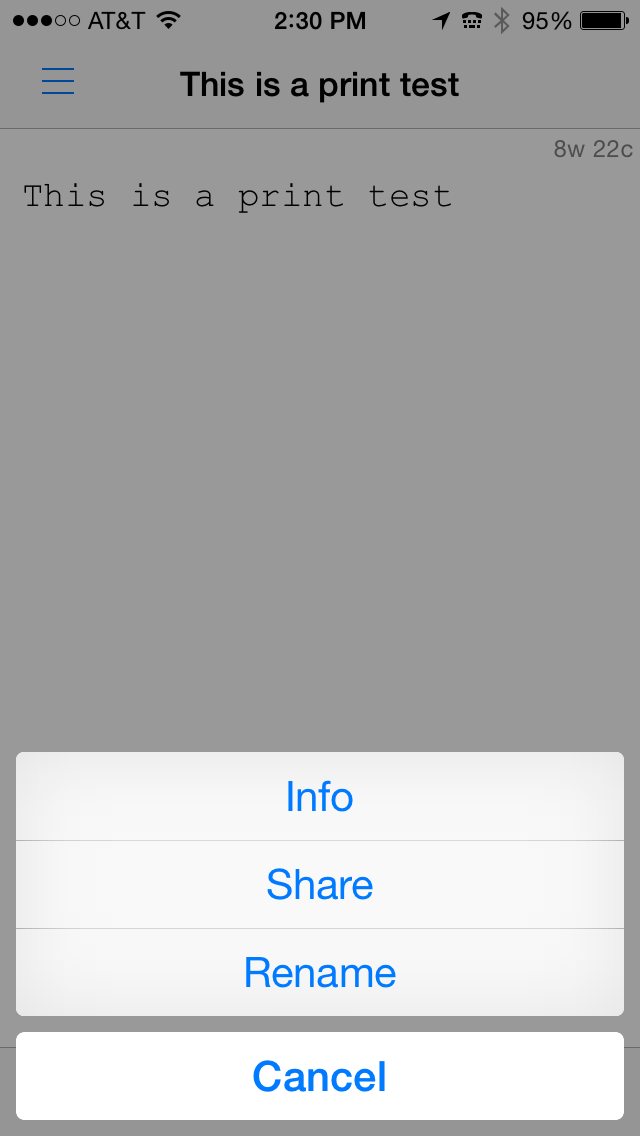
Lantronix 1: Open File for Printing
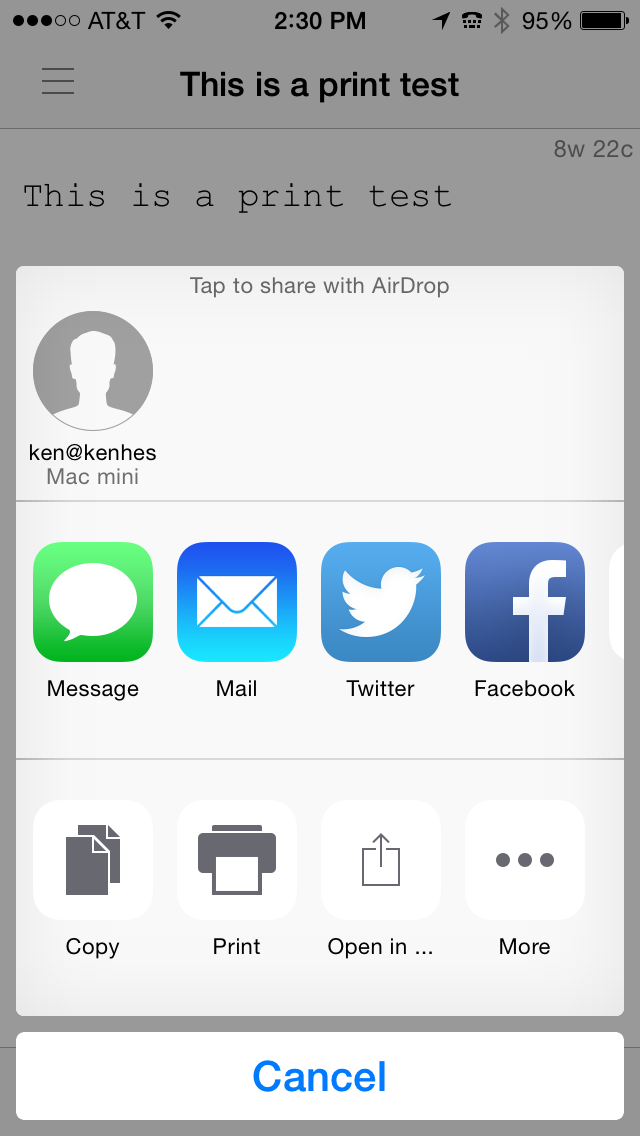
Lantronix 2: Share the File
Lantronix 3: Select Print

Lantronix 4: Tap Print to Send to Printer
Open an app. I’m using PlainText. In that app, select a document to print. See Lantronix 1.
Tap the Share button at the bottom center of the screen to see the options given in figure Lantronix 2.
Tap Print from the screen as shown in Lantronix 3.
Finally, be sure that your printer is listed and then tap Print to send the file to the printer.
Apple devices should find the printer automatically and display it for you. The printer might not appear immediately, but if you attempt to find the printer by running through these four steps and then try again in a minute or two, the printer should appear for you to use.
The Lantronix xPrintServer is a good device and performs flawlessly. It offloads print jobs quickly and never hesitates or loses a print job. The web interface is simple and intuitive to use–that is, if you ever need to use it, which you probably won’t. Just know that it’s there if you need it.
Overall, I like the xPrintServer. I just wish that support for Mac OS X and for Windows 8 was there, but again, I don’t think this is necessarily the Lantronix product’s fault. I think it’s with the Bonjour software.
Rating: 8.5/10
Recommendation: If you have Windows 7 and iOS devices, buy it; it works.
Pelican Introduces Next-Generation Pelican ProGear™ Vault Cases For the Apple iPad Air® 2 and iPad mini® 1/2/3
 March 31, 2015 TORRANCE, Calif.–(BUSINESS WIRE)–To make sure your movies, music and apps are protected, Pelican Products, Inc., the global leader in the design and manufacture of high-performance protective case solutions, has introduced its next-generation, rugged Pelican ProGear™ Vault cases for the Apple iPad Air® 2 (available mid/late April) and iPad mini® 1/2/3.
“The advanced Vault case design also gives users the freedom to use the tablet within a case as it’s meant to be, without sacrificing protection.”
Crafted with the same tried-and-true DNA found in all Pelican™ products, the next-generation Vault case provides the ultimate suit of armor without sacrificing device functionality. The slim, lightweight Pelican ProGear™ Vault is dustproof, water resistant, shock-absorbent and drop-tested to ensure that a mobile device can handle an active lifestyle. Made with high quality polycarbonate and an elastomeric copolymer rubber interior to expertly absorb impact, the case is designed to withstand a four-foot drop unscathed.
“You may well know the upset, frustration and cost of a smashed iPad. Our next-generation Pelican ProGear™ Vault cases are built with the same legendary toughness that Pelican is known for. As a result we have engineered this case to help make sure that the only thing you need to worry about is finding your favorite app,” said Lyndon Faulkner CEO of Pelican Products. “The advanced Vault case design also gives users the freedom to use the tablet within a case as it’s meant to be, without sacrificing protection.”
 Pelican ProGear™ Vault Series Tablet Cases for the iPad Air® 2 (C11080) and the iPad mini® 1/2/3 (C12080)
The Pelican ProGear™ Vault cases for the iPad Air® 2 (C11080) and the iPad mini® 1/2/3 (C12080) protect each tablet in a variety of ways: with the lid closed, it prevents impact damage to the screen. Open, the lid provides the freedom of cover-free use, an impact absorbing case (Meets Military Specification MIL-STD-810G) and a protective seal against water and dust (IP54 rated). Additionally, users can flip the cover over the back of the case to utilize multiple viewing angles. The product boasts a water-resistant membrane to cover the microphone(s) and speakers, while still providing users with the utmost high-fidelity audio. Available in black with gray accents and gray with white accents, the Pelican ProGear™ Vault case for the iPad Air® 2 (Available mid/late April) has an MSRP of $99.95, while the Pelican ProGear™ Vault for the iPad mini® 1/2/3 has an MSRP of $79.95. Like all Pelican products the new Vault cases are backed by a lifetime guarantee.
For more information on these models and the full Pelican ProGear™ line visitwww.PelicanProGear.com or one of the authorized dealers. Pelican Products, Inc. is a portfolio company of Behrman Capital, a private equity investment firm based in New York and San Francisco.
About Pelican
Pelican Products, Inc. is the global leader in the design and manufacture of both high-performance case solutions and advanced portable lighting systems. Their products are used by professionals in the most demanding markets including fire safety, law enforcement, defense / military, aerospace, entertainment, industrial and consumer. Pelican™ products are designed and built to last a lifetime. The company operates in 19 countries, with 28 offices and six manufacturing facilities across the globe. For more information, visit www.pelican.com or www.behrmancap.com.
Trademarks and logos displayed herein are registered and unregistered trademarks of Pelican Products, Inc., its subsidiaries and /or affiliates.
iPad Air, iPad mini and Apple are registered trademarks of Apple Inc.
Boinx Hits the 2015 New Media Expo Floor to Show Off BoinxTV 2 Beta
 Puchheim, Germany – February 27, 2015 – Making their way to the site of one of the biggest broadcasting shows of the year, Boinx Software will be joining the ranks of innovators at New Media Expo 2015, taking place in conjunction with the NAB Show from April 13th through 16th at the Las Vegas Convention Center. Exhibiting at booth N8012 video experts from Boinx will be showcasing the latest version of its broadcast truck-in-box broadcast solution, BoinxTV 2. A plug-and-play broadcast production package, the Mac-based BoinxTV lets users combine live camera video, clips, photos, 3D graphics, lower thirds and audio to create recordings and stream live presentations, podcasts, concerts, sporting events and more. Boinx will also unveil the new BoinxTV Broadcast Graphics Machine.
To demonstrate its immense power and suitability for podcasters and broadcasters of all levels, attendees to the show can stop by to see BoinxTV 2 Beta in action as experts put on a production live from the NMX show floor. Taking productions to the next level, the much anticipated BoinxTV 2 features native streaming support via RTMP to YouTube, Ustream, Twitch.tv and more; direct manipulation via a newly designed, easy-to-use UI; and 64bit support, which makes running out of memory virtually impossible. Combined with the all-new BoinxTV Broadcast Graphics Machine, a hardware/software solution for broadcast graphics with support for SDI playout with alpha channel, booth visitors will see how BoinxTV 2 is the perfect solution for all of their live production needs.
Attend the Boinx Software Press Briefing or Schedule a Private Meeting
Boinx will be hosting an informal “Press and Friends” event on the morning of Tuesday, April 14th at 8:00am. Members of the media are invited to indulge in coffee and morning treats while discussing the latest broadcasting solutions from Boinx Software. To register for the event or to schedule a private briefing for those who cannot attend, please contact Anya Oskolkova atanya@zazilmediagroup.com.

What’s New With BoinxTV?
BoinxTV 2 (Beta version scheduled for end of April)
- Native streaming support via RTMP to YouTube, Ustream, Twitch.tv and more
- New UI that makes using BoinxTV 2 even easier than before, with a modern look
- Direct manipulation instead of fiddling with settings
- More options for automation
- 64bit support makes running out of memory virtually impossible
- BoinxTV with integrated BoinxTV ATEM Controller, which supports full integration with production switchers from Blackmagic Design, including the ATEM Television Studio and ATEM Production Studio 4K
BoinxTV Broadcast Graphics Machine
- Hardware/software solution for broadcast graphics based on a Mac mini with a Blackmagic Design DeckLink 4K Extreme card in a 19” rack mount enclosure
- Playout via HD-SDI with Alpha channel support
- Visualize real time data including sport scores, weather, stock chart, news feeds and more
- 2D and 3D graphics
- Integrate interactive elements such as a Twitter feed
- Play any video format, scale, crop and convert to fit your needs
About Boinx Software
Located in Puchheim, near Munich, Germany, Boinx Software Ltd. develops award-winning animation, video production and photography software for the Mac® platform and iOS devices including the iPhone®, iPad® and iPod®. Honored with numerous Apple Design Awards and coveted spots on the Mac App Store’s Best Apps of the Year list, the extensive family of Boinx apps includes iStopMotion for Mac, iStopMotion for iPad, FotoMagico, BoinxTV, Mouseposé, You Gotta See This!, PhotoPresenter for iOS, and PartySnapper, Boinx’s newest social photo wall for sharing and saving event photos. Boinx Software has also been instrumental in the developmental processes of popular apps including Heads Up!, Ellen DeGeneres’s charades party game, and the Leica T iPhone and iPad app, the elegant remote companion to the Leica T digital camera.
Follow @boinxsoftware on Twitter and Facebook. For more information, please visit the Boinx Software website.
IK Multimedia updates iGrand Piano and iLectric Piano, studio-quality acoustic and electric piano apps for iOS
compatibility, user presets, new expansion libraries and more
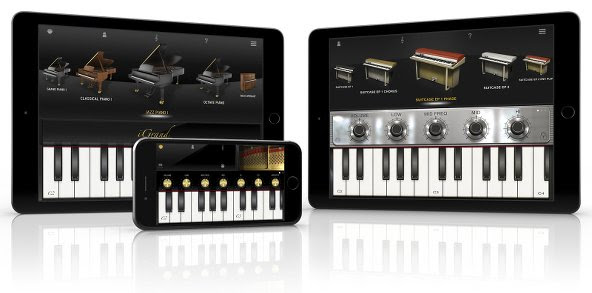
Optimized for iOS 8
Compatibility is at the heart of the latest versions of iGrand Piano and iLectric Piano. Musicians can now use both with their favorite third-party audio apps, thanks to newly updated compatibility with Audiobus and Inter-App Audio in iOS 8. This new support allows for both practical and wildly creative combinations when combined with DAW-style recording apps like GarageBand for iOS or multi-effects modeling apps like IK’s own AmpliTube.
Versatile variations
Both iGrand Piano and iLectric Piano feature easy to use and adjustable controls that allow for limitless tonal sculpting. iGrand Piano has been updated to now include the same semi-parametric equalizer as iLectric Piano, meaning musicians can now tweak both with the power of 4 EQ knobs in addition to other app-specific parameters – like piano lid aperture in iGrand Piano or modulation effects in iLectric Piano.
Users can also now save specific edit panel settings in 4 writeable locations provided for each instrument using the newly introduced “Variation” system. This system gives musicians 4 conveniently accessible buttons (found in the Edit Strip of either app) that can be used to store knob positions and tweaks for later use when recording in the studio, on stage performing or just practicing at home.
Introducing new sounds
The latest update to both apps also introduces new sound packs available for in-app purchase. These packs expand the sonic range of iGrand Piano’s collection of gorgeous acoustic pianos and iLectric Piano’s stunning collection of vintage and modern keyboards by making 22 entirely new instruments available for each app – in total, that makes for 40 possible instruments in iGrand Piano and 64 possible instruments in iLectric Piano. The additions, titled “Piano Expansion 2” for iGrand Piano and “Electric Piano Expansion 2” for iLectric Piano, unlock an entirely new tonal dimension for mobile keyboard players to explore.
Pricing and availability
The latest versions of iGrand Piano for iPhone/iPod touch and iPad and iLectric Piano for iPad are available now as a complimentary update for existing users or individually as paid apps for just $19.99/€18.99 for new users. The “Piano Expansion 2” for iGrand Piano and “Electric Piano Expansion 2” for iLectric Piano sound packs are available individually for $9.99/€9.99. A free version of iGrand Piano is also available.
| iLectric Piano for iPad on the App Store: www.appstore.com/ilectricpianoforipad |
 |
| iGrand Piano for iPhone/iPod touch on the App Store: www.appstore.com/igrandpiano |
|
| iGrand Piano for iPad on the App Store: www.appstore.com/igrandpianoforipad |
|
For more information, please visit:
www.ikmultimedia.com/igrandipad
www.ikmultimedia.com/igrandiphone
www.ikmultimedia.com/ilectricipad
To see the official video of iGrand Piano and iLectric Piano in action, please visit:
www.ikmultimedia.com/igrandpiano/videos
www.ikmultimedia.com/ilectricpiano/videos
Dux Case by STM for iPad mini (Review)
 dux for iPad mini
Standard Technical Merchandise Pty Ltd
$40.26 Amazon (Prime)
STM has an array of products, but the one I’m focused on for this review is for my wife’s iPad mini. The dux protective cover for the iPad mini is a hard plastic full cover that features a smart cover, a magnetic clasp, and a see-through back cover area. The case covers the entire iPad mini, but isn’t bulky or heavy. It’s surprisingly unobtrusive for a full cover case.
The dux case gives you full access to all of your iPad controls, but also protects them from drops from heights of six feet or so.
dux case notable features:
- Tested to meet or exceed US Dept. of Defense Standard 810F/G protocols
- Survives extreme drop test at 6.6 feet or 200 cm
- Super protective polycarbonate and rubberized TPU bracket for even the most accident prone among us
- Clear back to customize your device with personal images, scan a tagging barcode or allow your pristine device to shine through
- Durable and water resistant polyurethane cover to ward off an occasional drip or spill
- Patent pending magnetic closure for an easy fold into the perfect typing or viewing position
- Instant on/off cover wakes and turns the device off saving battery life
- Will fit and protect all generations of the mini (iPad mini, iPad mini Retina, iPad mini 2 and iPad mini 3)
- Designed in Australia
Why it’s Frugal: The STM dux case for the iPad mini is frugal because it protects your device from accidental drops, spills, and other random acts that might damage it. Part of frugality is taking care of your devices, especially the expensive ones. $40 to fully protect your (my) $350 investment is a very wise and frugal choice.
The dux case really impressed my wife who had used the Apple smart cover ($30) that I purchased for her with the iPad mini. The back protector is a silicone rubber case which also cost $30. And both together didn’t protect it as well as the single $40 case by STM.
So, she actually gets credit for rating this one. As you can see in the video, she told me to give it a 10/10. She loves it and will probably never use anything else on her mini. And if she’s happy with it, I’m happy with it.
Rating: 10/10
Recommendation: Buy it and love it for the life of your device.
IK Multimedia announces iRig Mic Studio, the ultra-portable large-diaphragm digital microphone for every platform
The latest addition to IK’s iRig digital microphone range provides professional-quality sound, an extremely compact size and compatibility with all popular mobile and desktop platforms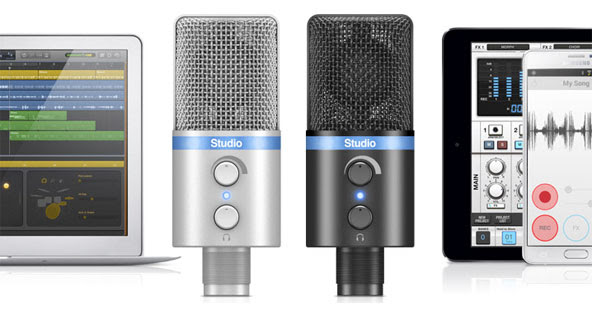
January 22, 2015 – IK Multimedia, the leader in mobile music creation technology, is pleased to announce iRig® Mic Studio, its ultra-portable large-diaphragm digital condenser microphone for iPhone, iPad, iPod touch, Mac, PC and Android. Offering superior sound and an extremely portable size, it packs a 1” diameter condenser capsule into an ultra-compact enclosure that can be used to make professional recordings anywhere. With iRig Mic Studio, musicians, vocalists, home producers, podcasters, broadcasters, voice-over artists and more have a studio-quality large-diaphragm microphone that fits in the palm of their hand.
Superior portable performance
iRig Mic Studio has been designed to provide the best possible recording quality. It features a large 1” diameter back electret condenser capsule, a 24-bit audiophile-grade A/D converter (with 44.1/48 kHz sample rate) and a built-in low-noise high-definition preamp. These, combined with its 133dB SPL rating, allow for optimal audio capture at any sound pressure level — it can capture everything from the subtle and nuanced dynamics of the human voice to the full-on bombast of an amplified electric guitar, and everything in between.And while these features are excellent on their own, what’s truly remarkable about iRig Mic Studio is that it fits its components into a compact enclosure that’s smaller than an iPhone.
Comprehensive control
To assist its high-end components, iRig Mic Studio also sports a comprehensive set of monitoring and level control features. To ensure the best sound for every situation, it comes with a gain control knob and a multicolor LED level indicator. It also includes a headphone output with its own level control for monitoring directly from iRig Mic Studio itself. And, for better positioning while recording, iRig Mic Studio comes with a sturdy and portable tabletop tripod stand.
It’s all about the connections
iRig Mic Studio is compatible with nearly every popular mobile and desktop platform. It comes with a female micro-USB port and an assortment of cables: Micro-USB to Lightning for iPhone, iPad and iPod touch; micro-USB to micro-USB OTG for Android (requires either an Android 5 or Samsung Professional Audio device); and micro-USB to USB for Mac and PC.
Record with the power of apps
For immediate recording, iRig Mic Studio comes equipped with a powerful suite of vocal apps. VocaLive™ is a powerful effects processor and multi-track recording app that features a selection of 12 professional real-time vocal effects. EZ Voice™ for iPhone, iPad and iPod touch and EZ Voice™ for Android are streamlined and easy-to-use sing-along apps that make it easy for vocalists to practice with any song in their music library. iRig® Recorder for iPhone, iPad and iPod touch and iRig® Recorder for Android are straightforward apps for field recording, podcasting, note taking and more.
The VocaLive App is available from the App Store at www.appstore.com/vocalive
The EZ Voice App is available from the App Store at www.appstore.com/ezvoice
The iRig Recorder App is available from the App Store at www.appstore.com/irigrecorder
EZ Voice is available for Android via Google Play and the Samsung GALAXY Apps store. iRig Recorder is available for Android on Google Play.
iRig Mic Studio is also fully compatible with a wide variety of third party apps and software, like Cubasis, ProStudio Vocal FX, MultiTrack DAW and more. It’s also compatible with Apple’s GarageBand and Logic Pro X apps, and iOS Voice Memo.
Pricing and availability
iRig Mic Studio comes in silver or black and will be available Q1, 2015 from music and electronics retailers worldwide, and from the IK online store, for only $179.99/€144.99 (excluding taxes).
For more information, please visit: www.irigmicstudio.com
To see the official video of iRig Mic Studio in action, go to: www.irigmicstudio.com/video
iRig Mic Field from IK Multimedia
iRig Mic Field from IK Multimedia shipping:
Make professional audio/video recordings everywhere
Capture audio or video with high-quality stereo sound on iPhone, iPad and iPod touch
January 5, 2015 – IK Multimedia, the leader in mobile music creation, today announced it’s shipping iRig® Mic Field, the first ultra-compact, stereo digital microphone for audio and video field recording on iPhone, iPad or iPod touch – including the new iPhone 6, iPhone 6 Plus, iPad Air 2 and iPad mini 3. Slim, light and fully rotatable, iRig Mic Field lets anyone make great audio and video recordings with high-quality stereo sound everywhere.
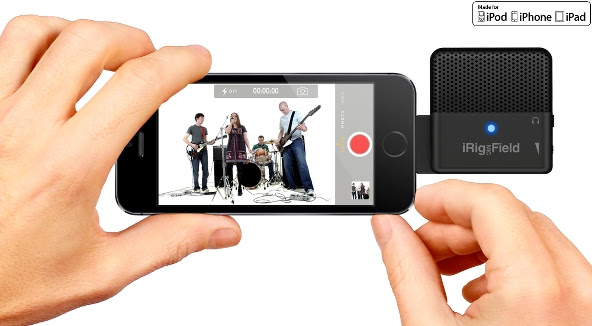
High-quality stereo field recording
iRig Mic Field is the only mobile digital microphone designed to be used for both video and audio projects. It delivers superb stereo sound by connecting digitally to iPhone, iPad or iPod touch via Lightning connector. Its two high-quality cardioid electret condenser capsules, 24-bit audiophile-grade A/D converter (with 44.1/48kHz sample rate), 115 dB maximum SPL rating and built in low-noise, high-definition preamp allow for pristine sound capture quality at rehearsals, concerts, lectures, speeches, music practice and more, as well as field recording and on-the-move videography projects. iRig Mic Field can create accurate and faithful field recordings in nearly every imaginable context.
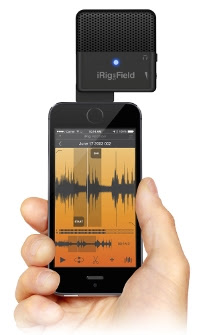
| 90 degrees of flexibility To better preserve the stereo image while recording audio for video, iRig Mic Field features a conveniently rotatable patent-pending design. With the touch of a finger it can be easily rotated 90 degrees and locked in one of two positions for an accurate stereo image in both landscape and portrait modes. This means that iRig Mic Field can record the proper left and right channel position in any situation – surpassing other mobile microphones that only produce a true stereo sound when held in portrait mode. Unmatched portability |
 |
Pocket-sized video production
iRig Mic Field has also been designed with mobile video in mind. It can be used to record video on iPhone, iPad and iPod touch with crystal-clear, professional sounding audio. It’s never been easier to shoot a great sounding video and share it with friends, followers and fans. Now musicians, videographers, journalists, podcasters, casual users and more can get high-quality sound while on-the-go without sacrificing mobility or audio fidelity.
Superior level control
Capturing good sound requires more than just high-quality components; it also requires comprehensive control. iRig Mic Field has everything needed to ensure that sound is recorded at the perfect setting. It features a thumbwheel gain control, an audio-out jack for quality real-time headphone monitoring and a multi-color LED input level indicator for quick visual monitoring.
Record with the power of apps
For immediate stereo recording, an update to IK’s iRig® Recorder app for iPhone, iPad and iPod touch will soon be available to fully support iRig Mic Field. iRig Recorder lets users quickly record, edit, process and share their audio, thanks to its intuitive GUI, 8 intelligent effects processors and sharing capabilities. iRig Mic Field also works seamlessly with a wide variety of apps including Apple’s GarageBand and iMovie apps, and iOS Voice Memo and Camera.
Pricing and availability
iRig Mic Field is now available from music and electronics retailers worldwide, and from the IK online store, for only $99.99/€79.99 (excluding taxes).
For more information, please visit www.irigmicfield.com
iRig 2: The sequel to the most popular guitar interface of all time
IK Multimedia announces iRig 2, the sequel to
the most popular mobile guitar interface of all time
The successor to the guitar interface that sparked the mobile music revolution improves sound quality, adds features and allows wide cross-platform compatibility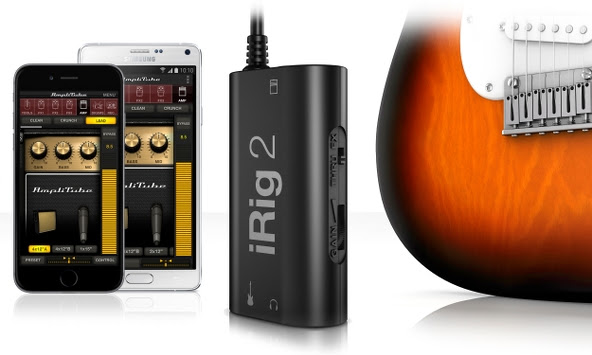 January 5, 2015 – IK Multimedia, the leader in mobile music creation, is pleased to announce iRig® 2, the latest addition to its iRig range of products. The sequel to IK’s groundbreaking and best-selling iRig guitar interface, iRig 2 builds on the design that made its predecessor so popular. It pairs great sound and streamlined convenience with new updated features like versatile input gain control, a ¼” amplifier output jack and Android compatibility. iRig 2 makes for a versatile tool that’s perfect for practice sessions, live performances, jamming with friends, recording and more.Now everyone can plug in their guitar or bass to enjoy killer tone on their iPhone, iPad, iPod touch, Mac or Android device – with the release of iRig 2, the world’s most popular guitar interface is better than ever before.
Powerful performance
The biggest update that iRig 2 brings is its new ¼” amplifier output. This augments its 1/8″ headphone output by allowing musicians to use iRig 2 and their mobile device along with their favorite amplifier, without the use of an adaptor. This opens up a whole world of opportunities when paired with AmpliTube®, IK’s powerful guitar and bass multi-effects processor. iRig 2 now lets musicians easily use AmpliTube’s vast library of meticulously modeled virtual stompbox effects, amplifiers and other gear as a part of their physical rig.iRig 2’s added switch allows dual-mode operation: FX lets musicians send a processed signal to their amplifier’s ¼” output from apps like AmpliTube. THRU sends a clean signal, letting musicians use their mobile device as a tuner, recorder or other utility while using their classic analog rig, which maintains the purity of a 100% analog signal path.Made for both practice and performance, iRig 2 comes with a removable support that, together with a Velcro strip, allows easy mounting of iRig 2 on any mic or music stand, making iRig 2 perfectly at home on stage during live performance.
Plug and play simplicity on every device
iRig 2 has been made to be compatible with the widest range of instruments and mobile devices possible. Its built-in universal 1/8″ TRRS output connector provides a true plug-and-play experience on iPhone, iPod touch, Mac and Android. Likewise, its 1/4″ instrument input works with any guitar, bass or line-level instrument. To ensure the best sound quality, iRig 2 comes with an input gain thumbwheel that allows musicians to dial in the perfect setting for their setup – iRig 2 works just as well when its connecting a wailing 3 humbucker electric guitar to a Samsung Galaxy Note 4 as it does a jazzy archtop or mellow electric piano to an iPhone 6.
Killer guitar tone on Android
iRig 2 is now widely compatible with Android smartphones and tablets. Its 1/8″ output connector is compatible with many popular Android devices produced by manufacturers like Samsung, LG, Motorola, HTC and more – any device with an 1/8″ input that supports the CTIA/AHJ wiring standard works with iRig 2.Additionally, users with Android devices that support Samsung Professional Audio can enjoy AmpliTube for Android, a special version of the popular multi-effects processor that brings a full spread of meticulously modeled virtual gear to the Android platform.
A full suite of apps
iRig 2 is ready to go right out of the box. It comes with a powerful cross-platform suite of apps and software that includes free versions of AmpliTube for iOS, Android and Mac/PC. And while iRig 2 is the ideal companion to AmpliTube, it also works with any other recording, processing, tuning or music app.
Pricing and availability
The new iRig 2 interface will be available in Q1 2015 via the IK Online Store and select music and consumer electronics retailers worldwide for $39.99/€29.99 (excl. taxes).
For more information, please visit:
www.irig2.com
www.amplitube.com
MediaFire Launches Native iOS 8 Update With “Power Upload” Feature
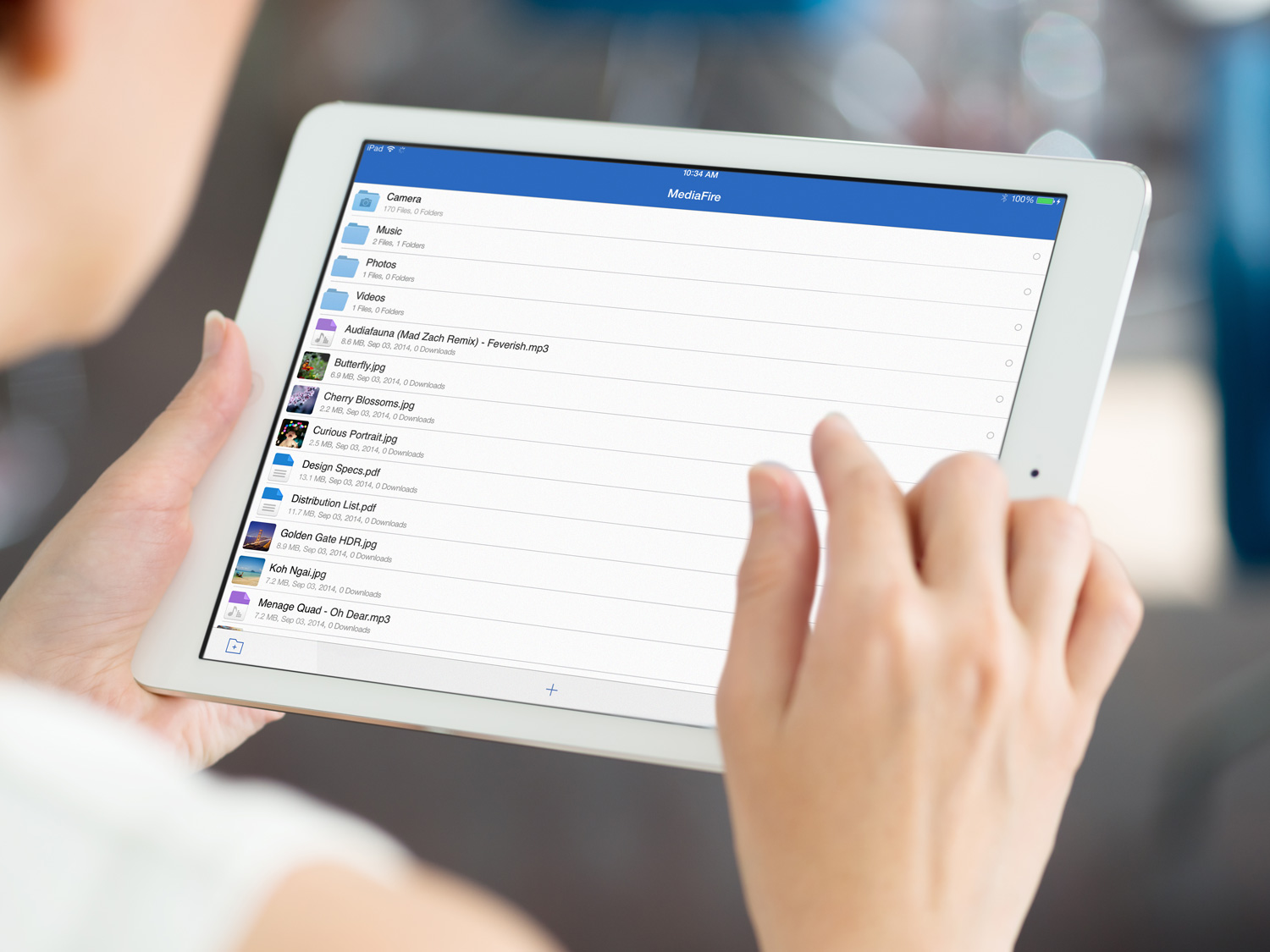 HOUSTON, TX–(November 18th, 2014) – MediaFire, a leading provider of consumer online storage solutions, today announced the release of MediaFire for iOS 8, our latest and greatest cloud storage application for iPhone and iPad users.
Available today for free on iTunes, MediaFire for iOS 8 adds a variety of new features that make it easier than ever to access, and share all of your files on the go, including new photo and video playback options, a new “Power Upload” mode for faster data syncing, and a new optimized interface designed to take advantage of the extra screen real estate offered by the iPhone Plus.
To download MediaFire for iOS, 8 visit: https://itunes.apple.com/us/app/mediafire/id555646196?mt=8
MediaFire’s newest feature, called “Power Upload” allows iOS users to effectively double their upload speeds. The feature can be toggled on and off as needed, in order to quickly and easily upload all of your photos and videos from your iPhone or iPad.
Now iOS 8 users can use MediaFire to access, protect, and share all of their mobile photos, videos, automatically. Files are safely stored in the cloud, and can be automatically synced and accessed on your home computer (via MediaFire Desktop), or the web via MediaFire’s online interface. MediaFire Desktop is currently available as a free download for both OSX and Windows users.
“Everyday, over a Million iOS users choose MediaFire to access, share, and safeguard the files that matter most to them,” said Derek Labian, president and CEO of MediaFire. “Whether you are looking to simply share a file, or to back up and access all of your media from the cloud, MediaFire is the simplest and most affordable cloud storage service on the market today.”
Starting at just $2.50 per month, or 24.99 a year for one terabyte of online storage,
 In addition to paid accounts, MediaFire continues to offer users up to 50 gigs of cloud storage for free.
In addition to today’s launch, MediaFire’s complete mobile SDK for iOS has been updated with additional support for iOS 8 devices, enabling developers around the world to easily integrate cloud syncing and storage into their mobile applications.
For a full list of resources and tutorials, visit http://www.mediafire.com/developers/
MediaFire iOS 8 Features:
- Automatically backup your camera photos! – MediaFire for iOS lets you automatically upload and protect all your photos and videos.
- Power Upload -A new selectable mode that allows you to harness the full upload speed from your iOS Device.
- Stream music and videos – Stream your music and video collection anywhere and anytime.
- Share documents and media directly from your mobile device – Easily share through email, sms, or your favorite chat app!)
About MediaFire:
MediaFire is an online storage and collaboration company focused on providing regular people with a complete and easy-to-use solution for managing their digital stuff. Available for iPhone, Android, OSX, Windows, and Web, MediaFire is the only online storage solution to offer unlimited downloads, download resuming, zero wait times and more, all for free. Every month, more than 150 million people use MediaFire to quickly and securely store, organize and share all their personal and work data.
For Developers
MediaFire’s API solutions enable developers to quickly and easily integrate cloud storage and file sharing into their applications. For information on how your organization can use MediaFire to enhance your business, visit http://developers.mediafire.com/, or contact developers@mediafire.com for more information.

 Techopedia
- An error has occurred; the feed is probably down. Try again later.
Datamation
- Google and NextEra Strike AI-Powered Grid Deal
- NYT Sues Perplexity AI in Copyright Conflict
- Cloudflare Outage Affects Major Websites
- OpenAI Forces AI to Confess Its Lies
- OpenAI Declares Code Red as Google’s Gemini 3 Threatens ChatGPT
- Coupang Breach Exposes 33.7M South Koreans’ Data
- ChatGPT Celebrates Third Anniversary
- Asahi Group Reveals Findings of Cyberattack
- OpenAI Discloses Mixpanel Security Incident Affecting Some API Users
- Firefox Zero-Day Flaw Exposed 180M Users

 The Frugal Networker
You must be logged in to post a comment.