Archive
iRig KEYS PRO and iRig KEYS with Lightning connector
December 3, 2013 – IK Multimedia, the global leader in mobile music making apps and accessories for iPhone, iPad, iPod touch and Mac/PC, announced the expansion of its iRig KEYS line with two new products for mobile musicians: iRig KEYS PRO and iRig KEYS with Lightning connector, compact MIDI keyboard controllers with 37 velocity-sensitive keys.
 Both iRig KEYS PRO and iRig KEYS come with Lightning-connector, 30-pin and USB cables. These allow musicians to connect all iRig KEYS to any iPhone, iPad, iPod touch and Mac/PC model, and provide MIDI control and performance features for Core MIDI apps of all types, such as IK’s own SampleTank, iGrand Piano and iLectric piano apps, and its range of Mac/PC virtual instruments.
iRig KEYS PRO: Big features — compact design
iRig KEYS PRO is a true “plug and play” professional-quality programmable MIDI controller designed specifically for making music on the go with an iPhone, iPad, iPod touch, Mac, or PC. It features 37 velocity-sensitive full-size keys for 3 full octaves plus one note — allowing for realistic-feeling, two-handed playing. Even with pro features like mod and pitch wheels, illuminated octave and program buttons, 4 programmable “sets” for storing complete setups, and a programmable continuous-controller volume knob, iRig KEYS PRO is 30% smaller than any other full-size key MIDI controller that can be played with two hands.
iRig KEYS PRO comes complete with Lightning-connector and 30-pin cables for plugging directly into the dock connector of any iPhone, iPad or iPod touch. A USB cable is included for direct Mac or PC connection. With standard Core MIDI support, you can play any compatible virtual instrument or recording app on your iOS device or computer from Apple’s GarageBand to IK’s SampleTank. iRig KEYS PRO needs no AC adapter or batteries, it draws its power from the device it’s connected to, and it even features an auxiliary mini-USB port to provide it with power during performance, allowing the battery on the mobile device to be conserved.
Programming and expansion
iRig KEYS PRO also has powerful programming features that are useful during live performance and in the studio. Players can program iRig KEYS PRO with different set-ups and store them in one of the 4 “Set” banks. When iRig KEYS PRO is in Edit mode, the user can set the MIDI transmit channel, velocity (touch) response, assign Control Change numbers to the Volume/Data knob, send custom Program Change messages, transpose the keyboard in semi-tones and more.
iRig KEYS PRO also sports an expansion jack for adding a sustain pedal (not included) for a realistic piano feel, or an expression pedal that sends MIDI continuous controller data that can control parameters such as volume, rotary speaker speed, tremolo and vibrato speed and more, on the connected app or software instrument.
FREE software for instant playability, universal compatibility
iRig KEYS PRO comes with SampleTank FREE* for iPhone/iPod touch and iPad, IK’s award-winning multi-part sound module designed for live performance and recording, and the iGrand Piano FREE* app, a high-quality studio-sampled grand piano sound module. Both apps are expandable with sounds from IK’s massive collection of sound libraries, and provide musicians with tools for complete music production.
iRig KEYS PRO is also right at home in the studio, and works seamlessly with DAW software, including GarageBand, Logic Pro and many others. It’s also perfect for controlling virtual instrument plug-ins such as IK’s SampleTank, Sonik Synth, SampleMoog™, SampleTron and Miroslav Philharmonik. For Mac/PC use, iRig KEYS PRO comes with SampleTank 2L**, the full-featured professional sound workstation that includes over 2 GB of professional samples, which cover all instrument categories.
iRig KEYS with Lightning connector
iRig KEYS with Lightning connector is IK’s new version of the ultra popular iRig KEYS portable mini keyboard and now comes with a Lightning-connector cable for connecting iRig KEYS to the newest Apple devices, including the new iPad, iPad mini and iPhone 5 series. It shares the same powerful features of iRig KEYS PRO but with a more compact build so it only takes up minimal space on your desktop and can easily fit in a backpack or a carry-on bag.
Pricing and Availability
iRig KEYS PRO is priced at $149.99 / €119.99 MSRP (excl. tax), and is available now from the IK network of music and electronic retailers around the world and the IK online store. iRig KEYS with Lightning connector is priced at $129.99/€95.99 and is available now from music and electronics retailers worldwide.
* Available on the App Store.
** Register and download on the IK Multimedia online User Area.
For more information, go to www.irigkeys.com.
For more information on IK Lightning Compatible Accessories, go to www.ikmultimedia.com/lightning
[Note: I have used the iRig KEYS keyboard, SampleTank, and iGrand Piano (Review coming soon). They’re fun and very professional. Advanced enough for the professional musician and simple enough for the beginner. IK Multimedia knows music.]
Try Shuttr by Muku Labs for redefined selfies and sneakies (Review)
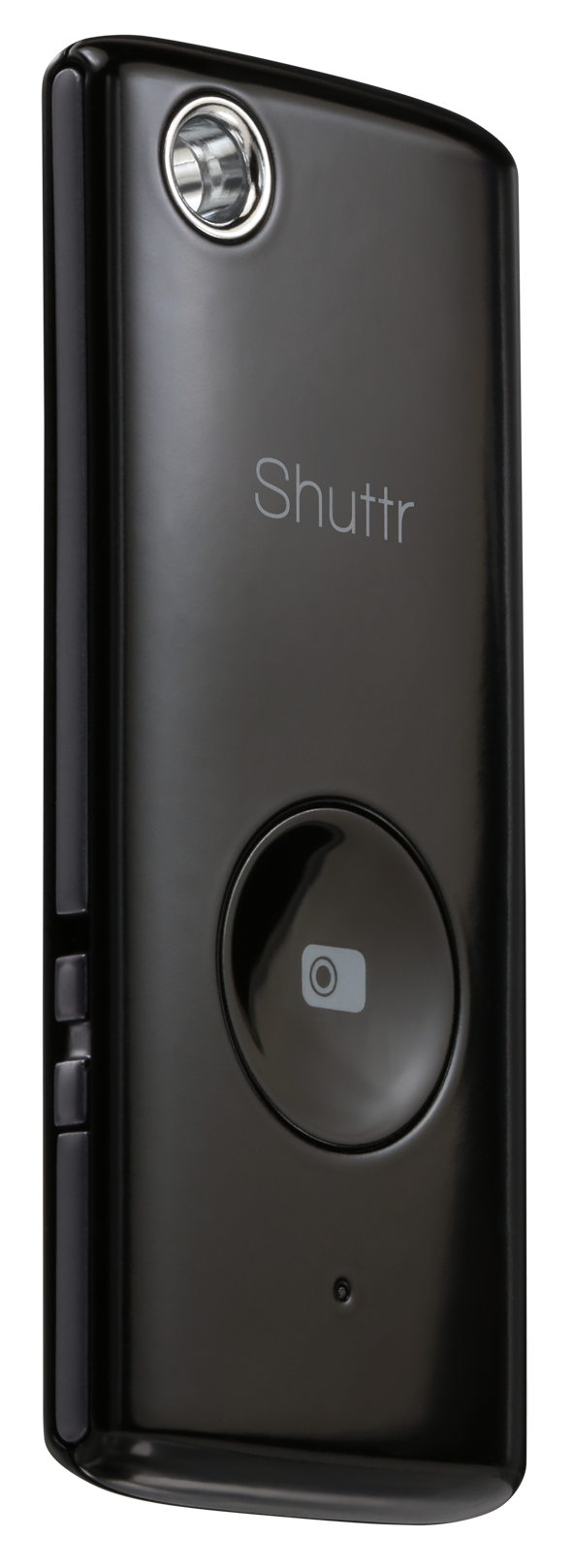
 Shuttr, Remote Shutter Release
Muku Labs
$39.99
Compatible with iOS5+, Samsung Galaxy S3/S4/Note 2/3/10.1/ and Nexus 4/7
Dimensions: 2.2 x 0.2 x 1 inches
Weight: 2 ounces
Attention avid Phoneographers! I’m not going to make you wait for the punch line on this one. The Muku Labs’ Shuttr, remote shutter release, is exactly what I’ve been looking for–for a very long time. I love it! I love my iPhone 5 too. It takes great photos. But, it has one limitation–the same limitation as all phone cameras, and cameras in general–it’s awkward to take remote pictures with.
Sure, you can prop it up or use a phone tripod and set the timer but are you really getting the picture you want with a timer? It’s a rare occurrence, if you do.
With the Shuttr, you can use the handy included phone stand or use some other method of planting your phone far enough away from yourself that you don’t look distorted like you’re looking through some psycho’s eyes in a horror movie.
Or, my favorite thing to do with the Shuttr–place my phone around and take candid shots on demand. And as many as I want to take. No silly app and no timer. Just press, press, press as much as you want to grab those stills or to start and pause video.
The Shuttr works great with the standard iPhone‘s native camera app in still or video mode. But what about other apps?
Here’s the list I’ve tested with and my results (iPhone 5, iOS 7.3):
(In no particular order)
| Camera | Yes |
| Camera+ | Yes |
| Old Camera | No |
| Sepia Camera | No |
| Old Movie | No |
| Cameo | No |
| Cartoonmatic | No |
| Retro Camera | No |
| 360 | No |
| Hipstamatic | Yes |
| Fisheye Cam | Yes |
| Cam Studio+ | No |
| Super Pop Cam | No |
| Pixlromatic | Yes |
| Popstamatic | Yes |
| iDarkroom | Yes |
| Camera360 | Yes |
| Paper Camera/td> | No |
| Duomatic | Yes |
| More Lomo | No |
| SlowShutter | Yes |
| Leme Cam | No |
| TtV Camera | Yes |
| Top Camera Lite | No |
| CrossProcess | Yes |
| Otaku Camera | No |
| Big Lens | Yes |
| Diptic | Yes |
| Orange Cam | No |
| ShakeItPhoto | Yes |
| Momentage | No |
| Momentsia | No |
| Fixel | No |
| Vintagio | Yes |
| Rawporter | Yes |
| Ustream | No |
Your mileage, of course, may vary. I think some of my problems were due to iOS 7 and not Shuttr. Although, I did notice that the apps that work use the basic Camera app and simply apply filters or effects after the fact. So, chances are that if your camera app uses the built-in, generic Camera app, then Shuttr will likely work.
Shuttr is small enough to fit on your keychain and lightweight enough to take anywhere. I love the Muku Labs Shuttr. It’s one of the best smart phone and tablet accessories that I’ve seen. It feels durable and well made. You can also replace the battery when it gets weak or dies. This is not a throw away device.
Apparently I’m not alone in my praise of the Shuttr. There’s a lot of love for it out there. Every major blog and gadget site has sung its praises and it has all five star reviews on Amazon. You can add mine to that.
The Shuttr comes in either black or white and includes a soft carrying pouch and stand. If the $40 price tag seems high to you, then try to find something else that does the same thing. I hadn’t found anything like it and I receive daily emails from Photojojo.
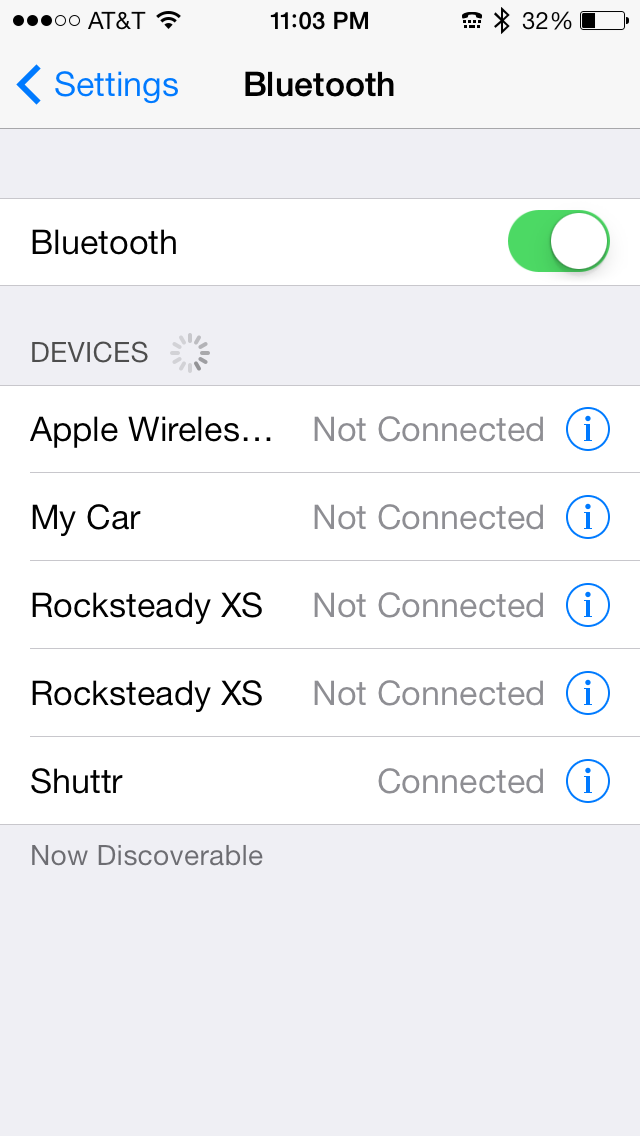 You connect it via Bluetooth by turning on the Shuttr, opening your Settings, opening Bluetooth settings, and then discovering the Shuttr. Tap the Shuttr listing to pair it. You’re done and the Shuttr is ready to use.
Why it’s frugal: The Shuttr is an essential device if you’re a real Phoneographer–seriously. You should have one. I haven’t found anything that comes close to it at any price, so for me, it’s the most valuable photographic accessory that I have. Its value as a must-have accessory makes it frugal.
Of all the iPhone accessories I’ve played with and used, the Shuttr is one that I’ll always have with me. I might forget my tripod, a USB disk, an EyeFi card, or even my car keys, but you can be sure that I’ll never forget this little gem.
Review: 10/10
Recommendation: Definitely buy it.
The Jackery Bar – portable power source (Review)
 The Jackery Bar – Black version
Jackery
$29.99 Amazon (Prime)
There are some products that you just have to see to believe and the Jackery Bar is one of those products. It’s very hard to explain but easy to see, once you’ve held one in your hands. The Jackery Bar, in a nutshell, is a small, about the size of 4 AA batteries, case with rechargeable batteries inside that provides you with a source of portable power. I, for one, didn’t understand how powerful or handy this little gadget is until I needed it–or rather until my wife needed it.
My wife and I were at an Oklahoma State University home football game a few weeks ago against Kansas State University. We both usually carry our iPhones with us so that we can text friends and family when OSU scores or pictures of interesting people at the games. On this auspicious day, I didn’t have mine, which annoyed her greatly. She had hers but it was only at 18% power. Someone forgot to plug in her phone.
We needed to communicate with our son after the game to coordinate a dinner meeting with him and his girlfriend. She was afraid that we wouldn’t be able to do that because of my incompetence. I know, right–my incompetence alone.
While messing around with the pockets of my jacket, I noticed extra weight in one. I thought that I had my cell phone in it and as I was about to say that I have it, I pulled out the Jackery Bar.
At first, it took me aback because I had to remember why it was in my jacket. It was there because I went on a so-called photographic expedition a few days before and took it with me in case my digital camera’s battery died on me. It didn’t and I forgot to take the Jackery Bar out of my pocket and put it away. Hey, I’m a guy, I don’t always put my things away as soon as I’m finished with them.
Well, after missing one of the exciting OSU interceptions of the game during my deep thought, I explained to her what had happened. She looked at me unimpressed. Fortunately, she also had her charger with her. I took her phone, her charger, and the fully charged Jackery Bar and connected them all together in one of my pockets.
A couple of hours later, at the end of the game (OSU won!), she skeptically snatched the cell phone from my pocket to see how much power she had left on her iPhone. To her surprise, it was at 100 percent.
She said, “Hey, it worked. What is that thing?”
I had to explain it on our way to my son’s dorm across campus. She said, “Thank you, honey” and grabbed my hand. We chatted happily the rest of the way.
That scenario, as unusual as it sounds, could have gone much differently and normally would have. But the Jackery Bar saved me and possibly my marriage. I guess that might have been a better title to this piece: How the Jackery Bar Saved My Marriage.
Sometimes truth really is stranger than fiction.
The black Jackery Bar was officially announced on September 12, 2013. I’m a little late in getting this review out but it’s totally worth the wait just for the story alone. Below is the official press release about the new product:
Santa Clara, CA (Thursday, September 12th) — Jackery, a provider of premium rechargeable battery products for mobile devices, announced today the launch of a new black version of its popular Jackery Bar portable battery. Jackery’s loyal customer base submitted many requests for a black Jackery Bar to join the silver version and the company’s original distinctive orange.
The black version of the Jackery Bar offers users an additional 120 hours of operational time and is the world’s smallest portable battery with a 2.1A output. Weighing only 5.4 ounces, the Jackery Bar is designed for maximum convenience, giving smartphone and tablet users a reliable and portable power source. Ideal for users that need power and device security, the Jackery Bar is a secured batter with four layers of smart safety protection.
“We introduced a sleek and stylish black color for Jackery Bar in addition to the classic orange and silver colors due to a lot of demand from our customers for the classic black look,” said York Wu, CEO of Jackery. “Jackery Bar offers great looks and power, with a powerful charge that can be on standby for up to six months. Our products embrace both form and function, with a great design aesthetic that is complemented by our extraordinarily powerful portable batteries.”
In addition to iOS and Android devices, Jackery’s products are also compatible with Windows phones, various smartphone and tablet platforms, multiple gaming devices, and MP3 players.
Jackery also features the Air, Giant, and Mini products, each designed to offer portability and power for electronics users.
One of its very cool features is the built-in flashlight. It has a very bright single LED light at one end that you activate with a double press of the power button.
Why it’s frugal: After my personal saga, I shouldn’t have to tell you that its value and frugality are far beyond its price tag. However, for the more practical among you, the Jackery Bar can save you time in that you can charge your device or power it while on the move. You can’t do that any other way. Ordinarily, you have to stop, plug-in, and wait for hours. Charging on the go is worth a lot. Think about the possibilities.
Review: 10/10
Recommendation: For married folks and singles alike, the Jacker Bar is the ultimate in portable power. I won’t guarantee that one will save your marriage but it will save you time and time is money.
Jackery is a Santa Clara, California-based technology company focused on developing premium battery products for smartphones and tablets. The company offers a lineup of two products, the Jackery Bar and Jackery Mini, which both offer considerable charging time and small form factors for owners of the most popular smartphones, tablet devices, MP3 players and gaming devices.
For more information, visit http://www.jackeryusa.com.
Announcing the iRig Blueboard: the first wireless MIDI pedalboard controller
 IK Multimedia iRig Blueboard
IK Multimedia
$99.99 / €79.99 MSRP (excluding taxes)
iRig BlueBoard is the first wireless MIDI pedalboard for iPhone, iPad, iPod touch and Mac that uses Bluetooth technology to transmit MIDI messages to control app and software functions and features. Musicians can use iRig BlueBoard to control parameters in their favorite music making apps — such as stompbox effects on/off, preset patch-switching on the fly, volume or wah control, or any other MIDI controllable function. Set-up is as simple as turning on the power and launching the iRig BlueBoard companion app and assigning the backlit pads to the desired control function.
iRig BlueBoard uses Bluetooth 4.0 (LE – Low Energy) technology to transmit the actions of its four onboard, backlit foot switches and its two optional external devices to the mobile device or Mac. Then, using the included iRig BlueBoard app (download from the App Store) and software (download from the IK web site User Area), the Bluetooth signals are converted into MIDI messages and routed internally to the music app that’s running on the device.
The Ultimate App Control
Any music app or Mac music-software application that is MIDI compatible (the standard communication protocol for musical instruments) — such as IK’s AmpliTube, VocaLive, SampleTank, iLectric Piano, iGrand Piano — or any other Core-MIDI-compatible app like Apple’s GarageBand, can be controlled wirelessly.
iRig BlueBoard is also expandable — musicians can add up to two standard additional expression pedals or foot switches via the unit’s two TRS 1/4” expansion jacks, allowing for control of continuous rotary functions like wah effects, volume, EQ, gain control, etc.
For a guitarist or vocalist using a mobile multi-FX app like AmpliTube or VocaLive as a sound processor, iRig BlueBoard provides the foot-controlled functionality and convenience of a pedalboard, but with a form factor so compact and portable that it can easily slide into a backpack, a laptop bag or an instrument case. Because it’s wireless, iRig BlueBoard puts musicians on stage without being tethered to their mobile device. The unit’s range is 10 meters (over 32 feet), giving players a great deal of mobility to roam the stage that would be impossible with a wired unit.
Because the foot switches are backlit, they’re easy to see in all lighting conditions, even on a dark stage. The fact that iRig BlueBoard uses wireless Bluetooth leaves all the wired ports of the device free, so they can be used simultaneously by interfaces or controllers that feature the 30-pin or Lightning connector, like IK’s iRig PRO, iRig HD, iRig MIDI or iRig KEYS, and adapters or microphones that use the device mini-jack such as iRig, iRig PRE or iRig Mic.
Ultra Compact, Ultra Portable
iRig BlueBoard is extremely compact, light and portable, measuring only 27 cm wide x 9 cm deep (10.6″ x 3.5″) and only 2 cm (0.8″) tall. It’s extremely lightweight, but with a sturdy, stageworthy chassis and four foot switches made of soft-touch rubber and designed for durability.
iRig BlueBoard is battery powered using 4 standard AAA batteries (included), and because it uses Bluetooth Low Energy (BLE), it draws very little power giving it extremely long battery life for extended operation.
Recoil: The no cuss, no fuss automatic cord winder (Review)
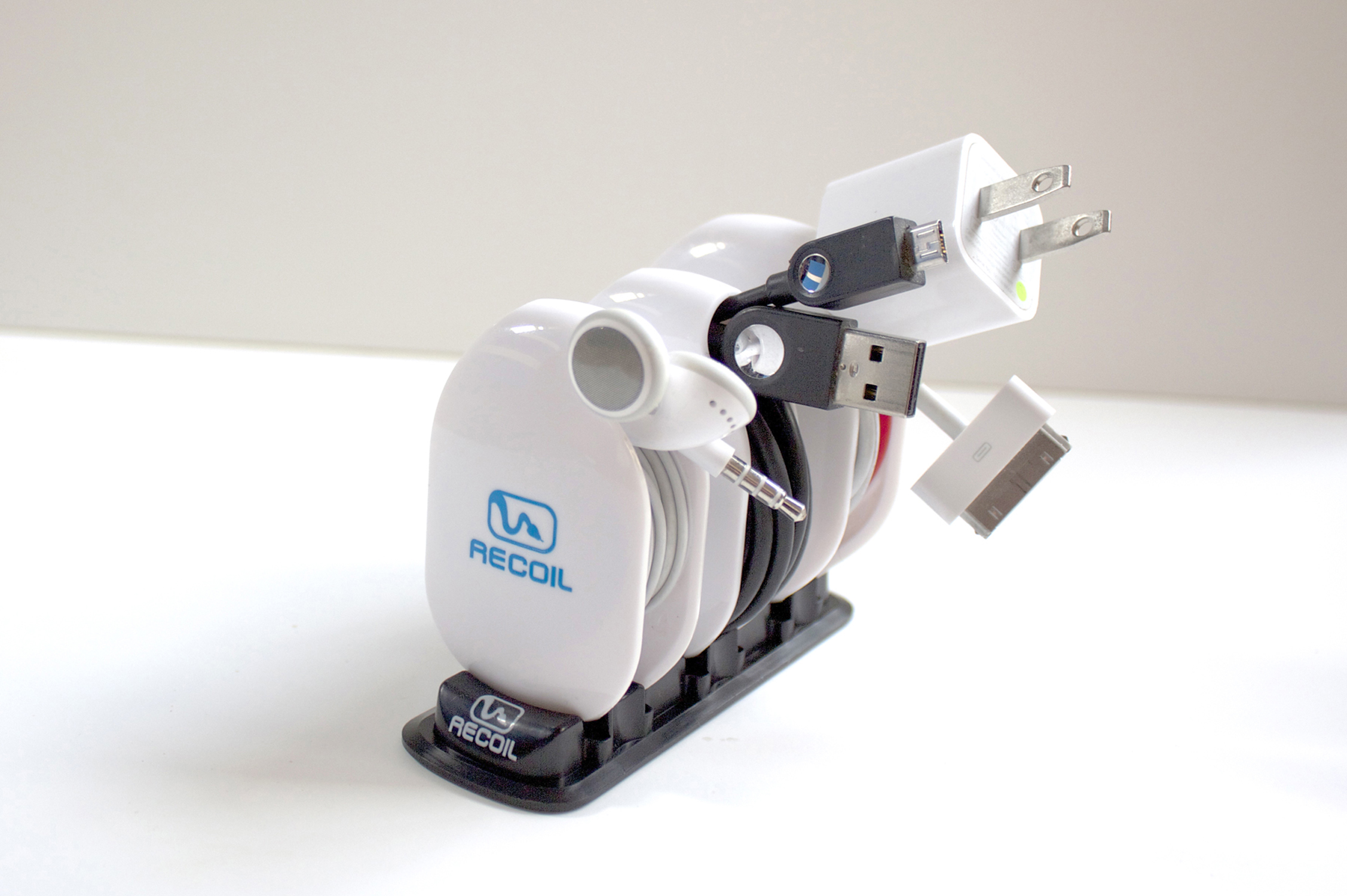
The Recoil Combo Pack
Recoil Automatic Cord Winders
Recoil Winders
$9.99 each or set of 3 for $27.99
(Set of 3 Combo Pack comes with Storage Rack)
I’ve had the theory that any two cables laid side-by-side, as neatly as possible, will somehow, through the magic of universal entropy, become impossibly entangled without human intervention. I’m sure you’ve experienced this too. The funny thing is that now my theory has a corollary: Any cable will become impossibly entangled upon itself in a pocket, a drawer, or even on a desktop. I just want to know why that is.
Often, on my way to gym, I place my earbuds into my pocket so that I don’t look like a total nerd until I get to the weight machines. I pull out my iPhone. I retrieve my earbuds, untangle my earbuds, place my phone back into my pocket and start my workout.
Even funnier than my theory, is that the five minute drive and two minute walk into the gym, collects enough entropy to twist and mangle my earbuds into knots and Moebius strips that require another ten minutes, forty calories (OK, I’m thankful for the calorie burn), quite a bit of cussing, and a whole bucket of frustration to detangle the !@#$% things.
And now here’s where I sound like a late night infomercial, which I hate more than detangling my earbuds every time I use them.
But, has this ever happened to you?
Well, now there’s a solution: The Recoil Winder.

Large winder loaded with USB cable.
Yeah, I know, a TV Pitchman could say it better and with more zeal. But seriously, you know what I’m talking about with tangled earbuds, USB, and Apple power cords. It’s enough to make me want to break the law. The Second Law of Thermodynamics that is.
The Recoil Winder is a clever little gadget that comes in three sizes so that you can organize your earbuds, USB power cables, Apple power cables, and other small gauge electronic cables into a neat little entropy-defying package that fits neatly into your pocket, purse, backpack, or whatever.
The video provides a far better look at the product than I can give you in text format. Take a look to see what I mean.
I use the smallest winder for my earbuds. No more cussing. No more ten minutes wasted at the beginning of every workout trying to untangle tasteless spaghetti. No more starting my workout with an elevated anxiety level. One tug and the cable is out. And it’s just as easy to load: just loop, pull, and let the Recoil Winder do its job.
I should warn you that the Recoil Winder really grabs the cable, so you need to be careful until you acquaint yourself with the product by practicing a few times. And when you remove a cable for use, pull it all the way until the Winder stops and locks, otherwise, you might loosen your grip and allow the cable to rewind onto the Recoil Winder unexpectedly. You can see for yourself in the demo video that you need to keep your fingers out of the way. Don’t worry, after a few times, you’ll get the hang of it.
The Recoil Winder is a cool product. I’m not sure how I kept my cables organized and out of the way before. You see, it’s not just a winder product, it’s also an organizer. I have trouble keeping track of my cables. One reason is that they get tangled up. The other reason is that they tend to get lost. Now they do neither.
The Recoil Winder is one of those products that you look at and think, “I should have thought of that.” It’s both handy and obvious that you need it. The only problem that I have is that I have more cables than Recoil Winders.
The only three negatives I’ve found with the Recoil Winder is that one, I wish they made bigger ones for laptop cables–I hate those things. Two, $9.99 is a little steep for as many as I need. If you only need one, two, or three, you’re OK. I need like ten or so to keep all of my various gadget cables tangle-free and where I can find them easily. And finally, the third negative is that I wish that I could pull out a cable part way so that I could use the cable but keep it partially wound.
Maybe in Recoil Winder 2.0, they’ll add that feature.
Why it’s frugal: The Recoil Winder is frugal because it keeps you organized and that has value. If you’re fumbling around for a USB cable, earbuds, or other cable, you’re neglecting something else. And the Recoil Winder only takes about half a second to wind a cable. It saves you time, which is essentially money.
Review: 9/10
Recommendation: Pick one up and try it out. Chances are very good that you’ll buy more–one for each annoying cable that you have.
IK Multimedia announces iRig PRO: Universal MIDI Interface

iRig Pro Universal MIDI Interface
IK Multimedia
$149.99/€119.99 (exc. taxes).
IK Multimedia, the global leader in mobile music-creation apps and accessories, is proud to announce iRig® PRO, the universal digital mobile audio/MIDI interface for iPhone, iPad, iPod touch and Mac.
Universal Compatibility
iRig PRO comes with three detachable cables, compatible with Lightning, 30-pin and USB connectors, respectively, allowing for digital connection to every model of iPhone, iPod touch, iPad and Mac, out of the box, with no need for adapters. A MIDI cable with a standard MIDI jack is also provided to connect the widest variety of MIDI-compatible keyboards and controllers.
iRig PRO is class compliant and compatible with Core Audio and Core MIDI, so it can be used with any audio and MIDI processing apps for iOS and Mac OS, for true plug-and-play performance without additional hardware/software.
Universal Apps and Software Included
For iPhone and iPad users, iRig PRO comes with a suite of IK Multimedia’s most popular apps for mobile music creation on iPhone, iPad and iPod touch, including AmpliTube FREE (the #1 app for guitar players) for guitarists and bass players, VocaLive FREE for singers, SampleTank FREE and iGrand Piano FREE for keyboard players and iRig Recorder FREE for recording engineers.
For Mac users, iRig PRO includes AmpliTube Custom Shop, the industry standard guitar-and-bass processing software; a free version of AmpliTube Metal; T-RackS Custom Shop, the mixing-and-mastering effect suite with a free version of T-RackS Classic; and SampleTank XT, a sound workstation that includes over 1GB of sounds. All these software titles are available both as plug-ins for the most popular digital audio workstations (including GarageBand), or as standalone applications for immediate plug and play.
While this post is not a review, I have used other IKMultimedia products (Reviews coming soon) and they are very high quality, durable, and they deliver the performance and features that you’d expect from equipment priced many times higher. If you’re a singer/songwriter, bandmate, or a hobbyist with a flare for producing your own sound, you need to check out IKMultimedia’s line. I’m excited every time IKMultimedia announces a new product. I haven’t seen the iRig Pro yet but it’s only a matter of time.
It’s not yet available at all online retailers but I’m looking forward to plugging one in and testing it for myself. You can purchase one directly through the IKMultimedia Store or use the Dealer Locator to find a store near you.
Why it’s frugal: The iRig Pro, for $149.99 is an all-in-one device. The iRig Pro comes with apps, cables, and MIDI peripherals. All you need are instruments, a microphone, and inspiration.
Quiller: Your private Journal App (Review)
 Quiller (App)
Journaling App for iPad
From Passion to Purpose, LLC.
$1.99 Apple App Store
Follow: @quillerapp
Remember Doogie Howser, MD. pecking away at the end of every episode in the obscure blue-screened word processor to record the day’s thoughts, hopes, and dreams? Sure you do. Primitive wasn’t it? Well, if Doogie inspired you to begin journaling back then but you never did anything about it, let Quiller bring that inspiration into the 21st Century as an iPad app.
When questioned, something to the tune of 85% of all people want to write for publication but sadly, or maybe happily for writers like me, fewer than five percent ever become published in any kind of forum. But you don’t have aspire to be the next Hemingway or James Joyce to enjoy putting your own thoughts down onto electronic paper or into an electronic journal.
You, like many others, can journal for the therapeutic value or for posterity. But whatever your reason for doing it, Quiller can make it easy–far easier than using a word processor or Big Chief tablet. If you know what a Big Chief tablet is, bless you. If not, it has nothing to do with what you call a tablet today. This one is made of paper and has lined pages. I’m pretty sure that it was the substrate onto which many novels and journals were written. I digress.
Quiller is the new genre of journaling. It is a prompt-driven journaling program that helps you collect your thoughts, navigate the app, and even apply an emotion (via emoticon) to the day.
You can create multiple journals, each with a different look, and you can password protect them too–each with a different password, if you prefer. This also means that if you share a single iPad in your family, each of you can have your own password-protected journal. How do you know which journal is yours? You engrave your name on it. Nice.
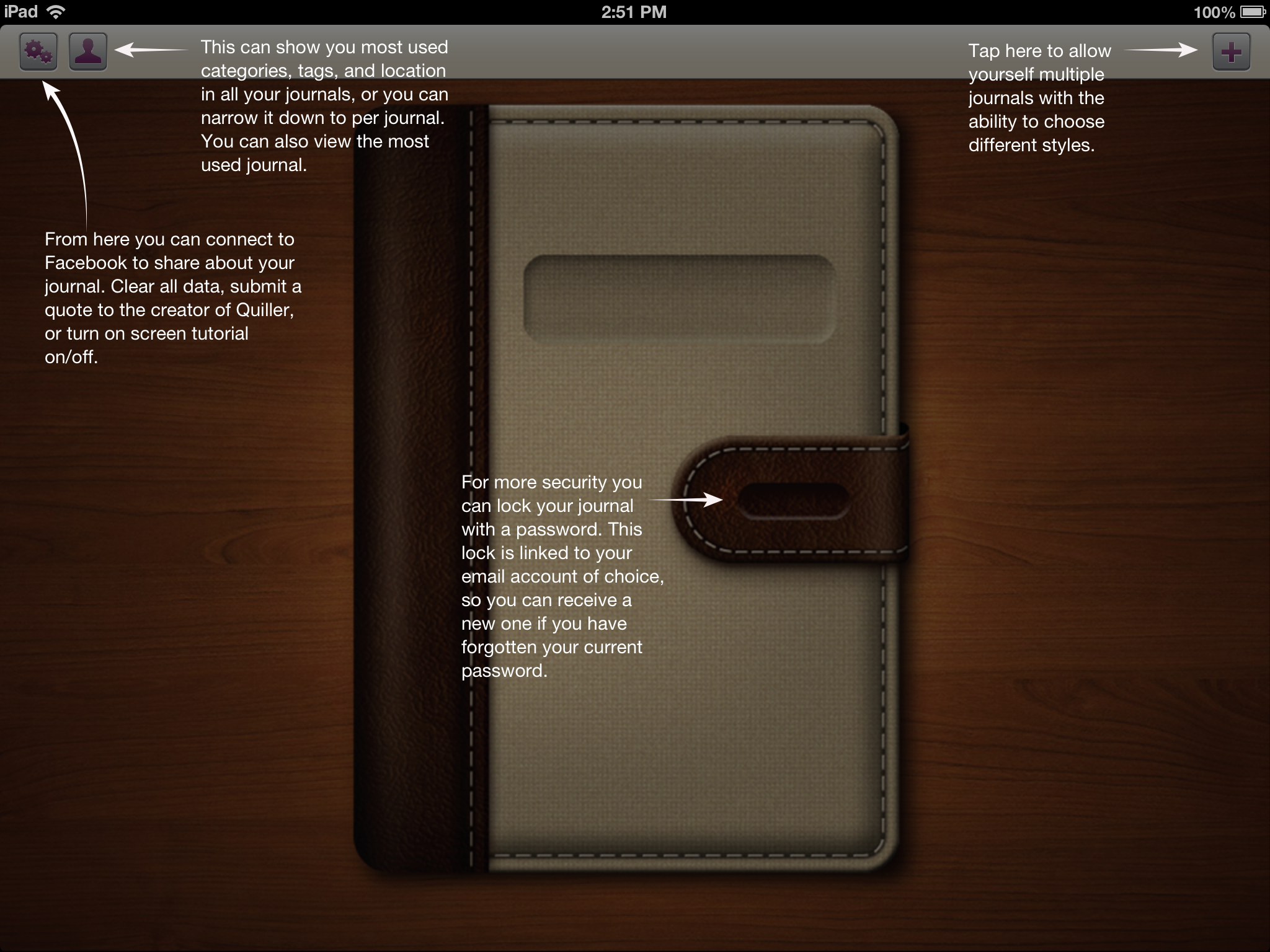
Figure 1: Creating a new journal.
Oh, and if you forget your journal password, you can have it reset via email, so that you never get locked out of your journal.
To understand what’s meant by “prompt-driven,” refer to Figure 1 that shows you what a new journal looks like when you open it for the first time.

Figure 2: Starting your new journal.
As you can see from Figure 2, there are more prompts once you open your journal and begin or continue writing. My daughter left me a message back in June. Yes, I’ve been a bad boy in not getting this review finished months ago. Apologies all around. Better late than never.
To use the journal, simply follow the on screen prompts. It really couldn’t be any easier than that.

Figure 3: Your Personal Stats Page.
There is a very interesting additional detail that the designers put into Quiller: Personal Stats. To get to your personal stats, go back to the home area by tapping the Home icon in the app. Now tap the Person icon at the top of the screen to see a page similar to that in Figure 3.
The other very cool feature shown on this page is that you can export your journal entries as PDF or TXT files. This is an extremely valuable feature if you ever decide to publish or self-publish your writings.
Quiller, at $1.99, is not the least expensive app on the market but it’s certainly one of the finest that I’ve seen at any price. No ads to bug you or distract you. That’s worth 99 cents all by itself. Remember that any “free” apps that you get will probably have ads and those annoying “In App” purchase prompts.
Remember Quiller is prompt-driven not ad-driven.
Why it’s frugal: Quiller is a quality app that helps you get your thoughts down on “paper.” You might not save a bundle of money by using it but if your writing is good and you stick with it, you could become a published writer, if that’s your thing. Buying a quality product that doesn’t constantly tap you to buy something else is worth something.
Since you can create multiple journals and password protect them individually, you only have to buy Quiller once. That’s pretty frugal.
The only features missing from Quiller are the ability to allow you to write with a stylus–or something other than the keyboard and the ability to embed pictures or graphics either from external sources or from your own scribbles.
Review: 9/10
Recommendation: Buy it and write, write, write.
Mujjo iPhone 5 Leather Sleeve: Originals Collection (Review)
 iPhone 5 Leather Sleeve
Originals Collection
Mujjo
Retail 34.95 Euro/~$45.00 USD
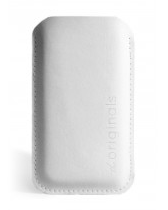
If you prefer to keep your iPhone naked, then the new Mujjo iPhone 5 sleeve is just what you need to protect your investment when it’s not in use. This all leather, vegetable-dyed sleeve will provide you with all the protection you’ll need from scratches, drops, dirt, dust, and smudges from carrying around in a pocket, a briefcase or a purse.
The Mujjo sleeve is a quality product. It is not a cheap knock-off. It’s real stitched leather, subtly stamped with “The Originals” on one side to show that the product is part of Mujjo’s Originals Collection.
The sleeves, also available for the iPhone 4/4S, come in beautiful ivory white or natural brown. This review covers the white sleeve.
Don’t confuse this sleeve with a protective case. This sleeve is protective but you have to remove the phone from the case before you use it. You also can’t use the case with other protective cases, although you could use a screen protector with this product with no trouble. This case is for those of us who prefer to use our phones naked.
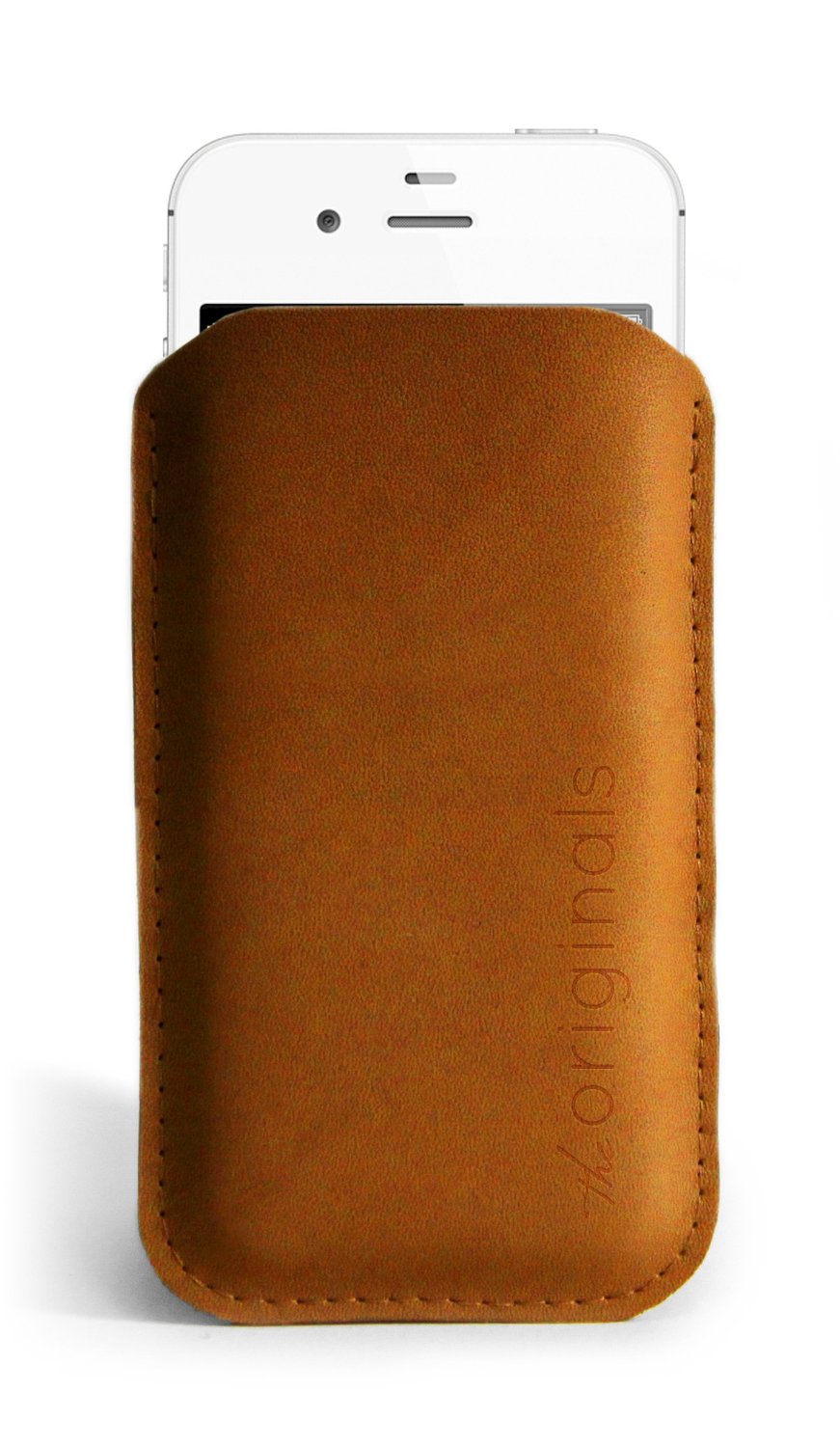 The price of the sleeve is not cheap at around $45.00 USD, it’s a fashion statement as well as a protective element. Why not have something a little posh as well as useful? After all, isn’t that what fashion is all about?
The sleeve holds your phone tight so that there’s little chance of it slipping out on its own. You’ll feel confident in its protective capability while you’re running for a taxi or bumping into strangers on the bus or subway.
On a funny side note, neither my wife nor my daughter “get” the purpose of the sleeve. Both of them looked at the product and simply asked, “Why?”
The “Why” is simple to answer: It’s a statement–a statement about who you are and about quality products. No one needs expensive rims on a car, $300 Prada sunglasses, a $75,000 Mercedes, or a $45.00 iPhone sleeve. It isn’t about need. To be perfectly honest, I don’t need an iPhone 5. I want an iPhone 5, therefore I have an iPhone 5. If you’re a person who loves quality accessories, then you will want the Mujjo iPhone sleeve as well. Seriously, I have to ask, who wouldn’t?
The Mujjo Originals Collection accessories also make great gifts. Everyone loves a quality gift and if you have someone in your life who has everything else, get her or him one of these beautiful and useful sleeves.
It’s frugal because it is a quality product that will last a very long time. Plus, it protects your valuable phone from damage during transport between uses. There’s nothing more frugal than protecting your investment in something you already have.
You’ll love the Mujjo iPhone sleeve at any price. It’s sleek, it’s fashion forward, it’s leather, and it’s an original. What more do you need or want?
Review: 9/10
Recommendation: It’s the nicest iPhone sleeve that I’ve seen and if you like using your phone without being wrapped up in a rubber case, then this is the ultimate accessory for you.
The iProp Universal Tablet Stand: The Return of the Bean Bag (Review)
 iProp Universal Tablet Stand
iProp
Dockem
$29.99 Retail, $29.99 Amazon (Prime qualified).
When I first heard of the iProp Universal Tablet Stand (iProp), I didn’t know what to think. I have seen other stands and, in fact, I have one that is a bit awkward to use and only works on rigid surfaces. But the iProp is cool in that it can sit comfortably on just about any surface including laps, tables, beds, chairs, floors, and carpet, because it conforms to the surface with its “bean bag” construction. And who doesn’t love bean bag stuff?
The iProp does its job well. In my house, we have iPhones, iPads, and iPad minis and they all work very well with the iProp. My daughter Maria loves the iProp and uses it for reading and working with her iPad mini for everything except video games. Apparently you need to hold the iPad for that.
The iProp has several clever features but our favorite is that you can stash your earbuds and power cable into the zipper pocket for safe keeping and handy access because you don’t want to disturb others while you watch YouTube videos. And you certainly don’t want to run low on power during the all-important Minecraft world creation.
I like to use the iProp to hold my iPad while using my Apple Bluetooth Keyboard. It works much better than the aforementioned rigid stand. I can use the iProp up close and it’s the perfect height to avoid neck strain during my long hours of article writing. The iProp makes writing on the iPad pleasant.
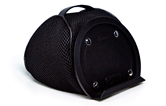 The iProp currently is available in two colors: Silver (Light Gray) and Black. It is lightweight at just 7.4 ounces and its small footprint (5.9″ x 7.1″ x 5.9″) makes it easy to carry or pack.
Although I’m not sure why, but the plastic tablet rest/holder detaches from the rest of the unit with snaps. Perhaps it does so for convenience if you should need to wash the iProp or for more compact packing. But, in any case, it’s there as an added feature if you should need to separate the two pieces.
The iProp adjusts to minimize glare from your tablet and to accommodate your optimum viewing angle. Just mash it around like you would any bean bag type product until you’re satisfied. You’ll find the iProp stable and comfortable to use no matter how picky you are.
From a quality perspective, the iProp is very well made. I’m impressed with the construction and apparent durability. The product feels good in your hands and is something that you’d be proud to use in public settings such as lunch, bookstores, presentations, seminars, group meetings, or at home. This product will outlast many generations of iPads.
I can honestly recommend the iProp as a phone or tablet accessory. I use it in the kitchen to hold my iPad when I’m on allrecipes.com concocting a new creation for my family.
I love the iProp and so does my daughter who will probably take it to her room and never allow me to touch it again.
 The iProp is frugal because you will only need this one product to hold your tablet or phone, regardless of manufacturer. The iProp is compatible with Apple products, Androids, the Microsoft Surface tablet, and all mobile phones.
Maria’s Review: 10/10
My Review: 9/10
Recommendation: If you need a tablet or phone stand, get the iProp.
Rocksteady XS 1.5 with Speakerphone: First Impressions
 Rocksteady XS 1.5 bluetooth portable speaker with Speakerphone.
Killer Concepts, LLC.
$89.99
Question: What has the exact dimensions of the Rocksteady XS portable bluetooth stereo speaker but with even more cool features?
Answer: The Rocksteady XS 1.5 with Speakerphone.
And if I told you that the new Rocksteady XS with Speakerphone has jawdropping sound, you’d have to believe me. After I paired the new XS with my iPhone 5, I turned on my music to test it for the first time. It was one of those “unboxing” experiences that I didn’t record with video. Thankfully so. The queued song just happened to be a classic recording of Iron Butterfly‘s “In-A-Gadda-Da-Vida” and the first few notes of the intro made me jump and I almost dropped my iPhone. Jawdropping (or phonedropping) is a good description of that experience. My heart was still pounding a few minutes later when the song switched to Flyleaf’s hard-hitting “All Around Me.”
My kids, who are all on summertime vampire slumber hours, all three hit my office door at the same time to find out what the heck was going on. When I showed them the new XS and the fact that I could receive phone calls on it, they all responded, “Cool.” They also looked as if I had just run over their iPhones in the process. (They obviously wanted me to tell them it was for one or more of them) I waved them away while I continued my play–, ahem, research with the new XS.
Ordinarily my kids and my wife all make fun of me and my tech gadgetry. When I showed my wife the Speakerphone feature of the new XS, she picked up the XS and started walking away with it. “Hey, I’m not done with that. I’m writing a review.”
She returned it to me albeit reluctantly. I also told her that the new XS isn’t exclusive to my phone or a single device anymore. You can bluetooth connect two devices simultaneously and, like my Nissan Cube, the new XS remembers the last four devices paired to it for easy connection later.
The new Rocksteady XS with Speakerphone’s other notable features:
Battery Life: >10 hours
Distortion Free > 85dB
Charge USB devices with the USB port
3.5mm Line in music playback
USB stick music playback
Bluetooth streaming music playback
Control music and phone from phone or XS
Bluetooth 3.0 and no pairing PIN
Tough all-aluminum case
Replaceable rechargeable Lithium ion batteries
Longer, higher quality cables (1m USB and 1.2m 3.5mm cable)
And one notable feature that they forgot to tell me about in the literature: Killer sound. Of course I understand that marketing people don’t use phrases like “freakin’ killer” or “blow you away” but wow, just wow. You have to hear it to believe it.
OK, what they did say about the sound quality is this: Proprietary air channels inside to augment the sound range and volume using patent pending air channeling and membrane technology.
Uh, yeah, that’s what I meant by “blow you away” quality. I just didn’t get all geeky with it.
The sound grabs you by the throat and pounds your head. That’s a better way of saying it. And it’s not just the volume, which is important but the clarity and quality of the sound is unreal. I’m glad I don’t understand the magic behind it because I like it. I’m no sound expert but the tone is excellent and I never got any distortion even at the highest setting.
The sheer volume and clarity on this little device is one that could quite possibly drive your neighbors crazy–and if you knew my neighbors, you’d know that’s a pretty short drive.
For the highest setting, I turned my phone’s volume all the way up and then tapped the XS volume + button several times to get the most from it.
Remember the days when party DJs used to bring all that crap with them? Well, frankly, unless you have a huge auditorium, you could start your own DJ business with a phone and two or three of these new XSs. The XS would be really cool for street musicians too who don’t want to lug around a bunch of sound equipment. If I were a street musician, I’d use two of them and I’d have all the attention–even in Las Vegas, where you’ll have street performer overload after a stroll on the strip.
I compared the sound on this little device to my expensive HD TV and there’s no comparison. (I’m going to figure out a way to play my TV through it and give you an update).
The whole point of any sound device is to give you a great listening experience. The Rocksteady XS with Speakerphone will do just that. You’ll be impressed.
But its other features make it a “must have” pairing with your phone or other bluetooth-capable audio devices.
A note about the speakerphone feature. The microphone is located near the Pause/Stop button on the top of the XS. Apparently it’s pretty sensitive because my wife who answered my phone with it was standing about six or more feet away after she pressed the Pause/Stop/Answer/Hangup button. We could both hear each other just fine through it. I think the capability to receive calls through the XS is my personal favorite feature. Well, other than the incredible sound quality, it’s my favorite feature.
The Rocksteady XS 1.5 with Speakerphone is a great value. It is a stand-out in its class and you’ll be happy with it. As of this writing, Amazon.com is out of stock on it, so that should tell you something. It tells me that you’ll be lucky to find one and you should grab it when you do.
My highest recommendation and highest rating: 10/10
In the, “Why is it Frugal?” category, the Rocksteady XS 1.5 with Speakerphone is frugal because it does everything you want it to. In other words, it is the single best device to pair with your phone that I’ve seen in a while. It is more than just a portable speaker, it’s a companion. It’s what you need and its features make it a bargain.

 Techopedia
- An error has occurred; the feed is probably down. Try again later.
Datamation
- Google and NextEra Strike AI-Powered Grid Deal
- NYT Sues Perplexity AI in Copyright Conflict
- Cloudflare Outage Affects Major Websites
- OpenAI Forces AI to Confess Its Lies
- OpenAI Declares Code Red as Google’s Gemini 3 Threatens ChatGPT
- Coupang Breach Exposes 33.7M South Koreans’ Data
- ChatGPT Celebrates Third Anniversary
- Asahi Group Reveals Findings of Cyberattack
- OpenAI Discloses Mixpanel Security Incident Affecting Some API Users
- Firefox Zero-Day Flaw Exposed 180M Users

 The Frugal Networker
You must be logged in to post a comment.