Archive
Embracing BYOD and BYON to Reduce Risks
 By Sarah Lahav, CEO, SysAid Technologies
The “bring your own device” (BYOD) trend has received a lot of attention in business circles, but BYON – “bring your own network” – is another security risk IT teams should be working proactively to address. In fact, BYON is a far graver threat to corporate security than BYOD, and the best way to counter the risks associated with BYON is to fully embrace BYOD.
Company IT professionals and security officers are right to be concerned about the risks of BYOD and BYON: Lax security practices such as failure to use strong passwords can put sensitive company data at risk when it is stored on employee devices. And the use of unsecured BYON connections can leave confidential data exposed when employees transmit messages or log in to company portals.
But trying to address the risks associated with BYOD and BYON by banning the use of personal devices in the workplace will ultimately prove to be a nonstarter. An increasingly mobile workforce is transforming the way business is conducted, and always-on, always-connected mobile devices are driving the change. In fact, industry analyst Gartner predicts that by 2017, half of employers will stop providing devices to employees altogether and require staff to use their personal devices on the job.
The reason many companies are embracing BYOD is that, in theory, it delivers a win-win: Employees win because they get to use the devices they choose that are increasingly an integral part of their daily lives, and employers win because BYOD expands access to employees and increases job satisfaction. But without robust IT support, neither employees nor employers can achieve a clear win. Instead, employees take chances with company data via BYON connections, leaving employers exposed to more liabilities, which transforms a potential win-win into a lose-lose proposition.
BYOD is inevitable. The IT team’s customers – their employer and its employees – are increasingly demanding the flexibility it delivers. So to address the risks, IT needs to embrace BYOD now, while the trend is evolving, and prepare for emerging technologies like wearables, which will affect enterprise security in the future.
IT departments can counter the threat of BYON by providing WiFi access for employee-owned devices, which gives IT professionals greater control over security. IT departments can provide across-the-board support for social platforms and apps, which will give them a chance to review security protocols. In return for enabling IT to gain greater control over device and network security, employees will receive support, creating a win-win scenario.
In a rapidly evolving technology environment, many IT teams are struggling to keep up, looking for ways to protect their companies and provide the services their customers demand. The BYOD and BYON trends pose daunting challenges for IT, and it’s understandable that the first impulse would be to try to keep the risks at bay by banning the use of personal devices on the job. But these trends aren’t a passing fad: BYOD is a sea-change in IT.
Because the use of personal devices in every facet of life is gaining momentum and will be bolstered by emerging technologies, the time is now for IT organizations to embrace and manage the change. As is often the case in business, identifying what the customer demands and shifting strategies to meet their requirements turns out to be a smart move – for the company, for the customer and for those involved in providing support.
Introducing the Microsoft Migration Accelerator for Azure
Announcing the limited preview of the Migration Accelerator (MA), for Azure. Spawned from the technology of Microsoft’s InMage acquisition announced July 11th the MA is designed to seamlessly migrate physical, VMware, AWS and Hyper-V workloads into Azure. It automates all aspects of migration including discovery of source workloads, remote agent installation, network adaptation and endpoint configuration. With MA, transitions into Azure can occur in mere minutes!
MA changes the cloud migration paradigm by offering:
- Heterogeneity: With MA you can migrate workloads running on a broad range of platforms such as VMware, Microsoft Hyper-V, Amazon Web Services and/or Physical servers within your environment. MA can support workloads running on Windows Server 2008 R2 sp1, Windows Server 2012 and Windows Server 2012 R2 operating systems.
- Simple, Automated Migration: The MA portal allows you to automatically discover your enterprise workloads, remotely from the cloud. With few clicks you can configure end-to-end migration scenarios. MA allows you to test your workload in the cloud without impacting the existing on premise production workload, offering the ability to validate workload functionality before a cutover is performed.
- Migrate Multi-tier Applications: MA boasts the unique ability to migrate multi-tier production system with application level consistency, orchestrated across tiers. This ensures multi-tier applications run the same in Azure, as they ran at the source. Application startup order is even honored, without the need for any manual configuration.
- Continuous Replication, Least Cutover Time: MA for Azure provides full-system replication including the OS and application data. This continuous replication and in-memory change tracking reduces the cutover time to mere minutes, minimizing impact to production workloads.
How MA works
MA uses multiple components to orchestrate your migration project as shown below:
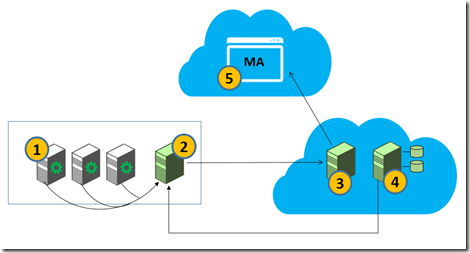
- Mobility Service: A light weight (guest based) centrally deployed agent which gets installed on source servers (on-premises physical or virtual) to be migrated to the target virtual machines on Azure. It is responsible for real time data capture and synchronization of the selected volumes of source servers to target servers.
- Process Server (PS): A physical or virtual server that is installed on premise. It facilitates the communication between the Mobility Service and target virtual machines in Azure. It provides caching, queuing, compression, encryption and bandwidth management.
- Master Target (MT): A target for replicating disks of on premises servers. It is installed within a dedicated Azure VM in your Azure subscription. Disks are attached to the MT to maintain duplicate copies.
- Configuration Server (CS): Manages the communication between the Master Target and the MA Portal. It is installed on a dedicated Azure VM in your Azure subscription. Regular synchronization occurs between the CS and MA Portal.
- MA Portal: It is a multitenant portal by which you can discover, configure protection and migrate your on premise workloads into Azure.
MA automates all critical processes required to migrate a source workload within an Enterprise into Azure Cloud. It can discover on premise workloads running in ESX/Hyper-V, AWS or physical servers. The workloads are discovered using a Process Server which is connected to MA portal. The discovered instances are listed in MA portal as shown below:

You can choose particular instance(s) from the discovered list of workload for migration. The next step is to install the Mobility Service (agent) on the source servers. This can be remotely orchestrated from the MA portal by choosing ‘Install Mobility Service’ option as shown below:

After installing the Mobility Service, you can configure replication for selected servers by choosing the Protect option. MA uses the configuration details garnered from the discovery process for the protected source servers to determine and provision the most suitable sizing for the environment within Azure. In addition, the target VHDs are provisioned on the Master Target. Once replication is setup, synchronization of the on premise server disk to the target VHD in the Azure cloud begins.
Now, that you have configured the initial sync, wait to ensure the initial replication is complete. After initial replication, select the Migration option from the Cloud Services menu.

From the list of protected servers that appear under Protected Application, select the “protection plan” or list of assets you wish to migrate.

Once you choose a protection plan it will appear under Migration > Selected Hosts. Click Migrate to start the migration process.

You can now monitor the progress of migration under Migration Scenarios > Migration Status.

After successful migration, Virtual Machines are created in Azure Cloud. You can now logon to the migrated VMs to validate if the running instances on the cloud is identical to your source.
Summary
In summary, MA offers an unprecedented level of automation to provide seamless migrations of heterogeneous assets, into Azure.
Key Highlights:
- Automated asset discovery and migration – MA portal orchestrates the discovery and migration of workloads from a single pane of glass.
- Migration cutovers to Azure in minutes – continuous replication and in-memory change tracking significantly reduce cutover time.
- Self-provisioned target Azure VM’s – Target VMs are dormant during synchronization saving compute cost and are then automatically provisioned during cutover.
- Heterogeneous platform support – support for broad range of environments and platforms.
- Continuous replication – lightweight agents on the source servers continuously replicate all changes to target ensuring near zero downtime during migrations.
- Multi-tier application support – migrate your multi-tier production system with application level consistency orchestrated across tiers.
- Target VM Network and Endpoint Adaptation – support for automated network adaptation and endpoint reconfiguration.
- Integrated compression, encryption and bandwidth management.
To get started visit Microsoft Migration Accelerator and sign-up for preview.
Former employees: Gone but (passwords) not forgotten
 Contributed Article: by Joe Siegrist, Founder and CEO of LastPass
Security is a buzzword right now – from cyber security to password security, it’s got everyone talking. When it comes to employees and passwords, IT departments try to take all the necessary precautions to ensure the business is secure. But what happens when an employee leaves a company? What security risks should businesses be aware of after an employee leaves (either voluntarily or otherwise)? Taking action following a change in staff is important for every company, but small and micro businesses may need more help. Many smaller businesses rely heavily on technology but aren’t big enough to support full time IT employees or departments, so may not know best practices for computer and data security.
While it’s best if your company has security processes in place before an employee leaves, in the event that they aren’t implemented, there are a few steps the company should immediately take.
- Deactivate the employee’s computer and accounts. Ideally, this should be done immediately upon termination. Change passwords for accounts they had access to, including conference lines and building codes. If you wait too long to do this, the ex-employee may have time to access company information to destroy, compromise, or steal from a remote site – even if their computer and other company devices have been confiscated prior to their departure.
- Collect all company devices, including computers, cellphones, tablets, security cards, credit cards, company manuals, and any other sensitive material or anything that provides access to that information. Preferably, this should be done before the employee leaves the office for the last time. The longer it takes you to deactivate accounts and computers, the more time an employee has to alter information (like file creation dates), completely delete files (evidence of misconduct or theft), or commit fraudulent acts (entering new data, loading new software, moving data). For the safety of your employees, it may also be advisable to change the locks and security access codes.
- Debrief the employee on confidentiality. If the employee signed a non-disclosure, non-compete, or non-solicitation agreement, review the document to make sure the employee is clear on their obligation not to reveal information on the company. Now that you’ve taken care of the immediate needs of securing your company’s information, you can focus on implementing some security structures that will not only better protect your business, but will also make your life easier the next time an employee leaves.
- You need better control of your passwords. How many passwords do you have between your personal and work life? My guess is that it’s more than you even realize, and ideally each of those accounts should have a strong, unique password. Unfortunately, that is too much for most people to remember and we end up writing our passwords on sticky notes or Word documents saved on the computer. This is a habit you and your employees need to break. Keep your passwords somewhere where you, and only you, know where they are and have access to – a password manager, an encrypted file, or a similar system that works for you. Make sure it is a place you can store unique passwords for each account and keep track of them. Now that all your passwords are in one, safe location, shred those Post-Its or delete the unsecured Word document. Finally, if you haven’t already don’t so, go through your accounts and make a unique password for each of them.
- You need better passwords. Speaking of passwords, they should be stronger. Hackers use computer systems that are able to recognize the “tricks” humans are likely to use to try to make better passwords. Use a complex combination of capital and lowercase letters, numbers, symbols, and if possible, stay away from dictionary words. Using a password generator that creates random, long passwords is the ideal solution.
- Your password isn’t safe if you give it away. Although account sharing can be convenient, it’s not worth the risks. It makes the company more vulnerable to attack since accounts are accessible by multiple employees (who may or may not have clearance to the information they are accessing). In general, it is important to know who has access to what information, when, and from where. If something unfortunate happens to the company, like theft or leaked information, there will be no way of telling which employee is responsible. If you give out the password to the wrong person and they cause damage – physical or reputation – you may be liable, which leads me to my next point.
- Maintain information on employee access and perform frequent audits. Set up a system that requires employees to use unique passwords to gain access to their accounts and information – ones that make it difficult to share password information. Access rights vary because of different security levels, job descriptions, and locations across the network. Maintain a secure database that keeps track of each employee’s access level, what they have access to, and passwords associated with that access. When an employee leaves, use this to create a checklist that their supervisor can use to disable their access rights, and limit their error in doing so. Perform audits on accounts and enforce a strong password policy that requires that they are changed frequently. And remember, threats don’t always come from the outside – there can be intentional theft, lost or stolen devices, or accidental exposure. The more you are aware of what information is where and who has access to it, the more equipped you will be to handle a disaster.
- Separate personal and financial data. Implement network segmentation to restrict inter-systems access. Set permissions within your network so that employees only have access to information as needed to do their job.
- Last but not least, educate your employees. Develop an effective educational system that informs employees about the dangers of password and account sharing. Explain why security is important and essential to the functions of the company, and how they can contribute to the security through their everyday actions.
Though there is an upfront investment in taking the time and effort to put better security measures in place, the return on investment is massive when mitigating the likelihood of incidents with departing employees, which can cause untold damage to company assets and reputation.
iRig Mic HD from IK Multimedia now shipping
August 5, 2014 – IK Multimedia, the global technology leader in mobile apps and accessories, today announced it’s shipping iRig® Mic HD, the first mobile digital microphone for iPhone, iPad, iPod touch, Mac and PC. The sequel to IK’s popular iRig Mic, iRig Mic HD is the perfect tool for singers, podcasters, online radio broadcasters, journalists, videographers, home studio enthusiasts and anyone else who needs to record high-definition digital audio on the go. iRig Mic HD comes in black and an exclusive silver version is available only from the Apple Store. Powerful, mobile and affordable: iRig Mic HD is the first handheld digital microphone for everyone.

Designed to perform
iRig Mic HD is the only mobile digital condenser microphone designed for live handheld performance and recording. It delivers high-quality digital sound via an electret condenser capsule, a 24-bit audiophile-grade A/D converter (with 44.1/48 kHz sample rate) and a built-in low-noise high-definition preamp. iRig Mic HD sports an easy-to-use gain control that allows for optimum audio capture at any sound pressure level, from the quiet whisper of an ambient room to the full blast of a loud rock concert. A multi-color LED provides at-a-glance monitoring of sound levels.
Professional plug-and-play sound
For superior recording quality on the move, iRig Mic HD plugs directly into the digital input of your iOS device. iRig Mic HD is compatible with the latest generation of iPhone, iPad and iPod touch devices via its included Lightning cable. An optional 30-pin connector is available for legacy iOS devices. You can also use it for instant plug-and-play compatibility with your computer using the included USB cable to connect to your Mac or PC (driver download required for PC).
Capture high-quality sound on the go with the first mobile digital microphone for iPhone, iPad, iPod touch, Mac and PC.
A full spread of apps
For immediate recording, iRig Mic HD comes fully equipped with a suite of powerful IK apps: iRig® Recorder for iPhone, iPad and iPod touch is a straightforward audio and editing app for field recording and interviews. VocaLive™ for iPhone, iPad and iPod touch is a powerful vocal effects and multi-track recording app with a suite of 12 professional real-time vocal effects. AmpliTube® for iOS, Mac and PC is the industry-standard guitar studio app that features ultra-accurate digital models of some of the world’s most desirable guitar amplifiers and effects. EZ Voice for iPhone, iPad and iPod touch is an easy-to-use vocal recording app that lets you sing-along and record with any song in your iTunes music library. iRig Mic HD is also compatible with a wide variety of third party apps, like GarageBand, Cubasis, ProStudio Vocal FX, MultiTrack DAW and more.
| The iRig Recorder App is available for free from the App Store on iPhone, iPad and iPod touch or at www.appstore.com/irigrecorder |
| The VocaLive App is available from the App Store on iPhone, iPad and iPod touch or at www.appstore.com/vocalive |
| The EZ Voice App is available for free from the App Store on iPhone, iPad and iPod touch or at www.appstore.com/ezvoice |
| The AmpliTube app is available for free from the App Store on iPhone, iPad and iPod touch or at www.appstore.com/amplitubefree |
| Register and download AmpliTube FREE for Mac and PC from the IK Multimedia site or at http://www.ikmultimedia.com/amplitubefree |
Pro sound at an affordable price
iRig Mic HD is so affordable that now anyone can capture high-quality digital audio on the go. Whether it’s broadcast interviews in the field, home recording in the studio, memo recording for the office or anywhere else audio needs to be captured.
Pricing and Availability
iRig Mic HD is now available from music and electronics retailers worldwide for $129.99/€99.99 (excluding taxes). An exclusive silver version is also available from the Apple Store.
For more information, please visit www.irigmichd.com
IK Multimedia. Musicians First.
About IK Multimedia: IK Multimedia is a computer music technology company that offers a diverse range of affordable and easy-to-use music production tools with great sound quality and a realistic look and feel. With millions of installations worldwide, the IK range has been adopted by musicians of every level, from beginners to professionals, to gain access to high-end, studio-quality gear from their computers or mobile devices. iRig®, AmpliTube® and VocaLive™ are trademarks property of IK Multimedia Production. iPhone, iPad, iPod touch, Mac and GarageBand are trademarks of Apple, Inc., registered in the U.S. and other countries. iPad Air, iPad mini and Lightning are trademarks of Apple, Inc. All other trademarks are property of their respective owners.
Acer Chromebook C720 (Review)
 Acer Chromebook C720
Acer, Inc.
Price varies from $179 to $379 depending on hardware and features.
$199 for the C720-2800 Reviewed model
My Acer Chromebook C720 is just cool. I know that’s not a very good review, but it is in fact, cool. I love it. If there’s one computer that I always grab for writing, Internet browsing, buying stuff online, watching YouTube videos, or connecting to remote server systems to do some heavy work, it’s my trusty, little C720 Chromebook. If you’ve ever read anything I’ve written on ZDNet in my Consumerization column, you know that I sort of have a love affair with Acer. Yes, I’m afraid that it’s a one-sided affair, but it’s one that I’ve carried on for years.
I’ve purchased many Acer products and have recommended them (successfully) to my in-laws and others. Someday I’ll provide a full list of the still living models, although I can tell you that I have one, a Linux system living in my personal data center (garage) that has to be ten years old. I digress. But you see my point? I love Acer products. And the C720 hasn’t changed my mind.
The C720 is what Chromebooks aspire (Watch that pun, Acer has a line of Aspire systems) to be. They’re lightweight, powerful, stable, durable, high quality, full of features, and competitively priced. What more can you ask for? Great support, probably. Well, Acer has that. Although I’ve never had any serious problems with any of my Acer products, the two or three times I’ve used Customer Support, the agent has helped me until the issue was resolved. I’ve never disconnected from one of the online chat sessions with anything but satisfaction in my head and a smile on my face.
My Acer C720 surpassed my Acer One Netbook as my favorite computer about a week after I got it. The C720 is so fast and responsive that rivals even the most souped-up computer that I’ve ever used. There’s never any hesitation, freezing, or “Not responding” messages. And I really don’t have the patience for “Not responding” messages.
And say what you will about Google, but the Chrome browser and the Chrome OS are the best things to happen to computers since Linus released Linux back in the mid-1990s. Google aced it, in my humble opinion, with Chrome and Chrome OS.

The C720 comes in a variety of models from the most basic to the very elaborate with a touch screen, super fast CPU(s), 4GB RAM, and a larger (32GB) internal SSD. The touch screen is the big bonus feature for the Chromebook. Chrome OS isn’t Windows 8, but the operating system and computing environment is still enhanced by touch screen technology for those of us who have become accustomed to tapping and swiping our phones and tablets. Alas, my C720 doesn’t have a touchscreen, but the trackpad is very good. Sometimes, if I’m working at a desk instead of on my lap, I plug in an external mouse and I’m fine.
- 11.6’’ (1366×768) display, 16:9 aspect ratio
- 0.75 inches thin – 2.76 lbs/ 1.25kg
- Up to 8.5 hours of active use 1
- New Intel® Celeron™ processor
- 100 GB Google Drive Cloud Storage2 with 16GB Solid State Drive
- 30-day free trial with Google Play Music All Access
- Built-in dual band Wi-Fi 802.11 a/b/g/n
- VGA Camera
- 1x USB 3.0, 1x USB 2.0
- Full size HDMI Port
- Bluetooth®4.0 Compatible
One thing to note about your Chromebook is that its operating system, Chrome OS, has been deemed the “most secure operating system” by Kevin Mitnick, the famous hacker turned security expert. He’s correct. I’ve performed multiple security scans over the network against the Chromebook and I can’t break into it. There’s just no available attack vector. In other words, you can feel safe using your Chromebook out in public because no one can scan your system, break into it, and grab your data.
Why it’s Frugal: The C720 is frugal for many reasons, but the most important one is features per dollar. You get a full, powerful computer for $200 that won’t require you to spend on hardware upgrades because of a newer operating system version every two years. There’s no spinning hard drive to fail on you. There’s very little heat generated from it. It requires very little electricity. It really requires no additional accessories to make it useful. And it’s an Acer product, which means that it will last for years. That’s frugal.
While your C720 doesn’t come with an Ethernet connection, you can purchase a USB-to-Ethernet network interface for under $20. There are no drivers to install or any issues. Plug it in and it works.
Welcome to the Real World (Book Review)
 Welcome to the Real World
Finding your place, perfecting your work, and turning your job into your dream career.
Lauren Berger
April 2014
240 pages
$16.99 Cover Price, $11.92 Amazon, $10.67 Kindle
Review Rating: 9/10
Lauren Berger is the founder and CEO of InternQueen.com as well as an author, speaker, and internship expert. Her latest book, Welcome to the Real World, is basically a Lauren Berger brain dump of what she’s learned in her years as the Intern Queen.
The book consists of ten chapters that are full of pertinent information yet very easy to read and to comprehend. I enjoyed reading Welcome to the Real World (Real World) and found that it would be helpful to anyone anywhere along the career path continuum, not just those new to the workforce.
Lauren gives you pointers on workplace behavior, appropriate dress, connecting with others, how to manifest your own personal ‘brand,’ how to organize yourself, and how to juggle all those things that you have to do. Her advice is practical and very much worth more than the few dollars of the book’s cost. Particularly valuable is the chapter titled, “Your Money, Your Finances, Your Life.” In my humble opinion, this should be the first chapter instead of ninth.
I have several reasons for stating that Chapter 9 should have come first: It’s by far the most important chapter for a young person (or a person of any age for that matter), it teaches real life lessons, it’s worth the price of the entire book on its own, and directness of the material.
To explain my “directness” reason, Lauren is direct and to the point in this chapter. There are no gray lines when it comes to finances. You must have discipline and you must have a plan. You have to handle money intelligently, no matter how much or how little you make. She gets to the point in each section without mincing words or adding any extra fluff. She tells it like it is. Read and heed her advice.
This chapter should be up front because young people have short attention spans. The phone buzzes with a new text message, a YouTube video distracts you, an email notification pops up, or you notice something happening on television, and you’ve lost your train of thought. If it were the first chapter, it would be read for sure.
So many young people get into financial problems and it takes years to recover from them. If you read and adhere to the advice given, you’ll be fine.
My favorite chapter, perhaps because of where I am in my career, is Chapter 4, How to Work Your Personal Brand. To me, creating, developing, and working your personal brand is the most important way that you can move up in your company or get a different job outside of your company. You should always be aware of how you portray your personal brand and how others perceive you. Wise advice from Lauren. Mark this chapter and reread it often. Some of the people she mentions pay thousands of dollars to ‘coaches’ to help them develop their brands. You don’t necessarily need to do that. Just read the chapter.
Finally, Lauren wraps it up with Chapter 10: Time to Get Personal, which is more or less a ‘care and feeding’ of you discussion.
In all, the book is very good. Lauren has a lot of good advice to give you and she teaches you how to put her advice into practice. I love the practicality of the book. Oftentimes, books written by what I’ll loosely call “motivational” types, don’t really do anything except boost the personal brands of the writer or alleged writer (most are ghost written, in case you didn’t know that).
If you hadn’t guessed already, I highly recommend Lauren’s book and her website, no matter where you are in your career. There’s something valuable for everyone. The book is a quick read. 240 pages is pretty short and you can manage it in a few evenings. Put down your cell phones and TV remotes and spend a few hours investing in your career.
Considering Crowdfunding? Check out The Ultimate Guide to Crowdfunding
 If you haven’t heard of crowdfunding by now, it’s not too late. Even if you have heard of it, you might not really understand it. The Ultimate Guide to Crowdfunding is your one-stop source for a lot of information on crowdfunding, successful crowdfunding projects, and the best sources/sites for crowdfunding. The Ultimate Guide to Crowdfunding is an infographic that has hyperlinks to more information about each topic, each source, and each story behind it.
At the top of the infographic, there are links for finding out exactly what crowdfunding is and an analysis of whether it’s right for your business.
On the infographic, you also have a profile of 14 of the top crowdfunding sites with an associated review and a success story.
One thing to note about crowdfunding is that you have to be motivated to raise your funds. It’s not a “set it and forget it” type of thing. And I want to warn you, the results in the success stories are not typical. They are big success stories. For all the projects that get funding, thousands more do not.
Kickstarter, for example, might be the biggest name out there, but in my opinion, it’s the worst of the lot because of its ‘all or nothing’ funding scheme. Again, in my opinion, Indiegogo is a much better site for funding those types of projects. I’ve seen too many good projects go unfunded on Kickstarter that would have benefitted from Indiegogo’s partial funding successes.
In other words, if you setup a $50,000 campaign on Kickstarter and you receive $49,999, you get $0. With Indiegogo, you get $49,999 or however much your contributors pledged toward your campaign. There’s also the problem of non-payment on some of these platforms. Some, like Kickstarter, take the pledges and hold them in escrow until the end of the campaign.
I have yet to use a crowdfunding site for any of my projects, although I’m pondering doing so within the next few months. I have contributed to a number of successful and unsuccessful campaigns on Kickstarter and on Indiegogo.
To setup a crowdfunded project, you have to offer your contributors ‘perks.’ Perks are tokens of your appreciation and incentives for people to contribute to your project. I usually don’t take the perks because I want the artists to receive all the funds I send them without strings and I don’t want them hassled with having to worry about perks when they should focus their energies on the projects that I’m funding.
Crowdfunding can be a great way to get your ideas off the ground, but remember that your contributors will hold you accountable for their earned perks and the project itself, so you’d better be prepared to deliver.
Generally, there’s no payback associated with crowdfunding, although I haven’t checked out all 14 of the sites listed on the infographic. The payback is the project. People like to contribute to something that’s bigger than themselves. Some people, like myself, like to contribute to artists and filmmakers to see just what’s possible through donations. It gives me the power to help people realize their dreams that otherwise they might not have the opportunity to do so.
If I ever win the lottery, I will set aside a portion of the money for artistic projects and endowments. I think that there’s no greater achievement in this world than to create. Whether it’s a mural in the ‘hood’ or a feature-length film, I want to see it happen.
But, this isn’t about me. It’s about the projects and their creators. Crowdfunding is an excellent way to put something into action. If you have the money, go to some of the listed sites, pick some projects, select your perks (if you want them), and fund some hope. If you, on the other hand, are someone who has a project in mind that crowdfunding is a fit for, sign up on one of the sites that’s appropriate for your project and get busy.
Remember that the perks you offer can be very small, such as mention on a website as a contributor. But, as the amount of contribution rises, so do the perk values. Some people offer all expenses paid trips to large contributors, special privileges to the project, part ownership, or some other creative perk. While this is not a review of one particular site/system over another, crowdfunding is a thing and it’s a good thing.
Your mission, should you choose to accept it, is to sign up, log on, create your campaign, develop your perks, and get busy on that project. And one of the ancillary requirements of your campaigns is that you let me know about them. No, I’m not kidding. I’ll even help fund some of them.
I’d like to thank Choice Loans for sharing this infographic.
The Brydge+ Keyboard for iPad (Review)
 Brydge+ Keyboard for iPad
Brydge
$99
I’ve reviewed several keyboards for the iPad and I’ve also refused to review some (You don’t see those), but the Brydge+ keyboard for iPad is a very fine accessory. I really like it. In fact, it’s rarely been off my iPad since I received it in the mail almost a month ago. Yes, I’m a bit slow with some reviews–not because of the products, but because I have so many in my queue to do. I have finally caught up to this one and I’m glad because I really like this keyboard. It matches my iPad perfect in material and in looks.
The Brydge+ is made of the same aircraft aluminum as the iPad itself. Same color, same weight, and same lines. In fact, you’d probably assume that it’s made by Apple, but it isn’t. The Brydge keyboard line began life as a Kickstarter project.
Their Kickstarter campaign is one of the most successful that I’ve ever seen. They asked for $90K and received almost $800K. Yes, you read that correctly. It can happen, even on Kickstarter, which I really don’t like. That said, it does work for some people.
The keyboard coupled with the iPad makes for a bit of heavy lifting. I’m pretty sure that the keyboard more than doubles the weight of the iPad. I also have the built-in speaker version which probably weighs heavier than the non speaker version. But if you’re used to carrying around a full-sized laptop computer, this little combo will seem lightweight to you.
The keyboard has keys that mimic the iPad’s Home button, lock button, music controls, brightness, search, and sound volume. The best additional functionality is that you can press the keyboard’s Home button and Lock button at the same time to take screenshots. That’s a great feature! It’s great because I have a hard time doing it with the actual iPad buttons. If my timing is a little off, either I lock the iPad or I close the App that I’m using.
One thing to note about the Brydge keyboard: the charge lasts a very long time. I’ve charged my iPad five or six times compared to two charges on the keyboard.
The keyboard pairs easily with your iPad and stays paired, even after prolonged non-use, it will stay paired. And by prolonged, I mean days not hours. If you haven’t had your keyboard paired in several days, just switch it on and tap a key. It might take a second or two to re-establish the link, but you really have to do nothing else to re-establish the pairing. I like that. I don’t like having to repeat the same process to pair a device with my iPad every time the two become disconnected. I consider such behavior a fail.
Your iPad slips into the keyboards clamps with the help of silicone rubber protectors that also hold your device with a pretty good grip. Don’t worry, it won’t slip out. You have to pull it out of the clamps. You can adjust the iPad’s angle from closed for carrying to 180 degrees flat. The clamps are sturdy and ready to work. When you have your keyboard attached, you can place your iPad/keyboard combination on an table surface safely because of the keyboard’s protective feet. Of course, the same goes for when it’s open and in use. Don’t worry, you won’t get yelled at for scratching someone’s mahogany table with your fancy thingamajig.
I’ve never had any problem with the Brydge+ keyboard from first use. The keys have a nice touch to them, good feedback, and no repeated characters. This is a well made product that’s durable, elegant in design, professional quality, and priced well for the market at $99. The non-speaker model is $79. For the extra $20, I say go for the speakers, especially if you have a hard time adjusting sound on your iPad to get the right volume.
The speakers are located at the top of the keyboard above the keys, which makes the sound project back to your ears very well because it bounces off the iPad and back toward you. I can tell from the craftsmanship, attention to detail, and key quality that a lot of thought went into this product. This is definitely not some thrown together gadget that’s meant to entice you, extract $100 from you, and then promptly leave its usefulness in the ad. The Brydge+ keyboard basically turns your $800 iPad into an $1,800 laptop computer that folds up into a neat little package.
The only negative I find with the Brydge keyboard is that, depending on your iPad’s generation (2,3,4), some of the function keys might not work. For example, on my iPad 4, the Internet key doesn’t work and neither does the Photos key that opens your Camera Roll. Minor issues to be sure, still worth mentioning.
Why it’s Frugal: The Brydge+ keyboard with speakers is a frugal choice because not only does the keyboard protect your iPad, when folded, it is an extremely functional device. It also uses very little power and requires very little intervention from the user. The keyboard offers you a laptop look and feel, with a design esthetic that says, “Made for Apple.” It’s a frugal choice for your iPad.
The instructions that come with your Brydge keyboard are clear and concise. You connect the keyboard in the usual way via your iPad’s Bluetooth settings and powering on the keyboard. To pair the speakers is not as intuitive and might require a try or two to get it right.
Press Ctrl-B on the keyboard and hold it until you hear four beeps, watch your iPad’s Bluetooth settings to confirm the pairing. I had to pair/unpair a few times before I got the hang of it. Now the unit pairs by itself without my intervention.
I’ve read a few other reviews of the Brydge keyboard and there are two points they mention that I’d like to respond to. First, they write that the back of the iPad isn’t protected. It’s true that the Brydge keyboard, when folded only protects the somewhat delicate glass portion of the iPad. You know, the most important part. The back of the iPad is made of aircraft aluminum like the keyboard. That is its protection.
If there were another protective cover, the unit would be even heavier. That, and the fact that nothing protects your laptop when it’s folded. I have yet to see a protective cover for a laptop except for carrying cases.
Second, they state the price of $99 as being high. If you read my other reviews, you’ll see that I do mention price often as a negative point for some of these products. However, I balance value with price. That is to say that I measure a product’s quality against its price. If the quality, design, and craftsmanship justify the price, so be it, as is the case with the Brydge keyboard. Its $99 price tag doesn’t detract from its functionality, ease of use, design, materials, features, and esthetic.
The Brydge+ keyboard with speakers is an excellent choice for your iPad. The keyboard operates on very little power. It looks good. It feels good. And the price is right. Check out the official promotional video to get a better look at it and its functionality.
Rating: 9.5/10
Recommendation: Once you use it, you probably will never separate your iPad from it again. Buy it from the Brydge keyboards website.
Buyer Beware: The Hidden Costs of Free Software for Nonprofits
 y Gretchen Barry, of NonProfitEasy.com
Cloud is Reshaping the World of Business for SMBs
 On Thursday, June 26, I participated in an hour-long IBM Business Insider Spreecast titled, “Cloud: Reshaping the World of Business,” where host Paul Gillin led the panel through a series of questions and thought points concerning Cloud and small to medium-sized businesses. There was also an associated Twitter Chat that used hashtag, #SMB4Cloud, that I participated in during the event. Though you can’t attend the live event now, you can click the link above and connect to the Spreecast and gain insight into the discussion that we had.
There were a few major highlights that sprang from the panel and participants. First, is the concept that mature businesses move slower to adopt new technologies than their newer counterparts do. Startups are especially onboard with new technologies, such as cloud computing, cloud storage, and Infrastructure as a Service (IaaS). Startups don’t always have the capital to purchase infrastructure and data center space that can run into the millions of dollars for the kind of computing power required to run high capacity applications, to store big data, to maintain a potentially huge number of customers, to supply adequate bandwidth, and to provide 24×7 service uptimes.
Startups have to leverage cloud computing, IaaS, and new technologies in order to get into the market and compete effectively against established businesses.
Second, cloud computing allows companies, at any stage of development, to get to market faster than is possible with traditional computing infrastructure. Provisioning times with IaaS is measured in minutes rather than in weeks or in months.
Third, using a cloud provider or managed service provider (MSP) allows a company to use expertise that might not be available within the company. MSPs also allows companies to leverage these skills that might be out of their salary range. SMBs can effectively compete on a scale and at a speed that wasn’t possible just a few years ago. Only large companies could move infrastructure, people, and skills fast enough and on a large enough scale to take on significant contracts. Cloud computing has opened up new possibilities and expanded business opportunities for SMBs.
Fourth, cloud computing offers a high level of simplicity for SMBs. There are services available that are very easy to use. If the business doesn’t require a lot of customization or specialized services, then cloud usage can be as simple as a few mouse clicks, which allows SMBs to use current employee skillsets to step into cloud services without the complexity.
Finally, the cloud transforms IT people into business people. Fixing computers and troubleshooting problems now shifts to a provider. IT people are now becoming more focused on business outcomes, customer satisfaction, and business growth rather than day-to-day break/fix and operational objectives of running an IT shop.
Panelists:
Paul Gillin – Paul Gillin Communications, Host.
John Mason – General Manager, Midmarket at IBM.
Laurie McCabe – Co-founder and Partner, The SBM Group.
Subbu Balakrishnan – CTO and Co-founder, Good.co.
One of the panelists noted that, “Cloud works for DIY and “Do It For Me” businesses alike.”
That statement covers the gamut of what cloud computing can do for businesses at whatever comfort or expertise level they have at their disposal. Although it’s difficult for some IT people, even CIOs, to see is that if your company isn’t an IT company, then there’s no reason to be in the IT business. Cloud makes it possible to be in the business you’re in, but have the computing power you need to run your business without becoming an IT business.
The conclusions from the Spreecast and the Twitter Chat can be summarized as the following:
- Established businesses must embrace cloud computing to remain relevant
- Startups and young businesses use new technologies and adapt faster
- Cloud computing enables a faster startup and faster presence for new services
- Cloud computing is transforming IT from a service to a business quality organization
- IaaS significantly shortens infrastructure provisioning times
- Cloud computing allows businesses to focus on business rather than on IT
Cloud computing, for some, is quite controversial, but few would argue that cloud isn’t transformative and a paradigm shift from business as usual. Businesses that want to remain relevant and those that want to become agile, or even virtual, should examine the possibilities of what cloud can offer them.
If you’re considering cloud computing for your business, check out IBM’s Cloud Computing Marketplace.
 This post was written as part of the IBM for Midsize Business program, which provides midsize businesses with the tools, expertise and solutions they need to become engines of a smarter planet.
I’ve been compensated to contribute to this program, but the opinions expressed in this post are my own and don’t necessarily represent IBM’s positions, strategies or opinions.

 Techopedia
- An error has occurred; the feed is probably down. Try again later.
Datamation
- USA₮ Modernizes American Payments with High-Impact St. Patrick’s Day Activation in Times Square
- Google and NextEra Strike AI-Powered Grid Deal
- NYT Sues Perplexity AI in Copyright Conflict
- Cloudflare Outage Affects Major Websites
- OpenAI Forces AI to Confess Its Lies
- OpenAI Declares Code Red as Google’s Gemini 3 Threatens ChatGPT
- Coupang Breach Exposes 33.7M South Koreans’ Data
- ChatGPT Celebrates Third Anniversary
- Asahi Group Reveals Findings of Cyberattack
- OpenAI Discloses Mixpanel Security Incident Affecting Some API Users

 The Frugal Networker
You must be logged in to post a comment.