
The myCharge RazorMax 6000mAh portable charger
April 6, 2015
Comments off
 Razor Max RZ60G-A Portable Charger
myCharge
$69.99
I’ve reviewed so many portable chargers that sometimes I feel like saying no to the next pitch for one, but the myCharge Razor Max RZ60G-A 6000mAh portable charger (RZ60G-A) caught my eye. It caught my eye because it has not one but two USB ports for charging and it’s extremely thin. In fact, it’s just a little larger, heavier, and thicker than my iPhone 5.
The RZ60G-A is made of anodized aluminum that’s rugged and lightweight. Its dimensions are a diminutive 4.4 in x 2.6 in x 0.5 in and 0.38 pounds (6 ounces), which is perfect to stash into a purse, back pocket, any pocket, tote, or in your car. After seeing and using this charger, my days of lugging around brick sized chargers is over. It’s so small and lightweight that I actually I thought that I hadn’t brought it along in my camera bag on a recent video shoot.
 It powered my iPad 4 and my iPhone 5 simultaneously all day long without issue. I never ran out of power for them. When I returned home, I plugged it in and I still showed two lights, which means that I only used about 50 percent of its capacity. 6000mAh is a lot of power. The charger’s two built-in USB ports deliver a combined 2.4A output–enough for a lot of charging.
Notable Features:
- Smart-sense: ensures complete device compatibility
- Max-power: maximum power transfer from powerbank to device
- Power-stay: maintains battery power for up to 1 year
- High-density battery: the smallest and lightest powerbank
- Safe-cell: provides the highest level of battery safety
- Pass Through Charging: will charge the powerbank and connected device simultaneously
Why it’s Frugal: The RZ60G-A charger is frugal because it’s small, but it packs a huge amount of power. 6000mAh is enough to power multiple devices (up to two at a time) for at least an entire day. For $69.99, it’s a little pricey, but it delivers exactly as advertised.
The RZ60G-A’s capacity is 22.2Wh, with input at 5VDC and 0.7A to 2.1A, and output at 5VDC and 2.4A maximum.
 One interesting feature of the charger is that you can simply shake it to make the LEDs light up to tell you how much power you have left. Clever. That feature was an unexpected surprise for me. The RZ60G-A comes with its own mini USB charging cable and a Quick Start Guide. The unit comes with a one year limed warranty and is fully charged when you receive it.
In all, the Razor Max RZ60G-A Portable Charger delivers a powerful punch of on demand power where ever you take it and for any device that you can plug into a USB connector/charger.
Rating: 8.5/10
Recommendation: Buy it for all your charging needs. It’s portable and powerful.
Categories: Product Review
iPad, iPhone, mycharge, phones, portable charger, portable power, Razor Max, RZ60G-A, tablets, USB
Introducing the Grip&Shoot Bluetooth Smart Grip for iPhone
April 6, 2015
Comments off
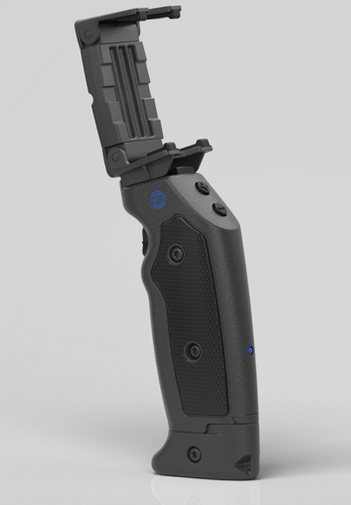 The Bluetooth Smart Grip for iPhone
Grip&Shoot
$99.95 (Black or White)
I’ve seen several iPhoneography camera holders, mounts, and brackets to give the iPhone a more DSLR-type experience. The Grip&Shoot is a little different in that it’s not just a one-trick pony product. It is actually multiple products in one. The current Grip&Shoot (G&S) retail package comes with an iPhone 5 Shooter Case, an iPhone 4S Shooter Case, a Bluetooth Smart Grip, a Grip Adapter, a Carrying Pouch, a Wrist Lanyard, and a late edition includes the JawZ Universal Adapter.
Because there are so many parts to discuss, I’ll cover each one in its own subsection.
 Shooter Cases
The Shooter Cases that come with the G&S package are pretty standard case fare with the exception of the G&S attachment on one side. The cases are actually suitable for regular use. The attachment portion isn’t really obtrusive or inconvenient, so you basically get a free case in the bargain. Two cases currently come with the G&S package, one for the iPhone 4S and one for the iPhone 5.
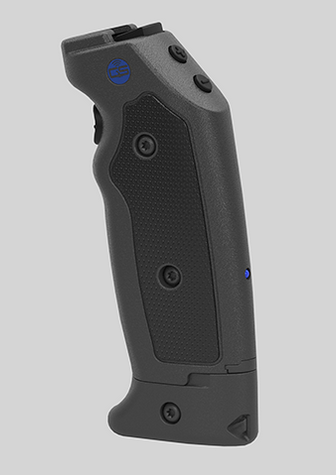 Bluetooth Smart Grip
The Smart Grip is really the meat and potatoes of the G&S package and even if you lost all the other parts, this one has the functionality you purchased. It is the Bluetooth connection, the trigger, and the connector for the Shooter Case or for the JawZ universal adapter.
The Smart Grip also has a (+) and a (-) button for zoom in and zoom out functions. You can take photos or start/stop video through the G&S app. The G&S device does not work with any other app on your phone. You must use the G&S app for functionality.
The bottom portion of the G&S Smart Grip is removable and can act as a remote stand for your phone for selfies, group shots, or just to place somewhere that isn’t convenient to stand. You fire the camera from the Smart Grip and you have a stable surface that kind of acts like a tripod, only a lot more portable. It works as a remote shutter release over 100 feet away from the phone.

Compatible devices:
iOS
- iPhone: 4S and newer
- iPod: 3rd Gen and newer
- iPad: 3rd Gen and newer
- iPad Mini: All supported
Android (Kit-Kat 4.4 and newer)
- Nexus 4
- Nexus 5
- Asus Nexus 7
- HTC One
- Samsung Galaxy S4, S5
- Samsung Galaxy Note 3, 4
- Samsung Galaxy Tab2
- Samsung Galaxy Ace3
- Sony Xperia
 Grip Adapter
OK, I’ll admit that I was going to criticize the G&S for missing one of the most important features of any photo-related device: a tripod interface. Well, wouldn’t you know it…the G&S folks put one on there. It’s part of the so-called Grip Adapter attached to the bottom of the removable stand. You can screw this into a tripod mount on any device that has one and you can also put the G&S device on a tripod after removing the Grip Adapter. So, it really serves two purposes. Three if you count the third one as I wasn’t able to criticize the lack of a tripod mount. You can unscrew the Grip Adapter with a penny and the screw is designed to remain in the adapter and not fall out onto the ground to be lost forever. Indeed, the G&S people thought of everything.
Why it’s Frugal: The G&S package is frugal because it’s so much more than simply a phone grip to steady your phone for pictures. It’s the full package created by someone who knows photography and phoneography. Honestly, it might be the best sub $100 accessory you can buy for your phone. It has everything. If you tried to buy the package components separately, you might end up spending close to $200. It’s a frugal value.
 Carrying Pouch
The Carrying Pouch is a magnetic closure protective case that not only stores your G&S, but also your phone. It features quick open/close flaps for you rapid shooters, a belt clip, and two belt or strap loops for attaching to a purse strap, a camera case strap, or your belt. It has a plush, non-abrasive interior covering to protect your phone and your G&S. Have I said that the G&S designers thought of everything?
Wrist Lanyard
For those of you who are really rapid shooters, the package includes a wrist lanyard that loops through an opening in the Removable Stand. Put it on and let ‘er swing. Handy, thoughtful, and sturdy.
 The JawZ Universal Adapter
Finally I get to my favorite G&S accessory: The JawZ Universal Adapter. I already have a case for my phone. I don’t want to remove it to use it with the G&S, so I thought, “Gee, it would be nice if…” And, of course, before I could finish that sentence, I found the adjustable JawZ universal adapter that fits just about any phone, including the case. <Sigh> What’s a techno gadget critic to do when there’s nothing to complain about for a product? Just enjoy the product that was obviously made by someone who knows photography/iPhoneography as well as I do?
As painful as it is to do it, I have to admit that the G&S package is everything you need to be a successful phoneographer. For phone photos and video, I’m not sure it can be beat. And yes, I’m an Apple product bigot here because it was originally touted as a gadget for the iPhone, but apparently the G&S geniuses have extended that functionality to other phones as well. Great job guys. I know it’s not really a criticism, but it’s the best I have for one–that G&S extended its reach to customers other than those who spend a lot of money on Apple stuff.
If you couldn’t tell, I really like the Grip&Shoot Bluetooth Smart Grip package. I think it’s well worth the $99.95 price tag and that anyone who’s into phoneography needs to get one.
Rating: 10/10
Recommendation: Buy it. It’s versatile, rugged, and is an awesome phoneography accessory.
Categories: Product Review
Bluetooth, gripandshoot, iPhone, IPhoneography, phoneography, Photography, photos, smart grip, video
Fun in the sun with Secur’s Solar Media Player (Review)
April 3, 2015
Comments off
 Solar Media Player SP-5000
Secur Products
$49.99 MSRP
If you’re like me, I play music on my iPhone–a lot. Seriously, I connect it to my car’s stereo, to earbuds at work, or to a Bluetooth speaker when I’m outside messing with my plants or partaking in the never-ending task of weeding the flower beds. The problem with most music playing options is that they are a terrible drain on your phone battery. Plus the battery in the speaker also drains during music play. I might enjoy two hours-ish of continuous music playing with a standard Bluetooth speaker when I’m outside. The folks at Secur Products have solved this problem with a solar-powered, water-resistant media player, the SP-5000 Solar Media Player (SP-5000).

Not only can you get continuous music for as long as the unit is in the sun, your phone is safe inside the water-resistant case. Now I don’t have to leave my phone and Bluetooth speaker on the back porch far away from where I am in my fairly large back yard. I have to turn the speaker up so loud on standard Bluetooth speakers that it disturbs the neighbors who apparently have nothing better to do than to complain about my loud music. After all, I play good stuff and they should just enjoy it–it’s free. I digress, but you get the point.
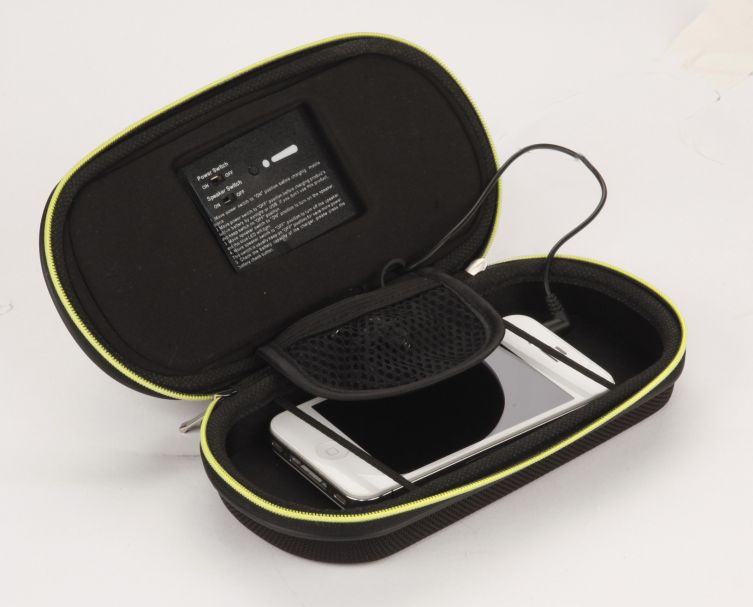 The SP-5000 can sit closer to me and I don’t have to worry about a little dirt or even a little water that might accidentally drip onto it. I can also arrange the case so that the speakers point toward me for better (and lower) volumes, so that I don’t disturb my neighbor’s beauty sleep, groundbreaking scientific experiments, or focus on their great American novel efforts.
The SP-5000 charges itself while in the sun while you’re playing music instead of draining its battery too. If your phone battery begins to fade, you can plug it into the power adapter and charge/power your phone while you play music–all for free thanks to the sun’s abundant energy resources.
Product Details:
• Stereo speakers and amplifier
• Rainproof, dustproof, shock proof smart phone case
• Solar powered power bank
• Power bank charges speakers as well as smart phones
• Includes USB and stereo connectors
• Works with most MP3 players and smart phones including the iPhone 6 and Samsung Galaxy S5
• Includes carabiner for hanging
• Stereo Media Player – lets you play music from your smart phone or MP3 player
• Solar Powered Amplifier and Power Bank – charges by the sun
• Rainproof Protective Case Protects Your Smart Phone – perfect for the outdoors
Why it’s Frugal: The SP-5000 Solar Media Player is frugal because it not only protects your phone from the “elements,” but being in the sun is good for it. It charges your phone, protects your phone, and is a mobile music center all in one neat little, well-made package. At $50, it’s a steal–I mean, a frugal choice.
This product isn’t Bluetooth, so don’t be confused by my mention of Bluetooth speakers. You have to plug the attached 3.5mm jack into your phone, power on the unit, and then power on the speakers.
One reason that I say that the SP-5000 is frugal, although I often complain about product pricing, is that this unit is only $50. Most, if not all, Bluetooth speakers, that offer no charging feature and no protection for your phone. So, really you’re getting a very tough case, multiple cables, a solar charger, and two, 3Watt speakers for very little cash. If that’s not frugal, then please spend more money for a lesser product.
Nerd Stuff/Technical Details:
• 2000 mAh power bank
• 5.5V/70 mA solar panel
• DC input – 500 mA
• DC output – 500 mA
• 2 x 3 watt stereo speakers
• Battery charge indicator
• Water resistant protective case – IPX 64
• Size 7.28″ x 3.74” x 1.77″
• 8.3 oz
The Secur Solar Media Player SP-5000 is a well-made, quality product that is three products in one: media player (speakers), a protective case, and a charger. I’m not sure what else you can ask for in its price range.
Rating: 10/10
Recommendation: It’s a great product at an excellent price and if you ever listen to music outside, you need this. Strong buy.
About Secur Products
Secur Products is dedicated to constant product development and technological innovation to produce leading edge products for emergency preparedness, outdoor sports, portable power solutions and alternative energy. Secur Products is a division of Maverick Industries, Inc. based in Edison, New Jersey. For over 30 years, Maverick has been a leading manufacturer and distributor of household electronics and electric appliances.
Categories: Product Review
iPhone, phone case, secur, securproducts, solar media player, solar power, sp-5000, speakers, weatherproof
Lantronix xPrintServer Home Edition (Review)
April 3, 2015
Comments off
 xPrintServer Home Edition
Lantronix
$99.95
The xPrintServer Home Edition box reads, “iPad & iPhone Printing Made Easy. Print From All Your iOS Devices To Virtually Any Printer.” And Lantronix has adhered to ‘truthful advertising’ because the xPrintServer Home Edition (xPrintServer) does exactly that and it does so without any fancy setup or hassles. It couldn’t be any easier to do so, with the xPrintServer’s two-step process.
- Connect the xPrintServer to power, your network, and printer.
- Print from your iPad, iPhone, or computer.
In addition to printing from your iPad and iPhone, you can also print from Macs and Windows computers. However, Windows 8 seems to have a problem with Bonjour printing and my Mac mini works at first and then doesn’t print again. Windows 7, iPad, and iPhone work great with it.

I’ve used other print servers, from the small generic and inexpensive ones on up to the ones costing several hundred dollars and the Lantronix xPrintServer Home Edition falls into the category of an individual home use unit as advertised. I wouldn’t use it for a small business unless all of my employees used Windows 7 and iPads because it doesn’t seem to work consistently with Mac and I can’t get it to work with Windows 8.x at all.
That said, I’m not sure whether the failure to print is with the Lantronix unit , the Bonjour printing software, or perhaps with my somewhat outdated HP OfficeJet J3680 All-in-One printer. Since it does print with Windows 7 and our iPads, I have to assume it is the Bonjour printing software.
The xPrintServer takes up very little space. It has the approximate dimensions of an iPhone 5, but about two to three times the thickness. It does require its own AC power source, a network connection, and a USB connected printer plugged into it. So, while the unit is small, it still requires three wires for power and connectivity. That’s not a negative statement; just a fact.
The xPrintServer does what it’s supposed to do: print. For those systems it works with, it’s never failed or hesitated to work in any way.
Why it’s Frugal: The Lantronix xPrintServer Home Edition is a frugal solution for home users who need to print from a short list of supported devices to a single printer and have no other means to do so. The $99.95 price tag is a little off-putting, but still within the range of a home-oriented gadget.
Here’s how it works from an iPhone:

Lantronix 1: Open File for Printing
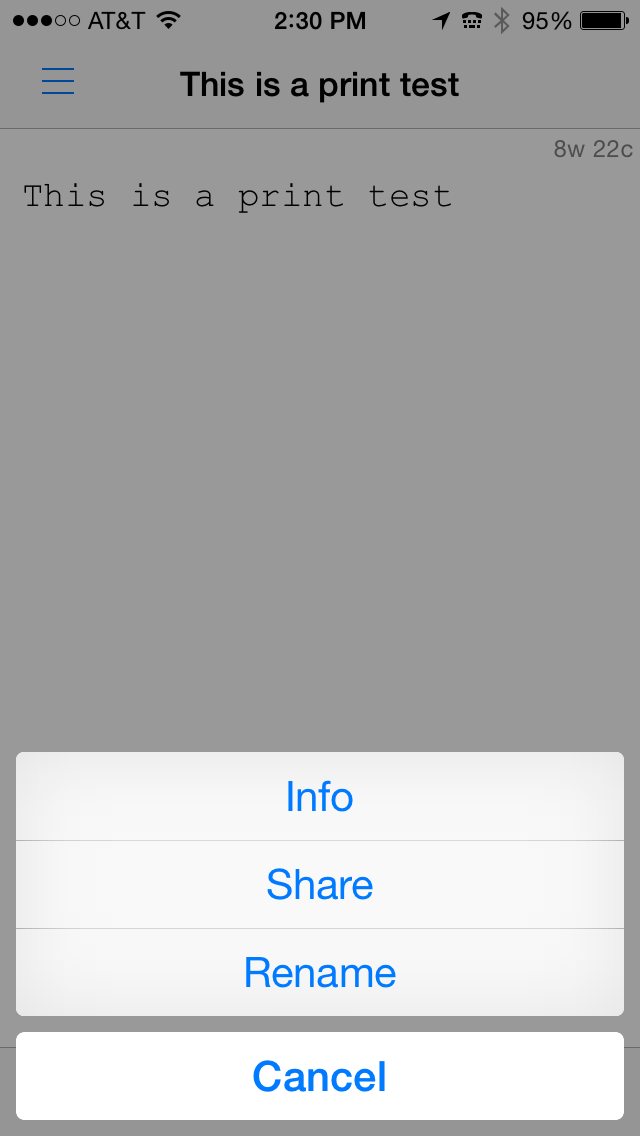
Lantronix 2: Share the File
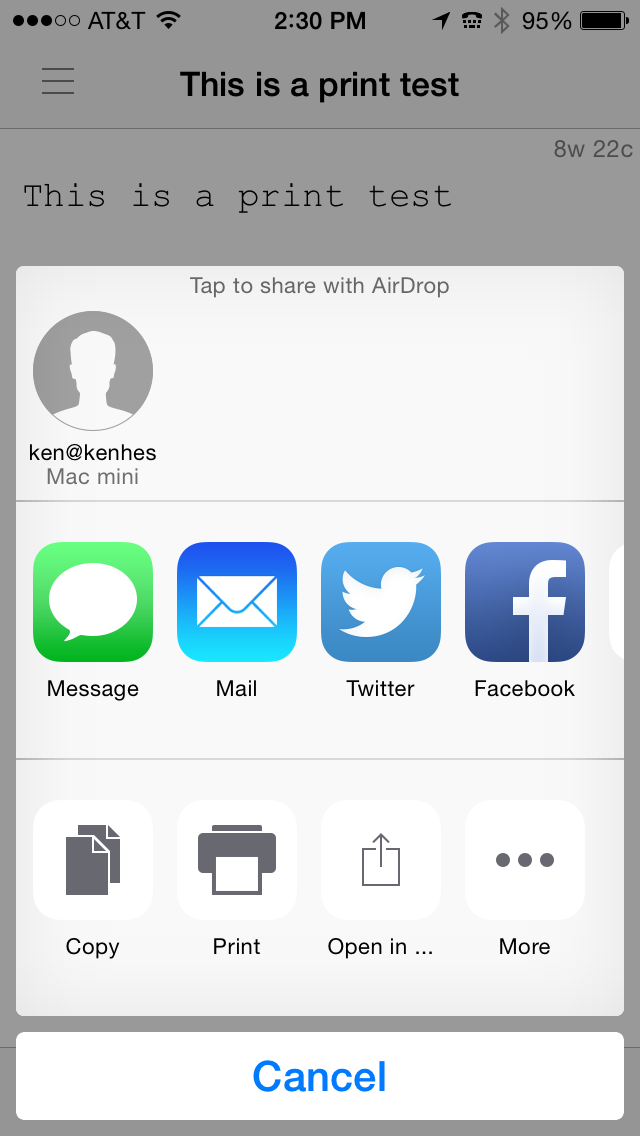
Lantronix 3: Select Print

Lantronix 4: Tap Print to Send to Printer
Open an app. I’m using PlainText. In that app, select a document to print. See Lantronix 1.
Tap the Share button at the bottom center of the screen to see the options given in figure Lantronix 2.
Tap Print from the screen as shown in Lantronix 3.
Finally, be sure that your printer is listed and then tap Print to send the file to the printer.
Apple devices should find the printer automatically and display it for you. The printer might not appear immediately, but if you attempt to find the printer by running through these four steps and then try again in a minute or two, the printer should appear for you to use.
The Lantronix xPrintServer is a good device and performs flawlessly. It offloads print jobs quickly and never hesitates or loses a print job. The web interface is simple and intuitive to use–that is, if you ever need to use it, which you probably won’t. Just know that it’s there if you need it.
Overall, I like the xPrintServer. I just wish that support for Mac OS X and for Windows 8 was there, but again, I don’t think this is necessarily the Lantronix product’s fault. I think it’s with the Bonjour software.
Rating: 8.5/10
Recommendation: If you have Windows 7 and iOS devices, buy it; it works.
Categories: Product Review
iPad, iPhone, Lantronix, Mac OS, printing, USB printer, Windows, Wireless, wireless printing, xPrintServer
Using the FlashPoint 180WS StreakLight (Review)
April 2, 2015
Comments off

Flashpoint 180WS Streak Light
Adorama
$299.95*
Flashpoint Blast Power Pack BP-960
$249.95*
*Bundles available at significant discounts.
If you’re a professional photographer, you need great lighting. You tell stories with light, but you can’t always have the perfect natural light that you want when you want it. You have to use continuous or flash lighting. For flash lighting, there are a lot of options. However, for those field trips, you need something powerful, rugged, portable, and long-lasting. That’s where the pack narrows down to the leaders. Among the clear winners is the FlashPoint 180WS Streak Light (180WS).
[The 180WS stands for 180 Watt-Second — a standard measure of flash power]
The 180WS has to have a power source, such as the pictured Flashpoint rechargeable Blast Power Pack BP-960 (sold separately).
- Powerful 180ws Guide Number 197 (ft ISO 100) with standard reflector
- Super Soft and Even Light from Replaceable Bare Bulb
- Stable Color Temperature
- Fast Recycle Times from with Flashpoint BLAST POWER PACK or Quantum Turbo
- Precise output from 1/128 to Full in 1/3 stop increments
- Four Modes : Pure Manual [M], Slave Normal [S1], Slave Filtered [S2], Multi/Stroboscopic with calculator [RPT]
- Auto Focus Assist Beam
- Switchable Audio Recycle
- Built in Optical Slave
- Wireless Remote Control USB Port
- 2 Sync Jacks PC & 3.5mm
- Overheat Protection Circuitry
- Vertical and Horizontal Head Adjustments
- Umbrella Mount Adapter
- Tough Secured Hot shoe Mount
- Full Line of Optional Light Modifiers from Snoots to Beauty Dishes
 The 180WS is a powerful flash unit, but it can also be “dialed back” to a mere 1/128 full power to give you just enough light to fill in those subtle shadows, even in bright sunlight.
Why it’s Frugal: The 180WS and Blast Power Pack are true professional tools at an extremely good price ($349.95 for the 180WS/BP-960 bundle). The 180WS Creative Collection is also a value at $549.92. This professional lighting model and power pack are frugal because they offer fully adjustable, immediate flash lighting at a very affordable price point. It would be a challenge to find the power and the features of this combination anywhere at twice the price.
The 180WS is easy to setup and to use from a tabletop standalone, to tripod mount, to on-camera hot shoe mount. It is surprisingly lightweight and not bulky nor clumsy to use. The handy belt clip on the Blast Power Pack is a nice feature, although you can also use the lanyard to hang it around your neck.
The 180WS is so powerful and so versatile that my videographer and I use it off-camera, mounted on a tripod using a wireless remote shutter to fire it. We have used it for more than 300 shots on all power settings, in a variety of situations, without ever having to recharge the Blast Power Pack. It never failed us nor did it ever hesitate to fire on demand.
Flashpoint StreakLight 180WS Specifications:
- Strobe Output – 180 watt seconds
- Guide Number – 60m/196ft for ISO 100
- Power Supply – External Lithium Battery and compatibles*
- Recycle Time – 0.05 – 2.6 seconds
- Flash Duration – 1/300 – 1/10,000 sec
- Recycle Indication – Ready Light and Switchable Audio
- Light Coverage – Approximately 65 Degrees / 28mm coverage on 35mm full frame format
- Vertical Angle – -15 to 90 degrees
- Horizontal Rotation – 0 to 270 degrees
- Slave Eye Sensitivity – Greater than 33 feet / 160 degree radius
- Color Temperature – 5600K +/-200K
- Housing Size – 8 X 3.55 X 2.75 in
- Body Weight – 19.4 oz /1.50 lbs
The unit gives you the characteristic flash “beep” when the unit is ready to fire again. There was never any hesitation during any of our shoots. It consistently recharged immediately. Fire. Beep. Fire. Beep. Fire. Beep. In fact, the 180WS responded so well to our demands, I think we’re spoiled in never having to wait for a flash unit to power up again.
And I love the ability to adjust the power from 1/128 in 1/3 stop increments because it’s easier to bracket your shots. It’s great to get just enough light without blowing out the subject or the background when using it for bounced lighting.
The 180WS comes with a parabolic reflector and a set of two diffusers to further soften the light source, although the bare bulb delivers an even light coverage for objects that are as few as five or six feet away.
The flash head adjusts from horizontal to vertical and locks into place. The parabolic reflector also locks into place so that there’s no chance of it falling during movement if you have it camera-mounted. The head also rotates 270-degrees so that you can aim the flash to create any kind of special effect or bounce reflection that you want. You can also purchase an umbrella reflector setup for the 180WS so that you don’t have to have a separate umbrella light unit.
I really like working with the 180WS and the Blast Power Pack. It’s impossible for either of us to work with standard on-camera flash anymore after this experience. The 180WS is so versatile, usable, rugged, and powerful that every professional should carry one in his or her gig bag. Both units are small enough to fit into a carry on bag or into a standard camera tote.
Every time we pull out the 180WS to use, we get a universal “Wow” from whomever is within sight of it. During one video and photography shoot, we had several other photographers approach us to see what exactly it was that we were using. Of course, Joseph and I were only too happy to show it off and give our own demonstration of the product. For a moment, we both felt like we were selling the units at a trade show. It gave us a personal boost to show off the high end equipment we were using and I think gained us a little street cred in the process.
Don’t let me put you high-end amateurs or prosumers off, this unit would be great for team sports shots, school events, family photos, vacation photos, or even your first foray into the pro world. The combination is affordable enough for amateurs and pros alike. Amateurs will love the ease of operation and although the unit looks intimidating, it isn’t. It’s easy on, easy off, and adjustable with the touch of a single finger and fire, fire, fire, as fast as you can press the shutter button.
Honestly, this is the finest product of its type that I’ve ever used and I’ve used a lot of flash units over the past couple of decades. Quality really makes a difference. This unit is an investment that is a real winner. And you can take that from two guys who’ve eaten a lot of lemons over the years. The 180WS and Blast Power Pack are a winning combination.
Rating: 10/10
Recommendation: Pros: It’s a must have–you can’t afford not to have one. Amateurs: This could be exactly what you’ve been looking for to take your photography to that higher level.
Note: I will soon have our own video up demonstrating the 180WS and the BP-960. My camera battery went dead during my original video. Too bad it wasn’t powered by the BP-960.
Categories: Product Review
180ws, Adorama, blast power pack, bp-960, Flash (photography), Flashpoint, lighting, Photography
The next generation of the industry’s #1 vaporizer has arrived
April 2, 2015
Comments off
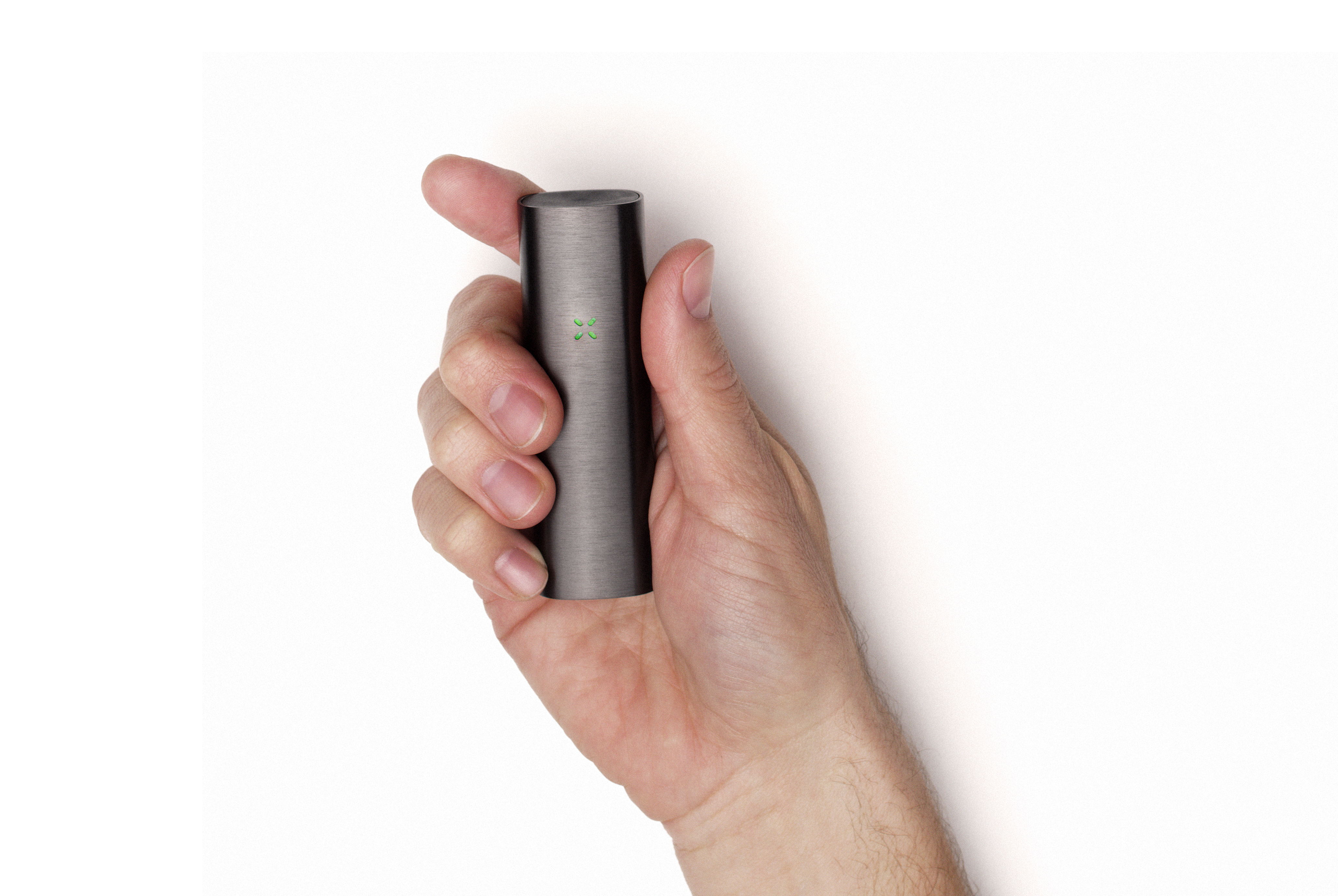 San Francisco, CA (April 2, 2015) – PAX Labs, Inc., developers of products that provide a cleaner, modern alternative to smoking, today announced the launch of PAX 2, the most innovative vaporizer yet. PAX 2 is the most pocketable and premium loose-leaf vaporizer available, revolutionizing the vaping industry and offering consumers the smoking alternative they’ve been looking for.
[Stay tuned for my upcoming review–I’ll link it here when posted. -Ken]
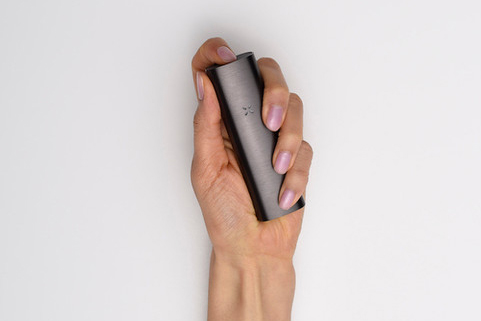 PAX 2 is 25 percent smaller, with up to 30 percent longer usage time, making it a must-have item for today’s on-the-go consumer. In addition, PAX 2 is the most technologically advanced vaporizer available, offering an intelligent, lip-sensing technology that automatically adjusts the temperature when you’re using it, avoiding unnecessarily heating your material, and providing consistent draws. PAX 2 also has a streamlined profile with an integrated and enhanced LED communication interface.
Check out the PAX2 User Guide
“When we introduced PAX over two years ago, we defined the vapor market selling over half a million devices. Since then, our team of product engineers has redesigned PAX to meet consumers’ every need,” said James Monsees, co-founder of PAX Labs, Inc. “Today, we are launching the most intelligent, premium and highest performing vaporizer in the market.”
PAX 2 features:
- Auto-cooling
- Self-optimizing temperature and power
- Two, interchangeable mouthpieces, with an integrated power button
- Motion and lip-detection heat system
- Simple, elegant design
- User friendly interface
- Four temperature settings
- AC and USB charging options
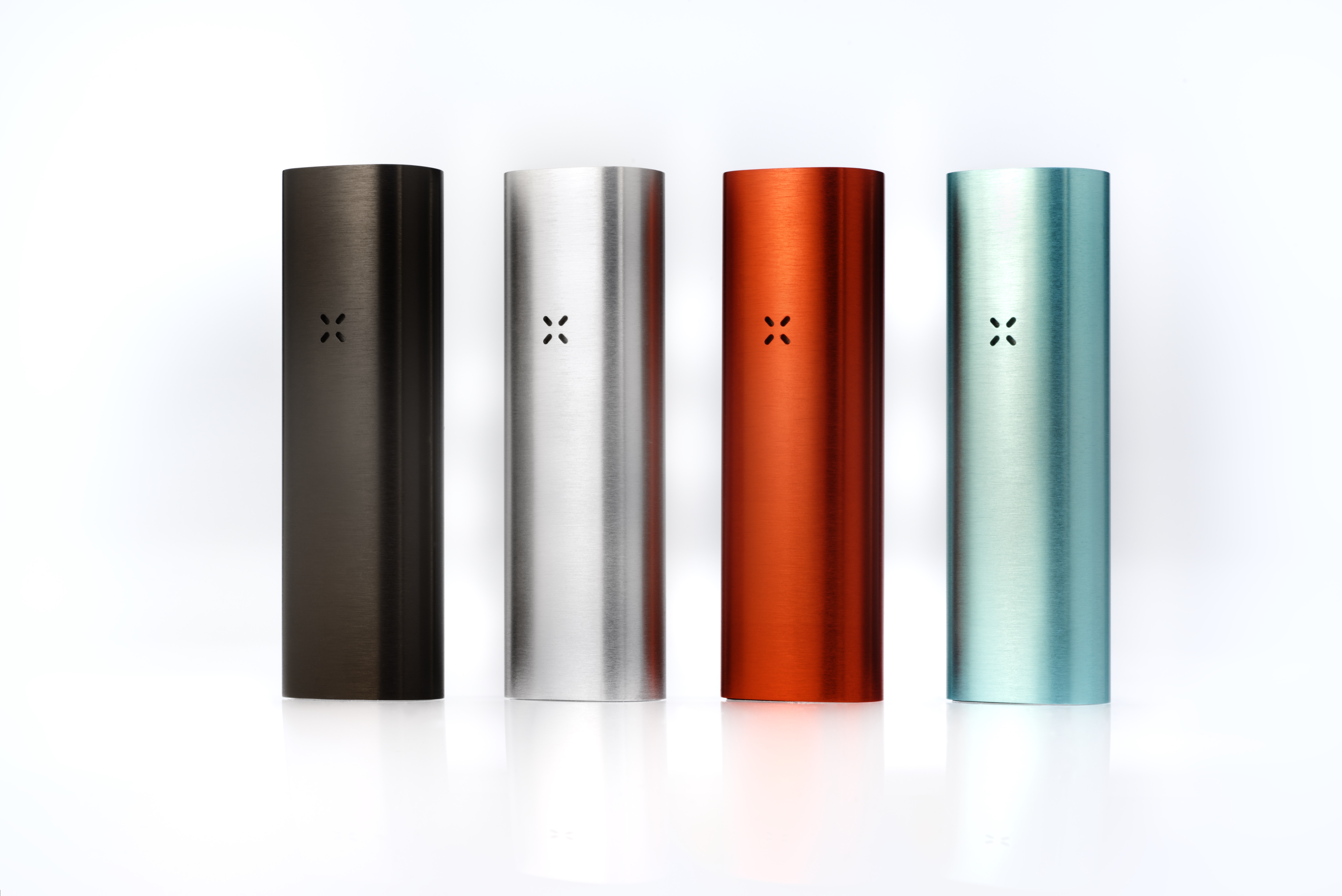
- Available in four colors: topaz, flare, platinum, charcoal
- 10-year warranty
- Heats in as little as 45 seconds
- Hidden features and fun modes for sharing with friends
 “Our connection to Silicon Valley is evident in our designing PAX 2 – addressing customer feedback, integrating hardware and software, and delighting users. We’ve even included hidden features, functionality and games into our LED interface. PAX 2 demonstrates the thoughtful design and advanced technology we are known for, offering consumers all of what they loved about our original PAX, plus more,” said Monsees.
PAX 2 heats loose-leaf material, instead of burning it, releasing active ingredients and natural oils into a subtle vapor. This process produces no combustion, eliminating secondhand smoke, optimal for social settings and public places where smoking is not permitted.
PAX 2 retails for $279.99 at select stores nationwide and is available for purchase online at www.PAXvapor.com.
About PAX Labs, Inc.
Founded in 2007 by two Stanford Design Program Masters program graduates, PAX Labs has reinvented the smoking experience, fusing applied design principles with technology. Headquartered in San Francisco, the company produces innovative premium vaporizers that provide a cleaner, modern alternative to smoking.
For more information, please visit www.PAX-Labs.com.
Categories: Press Releases
pax, pax-labs, pax-labs.com, pax2, paxvapor.com, smoking, smoking alternative, vaping, vaporizer
Got Security?
April 1, 2015
Comments off
 Security is a topic that’s on everyone’s minds these days. And there’s a good reasons for it: Security is important. Now, that might sound like a tremendous understatement, but it’s the truth. In fact, the truth is that security is the top concern for most of the world’s businesses. It should be. Every day you read about another significant breach of a major retail chain, of a bank, or even of a government site. Prominent companies are under constant attack from so-called “black hat” or criminal hackers whose sole purpose is to compromise data, steal valuable data, and to expose vulnerabilities in your security.
If you think that you’re safe, for whatever reason that you’ve told yourself, you aren’t. If you’ve ever had a fraud alert from a credit card company or your bank, then you realize how vulnerable you really are.
Unfortunately, as a customer of a restaurant, of a clothing store, of an online vendor, or of your corner market, you’re vulnerable to credit card and, ultimately, identity theft. While the point of this post is to inform you, rather than to scare you, please note that the threats are real and that you should take more care and practice vigilance in the use of your identity, including your credit cards, debit cards, and online accounts.
If you own a business, you owe it to yourself and to your customers to make every effort to prevent breaches of your company information, your personal information, and your customer’s information. It’s not easy to do by yourself. There’s all kinds of advice, good and bad, on the Internet about how to protect yourself, how to recover from identity theft, and how to go on the security offensive for you, your business, and your family.
Bad information is worse than no information at all. You can put yourself at greater risk by listening to alleged experts than you can by playing it smart and hiring a security consultant who can find out exactly what the bad guys can find out about you and your business.
It works something like this: If you want to find out how vulnerable your house is to break-ins, who would you hire–a clean-shaven, upstanding, taxpaying citizen who’s never been arrested for breaking and entering or would you be smarter to hire a reformed bad guy to tell you how it’s really done? If you’re smart, you’ll hire the person with a criminal background who’s gone straight to figure out where you’re vulnerabilities are.
On the same hand, if you want to test your company’s or your personal security, you should hire someone who’s hacked for a living–in the criminal sense.
That’s the service I’m offering you. I have a select group of former black hat hackers as my associates who’ll put your security through its paces. Further, we’ll help you mitigate the flaws we find* and tell you how to fix the problems.
Here is a partial listing of our services:
- Identity fraud checking/fixing
- Employee Social Engineering checking/fixing
- Website Penetration/Vulnerability analysis
- Company penetration/information grabbing
- Training and prevention
If you’re not 100 percent sure of how vulnerable you might be, here are some examples:
About four years ago, I bought a cake from a local bakery and used my debit card for the purchase. One of the workers there used my card to buy pizza and some other things that he’d had delivered to his girlfriend’s house. Once I found the fraudulent charges, I tracked him down, via his girlfriend and confronted him. I won’t go into detail, but I did make an impression. The bank investigated and made good on the losses to my account.
That scenario is common, except for the part where you get to confront the perpetrator. Typically, the guilty party is so far away that you’ll never find him. Bad for you, but great for him.
My wife paid my son’s technical school tuition with a credit card only to find later that we’d been charged an additional $1,800 for services that we’d never heard of, much less purchased. We contacted the vendor and explained the situation and they promptly removed the charges.
I receive calls from unknown numbers on a weekly basis, trying to have me answer so that my phone can be charged bogus fees or to verify my number for fraudulent charges. I Google the numbers to verify their legitimacy. So far, all of them have been sources of fraud.
Yes, these things actually happened to me/us. These are only three examples and we’re only one family in 750 million that’s had our accounts or cards compromised. Think about the repercussions of poor security on you, your family, and your business. Your integrity and reputation, not to mention your credit score, are at risk. It’s made us all a lot smarter about how we transact business these days.
So that you realize that we’re trying to help you, I’m going to offer you a free list of 10 things you can do to make yourself more secure today.
- Google yourself – Contact all of the “public information” carriers/resellers and have them remove your information from their databases.
- Do Not Call lists – Go to https://www.donotcall.gov/ and register to have your phone numbers removed.
- Mall survey cards – Never fill out one of those mall survey cards or enter any contest at a mall or other retail establishment.
- Unrecognized phone numbers – Never answer calls to your cell phone when you don’t recognize the phone number.
- Use cash – Carry cash with you and avoid using credit/debit cards as much as possible.
- Email attachments – Don’t open email attachments that don’t make sense and don’t respond to those emails.
- Nigerian Princes – Never respond to any email from a Nigerian Prince who wants you to deposit money in a bank account for him.
- Ignore “You’re a Winner!” emails – If you didn’t enter it, you didn’t win it.
- Passwords/SSNs – Never give your passwords or Social Security Numbers to anyone over the phone.
- Account-oriented emails – No online service will ever request your password or a login via email.
If you’d like to discuss your security or your security concerns, you may contact me via email at ken@kenhess.com. I’ll be glad to setup a time to call you and discuss your concerns and how we can help you get a handle on your personal or business security. Don’t be a victim. Don’t be a statistic. Learn to fight back by finding out what the bad guys know about you and how to fix it.
*Ask about our 50 percent rebate plan.
Categories: Articles, Hot Topics
black hat, compromise, cybersecurity, ddos, doxing, email, fraud, hacking, phishing, security, social engineering, white hat
ESG Validates Transporter as a Private-Cloud File Sync and Share Appliance that Delivers the Privacy, IT Control and Data Protection Business Users Demand
April 1, 2015
Comments off
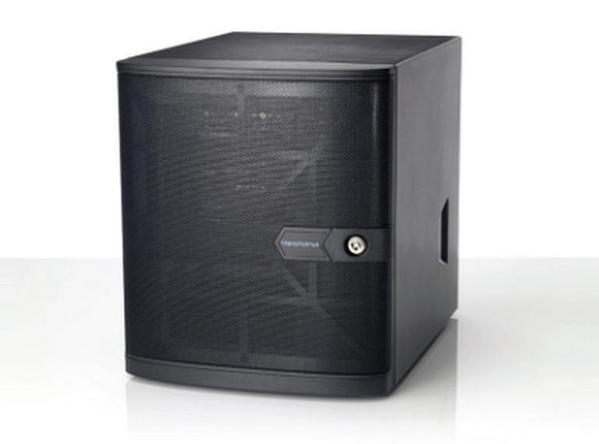 SANTA CLARA, Calif. – April 1, 2015 – Connected DataTM, the creator of Transporter, today announced findings from an ESG Lab Test Drive report that validates the company’s Transporter private cloud storage appliance as an excellent business solution for file sync and share. The lab report, “Transporter from Connected Data,” explores the key features of Transporter and outlines how Connected Data makes distributed private clouds affordable for any organization, while delivering the enterprise-class features they need.
ESG identifies that file sharing for collaboration and improved productivity has become an expected part of the user experience in today’s corporate environments. It also outlines that organizations are struggling to maintain control of sensitive corporate data in an age of BYOD and widespread proliferation of cloud services. These are the challenges directly addressed by Transporter, the world’s first private cloud appliance. Designed for business, Transporter appliances allow corporate IT to leverage their existing infrastructure to build cloud services that maintain complete control over where data is stored and how it is shared, while providing Dropbox like simplicity for its users.
“ESG Lab validated typical sync and share functionality along with simultaneous user editing, creation of links for sharing with external users, and mobile device access,” said Kerry Dolan, Lab Analyst and Vinny Choinski, Sr. Lab Analyst in the ESG report. “The Lab also validated administrative features, including integration with Active Directory for access control, integration with existing backup infrastructure, configuration of network ports and a Factory Reset option to remotely wipe data stored on a Transporter. These features demonstrated the business-class focus of Transporter, for both users and administrators.”
The ESG Lab Test Drive was performed by testing a Transporter 75 device. It took a deep, hands-on look at Transporter from both an end user and administrator perspective. Key features tested include:
- Sharing and accessing files located in Transporter folders
- Accessing remote files located in the Transporter Library
- Versioning and undelete capability including restoring previously modified and deleted files
- Sharing files via both standard and direct (private) links
- Folder and user level read-only access controls for both desktop and mobile
- Active Directory integration for users and groups
“Today’s business users are concerned about the compliance and security challenges presented by cloud-based file sharing, yet users continue to demand easier access to business content, especially when using mobile devices and when working remotely,” said Geoff Barrall, CEO, Connected Data. “Connected Data has the solution. With our innovative line of Transporter private cloud appliances, we deliver the efficiency and simplicity of the cloud with the privacy, security and control required in a managed data center. We are pleased that ESG Lab has validated our approach based on helping our customers to create their own sync and share service using their existing infrastructure.”
To access the complete ESG Lab Test Drive report, please visit:http://info.filetransporter.com/esg-lab-report.html
Tweet this: ESG Lab Test Drive Validates @filetransporter from Connected Data as an Affordable, Private-Cloud Solution
About Connected Data
Connected DataTM, the creator of Transporter private cloud storage appliances is focused on changing the way consumers and businesses manage their files. Transporter appliances allow customers to privately sync, access, share and protect data at a fraction of the cost of fee-based cloud services. The fast-growing Transporter network includes over 35,000 users managing more than 20 Petabytes of storage all over the world. Connected Data is privately funded and based in Santa Clara, Calif. For more information, visit www.connecteddata.com.
###
Connected Data and Transporter are trademarks or registered trademarks of Connected Data, Inc. All other trademarks used are the property of the respective trademark owners.
Categories: Press Releases
benchmarks, cloud, connected data, Dropbox, esg, filetransporter, lab report, private cloud, transporter
Pelican Introduces Next-Generation Pelican ProGear™ Vault Cases For the Apple iPad Air® 2 and iPad mini® 1/2/3
March 31, 2015
Comments off
 March 31, 2015 TORRANCE, Calif.–(BUSINESS WIRE)–To make sure your movies, music and apps are protected, Pelican Products, Inc., the global leader in the design and manufacture of high-performance protective case solutions, has introduced its next-generation, rugged Pelican ProGear™ Vault cases for the Apple iPad Air® 2 (available mid/late April) and iPad mini® 1/2/3.
“The advanced Vault case design also gives users the freedom to use the tablet within a case as it’s meant to be, without sacrificing protection.”
Crafted with the same tried-and-true DNA found in all Pelican™ products, the next-generation Vault case provides the ultimate suit of armor without sacrificing device functionality. The slim, lightweight Pelican ProGear™ Vault is dustproof, water resistant, shock-absorbent and drop-tested to ensure that a mobile device can handle an active lifestyle. Made with high quality polycarbonate and an elastomeric copolymer rubber interior to expertly absorb impact, the case is designed to withstand a four-foot drop unscathed.
“You may well know the upset, frustration and cost of a smashed iPad. Our next-generation Pelican ProGear™ Vault cases are built with the same legendary toughness that Pelican is known for. As a result we have engineered this case to help make sure that the only thing you need to worry about is finding your favorite app,” said Lyndon Faulkner CEO of Pelican Products. “The advanced Vault case design also gives users the freedom to use the tablet within a case as it’s meant to be, without sacrificing protection.”
 Pelican ProGear™ Vault Series Tablet Cases for the iPad Air® 2 (C11080) and the iPad mini® 1/2/3 (C12080)
The Pelican ProGear™ Vault cases for the iPad Air® 2 (C11080) and the iPad mini® 1/2/3 (C12080) protect each tablet in a variety of ways: with the lid closed, it prevents impact damage to the screen. Open, the lid provides the freedom of cover-free use, an impact absorbing case (Meets Military Specification MIL-STD-810G) and a protective seal against water and dust (IP54 rated). Additionally, users can flip the cover over the back of the case to utilize multiple viewing angles. The product boasts a water-resistant membrane to cover the microphone(s) and speakers, while still providing users with the utmost high-fidelity audio. Available in black with gray accents and gray with white accents, the Pelican ProGear™ Vault case for the iPad Air® 2 (Available mid/late April) has an MSRP of $99.95, while the Pelican ProGear™ Vault for the iPad mini® 1/2/3 has an MSRP of $79.95. Like all Pelican products the new Vault cases are backed by a lifetime guarantee.
For more information on these models and the full Pelican ProGear™ line visitwww.PelicanProGear.com or one of the authorized dealers. Pelican Products, Inc. is a portfolio company of Behrman Capital, a private equity investment firm based in New York and San Francisco.
About Pelican
Pelican Products, Inc. is the global leader in the design and manufacture of both high-performance case solutions and advanced portable lighting systems. Their products are used by professionals in the most demanding markets including fire safety, law enforcement, defense / military, aerospace, entertainment, industrial and consumer. Pelican™ products are designed and built to last a lifetime. The company operates in 19 countries, with 28 offices and six manufacturing facilities across the globe. For more information, visit www.pelican.com or www.behrmancap.com.
Trademarks and logos displayed herein are registered and unregistered trademarks of Pelican Products, Inc., its subsidiaries and /or affiliates.
iPad Air, iPad mini and Apple are registered trademarks of Apple Inc.
Categories: Press Releases
Apple, iPad, iPad Air, ipad mini, pelican, pelican vault, ProGear, protective cases, tablet cases
The Sixth Flag Launches a Highly Secure Desktop As A Service for the Enterprise
March 26, 2015
Comments off
Raleigh, N.C. – March 25, 2015 – The Sixth Flag, Inc. (TSF), an emerging new technology firm, today released its web-based, HTML-rendered Desktop-as-a-Service that requires no dedicated hardware. The offering provides a unique solution specifically designed to address the increasing challenges faced by today’s distributed workforce. With nothing more than a browser, users can access their cloud-based corporate desktop, whether from a laptop, PC desktop or tablet. Because user data is not stored on the local device, loss of a device does not represent compromised sensitive company data.
According to Pete Kofod, co-founder and CEO at TSF, “Our solution targets mobile users, contract, seasonal and temporary personnel as well as select employees that are targeted for corporate espionage.”
“Taken together, those groups of corporate technology users consume disproportionate resources to prevent security breaches and mitigate data risk. When you include the compliance requirements and capital costs associated with asset management, organizations of all sizes face serious challenges when dealing with the complexities of managing the desktops of a globally distributed work force.”
“The prevailing ‘solutions’ today are limited to one-offs,” Kofod explains. “Corporate technology departments need to be flexible in resource allocation, yet a significant part of the overall budget is the capital outlay towards corporate desktops, forcing IT staff to continuously support one-off solutions for these emerging requirements, which are neither practical nor cost effective.”
Unlike other vendors offering Desktop-as-a-Service solutions, The Sixth Flag is specifically designed to serve the remote enterprise user. “What we do is pretty straight forward,” Kofod continues. “we offer secure, easy-to-manage desktops to remote users without breaking the bank.”
According to David Kinghorn, co-founder and chief technology officer, by using TSF’s solution, organizations can manage the configuration and software installed on the desktop, including popular office productivity and line of business applications. TSF supports a complete Microsoft-based desktop user experience, including print and file management and more.
“With our offering, all you need is a current web browser,” he says. “This includes all desktops as well as tablets, because we do not rely on any plugin or download.”
At the end of every computing session, all user information is encrypted, stored and the desktop is, in effect, destroyed. Subsequently, every time a user logs in, they receive a fresh desktop with their data and settings intact. Kinghorn points out that any persistent threat that has found its way on to the desktop is deleted along with the desktop at the session’s end.
Exclusive to the TSF offering is a patent-pending “watermark” function. The unique pattern is overlaid on the screen session, discouraging users from leaking sensitive data by photographing or capturing desktop screen shots. “We received requests for this feature from firms that have been significantly harmed by unauthorized leaks,” says Kofod.
TSF supports Active Directory authentication. System administrators can implement traditional desktop group policies. Additionally, the administrators can also restrict uploads/downloads, Internet access, printing, copy and paste, as well as other functions using the TSF administrative console.
In its most restrictive configuration, TSF is comparable to a “clean room” in biotech. What happens on that desktop cannot leave. It can’t be sent via email or saved to cloud-based file storage.
“When high-risk groups collaborate using The Sixth Flag, they are in essence fenced off, without any meaningful drop-off in productivity,” he says. “Even if they pick up malware, it disappears when they sign off.”
No capital investment or long-term commitment is required. From service costs, to desktop licensing, TSF rolls all those costs into a monthly fee. For organizations that have seasonal, temporary or contract workers, there is no need to make a long term investment to meet short term requirements.
With today’s increasing demand for “bring your own device” (BYOD) working environments, IT departments face the challenge of maintaining internal controls through a standardized corporate platform. TSF enables full BYOD, eliminating the need to provide and manage end-user physical desktops, while facilitating standardization and significantly reducing capital expenditures on desktop hardware.
“Best of all,” Shane Yocum, Vice President of Business Development notes, “TSF can be deployed for an organization in as little as 20 minutes. A recent use case is a customer wanting to set up a disaster recovery environment. There is no way to do that cost effectively using traditional DaaS licensing,” he notes, “but we have a DR licensing model that allows organizations to maintain a Desktop DR environment very economically.”
About The Sixth Flag, Inc.
The Sixth Flag Inc, is a Raleigh, North Carolina-based Desktop-as-a-Service firm for global teams and organizations in need of Remote Desktop Management solutions. Launched in 2015, TSF provides a web-based, cost effective and secure throw away desktop for today’s global, mobile teams. Its cloud-based, HTML-rendered Desktop-as-a-Service requires no dedicated hardware, thereby eliminating the need for organizations to spend on capital outlay. With nothing more than a browser, users can access their corporate desktop from anywhere in the world, whether from a laptop, desktop, or tablet. Because user data is not stored on the local device, loss of a device does not represent compromise of sensitive organizational data. For more information, visit www.thesixthflag.com
Categories: Press Releases
byod, cloud, desktop virtualization, desktops, html5, pete kofod, thesixthflag, vdi, virtualization, web-based desktops, Windows

 Techopedia
- An error has occurred; the feed is probably down. Try again later.
Datamation
- Google and NextEra Strike AI-Powered Grid Deal
- NYT Sues Perplexity AI in Copyright Conflict
- Cloudflare Outage Affects Major Websites
- OpenAI Forces AI to Confess Its Lies
- OpenAI Declares Code Red as Google’s Gemini 3 Threatens ChatGPT
- Coupang Breach Exposes 33.7M South Koreans’ Data
- ChatGPT Celebrates Third Anniversary
- Asahi Group Reveals Findings of Cyberattack
- OpenAI Discloses Mixpanel Security Incident Affecting Some API Users
- Firefox Zero-Day Flaw Exposed 180M Users

 The Frugal Networker
You must be logged in to post a comment.