Archive
Introducing the Grip&Shoot Bluetooth Smart Grip for iPhone
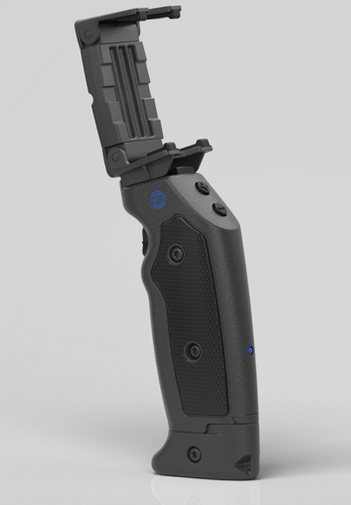 The Bluetooth Smart Grip for iPhone
Grip&Shoot
$99.95 (Black or White)
I’ve seen several iPhoneography camera holders, mounts, and brackets to give the iPhone a more DSLR-type experience. The Grip&Shoot is a little different in that it’s not just a one-trick pony product. It is actually multiple products in one. The current Grip&Shoot (G&S) retail package comes with an iPhone 5 Shooter Case, an iPhone 4S Shooter Case, a Bluetooth Smart Grip, a Grip Adapter, a Carrying Pouch, a Wrist Lanyard, and a late edition includes the JawZ Universal Adapter.
Because there are so many parts to discuss, I’ll cover each one in its own subsection.
 Shooter Cases
The Shooter Cases that come with the G&S package are pretty standard case fare with the exception of the G&S attachment on one side. The cases are actually suitable for regular use. The attachment portion isn’t really obtrusive or inconvenient, so you basically get a free case in the bargain. Two cases currently come with the G&S package, one for the iPhone 4S and one for the iPhone 5.
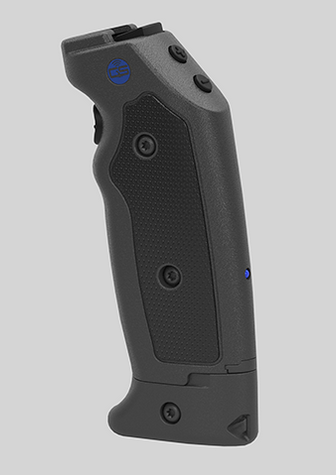 Bluetooth Smart Grip
The Smart Grip is really the meat and potatoes of the G&S package and even if you lost all the other parts, this one has the functionality you purchased. It is the Bluetooth connection, the trigger, and the connector for the Shooter Case or for the JawZ universal adapter.
The Smart Grip also has a (+) and a (-) button for zoom in and zoom out functions. You can take photos or start/stop video through the G&S app. The G&S device does not work with any other app on your phone. You must use the G&S app for functionality.
The bottom portion of the G&S Smart Grip is removable and can act as a remote stand for your phone for selfies, group shots, or just to place somewhere that isn’t convenient to stand. You fire the camera from the Smart Grip and you have a stable surface that kind of acts like a tripod, only a lot more portable. It works as a remote shutter release over 100 feet away from the phone.

Compatible devices:
iOS
- iPhone: 4S and newer
- iPod: 3rd Gen and newer
- iPad: 3rd Gen and newer
- iPad Mini: All supported
Android (Kit-Kat 4.4 and newer)
- Nexus 4
- Nexus 5
- Asus Nexus 7
- HTC One
- Samsung Galaxy S4, S5
- Samsung Galaxy Note 3, 4
- Samsung Galaxy Tab2
- Samsung Galaxy Ace3
- Sony Xperia
 Grip Adapter
OK, I’ll admit that I was going to criticize the G&S for missing one of the most important features of any photo-related device: a tripod interface. Well, wouldn’t you know it…the G&S folks put one on there. It’s part of the so-called Grip Adapter attached to the bottom of the removable stand. You can screw this into a tripod mount on any device that has one and you can also put the G&S device on a tripod after removing the Grip Adapter. So, it really serves two purposes. Three if you count the third one as I wasn’t able to criticize the lack of a tripod mount. You can unscrew the Grip Adapter with a penny and the screw is designed to remain in the adapter and not fall out onto the ground to be lost forever. Indeed, the G&S people thought of everything.
Why it’s Frugal: The G&S package is frugal because it’s so much more than simply a phone grip to steady your phone for pictures. It’s the full package created by someone who knows photography and phoneography. Honestly, it might be the best sub $100 accessory you can buy for your phone. It has everything. If you tried to buy the package components separately, you might end up spending close to $200. It’s a frugal value.
 Carrying Pouch
The Carrying Pouch is a magnetic closure protective case that not only stores your G&S, but also your phone. It features quick open/close flaps for you rapid shooters, a belt clip, and two belt or strap loops for attaching to a purse strap, a camera case strap, or your belt. It has a plush, non-abrasive interior covering to protect your phone and your G&S. Have I said that the G&S designers thought of everything?
Wrist Lanyard
For those of you who are really rapid shooters, the package includes a wrist lanyard that loops through an opening in the Removable Stand. Put it on and let ‘er swing. Handy, thoughtful, and sturdy.
 The JawZ Universal Adapter
Finally I get to my favorite G&S accessory: The JawZ Universal Adapter. I already have a case for my phone. I don’t want to remove it to use it with the G&S, so I thought, “Gee, it would be nice if…” And, of course, before I could finish that sentence, I found the adjustable JawZ universal adapter that fits just about any phone, including the case. <Sigh> What’s a techno gadget critic to do when there’s nothing to complain about for a product? Just enjoy the product that was obviously made by someone who knows photography/iPhoneography as well as I do?
As painful as it is to do it, I have to admit that the G&S package is everything you need to be a successful phoneographer. For phone photos and video, I’m not sure it can be beat. And yes, I’m an Apple product bigot here because it was originally touted as a gadget for the iPhone, but apparently the G&S geniuses have extended that functionality to other phones as well. Great job guys. I know it’s not really a criticism, but it’s the best I have for one–that G&S extended its reach to customers other than those who spend a lot of money on Apple stuff.
If you couldn’t tell, I really like the Grip&Shoot Bluetooth Smart Grip package. I think it’s well worth the $99.95 price tag and that anyone who’s into phoneography needs to get one.
Rating: 10/10
Recommendation: Buy it. It’s versatile, rugged, and is an awesome phoneography accessory.
Fun in the sun with Secur’s Solar Media Player (Review)
 Solar Media Player SP-5000
Secur Products
$49.99 MSRP
If you’re like me, I play music on my iPhone–a lot. Seriously, I connect it to my car’s stereo, to earbuds at work, or to a Bluetooth speaker when I’m outside messing with my plants or partaking in the never-ending task of weeding the flower beds. The problem with most music playing options is that they are a terrible drain on your phone battery. Plus the battery in the speaker also drains during music play. I might enjoy two hours-ish of continuous music playing with a standard Bluetooth speaker when I’m outside. The folks at Secur Products have solved this problem with a solar-powered, water-resistant media player, the SP-5000 Solar Media Player (SP-5000).

Not only can you get continuous music for as long as the unit is in the sun, your phone is safe inside the water-resistant case. Now I don’t have to leave my phone and Bluetooth speaker on the back porch far away from where I am in my fairly large back yard. I have to turn the speaker up so loud on standard Bluetooth speakers that it disturbs the neighbors who apparently have nothing better to do than to complain about my loud music. After all, I play good stuff and they should just enjoy it–it’s free. I digress, but you get the point.
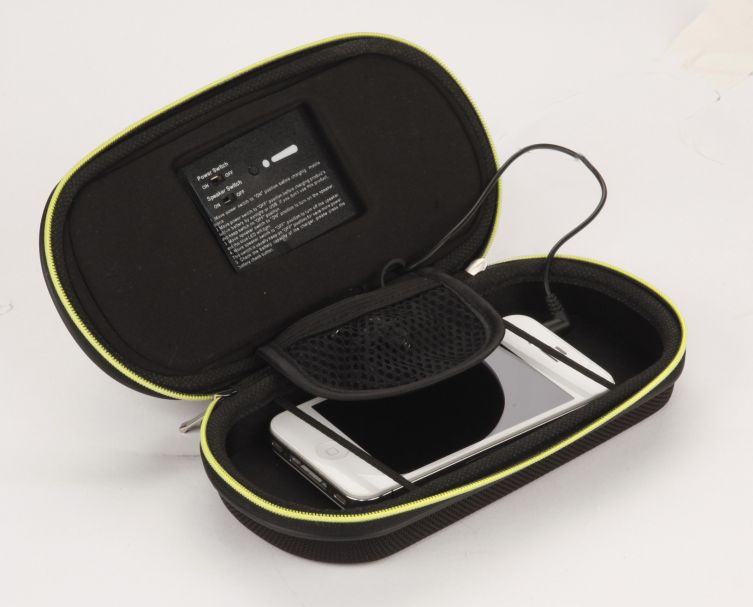 The SP-5000 can sit closer to me and I don’t have to worry about a little dirt or even a little water that might accidentally drip onto it. I can also arrange the case so that the speakers point toward me for better (and lower) volumes, so that I don’t disturb my neighbor’s beauty sleep, groundbreaking scientific experiments, or focus on their great American novel efforts.
The SP-5000 charges itself while in the sun while you’re playing music instead of draining its battery too. If your phone battery begins to fade, you can plug it into the power adapter and charge/power your phone while you play music–all for free thanks to the sun’s abundant energy resources.
Product Details:
• Stereo speakers and amplifier
• Rainproof, dustproof, shock proof smart phone case
• Solar powered power bank
• Power bank charges speakers as well as smart phones
• Includes USB and stereo connectors
• Works with most MP3 players and smart phones including the iPhone 6 and Samsung Galaxy S5
• Includes carabiner for hanging
• Stereo Media Player – lets you play music from your smart phone or MP3 player
• Solar Powered Amplifier and Power Bank – charges by the sun
• Rainproof Protective Case Protects Your Smart Phone – perfect for the outdoors
Why it’s Frugal: The SP-5000 Solar Media Player is frugal because it not only protects your phone from the “elements,” but being in the sun is good for it. It charges your phone, protects your phone, and is a mobile music center all in one neat little, well-made package. At $50, it’s a steal–I mean, a frugal choice.
This product isn’t Bluetooth, so don’t be confused by my mention of Bluetooth speakers. You have to plug the attached 3.5mm jack into your phone, power on the unit, and then power on the speakers.
One reason that I say that the SP-5000 is frugal, although I often complain about product pricing, is that this unit is only $50. Most, if not all, Bluetooth speakers, that offer no charging feature and no protection for your phone. So, really you’re getting a very tough case, multiple cables, a solar charger, and two, 3Watt speakers for very little cash. If that’s not frugal, then please spend more money for a lesser product.
Nerd Stuff/Technical Details:
• 2000 mAh power bank
• 5.5V/70 mA solar panel
• DC input – 500 mA
• DC output – 500 mA
• 2 x 3 watt stereo speakers
• Battery charge indicator
• Water resistant protective case – IPX 64
• Size 7.28″ x 3.74” x 1.77″
• 8.3 oz
The Secur Solar Media Player SP-5000 is a well-made, quality product that is three products in one: media player (speakers), a protective case, and a charger. I’m not sure what else you can ask for in its price range.
Rating: 10/10
Recommendation: It’s a great product at an excellent price and if you ever listen to music outside, you need this. Strong buy.
About Secur Products
Secur Products is dedicated to constant product development and technological innovation to produce leading edge products for emergency preparedness, outdoor sports, portable power solutions and alternative energy. Secur Products is a division of Maverick Industries, Inc. based in Edison, New Jersey. For over 30 years, Maverick has been a leading manufacturer and distributor of household electronics and electric appliances.
Lantronix xPrintServer Home Edition (Review)
 xPrintServer Home Edition
Lantronix
$99.95
The xPrintServer Home Edition box reads, “iPad & iPhone Printing Made Easy. Print From All Your iOS Devices To Virtually Any Printer.” And Lantronix has adhered to ‘truthful advertising’ because the xPrintServer Home Edition (xPrintServer) does exactly that and it does so without any fancy setup or hassles. It couldn’t be any easier to do so, with the xPrintServer’s two-step process.
- Connect the xPrintServer to power, your network, and printer.
- Print from your iPad, iPhone, or computer.
In addition to printing from your iPad and iPhone, you can also print from Macs and Windows computers. However, Windows 8 seems to have a problem with Bonjour printing and my Mac mini works at first and then doesn’t print again. Windows 7, iPad, and iPhone work great with it.

I’ve used other print servers, from the small generic and inexpensive ones on up to the ones costing several hundred dollars and the Lantronix xPrintServer Home Edition falls into the category of an individual home use unit as advertised. I wouldn’t use it for a small business unless all of my employees used Windows 7 and iPads because it doesn’t seem to work consistently with Mac and I can’t get it to work with Windows 8.x at all.
That said, I’m not sure whether the failure to print is with the Lantronix unit , the Bonjour printing software, or perhaps with my somewhat outdated HP OfficeJet J3680 All-in-One printer. Since it does print with Windows 7 and our iPads, I have to assume it is the Bonjour printing software.
The xPrintServer takes up very little space. It has the approximate dimensions of an iPhone 5, but about two to three times the thickness. It does require its own AC power source, a network connection, and a USB connected printer plugged into it. So, while the unit is small, it still requires three wires for power and connectivity. That’s not a negative statement; just a fact.
The xPrintServer does what it’s supposed to do: print. For those systems it works with, it’s never failed or hesitated to work in any way.
Why it’s Frugal: The Lantronix xPrintServer Home Edition is a frugal solution for home users who need to print from a short list of supported devices to a single printer and have no other means to do so. The $99.95 price tag is a little off-putting, but still within the range of a home-oriented gadget.
Here’s how it works from an iPhone:

Lantronix 1: Open File for Printing
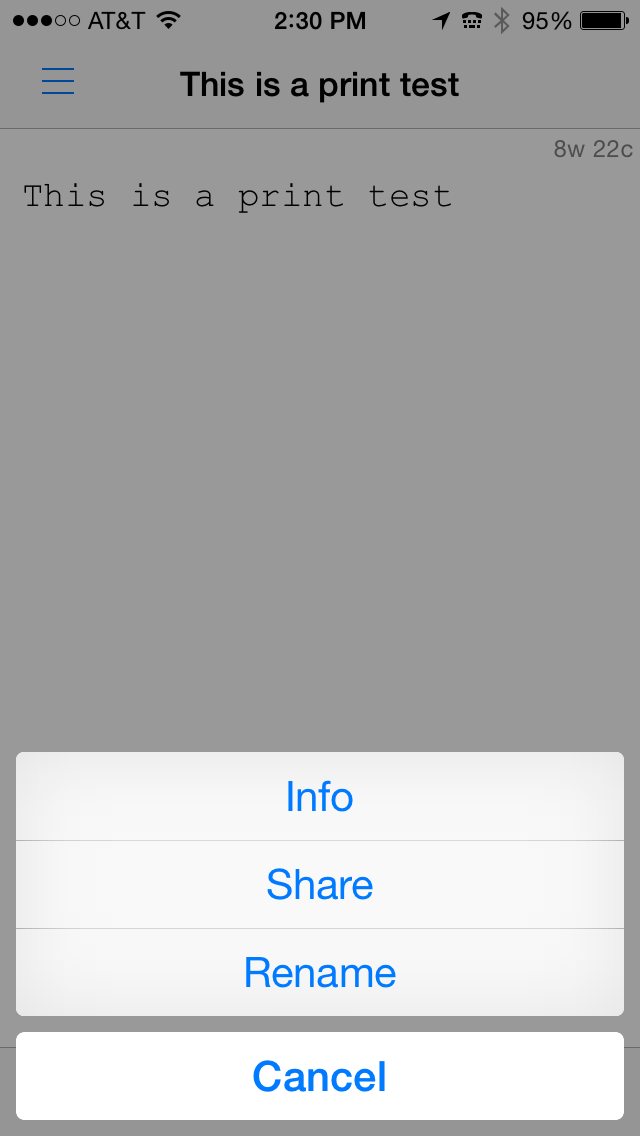
Lantronix 2: Share the File
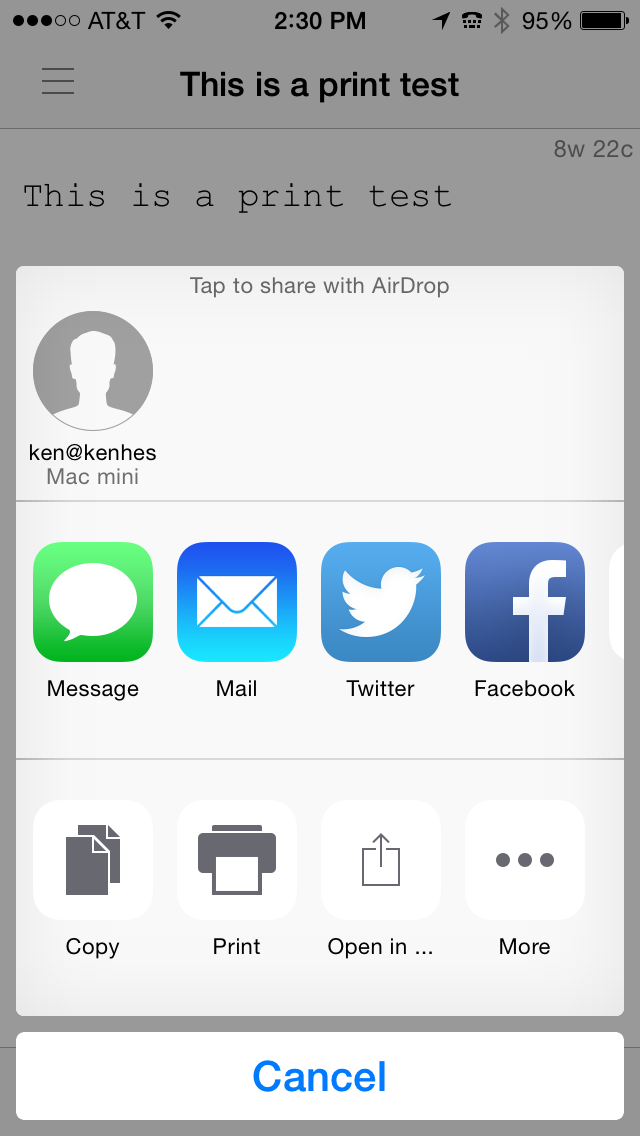
Lantronix 3: Select Print

Lantronix 4: Tap Print to Send to Printer
Open an app. I’m using PlainText. In that app, select a document to print. See Lantronix 1.
Tap the Share button at the bottom center of the screen to see the options given in figure Lantronix 2.
Tap Print from the screen as shown in Lantronix 3.
Finally, be sure that your printer is listed and then tap Print to send the file to the printer.
Apple devices should find the printer automatically and display it for you. The printer might not appear immediately, but if you attempt to find the printer by running through these four steps and then try again in a minute or two, the printer should appear for you to use.
The Lantronix xPrintServer is a good device and performs flawlessly. It offloads print jobs quickly and never hesitates or loses a print job. The web interface is simple and intuitive to use–that is, if you ever need to use it, which you probably won’t. Just know that it’s there if you need it.
Overall, I like the xPrintServer. I just wish that support for Mac OS X and for Windows 8 was there, but again, I don’t think this is necessarily the Lantronix product’s fault. I think it’s with the Bonjour software.
Rating: 8.5/10
Recommendation: If you have Windows 7 and iOS devices, buy it; it works.
Boinx Hits the 2015 New Media Expo Floor to Show Off BoinxTV 2 Beta
 Puchheim, Germany – February 27, 2015 – Making their way to the site of one of the biggest broadcasting shows of the year, Boinx Software will be joining the ranks of innovators at New Media Expo 2015, taking place in conjunction with the NAB Show from April 13th through 16th at the Las Vegas Convention Center. Exhibiting at booth N8012 video experts from Boinx will be showcasing the latest version of its broadcast truck-in-box broadcast solution, BoinxTV 2. A plug-and-play broadcast production package, the Mac-based BoinxTV lets users combine live camera video, clips, photos, 3D graphics, lower thirds and audio to create recordings and stream live presentations, podcasts, concerts, sporting events and more. Boinx will also unveil the new BoinxTV Broadcast Graphics Machine.
To demonstrate its immense power and suitability for podcasters and broadcasters of all levels, attendees to the show can stop by to see BoinxTV 2 Beta in action as experts put on a production live from the NMX show floor. Taking productions to the next level, the much anticipated BoinxTV 2 features native streaming support via RTMP to YouTube, Ustream, Twitch.tv and more; direct manipulation via a newly designed, easy-to-use UI; and 64bit support, which makes running out of memory virtually impossible. Combined with the all-new BoinxTV Broadcast Graphics Machine, a hardware/software solution for broadcast graphics with support for SDI playout with alpha channel, booth visitors will see how BoinxTV 2 is the perfect solution for all of their live production needs.
Attend the Boinx Software Press Briefing or Schedule a Private Meeting
Boinx will be hosting an informal “Press and Friends” event on the morning of Tuesday, April 14th at 8:00am. Members of the media are invited to indulge in coffee and morning treats while discussing the latest broadcasting solutions from Boinx Software. To register for the event or to schedule a private briefing for those who cannot attend, please contact Anya Oskolkova atanya@zazilmediagroup.com.

What’s New With BoinxTV?
BoinxTV 2 (Beta version scheduled for end of April)
- Native streaming support via RTMP to YouTube, Ustream, Twitch.tv and more
- New UI that makes using BoinxTV 2 even easier than before, with a modern look
- Direct manipulation instead of fiddling with settings
- More options for automation
- 64bit support makes running out of memory virtually impossible
- BoinxTV with integrated BoinxTV ATEM Controller, which supports full integration with production switchers from Blackmagic Design, including the ATEM Television Studio and ATEM Production Studio 4K
BoinxTV Broadcast Graphics Machine
- Hardware/software solution for broadcast graphics based on a Mac mini with a Blackmagic Design DeckLink 4K Extreme card in a 19” rack mount enclosure
- Playout via HD-SDI with Alpha channel support
- Visualize real time data including sport scores, weather, stock chart, news feeds and more
- 2D and 3D graphics
- Integrate interactive elements such as a Twitter feed
- Play any video format, scale, crop and convert to fit your needs
About Boinx Software
Located in Puchheim, near Munich, Germany, Boinx Software Ltd. develops award-winning animation, video production and photography software for the Mac® platform and iOS devices including the iPhone®, iPad® and iPod®. Honored with numerous Apple Design Awards and coveted spots on the Mac App Store’s Best Apps of the Year list, the extensive family of Boinx apps includes iStopMotion for Mac, iStopMotion for iPad, FotoMagico, BoinxTV, Mouseposé, You Gotta See This!, PhotoPresenter for iOS, and PartySnapper, Boinx’s newest social photo wall for sharing and saving event photos. Boinx Software has also been instrumental in the developmental processes of popular apps including Heads Up!, Ellen DeGeneres’s charades party game, and the Leica T iPhone and iPad app, the elegant remote companion to the Leica T digital camera.
Follow @boinxsoftware on Twitter and Facebook. For more information, please visit the Boinx Software website.
IK Multimedia updates iGrand Piano and iLectric Piano, studio-quality acoustic and electric piano apps for iOS
compatibility, user presets, new expansion libraries and more
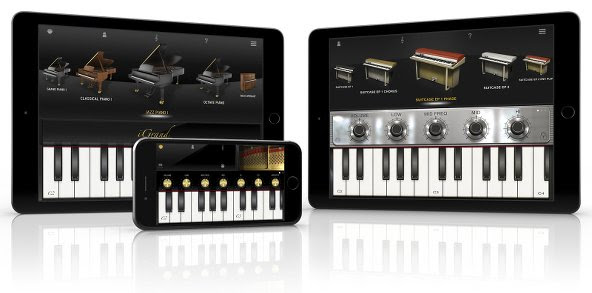
Optimized for iOS 8
Compatibility is at the heart of the latest versions of iGrand Piano and iLectric Piano. Musicians can now use both with their favorite third-party audio apps, thanks to newly updated compatibility with Audiobus and Inter-App Audio in iOS 8. This new support allows for both practical and wildly creative combinations when combined with DAW-style recording apps like GarageBand for iOS or multi-effects modeling apps like IK’s own AmpliTube.
Versatile variations
Both iGrand Piano and iLectric Piano feature easy to use and adjustable controls that allow for limitless tonal sculpting. iGrand Piano has been updated to now include the same semi-parametric equalizer as iLectric Piano, meaning musicians can now tweak both with the power of 4 EQ knobs in addition to other app-specific parameters – like piano lid aperture in iGrand Piano or modulation effects in iLectric Piano.
Users can also now save specific edit panel settings in 4 writeable locations provided for each instrument using the newly introduced “Variation” system. This system gives musicians 4 conveniently accessible buttons (found in the Edit Strip of either app) that can be used to store knob positions and tweaks for later use when recording in the studio, on stage performing or just practicing at home.
Introducing new sounds
The latest update to both apps also introduces new sound packs available for in-app purchase. These packs expand the sonic range of iGrand Piano’s collection of gorgeous acoustic pianos and iLectric Piano’s stunning collection of vintage and modern keyboards by making 22 entirely new instruments available for each app – in total, that makes for 40 possible instruments in iGrand Piano and 64 possible instruments in iLectric Piano. The additions, titled “Piano Expansion 2” for iGrand Piano and “Electric Piano Expansion 2” for iLectric Piano, unlock an entirely new tonal dimension for mobile keyboard players to explore.
Pricing and availability
The latest versions of iGrand Piano for iPhone/iPod touch and iPad and iLectric Piano for iPad are available now as a complimentary update for existing users or individually as paid apps for just $19.99/€18.99 for new users. The “Piano Expansion 2” for iGrand Piano and “Electric Piano Expansion 2” for iLectric Piano sound packs are available individually for $9.99/€9.99. A free version of iGrand Piano is also available.
| iLectric Piano for iPad on the App Store: www.appstore.com/ilectricpianoforipad |
 |
| iGrand Piano for iPhone/iPod touch on the App Store: www.appstore.com/igrandpiano |
|
| iGrand Piano for iPad on the App Store: www.appstore.com/igrandpianoforipad |
|
For more information, please visit:
www.ikmultimedia.com/igrandipad
www.ikmultimedia.com/igrandiphone
www.ikmultimedia.com/ilectricipad
To see the official video of iGrand Piano and iLectric Piano in action, please visit:
www.ikmultimedia.com/igrandpiano/videos
www.ikmultimedia.com/ilectricpiano/videos
IK Multimedia announces iRig Mic Studio, the ultra-portable large-diaphragm digital microphone for every platform
The latest addition to IK’s iRig digital microphone range provides professional-quality sound, an extremely compact size and compatibility with all popular mobile and desktop platforms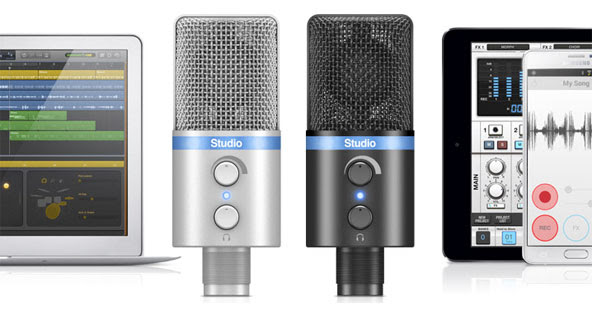
January 22, 2015 – IK Multimedia, the leader in mobile music creation technology, is pleased to announce iRig® Mic Studio, its ultra-portable large-diaphragm digital condenser microphone for iPhone, iPad, iPod touch, Mac, PC and Android. Offering superior sound and an extremely portable size, it packs a 1” diameter condenser capsule into an ultra-compact enclosure that can be used to make professional recordings anywhere. With iRig Mic Studio, musicians, vocalists, home producers, podcasters, broadcasters, voice-over artists and more have a studio-quality large-diaphragm microphone that fits in the palm of their hand.
Superior portable performance
iRig Mic Studio has been designed to provide the best possible recording quality. It features a large 1” diameter back electret condenser capsule, a 24-bit audiophile-grade A/D converter (with 44.1/48 kHz sample rate) and a built-in low-noise high-definition preamp. These, combined with its 133dB SPL rating, allow for optimal audio capture at any sound pressure level — it can capture everything from the subtle and nuanced dynamics of the human voice to the full-on bombast of an amplified electric guitar, and everything in between.And while these features are excellent on their own, what’s truly remarkable about iRig Mic Studio is that it fits its components into a compact enclosure that’s smaller than an iPhone.
Comprehensive control
To assist its high-end components, iRig Mic Studio also sports a comprehensive set of monitoring and level control features. To ensure the best sound for every situation, it comes with a gain control knob and a multicolor LED level indicator. It also includes a headphone output with its own level control for monitoring directly from iRig Mic Studio itself. And, for better positioning while recording, iRig Mic Studio comes with a sturdy and portable tabletop tripod stand.
It’s all about the connections
iRig Mic Studio is compatible with nearly every popular mobile and desktop platform. It comes with a female micro-USB port and an assortment of cables: Micro-USB to Lightning for iPhone, iPad and iPod touch; micro-USB to micro-USB OTG for Android (requires either an Android 5 or Samsung Professional Audio device); and micro-USB to USB for Mac and PC.
Record with the power of apps
For immediate recording, iRig Mic Studio comes equipped with a powerful suite of vocal apps. VocaLive™ is a powerful effects processor and multi-track recording app that features a selection of 12 professional real-time vocal effects. EZ Voice™ for iPhone, iPad and iPod touch and EZ Voice™ for Android are streamlined and easy-to-use sing-along apps that make it easy for vocalists to practice with any song in their music library. iRig® Recorder for iPhone, iPad and iPod touch and iRig® Recorder for Android are straightforward apps for field recording, podcasting, note taking and more.
The VocaLive App is available from the App Store at www.appstore.com/vocalive
The EZ Voice App is available from the App Store at www.appstore.com/ezvoice
The iRig Recorder App is available from the App Store at www.appstore.com/irigrecorder
EZ Voice is available for Android via Google Play and the Samsung GALAXY Apps store. iRig Recorder is available for Android on Google Play.
iRig Mic Studio is also fully compatible with a wide variety of third party apps and software, like Cubasis, ProStudio Vocal FX, MultiTrack DAW and more. It’s also compatible with Apple’s GarageBand and Logic Pro X apps, and iOS Voice Memo.
Pricing and availability
iRig Mic Studio comes in silver or black and will be available Q1, 2015 from music and electronics retailers worldwide, and from the IK online store, for only $179.99/€144.99 (excluding taxes).
For more information, please visit: www.irigmicstudio.com
To see the official video of iRig Mic Studio in action, go to: www.irigmicstudio.com/video
iRig Mic Field from IK Multimedia
iRig Mic Field from IK Multimedia shipping:
Make professional audio/video recordings everywhere
Capture audio or video with high-quality stereo sound on iPhone, iPad and iPod touch
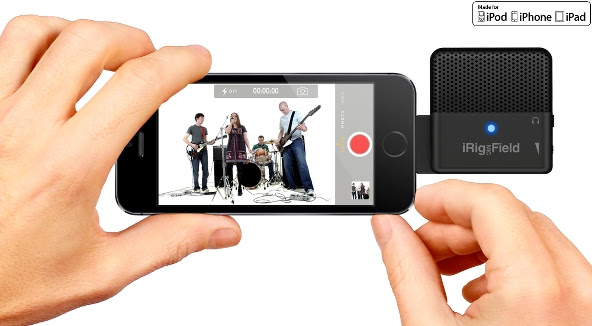
January 5, 2015 – IK Multimedia, the leader in mobile music creation, today announced it’s shipping iRig® Mic Field, the first ultra-compact, stereo digital microphone for audio and video field recording on iPhone, iPad or iPod touch – including the new iPhone 6, iPhone 6 Plus, iPad Air 2 and iPad mini 3. Slim, light and fully rotatable, iRig Mic Field lets anyone make great audio and video recordings with high-quality stereo sound everywhere.
High-quality stereo field recording
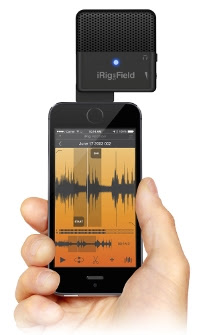
iRig Mic Field is the only mobile digital microphone designed to be used for both video and audio projects. It delivers superb stereo sound by connecting digitally to iPhone, iPad or iPod touch via Lightning connector. Its two high-quality cardioid electret condenser capsules, 24-bit audiophile-grade A/D converter (with 44.1/48kHz sample rate), 115 dB maximum SPL rating and built in low-noise, high-definition preamp allow for pristine sound capture quality at rehearsals, concerts, lectures, speeches, music practice and more, as well as field recording and on-the-move videography projects. iRig Mic Field can create accurate and faithful field recordings in nearly every imaginable context.
| 90 degrees of flexibility To better preserve the stereo image while recording audio for video, iRig Mic Field features a conveniently rotatable patent-pending design. With the touch of a finger it can be easily rotated 90 degrees and locked in one of two positions for an accurate stereo image in both landscape and portrait modes. This means that iRig Mic Field can record the proper left and right channel position in any situation – surpassing other mobile microphones that only produce a true stereo sound when held in portrait mode. Unmatched portability |
 |
Pocket-sized video production
iRig Mic Field has also been designed with mobile video in mind. It can be used to record video on iPhone, iPad and iPod touch with crystal-clear, professional sounding audio. It’s never been easier to shoot a great sounding video and share it with friends, followers and fans. Now musicians, videographers, journalists, podcasters, casual users and more can get high-quality sound while on-the-go without sacrificing mobility or audio fidelity.
Superior level control
Capturing good sound requires more than just high-quality components; it also requires comprehensive control. iRig Mic Field has everything needed to ensure that sound is recorded at the perfect setting. It features a thumbwheel gain control, an audio-out jack for quality real-time headphone monitoring and a multi-color LED input level indicator for quick visual monitoring.
Record with the power of apps
For immediate stereo recording, an update to IK’s iRig® Recorder app for iPhone, iPad and iPod touch will soon be available to fully support iRig Mic Field. iRig Recorder lets users quickly record, edit, process and share their audio, thanks to its intuitive GUI, 8 intelligent effects processors and sharing capabilities. iRig Mic Field also works seamlessly with a wide variety of apps including Apple’s GarageBand and iMovie apps, and iOS Voice Memo and Camera.
Pricing and availability
iRig Mic Field is now available from music and electronics retailers worldwide, and from the IK online store, for only $99.99/€79.99 (excluding taxes).
For more information, please visit www.irigmicfield.com
iRig 2: The sequel to the most popular guitar interface of all time
IK Multimedia announces iRig 2, the sequel to
the most popular mobile guitar interface of all time
The successor to the guitar interface that sparked the mobile music revolution improves sound quality, adds features and allows wide cross-platform compatibility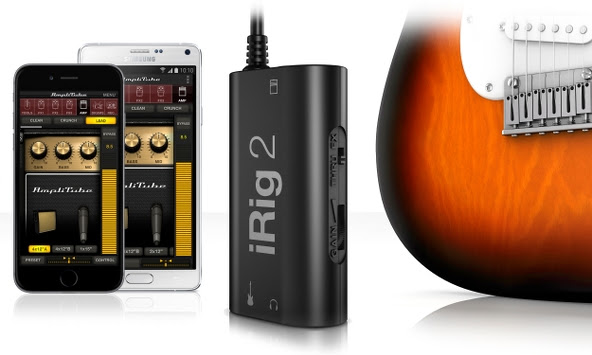 January 5, 2015 – IK Multimedia, the leader in mobile music creation, is pleased to announce iRig® 2, the latest addition to its iRig range of products. The sequel to IK’s groundbreaking and best-selling iRig guitar interface, iRig 2 builds on the design that made its predecessor so popular. It pairs great sound and streamlined convenience with new updated features like versatile input gain control, a ¼” amplifier output jack and Android compatibility. iRig 2 makes for a versatile tool that’s perfect for practice sessions, live performances, jamming with friends, recording and more.Now everyone can plug in their guitar or bass to enjoy killer tone on their iPhone, iPad, iPod touch, Mac or Android device – with the release of iRig 2, the world’s most popular guitar interface is better than ever before.
Powerful performance
The biggest update that iRig 2 brings is its new ¼” amplifier output. This augments its 1/8″ headphone output by allowing musicians to use iRig 2 and their mobile device along with their favorite amplifier, without the use of an adaptor. This opens up a whole world of opportunities when paired with AmpliTube®, IK’s powerful guitar and bass multi-effects processor. iRig 2 now lets musicians easily use AmpliTube’s vast library of meticulously modeled virtual stompbox effects, amplifiers and other gear as a part of their physical rig.iRig 2’s added switch allows dual-mode operation: FX lets musicians send a processed signal to their amplifier’s ¼” output from apps like AmpliTube. THRU sends a clean signal, letting musicians use their mobile device as a tuner, recorder or other utility while using their classic analog rig, which maintains the purity of a 100% analog signal path.Made for both practice and performance, iRig 2 comes with a removable support that, together with a Velcro strip, allows easy mounting of iRig 2 on any mic or music stand, making iRig 2 perfectly at home on stage during live performance.
Plug and play simplicity on every device
iRig 2 has been made to be compatible with the widest range of instruments and mobile devices possible. Its built-in universal 1/8″ TRRS output connector provides a true plug-and-play experience on iPhone, iPod touch, Mac and Android. Likewise, its 1/4″ instrument input works with any guitar, bass or line-level instrument. To ensure the best sound quality, iRig 2 comes with an input gain thumbwheel that allows musicians to dial in the perfect setting for their setup – iRig 2 works just as well when its connecting a wailing 3 humbucker electric guitar to a Samsung Galaxy Note 4 as it does a jazzy archtop or mellow electric piano to an iPhone 6.
Killer guitar tone on Android
iRig 2 is now widely compatible with Android smartphones and tablets. Its 1/8″ output connector is compatible with many popular Android devices produced by manufacturers like Samsung, LG, Motorola, HTC and more – any device with an 1/8″ input that supports the CTIA/AHJ wiring standard works with iRig 2.Additionally, users with Android devices that support Samsung Professional Audio can enjoy AmpliTube for Android, a special version of the popular multi-effects processor that brings a full spread of meticulously modeled virtual gear to the Android platform.
A full suite of apps
iRig 2 is ready to go right out of the box. It comes with a powerful cross-platform suite of apps and software that includes free versions of AmpliTube for iOS, Android and Mac/PC. And while iRig 2 is the ideal companion to AmpliTube, it also works with any other recording, processing, tuning or music app.
Pricing and availability
The new iRig 2 interface will be available in Q1 2015 via the IK Online Store and select music and consumer electronics retailers worldwide for $39.99/€29.99 (excl. taxes).
For more information, please visit:
www.irig2.com
www.amplitube.com
MediaFire Launches Native iOS 8 Update With “Power Upload” Feature
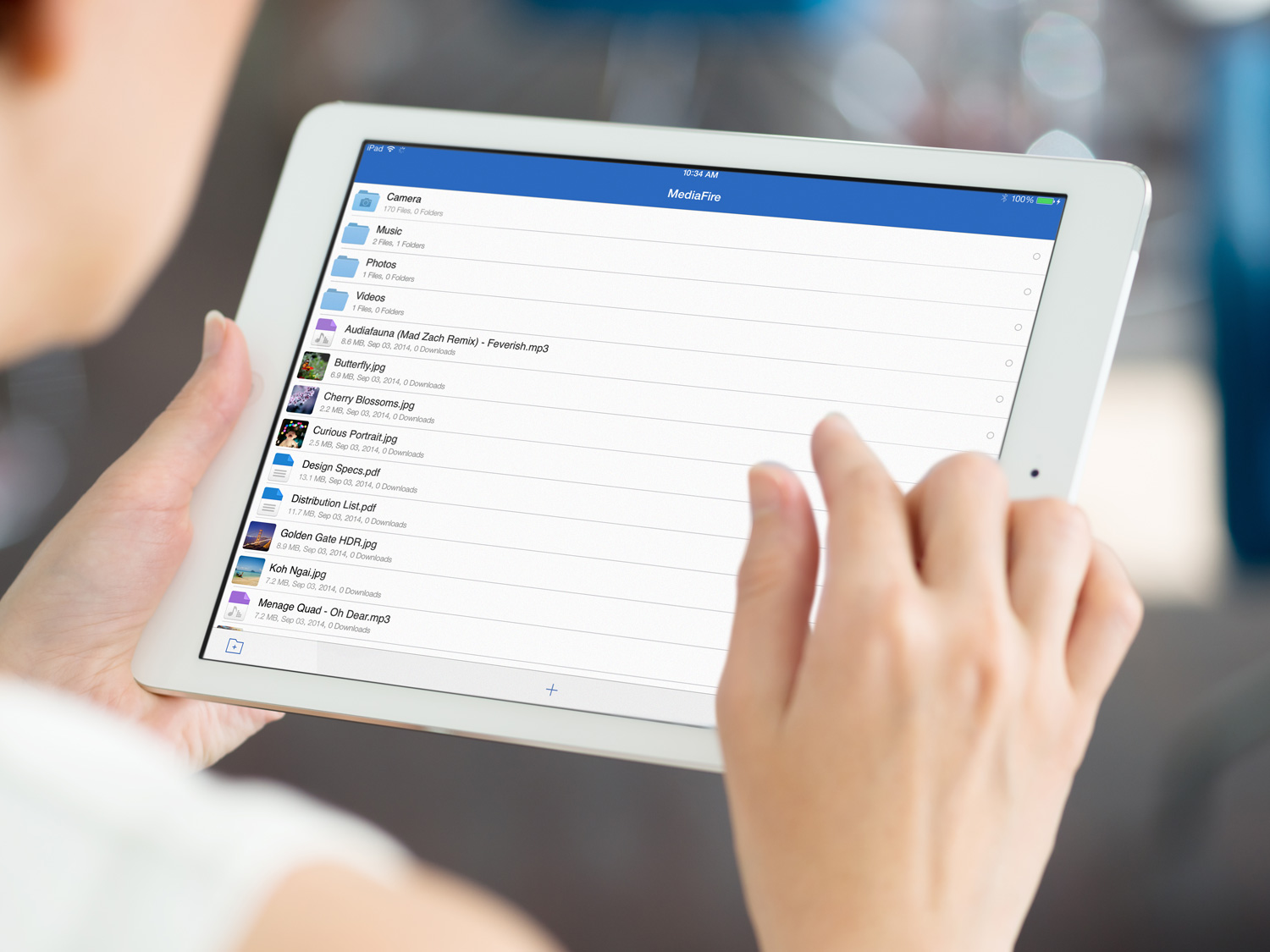 HOUSTON, TX–(November 18th, 2014) – MediaFire, a leading provider of consumer online storage solutions, today announced the release of MediaFire for iOS 8, our latest and greatest cloud storage application for iPhone and iPad users.
Available today for free on iTunes, MediaFire for iOS 8 adds a variety of new features that make it easier than ever to access, and share all of your files on the go, including new photo and video playback options, a new “Power Upload” mode for faster data syncing, and a new optimized interface designed to take advantage of the extra screen real estate offered by the iPhone Plus.
To download MediaFire for iOS, 8 visit: https://itunes.apple.com/us/app/mediafire/id555646196?mt=8
MediaFire’s newest feature, called “Power Upload” allows iOS users to effectively double their upload speeds. The feature can be toggled on and off as needed, in order to quickly and easily upload all of your photos and videos from your iPhone or iPad.
Now iOS 8 users can use MediaFire to access, protect, and share all of their mobile photos, videos, automatically. Files are safely stored in the cloud, and can be automatically synced and accessed on your home computer (via MediaFire Desktop), or the web via MediaFire’s online interface. MediaFire Desktop is currently available as a free download for both OSX and Windows users.
“Everyday, over a Million iOS users choose MediaFire to access, share, and safeguard the files that matter most to them,” said Derek Labian, president and CEO of MediaFire. “Whether you are looking to simply share a file, or to back up and access all of your media from the cloud, MediaFire is the simplest and most affordable cloud storage service on the market today.”
Starting at just $2.50 per month, or 24.99 a year for one terabyte of online storage,
 In addition to paid accounts, MediaFire continues to offer users up to 50 gigs of cloud storage for free.
In addition to today’s launch, MediaFire’s complete mobile SDK for iOS has been updated with additional support for iOS 8 devices, enabling developers around the world to easily integrate cloud syncing and storage into their mobile applications.
For a full list of resources and tutorials, visit http://www.mediafire.com/developers/
MediaFire iOS 8 Features:
- Automatically backup your camera photos! – MediaFire for iOS lets you automatically upload and protect all your photos and videos.
- Power Upload -A new selectable mode that allows you to harness the full upload speed from your iOS Device.
- Stream music and videos – Stream your music and video collection anywhere and anytime.
- Share documents and media directly from your mobile device – Easily share through email, sms, or your favorite chat app!)
About MediaFire:
MediaFire is an online storage and collaboration company focused on providing regular people with a complete and easy-to-use solution for managing their digital stuff. Available for iPhone, Android, OSX, Windows, and Web, MediaFire is the only online storage solution to offer unlimited downloads, download resuming, zero wait times and more, all for free. Every month, more than 150 million people use MediaFire to quickly and securely store, organize and share all their personal and work data.
For Developers
MediaFire’s API solutions enable developers to quickly and easily integrate cloud storage and file sharing into their applications. For information on how your organization can use MediaFire to enhance your business, visit http://developers.mediafire.com/, or contact developers@mediafire.com for more information.
Apple Begins Selling Nova – The First Wireless, Bluetooth iPhone Flash
Sneaky Squid LLC – novaphotos.com
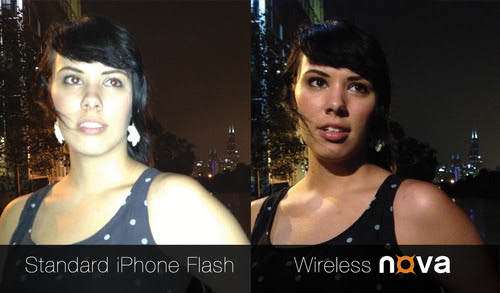
- Nova is the first wireless, Bluetooth iPhone flash and will be sold in the Apple Store
- Funded on Kickstarter in 2 days, Nova raised 3-times its funding goal by backers in more than 60 countries
- Created by former Senior Google Engineer (Mobile and Photos)
Possible Topics
- Nova is the first wireless, Bluetooth flash for iPhone. Apple starting selling Nova online at www.apple.com in November 2014, and it will be available at select Apple stores in the United States and Canada later this month.
- Nova is a portable, sleek iPhone accessory that fits in a wallet and can go everywhere your iPhone does. Unlike other iPhone flash accessories, Nova has a Bluetooth connection to avoid dealing with clunky connecting cables and packs 10-times the number of LEDs as alternative options to give users greater control over their photos (to create consistently great photos).
- Nova is the photographer’s friend, providing beautiful natural light. It gives users the creative freedom to position and angle the light where they need it. Nova also offers a custom option to select from cool to warm and soft to bright light using 40 LEDs set behind a built in diffuser.
Founders
- Joe Walnes (Former Senior Engineer at Google, Mobile and Photo products)
- Alex Lukashevich (Software Services Manager, DRW Trading Group)
Details
Nova is the first wireless, Bluetooth flash for iPhone users to capture consistently great photos. With a beautiful natural light, Nova captures photos that are rich with color and depth, smoothing out lines and wrinkles, with soft shadows, that makes everyone look their best. It is an off-camera and wireless accessory designed to provide the right light in the right place for amazingly lit photos. Anyone can point and shoot or unleash the artist within using different positions and tilting the light.
The Nova features and details include:
- 40 cool and warm LEDs behind a soft diffuser, controlled by the app
- 4 presets: gentle for close ups, warm for portraits, neutral for daylight and bright for groups or strong background light
- Custom option to select exact cool to warm and soft to bright light
- Slim design to fit in a wallet
- Requirements: iPhone 4s and above, running iOS 7 or later
- Price: $59 – novaphotos.com/presskit for hi-res photos

 Techopedia
- An error has occurred; the feed is probably down. Try again later.
Datamation
- Google and NextEra Strike AI-Powered Grid Deal
- NYT Sues Perplexity AI in Copyright Conflict
- Cloudflare Outage Affects Major Websites
- OpenAI Forces AI to Confess Its Lies
- OpenAI Declares Code Red as Google’s Gemini 3 Threatens ChatGPT
- Coupang Breach Exposes 33.7M South Koreans’ Data
- ChatGPT Celebrates Third Anniversary
- Asahi Group Reveals Findings of Cyberattack
- OpenAI Discloses Mixpanel Security Incident Affecting Some API Users
- Firefox Zero-Day Flaw Exposed 180M Users

 The Frugal Networker
You must be logged in to post a comment.