Archive
Photographer’s Holiday Gift Guide 2013
 If you have a photographer in your life, then this gift guide is the key to his or her happiness this holiday season. No photographer, amateur or professional, has everything he or she wants. There’s always some light, lens, or gadget that’s missing and she’s just never taken the time to buy it or it slips her mind until there’s a special need. You can fill that void with these ideas but first there’s something you have to do.
You have to listen to and observe your photographer. What subjects does she shoot? Does she only photograph people? Does she only work outdoors? Does she like to create short films? Does she ever work with film or is she a digital only type? Does your photographer ever take pictures with her phone? It’s a real thing called Phoneography and there are a lot of apps and accessories available for it. Ask a few questions. It won’t kill you to find out a few details before embarking on a shopping spree.
And you have the choice of enhancing your photographer’s equipment list or expanding it in a different direction. For example, if your photographer only shoots outdoors, you could buy her some studio lights and backdrops to give her a chance to try some portraiture or product photography.
If she’s a digital only shooter, you should buy her an old school film camera and let her creativity flow. Yes, lots of people still use film. In fact, more people now use film than ever before and there are some really cool ones available that extend your sight beyond the normal.
Here are the “goto” websites that you need to know for photography gear, cameras, lenses, and accessories.
Adorama: http://www.adorama.com
I’ll go out on a limb here and say that most serious photographers know about Adorama. It is the primary goto site for all things professional or prosumer, a term that means a high-end consumer who might be a part-time freelance photographer or someone who uses professional equipment. Although bent toward the professional, your up and coming amateur can benefit from better lighting, a higher quality tripod, or a new telephoto lens.
There are shopping tabs on the site that direct you to products that fit your budget or those oriented toward him or her. For example, there are tabs labeled Under $50, Under $100, Under $200 up to Over $500. You can also purchase Adorama gift cards from the front page. Trust me when I say that you’ll see a happy face when your photographer opens an Adorama gift card. A gift card is a great idea, especially if you have no clue as to what your photographer wants or needs.
There are also tabs that are product specific, such as Studio & Lighting, Cameras, Tripods, Lenses, etc.
Great sound is essential for movies, great lighting is essential for photography. Adorama has lighting. It has studio lighting, outdoor lighting, reflectors for natural lighting, flash lighting, continuous lighting, and just about everything any photographer or movie maker needs.
There are two lighting products in particular that I want to bring to your attention: Flashpoint 14″ Fluorescent Dimmable Ring Light and the Glow HexaPop 20″ for portable off camera flash – R Series.
My Flashpoint 14″ Dimmable Ring Light Review gives you a lot of good reasons to choose it for a portrait light. If your photographer needs a source of continuous light for portrait photos, product photos, short films, or stop motion films, this is what you should buy her. Currently, the Ring Light costs $140.00 with free shipping. Buy a replacement bulb for $15.95 and a stand for $25.00 to round out this full lighting solution.

The Glow Hexapop Diffuser shown on stand and with flash unit.
The other interesting lighting gift idea is the 20″ Glow Hexapop Diffuser. Though I haven’t posted my Hexapop review yet, I can tell you that I’ve worked with it and I like it. It is extremely portable, lightweight and it does a great job of providing soft, even lighting from a flash unit.
Ordinarily a flash unit sits atop your camera in what’s known as the “hot shoe.” This is an electronic interface that’s timed with the shutter button so that the flash fires as the shutter opens so that your subject receives enough light to be photographed. Unfortunately most flash units are overpowered and flood the subject with bright, harsh light that is neither flattering nor even.
The Hexapop diffuser does. To use the Hexapop, your photographer needs to have her own flash unit (most do) and a flash sync cord (again, most do). If your photographer happens not to own a flash sync cord, get one at least ten feet long and one that’s compatible with your photographer’s equipment.
The Hexapop is sort of a hybrid softbox and umbrella combination that photographer’s use for studio lighting. Unlike studio lighting, the Hexapop can travel with the photographer without the need for external power. It comes with its own tasteful black carrying case that makes it extremely portable for the photographer on the move.
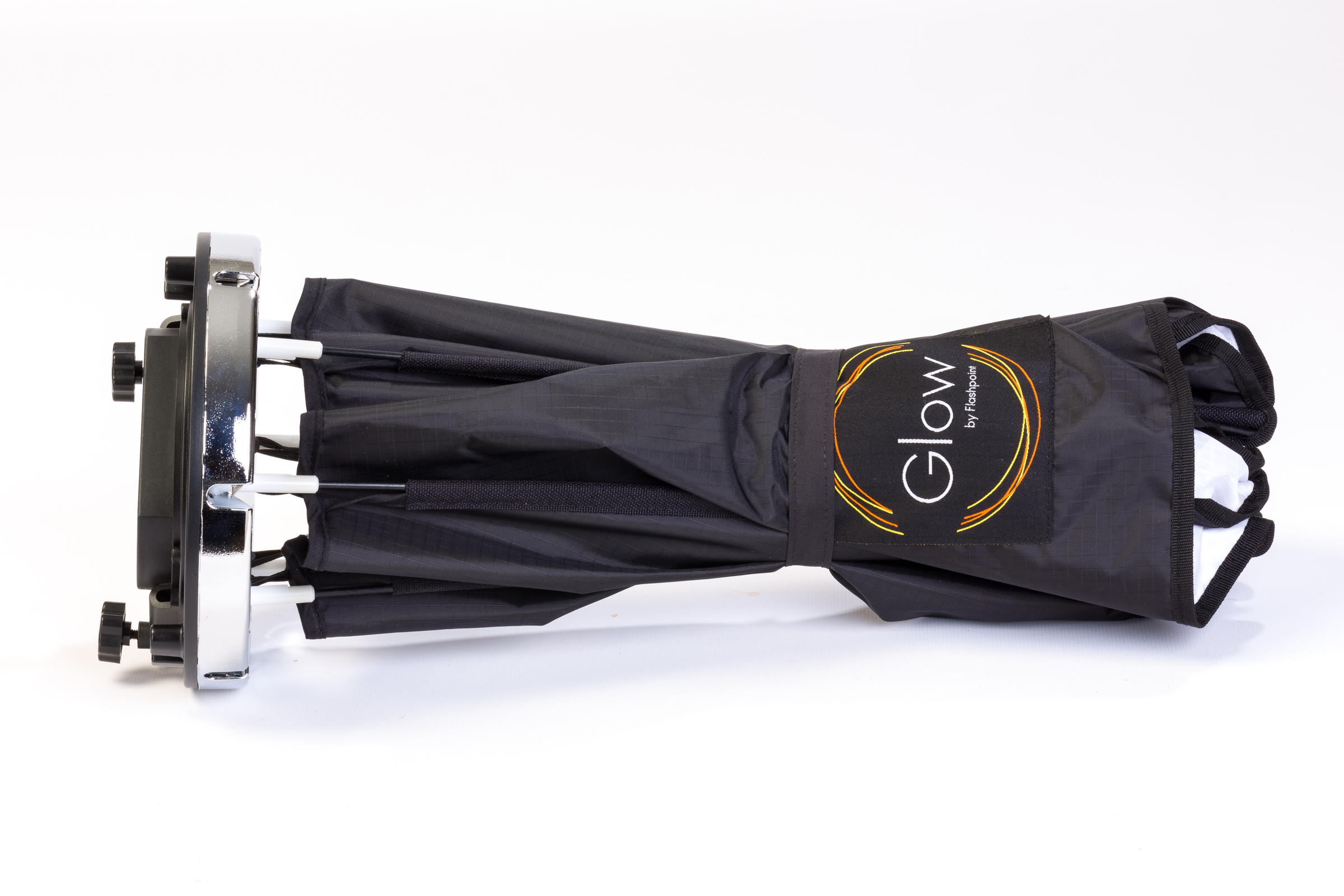
The Glow Hexapop Diffuser ready to open or to drop in the bag for easy transport.
It sets up quickly and easily by pulling the arms into place and it folds up even faster with a “Pop!” by pressing its release triggers.
Adorama has everything for the photographer and photography enthusiast. For the truly budget conscious, there’s a Deals link that you should check out for Specials, overstocks, refurbished products, and used equipment. Adorama offers free shipping within the USA on many products.
Lomography: http://www.lomography.com
Lomography is an online presence, it’s a store, it’s a movement, it’s a place for you to show off your lo-fi photography, it’s an online magazine, and it’s something kind of unexplainable. Lomography is film and cheap cameras. I should put cheap in quotation marks because some of them aren’t so cheap at all. I guess cheap is relative. You have to love film, its unexpected qualities, its artistic value, and the feeling that you’re going against the grain of the “digital revolution.”
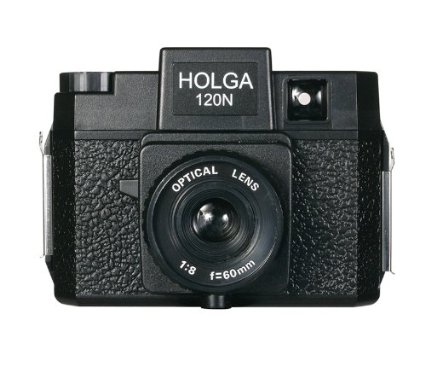
The Holga 120N Camera.
There’s no wrong answer or wrong way to do anything in the world of Lomography but you have to have a lo-fi lens or lo-fi camera to do it. If you want to know more about it all, you can read up on the history and the movement on the website. Just know this: Lomography is addictive and once you start, you want to experience every type of camera.
For example, the medium format (120 film) cameras are kind of my favorites. The negatives are large (generally 2″ x 2″) and you only get 12 or 16 photos per roll. Using one of these plastic gems is not an exact science but it’s really fun. Great examples of medium format lo-fi cameras are: Holga, Diana, and Debonair (the look of a Diana but the operation of a Holga).

The Debonair Camera
My own collection “lomo” cameras include the Smena (Russian), the Holga, the Diana, half-frame cameras, Canon AE-1s, and others. But my most favorite of all is the Debonair. It’s a super cheap little camera that uses 120 film. See photo.
You can find them on ebay.com for under $20. They are cheap, plastic cameras that have a very simple focusing mechanism, a manual film advance, and your creativity to power them. Awesome.
For someone who isn’t into Lomography or just wants to try it, the Debonair is a great starter camera. If you can’t find one, buy a Holga. You can find Holgas everywhere and they come in a variety of colors and styles but only two film sizes: 120 and 35mm. The Holga 135 is the 35mm one. Holgas generally cost under $30 for the standard black 120 film version. You can find film for it online or in camera shops. Use color print film C-41 process because Black and White film is getting harder to find a developer locally. Good luck if you like B&W, like I do. Use color, have the developer scan them onto CD for me and then I use a photo manipulation program to change them to grayscale. It’s almost the same. Plus you can alter the contrast that way too.

The Classic Diana updated with interchangeable lenses and more durable construction.
Once your photographer has caught the bug, you can buy her a Diana, or a 35mm Smena, or one of the more exotic cameras such as a Sprocket Rocket, an LC-A, or a Lubitel. They all have their quirks and interesting features. In fact, no two Holgas are alike, so explore the possibilities with more than one.
Photojojo: http://www.photojojo.com
Photojojo is the Phoneographer’s paradise. It has everything cool for the Phoneographer: lights, lenses, carrying cases, ideas for DIY projects, and all sorts of off the wall products.
I personally bought the three lens set for my iPhone from Photojojo. I love them and they work perfectly. Photojojo also sells some Lomography accessories too. You can also buy film, tripods, microphones, a film scanner, props, a dolly, and just about every kind of oddball thing you can imagine and a lot that you can’t.
If nothing else, Photojojo is worth a look just to see what’s out there for the phoneography nut in your life or perhaps for yourself. Photojojo offers free shipping on orders over $50.00. Often this is not easy to do because most of their items are under $50.00. I guess that’s so you’ll buy more stuff. That’s OK because I’ve never been bummed out about anything that I’ve purchased there.
Amazon: http://www.amazon.com
Amazon has a lot of the photographic equipment, cameras, and accessories that you want and at the prices you want to pay. It has an excellent search engine and if you’re a Prime member, then you get free priority shipping on anything that is Prime qualified. Look for the Prime symbol  when you find a product that you like.
Sometimes I use Amazon just as a sanity check against other online retailers. I also use it to see if I can get the products I want with free shipping, because I’m a Prime member. I don’t want to take anything away from the other retailers in this list or any other but if I can find the exact product on Amazon with Prime at a comparable price, I’m going for free shipping.
If you can’t figure out what you want to buy or you need a little extra advice, I’d be glad to help out. Drop me a line at ken-at-kenhess-dot-com (replace the at with @ and dot with . and don’t use the dashes. I have to do this to confuse email bots–sorry) and I’ll see what I can do for you.
iRig KEYS PRO and iRig KEYS with Lightning connector
December 3, 2013 – IK Multimedia, the global leader in mobile music making apps and accessories for iPhone, iPad, iPod touch and Mac/PC, announced the expansion of its iRig KEYS line with two new products for mobile musicians: iRig KEYS PRO and iRig KEYS with Lightning connector, compact MIDI keyboard controllers with 37 velocity-sensitive keys.
 Both iRig KEYS PRO and iRig KEYS come with Lightning-connector, 30-pin and USB cables. These allow musicians to connect all iRig KEYS to any iPhone, iPad, iPod touch and Mac/PC model, and provide MIDI control and performance features for Core MIDI apps of all types, such as IK’s own SampleTank, iGrand Piano and iLectric piano apps, and its range of Mac/PC virtual instruments.
iRig KEYS PRO: Big features — compact design
iRig KEYS PRO is a true “plug and play” professional-quality programmable MIDI controller designed specifically for making music on the go with an iPhone, iPad, iPod touch, Mac, or PC. It features 37 velocity-sensitive full-size keys for 3 full octaves plus one note — allowing for realistic-feeling, two-handed playing. Even with pro features like mod and pitch wheels, illuminated octave and program buttons, 4 programmable “sets” for storing complete setups, and a programmable continuous-controller volume knob, iRig KEYS PRO is 30% smaller than any other full-size key MIDI controller that can be played with two hands.
iRig KEYS PRO comes complete with Lightning-connector and 30-pin cables for plugging directly into the dock connector of any iPhone, iPad or iPod touch. A USB cable is included for direct Mac or PC connection. With standard Core MIDI support, you can play any compatible virtual instrument or recording app on your iOS device or computer from Apple’s GarageBand to IK’s SampleTank. iRig KEYS PRO needs no AC adapter or batteries, it draws its power from the device it’s connected to, and it even features an auxiliary mini-USB port to provide it with power during performance, allowing the battery on the mobile device to be conserved.
Programming and expansion
iRig KEYS PRO also has powerful programming features that are useful during live performance and in the studio. Players can program iRig KEYS PRO with different set-ups and store them in one of the 4 “Set” banks. When iRig KEYS PRO is in Edit mode, the user can set the MIDI transmit channel, velocity (touch) response, assign Control Change numbers to the Volume/Data knob, send custom Program Change messages, transpose the keyboard in semi-tones and more.
iRig KEYS PRO also sports an expansion jack for adding a sustain pedal (not included) for a realistic piano feel, or an expression pedal that sends MIDI continuous controller data that can control parameters such as volume, rotary speaker speed, tremolo and vibrato speed and more, on the connected app or software instrument.
FREE software for instant playability, universal compatibility
iRig KEYS PRO comes with SampleTank FREE* for iPhone/iPod touch and iPad, IK’s award-winning multi-part sound module designed for live performance and recording, and the iGrand Piano FREE* app, a high-quality studio-sampled grand piano sound module. Both apps are expandable with sounds from IK’s massive collection of sound libraries, and provide musicians with tools for complete music production.
iRig KEYS PRO is also right at home in the studio, and works seamlessly with DAW software, including GarageBand, Logic Pro and many others. It’s also perfect for controlling virtual instrument plug-ins such as IK’s SampleTank, Sonik Synth, SampleMoog™, SampleTron and Miroslav Philharmonik. For Mac/PC use, iRig KEYS PRO comes with SampleTank 2L**, the full-featured professional sound workstation that includes over 2 GB of professional samples, which cover all instrument categories.
iRig KEYS with Lightning connector
iRig KEYS with Lightning connector is IK’s new version of the ultra popular iRig KEYS portable mini keyboard and now comes with a Lightning-connector cable for connecting iRig KEYS to the newest Apple devices, including the new iPad, iPad mini and iPhone 5 series. It shares the same powerful features of iRig KEYS PRO but with a more compact build so it only takes up minimal space on your desktop and can easily fit in a backpack or a carry-on bag.
Pricing and Availability
iRig KEYS PRO is priced at $149.99 / €119.99 MSRP (excl. tax), and is available now from the IK network of music and electronic retailers around the world and the IK online store. iRig KEYS with Lightning connector is priced at $129.99/€95.99 and is available now from music and electronics retailers worldwide.
* Available on the App Store.
** Register and download on the IK Multimedia online User Area.
For more information, go to www.irigkeys.com.
For more information on IK Lightning Compatible Accessories, go to www.ikmultimedia.com/lightning
[Note: I have used the iRig KEYS keyboard, SampleTank, and iGrand Piano (Review coming soon). They’re fun and very professional. Advanced enough for the professional musician and simple enough for the beginner. IK Multimedia knows music.]
2X ApplicationServer XG version 11 (Review)
 2X ApplicationServer XG version 11
2X Software
The 2X ApplicationServer is an application and desktop delivery system, similar to Citrix XenApp or Microsoft’s App-V and RemoteApp solutions.
Pricing: $75/concurrent user/1 year subscription; $93/concurrent user/2 year subscription; $109/concurrent user/3 year subscription. Licensing available in 15 user packs. Support at various levels available at additional cost.
If you’re thinking of using Citrix, or some other product, to deliver virtual desktops or applications to your users, you should hold off until you read this review of the 2X ApplicationServer XG (XG) version 11. XG is a complete Citrix alternative for desktop and application delivery.
It’s rare for me to give such high marks to any product that I review but I really like the 2X ApplicationServer. XG is easy to install, setup, and manage. It supports a wide range of clients and the price is attractive to small and medium-sized businesses. The price is a real treat for larger companies too.
I first looked at the 2X ApplicationServer in 2011 over at Linux Magazine (now defunct), where I showed readers how to connect Linux clients to its published applications via Linux clients.
For this review, I focus mostly on application publishing because to write extensively on every aspect of XG would require that you read 50 or more pages of material. For that level of detail, you can read the product manual. This review is an independent assessment of the product, its features, its pricing, its licensing, and my overall impressions.
I’ve recommended the 2X ApplicationServer product to clients, colleagues, and associates in the past, and I’ve never had anything but praise for the product–especially its extreme ease of use and speed of setup.
Download and Installation
The first thing you need to do is to download XG. You have to fill out the online form to receive your free license key for the product. The evaluation license provides you with the capability of testing 25 concurrent users for two terminal servers or virtual hosts. You can also manage ten devices with the 2X ClientManager application.
After the initial 30 day trial, the software scales back to three concurrent users and three devices for the ClientManager.
The XG download is approximately 95MB and is delivered in the form of a Windows MSI file. Once you download the 2X ApplicationServer XG installer file, double-click it to begin installation. Click through the install wizard, accept the license agreement, and allow the program to install to your system.
The only prerequisite for your XG host system is that it must be configured as a Terminal Server or that you have a Terminal Server available to configure for use with XG.
For my evaluation, I used a Windows Server 2008 R2 Standard Edition on a physical server system. You can install and configure XG on virtual machines. I used a regular server because I already had it setup for another project and it was handy for me. Otherwise, I would have used the virtual machine option.
My server hardware consists of a 2.0GHz dual-core AMD with 4GB RAM and standard SATA II HDD.
The download to completed installation was less than 10 minutes.
Resource Publishing
Publishing an application is quick too. I published Notepad, a classic test application, in less than five minutes. I installed the product and published my first application all without reading a single word of documentation. Try that with any competitive product. Now, for advanced configuration options such as printing, scanning, reporting, and Active Directory integration, I suggest that you read the manual.
But, like all things 2X creates, XG is simple to use, quick to setup, and painless to administer. And the application’s server footprint is extremely small and unobtrusive. The fact that you can run XG on virtual machines proves how lightweight it is.
I like that 2X has setup a menu of sorts for publishing resources. I say resources because you can publish more than just desktops and applications. You can publish applications, folders, desktops, predefined applications, and documents with a few simple clicks.
Predefined applications are applications that you can deploy by simply selecting them from an existing list. Included in the list are control panel applets, network configuration, Windows Explorer, or the Windows desktop as a folder.
Never before has centralized resource publishing been so easy to do.
How to Publish a Resource: Internet Explorer
From anywhere in the 2X Console application, click the Application icon located on the far left of the toolbar. See Figure 1.

Figure 1: The 2X Console.
This launches the Publish New Application Wizard and the first screen you see is the Select Server Type screen where you pick the type of server from which you want to publish your application as shown in Figure 2.
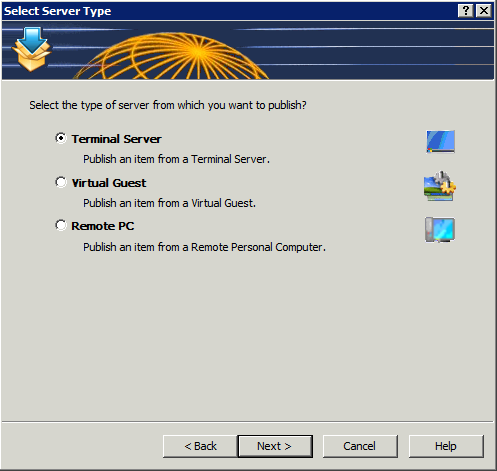
Figure 2: Select the source server type.
I chose Terminal Server because I want to publish Internet Explorer from the local system. Click Next to continue.
Figure 3 prompts you to select the application type to publish: single application, installed application, or predefined application.
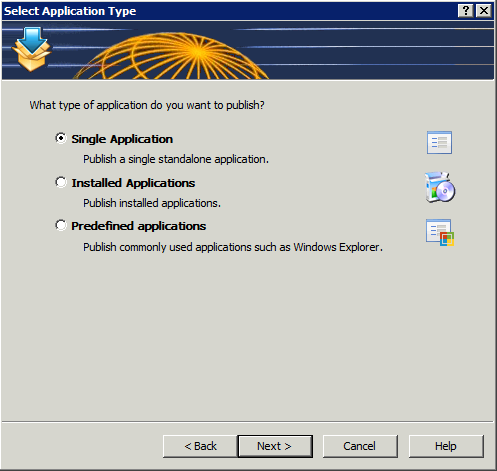
Figure 3: Select the type of application to publish.
I selected Single Application. Click Next to continue.
On this final screen, you’ll give your application a familiar name, select your application (browse to its executable), enter its description, and choose a server from which to run the application. Optionally, you may also select an icon and various application parameters. By default, if you browse to your executable, the optional parameters automatically fill in for you. See Figure 4.

Figure 4: Supply the application details for publishing.
Click Finish to complete the wizard and publish your application. Your published application will appear in the Console window under Published Resources and is ready to be accessed from remote systems that have the 2X client software installed.
Client Access
Download and install the 2X client software appropriate for your device.
Setup the client software to connect to your 2X server by entering an alias (familiar name) for your connection, the server name or IP address of the 2X server, the connection port (default is 80), a username, a password, and the servers “mode.” The mode can be Gateway, Direct, Gateway SSL, or Direct SSL. If you don’t know, try Gateway first. If you aren’t the 2X system administrator, ask the administrator which type you use.
There might be other optional parameters that you can select and tweak but for testing, I suggest leaving everything default. When you’ve finished your client setup, test it by attempting a connection. You should automatically logon to the Windows system and see a list of published resources to which you have access.
Security
Everyone wants to know about security and 2X has it in spades, which means there are so many security options that you can really lock down access to your published resources. For example, in the 2X Console, in the Connection section, you can select domain authentication from the Authentication tab. You can specify the domain, all trusted domains, workgroups, and you can also require authentication before a user can see the list of published resources.
On the Second Level Authentication tab, you specify a provider (Deepnet, SafeNet, or RADIUS) and then you enter exclude list details by IP address, client, or MAC address. Additionally, you can select specific gateway servers to service clients using second level authentication.
If you have a bring your own device (BYOD) program in place but only want to allow certain types of devices to connect to published 2X resources, you can exclude users by the device or client type. For example, if you only want to allow Windows and iOS-based systems to connect, you can exclude all other clients.
There are other security options that you can configure but they require more advanced setup than what I have available to me in my limited lab but I want you to be aware of their existence. You configure groups, 2X client policies, and other options via the Client Manager section of the 2X Console.
Nikolaos Makris, 2X CEO, had this to say about ApplicationServer XG version 11:
“This is a significant release for 2X as it enables businesses of all sizes the ability to scale their virtualization infrastructure according to their organizational demands. We have achieved this through the development of a feature-rich, yet flexible virtual desktop and application delivery solution. Our focus was to provide companies with a cost-effective solution to easily implement and manage a Private Cloud infrastructure. Now that we have released, I’m excited to say that we have achieved our objectives.”
New Features
Sites Management: A farm can be divided into multiple sites with each site representing a single location infrastructure. All sites share the same settings and are isolated. Sites can forward users to other sites if an application or desktop is not available on the current site, if the user is already running sessions on a different site, or if a user is geographically closer to another site.
Role Based Administration: Multiple administrators can modify farm settings at the same time. Different administrators can also have different roles and levels of authority within the system. The settings are stored at the master site, then distributed and activated to the others when the settings are applied. Auditing of who made changes to the system, and when they did so, is also available. If two users try to edit the same object, the second user will find the object locked. If a user adds, edits or deletes an object, the change is shown immediately in the second console. When a user starts the console application they will need to enter their credentials.
Task Menu: The task menu behaves more efficiently when items are selected. On right click in the list control, a context menu can be used. This provides more space for information and makes it easier to add new actions.
Replicate Settings in All Sites: A standard button is used throughout the console so that the same set of settings can be replicated in all sites.
Notifications to Multiple Administrators: Since multiple administrators can be managing the system, it’s possible to send notifications to more than one user depending on the settings used. New types of notification have also been introduced.
Improvements
Start-up Speed of 2X Publishing Agent: When system settings are changed, it has no effect on the agents in use, as the publishing agent will not be restarted but rather it will refresh the actual setting which was effected.
Restructuring of the Console Page: With the addition of Role Based Administration, the console page was structured in a more logical manner, creating a new category for administrator roles.

iPad Client running Internet Explorer and displaying the options menu.
Client Accessibility
You can connect from a wide range of clients to 2X resources. This list is current as of this writing:
- 2X Windows client
- 2X Cloud Portal
- 2X Java client
- 2X Android client
- 2X iOS client
- 2X Linux client
- 2X Mac client
- 2X HTML5 client
- 2X Blackberry client
- 2X Wyse client
- 2XOS client
The range of available clients means that users will be able to connect to published resources regardless of which device they use. This is very good news for companies who participate in BYOD programs.
Why the 2X ApplicationServer XG product is frugal: XG is frugal because of its low barriers to implementation. The pricing is low. The installation and setup are very easy. The management is relatively simple. The security is comfortably high and easy to configure. And you can connect any currently available device to published resources. XG is a lot of bang for the buck and that’s the definition of frugal for me: value.
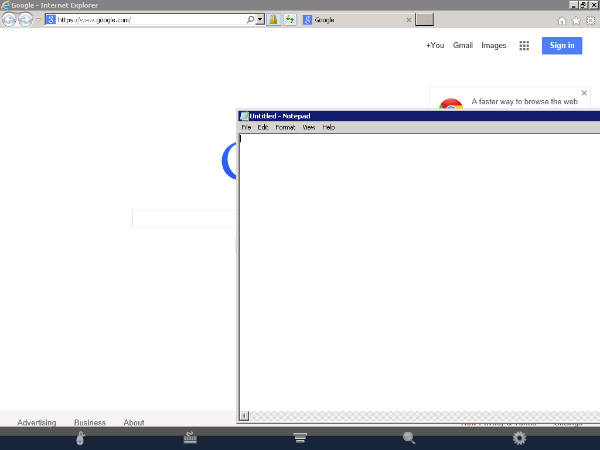
iPad Client running Internet Explorer and Notepad.
Pricing and Licensing
The 2X ApplicationServer XG is licensed to you as a subscription in one-year, two-year, or three-year increments and by number of concurrent users. The three-year subscription is the most cost effective option at $109 per concurrent user. You have to purchase license packs in increments of 15 users.
The 2X license model is a bit hard to follow. I find it somewhat confusing. The licensing document (link below) attempts to describe several scenarios to help with understanding but the examples aren’t very clear. I don’t understand the expiry terms, upgrade insurance, or the timing when purchasing new licensing.
In my opinion, the licensing could be made simpler. I also don’t really like having to purchase licenses in 15 user increments. But, the license pricing is so good for those 15 that it might matter less to you than purchasing a competitor’s product at a much higher cost. In other words, I can deal with some licensing idiosyncrasies if the numbers are right.
For full pricing and support options, see the 2X Licensing Guide in US Dollars.
Summary
The 2X ApplicationServer XG product can have you up and running published applications in minutes instead of hours or days. You need little to no training to install, setup, publish, and manage a 2X ApplicationServer system.
The price is low enough to where even the smallest companies with the tightest budgets can withstand its pricing model.
And for those really tight budgets, just about anyone with very little training can setup and manage the XG product. For those who don’t want a full-time IT person on staff, you could hire someone to take care of your needs remotely. Publishing an application is so quick an easy that your support costs should be minimal as well.
For my money, the 2X ApplicationServer XG product is the most cost-effective and simplest application and desktop delivery product on the market.
My assessment on a 10-point scale, with 1 being low and 10 being high:
Ease of installation: 10
Speed of installation: 10
Easy to publish resources: 10
Easy to access published resources from remote clients (Windows, Linux, Mac, tablets): 10
License Model: 7
Price/Licensing: 10
Support options: 10
Security options: 10
Client accessibility: 10
You can also check out my ZDNet version of this review.
Screenwriters Unite and Discover WriterDuet
 WriterDuet
WriterDuet.com
Collaborative Screenwriting Site
Free
[This post is a product spotlight and not a review]
FADE IN:
Guy Goldstein has created one of the best screenwriting tools that I’ve ever seen and used. I’ve used several: Celtx, Final Draft, Microsoft Word with Screenwriting Template, and Sophocles, to name a few. One of the cool things about WriterDuet is that you can collaborate in real-time with someone else on a script. You can immediately see updates, chat, share ideas, and more. This means that your writing team no longer has to all be in the same room or on the phone trying to fumble around with some white board or screen sharing program.
WriterDuet has an easy to use, intuitive interface that gets you going fast. You really need almost no experience with screenplay formatting to use it–it helps but it isn’t absolutely necessary.
And Guy listens to his users. I wrote him that I’d love to have the ability to create an outline and have a place for notes. He created it within a few days and emailed me back for feedback. The new tools were perfect and exactly what I was looking for.
It’s a true collaborative tool that I’d recommend to anyone who writes scripts alone or in a group. To me, WriterDuet is like the WordPress of screenwriting: easy, unencumbered, and free. Well, it’s like WordPress with one notable exception: Guy responds to his emails. So, there’s that.
To see WriterDuet in action, check out the video below and meet Guy Goldstein face-to-face (virtually speaking).
 As you can see from the image (right), the interface is clean and ready to help you on your way to screenwriting success. There’s a built-in spell checker, all the screenwriting features you need such as parentheticals, actions, dialogues, character, and more. If you don’t want to type, you can click the microphone icon and speak your script to get a feel for how your dialogue sounds as it’s written to the screen.
You can download your scripts to PDF format or into a variety of other popular commercial screenwriting tool formats. There’s also an option for uploading your scripts so that you can collaborate on them.
So, what more could you want from a cool screenwriting tool? Well, how about an offline version? You know, a standard, installable software version of this great tool. That’s exactly what Guy is working on now. He’s started a Kickstarter campaign to help fund it.
If you decide that you like WriterDuet and that you’d like an offline version, please go to his Kickstarter page and help fund it. Or if you’d just like to help out a young man realize his dreams in exchange for a few dollars, I’m sure that he’d be OK with that.
Personally, I love WriterDuet. I love its professional design. I love its simplicity. I love its price. And I love the fact that Guy is trying to make this incredible tool even better by creating the offline version. I think that WriterDuet is the perfect screenwriting tool and its enhanced features (collaboration, notes, chat, voice chat, voice dictation, downloads) make it even better.
FADE OUT:
Phoenix Republic: The Lone Star Gambit (Podcast)
 Phoenix Republic: The Lone Star Gambit
Danielle Wedgeworth
Amazon: Kindle Edition $4.99/Paperback $15.71
I had the opportunity to speak to author Danielle Wedgeworth about her new novel, Phoenix Republic: The Lone Star Gambit, which is available now on Amazon.com and other outlets.
Visit Danielle’s website for more information on ordering, obtaining a signed copy, or discussing nuances of the book with her.
Podcast Info:
MP3 format. 19:55 minutes. Rated G for all audiences.
This political thriller will put your teeth on edge because of its very real look at one possible, but fictional, outcome of our current political and economic climate.
“Three ordinary American sisters from Texas must cope with the destruction of their comfortable lives. They must survive the dangers of dramatic upheaval as they rediscover their faith amidst an economic tsunami affecting the United States and Europe.
Following a collapse of the U.S. dollar, Kate, Megan, and Annie each struggle to overcome personal failings as they make their way back home to the Texas ranch where they grew up, and back to their core values. If an economic collapse was not enough, Americans must also contend with the rise of a profound level of oppression brought on by a statist political class, as well as a fundamental power shift in the Middle East.
The situation is dire and freedom-loving Americans will be gravely tested if they wish to retain their freedom and their God-given rights.”
After reading this book, I feel like pulling a significant amount of money out of the bank and burying it in the back yard–just in case. If this book doesn’t send a few chills up your spine, check your pulse. I’m not sure that I’ll ever be the same.
If you check out Danielle’s site and the incredible art on it, created especially for Phoenix Republic, let her know that you agree with me that this book and images would make an incredible Graphic Novel. Because it would.
Listening to myself: Eskuché Headphones (Review)
 Eskuché Control V2 Headphones
Eskuché
$59.95
Classic Design * Modern Sound
There’s something seductive about any product that is based on a classic style. Whether it’s furniture, cars, clothes, or headphones, there’s something special in those updated retro designs. That’s what you’ll find with the Control V2 lineup of Eskuché (es-koo-chay) headphones. It’s also cool that they have an exotic sounding name. I wasn’t exactly sure how to pronounce Eskuché until I saw the phonetic helper that I’ve also provided for you.
But, it doesn’t matter how the name sounds, it matters how the product sounds and this one sounds like professional-quality to me.
The padded earpieces filter out all but the loudest of external noises. Even on lower volumes, I have to remove the headset to hear what someone is saying to me. The headband is also padded for greater comfort. The cord that attaches to your computer or other device is a soft, braided one instead of a rubber-coated one. Being soft and braided means that it won’t catch on other rubber-coated cords or get tangled easily. The cord is also far more forgiving than the rubber-coated ones. It moves as you do. There’s no stiffness to it.
Beyond the retro styling, the Eskuché Control V2 headphones are an excellent piece of audio workmanship. The sound is clear and crisp with no fuzziness that you sometimes get with ear-covering ear cups.
For you audiophiles, here’s the technical data:
Driver diameter: 40mm
Impedance: 32Ω
Frequency response: 20Hz-20kHz
Input plug diameter: 3.5mm
The headset also has a 3-button control microphone on it. Upon casual use, I didn’t notice this feature, which means that I’ve unknowingly embarrassed myself multiple times over the past week or so. I make a lot of Skype calls and I have an external microphone for those calls. I assumed, incorrectly, that this headset was just a headset and not also a microphone.
I wondered why my recorder was still responding to my extraneous noises when my microphone was muted–it has a blinking light when on mute, so there’s no doubt. After having a couple of people pause during a conversation and a “Bless you,” I figured it out and fixed the problem. I went back through my recent calls to find out just how obnoxious I’ve been and it’s not as bad as I’d thought. Still, I should have read the box a bit before plugging in and assuming all would be OK. Totally my fault but be warned that the headset has a built-in microphone. Be sure that your devices are setup to use the correct input and output so that you don’t have the same problem.
The pair that I reviewed are a very 1970s burnt orange color. There are other colors from which to choose: Light blue, chocolate brown, and cream.
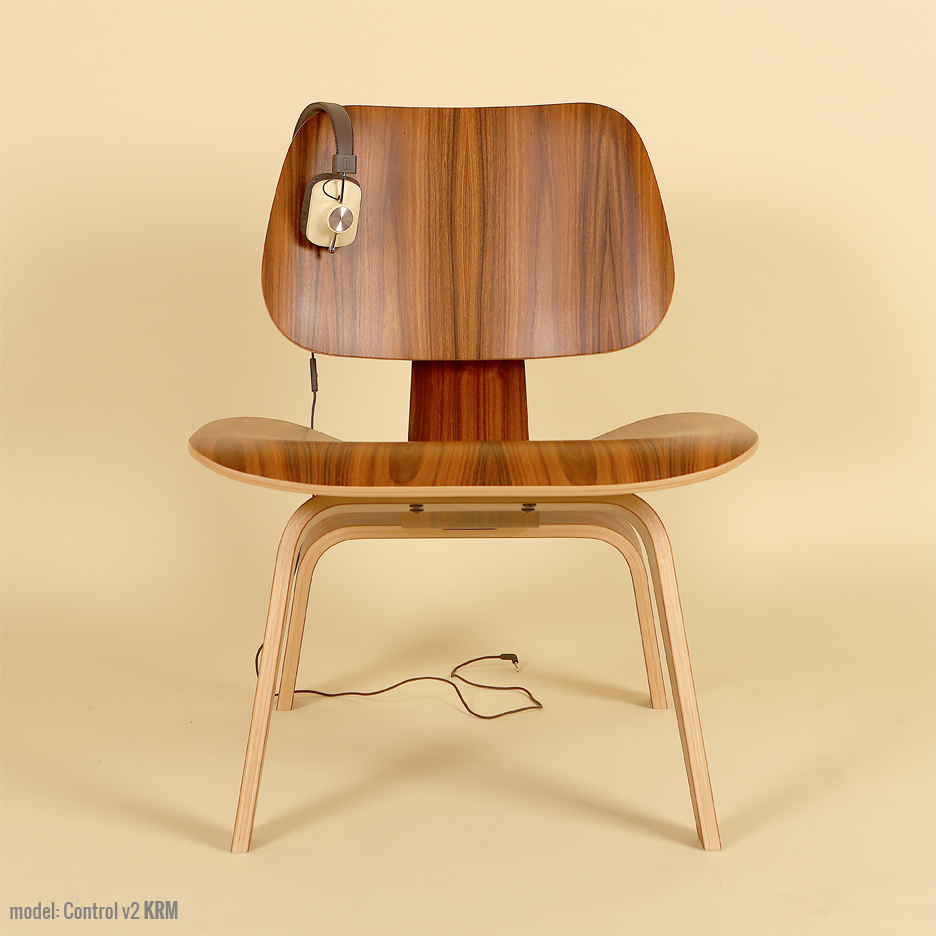 I like the colors, but if you’re really going retro, there’s another list of colors that should have been used that include burnt orange: Avocado green, coppertone, harvest gold, and that loud red color that some called “Poppy.” If you’re going retro, you’ve got to go all the way.
The headset also has a music player button on the same control as the volume up/down for the microphone. If you’re using an Apple device and you press it, your music app launches and begins to play. You can also use that button for answering/hanging up your phone.
Why it’s Frugal: The Eskuché is frugal because the headset is quality made down to the 90° (right angle) input jack, so that the wire doesn’t become weak and worn. The frugality comes from being able to use a device for a period of time that offsets its cost. In other words, if you could only use the headset for three months, it wouldn’t be worth the price. Three years or more is a different story.
In all, the Eskuché headset is excellent. I really enjoy using the headset, especially now that I’ve discovered all of its features. The headset is well made, lightweight, durable and well worth the $60 price tag. If you’re an avid musicphile, you’ll love the great sound. If you’re a casual user, you’ll love that cool hipster, retro look. You’ll also like that soft cord that stays out of your way and untangled. If you’re a podcaster or audio editor, you’ll enjoy the comfort of the headset. Sometimes I forget that I have it on–honestly.
If there’s an Apple store or a Best Buy near you, I suggest that you go and try out the Eskuché headset for yourself. There’s no amount of discussion that can match your own experience. I’ve used a lot of headsets of every shape and description and I really like this one.
Rating: 9/10
Recommendation: Go try them out for yourself and listen to the sound quality. Don’t forget to look in a mirror to see how cool you look.
Try Shuttr by Muku Labs for redefined selfies and sneakies (Review)
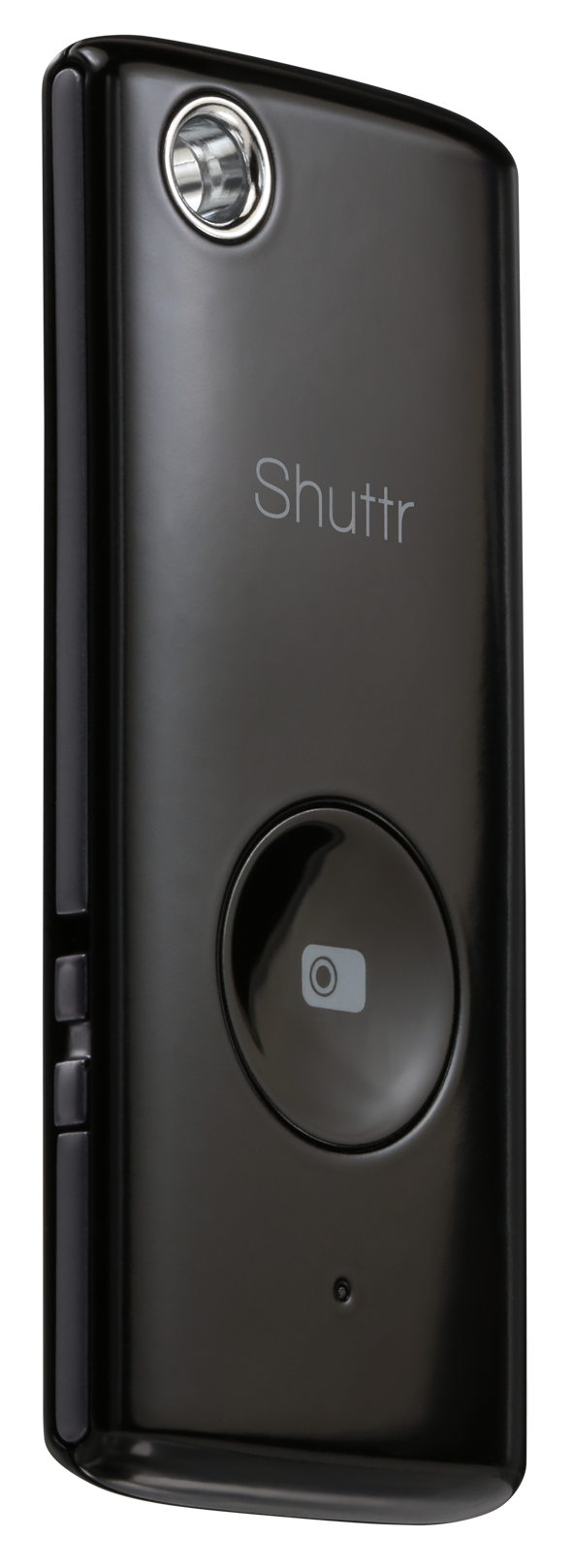
 Shuttr, Remote Shutter Release
Muku Labs
$39.99
Compatible with iOS5+, Samsung Galaxy S3/S4/Note 2/3/10.1/ and Nexus 4/7
Dimensions: 2.2 x 0.2 x 1 inches
Weight: 2 ounces
Attention avid Phoneographers! I’m not going to make you wait for the punch line on this one. The Muku Labs’ Shuttr, remote shutter release, is exactly what I’ve been looking for–for a very long time. I love it! I love my iPhone 5 too. It takes great photos. But, it has one limitation–the same limitation as all phone cameras, and cameras in general–it’s awkward to take remote pictures with.
Sure, you can prop it up or use a phone tripod and set the timer but are you really getting the picture you want with a timer? It’s a rare occurrence, if you do.
With the Shuttr, you can use the handy included phone stand or use some other method of planting your phone far enough away from yourself that you don’t look distorted like you’re looking through some psycho’s eyes in a horror movie.
Or, my favorite thing to do with the Shuttr–place my phone around and take candid shots on demand. And as many as I want to take. No silly app and no timer. Just press, press, press as much as you want to grab those stills or to start and pause video.
The Shuttr works great with the standard iPhone‘s native camera app in still or video mode. But what about other apps?
Here’s the list I’ve tested with and my results (iPhone 5, iOS 7.3):
(In no particular order)
| Camera | Yes |
| Camera+ | Yes |
| Old Camera | No |
| Sepia Camera | No |
| Old Movie | No |
| Cameo | No |
| Cartoonmatic | No |
| Retro Camera | No |
| 360 | No |
| Hipstamatic | Yes |
| Fisheye Cam | Yes |
| Cam Studio+ | No |
| Super Pop Cam | No |
| Pixlromatic | Yes |
| Popstamatic | Yes |
| iDarkroom | Yes |
| Camera360 | Yes |
| Paper Camera/td> | No |
| Duomatic | Yes |
| More Lomo | No |
| SlowShutter | Yes |
| Leme Cam | No |
| TtV Camera | Yes |
| Top Camera Lite | No |
| CrossProcess | Yes |
| Otaku Camera | No |
| Big Lens | Yes |
| Diptic | Yes |
| Orange Cam | No |
| ShakeItPhoto | Yes |
| Momentage | No |
| Momentsia | No |
| Fixel | No |
| Vintagio | Yes |
| Rawporter | Yes |
| Ustream | No |
Your mileage, of course, may vary. I think some of my problems were due to iOS 7 and not Shuttr. Although, I did notice that the apps that work use the basic Camera app and simply apply filters or effects after the fact. So, chances are that if your camera app uses the built-in, generic Camera app, then Shuttr will likely work.
Shuttr is small enough to fit on your keychain and lightweight enough to take anywhere. I love the Muku Labs Shuttr. It’s one of the best smart phone and tablet accessories that I’ve seen. It feels durable and well made. You can also replace the battery when it gets weak or dies. This is not a throw away device.
Apparently I’m not alone in my praise of the Shuttr. There’s a lot of love for it out there. Every major blog and gadget site has sung its praises and it has all five star reviews on Amazon. You can add mine to that.
The Shuttr comes in either black or white and includes a soft carrying pouch and stand. If the $40 price tag seems high to you, then try to find something else that does the same thing. I hadn’t found anything like it and I receive daily emails from Photojojo.
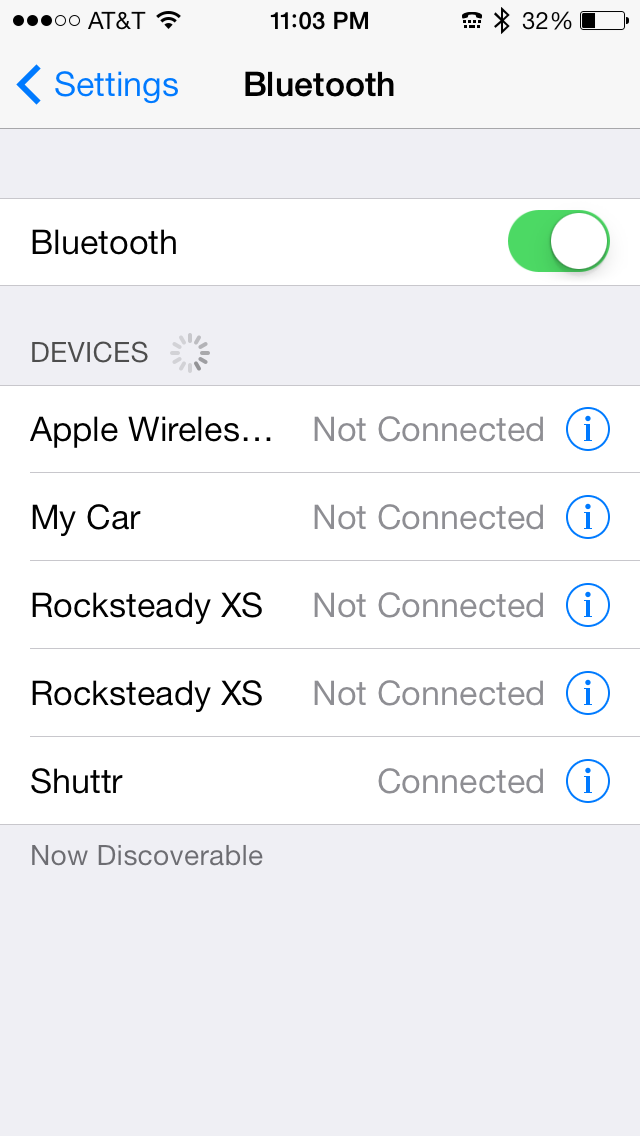 You connect it via Bluetooth by turning on the Shuttr, opening your Settings, opening Bluetooth settings, and then discovering the Shuttr. Tap the Shuttr listing to pair it. You’re done and the Shuttr is ready to use.
Why it’s frugal: The Shuttr is an essential device if you’re a real Phoneographer–seriously. You should have one. I haven’t found anything that comes close to it at any price, so for me, it’s the most valuable photographic accessory that I have. Its value as a must-have accessory makes it frugal.
Of all the iPhone accessories I’ve played with and used, the Shuttr is one that I’ll always have with me. I might forget my tripod, a USB disk, an EyeFi card, or even my car keys, but you can be sure that I’ll never forget this little gem.
Review: 10/10
Recommendation: Definitely buy it.
SpiceWorks Launches New Profile Pages and Jobs Board

AUSTIN, Texas – October 29, 2013
Today at SpiceWorld 2013, Spiceworks announced new IT Profile with Project pages and a job board to help more than 4 million IT professionals, who use Spiceworks, showcase their work, highlight their technical expertise, and identify new career opportunities.
The new IT job profiles allow users to include their community contributions, the vendors they follow, the content they find valuable, and traditional resume components, such as work experience and certifications.
IT projects can now be added to any profile and can include photos, videos, geographic information, budgets and more than 40,000 individual IT products and services from Spiceworks’ catalog of solutions. Spiceworks reimagines and redefines the online IT resume by providing a rich, visually appealing account of the technologies and people involved in the IT experience.
“IT professionals have and amazing ability to architect and use technology solutions to solve really complex business problems, so we wanted to give them a way to share those experiences with peers, partners, and future employers, ” said Tabrez Syed, Vice President of Products at Spiceworks. “Collectively, the new profiles and job board represent major steps forward in how IT professionals share information about themselves, their work, and the technologies they rely on to do their jobs.”
Spiceworks’ new profiles with projects for IT professionals are available to SpiceWorld attendees today and will roll-out to others in the network over the next quarter. Spiceworks’ job board is available today. IT professionals can sign up for their new profiles and learn more at http://community.spiceworks.com/people.
#SpiceWorld2013
@Spiceworks
http://www.facebook.com/Spiceworks
Spiceworld Keynote Presentations
The Jackery Bar – portable power source (Review)
 The Jackery Bar – Black version
Jackery
$29.99 Amazon (Prime)
There are some products that you just have to see to believe and the Jackery Bar is one of those products. It’s very hard to explain but easy to see, once you’ve held one in your hands. The Jackery Bar, in a nutshell, is a small, about the size of 4 AA batteries, case with rechargeable batteries inside that provides you with a source of portable power. I, for one, didn’t understand how powerful or handy this little gadget is until I needed it–or rather until my wife needed it.
My wife and I were at an Oklahoma State University home football game a few weeks ago against Kansas State University. We both usually carry our iPhones with us so that we can text friends and family when OSU scores or pictures of interesting people at the games. On this auspicious day, I didn’t have mine, which annoyed her greatly. She had hers but it was only at 18% power. Someone forgot to plug in her phone.
We needed to communicate with our son after the game to coordinate a dinner meeting with him and his girlfriend. She was afraid that we wouldn’t be able to do that because of my incompetence. I know, right–my incompetence alone.
While messing around with the pockets of my jacket, I noticed extra weight in one. I thought that I had my cell phone in it and as I was about to say that I have it, I pulled out the Jackery Bar.
At first, it took me aback because I had to remember why it was in my jacket. It was there because I went on a so-called photographic expedition a few days before and took it with me in case my digital camera’s battery died on me. It didn’t and I forgot to take the Jackery Bar out of my pocket and put it away. Hey, I’m a guy, I don’t always put my things away as soon as I’m finished with them.
Well, after missing one of the exciting OSU interceptions of the game during my deep thought, I explained to her what had happened. She looked at me unimpressed. Fortunately, she also had her charger with her. I took her phone, her charger, and the fully charged Jackery Bar and connected them all together in one of my pockets.
A couple of hours later, at the end of the game (OSU won!), she skeptically snatched the cell phone from my pocket to see how much power she had left on her iPhone. To her surprise, it was at 100 percent.
She said, “Hey, it worked. What is that thing?”
I had to explain it on our way to my son’s dorm across campus. She said, “Thank you, honey” and grabbed my hand. We chatted happily the rest of the way.
That scenario, as unusual as it sounds, could have gone much differently and normally would have. But the Jackery Bar saved me and possibly my marriage. I guess that might have been a better title to this piece: How the Jackery Bar Saved My Marriage.
Sometimes truth really is stranger than fiction.
The black Jackery Bar was officially announced on September 12, 2013. I’m a little late in getting this review out but it’s totally worth the wait just for the story alone. Below is the official press release about the new product:
Santa Clara, CA (Thursday, September 12th) — Jackery, a provider of premium rechargeable battery products for mobile devices, announced today the launch of a new black version of its popular Jackery Bar portable battery. Jackery’s loyal customer base submitted many requests for a black Jackery Bar to join the silver version and the company’s original distinctive orange.
The black version of the Jackery Bar offers users an additional 120 hours of operational time and is the world’s smallest portable battery with a 2.1A output. Weighing only 5.4 ounces, the Jackery Bar is designed for maximum convenience, giving smartphone and tablet users a reliable and portable power source. Ideal for users that need power and device security, the Jackery Bar is a secured batter with four layers of smart safety protection.
“We introduced a sleek and stylish black color for Jackery Bar in addition to the classic orange and silver colors due to a lot of demand from our customers for the classic black look,” said York Wu, CEO of Jackery. “Jackery Bar offers great looks and power, with a powerful charge that can be on standby for up to six months. Our products embrace both form and function, with a great design aesthetic that is complemented by our extraordinarily powerful portable batteries.”
In addition to iOS and Android devices, Jackery’s products are also compatible with Windows phones, various smartphone and tablet platforms, multiple gaming devices, and MP3 players.
Jackery also features the Air, Giant, and Mini products, each designed to offer portability and power for electronics users.
One of its very cool features is the built-in flashlight. It has a very bright single LED light at one end that you activate with a double press of the power button.
Why it’s frugal: After my personal saga, I shouldn’t have to tell you that its value and frugality are far beyond its price tag. However, for the more practical among you, the Jackery Bar can save you time in that you can charge your device or power it while on the move. You can’t do that any other way. Ordinarily, you have to stop, plug-in, and wait for hours. Charging on the go is worth a lot. Think about the possibilities.
Review: 10/10
Recommendation: For married folks and singles alike, the Jacker Bar is the ultimate in portable power. I won’t guarantee that one will save your marriage but it will save you time and time is money.
Jackery is a Santa Clara, California-based technology company focused on developing premium battery products for smartphones and tablets. The company offers a lineup of two products, the Jackery Bar and Jackery Mini, which both offer considerable charging time and small form factors for owners of the most popular smartphones, tablet devices, MP3 players and gaming devices.
For more information, visit http://www.jackeryusa.com.
The iHome type pro Bluetooth keyboard case for iPad (Review)
 iHome type pro Bluetooth keyboard case for iPad
iHome, a division of SDI Technologies, LLC.
Office Depot $99.99
You never know just how your day will turn out or change your whole attitude until you wake up and face what may come head on. I follow a simple routine: I wake up, head to the gym, work out, shower, come home, fix breakfast for my daughter, take a deep breath or two, and then head into my office (a five second commute) to start my work day. And I do all that by 7:30 a.m. Some days I ask myself, “What’s my motivation.” Well, on Monday, I received, via UPS delivery, a new motivation: The iHome type pro Bluetooth keyboard case for iPad. Specifically, my iPad 4.
If you think that I’m being dramatic, you’re probably right. After all, why should I be so excited about an iPad keyboard case thingy? That’s what your formerly cynical self tells you about products like this. But having experienced the iHome keyboard case firsthand, I can tell you honestly that it’s one of the most exciting accessories I’ve ever used.
First, the case opens clamshell style to reveal a standard Apple keyboard–better still, an enhanced Apple-style keyboard–that’s right, it’s an Apple-style keyboard, but enhanced–enhanced with the Command key, the Option key, the Control key, and the fn key. It has the standard function keys along the top (F1 through F12), which perform double duty as special iPad device keys.
Now here’s the enhanced part. Those special iPad keys do stuff that you normally have to tap and swipe for–right there on your keyboard. You can close apps by using the Home key. If you press the Home key twice, it has the same effect as double pressing your Home button twice.

You can change the brightness of your screen with F1/F2, lock/unlock your screen with the F6 key, navigate through your music selections with the F7, F8, and F9 keys, and adjust your sound settings with the F10, F11, and F12 keys. When you need to use your function keys as function keys, press and hold the fn key while pressing the function key that you want to use.
Your iPad fits snuggly into the “screen” area with a couple of simple snaps. You can charge your keyboard case with the included mini USB charger and use it wire free or you can plug it in and use it wired and allow it to charge while you’re using it.
When you close the case, you have a sturdy metal shield on the bottom and a hard plastic cover on the top that creates a protective shell for your keyboard and your iPad. And the whole thing is roughly twice the thickness and just a little larger than your iPad without the keyboard case. The keyboard case feels sturdy too. It feels more like a netbook rather than a tablet plus a keyboard. You can easily carry the combo or slip it into a purse or backpack for easy transport.
I don’t know how long the keyboard’s battery life is because I’ve never had to charge it yet and my iPad has been in the case for several days, switched to the ON position, and not plugged in. I’ve used it quite a bit too. I’ve carried it from room to room, to an outside table, and to the bedroom as a laptop unit used on my ePad pillow desk. I’ve no trouble with it preventing any connectivity to WiFi and have had no issues with the keyboard.
The one exception to its otherwise perfect performance is that it seems that on my iPad, which has iOS 7, three of the keys don’t work–or maybe I should say that I haven’t figured out how to make them work yet. The Internet browser key (F3), the Search key (F4), and the Photos key (F5) have no effect when pressed. I believe it to be an iOS 7 problem because the icons on the keys look like the old symbols for those apps on iOS 6 and previous.
Why it’s frugal: The iHome type pro Bluetooth keyboard case for iPad is frugal because it protects your investment. Spending so much on your iPad means that you need to protect it plus it’s not just a case, you get a top notch keyboard to boot. The Apple Bluetooth keyboard will cost you $69.99 and it can’t be put into a case with your iPad. A great combo at a great price.
I know there are other iPad keyboard/case combos out there but this is the one that I like the best–that’s why you’re seeing it here. The iHome type pro Bluetooth keyboard case for iPad is sturdy, handy, appropriately proportioned for the iPad, attractive, and includes all of the features of an Apple keyboard plus a very nice case rolled into one package. All of your iPad ports remain available while in the case (open or closed) and your mini USB charger port on the keyboard is also exposed for easy connectivity.
Review: 10/10
Recommendation: If you want a sturdy case and a Bluetooth keyboard for your iPad, this is the one to buy.

 Techopedia
- An error has occurred; the feed is probably down. Try again later.
Datamation
- Minimus Appoints Tech Dealmaker Yael Nardi as Chief Business Officer to Drive Hyper-Growth
- USA₮ Modernizes American Payments with High-Impact St. Patrick’s Day Activation in Times Square
- Google and NextEra Strike AI-Powered Grid Deal
- NYT Sues Perplexity AI in Copyright Conflict
- Cloudflare Outage Affects Major Websites
- OpenAI Forces AI to Confess Its Lies
- OpenAI Declares Code Red as Google’s Gemini 3 Threatens ChatGPT
- Coupang Breach Exposes 33.7M South Koreans’ Data
- ChatGPT Celebrates Third Anniversary
- Asahi Group Reveals Findings of Cyberattack

 The Frugal Networker
You must be logged in to post a comment.