
IK Multimedia releases iKlip Grip Pro – the pro-quality 4-in-1 tripod and video handle for iPhone
December 6, 2016
Comments off
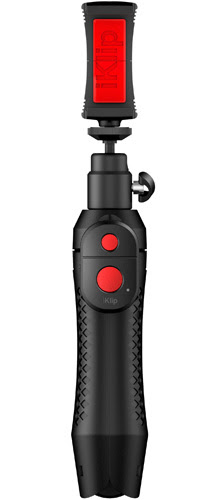
 December 6, 2016 – IK Multimedia, a leading manufacturer of hardware, accessories, apps and software for iPhone, iPad and Mac, is pleased to announce the availability of the new iKlip Grip Pro – the professional quality 4-in-1 tripod and handle for capturing professional photos and video on the go with any iPhone or compact action video camera. iKlip Grip Pro lets users securely hold their iPhones while using the stand as a compact tabletop tripod, a video handle, a monopod or as a standard tripod adapter. iKlip Grip Pro features an integrated, all-in-one compact design that provides the highest level of convenience for capturing media on the go.  Ultimate Control and stability for the best shots
Pivoting 360° Positioning Remote Control Tripod Adapter Pricing and availability For more information, please visit: Find iKlip Grip Pro at an Apple Store near you: |
Categories: Press Releases
Bluetooth, GoPro, IK Multimedia, iKlip Grip Pro, iPhone, IPhoneography, Photography, remote shutter, tripod
Dok Solution Launches Bluetooth Karaoke System at CES 2017
November 30, 2016
Comments off
 November 30, 2016, Largo, Florida – Dok Solution, LLC/Karaoke USA www.easy-doks.com https://karaokeusa.com/, maker of the innovative award-winning line of smart chargers and karaoke systems, announced today the Karaoke GF842 Bluetooth Karaoke System, an all-in-one media player featuring a powerful 35 Watt Peak Digital Power Amplifier System, clear 7” TFT color screen, music recording, Bluetooth music playing, karaoke with 2 microphones, bright flashing LED sync party lights, digital music and video through auxiliary and A/V Input, and DVD/CDG/MP3G karaoke formats. Connect your smartphone or other device through Bluetooth to play your music wirelessly on a powerful speaker! Dok Solution/JSK/Easy-Doks will be exhibiting at the Consumer Electronics Show (CES) January 5-8, 2017 in Las Vegas, Booth #11235 LVCC Central Hall.
All-in-One Media Player 35 Watt Speaker System Comes with 300 Songs & 2 Mics
Clear Screen is Easy-to-Read from Distance — Play Bluetooth Music & Use with Big Screen TV or Home Entertainment Center for Bigger Visuals & Louder Sound
The Karaoke GF842 has an unmatched sleek design with a gorgeous TFT color screen that’s easy-to-read from far away. It comes with 300 MP3G songs on a disc to get you singing karaoke out of the box and also works with all standard CDG and DVD karaoke discs and digital music through its auxiliary input that works with smartphones, tablets, gaming consoles and more — it evens lets you watch DVD movies. The Karaoke GF842 also comes with 2 microphones with individual volume controls and a handy cradle to rest and charge your smartphone or MP3 player while viewing the screen in an upright position. The karaoke system lets you sing and record music onto an SD Card in MP3 format from your favorite karaoke disc or download music and then play it back or take it with you. It also lets you view karaoke on a big screen TV or entertainment center through audio/video output for louder sound and better visuals.
Karaoke GF842 Features:
• All-in-one media player.
• 7” TFT color screen, easy-to-read from distance.
• 35 Watt Peak Digital Power Amplifier (25W RMS) wireless and wired speaker.
• Colorful, bright flashing LED lights sync with the beat of the music.
• Play music from smart devices through Bluetooth.
• Records voice and music to download onto an SD card.
• Comes with 300 MP3G songs.
• Compatible with MP3G, CDG, and DVD karaoke discs.
• Includes Auxiliary Input for playing music from smartphones, tablets, gaming consoles, and MP3 players.
• Includes audio/video outputs for playing music and video on a big screen TV or home entertainment center for better visuals and sound.
• Includes 2 microphones with individual microphone volume controls.
• Charges and cradles devices.
Available now for $219.99 SRP at KaraokeUSA.com at https://karaokeusa.com/display.asp?o=GF842, Target.com http://www.target.com/p/karaoke-system-usa/-/A-51885340#sn-15884485, and Amazon.com, the Karaoke GF842 comes complete with a Remote Control, 2 Microphones, 300 MP3G songs on 2 discs, Universal Cradle for smartphones and other devices, 3.5mm to RCA audio cable, RCA audio/video to RCA audio/video cable, AC adaptor: 110V/50Hz~AC 240V/60Hz, manual, and warranty card. For more information, see https://karaokeusa.com/display.asp?o=GF842 or the website: https://karaokeusa.com/.
Award-Winning Line of Karaoke & Charging Products
Based in Largo, Florida, Dok Solution/Karaoke USA is your go-to source for quick-charging devices and high powered quality karaoke systems. The Easy-Doks’ DOK brand provides low-priced solutions to solve all your charging needs, from reliable smartphone charging stations and docks to travel-ready car chargers. Karaoke USA karaoke systems have won numerous awards, including Bestreviews.com “Best of the Best” at http://bestreviews.com/best-karaoke-machines, Amazon.com #1 sellers, and more. Easy-Doks and Karaoke USA products are made from the best electronic circuit boards and components available, subjected to strenuous testing — the products will last forever. For more information, see Dok Solution www.easy-doks.com or Karaoke USA https://karaokeusa.com/.
Categories: Press Releases
Dok, easydoks, entertainment, karaoke, karaokeusa, music, musicians, parties, party, Target
IK Multimedia releases MODO BASS – the breakthrough physically modeled electric bass virtual instrument for Mac/PC
November 30, 2016
Comments off
 November 30, 2016 – IK Multimedia, the pioneer in analog effects modeling, is pleased to announce the release of MODO BASS®, the new breakthrough physical modeling technology that brings a completely new level of realism and playability to the world of virtual bass instruments. MODO BASS is a customizable physically modeled virtual bass instrument that recreates the sound of the electric bass and how it’s played in real time – from all of the physical instrument components, the human technique of how the instrument is played, to the entire sound signal chain with effects and amplifiers.
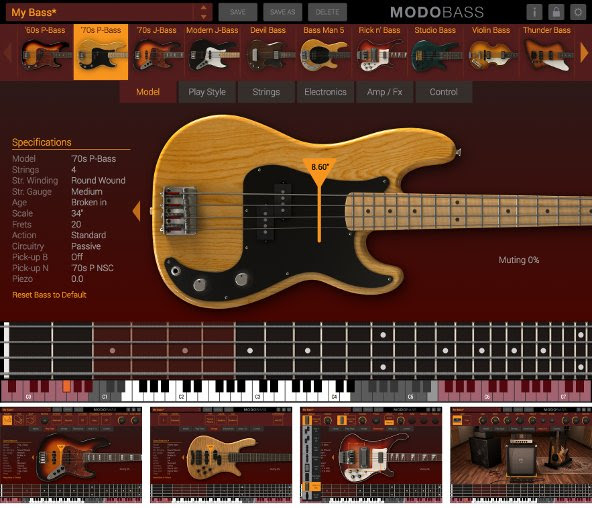
Unlike traditional sample-based virtual instruments, MODO BASS utilizes modal synthesis technology and an ultra-optimized sound engine to model each string as a nonlinear resonator – the string’s acoustic behavior is determined by its physical parameters as well as by the interaction of the string with fretboard, body and pick-ups of the instrument. The action of the player is then modeled as a nonlinear physical interaction with specific areas on the string surface. Then using IK’s cutting edge analog modeling expertise, the amp and effects rig of the electric bass is added to the sound chain. This gives MODO BASS the ability to create hyper-realistic sound in real time.Every electric bass sound imaginable
MODO BASS contains a collection of 12 physically modeled iconic electric basses that span the history of bass sound in recorded music – more bass models than available in most other virtual instruments. Models include “60s P-Bass” based on an Alder body 60s era Fender Precision Bass®, “70’s P-Bass” based on an Ash body Fender Precision Bass®, “70’s J-Bass” based on an Alder body Fender Jazz Bass®; “Modern J-Bass” based on an Ash body Fender Jazz Bass®, “Devil Bass” based on Gibson® EB-0; “Bass Man 5” based on Music Man® StingRay 5-string; “Rick n’ Bass” based on Rickenbacker® 4003; “Studio Bass” based on Yamaha® RB5; “Violin Bass” based on a Hofner® Violin Bass, “Thunder Bass” based on a Gibson® Thunderbird, “Japan Bass” based on an Ibanez® Soundgear, and “Flame Bass” based on Warwick® Streamer.Every detail of each bass has been meticulously analyzed and modeled to capture their true sonic character; the shape and type, the wood used for the body and neck construction, the hardware components, the original onboard electronics and controls – every aspect and detail has been recreated to provide the highest degree of authenticity of the original instrument. But the sounds available with MODO BASS extend far beyond the 12 modeled basses – with the available customization features, users can craft virtually every electric bass sound imaginable. MODO BASS is able to produce an unmatched and unlimited palette of bass sounds because everything can be customized.
Pluck, Slap or Pick – modeled playing styles
Once the bass has been selected, players can choose from 3 playing styles – pluck, slap or pick – and control parameters of each style and how they influence the sound. Adjustments can be made to the force applied to the strings, the position of the hand, the direction of the stroke, the fingers used to play the instrument and how the strings are approached, the impact of the thumb slap and the finger pull on the string and even the thickness of the pick and style of its attack. Every aspect of playing style has been modeled as a non-linear interaction with the strings to provide a dynamic, ever-changing sound output.
String Customization
IK painstakingly studied and recreated all of the factors that affect string tone and performance. Players can choose the number of strings on the bass, the construction type and material of the strings (round or flat wound), the gauge and age, plus the physical action height of above the fretboard. Each of these options contributes its own character to the output of the bass and introduces realism never before heard in a virtual instrument.
Custom pickup configuration
There are 20 iconic bass pickups from which to choose that can be freely interchanged and added to the instrument – up to 2 pickups per bass. Users can change the type of pickups used, neck or bridge single coil or humbuckers, and their physical location under the strings can be moved freely for unlimited playing and tonal variations – a feature virtually impossible in the physical world. MODO BASS also gives players the ability to mix in the sound of an under-bridge piezo pickup for added resonance and top end. Switching from Passive to Active electronics option also enables a 3-band parametric EQ to fine-tune the pickup output tone.
Customize FX and Amp choices
With MODO BASS, players have full control over the post-instrument signal path as well and get 7 bass stomp boxes and two classic bass amplifiers derived from IK’s AmpliTube flagship software. Stomp box effects include an Octaver, Distortion, Chorus, Compressor, Delay, Envelope Filter or Graphic EQ. Each stomp box gives players full control over the effect applied to the signal, parameter adjustment and overall output volume into the next effect. Also available is a classic all-tube amplifier and 1×15 cab, or a solid-state model with a 4×10 cab.
Expressive control in real time
MODO BASS provides MIDI control of critical parameters that can be automated in real time. With the MIDI Control section, players control and adjust the application of vibrato, the playing style, the application of Mute technique and the amount of slide technique applied while playing. The frequency of the vibrato, the amount of the bend, plus the amount of slide and detach noise while playing can all be controlled in real time on the fly.
Keyswitching in MODO BASS allows players to create amazingly real techniques like slides and percussive ghost notes. Users can switch on the fly between chord mode and note mode, the type of stroke used for playing, the fingers used and the method of playing, which provides the ability to completely customize the sound in real time.
Pricing and availability
MODO BASS is available now from the IK Multimedia online store for a special introductory price of $/€149.99* until December 4, 2016. After that date, MODO BASS will be $/€299.99* and a crossgrade will be available for $/€199.99 ** to qualified users.
*All prices excluding taxes.
**Any previous purchase of an IK Multimedia product with a value of $/€99.99 or more qualifies for crossgrade pricing.
For more information, please visit:
www.modobass.com
To see MODO BASS in action, watch the videos:
www.modobass.com/video
Categories: Press Releases
IK Multimedia, Mac, MIDI, modo bass, music, musicians, PC
Why a Seamless Digital User Experience Matters
November 3, 2016
Comments off
 Guest post by: Pem Guerry
As the digital space evolves, new applications, services and platforms are introduced to the market each year. This multitude of digital tools have certainly proved beneficial in the workplace and at home, but because so many of these programs work independently, users often miss out on the benefits of a truly seamless digital experience.
Integrating, or combining, two or more digital services into one fluid application greatly improves efficiency, usability and the overall user experience. This can be seen in the most robust e-signature integration—where a company combines a third party e-signature service with its own user platform for a swift signing process.
E-signature integration isn’t new to the digital conversation, but the technology behind these integrations has continued to improve—enabling you to offer a completely seamless signing experience for your clients.
API Integration
The most effective way to integrate e-signatures is through an application programming interface (API), which acts as a bridge between multiple applications, allowing you to manage them from a single platform.
The catch is looking for the degree of integration that an e-signature service can provide. There’s a difference between simply connecting two software workflows together and building a truly cohesive, integrated experience for signers. Most e-signature services will be able to provide a rudimentary-level integration where users can flow from one digital service, like a CRM portal, to an e-signature platform—an automatic connection from “Point A” to “Point B.”
Far fewer are able to provide a true private-label integration—where it’s virtually impossible for a user to tell that there are two technology engines behind their digital workflow. However, some technology providers and development resources have capabilities that allow you to customize an e-signature dashboard to match your own user interface with the same colors, fonts, logos, navigation menu and more. Because the end user does not have to switch back and forth between your site and an e-signature site, it’s a transparent process for him. This allows you to appear as the only source your clients must go through to submit approval, providing him with a smooth and easy signing experience.
Why does this level of detail matter? Why not simply take users from Point A to Point B? Two primary reasons:
- Client Trust
Client trust is a top priority – especially for members of highly regulated, high-stakes industries such as financial services, real estate and healthcare. Your clients are familiar with your brand, have had positive experiences using your software and have grown to trust you.
So think about how they’ll feel if they’re suddenly shuffled to an outsider for a portion of a transaction. For a homebuyer about to sign a real estate contract worth hundreds of thousands of dollars, going from the lender’s original website to a third party e-signature site could suddenly raise suspicion and cause hesitation. An integrated approach gives users a single, consistent and secure platform throughout the entire process.
- Brand Retention
In a world full of competition, creating a memorable brand—including company personality, logos, slogans and more—is key if you want to stand out in consumers’ minds. E-signature integration contributes to brand retention and exposure by eliminating third party branding and keeping your company name at the center of the signing process.
When searching for an e-signature service, make sure that you’re not leaving the aesthetics out of the conversation. With a cohesive, easy-to-use platform, your clients will complete seamless transactions and have more positive encounters with your company, furthering their loyalty to your brand.
###
Pem Guerry is the Executive Vice President at SIGNiX, a digital signature solutions provider that makes signing documents online safe, secure, and legal for any business. SIGNiX offers the only independently verifiable, cloud-based digital signature solution, which combines workflow convenience with superior security. Learn more about what makes SIGNiX different at www.signix.com.
Categories: Contributed Articles
client trust, digital signatures, documents, e-signatures, pem guerry, security, signix
The Sixth Flag Named “Best of 2016” in the 15th Annual Mobile Star Awards™
November 2, 2016
Comments off
 Raleigh, NC- November 2nd, 2016 – The Sixth Flag, Inc. today announced that its Desktop-As-A-Service was named one of the best mobile products of year in the 15th annual Mobile Star Awards™ program, hosted by the mobile technology directory and news site MobileVillage.com.
The Sixth Flag, a Raleigh, North Carolina-based Desktop-As-a-Service firm for global teams and organizations in need of Remote Desktop Management solutions, won the Rising Star Award in the Mobile Remote Desktop/VPN category. The only two other winners in this category are VMWare and Citrix, two of the leading DaaS market providers.
“Recognition of The Sixth Flag as Rising Star in DaaS reflects our commitment to continuously improve our offering to get to the top. We identified demand in the mobile desktop marketplace for simple, secure and easy to manage virtual desktops. Today, with the increasing security challenges faced by enterprises globally, we are confident that our solution addresses these organization’s most immediate needs, at a very competitive price,” said Pete Kofod, founder of The Sixth Flag, Inc.
Earlier this year, The Sixth Flag reported mentions as Representative Vendor in four key Gartner reports. The Sixth Flag was specifically recognized for its Desktop-as-a-Service as a true cloud- based solution in the Gartner Cool Vendor in Endpoint Computing report. The Gartner report states “products that require no special software on the endpoint and are OS-neutral are especially better in that they can enable CYOD and BYOD — and effectively allow users to pick the device of their choice.” By using standard web browsers, The Sixth Flag (TSF) actively supports growing organizational mandates for BYOD. Furthermore, TSF’s patent-pending watermarking technology known as dewdrop.tsf offers strong protection for organizations concerned about the loss of intellectual property.
The ability to securely deliver Windows(tm)-based applications to a distributed and dynamic workforce continues to challenge technology leaders. According to Gartner, technology leaders should “plan to provide Win32 applications virtually or remotely in a container to users, or as part of DaaS to enable more agile management and diversity for user endpoint devices.” Pete Kofod agrees with this assertion and states, “the ability to confidently and securely deliver legacy applications to remote users is a recurring problem facing our customers.”
Since its debut, The Sixth Flag has been transforming DaaS with its award-winning solution. Easy to integrate and deploy, the company’s clients have reported great results in delivering legacy applications to remote users where uncompromised performance, global availability and ground-breaking security is paramount.
About The Sixth Flag, Inc.
The Sixth Flag Inc, is a Raleigh, North Carolina-based Workspace-As-a-Service firm for global teams and organizations in need of Remote Desktop Management solutions. Launched in 2015, TSF provides a web-based, cost effective and secure throw away desktop for today’s global, mobile teams. Its cloud-based, HTML-rendered Workspace-as-a-Service requires no dedicated hardware, thereby eliminating the need for organizations to spend on capital outlay. With nothing more than a browser, users can access their corporate desktop from anywhere in the world, whether from a laptop, desktop, or tablet. Because user data is not stored on the local device, loss of a device does not represent compromise of sensitive organizational data. For more information, visit www.thesixthflag.com
About MobileVillage / PDA Inc.
Founded in 1993 as PDA Inc., MobileVillage® is a market and solution development company dedicated to advancing mobile technology in a wide range of industries. MobileVillage fosters education and alliances through news, an online directory, the annual Mobile Star Awards™ program, events listings, partnerships, and “Best of Breed” mobile solutions.
Categories: Press Releases
DaaS, MobileVillage, pete kofod, The Sixth Flag, WSaaS
iPhone 7 Release: How to Save Money on Smartphones
September 6, 2016
1 comment
Guest Post by Andrea Woroch
For gadget heads and Apple fans, the wait is over. The much-anticipated press event held by Apple every year is scheduled forSeptember 7, at which the company is expected to unveil new iPhones and possibly new MacBook Pros and the Apple Watch 2.
While early adopters are likely making plans to line up at the nearest Apple store, the average consumer would rather not pay full price for the latest-and-greatest gadget. To help reduce the cost of your next smartphone upgrade or replacement, follow these seven tips.
Check competitor offers.
Whenever Apple releases their newest iPhone and other devices, competitors often feel the burn with a drop in sales and offer discounts in an attempt to grab attention away from Apple products. In the past, we’ve seen retailers like Walmart and Best Buy as well as wireless carriers such as Verizon and AT&T slash prices on Samsung, LG, Motorola and other Android devices. Keep your eyes peeled for similar deals this year!
Save big on previous models.
With the arrival of the iPhone 7, prices of previous-generation iPhones typically drop by as much as $150. Since the design and functional differences between the iPhone 6 and iPhone 7 are reportedly minimal, buying a previous-generation iPhone at a reduced rate is hardly a compromise. Same goes for Android devices: the Samsung Galaxy S6 was offered for just $1 with a two-year contract in April of this year, ahead of the S7 release.
Search for refurbished.
One of the best ways to save on any smartphone is to search for deals on previously-owned and certified options across brands and carriers including Apple, Samsung, AT&T or Verizon to save 20% to 40%. Even sites like Overstock offer certified-refurbished phones. For example, a refurbished iPhone 5s Unlocked GSM starts at $381.99, compared to $450 for a new iPhone 5s from Apple.
Wait it out.
Jumping on the latest release of any new gadgets means you’re going to pay a premium. Wait for deals to come out later in the year and mark your calendar for Cyber Monday, the one day every year that Apple releases deals on their popular gadgets. Last year, for example, Best Buy offered the iPhone 6s for $99.99 with a two-year activation with Verizon during Cyber Week, a $100 price drop from when the phone was released in September.
Repair first.
If you’re considering upgrading or buying a new phone because of a faulty mechanism or cracked screen, consider repairing it first before shelling out big bucks for a new one. Common issues such as cracked screens, broken charging docks and diminished battery life can be fixed for low fees at sites like RapidRepair.com, saving you hundreds of dollars.
Unload your old device.
Once you buy your upgrade or new device, think about what to do with the old one. Sites like Gazelle.com pay surprisingly well for a number of phone models. For instance, a quick search revealed that they offer $168 for an unlocked iPhone 6S 64GB in good condition and $45 of a Samsung Galaxy Tab 3 10.1 tablet. Otherwise, Apple offers their own trade-in program, while retailers like Walmart and Best Buy are also getting in on the action.
Buy extras online.
Spending on a new smartphone doesn’t end with the device. You’ll likely buy a case, screen protector, additional chargers or even upgraded headphones (especially if the iPhone 7 doesn’t have a headphone jack, as rumored). Before loading up with these extras from a traditional retailer or your wireless carrier, know that most stores mark up mobile accessories by up to 60%. Instead, save big by shopping for these accessories online at sites like Amazon or AccessoryGeeks, and search for coupons before checkout. For example, deals’ site CouponSherpa.com recently featured several Amazon promo codes for $4 to $7.50 off popular iPhone accessories.
Keep an emergency smartphone stash.
30% of smartphone users admit to breaking their device by dropping it, while others cite irreparable water damage. Though Apple’s new upgrade program includes coverage for up to two incidents of accidental damage, the best insurance comes in the form of an emergency fund. Set aside a few hundred dollars in a separate account to cover the full cost of replacing your device.
Feel free to share “iPhone 7 Release: How to Save Money on Smartphones” with your audience, giving proper attribution to the source.
###

Andrea Woroch is a money-saving expert who transforms everyday consumers into savvy shoppers by sharing smart spending tips and personal finance advice. As a sought-after media source, she has been featured among such top news outlets as Good Morning America, Today, CNN, Dr. OZ, New York Times, MONEY Magazine, Consumer Reports, Forbesand many more. In addition, Andrea’s stories have been published among leading publications and sites such as Yahoo!, AOL Daily Finance, CNN Money, Huffington Post, LearnVest and New York Daily News. Check out Andrea’s demo reel or visit her website at AndreaWoroch.com for more information about booking an interview or requesting an original written article. You can also follow her on Twitter or Facebook for daily money tips.
Categories: Contributed Articles
Andrea Woroch, Android, Apple, budget, frugal solutions, frugality, Galaxy 7, iPhone, iPhone 7, money, money saving, Samsung, Samsung Galaxy
Adorama’s Top Photographer with Nigel Barker Adds Powerhouse Photographers to Guest Judge Lineup
August 11, 2016
Comments off
|


The Sixth Flag Recognized as a Representative Vendor in Gartner’s Market Guide for DaaS
August 10, 2016
Comments off
Raleigh, N.C. – August 10, 2016—The Sixth Flag, a leading Enterprise Desktop-As-A-Service solution, today announced that it has been identified as a representative vendor in Gartner’s recently published Market Guide for Desktop as a Service report authored by Nathan Hill, Tiny Haynes, Michael A. Silver, and Federica Troni, published August 1, 2016.
“We are delighted to again be mentioned by Gartner among DaaS vendors. Our just released concurrent pricing model, also highlighted in the report, offers customers flexibility regardless of company size. With the increased demand for enterprise BYOD, The Sixth Flag offers an attractive alternative to furnishing end users with costly hardware. BYOD and complementary solutions like The Sixth Flag not only reduce hardware costs but also full lifecycle management, including asset tracking and recovery,” said Pete Kofod, Founder of The Sixth Flag, Inc.
In their report, Gartner notes the importance of considering full lifecycle DaaS solutions, “DaaS vendors are learning the nuances of workspace and application life cycle management beyond “simple” image hosting to develop more comprehensive solutions.”
“We are confident that with an adaptable pricing schedule and a BYOD-friendly service offering, organizations will find The Sixth Flag to be a highly compelling alternative to traditional VDI,” said Shane Yocum, VP Business Development at The Sixth Flag, Inc.
Enterprise technology leaders should consider two circumstances in which BYOD is particularly attractive:
The first is the continued move to web-based applications. With more applications relying on only a browser, end point management is dramatically simplified, a key driver of BYOD adoption. With the increasingly rich capability of HTML5, even complex applications such as VDI can be delivered as a pure web-based application.
The second is application delivery from public infrastructure service providers. Because BYOD is particularly relevant for remote or mobile users, the ability to pair CAPEX savings at the client endpoint with savings in the premise datacenter make for a compelling value pairing. Enterprise IT managers are then allowed to focus on what truly “pays the bills”, delivering applications to users that increase individual an organizational effectiveness.
The Sixth Flag is a web-based VDI as a service offering delivered from public infrastructure. With BYOD, there is no CAPEX in most configurations and operating costs can be tightly adjusted to match changing business conditions.
Gartner does not endorse any vendor, product or service depicted in its research publications, and does not advise technology users to select only those vendors with the highest ratings or other designation. Gartner research publications consist of the opinions of Gartner’s research organization and should not be construed as statements of fact. Gartner disclaims all warranties, expressed or implied, with respect to this research, including any warranties of merchantability or fitness for a particular purpose.
About The Sixth Flag, Inc.
The Sixth Flag Inc, is a Raleigh, North Carolina-based Desktop-As-A-Service firm for global teams and organizations in need of Remote Desktop Management solutions. Launched in 2015, TSF provides a web-based, cost effective and secure throw away desktop for today’s global, mobile teams. Its cloud-based, HTML-rendered Desktop-As-A-Service requires no dedicated hardware, thereby eliminating the need for organizations to spend on capital outlay. With nothing more than a browser, users can access their corporate desktop from anywhere in the world, whether from a laptop, desktop, or tablet. Because user data is not stored on the local device, loss of a device does not represent compromise of sensitive organizational data. For more information, visit www.thesixthflag.com.
IT Security as a “Gated Community”
August 9, 2016
Comments off
Why workers are a threat organizations can no longer ignore
 By Stacy Leidwinger, VP of Products at RES
When one thinks about keeping the home and family secure, the first thought is to take up residence in a secure location – ideally, a guarded and gated community. The second is to carefully secure the perimeter of the house itself: the doors and windows – the points of ingress. Sensors are wired to each opening, cameras and motion detectors are aimed at carefully selected places, and monitoring is switched on. When it’s all plugged in and working, we are confident that our homes are safe. But we also need to keep track of the residents of the home and ensure their cooperation with security measures. Who has a key? Or a garage door opener? Do they routinely close and lock the windows? Because even the finest perimeter defenses are readily breached by the actions, intentional or not, of residents. What can happen when someone leaves a key under the doormat for an expected visitor? Or a garage door is mistakenly left open as the owner drives off to work?
In our gated community example, our traditional defense is focused on securing entry and exit points, and assuming that residents will make no action to breach security. And in the vast majority of cases that will prove just fine. But we in our houses are not continually subject to attackers seeking to trick or cajole us into one simple mistake; a mistake that, once taken, will crack the most airtight security, exposing our homes to the depredations of criminals.
When cybersecurity measures are focused entirely on the perimeter, the organization does nothing to mitigate its greatest risk: the workers whose actions can breach the most secure perimeter defense with a single, careless mouse click.
Secure perimeters require secure workers
An organization’s workers are its chief assets – the means by which value is delivered. But they’re also a massive liability in terms of cybersecurity. And new trends within the technology-enabled workforce are making things far worse.
Today’s IT organizations are expected to equip their workforces with the devices that make the most sense for the organization, while also satisfying the ever more demanding individual worker. Whether it’s supporting preferences between Mac and PC, providing immediate access to apps and services, or allowing workers to use their own mobile devices for work, the workspace has truly become digitized – and therefore more vulnerable, compared to the days when each worker had his or her own locked-down desktop PC, and worked exclusively from the office. But as IT continues to support mobile work-style requirements, a whole slew of security-related IT issues are being raised; and the most serious threats to today’s security are stemming from the inside.
In a time of “do more with less,” IT departments are struggling to provide basic protections against malware, ransomware and spyware, and to secure firewalls to prevent outsider attacks. But is enough attention being paid to those they trust the most – their own workers?
This insider threat is no secret. A recent global study by Kensington entitled “Voice of IT” revealed that IT executives pegged the following as their biggest pain points when it comes to IT: human error, lack of process and workers not following established processes.
What can companies to do streamline IT processes and find solutions to insider threats? After all, within the “gated community” of organizational security, the user is the last line of defense.
A Gap too Big to Span?
One of the biggest debates in recent years when it comes to the digital workspace is bridging the gap between worker enablement and security. It’s an old conundrum in IT: new technologies are constantly being layered into the infrastructure, but hardly anything is ever thrown away. The result is a hodgepodge of hybrid technologies seeking to solve the same problems. And this is far from invisible to workers, who are often required to shift from app to app, from physical to virtual, in an awkward sequence of steps that has them longing for the relative simplicity of the consumer technologies they enjoy at home.
And IT security is perhaps the greatest culprit in the disruption of worker productivity. Is your organization overwhelming your workers with too many checkpoints to cross and too many updates to install? Are your existing security systems working together? And if so, are they working together seamlessly?
Organizations must create a safety net around their workers – the risks of cyberattack are too great to do otherwise – but they must do it in a way that doesn’t inhibit individual productivity, allowing workers to work when and where they choose, on the devices that are most productive for them. And all this must be accomplished with safety controls in place to prevent them from being the source – witting or otherwise – of security threats.
Yes, there are Solutions
IT must be continually on the defensive, protecting workers and the infrastructure from easy-to-make, yet potentially tragic mistakes. And, good news: there are several decisive steps an organization can make that will secure the organizational community without undue hampering of workers.
- Deploy automated, context-aware access controls
Automate the many processes and workflows that govern the access each worker has to apps, databases and services within his or her digital workspace. Technology is available now that will:
- Govern what resources can be accessed for each person, based on their immediate working contexts (including the devices being used, physical locations and time of day)
- Automatically provision and de-provision those resources as needed based on that working context
- Track that access gathering data necessary for guaranteed, easy audits.
- Low-maintenance whitelisting with automation
Human behavior is your greatest security risk. And today’s cybercrooks are becoming increasingly creative in their attempts to exploit human inattention. Context aware whitelisting and blacklisting can ensure that only permitted apps can be executed; and the list of permitted apps can be governed by IT based on what the business chooses to allow, and each individual worker’s context at the moment access is attempted. Whitelisting adds a thick layer of protection by only allowing approved executables to be opened.
Although many organizations have some form of whitelisting in place, maintenance burdens can be high for traditional solutions. A new approach can not only use automation to better maintain the whitelist, but can add user safeguards by automatically verifying unique file signatures. This ensures that the files being executed are authentic and that workers aren’t being tricked into opening different infected files.
- Automate the onboarding and offboarding of workers
More than 13% of workers can still access a previous employer’s systems using their old credentials. And there’s much more. In a study on rogue access, Intermedia found that 89% of ex-workers retain access to at least one app from a former employer. 49% actually logged into an account they were supposed to no longer have access to. 45% retained access to confidential data.
When employees leave the organization, that is the moment they pose perhaps the greatest risk to the organization. IT must tightly integrate de-provisioning processes into existing human resource apps, project management systems and other enterprise identity stores. Doing so allows worker access qualifications to be automatically managed and altered each time a worker’s identity status is changed in those systems. With a more holistic approach to identity lifecycle management, organizations can significantly improve productivity, compliance and security – and prevent former employees from exposing the organization’s data and systems to extremely high risk.
- Stamp Out “Shadow IT”
Today’s crop of workers are productive like never before, thanks to the incredible technology available through modern digital workspaces. But this productivity also breeds an “I need it right now” attitude towards new technologies. And if IT can’t provide it “right now”? Often the worker’s solution is just a log in or credit card away, with ubiquitous cloud-based solutions studding the skies overhead.
The risks are great. IT must prevent employees from taking matters into their own hands to solve IT issues. But is shadow IT best prevented by hiring an army of alert IT professionals, available 24/7? Or is there an easier (and cheaper) solution? Yes! Through automation, IT can provide on-demand self-service access to the apps and services workers need, and prevent workers from circumventing access rules. This can include password management, access to a new data drive, or a request for a particular workspace app. The best way to prevent workers from going around procedures is to give them an instantaneous, trackable and reliable way to get what they need from IT. No hassles. No tickets. No violations.
Security should come naturally to an organization, but it will likely never become second nature to many of your workers. When we’re at home, we’re surrounded by a sense of security – no matter how real or illusory it truly is. Many of us don’t truly think about security unless our perimeter is breached. But IT can build a powerful security shroud around its systems, its data and its workers, by using automation and self service to simplify security processes, empowering workers to focus on their responsibilities without disruption, and keeping the enterprise safe from intrusion.
To be sure, no security solution is perfect. But we owe it to our organizations and our fellow workers to do our very best.
Introducing the Polaroid Travel Tripod and Polaroid Varipod Two-in-One Telescoping Monopod
August 4, 2016
Comments off
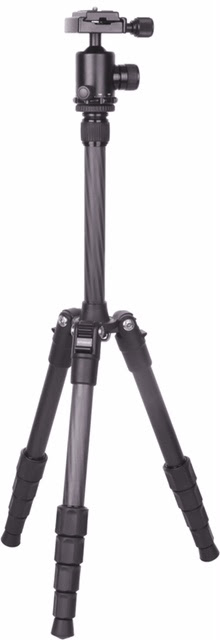
 RIDGEFIELD PARK, NJ – August 4, 2016 – Complementing its growing collection of camera accessories, Polaroid has recently added the Polaroid pro series 55” carbon fiber travel tripod and the Polaroid varipod two-in-one telescoping camera monopod to its repertoire. Available today through Amazon, the Polaroid travel tripod and monopod are ideal for everyone from the casual photographer or videographer to the serious prosumer looking for extra stability and versatility to capture that unforgettable shot.
 About the Polaroid Travel Tripod
Designed for the on-the-go photographer and videographer, the Polaroid travel tripod offers intelligent features like a fluid pan-head, braced center columns and adjustable spider legs with non-slip foot grips that handle uneven and rugged terrain. Thanks to its carbon fiber body, the Polaroid travel tripod is up to 50% lighter than its metal counterparts, with rugged durability to withstand the rigors of shooting on the go. The fully articulating ball head and removable plate offer photographers and videographers the ability to capture the perfect shot from just about any angle.
Polaroid travel tripod feature highlights include:
- A 100% carbon fiber body, 50% lighter than metal yet just as durable
- An extension height of over 55”
- A compactable size of just 12.5”
- Weighs less than three pounds with the ability to hold up to 20 pounds
- An included travel tripod carrying case
 About the Polaroid Varipod Monopod
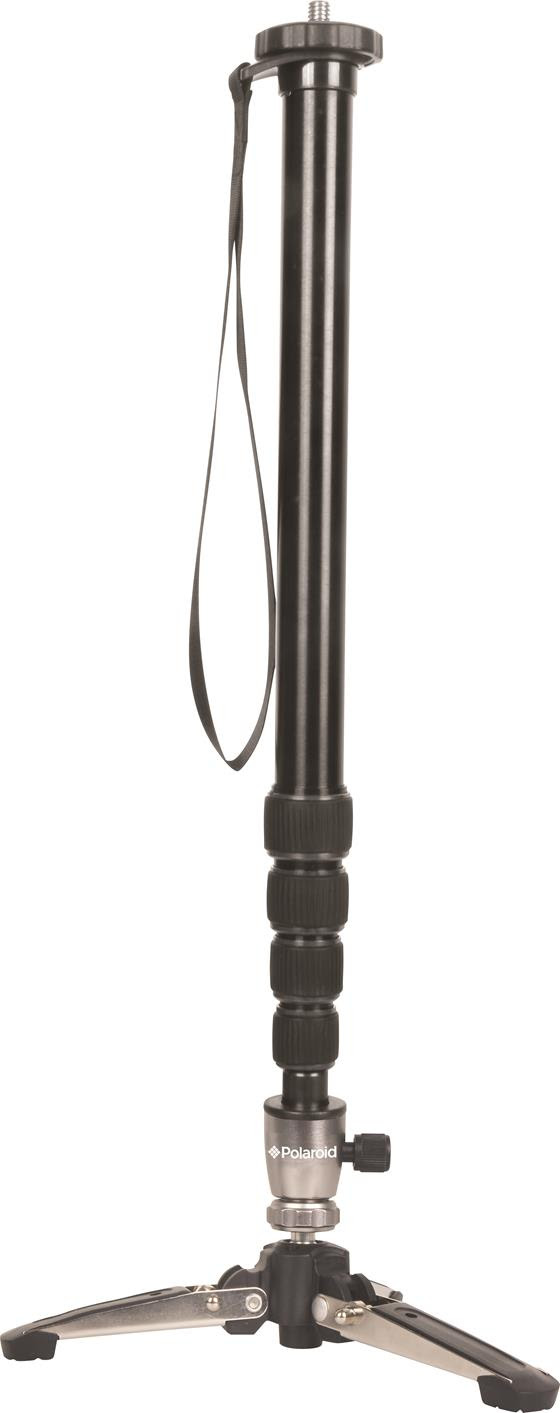
The Polaroid varipod two-in-one telescoping monopod can be used as both a monopod and a tripod, both of which offer incredible extended reach. Its rugged form-factor makes it ideal for shooting in any condition. With a removable four-inch tripod base, the Polaroid varipod monopod provides camera height where it is needed the most. Professional photographers and videographers will love this tool for its inclusive features, fine positioning controls and ability to stabilize difficult-to-capture shots.
Polaroid varipod monopod feature highlights include:
- A two-in-one monopod and tripod base that can be used independently or together
- Locking tripod feet with rubber grip pads
- An extension height of 65”
- A base tilt angle, rotation and telescoping section locks for secure positioning
- An included removable wrist strap and shoulder carrying bag
Pricing and Availability
The Polaroid travel tripod is now available via Amazon for 99.99 USD and ships with a fully articulating ball head with removable plate and travel tripod carrying case. The Polaroidvaripod monopod is now available via Amazon for 54.46 USD and ships with a removable wrist strap and a shoulder carrying bag.
Request a Media Review Kit
Members of the media are invited to review the Polaroid travel tripod and the Polaroidvaripod monopod. To request a media review kit sample, please contact Mariah Stein atmariah@zazilmediagroup.com.
The Polaroid Brand
Polaroid is one of the most trusted, well-respected and recognizable brands with a rich 75-year history beginning with Polaroid instant film. Our range of products include instant and digital still cameras, high-definition and mountable sports video cameras, tablets and flat-screen TVs that deliver the fun, instant gratification and value for which the brand has long stood. Today, the Polaroid Classic Border Logo rooted in our beginnings of instant photo sharing serves to designate genuine Polaroid branded products. For more information, visit http://www.Polaroid.com.
Polaroid, Polaroid & Pixel, Polaroid Color Spectrum and Polaroid Classic Border Logo are trademarks of PLR IP Holdings, LLC, used under license.
Categories: Press Releases
cameras, monopod, photo, Photography, Polaroid, studio, travel, tripods

 Techopedia
- An error has occurred; the feed is probably down. Try again later.
Datamation
- Minimus Appoints Tech Dealmaker Yael Nardi as Chief Business Officer to Drive Hyper-Growth
- USA₮ Modernizes American Payments with High-Impact St. Patrick’s Day Activation in Times Square
- Google and NextEra Strike AI-Powered Grid Deal
- NYT Sues Perplexity AI in Copyright Conflict
- Cloudflare Outage Affects Major Websites
- OpenAI Forces AI to Confess Its Lies
- OpenAI Declares Code Red as Google’s Gemini 3 Threatens ChatGPT
- Coupang Breach Exposes 33.7M South Koreans’ Data
- ChatGPT Celebrates Third Anniversary
- Asahi Group Reveals Findings of Cyberattack

 The Frugal Networker
You must be logged in to post a comment.